
Custom software development starts with one simple truth: your business is unique. Forcing a generic application onto specific workflows is like trying to fit a square peg in a round hole. Instead, imagine a solution designed from scratch to match your exact needs and grow alongside your goals. That’s the power of custom software—it fills the gaps that off-the-shelf tools leave behind and gives you room to innovate.
Before we dive into the details, here’s a quick snapshot of the essentials:
Key Points Of Custom Software Development
| Aspect | Description |
|---|---|
| Purpose | Create applications that mirror your workflows and objectives |
| Core Benefits | Flexibility, Security, Ownership, and Scalability |
| Typical Scenarios | Automating niche processes, securing sensitive data, unifying legacy systems |
This table offers a bird’s-eye view of why custom software might be the right fit for your organization.
Key Insights On Custom Software Development
When off-the-shelf solutions come up short, custom software steps in to close the gap. It crafts every feature, interface, and protocol around what matters most to you.

- Precise Fit aligns functionality with your day-to-day processes, so teams spend time solving real problems—not fighting the tools.
- Scalable Architecture adapts as you grow, letting you add modules or integrate new services without a full rebuild.
- Enhanced Security embeds industry-specific controls to satisfy auditors and protect sensitive information.
- Ownership And Control hands you full intellectual property rights and the freedom to update on your own schedule.
- Competitive Edge emerges when you offer capabilities no one else in your market can match.
In practice, these benefits shine when you’re automating highly specialized workflows, enforcing tight compliance rules, or stitching together older systems and fresh technology.
When To Choose Custom Solutions
Custom development isn’t for every project. However, it becomes a clear winner when:
-
Unique Business Model
Off-the-shelf software can’t reflect your core processes or competitive differentiators. -
Data Sensitivity
Your compliance and security requirements exceed what generic tools typically offer. -
Integration Demands
Multiple legacy systems need to talk to each other seamlessly—and you can’t afford workarounds. -
Performance Needs
High-volume transactions or specialized processing that standard applications can’t handle.
Evaluating these factors up front helps you plan budgets, timelines, and the right team structure. Custom software projects thrive on clear roadmaps, dedicated support teams, and well-defined milestones.
Up North Media guides you through every phase—from initial discovery workshops and prototype design to QA testing, deployment, and ongoing maintenance. We focus on measurable KPIs and ROI so you see real impact, not just lines of code.
Start your custom software journey today.
Understanding The Key Concepts
Custom software development is about crafting applications that fit your company’s processes like a well-made garment. Rather than shoehorning your team into off-the-shelf tools, you build around your workflows, giving you room to refine features as needs change.
Imagine heading to a tailor instead of grabbing a jacket off the rack. An off-the-rack piece might work for now, but it won’t feel quite right at the shoulders or waist. Custom software adapts exactly to how you operate, avoiding the workarounds that slow teams down.

Gathering Detailed Requirements
Every successful custom project starts with discovery sessions. In these workshops, we bring together stakeholders, comb through current documentation, and get clear on pain points, must-have functions, and how we’ll measure success.
We then translate those insights into user stories—bite-sized narratives like “As a warehouse manager, I want to scan inventory so I can track stock levels in real time.” These stories guide developers through real-world workflows.
• Stakeholder Interviews outline critical functions and limits
• User Personas capture typical roles and objectives
• Process Mapping traces each step and decision point
• Acceptance Criteria define when a feature is truly done
Designing Flexible Architecture
With requirements locked down, architects sketch out a system blueprint built to evolve. Instead of a monolithic block, the design breaks into independent modules that can change without upending the whole application.
This modular layout makes it straightforward to add capabilities—say, a mobile app for field technicians or an AI analytics engine—without rewiring the entire codebase. We weigh your team’s experience, expected load, and maintenance plans when choosing technologies.
• Modular Services reduce cross-component dependencies
• Scalable Databases grow with your data using sharding or replication
• API Layers guarantee reliable interaction between modules and external systems
Custom software development means creating purpose-built solutions rather than adapting your processes to generic products. In 2025, the global market for bespoke applications hits USD 44.2 billion. For a deeper look, explore custom software development market trends.
Successful custom systems start with blueprints that anticipate change, not just immediate needs.
Strategic Drivers
Several factors motivate organizations to invest in custom software rather than off-the-shelf packages.
• Competitive Differentiation: Unique features that strengthen your market position
• Data Control: Full ownership of your information under custom security rules
• Integration Needs: Bridging legacy platforms, ERPs, and CRMs with custom connectors
With this conceptual framework in place, you’re ready to dive into real-world examples that spotlight these principles and show how success gets measured through hard KPIs.
Custom solutions also deliver clear ROI by tracking metrics such as time saved, fewer errors, and revenue increases tied to new features. Agreeing on these KPIs early keeps everyone aligned and ensures the project drives tangible business value.
Key Terms To Know
Before you move forward, a common vocabulary helps everyone stay on the same page.
• Microservices – Independent services that can be scaled and deployed on their own
• User Story – A short scenario that describes what a user needs and how we’ll know it’s complete
• API – A set of rules allowing different software components to talk to one another
With these concepts and terminology in hand, you have a robust foundation before diving into practical hands-on examples and comprehensive implementation details.
By mastering these core definitions and design considerations, teams avoid scope creep and maintain clear project vision from start to finish.
Exploring Types And Use Cases
Custom software solutions unfold across different scenarios, each built to tackle a particular challenge. Picture client-facing portals, on-the-go sales apps, AI-driven chat assistants, and live data dashboards—all designed to sharpen specific processes.
Below, we break down key examples that show how custom development can boost efficiency:
- Customer Portals bundle self-service tools and data into one central hub.
- Mobile Sales Applications let reps capture orders and check inventory from anywhere.
- AI Chatbots handle routine inquiries instantly, freeing up human teams.
- Real-Time Analytics Dashboards turn live metrics into visual reports for faster decisions.
Customer Portals
A thoughtfully designed portal can cut admin work by 30% through centralized account tasks. For example, a regional health network automated patient record requests—trimming turnaround from 48 hours to under 4 and lifting satisfaction scores along the way.
Mobile Sales Applications
When your field team needs speed and accuracy, a custom mobile app steps in. After rollout, a national retailer saw 20% fewer order errors and 15% quicker checkouts—direct proof that purpose-built software pays off.
“Custom apps deliver controls and insights that generic tools simply can’t,” recalls a finance-sector CFO.
AI Chatbots
Chatbots trained on your product data can resolve about 85% of common support tickets without human intervention. One telecom provider cut support costs by 30% and improved response times by 60% within months.
Core metrics here include:
- Processing Time Reduction: Hours saved per request
- Customer Satisfaction: CSAT scores before and after
- Revenue Growth: Sales lift tied to self-service features
- Error Rate: Decline in manual mistakes
Real-Time Analytics Dashboards
Think of these dashboards as radar screens for your business, alerting you to anomalies the moment they appear. A logistics firm detected routing snags 50% faster, ultimately cutting delivery delays by 25%.
Custom development shines because it adapts to your exact business hurdles. Grand View Research values the global custom software market at USD 52.84 billion in 2025, up from USD 43.16 billion in 2024. With a 22.6% CAGR, it’s projected to hit USD 146.18 billion by 2030. Learn more on Grand View Research.
These snapshots underline how custom apps flex with changing demands. By defining success factors—like process time, error rates, and user feedback—companies unlock new revenue streams and enhance the user experience. Real-world stories, such as a manufacturing-line optimization app, prove that measurable ROI and stakeholder alignment are within reach.
Next up, we’ll weigh custom development against off-the-shelf alternatives.
Manufacturing Optimization
Custom apps that tap sensor data can forecast equipment glitches before they snowball into downtime. One automotive plant slashed downtime by 40% and cut maintenance costs by 25% in under a year.
| Use Case | Benefit | Metric |
|---|---|---|
| Patient Portal | Faster Requests | 88% Reduction in Wait Time |
| Sales App | Order Accuracy | 20% Boost per Rep |
| Analytics Dashboard | Issue Resolution | 50% Faster Detection |
| Chatbot | Support Efficiency | 30% Lower Costs |
Measuring Impact
Turning raw data into actionable insights is essential to justify your investment. Teams often use:
- Interactive Dashboards: Live snapshots of key metrics
- User Surveys: Direct feedback loops
- Financial Reports: Clear-cut ROI figures
Best practices include:
- Setting Baseline Metrics before development kicks off
- Defining Target KPIs such as net promoter score or error rate
- Reviewing data at regular intervals and fine-tuning features based on actual use
This framework ensures you’re tracking real value—not just lines of code.
Scaling With Growth
Custom-built platforms grow alongside your business, adding features and ramping up user capacity without missing a beat. For example, a fast-growing retailer expanded from 100 to 10,000 active users overnight, all while maintaining smooth performance.
Comparing Custom Versus Off The Shelf Software
When you start asking, “What is custom software development?” it’s only natural to line it up against ready-made solutions.
On one side, off-the-shelf products get your team up and running almost instantly. On the other, custom builds bend to your unique processes and growth plans.
To help you weigh your options, here’s a side-by-side look at critical factors for your software choice.
Custom Versus Off The Shelf Comparison
Side-by-side look at critical factors for your software choice.
| Criteria | Custom Software | Off The Shelf |
|---|---|---|
| Flexibility | Highly adaptable to evolving requirements | Limited options for deep customization |
| Deployment Time | Weeks to months | Immediate |
| Ownership | Full intellectual property rights | License-based usage with renewal fees |
| Cost Structure | Upfront investment, no recurring license payments | Subscription fees and per-user charges |
| Maintenance | On-demand support and tailored updates | Vendor-driven release cycles |
In short, this table lays out the core differences in flexibility, cost, deployment, and support.
“Custom builds can yield an ROI increase of 25% or more over off-the-shelf solutions when measured over three years.”
Scenarios For Your Business
Every company’s situation is different. Here are four common paths:
-
Quick Proof of Concept
Off-the-shelf tools let you validate ideas in days without a big upfront spend. -
Deep Integration Needs
Custom development stitches together ERP, CRM, and internal databases seamlessly. -
Unique Workflows
Bespoke solutions mirror your processes exactly, cutting out workarounds. -
Data Security Demands
Tailored builds embed specific protocols and audit trails from day one.
Each scenario comes down to your timeline, budget, and long-term vision.
Timeline And Costs
To plan effectively, you need realistic estimates. Here’s a snapshot:
| Option | Typical Timeline | Approximate Cost |
|---|---|---|
| Custom Software | 3–12 months | $50k–$500k+ |
| Off The Shelf | Immediate–2 weeks | $0–$50/user/month |
Cost drivers include feature complexity, integration needs, and ongoing support.
- Include hidden expenses like training, data migration, and add-on modules.
- Budget for a support team—custom projects require continuous care.
- Don’t forget license renewals if you choose off-the-shelf components.
“Budget planning early avoids scope creep and dashed expectations.”
Read also our guide on custom software vs off-the-shelf solutions for deeper insights (https://upnorthmedia.co/blog/custom-software-vs-off-the-shelf)
Key Takeaways
- Custom software adapts to change and secures IP ownership.
- Off-the-shelf tools speed deployment and lower initial spending.
- Evaluate ROI over time, factoring in maintenance and license fees.
- Plan support and training early to ensure smooth adoption.
Partnering with the right vendor streamlines delivery and maximizes ROI.
Up North Media provides expert consulting and development to guide you through vendor selection and project kickoff.
Our Omaha-based team blends technical know-how with local market insights to deliver software that scales.
Contact us to schedule a discovery workshop and get a preliminary estimate based on your requirements.
With clear criteria in hand, you’ll avoid budget overruns and timeline delays—and choose the path that best fits your strategic goals.
Outlining The Software Development Lifecycle
Custom software projects unfold in a sequence of distinct phases, each one building on the last. From early discovery sessions to long-term maintenance, understanding these stages sets realistic timelines and aligns everyone on goals.
Discovery And Planning
Every custom build starts like planning a cross-country road trip—you chart the route before you hit the highway. In discovery workshops, our teams sit down with your stakeholders, map out existing workflows and air any assumptions. By the end of this phase, you have clear success metrics and a list of potential detours.
- Conduct Workshops to surface pain points and goals
- Create User Stories that capture real user scenarios
- Outline Acceptance Criteria to know when a feature is complete
- Identify Dependencies such as external APIs and legacy systems
Design And Prototyping
With requirements in hand, the design team sketches out wireframes—think of them as floor plans for a new home. Interactive prototypes follow, giving everyone a chance to walk through screens, spot usability snags and tweak layouts before a single line of code gets written.
“Prototypes reveal hidden usability issues before they become costly fixes,” notes an Up North Media project lead.
- Low-Fidelity Wireframes for quick visual alignment
- High-Fidelity Mockups to refine colors and typography
- Clickable Prototypes for user testing and stakeholder sign-off
Infographic And Key Insights
Here’s a process flow that shows how software choice priorities evolve from startups to enterprises and scale-stage companies.
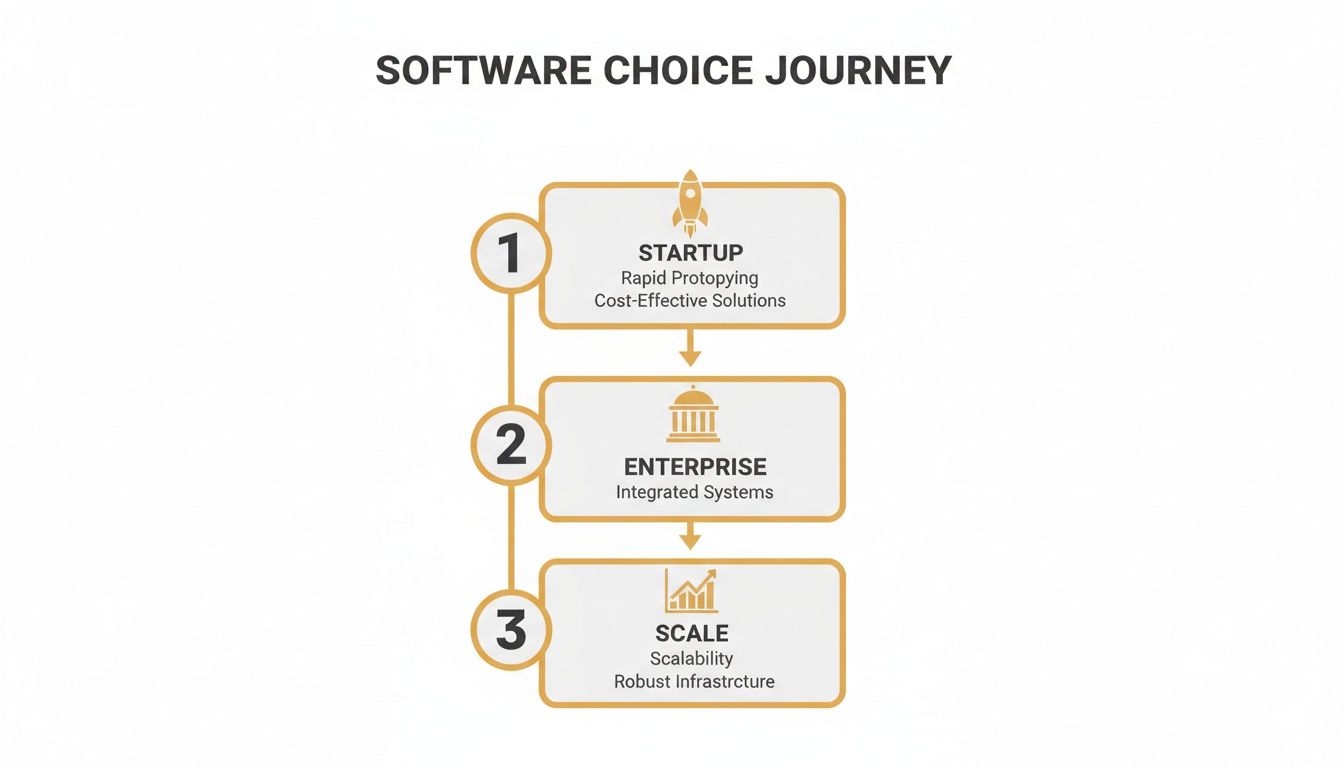
This graphic highlights the shift from rapid MVP launches for startups (rocket icon) to integration-heavy solutions at the enterprise level (building icon) and performance tuning for scale-ups (graph icon). Each growth phase brings different SDLC emphases and resource needs.
Development And Quality Assurance
Once designs are locked in, developers and QA engineers dive into agile sprints. Features roll out in increments, while continuous integration servers and manual checks keep defects from slipping through the cracks.
- Sprint Planning allocates tasks and estimates effort
- Feature Development turns user stories into working code
- Automated Tests run in CI pipelines to validate changes
- Manual Testing uncovers edge-case scenarios
- Sprint Review demo ensures stakeholder alignment
85% of critical bugs are found before deployment when QA is integrated into every sprint.
Learn more about agile practices in our guide on Agile Development Methodology.
Deployment And Release
Launching the application to production is like moving into a new house—you want everything unpacked and tested before guests arrive. CI/CD pipelines handle provisioning, configuration and database migrations with minimal downtime. Checklists cover security scans, performance tests and rollback plans.
- Staging Deployments for final validation
- Performance Testing under load conditions
- Security Audits to scan vulnerabilities
- Rollback Plans to revert in case of emergencies
Maintenance And Support
After launch, upkeep is key to keeping the system healthy. Teams monitor logs and metrics, apply security patches and roll out new features in response to user feedback. A steady maintenance rhythm prevents unexpected downtime.
- Monitor Logs and Metrics for anomalies
- Schedule Patch Updates during low-traffic windows
- Gather User Feedback for iterative improvements
- Track KPIs like uptime, response times, and error rates
Defining Success Metrics
From day one, set clear KPIs to measure progress and ROI. These numbers guide decisions and ensure each sprint delivers business value.
- Uptime Percentage to track system reliability
- Response Times to measure user experience speed
- Feature Adoption Rate to gauge user engagement
- Bug Count Trends to monitor quality over time
- Time To Market for new releases
- Return On Investment comparing costs versus benefits
Communication Cadence And Timeline
A consistent meeting schedule keeps surprises at bay. By locking in regular check-ins, teams and stakeholders stay in sync, and trust grows.
- Weekly Standups to surface blockers and progress
- Biweekly Sprint Demos to showcase features
- Monthly Steering Calls for strategic alignment
- Quarterly Roadmap Reviews for long-term planning
Phased Timeline Examples
Project size drives duration. Simple MVPs often launch in 3–6 months, midrange systems take 6–12 months, and enterprise-grade platforms can stretch beyond 12+ months.
- Small Projects (3–6 months) for MVPs and proof of concept
- Medium Projects (6–12 months) for feature-rich systems
- Large Projects (12+ months) for complex, integrated platforms
Mitigating Common Pitfalls
Scope creep, fuzzy acceptance criteria and breakdowns in communication can derail any project. A tight change-control process, documented sign-offs and weekly stakeholder syncs keep risks in check. Maintaining a risk register guides proactive fixes.
Effective communication can reduce project delays by 30% according to industry benchmarks.
Putting It Together
When each phase—from discovery through maintenance—aligns around clear metrics and a steady communication cadence, teams can focus on delivering resilient software that scales with your business. This roadmap helps everyone know what’s next and why it matters, driving continuous improvement and real business outcomes.
Estimating Project Investment And Choosing Vendors
Custom software demands a clear financial snapshot before writing a single line of code. Budget estimates and vendor choices are two sides of the same coin. This section breaks down the main cost drivers, timelines, ROI calculations, and vendor criteria you need to know.
Key Cost Drivers
Every feature you add is like building another room onto a house: it takes time, expertise, and quality materials. Connecting your app to other platforms brings licensing fees and extra test runs.
When you assemble your team—developers, UX designers, QA testers—each role has its own daily rate that adds up quickly. Plus, where your team is based can shift rates by as much as 50%.
- Feature Complexity: More moving parts mean more design, coding, and QA hours.
- Third-Party Integrations: Custom connectors, licensing, and additional test cycles.
- Team Composition: Roles from UX designers to QA testers shape total costs.
- Geographic Location: Regional rate differences of up to 50% influence vendor selection.
Don’t forget hidden expenses: data migration, user training, and ongoing support. Early quotes often skip integration overhead, so tack on a 10–20% buffer.
Guideline Timelines And ROI Methods
Think of project timelines as small, medium, and large road trips.
| Project Size | Timeline | Example Scope |
|---|---|---|
| Small | 3–6 months | MVP features for a single module |
| Medium | 6–12 months | Multi-module app with integrations |
| Large | 12+ months | Enterprise system with complex workflows |
To judge ROI, focus on efficiency gains, revenue growth, and cost savings.
- Efficiency Gains: Hours saved compared to manual processes.
- Revenue Uplifts: Additional sales driven by new features.
- Cost Savings: Cuts in license fees and support overhead.
- Dive deeper into cost models with our guide on software development cost estimation.
A rock-solid business case ties these numbers back to your leadership team’s goals. For example, automating a reporting process that frees up 100 hours each month at $50/hour translates to $60k in annual gains.
Security And Compliance Considerations
Regulations can feel like highway checkpoints—mandatory and time-consuming. Industries like healthcare, finance, and government need HIPAA, SOC2, or ISO 27001 certificates before they hit the road.
- Compliance Reviews: Regular security checks and risk assessments.
- Documentation Costs: Writing policies, training staff, and audit prep.
- Certification Fees: Third-party audits and ongoing monitoring.
If you skip these, expect delays or fines. Vet vendors for compliance expertise and ask for past audit reports.
Evaluating Potential Vendors
Picking a software partner is like choosing a co-pilot for a long flight. You need someone who knows the route and communicates clearly.
Review portfolios to see projects similar to yours. Make sure their tech stack matches your needs. Test their communication tools—if updates are slow or reports are vague, you’ll run into turbulence.
A vendor’s communication rhythm often predicts on-time delivery.
- Domain Expertise: Industry know-how and relevant technologies.
- Transparent Governance: Clear reporting and decision paths.
- Support Model: Post-launch service levels and dedicated teams.
- Cultural Fit & Timezone: Overlap for real-time collaboration.
Ask for detailed proposals outlining team structure, tools, and QA processes. Consider a paid prototype sprint to see them in action.
Vendor Selection Checklist And Next Steps
Follow this roadmap to narrow down your shortlist:
- Define your project scope and success metrics.
- Collect proposals with detailed estimates and timelines.
- Check references and case studies for similar work.
- Align on communication cadence and escalation paths.
- Confirm support levels and SLA commitments.
Negotiate clear SLAs covering response times, feature updates, and ongoing maintenance. Then, schedule a kickoff meeting to set vision, roles, and communication norms.
Up North Media offers discovery workshops and prototype sprints to validate concepts in days, not weeks.
Case Study Example
A mid-size healthcare provider needed a patient portal synced with their EHR system. Initial estimates ranged from $80k to $150k, reflecting team locations and varying scopes.
They opted for a two-week prototype sprint at $5k to test the waters. With that insight, they signed a $120k contract.
- Time-to-market improved by 25% after sprint validation.
- Stakeholder alignment soared thanks to hands-on prototypes.
This story shows how early cost estimation and small-scale trials cut financial risks.
Building Your Business Case
Start by mapping current costs and processes, then forecast savings for each software feature. Lay out best-case, expected, and worst-case scenarios. Include KPIs like time-to-market, error reduction, and user satisfaction gains.
Connect with our team to get started. Budget wisely, partner smartly.
FAQ
Below you’ll find clear answers to the most common questions on custom software development—from kickoff essentials to cost drivers, timelines, and measuring success.
What Initial Information Is Needed To Start A Custom Software Project?
Kicking off a custom software initiative means getting everyone on the same page. You’ll save time later by defining your core objectives and understanding who will actually use the system.
- Business Goals and Objectives to nail down vision and scope
- User Personas that map out roles, needs, and pain points
- Process Maps illustrating each workflow step and decision point
- Existing Technical Documentation for integrations and dependencies
Which Factors Most Affect The Cost Of Custom Software?
Not all projects are built the same. A handful of key drivers typically account for the bulk of your budget, so it pays to unpack each one before you start.
| Driver | Impact on Budget |
|---|---|
| Feature Complexity | More screens and intricate logic translate to extra hours |
| Integrations | Custom connectors and licensing demands added build & test |
| Design Requirements | Advanced UX/UI involves more design iterations |
| Hourly Rates | Location and expertise level dictate daily rates |
Custom Software Timelines
How Long Does a Typical Custom Software Build Take?
Project size and clarity of requirements play the biggest role here.
- Small Projects: 3–6 months
- Medium Projects: 6–12 months
- Large Enterprise Builds: Often 12+ months
Small to medium builds land in under a year when requirements are clear
How Can Businesses Measure the Success of Their Custom Solution?
You want more than a completed product—you need proof of impact. Tracking the right KPIs keeps your team focused on value.
- Time Saved: Hours reclaimed through automation
- Error Reduction: Fewer bugs and manual fixes
- User Adoption Rates: Percentage of users actively engaging
- Revenue Growth: New streams or cost savings realized
Regularly comparing these metrics against your initial benchmarks ensures your software continues to deliver—and evolve—over time.
Ready to kick off your custom software journey with Up North Media? Visit Up North Media today and schedule your free discovery workshop.