
Before you even dream up a single blog topic or pencil in a publishing date, your content calendar needs a solid foundation. Without clear goals, a calendar is just a to-do list, not a strategic tool for growth. I've seen it happen too many times—teams get excited about "doing content" but forget to define what success actually looks like.
This is where you connect every blog post, video, and social update back to a real business outcome. Forget vague hopes like "get more traffic" or "increase engagement." It's time to get specific.
Laying the Groundwork with Smart Content Goals
Moving Beyond Vague Objectives
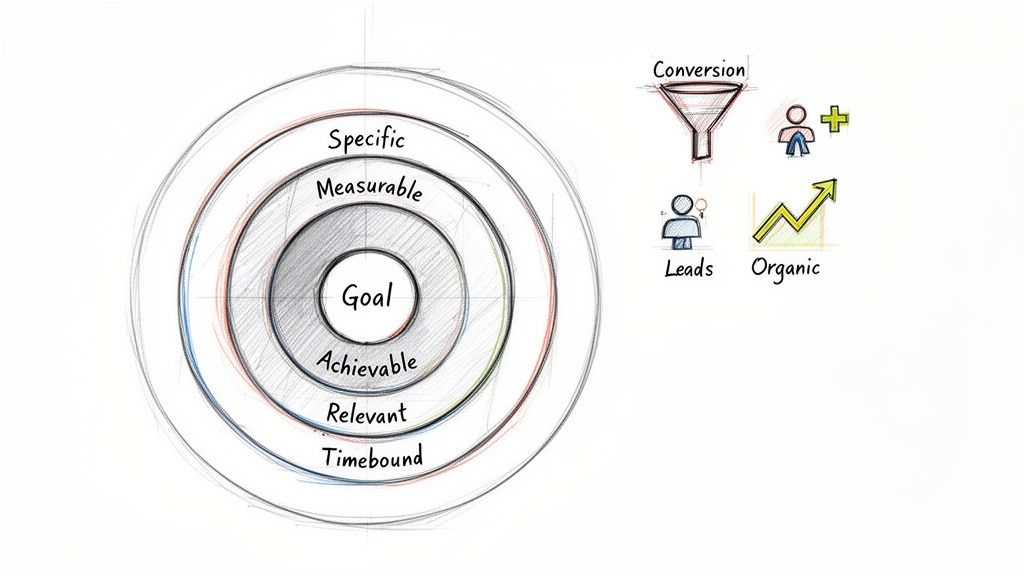
The best way I've found to nail down meaningful goals is by using the SMART framework. It forces you to make your objectives Specific, Measurable, Achievable, Relevant, and Time-bound. This simple filter turns fuzzy ideas into a clear action plan.
Let's see how this works in the real world:
-
Instead of: "We need more leads."
-
Try: "Increase marketing qualified leads (MQLs) from our blog by 15% in the next quarter by publishing four targeted, bottom-of-funnel articles."
-
Instead of: "Let's improve our SEO."
-
Try: "Achieve a top-5 ranking for our three primary 'service' keywords within six months by creating in-depth pillar pages for each."
See the difference? That level of detail is what separates a simple posting schedule from a high-performance content engine. If you're new to this, understanding what an editorial calendar is at a strategic level can really help frame your thinking here.
Identifying Your Key Performance Indicators
With your SMART goals in place, the next move is to pick the Key Performance Indicators (KPIs) you'll use to track progress. These are the hard numbers that tell you if the strategy is actually working. Your KPIs should be a direct reflection of your goals.
For an e-commerce store focused on driving sales, you'd be watching things like:
- Conversion rate from blog traffic
- Average order value from readers
- Product page views that started from a piece of content
A B2B SaaS company trying to generate leads would have a completely different dashboard:
- Number of demo requests from content downloads
- Lead-to-customer conversion rate
- Cost per acquisition (CPA) for leads from organic search
Your content calendar isn't just a scheduling tool—it's a performance dashboard. We build columns for our main KPIs right into our calendar templates. This creates a feedback loop that shows what's working and what isn't, letting us make data-driven pivots instead of just guessing.
Of course, knowing what you want to achieve is only half the battle; you also need to know who you're trying to reach. That's why defining goals goes hand-in-hand with audience research. For a much deeper dive, check out our guide on https://upnorthmedia.co/blog/how-to-create-buyer-personas that truly reflect your ideal customers. This ensures your goals aren't just measurable but are also laser-focused on the people who matter most to your business.
Building Your Core Content Pillars and Idea Funnel
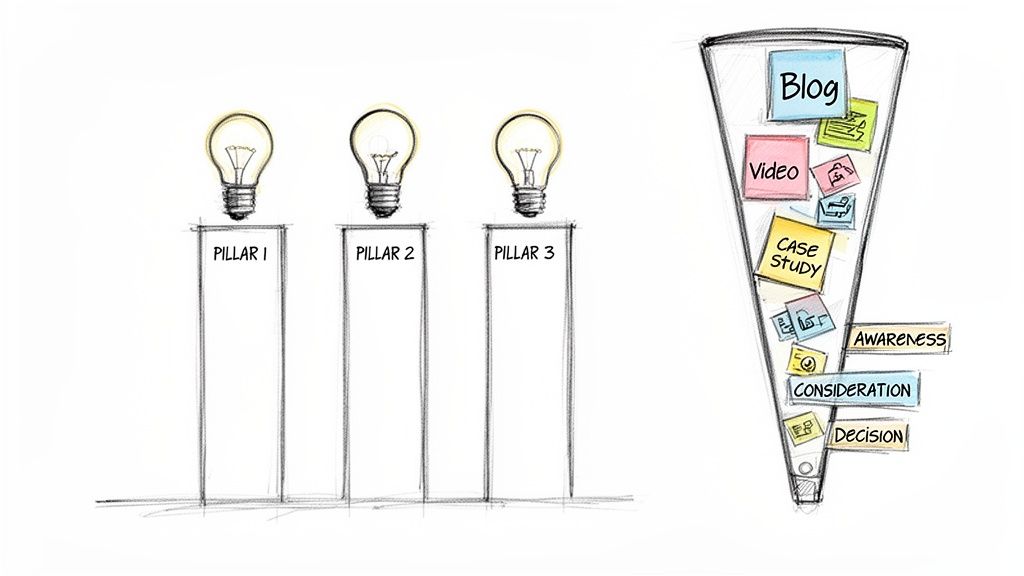
Alright, you've got your goals. Now for the fun part: laying the creative foundation for everything you'll publish. Think of this as building the main support beams for your entire content house. These are your content pillars—the 3 to 5 core topics you’re going to own.
These pillars aren't just random subjects you feel like writing about. They’re the sweet spot where what your audience is desperate to know meets what your business does best. They give you focus, making sure every blog post, video, and social update is relevant and builds your authority. Without them, your calendar becomes a junk drawer of one-off ideas that never gain any real traction.
Identifying Your Core Content Pillars
For most businesses, 3-5 core pillars is the magic number. Any fewer and your content can feel repetitive. Any more, and you risk diluting your message and just confusing people.
So, how do you find them? It’s time to put on your detective hat and dig into some data.
First up, see what your audience is actually looking for. Fire up your favorite SEO tool and explore keywords related to what you sell. You're looking for recurring themes and, more importantly, the questions people are asking. These are direct clues to their biggest headaches.
Next, do a little friendly snooping on your competition. What broad topics are the successful ones hitting over and over again? The goal isn't to copy them, but to see what territory they've claimed. This can shine a light on gaps in the market that your expertise is perfectly suited to fill.
Finally, tap into the goldmine you're already sitting on: your team and your customers.
- What questions does your sales team get on repeat? Every single one is a potential content idea that rolls up into a bigger theme.
- What core problems do your products solve? The solutions you offer are the most natural starting point for your pillars.
- Comb through customer feedback and support tickets. The challenges, frustrations, and goals people mention are pure gold for content ideas.
Let’s say you run an e-commerce store selling sustainable home goods. Your pillars might be something like: Eco-Friendly Cleaning, Zero-Waste Kitchen, and Sustainable Decor. Each one is broad enough to generate tons of ideas but specific enough to attract the right kind of customer.
Creating a Perpetual Idea Funnel
Once your pillars are in place, you need a system to feed them a constant stream of fresh ideas. This is your idea funnel—a way to capture, sort, and prioritize topics so you never have to stare at a blank page again. Honestly, a simple spreadsheet is all you need to get started.
Your funnel should track more than just a headline, though. For every idea, make sure you note:
- The Pillar: Which of your core themes does this fall under?
- Target Keyword: What’s the main search term you're aiming for?
- Content Format: Is this a blog post? A video? A case study? An infographic?
- Funnel Stage: Where in the buyer's journey does this piece fit?
Think of your content mix like a balanced diet. You need a healthy variety of formats and funnel stages. If you only create top-of-funnel 'awareness' content, you won't attract new people. But if you skip the bottom-of-funnel 'decision' content, you'll leave potential customers hanging right when they're ready to buy.
Mapping Ideas to the Buyer Journey
This is where your content calendar goes from a simple schedule to a strategic weapon. Slotting your ideas into the buyer's journey ensures you’re meeting people where they are, guiding them from stranger to customer.
-
Awareness (Top of Funnel): This content is for people who might not even know they have a problem yet. It’s educational, high-level, and answers "what is" and "why" questions. Think blog posts like, "5 Signs Your Current Website Is Losing You Customers."
-
Consideration (Middle of Funnel): At this stage, your audience knows they have a problem and are actively researching solutions. This is where you go deeper with comparisons, detailed how-to guides, and case studies that showcase your expertise.
-
Decision (Bottom of Funnel): This is for people on the verge of buying. The content here needs to build trust and make it obvious why you're the best choice. Customer testimonials, detailed pricing pages, and free demo offers are perfect for this.
When you organize your ideas this way, your content calendar becomes a strategic map. You'll have a balanced mix that attracts new people, educates them, and gives them the final nudge they need to convert. It's how you create a seamless journey for every customer.
Choosing the Right Tools for Your Content Calendar
A brilliant strategy is just an idea until you have the right tools to bring it to life. Once you’ve nailed down your goals and content pillars, the next step is picking a platform that can turn your plans into a functioning, collaborative command center. This isn't just about software; it's about finding a system that actually fits how your team works, your budget, and how much you plan to grow.
For a lot of small businesses, the journey starts with something simple and familiar. There’s no reason to overcomplicate things right out of the gate.
Starting Simple: Spreadsheets and Boards
You really don't need a massive budget to get a content calendar off the ground. In fact, some of the most effective calendars I've ever worked with started out as a basic spreadsheet.
-
Google Sheets: This is the ultimate starting point. It’s free, you can customize it endlessly, and sharing it with your team is a breeze. You can set up columns for every little detail you need—publish dates, headlines, target keywords, author assignments, you name it. A little color-coding by content pillar or status (like Drafting, Editing, Published) gives you an instant visual snapshot of where everything stands.
-
Trello: If your team thinks more visually, a Kanban-style board like Trello is a fantastic choice. You create a "card" for each piece of content and literally drag it through columns that represent your workflow stages. It's a super satisfying way to track production progress at a glance and keep everyone on the same page.
These simple tools are perfect for solo operators or tiny teams. They force you to be disciplined and think about what information is truly essential to track, without getting lost in a sea of features you don't need yet.
Scaling Up to More Robust Platforms
As your team and content machine grow, you’ll probably start to feel the limitations of a spreadsheet. When you’re juggling multiple writers, designers, and a higher volume of content, dedicated project management platforms offer some serious advantages.
-
Asana or Monday.com: Tools like Asana or Monday.com are built for managing complex projects. You can create detailed tasks, set dependencies (so the design can't start until the copy is approved), automate notifications, and build out some pretty sophisticated workflows. They also centralize all the communication and file sharing, which means no more digging through endless email chains.
-
CoSchedule: This is a platform built specifically for content marketing. CoSchedule combines your calendar with social media scheduling and even analytics. The big win here is that it integrates the entire content lifecycle, from brainstorming and creation all the way to promotion and performance tracking, all in one spot.
Key Takeaway: The best tool is the one your team will actually use every day. Start simple, prove the process works, and only upgrade when the headaches of your current system become more painful than the cost and learning curve of a new one.
To help you compare, here's a quick breakdown of some popular options.
Comparison of Content Calendar Tools
Choosing the right platform often comes down to your team's size, workflow complexity, and budget. Here’s how some of the top contenders stack up for small and mid-sized businesses.
| Tool | Best For | Key Features | Pricing Model |
|---|---|---|---|
| Google Sheets | Solo creators, small teams, and anyone starting on a tight budget. | Fully customizable, real-time collaboration, version history, free to use. | Free |
| Trello | Visual teams who prefer a Kanban workflow to track progress. | Drag-and-drop cards, customizable boards and lists, integrations (Power-Ups). | Freemium (Free plan available, paid plans add features) |
| Asana | Growing teams managing multiple projects and complex workflows. | Task dependencies, timeline views, custom fields, automation rules. | Freemium (Paid plans unlock advanced features) |
| Monday.com | Teams needing a highly visual and customizable project management hub. | Multiple views (Kanban, Gantt, Calendar), dashboards, extensive automations. | Paid (Based on user count and feature tier) |
| CoSchedule | Dedicated marketing teams wanting an all-in-one content and social media solution. | Integrated marketing calendar, social media scheduling, analytics, ReQueue feature. | Paid (Tiered plans based on features) |
While free tools are fantastic for getting started, dedicated platforms often pay for themselves in saved time and streamlined communication as your content operation matures.
The Must-Have Components of Your Calendar Template
No matter which tool you land on, its real power comes from the information you put into it. A well-designed template ensures nothing ever falls through the cracks and acts as the single source of truth for your entire content operation.
Your template absolutely must include fields for:
- Publish Date: The specific day the content is set to go live.
- Headline/Topic: The working title or main concept.
- Author/Owner: The person responsible for getting the content done.
- Status: The current stage in your workflow (e.g., Idea, Drafting, In Review, Scheduled).
- Content Pillar: The core theme or topic cluster the piece supports.
- Target Keyword: The primary SEO keyword you're aiming to rank for.
- Distribution Channels: Where you plan to promote the content (e.g., newsletter, LinkedIn, Facebook).
As you're putting your tool stack together, don’t forget about platforms that support your SEO efforts. You can find some great ideas in resources like this list of the 12 Best AI SEO Tools for Content Strategy.
And as you scale, making all these different platforms talk to each other becomes a huge time-saver. That’s when exploring business process automation tools can connect your calendar to your other marketing software, creating a beautifully seamless workflow.
Designing an Efficient Content Creation Workflow
You’ve got your goals and your calendar tool is picked out. Nice. But that’s just the starting line. A pretty calendar is one thing; consistently shipping great content without driving your team crazy is another beast entirely.
This is where the real work begins: building the engine that turns ideas into published assets. A solid workflow is what separates the teams that thrive from the ones that are constantly scrambling. It's about getting rid of the chaotic email threads, the missed deadlines, and the last-minute panic. It’s how your calendar goes from a simple schedule to a full-blown project management hub.
Defining Clear Roles and Responsibilities
First things first, you need to get crystal clear on who does what. Even if your "team" is just you and a freelancer, ambiguity is the enemy. When people aren't sure who owns a task, it's guaranteed to fall through the cracks.
Every piece of content, whether it's a blog post or a TikTok video, usually passes through a few key hands:
- The Writer/Creator: This is the person doing the initial heavy lifting—the research, the drafting, the core storytelling. They own the first version.
- The Editor/Reviewer: This person is the quality check. They’re looking at clarity, tone, and grammar. For anything SEO-related, they’re also making sure it actually hits the keyword and search intent.
- The Designer: This is your visual expert. They're whipping up custom graphics, infographics, social media visuals, or editing the video.
- The Publisher/Scheduler: This is the final checkpoint. They take the finished piece, load it into the CMS, and make sure all the formatting, links, and metadata are perfect before it goes live.
Defining these roles right inside your project management tool is a game-changer. It creates instant accountability and makes it obvious who to ping if something gets stuck.
By assigning specific roles, you’re not just delegating tasks; you're building a system of expertise. When a writer can focus on writing and a designer can focus on designing, the quality of both skyrockets. It transforms your process from a frantic relay race into a well-oiled assembly line.
Embracing Content Batching for Maximum Efficiency
One of the single most effective habits you can build is content batching. Seriously. Instead of creating one blog post from start to finish, you group all the similar tasks together and knock them out in focused blocks. This trick short-circuits the mental friction of constantly switching gears.
Think about it. You could dedicate one afternoon to outlining every blog post for the month. The next day could be all about writing first drafts. Another session could be just for creating all the graphics. It’s so much more efficient than trying to research, write, design, and edit a single post in one chaotic sitting.
As your workflow gets more sophisticated like this, you'll find your tools need to evolve, too. Teams often start simple and level up as they grow.
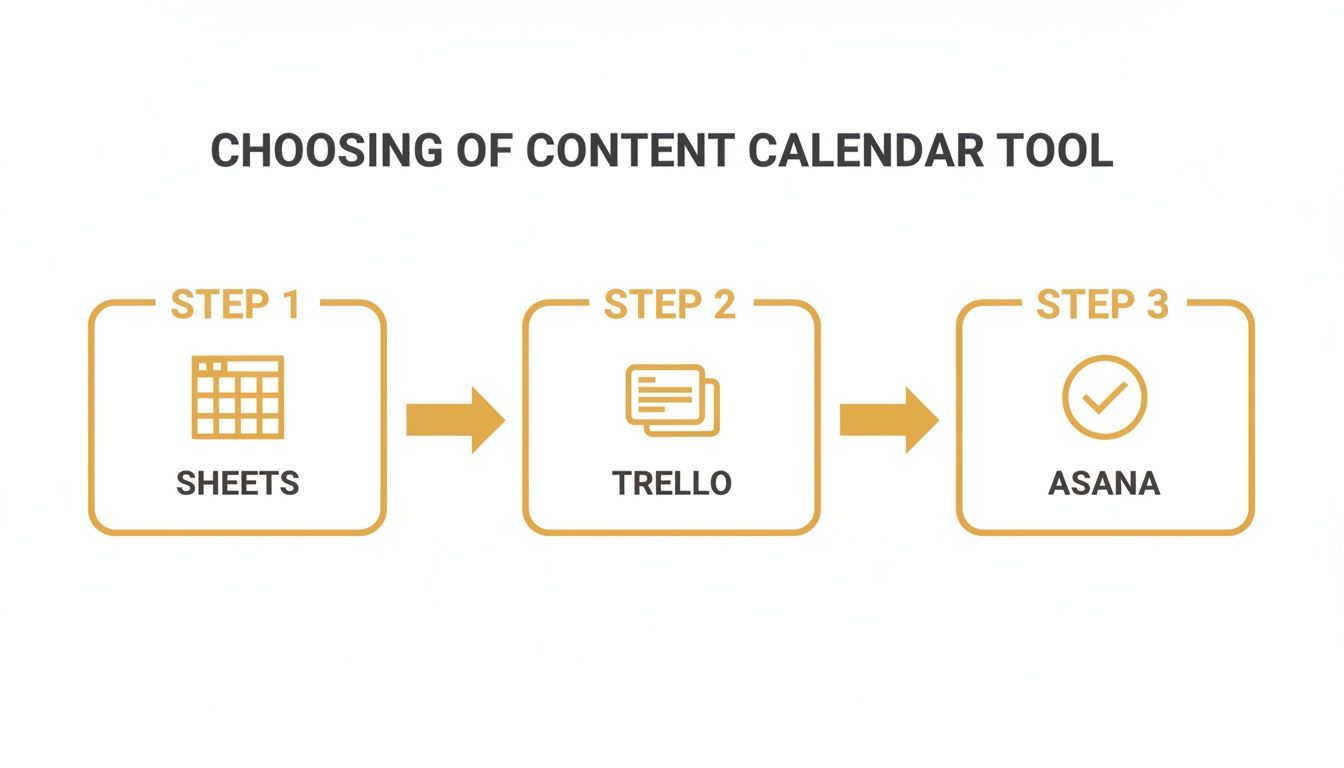
This visual pretty much sums it up. You might start with a simple spreadsheet, but as collaboration and complexity increase, moving to a dedicated tool like Trello or Asana becomes a no-brainer.
Adopting a Data-Informed Scheduling Strategy
Finally, an efficient workflow isn't just about how you create content, but when you publish it. If you're just posting whenever you feel like it, you're leaving a ton of engagement on the table. A data-informed approach ensures your hard work actually gets seen. This is especially true on fast-moving platforms like social media.
For example, I've seen e-commerce clients have massive success with a hybrid model. They schedule 60-70% of their posts ahead of time for consistency, but they keep 30-40% of the calendar open to react to trends or timely events. In one case, this strategy helped a creator jump from 62% to 94% posting consistency and boosted their engagement by a whopping 67%. For a deeper dive, explore the full guide on InfluenceFlow.io.
Put it all together—clear roles, smart batching, and strategic scheduling—and your content calendar becomes the backbone of a seriously effective content machine.
Executing a Strategic Publishing and Distribution Cadence
Look, creating fantastic content is only half the battle. A brilliant blog post or an insightful video is basically useless if no one ever sees it. This is where your content calendar needs to evolve from a simple production schedule into a full-blown distribution and promotion command center. It’s time to shift your focus from just making content to making sure it gets seen.
The most successful content teams I’ve ever worked with live and die by the 80/20 rule of promotion. They spend just 20% of their time on the initial creation and a massive 80% on promotion and distribution. That mindset shift is critical. Instead of hitting “publish” and immediately moving on, you build a comprehensive launch plan for every single asset right into your calendar.
Timing Your Content for Maximum Impact
Just throwing your content out there whenever it's ready isn't a strategy. You have to publish it when your audience is actually online and paying attention. This means getting away from random posting times and adopting a cadence that’s backed by data. Different industries and platforms have their own unique windows of peak activity, and hitting those windows can seriously amplify your reach.
For example, timing can vary wildly by industry. Tech audiences tend to be most active super early, around 7-8 AM, while sales and marketing pros are hitting their stride from 9-11 AM. On platforms like LinkedIn, videos published during that 8-11 AM weekday slot can outperform link posts by a factor of five. We've also seen carousels get a 40% higher engagement rate on Thursday and Friday mornings. You can dig into a full breakdown of these social media calendar insights on Digiligo.com.
To make this systematic, add a "Distribution Checklist" column to your calendar for each piece of content. This makes sure promotion isn't an afterthought but a core part of the workflow from day one.
Your checklist could include things like:
- Email Newsletter: Schedule the announcement for your main subscriber list.
- Social Media Channels: Plan out posts for LinkedIn, Facebook, Instagram, etc., at their respective peak times.
- Relevant Online Communities: Pinpoint forums or groups on Reddit or Slack where your content actually adds value (don't just spam).
- Employee Advocacy: Get your team ready to share the content with their own networks.
The Power of Content Repurposing
The real secret to maximizing your reach without completely burning out your team? Stop thinking in terms of one-off content pieces. Instead, you need to see every major asset—like a blog post, a webinar, or a case study—as the raw material for a dozen smaller pieces of content. This is how you multiply the value of your initial effort.
A single, well-researched blog post is not just one asset. It’s a goldmine. It can be atomized into a Twitter thread, a LinkedIn carousel, a series of Instagram graphics, a short-form video script, and a segment for your email newsletter. Building this repurposing plan directly into your calendar is how you dominate multiple channels with a fraction of the effort.
Let's walk through a real-world example. Say you just published a 2,000-word guide on "Choosing the Right E-commerce Platform."
Here’s how you could slice and dice it:
- Infographic: Pull out the data and create a visual comparison chart of the platforms you covered.
- LinkedIn Carousel: Turn the key takeaways into a 5-slide carousel with bold, simple graphics.
- Short-Form Video: Film a 60-second TikTok or Reel summarizing the top three tips from the guide.
- Email Mini-Series: Send out a three-part email series, with each email diving deeper into one key section of the guide.
- Quote Graphics: Pull the most impactful quotes and turn them into shareable images for Instagram and Facebook.
This multi-channel approach makes sure your core message reaches different segments of your audience on the platforms they actually use. It’s a fundamental part of building powerful omnichannel marketing strategies that create a consistent brand experience everywhere your customers might find you. When you strategically plan your distribution and repurposing from the start, your content calendar becomes a true engine for sustained growth.
A Few Common Questions About Content Calendars
Even with a killer plan, you're going to have questions pop up. That’s just part of the process. Getting answers to the common snags is what separates a calendar that works from one that just creates frustration. We've pulled together some of the most frequent questions we hear to help you work through the real-world challenges of making your calendar stick.
How Far Out Should I Actually Plan My Content?
This is the big one. For most businesses, planning one full month in advance is the sweet spot. It gives you enough of a runway to stay consistent without locking you into a plan so rigid it breaks the second something unexpected happens. Think of it as a hybrid approach—you can still map out your big quarterly themes or product launches, but you fill in the specific topics month by month.
This method keeps the momentum going but leaves you nimble enough to jump on new trends, react to a competitor's move, or create content around a news story that just broke.
Here's a pro tip: try to keep about 20% of your schedule intentionally open. Think of it as your "wild card" slot for timely, reactive content. It stops the calendar from feeling like a creative straitjacket and lets you post those high-engagement pieces you just can't plan for.
What Are the Most Important Metrics to Track?
Honestly, the best metrics are the ones that tie directly back to your actual business goals. It's that simple. If you’re trying to generate leads, then you need to be obsessed with tracking form submissions, content downloads, and the conversion rates from your blog traffic. It’s all about connecting a piece of content to a real business result.
On the flip side, if brand awareness is the name of the game, your dashboard should be lighting up with metrics like:
- Growth in your organic search traffic
- Better keyword rankings for your main content pillars
- Jumps in social media reach and engagement rates
By adding a couple of columns to your content calendar to log these KPIs for each post, you turn a simple schedule into a powerful analytical tool. This creates a feedback loop that shows you exactly what's resonating with your audience and what's falling flat, letting you make smarter, data-driven decisions next month.
How Do I Keep My Content Calendar From Feeling Too Rigid?
The trick is to treat your calendar like a strategic guide, not an unbreakable contract. Flexibility has to be baked in from the start. Schedule your big, foundational evergreen content first—the stuff you know has a long shelf life—but intentionally leave gaps. Those open slots are perfect for slotting in reactive posts or jumping on a trending topic without derailing your entire plan.
It's also a good idea to review your core content pillars every quarter. This little check-in makes sure the big themes you’re creating content around are still what your audience cares about and still line up with where the business is heading. A pillar that was a home run six months ago might need a refresh or a total rethink.
Finally, you have to actively encourage your team to experiment. If your calendar is a sea of blog posts, make a point to schedule a short video series, an interactive quiz, or a webinar. This doesn't just keep your content from getting stale for your audience; it keeps your creative team engaged and excited to try new things. A dynamic calendar is a healthy calendar.
At Up North Media, we specialize in turning content strategies into revenue-generating machines. If you're ready to build a content calendar that not only organizes your workflow but also drives measurable growth for your business, we can help. Schedule your free consultation today and let's create a plan that delivers results.