

You’ve probably heard of a 404 error. It’s that familiar “Not Found” page you land on when a link is broken. But what about its sneaky cousin, the soft 404?
A soft 404 error is a bit of a deception. It happens when a page that should be an error—like an empty product category or a search with no results—instead tells search engines it's a perfectly valid page by sending a '200 OK' server signal.
Think of it like this: You walk up to a store, the door is wide open, but inside, the shelves are completely bare. It’s a confusing experience for users and a major headache for search engine crawlers, and it can silently tank your SEO by wasting your site's crawl budget on useless pages.
Decoding Soft 404 Errors and Their SEO Impact
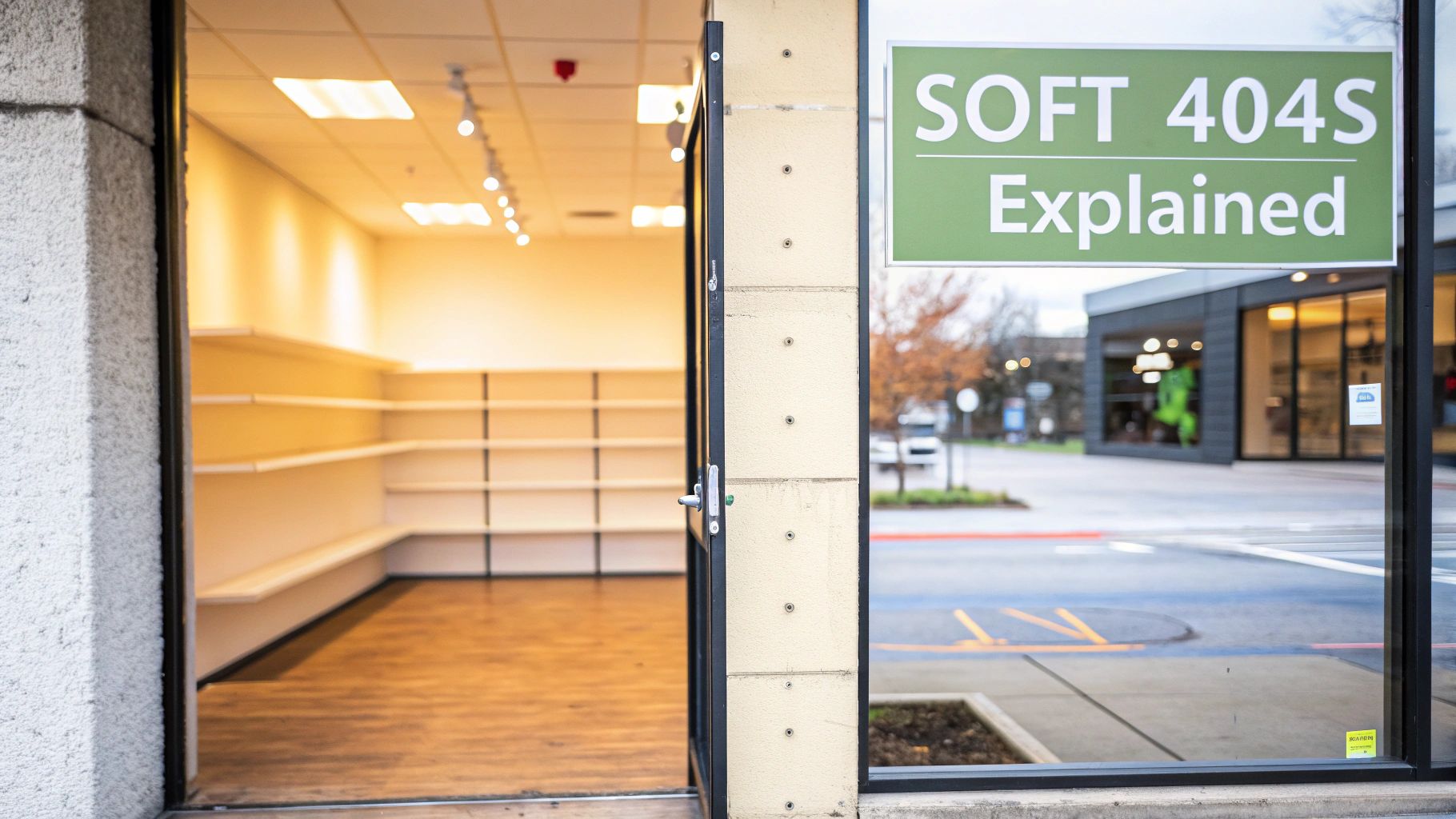
Unlike a proper "hard" 404 error, which clearly signals to search engines "this page is gone, don't bother," a soft 404 sends mixed messages. The server responds with a 200 OK status—the universal code for "everything is fine here"—but the content on the page tells a very different story, often with a message like "No products found" or just a blank space.
This miscommunication is a subtle but serious SEO problem. It tricks search engine crawlers into indexing low-value or non-existent content, which dilutes your site's authority and prevents Google from focusing on your most important pages.
The Real Cost of Ignoring These Errors
Letting soft 404s linger is like having a quiet leak in your SEO foundation. Over time, that small drip can cause some serious damage.
- Wasted Crawl Budget: Search engines only dedicate a certain amount of resources to crawling your website. When their bots get stuck on these dead-end pages, they have less time to find your new blog posts, updated product pages, and other critical content.
- Poor User Experience: Nothing frustrates a user more than clicking a search result and landing on an empty or broken-looking page. This leads to high bounce rates and tells search engines that your site isn't delivering a quality experience. You can read more about how user experience signals matter in our guide on what is https://upnorthmedia.co/blog/what-is-core-web-vitals.
- Lowered Site Quality Score: A high number of soft 404s can signal to Google that your site is poorly maintained or has thin content. This perception can drag down your overall domain authority and rankings across the board.
Standard 404 vs Soft 404 A Quick Comparison
To really get a handle on this, it helps to see the two error types side-by-side. Understanding this distinction is the first step in diagnosing and fixing the problem.
| Attribute | Correct 404 Error (Good) | Soft 404 Error (Bad) |
|---|---|---|
| Server Response | 404 Not Found | 200 OK |
| Signal to Google | "This page doesn't exist. Stop crawling it." | "This is a valid page. Please index it." |
| User Experience | Sees a clear "Not Found" page, hopefully helpful. | Sees an empty or irrelevant page, causing confusion. |
| SEO Impact | Neutral; handled correctly by search engines. | Negative; wastes crawl budget and hurts quality signals. |
A soft 404 isn't just a technical glitch; it's a fundamental miscommunication that needs to be addressed. By fixing these deceptive pages, you ensure search engines focus their attention where it matters most, strengthening your site’s overall performance.
A soft 404 is essentially a lie your website tells Google. It says a page is valuable when it’s not, leading to confusion and wasted resources that could have been spent on your most important content.
Gaining a deeper understanding of the science behind technical SEO can further highlight just how critical these fixes are. Taking the time to hunt down and resolve these issues is a non-negotiable part of maintaining a healthy, high-performing website.
How to Reliably Find Hidden Soft 404 Errors
Soft 404s are sneaky. They don't announce themselves with a clear "Not Found" message, which is why they can fly under the radar for so long. These pages look fine on the surface—they load, they have content—but to Google, they’re sending mixed signals. Finding them requires a bit of detective work, but luckily, you have some powerful tools at your disposal.
Your first stop should always be Google Search Console. Think of it as your direct line to Google. The search engine is already crawling your site and flagging pages it finds confusing, so this is the lowest-hanging fruit.

Start with Google Search Console
Once you’re logged into your GSC property, head over to the Pages report, which you’ll find under the Indexing section on the left. This is mission control for understanding how Google views your site’s URLs.
Scroll down below the main graph until you see the Why pages aren’t indexed table. This is where Google lists all the reasons a page might be excluded from its index. If you have soft 404 issues, you'll see a row labeled Soft 404. Click it.
Boom. You now have a complete list of every URL that Google has flagged. This isn't just data; it's your punch list. Each URL here represents wasted crawl budget and a potential hit to your site's perceived quality.
Use a Web Crawler for Deeper Analysis
Google Search Console is great for telling you what Google has already found. But what about the problems it hasn't spotted yet? For that, you need to be proactive. This is where a good web crawler like Screaming Frog or Ahrefs comes in.
The goal here is to crawl your site and hunt for pages that act like an error page but still return a 200 OK status code. You’re essentially trying to think like a search engine bot.
I usually look for a few common red flags:
- Thin Content: Pages with a super low word count (say, under 100 words) are prime suspects. Think of an empty search results page that just says, "No results found."
- Error-Like Language: You can set up your crawler to scan the HTML for specific phrases. I often create custom searches for terms like "product not found," "item is unavailable," or "your search returned no results" in the page title, H1, or body.
By running a custom crawl, you shift from being reactive to proactive. You’re not just waiting for Google to tell you there's a problem—you're finding the signals that create the problem in the first place.
For instance, with Screaming Frog's Custom Search feature, I might configure it to flag any page containing the phrase "Sorry, no products match your selection" while also verifying its status code is 200. Any URL that meets both conditions is almost certainly a soft 404 that needs to be fixed.
Reviewing Server Logs for Clues
If you want to go full-on technical, digging into your server's access logs can uncover patterns that other tools miss. It's a bit more involved, but the insights can be invaluable.
In your logs, look for URLs that get a lot of hits from Googlebot but show a high bounce rate or really low time-on-page in your analytics. This mismatch often means Google thinks the page is important, but users land there, find nothing useful, and leave immediately. That’s a classic user experience symptom of a soft 404.
This whole concept isn't new, by the way. Google's engineers were talking about it back in 2008. They explained that these pages are a problem because a 200 code tells them "this page is good," but the content screams "this page is broken." You can still read their original take on it over on the Google Search Central blog.
By combining GSC for known issues, a crawler for proactive hunting, and server logs for a deep dive, you’ll have a rock-solid process for finding and fixing every last soft 404.
Figuring Out Why You Have Soft 404s
Once your tools have flagged a list of potential soft 404s, the real detective work begins. Just knowing a URL is acting weird isn't enough; you have to figure out why Google is seeing it that way. Getting to the root cause is the only way to apply a real, permanent fix instead of just slapping a bandage on it.
Your first move is to put yourself in a user's shoes. Visit each flagged URL and ask some basic questions. What do you see? Does the page actually deliver what the title tag and meta description promised? More importantly, is there anything useful here, or is it a dead end?
The Usual Suspects Behind Soft 404 Errors
After doing hundreds of technical SEO audits, I’ve seen the same patterns pop up again and again. Soft 404s usually come from a small handful of common issues, especially on sites with lots of dynamic pages like e-commerce stores or big publishers. If you know what to look for, you can categorize your problems much faster.
Here are the most frequent offenders I run into:
- Empty E-commerce Categories: These pages are live on your site, but they have zero products in them. For a user, the page is completely useless, but the server is still telling Google everything is fine with a
200 OKstatus. - Out-of-Stock Product Variations: You might have a specific URL for a product variant, like
/blue-widget-size-large. When that exact combo sells out, the page becomes empty but often keeps its200 OKstatus, triggering a soft 404. - Internal Search Results Pages: Someone searches for an item you don’t carry, and your site generates a URL like
/search?q=nonexistent-item. The page says "No results found," but the server reports a success code. - Thin or Placeholder Content: These are the pages you forgot about from development—"Coming Soon" sections or pages with just a single sentence. Google sees them and correctly decides they offer no real value.
A page doesn’t have to be totally blank to get flagged as a soft 404. If the content is so thin or unhelpful that it doesn't solve a user's problem, Google's algorithm is smart enough to see it as a low-quality result that shouldn't be indexed.
This is a huge issue for sites with thousands of URLs. For example, an e-commerce site with 5,000 product pages might have hundreds that are obsolete because of inventory changes. If those pages aren't properly redirected or marked with a 404, they turn into soft 404s. As the folks at Zero Gravity Marketing point out, this shows how automated page creation can cause major SEO headaches if you’re not careful.
Checking the Technical Signals
What you see on the screen is only half the story. You also need to check the technical signals the page is sending to browsers and bots. This means looking at the HTTP response header and maybe the HTML source code to confirm what’s going on. The good news is you don’t need to be a developer—your browser’s built-in tools make this easy.
Just right-click on the page, select "Inspect," and head over to the "Network" tab in the developer tools panel.
Now, reload the page. The first item that appears in the list is usually the page's main document. Click on it. You’ll see a bunch of information, but you're looking for the Status Code. For a soft 404, you will almost always see a 200 OK.
This simple check confirms the entire problem. The page looks like an error to you and your users, but it's telling search engines that everything is perfect. That's the exact miscommunication you're here to fix. Once you've confirmed this, you're ready to start applying the right solution for each type of error you've found.
Your Action Plan for Fixing Different Types of Soft 404s
Alright, you've diagnosed the root causes of your soft 404 errors. Now it's time to get your hands dirty and actually fix them. The most important thing to remember is that not every soft 404 is the same, so a one-size-fits-all approach is doomed to fail. Your strategy depends entirely on what the page was supposed to do and why Google is flagging it.
The key is to match the fix to the problem. Is the page gone for good, like a discontinued product? Has it simply moved to a new URL? Or is it a valuable page that just lacks enough meat on its bones? Each scenario demands a different tactic.
This decision-making flowchart can help you visualize the right path to take for common culprits, like empty search results or thin category pages.
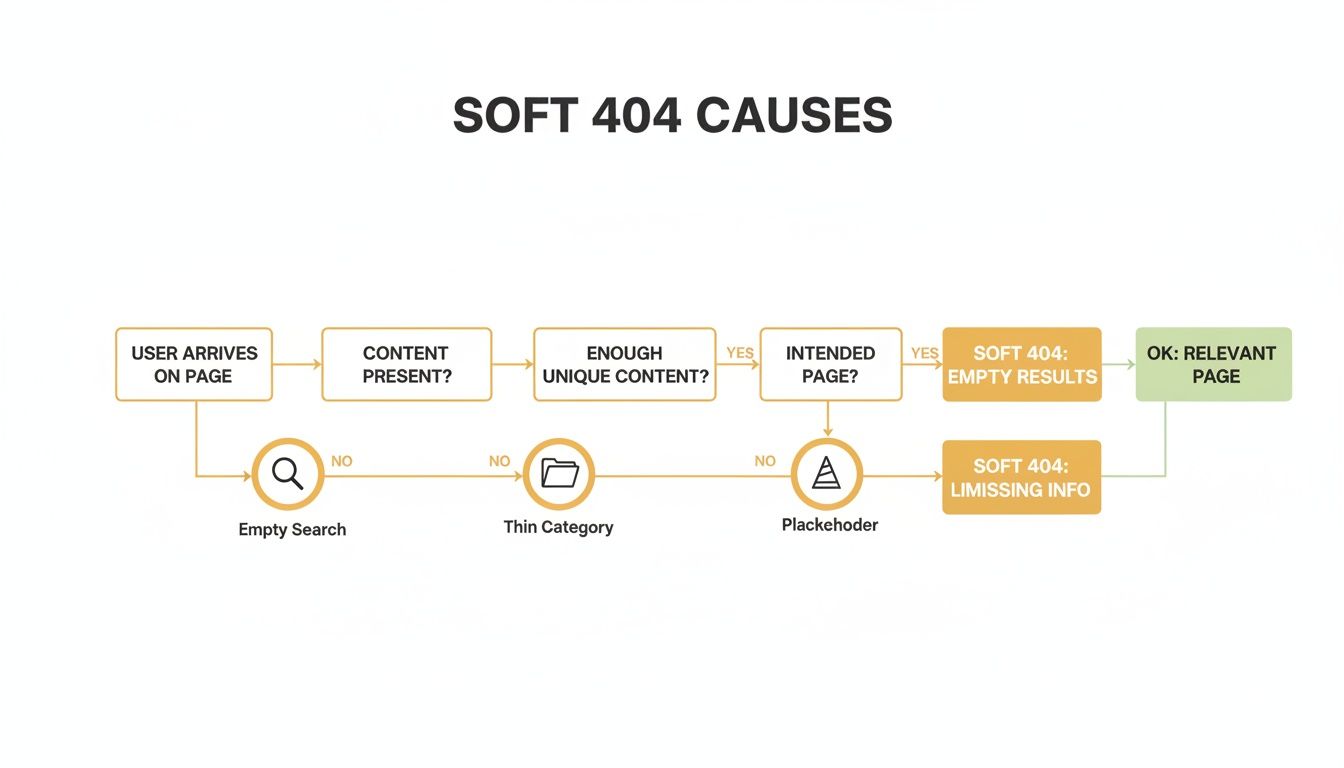
As you can see, the right solution—whether that’s beefing up content, setting up a redirect, or serving a proper 404—directly ties back to why the page exists in the first place.
When a Page Is Truly Gone
For URLs that have no replacement and shouldn't exist anymore, your job is to send a clear "gone" signal to search engines. This tells Google to stop wasting its time and crawl budget on a dead end.
You've got two solid options here:
- Serve a 404 (Not Found) Status Code: This is the standard, universally understood response for a page that doesn’t exist. It tells search engines the page is missing, and they'll eventually de-index it.
- Serve a 410 (Gone) Status Code: Think of this as a more definitive signal. A 410 tells Google the page has been permanently vaporized and will never return. In my experience, Google tends to process 410s a bit faster, making it a great choice for pages you know are gone for good.
Most server configurations and CMS platforms let you set these response codes. Just be careful: a custom-coded 404 page is great for user experience, but it must serve the 404 header. If it serves a 200 OK status, your helpful "not found" page will just become another soft 404.
When Content Has Moved to a New Home
If a page's content still exists but now lives at a new URL, a 404 is the absolute wrong move. This happens all the time when you restructure your site, update URL slugs, or merge a few similar articles into one definitive piece.
In these cases, the correct fix is a 301 permanent redirect. This acts like a mail forwarding service for the internet, telling both users and search engines the new, permanent address for that content. A 301 redirect is crucial because it passes most of the original page's link equity to the new URL, preserving its hard-earned SEO value.
For example, if /blog/old-post-name is now /blog/new-post-name, a 301 redirect ensures you don't lose traffic or rankings. If you need a deeper dive into redirects and other fixes, you can learn how to fix broken links and implement the right solutions.
Improving Thin Content Pages That Need to Stay
But what about the tricky ones? The pages flagged as soft 404s because their content is too thin, but the URL needs to exist. This often happens with empty e-commerce categories or internal search results pages that are still valuable for navigation. You can't just delete or redirect them.
The only real solution here is strategic content enrichment. Your goal is to add enough unique, valuable information to the page so that Google no longer sees it as a low-quality, unhelpful result.
Google’s algorithm is looking for signals that a page provides genuine value to the user. A blank page with "No results found" offers zero value. Adding context, related links, and helpful information changes that equation entirely.
Here are a few practical ways I've seen this work:
- For Empty Category Pages: Write a unique, descriptive paragraph explaining what types of products are usually found there. You can also feature links to related categories or popular products from other parts of the site.
- For "No Results" Search Pages: Instead of just showing an error message, provide alternative search suggestions. Display links to top-selling items or popular blog posts to guide the user somewhere useful.
- For Out-of-Stock Products: If a product is just temporarily unavailable, add a sign-up form for back-in-stock notifications. And definitely display similar or alternative products the user might be interested in.
Choosing the Right Fix for Your Soft 404
Making the right call is crucial for keeping your site healthy. To simplify things, I've put together a quick decision-making table based on the most common scenarios you'll run into.
This table should help you quickly map your diagnosis to the most effective fix.
| Scenario | Best Solution | When to Use It |
|---|---|---|
| Discontinued Product/Old Event | 410 (Gone) | The page is permanently removed and will never return. This signals immediate de-indexing. |
| Temporary Error/Non-Existent URL | 404 (Not Found) | A user types a wrong URL or clicks a broken link. The page never existed or is gone temporarily. |
| Updated URL or Merged Content | 301 (Permanent Redirect) | The content has a new permanent home. This preserves link equity and user experience. |
| Thin but Necessary Page | Content Enrichment | The page (e.g., an empty category) must exist but lacks value. Add unique content to make it useful. |
Implementing these fixes is a fundamental part of good technical SEO. It's not a one-time task but a continuous effort that contributes to better overall site performance. This kind of work is a core part of any good website updates and maintenance routine.
By correctly addressing each soft 404 error, you're not just cleaning up your site—you're optimizing your crawl budget and sending strong quality signals to Google.
Validating Your Fixes and Monitoring for New Issues
Fixing your existing soft 404 errors is a huge win, but the job isn't quite done. The last, most critical step is confirming your solutions actually worked and then setting up a system to keep these issues from creeping back in. Real technical SEO health isn't about a one-time cleanup; it's about building sustainable habits.
Your first stop after pushing your fixes live should be right back where you started: Google Search Console. Head over to the Pages report, find the list of URLs flagged under the Soft 404 status, and hit that "Validate Fix" button. Clicking this is your way of telling Google, "Hey, I think I've sorted this out," which prompts them to recrawl the pages in question.
Don't expect instant results. It can take anywhere from a few days to several weeks for Google to get around to re-evaluating everything, depending on your site's overall crawl frequency. You'll be able to track the progress in GSC as the status moves from "Started" to hopefully "Passed." A "Passed" validation is your green light—confirmation that Google now sees the page correctly.
Building a Proactive Monitoring System
Just waiting around for Google to flag new errors is a purely reactive strategy, and it will always keep you on the back foot. The real goal is to catch potential soft 404s before they ever show up in your Search Console report. This means baking some simple monitoring into your regular website maintenance.
A great way to do this is to set up scheduled site audits with a tool like Ahrefs or Screaming Frog. Configure your crawler to run automatically—maybe on the first of every month—and have it look for specific red flags:
- Low Word Count Pages: Set up a filter to flag any indexable page returning a
200 OKstatus code that has fewer than 100 words. - "Error" Keyword Searches: Run a custom search through the page's HTML for common error-like phrases, such as "no products found," "item unavailable," or "your search returned no results."
By automating this, you create an early warning system. You'll get an alert about a thin, useless page long before it wastes your crawl budget or gets officially flagged by Google.
Leveraging Analytics for Early Detection
Your analytics platform can also be a goldmine for spotting problems before they escalate. One of my favorite tactics is to set up custom alerts. For instance, you could create an alert that pings you if a non-essential page (like an internal search result page) suddenly starts getting a spike in organic traffic.
This weird traffic pattern often means the URL has been mistakenly indexed and might be acting as a soft 404. It's a clear signal that users are landing on a dead-end, which is a poor experience you'll want to squash immediately.
Proactive monitoring completely changes your approach from cleanup to maintenance. Instead of constantly putting out fires, you're preventing them from even starting. This keeps your site clean, efficient, and optimized for both users and search engines.
Ultimately, this ongoing vigilance makes sure your hard work has a lasting impact. The same principles apply when you're trying to figure out how to fix crawled currently not indexed issues, since both problems boil down to ensuring Google can efficiently crawl and make sense of your valuable content.
Common Questions About Soft 404 Errors
Once you start digging into soft 404 errors, a few questions always seem to pop up. These errors can be a real head-scratcher, so let's walk through some of the most common ones I hear from people trying to get their site health back on track.
"I Fixed It. How Long Until Google Notices?"
This is always the first question after someone hits "Validate Fix" in Google Search Console. The honest answer? It depends. You’re essentially asking Google to take another look at the URLs you’ve flagged, and that process can take anywhere from a few days to several weeks.
A few things will speed up or slow down the process:
- Your site's crawl frequency: Big, authoritative sites that publish new content all the time get crawled more often. Faster crawling usually means faster validation.
- The sheer number of errors: If you're trying to validate a fix for thousands of URLs, it’s going to take Google a lot longer to get through them than if you only had a handful.
- The type of fix: In my experience, pages that return a definitive
410 Gonestatus code often get processed a bit quicker. It's a very clear signal to Google that the page is permanently gone.
The key here is patience. As long as you see the validation status marked as "Started" in GSC, you know your request is in the queue and being processed.
Soft 404s vs. Hard 404s: What’s the Big SEO Deal?
Another critical question is whether a soft 404 is really that much worse than a standard "hard" 404. From an SEO perspective, the answer is a firm yes.
A hard 404, which correctly returns a 404 Not Found status code, is a clean, honest signal. You're telling search engines, "Hey, this page doesn't exist anymore, so you can drop it from your index." Google gets that loud and clear and moves on.
A soft 404, on the other hand, is just confusing. The 200 OK status code tells Google the page is perfectly fine and should be indexed, but the actual content is thin, empty, or says "not found." This mix-up wastes your crawl budget and can signal to Google that your site is poorly maintained, which can absolutely drag down your rankings over time.
A hard 404 is a resolved issue; a soft 404 is an ongoing problem. Prioritizing the fix for soft 404s is essential because they actively consume crawl resources on pages that offer zero value.
Can My Custom 404 Page Cause This Problem?
This is a fantastic question, and the answer is a little surprising to most people. You’ve spent time creating a helpful, user-friendly custom 404 page with links to your homepage and other useful content. But can this well-intentioned page actually cause a soft 404?
Absolutely, if it's not configured correctly. The problem happens when your server shows that beautiful custom page but sends a 200 OK HTTP status code along with it. To a search engine crawler, it looks like every non-existent URL on your site is actually a valid page with content.
To fix this, you have to make sure your server is set up to send a proper 404 Not Found status code every time it serves that custom error page. This gives you the best of both worlds: your users get a helpful, on-brand experience, and search engines get the clear technical signal they need to properly manage your site's index.
At Up North Media, we specialize in diagnosing and resolving complex technical SEO issues just like these. If you're struggling to clean up errors and improve your site’s performance, let our data-driven experts help. Get in touch with us for a free consultation.