
You probably check your website the way most owners do. You open it on your phone, it loads, and you get on with your day. That habit hides the failures that cost money, because a homepage can load while checkout times out, a booking form rejects submissions, or customers in another state can't reach you at all.
A good uptime monitoring service doesn't just ask whether your server answered. It tests whether the revenue path still works, from several places, often enough that you hear about trouble before a customer has to tell you.
What an Uptime Monitoring Service Actually Does
Say a shop owner in Omaha opens her email at 10 a.m. and finds a note from a frustrated customer. Checkout stopped working at 8 a.m., two hours of orders never happened, and nobody on the team knew.
An uptime monitoring service removes that delay. It sends automated requests to your website or app at a set interval, usually every one to five minutes, and records what came back. It logs the status code, how long the response took, and whether the content looked right. When several checks fail in a row, it alerts you by email, SMS, or chat so someone can act.
The smoke detector test
It is like a smoke detector. You don't walk through your house every hour checking for smoke. The detector watches constantly and signals only when something changes. Monitoring does the same job for your storefront, except it also keeps a record you can review later.
That record matters because uptime and availability aren't the same thing. Uptime is the share of time the server responds. Availability is whether customers can finish what they came to do, such as pay, book, or send a form. A server can score well on the first and fail you on the second.
Three parts in every service
- Probes: The checks themselves, run from data centers in different locations.
- Alert rules: The logic that decides when a failure is real enough to wake someone up.
- History reports: Response times and incidents over weeks and months, so you can spot a pattern.
If your business also has office devices, point-of-sale terminals, or internal systems to watch, that is a neighboring problem. For that side, RDE Technologies explains RMM software and how remote monitoring differs from checking a public website.
Of the three parts, I would learn the alert rules first. Probes are easy to buy. Reports are easy to ignore. Rules decide whether you find out in three minutes or three hours.
Check Types and What Each One Catches
A basic status check creates a dangerous kind of confidence. Your server returns a 200 response, the dashboard stays green, and meanwhile the page shows an error message or an empty cart. The check passed. The customer still couldn't buy.
That's why one check type is never enough. Each one tests a different layer, and each one has a blind spot you need to know about before you trust it.
| Check type | What it tests | What it misses | Best for |
|---|---|---|---|
| HTTP status check | Server returns a 2xx or 3xx response | Error pages that still return 200 | Basic site reachability |
| Keyword content check | Expected text appears on the page | Broken checkout logic or forms | Homepage and landing pages |
| SSL certificate check | Certificate is valid and not close to expiry | Server-side application faults | Avoiding browser security warnings |
| DNS resolution check | Domain resolves to the correct address | Application errors after resolution | Domain or DNS provider failures |
| TCP port check | Service accepts connections on a port | Whether pages render correctly | Mail, database or custom services |
| API endpoint check | Endpoint returns expected status and data | Front-end rendering problems | Integrations and mobile apps |
| Browser transaction check | Full journey such as login or checkout completes | Issues outside the scripted path | E-commerce checkout and lead forms |
| Multi-region probe | The same check runs from several regions | Problems that only affect one network or region | Regional and partial outages |
Two checks worth picturing
A keyword check confirms that specific text still appears, for example "Add to cart" on your best-selling product page. If a bad deploy wipes out the button, the page still returns 200, but the keyword check fails and you hear about it.
A browser transaction check goes further. It opens a real browser, adds an item to the cart, and walks through to the payment step. If any step breaks, the check fails at that step, which tells you where to look first.
A green status check proves the server answered. It doesn't prove anyone could buy anything.
For an e-commerce store or a lead-generation site, I would start with a minimum set: HTTP, keyword, SSL, and DNS checks, plus one browser checkout or form journey, run from at least three regions. Speed is part of this picture too, since a page that loads slowly loses buyers before it ever goes down, and the practical fixes are covered in these website performance optimization tips.
Dependency Failures That a Homepage Check Never Sees
Your homepage loads. The team relaxes. Orders stop coming through because the payment provider's API is timing out, and your single-URL check keeps reporting the site as up. You find out when the day's revenue looks wrong.
That gap is the whole argument for monitoring dependency failures, not merely checking whether a website responds.
What a customer journey actually touches
- DNS resolution: Customers can't find your domain if this breaks, even though your server is fine.
- Certificate validity: An expired certificate triggers browser warnings that send buyers away.
- Third-party APIs: Payment gateways, shipping calculators, and booking widgets each fail on their own schedule.
- CDN regions: Images and scripts may load in one region and fail in another.
- Cloud hosting: The platform underneath your site can have an incident while your code is untouched.
Shared platforms fail at a scale that's easy to underestimate. In 2025, a major AWS incident generated more than 17 million user reports and lasted over 15 hours, while a Cloudflare disruption generated more than 3.3 million reports and lasted nearly five hours, according to CRN Asia's roundup of major 2025 online outages. The same coverage notes Uptime Institute findings that fiber and cable incidents were the leading cause of publicly reported IT-service outages in 2025, and that 45% of reported incidents lasted more than 12 hours or extended beyond its shorter-resolution category.
Your business doesn't need a cloud-scale outage to lose money this way. Say a plumbing company runs emergency ads on a Saturday. The website loads perfectly, but the scheduling form depends on a third-party widget that's down. Homeowners with burst pipes can't book, the ad spend keeps running, and the owner learns about it Monday from an empty calendar.
Practical rule: If a service can stop a sale or a lead, it belongs on your monitoring list, whether you own it or not.
I would map it on paper first. List every service the journey touches, mark the ones critical to revenue or leads, then attach a browser or API check to each. That's synthetic transaction monitoring plus dependency mapping, and it's the difference between knowing your homepage answered and knowing customers could pay. A high advertised uptime figure means little if the monitor checks one endpoint from one location.
Turning Uptime Percentages Into Minutes You Can Plan For
A target such as 99.9% sounds close to perfect, but the remaining downtime can still consume an afternoon. Converting the percentage into minutes makes the trade-off visible, especially when the monitored service is a checkout, booking form, or payment connection rather than just the homepage.
| Availability target | Allowed downtime per year | Allowed downtime per 30-day month |
|---|---|---|
| 99% | 3 days 15 h 36 min | 7 h 12 min |
| 99.9% | 8 h 46 min | 43 min 12 s |
| 99.95% | 4 h 23 min | 21 min 36 s |
| 99.99% | 52 min 34 s | 4 min 19 s |
| 99.999% | 5 min 15 s | 26 s |
These figures follow from simple arithmetic on a 365-day year. A 99.9% availability target permits approximately 8 hours and 46 minutes of downtime in a year; 99.99% allows about 52 minutes and 34 seconds, and 99.999% about 5 minutes and 15 seconds. In a 30-day month, 99.9% allows about 43 minutes. One extended outage can use the entire monthly allowance.
Three terms that make the math usable
- SLI: The measured signal, such as the share of successful checkout requests.
- SLO: Your target over a stated window, such as 99.9% per month.
- Error budget: The downtime or failed requests the window still allows before the target is missed.
These core principles of reliability engineering turn an availability promise into a measurable limit. The limit is only useful if the measurement reflects the customer's path. A homepage may load while a booking form fails, so assess the availability of the action that generates a lead or sale.
A survey of 1,130 bioinformatics URLs published in PMC found that 91% of the URLs were available at least 90% of the time, while 4% were available less than half the time. The survey was conducted weekly from March 23 through July 21, 2006. Its findings illustrate why a single successful visit cannot establish availability over time.
For a small retailer, 99.9% can be a useful starting target if checkout is monitored and someone responds to failures. A lead-generation site paying for traffic may need a tighter target for its form, since an outage can waste ad spend and prevent inquiries. Set the target for the revenue path, then compare its measured downtime with the budget for the month.
How to Set Check Intervals and Alert Rules
The setup below works for a store, a publisher, or a local service business. The flow is summarized in the infographic, and each step includes the reason behind it.
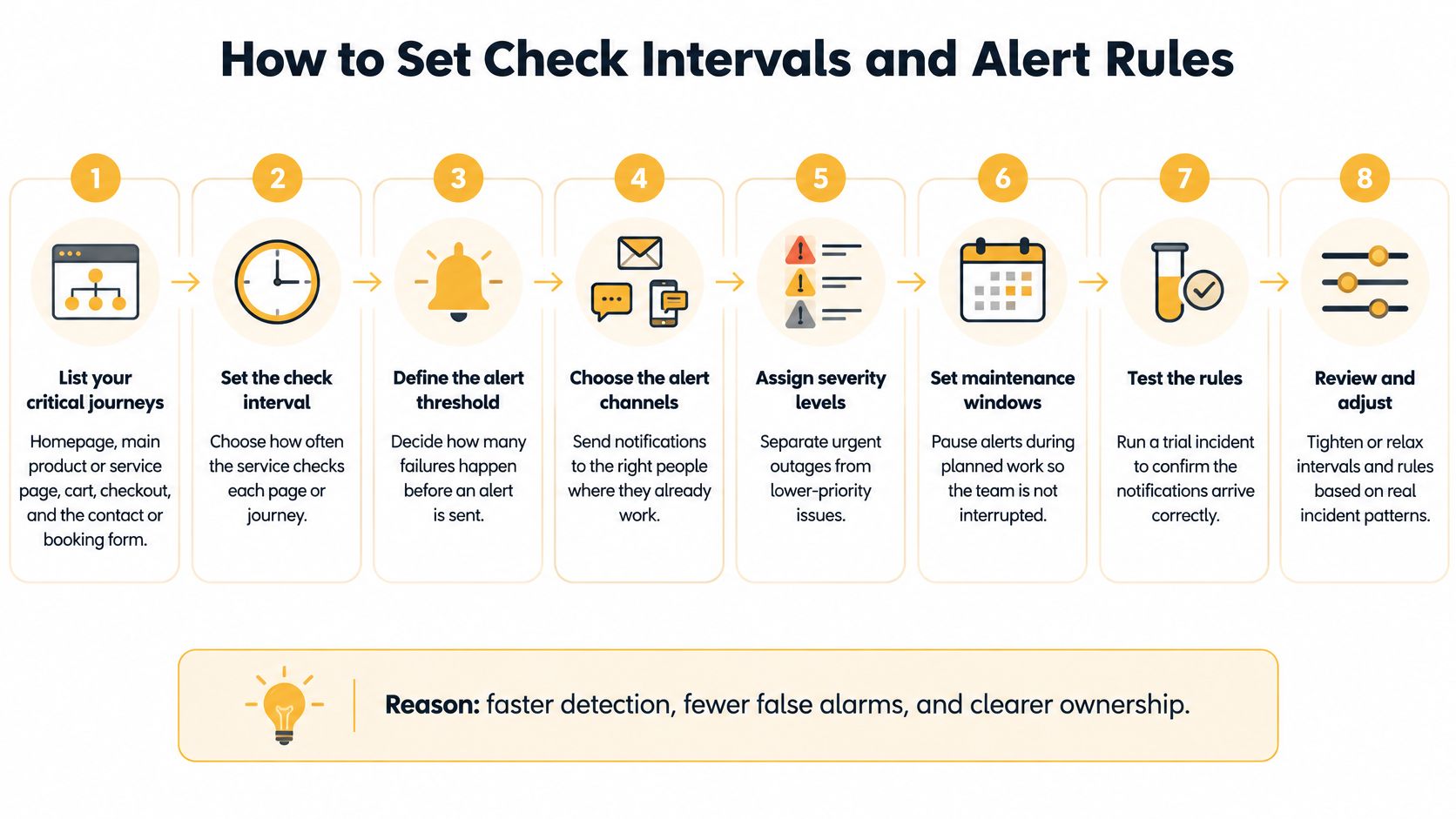
- List your critical journeys. Homepage, main product or service page, cart, checkout, and the contact or booking form. You're monitoring money paths, not every page you own.
- Set the check interval to one to five minutes. Slower checks delay detection by the length of the interval. A five-minute interval means a failure can run five minutes before the first failed check.
- Run probes from at least three regions. One bad network route can make a healthy site look down. Agreement across regions tells you the problem is real and widespread.
- Require two consecutive failures before alerting. Brief blips happen on every network. Two failures in a row filters most of them without adding much delay.
Turning checks into decisions
- Define an availability objective per journey. For example, 99.9% per month for checkout, converted into a minute budget. The homepage can carry a looser target than the payment step.
- Add two alert rules. A fast rule for total failure pages on-call staff within minutes. A slower rule catches partial errors sustained over several hours, which a fast rule alone misses.
- Confirm your data is fresh. If results are more than four to five minutes old, you can't tell whether your fix worked or the problem cleared itself. Fresh data keeps the response honest.
- Route alerts to a named owner. If nobody acknowledges within 15 minutes, escalate to the next person automatically. Then review the monthly report and tune thresholds based on what fired.
Planned work needs a pause button, or your team learns to ignore alerts during every update. That discipline fits naturally alongside routine website updates and maintenance, where maintenance windows are scheduled in advance.
The short video below walks through how interval and threshold choices interact in practice.
A well-tuned setup is quiet. You get few alerts, each one names a journey you care about, and the monthly report shows budget used per journey rather than one blended percentage.
Estimating What One Hour of Downtime Costs You
Enterprise outage figures won't help you set a budget. You need your own number, built from four drivers you can estimate from your analytics and your ad account in about twenty minutes.
The formula is plain. Hourly outage cost equals lost sales, plus failed leads, plus wasted ad spend, plus staff recovery time and support volume.
| Cost driver | How to estimate it |
|---|---|
| Lost sales | Average order value times orders per hour |
| Failed leads | Leads per hour times close rate times deal value |
| Wasted ad spend | Paid clicks per hour times cost per click |
| Staff recovery time | Hours spent diagnosing times hourly pay |
| Support volume | Extra support tickets times cost per ticket |
A worksheet example
Say a small online store averages 4 orders per hour at $75 each during open hours. That's $300 in lost sales for one hour. Add $40 of paid clicks landing on a broken checkout, an hour of owner time at $50, and a handful of "where's my order confirmation" emails. The hour costs roughly $400, using these illustrative numbers rather than measured data.
A service business lands differently. Lost bookings usually outweigh everything else, because an emergency customer who can't submit a form calls the next company on the list. Run your own five rows and total them. That total is the number every monitoring decision should be measured against.
Divide the monthly monitoring fee by your hourly downtime cost. The result is how many outage hours the tool must prevent to pay for itself.
With the example above, a $60 monthly monitor against a $400 hour means one avoided hour covers the fee for several months. That's an easy decision. The harder one is 24/7 human escalation. Compare the cost of outages that start after closing against the extra cost of after-hours coverage. Buy the coverage only when expected after-hours losses exceed it. A store selling mostly between 8 a.m. and 8 p.m. may rationally skip it.
Don't forget partial outages. If your site fails only for customers on one mobile network, you still lose that share of traffic. Estimate the affected percentage and apply it to your hourly figure.
Alert design determines how much of that hour you lose. Google's guidance in its SRE workbook on alerting on SLOs recommends burn-rate alerting with multiple windows, a short one for severe outages and a longer one for sustained degradation, because a single fixed threshold either detects slowly or pages too often. It also notes that monitoring data more than four to five minutes stale can significantly slow incident response. Faster, cleaner alerts shrink the expensive hour into an expensive ten minutes.
Pick a Monitor and Test It Before You Rely on It
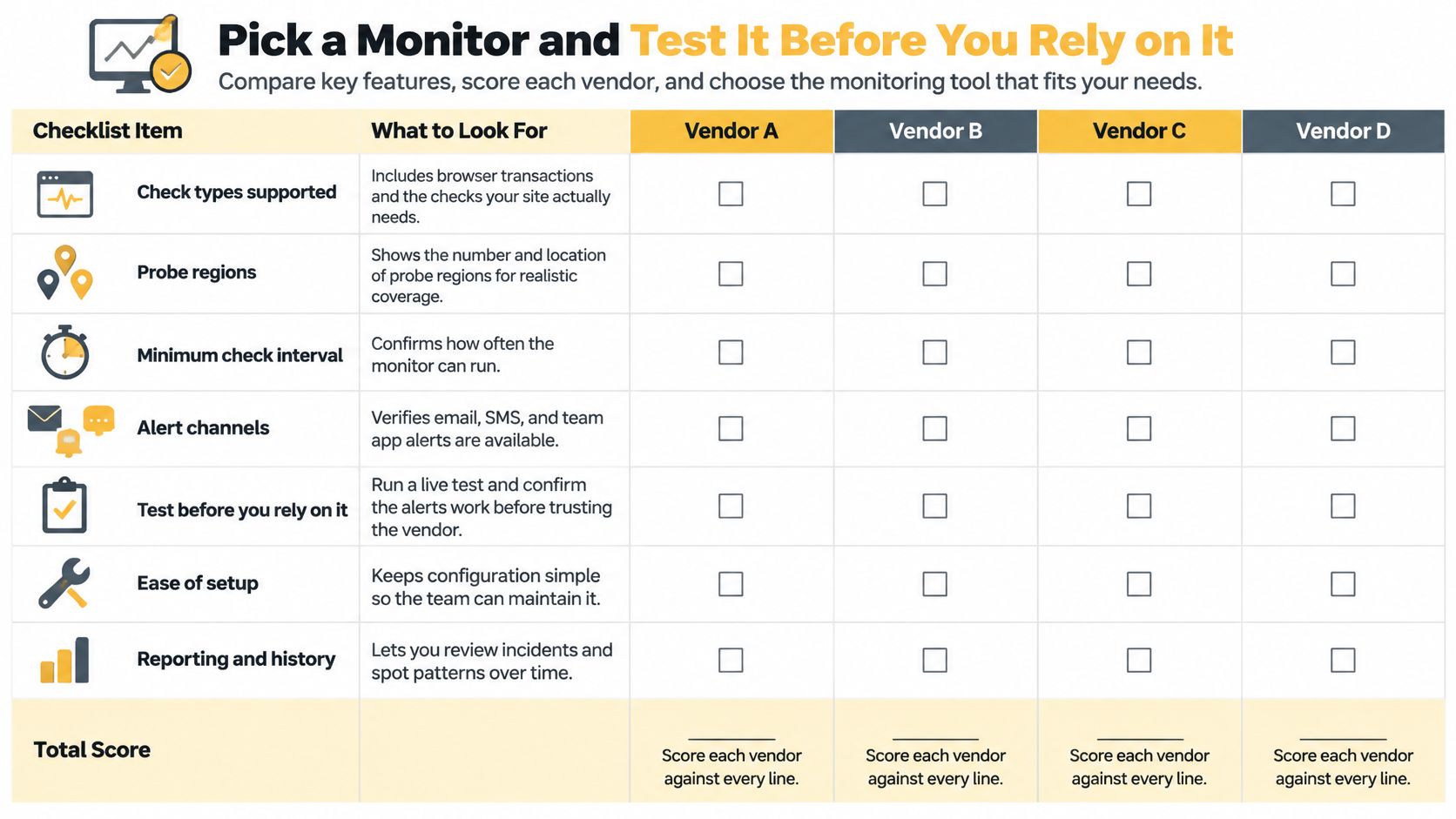
Score each vendor from 0 to 2 on every line below. Drop any vendor that scores zero on browser checks or regional probes if you run checkout or lead forms, because those gaps can't be fixed with configuration.
The scoring checklist
- Check types supported: Includes browser transactions, API, DNS, and SSL checks.
- Probe regions: Number and location of regions, including ones near your customers.
- Minimum check interval: How often it can run, and whether that needs a higher plan.
- Alert channels: Email, SMS, chat, and phone.
- Escalation and on-call routing: Named owners and automatic handoff.
- SLO reporting per journey: Availability by checkout or form, not just by hostname.
- Status page, export, and retention: Public status options and how long history is kept.
- Pricing shape: Per monitor versus per check, which changes fast as you add journeys.
The checklist below lays out the same criteria as a scorecard you can reuse for each vendor.
The two-week test
Set up monitors for your homepage and checkout. Then deliberately break a test page or pause a non-critical service, and time how long the alert takes to reach your phone. Compare that measured detection time with your SLO target, and check whether the alert named the right journey. A vendor that can't pass a staged failure won't save you during a real one.
Monitoring also gives you evidence when you evaluate hosting, since months of incident history say more than a sales page. That evidence is useful context when working through how to choose a web hosting service.
Finish by scoring your current setup against the checklist and your cost model. Then decide whether to switch vendors, add checks, or keep what you have. If you'd rather talk it through first, we offer a free 60-minute strategy call that you can book through our website.
If your checkout, booking form, or lead path matters to revenue, we'll help you map the dependencies, set sensible availability targets, and choose monitoring that fits your actual hourly downtime cost. Book a free 60-minute strategy call with Up North Media and leave with a concrete plan for catching the next failure before your customers do.