
AI integration is embedding AI capabilities into existing business systems, workflows and decisions rather than running AI as a separate experiment. If you're copying orders from email into a spreadsheet, pasting customer questions into a chatbot, then pasting answers back again, you're using AI, but you haven't integrated it yet.
What AI Integration Means in Plain Terms
A small online shop receives an order by email. Someone copies it into a spreadsheet, checks stock, then types a confirmation. With AI integration, an AI step can read the order, flag unclear details, update the order system, and draft a confirmation for a person to review. The process depends on how the shop's data and tasks are arranged, not just on adding an AI tool.
An integrated AI assistant works like a new team member with a defined role: it needs the right information, clear limits, and a way to pass uncertain or sensitive work to a person. Without those arrangements, a standalone chatbot can remain separate from the day-to-day work.
Using AI Versus Integrating It
A subscription alone does not connect AI to a business process. The setup also needs reliable data, appropriate permissions, human review where needed, and a way to measure whether the work improves. Otherwise, staff still move information between tools by hand, which can erase the time saved.
Firms' reported AI use has increased across OECD countries with available data. The OECD report on AI use by firms says 20.2% of firms reported using AI in 2025, compared with 14.2% in 2024 and 8.7% in 2023. Large firms reported 52.0% usage, while small firms reported 17.4%.
For a smaller business, the practical starting point is one process with usable data and a visible payoff. The goal is not to match a large company's spending. It is to improve a task the team already understands and can measure.
Before choosing a tool, identify three things: the system involved, such as a store, CRM, or inbox; the people responsible for reviewing or overriding AI output; and the outcome to improve, expressed in a metric the business already tracks. Systems can exchange information through APIs, and the agentcentral guide to API integration explains that basic connection concept.
How AI Integration Connects to Your Systems
A kitchen analogy helps here. The model is the cook. Your systems are the pantry and the order tickets. The interface layer is the ticket rail that controls what reaches the cook, in what order, and with what instructions. Without the rail, a talented cook still produces chaos during a busy service.
A production setup needs a few building blocks, whatever tool you choose. You need an interface such as an API or event stream, access controls that limit what the AI can see, data validation before inputs reach the model, and output filtering before anything reaches a customer. You also need monitoring, plus a fallback path for the moment the model is uncertain or the service goes down.
What the Engineering Guidance Expects
NIST guidance on generative AI risks recommends documenting training-data origins, biases, model architecture, and fine-tuning or retrieval-augmented-generation processes, and verifying that the architecture can monitor outputs and recover from security anomalies. In everyday terms, treat the AI feature as a monitored software subsystem. Define what a valid input looks like, limit the model's permissions, log what it does under your privacy rules, and measure accuracy and speed.
How you gather the input data matters too. If a workflow pulls information from public web pages before the model sees it, web scraping explained for developers covers how that collection step works and where it breaks. Our own overview of API integration services for connecting business systems shows how these connection points get scoped in practice.
| Pattern | How it connects | Best for | Main risk |
|---|---|---|---|
| API call to a hosted model | Application sends a request to a model provider and receives the output | Drafting product descriptions, summarizing tickets | Data leaves your environment; vendor outages stop the feature |
| Retrieval layer | Model answers using your documents or database records fetched at query time | Support answers, internal knowledge search | Stale or poorly indexed data produces confident wrong answers |
| Workflow automation | An AI step classifies or decides, then triggers actions in a CRM, email or inventory tool | Lead routing, order exception handling | A wrong decision executes before anyone checks it |
| Embedded smaller model | A compact model runs inside your app or on your own servers | Classification, fraud scoring | Higher maintenance and infrastructure cost |
The retrieval pattern deserves a note because it's the one most small businesses end up choosing. The model doesn't memorize your policies. It fetches the relevant page or record at the moment a question arrives, so answers stay current when you update the source. The trade-off is that your source material becomes the product. Duplicate, outdated policy pages will surface as contradictory answers.
Practical rule: Any action that changes a customer record, a payment or an order keeps a person in the loop until you've checked enough outputs to trust the pattern.
Business Benefits and Their Real Costs
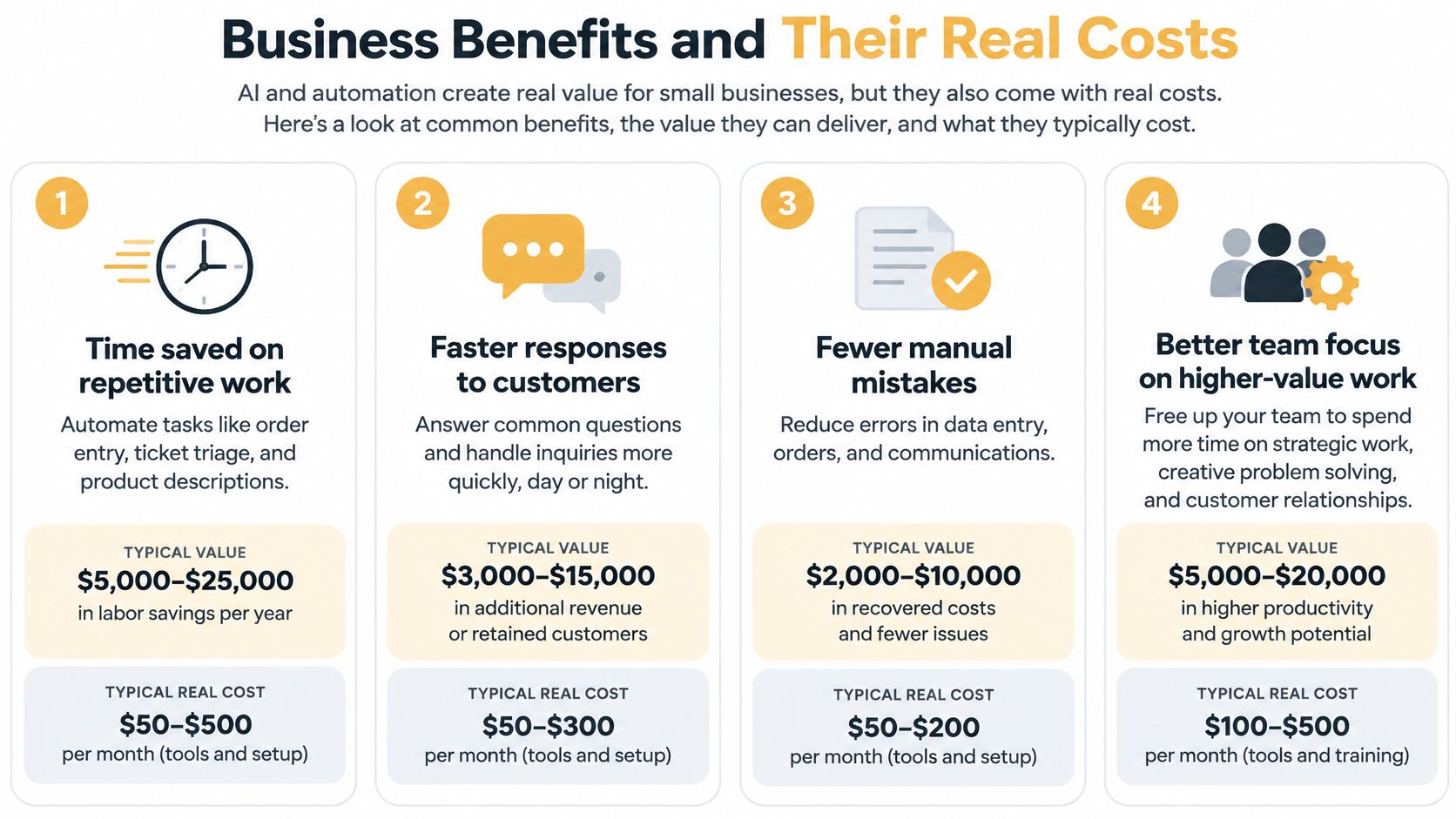
Small businesses usually notice benefits in a predictable order. First comes time saved on repetitive work, such as order entry, ticket triage and product descriptions. Next come faster replies to customers, then fewer manual errors, and finally new revenue from quicker lead follow-up or better product recommendations. Each benefit arrives with a cost attached, and pretending otherwise is how budgets get burned.
Why Model Prices Mislead
Model use is getting cheaper. Stanford's 2025 AI Index reports that the inference cost for a system performing at GPT-3.5 level fell more than 280-fold between November 2022 and October 2024, alongside approximately 30% annual hardware-cost declines. That helps, but it doesn't cover retrieval, storage, orchestration, evaluation, human review or fixing errors.
- Time saved: You pay for data cleanup first, because messy product records produce messy descriptions at scale.
- Faster responses: You pay in review time, since someone still checks replies that touch money, health or complaints.
- Fewer errors: You pay for validation rules and testing, which catch bad inputs before the model acts on them.
- New revenue: You pay for maintenance, because a recommendation feature decays as your catalog and customers change.
Compare cost per completed task, not price per API call. Say a support reply costs a few cents in model fees but still needs several minutes of staff review because it quotes a refund policy. The review is the main cost driver. If you can safely auto-send the simple shipping questions and route only refund questions to staff, the economics change completely, and that's a workflow decision, not a model decision.
Record four numbers before launch and again after. Track cycle time, error rate, escalation rate and conversion or productivity. Without a before picture, you'll argue about feelings at budget time instead of pointing at evidence.
Common Use Cases in E-commerce, Publishing and Local Services
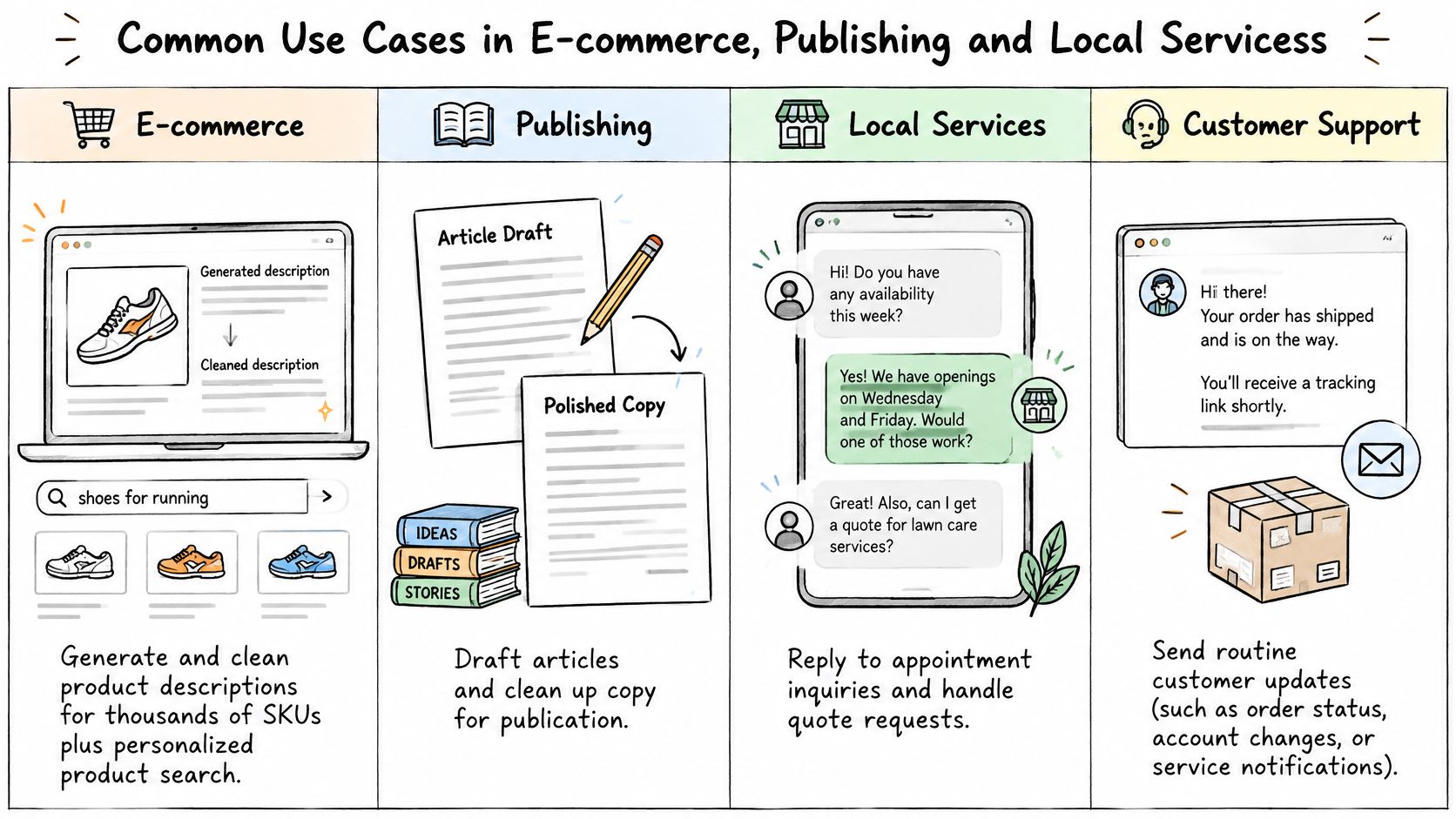
The strongest early use cases share three traits. The task repeats often, the input data already exists in one place, and a wrong answer is annoying rather than expensive. The image below maps four common starting points.
| Industry | Typical integration | Metric to track |
|---|---|---|
| E-commerce | Product description generation, catalog cleanup, personalized search | Catalog completeness, search-to-purchase conversion |
| Publishing | Article tagging, archive summaries, related-story links | Time per tagged article, click-through from related links |
| Local services | Booking and FAQ assistant, call note summaries | Booking completion rate, response time |
| Professional services | Intake form processing, document triage | Cycle time, error rate |
In e-commerce, the unglamorous winner is catalog cleanup. Thousands of SKUs with missing sizes, duplicated titles and thin descriptions hurt search and confuse buyers. An AI step can draft descriptions from supplier data and flag records that don't match your format, while staff approve anything involving claims, safety or sizing. You'd judge it on catalog completeness and whether more searches end in a purchase.
Publishers have a different asset sitting idle, the archive. Tagging and summarizing older articles lets that content resurface in internal search and related-story links instead of dying after publication week. The proof is simple. Measure how long tagging takes per article, and whether readers click the related links the system suggests.
The short video below walks through how these use cases connect to everyday tools.
One Florist, Fewer Evening Questions
Say a florist's staff spend their evenings answering the same questions about delivery areas, cutoff times and vase sizes. An assistant connected to the booking calendar and a maintained delivery-zone list can answer those after hours and take standard orders. Every custom wedding request still goes to a person. Repeat questions drop, but only because someone owns the zone list and updates it when routes change.
That ownership point is the limit that decides most projects. A use case works when its input data is accurate and a named person maintains the approved answers. For more worked examples across industries, see these intelligent automation use cases for growing businesses. Rank your own candidates on repetition, data availability and the cost of a wrong answer, then start with the one that's frequent, well documented and cheap to get wrong.
Risks and the Controls That Prevent Them
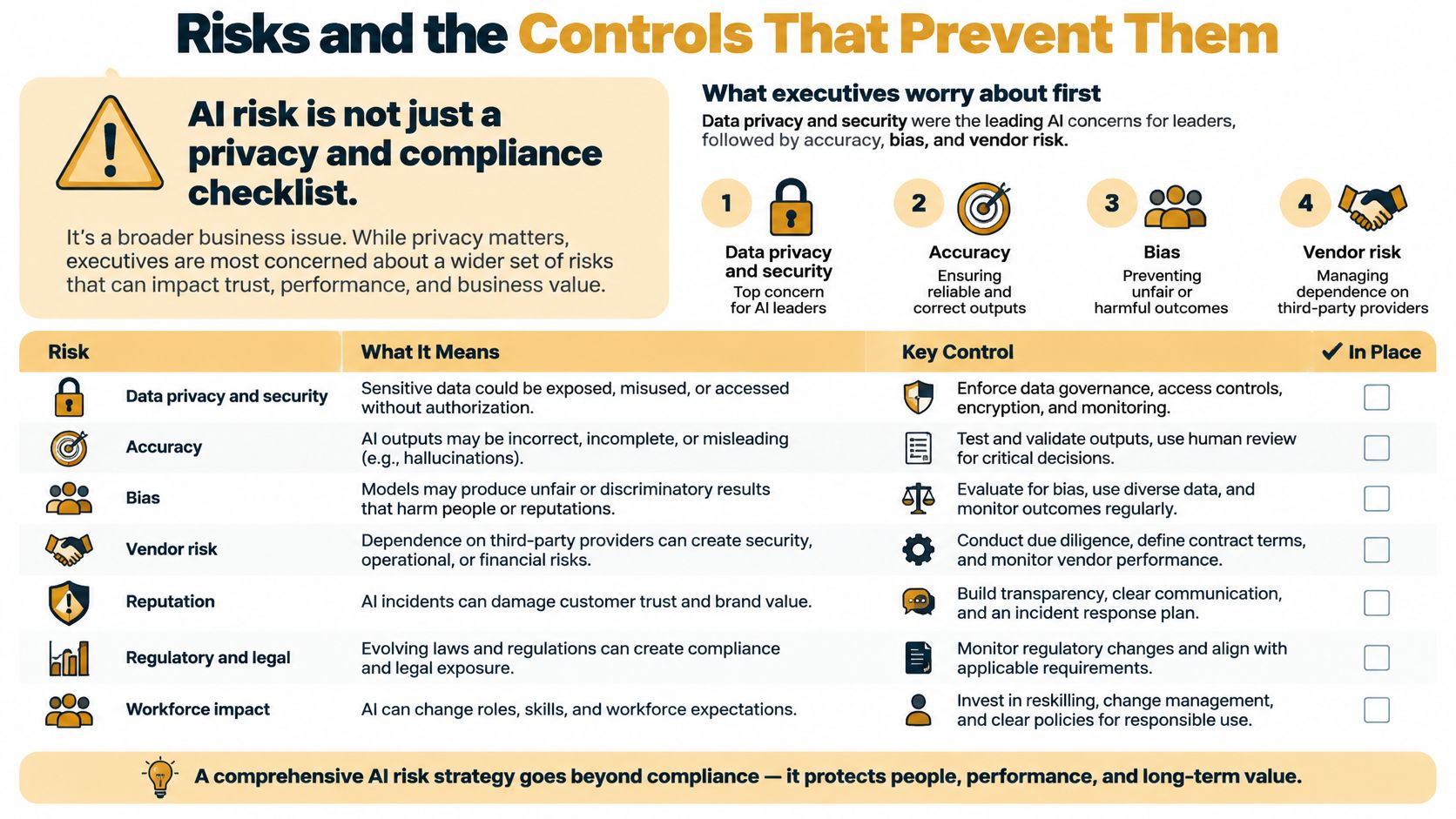
Most owners treat AI risk as a privacy checklist they complete once. That framing misses where damage happens, which is inside daily workflows. Who can the assistant see? When must a person approve its output? How would you know it started giving wrong answers last Tuesday?
Concern is high, but formal control lags behind. In a 2025 survey of executives covered by Okta's AI at Work 2025 report, data privacy and security were the leading AI-related concerns, cited by 68% and 60% of respondents, while only 36% reported having a centralized AI-governance model. Independent Google research cited in the same coverage found that 52% of organizations identified sensitive-data exposure as their top concern and 50% cited regulatory compliance, and organizations with broad governance reported substantially greater confidence in protecting AI systems than organizations with partial or developing policies.
Match Controls to the Damage a Wrong Output Can Do
| Risk tier | Example tasks | Required controls |
|---|---|---|
| Low | Summarizing public content | Audit logs, scheduled accuracy testing |
| Medium | Working with internal documents | Least-privilege access, data minimization, audit logs |
| High | Customer records, payments, hiring, health information, automated decisions | Human approval before output, vendor-contract review, written incident procedure |
Least-privilege access means the assistant sees only what its task needs, so a delivery FAQ tool never touches payment records. Data minimization means you send the relevant paragraph, not the whole customer file. For retrieval-based assistants, accuracy also depends on what the model is allowed to quote, and this guide on how to ground chatbot answers with RAG explains how restricting answers to retrieved sources reduces invented content.
Governance added after launch costs more because you're retrofitting logs, permissions and review steps into a workflow staff already depend on. Building those controls into a small pilot is cheaper and calmer. You're deciding who approves what while the stakes are still low.
Before launch, answer three questions in writing. Who can see the data the system touches? Who signs off on outputs that reach customers? How would the team know the system has failed? If any answer is vague, you're not ready to expand, whatever the demo looked like.
How to Evaluate an AI Integration Partner
A credible partner describes stages, not magic. Our AI Consulting process, for example, has four steps, AI Readiness Assessment, Solution Design, Development & Testing, and Deployment & Support. Whatever firm you interview, ask what each stage produces in writing.
The readiness assessment should name the process you're improving, the data sources involved and the person on your team who owns them. During design, consultants should analyze your operations, recommend AI solutions, and create implementation roadmaps aligned with your industry and goals. Testing means models get checked against your real records before anything goes live. Deployment and support should include handover and staff training, so the system doesn't become a black box only the vendor can touch.
Questions and Red Flags for the First Call
| Criterion | Question to ask | Red flag |
|---|---|---|
| Data access | Which data do you need, and who owns the outputs? | Full data access requested before scoping |
| System fit | How will this connect to our current software? | No named interface or integration method |
| Governance | Which risk framework and controls do you follow? | No written access, logging or review process |
| Measurement | Which metrics will you report against a baseline? | Results promised without a baseline |
| Training and handover | Who on our team will run this after launch? | No training or documentation included |
| Total cost | What do maintenance and review cost each month? | Quote covers build only |
On governance, ask whether their approach maps to a recognized framework. The U.S. National Institute of Standards and Technology released the Artificial Intelligence Risk Management Framework 1.0 on January 26, 2023, and the NIST AI Risk Management Framework organizes its core into four functions, govern, map, measure, and manage. A partner doesn't need to recite it, but they should have an equivalent way of talking about oversight, risk identification and ongoing measurement.
A vendor who can't name the metrics they'll report is asking you to judge the project on their enthusiasm.
Bring three questions to any first call. Which single process would you start with, and why that one? What data do you need from us in week one, and in what format? What will you show us at day thirty to prove this is working? Clear answers signal a partner who's done this before. Vague talk about transformation signals the opposite.
Start With One Measurable Process
A small business can test AI integration on one workflow before changing how the whole company operates. Choose a process with a clear owner and a result you can measure, such as order exceptions or first-reply emails.
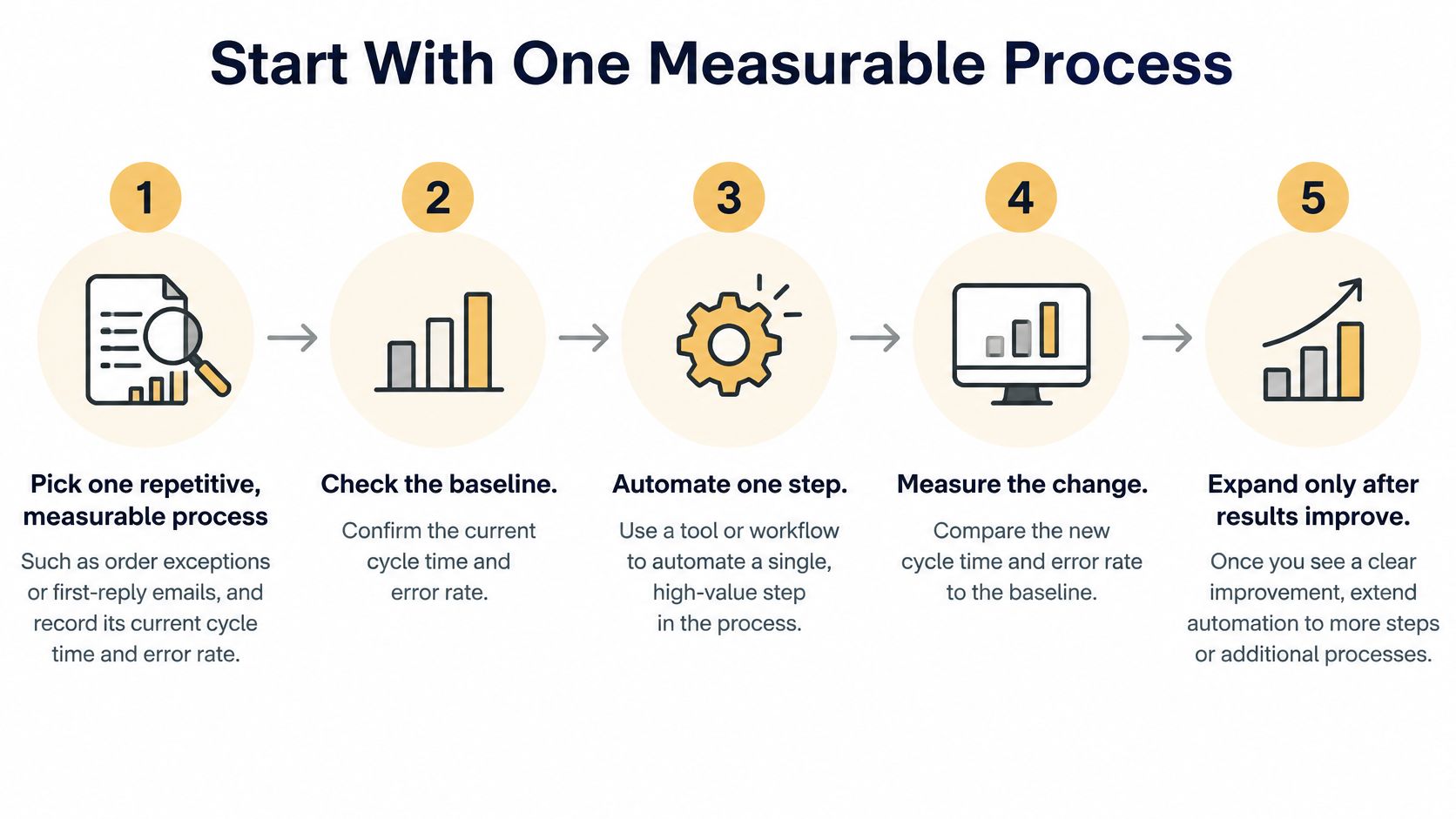
- Choose a repetitive process: Record its current cycle time and error rate. That baseline gives you a fair comparison after integration.
- Check the data: Confirm the relevant information is accurate, accessible, and permitted for use in the AI tool under your customer commitments.
- Estimate the full cost: Include review time and ongoing upkeep, not just model fees. A tool that saves staff time on one task may still require people to check its work.
- Run a limited pilot: Have a person review every output while the team records errors and fixes.
- Make an evidence-based decision: Compare the pilot with the baseline, then expand, adjust, or stop.
Plan for the work around the technology, too. U.S. Small Business Administration research on AI in small firms identifies staff training, vendor help with integration, and changes to data practices as areas where small firms lag larger ones. Set aside time and budget for these tasks so the pilot can fit the way your team works.
The first step may be an assessment of the process and its data, rather than building a model. A useful AI implementation roadmap for small businesses shows how to work out what to automate and what to prepare first.
Measure returns against your own starting point. Typical AI consulting clients at Up North Media see ROI within 6-12 months, and some experience 200-300% returns through improved efficiency and new revenue streams. These outcomes vary by business and project. If a chatbot is your chosen pilot, you can request a demo and assess it using your real customer questions.
Start this week by naming the process, recording its baseline, and assigning an owner.
Up North Media's Omaha team can assess your data, design an AI integration, and train your staff. Book a free consultation to discuss your business needs.