
Your team starts the morning copying customer requests into the helpdesk, chasing invoice approvals, and forwarding web enquiries to the right salesperson. You've already bought software for each job, but someone still has to move the work between systems. Adding an AI assistant sounds useful until you ask who will check its mistakes and whether that checking will cost more than the work it replaces.
AI powered business process automation starts with that question, not a tool shortlist. Diagnose the process, price its exceptions, and agree on the measures that will determine whether a pilot deserves to continue. A faster individual task isn't enough if customers still wait, employees still reconcile conflicting records, or managers inherit a larger review queue.
Use Cases That Pay Off First
AI powered business process automation uses AI models to read, classify, support decisions, and initiate actions on work that people previously moved between systems by hand. Unlike rule-based automation alone, it can interpret unstructured inputs such as emails, PDFs, and chat messages. Business rules still determine what the system is allowed to do.
Start with a bounded operational problem
| Use case | Trigger | What the AI does | Metric to track |
|---|---|---|---|
| Customer service triage | Inbound email or chat message | Classifies intent, answers routine questions, routes the rest | First-response time, share resolved without a human |
| Invoice processing | Supplier invoice arrives by email or PDF | Extracts fields, matches to purchase order, flags mismatches | Cost per invoice, days to approval, exception rate |
| Inventory reordering | Stock level falls below threshold | Forecasts demand, drafts purchase orders for approval | Stockouts per month, days of supply |
| Lead routing | Web form or enquiry submitted | Scores the lead and assigns an owner by territory and need | Time to first contact, lead-to-meeting rate |
The gap between using AI and changing operations is substantial. In McKinsey's 2024 global survey, 78% of respondents said their organizations used AI in at least one business function, while 21% of organizations using generative AI had redesigned at least one workflow.
That distinction matters to a small business. An employee asking an assistant to summarize an email is useful, but a controlled workflow also identifies the customer, checks the order, assigns responsibility, and records the outcome.
What these opportunities look like locally
Consider an Omaha retailer whose shared inbox mixes delivery questions with refund requests. The AI can separate shipping enquiries from refund cases and retrieve the relevant order details. Routine tracking answers can proceed through approved templates, while disputed deliveries stay with customer service.
At a professional services firm, the starting point might be supplier invoices. Extracting the amount isn't the hard part. The useful work is matching the supplier and purchase-order reference, identifying duplicates, and sending mismatches to accounts payable with the supporting evidence attached.
For an e-commerce shop, an inventory workflow can flag products approaching their reorder point and draft a purchasing recommendation. The purchasing manager still needs visibility into supplier lead times, open orders, and unusual promotions. A simple threshold may be cheaper and more reliable than forecasting when sales history is sparse.
A local service business can route web enquiries by service area and requested work. Use explicit territory rules for ownership, with AI interpreting the customer's free-text description. Don't let an opaque lead score discard unfamiliar but valuable enquiries.
Practical rule: Automate a clearly defined handoff before attempting an autonomous department.
For service businesses comparing operational savings with broader commercial value, Vight's guide to measuring ROI from MSP AI adoption offers a useful managed-services perspective. Keep the same discipline locally: choose a targeted workflow, then establish whether it has enough volume and manageable exceptions to justify integration.
How an AI Workflow Moves From Intake to Action
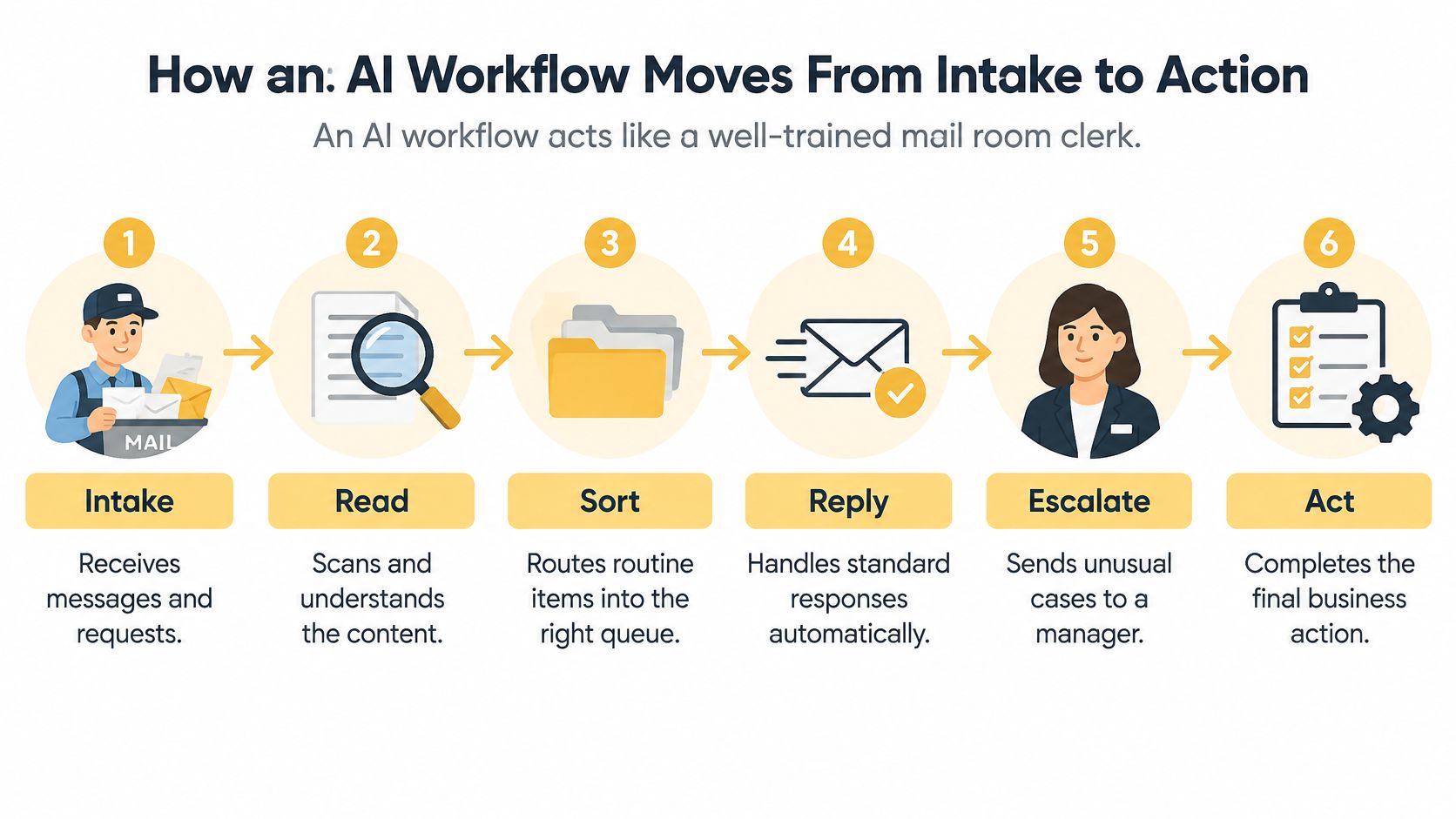
An AI workflow is like a well-trained mail room clerk. It reads incoming material, sorts routine requests, prepares standard responses, and takes unusual cases to a manager. The difference is that software needs explicit instructions about identity, permissions, and what counts as finished.
The visual summarizes that movement from receipt to controlled action.
Separate interpretation from execution
-
Intake captures the original evidence. An invoice arrives in the accounts-payable inbox, and the workflow saves its attachment, sender, and receipt timestamp. It also assigns a case identifier so retries don't create unrelated records.
-
Classification identifies the work. The model determines whether the attachment is an invoice, credit note, statement, or unrelated document. A payment-demand email might need urgent attention, but urgency shouldn't override approval requirements.
-
Extraction creates structured fields. The system pulls the supplier name, invoice number, purchase-order reference, amount, and currency into a defined schema. Missing information remains missing rather than being filled with a plausible guess.
-
Decision selects an authorized path. Deterministic checks compare the invoice with supplier and purchasing records. A mismatch, missing reference, or amount outside the configured approval authority sends the case to a reviewer.
-
Action updates the business system. An approved invoice might become a draft payable in QuickBooks or the company's ERP. The workflow checks that the destination accepted the record before marking the action complete.
-
Human review resolves uncertainty. A named accounts-payable employee receives the original document, extracted fields, and failed checks together. Review belongs before execution whenever the proposed action needs approval, even though it's listed here as a distinct responsibility.
Test the difficult documents
The common failure is designing around clean PDFs and discovering that actual suppliers send rotated scans, photographs, handwritten amendments, or attachments containing several documents. A successful extraction from a sample invoice doesn't establish production reliability.
Use document-quality checks and tested field-level validation signals to route weak reads to a person. A model's own statement that it's confident isn't enough. Compare amounts with line-item totals, require valid supplier references, and preserve the source image beside the extracted value.
Reading a document, approving a transaction, and posting a record are different achievements. Don't count them as the same event.
Before choosing software, draw these stages on a page. Under each, write the input, output, responsible person, and failure path. An empty box usually reveals an unresolved operating decision rather than a missing AI feature.
Expected ROI and the KPIs That Prove It
Redesigning the complete process matters more than making an existing step faster. The Hackett Group's benchmark announcement reports a 75% performance gap between organizations redesigning processes around AI and those merely automating current processes, alongside modeled potential reductions of 52%–59% in order-to-cash process costs. These are benchmark findings and modeled opportunities, not a forecast or guarantee for an individual small business.
The practical lesson is to inspect waiting, rework, and handoffs. Faster invoice extraction won't materially shorten approval if the invoice still sits in an unmonitored manager's queue.
Establish a comparable starting point
Use a representative recent operating period, long enough to include routine and difficult cases. Record case mix, staffing, and unusual demand so the pilot isn't compared with an artificially favorable baseline.
| KPI | What it measures | How to baseline it |
|---|---|---|
| Cycle time | Elapsed time from request to completion | Subtract receipt timestamp from completion timestamp for historical cases |
| Cost per transaction | Total labour and tool cost per case | Multiply logged hours by loaded hourly rate, add allocated tool costs, then divide by completed cases |
| Exception rate | Share of cases needing human handling | Divide cases requiring intervention by all cases started, separating mandatory approvals from avoidable failures |
| Field-level extraction accuracy | Share of extracted fields correct | Manually check a representative document sample against the originals |
| False-approval rate | Share of approved cases that should have failed approval | Audit approved cases and divide incorrect approvals by approvals reviewed |
| Mean time to human resolution | Time for a person to close an escalated case | Average elapsed time from escalation to closure in the ticket log |
For a workflow that doesn't exist yet, test proposed decisions against historical cases in shadow mode. Its false-approval baseline comes from those test decisions, not from pretending the previous manual process produced automated approvals.
Calculate payback after exception costs
Use these formulas consistently:
Annual net benefit = annual realized labour savings + avoided error costs − annual running costs − annual exception-handling costs.
Payback period in years = one-time implementation cost ÷ annual net benefit.
Implementation includes discovery, integration, data cleanup, testing, and staff training. Running costs include model usage, orchestration subscriptions, monitoring, maintenance, and support. Don't deduct the same review labour under both running costs and exception handling.
Price exceptions explicitly: case volume multiplied by exception share, review time, and loaded labour rate, plus expected correction costs. If net benefit is zero or negative, there's no positive payback under those assumptions.
Released employee capacity isn't automatically cash saved. Record it separately unless it avoids overtime, contractor spend, or a planned hire. Likewise, attribute additional revenue only where the workflow's contribution can be defended.
For customer-service pilots, SignalZen's guide to automating support triage and escalation is useful when designing the boundary between routine handling and specialist review. Our discussion of AI for operational efficiency provides broader operating context.
Freeze the pilot's success criteria before launch. Faster completion should count as success only while quality, customer protection, and total handling cost remain within agreed limits.
Choosing a Technology Stack and Integration Pattern
A production stack has distinct layers: source systems such as Microsoft 365, HubSpot, an ERP, or Zendesk; orchestration that moves work; AI that interprets information; and logging that records execution. Choose the integration pattern around those systems, not around a model demonstration.
Integration patterns compared
| Pattern | Best fit | Main trade-off |
|---|---|---|
| Direct API connection | One source system with a clean API and a clear decision rule | Needs developer time for each new system |
| Workflow orchestration with AI steps | Multi-step processes across several tools | Adds a platform to govern and maintain |
| RPA with AI for legacy screens | Older software with no API | Can break when the screen layout changes |
| Embedded assistant | Team already works inside one tool, such as a helpdesk | Less control over decision rules and logs |
Platforms such as Power Automate or n8n can coordinate cross-system workflows. A direct integration may be cleaner when the process is narrow, while an embedded helpdesk assistant may avoid unnecessary infrastructure. RPA is a practical bridge for legacy applications, but screen-based automation needs maintenance when interfaces change.
For payment-related workflows, separate interpretation from transaction routing and reconciliation. The guide to understanding payment platforms with Spell helps clarify that orchestration role. Payment execution shouldn't become an unrestricted language-model tool call.
Build an inspectable execution record
The NIST AI Risk Management Framework organizes risk management around Govern, Map, Measure, and Manage, with governance spanning the AI lifecycle. Put that into practice through versioned configurations and auditable execution records.
Log the model version, prompt or policy version, input classification, retrieved document references, tool calls, validation signals, human overrides, final disposition, and latency. Store sensitive content selectively, with retention and access restrictions rather than unrestricted debug logs.
High-impact actions need deterministic validation and explicit authority. A refund should reference a real transaction, satisfy the applicable policy, and pass the configured approval threshold. An irreversible database update needs a stronger control than a generated explanation.
Our guide to API integration services explains the connection layer that makes these checks and updates possible.
Before approving the architecture, resolve these questions:
- Traceability: Can an operator reconstruct why a case followed its path?
- Recovery: Can failed work be retried without duplicate records or charges?
- Rollback: Which actions can be reversed, and who handles those that can't?
- Access: Does each connection have only the permissions it requires?
- Change control: Who approves model, prompt, connector, and policy updates?
Accountability, Staff Roles and Compliance Controls
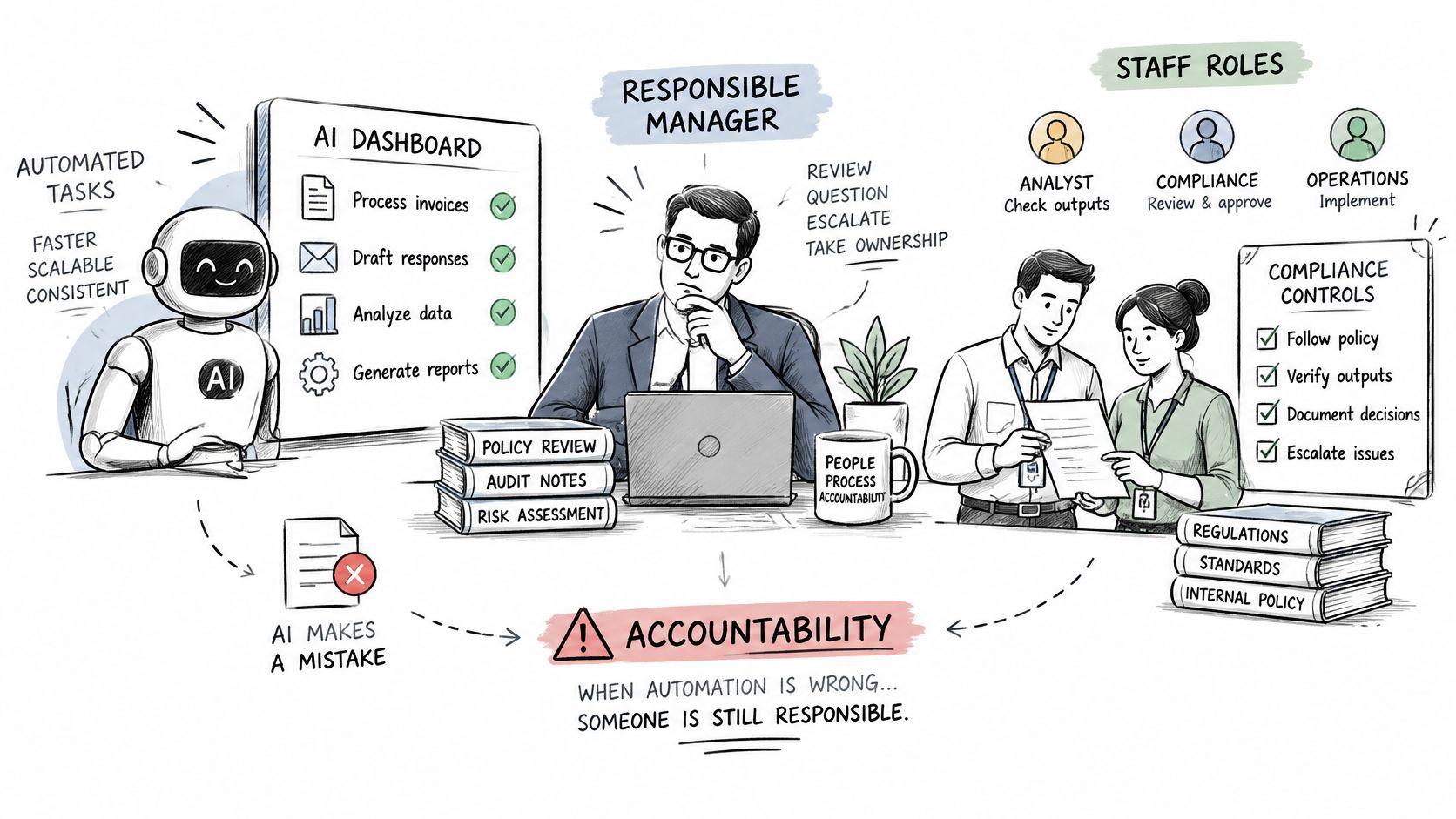
Who is responsible when the system is wrong? Labour-saving proposals often leave that question unanswered, even when the automation can affect a customer's money, eligibility, or published reputation.
Keep managerial oversight visible in the operating design.
The International Labour Organization's 2025 update estimates that one in four workers globally are in occupations with some degree of generative-AI exposure, while concluding that most jobs are more likely to be transformed than eliminated because human input remains necessary. Plan the changed responsibilities, not just the removed keystrokes.
Assign authority before launch
- Approval thresholds: Document which actions require authorization, including refunds outside the approved automatic-handling policy.
- Named decision owners: Assign each exception category to a role and a backup, not a shared inbox without ownership.
- Audit responsibility: Name the person who checks action records and investigates disputed outcomes.
- Fallback procedures: Define who pauses automation and how staff continue work during an outage.
Privacy controls should limit which customer records the model can read and where those records travel. Decide what customers need to know about automated interactions and how they can reach a person. Published product claims, editorial corrections, and consequential eligibility decisions need accountable review rather than automatic release.
Staff training should cover evidence checking, escalation judgement, and correction procedures. Someone who previously entered invoices may now investigate supplier mismatches; a support representative may handle sensitive complaints and identify recurring automation failures. Our guide to compliance management solutions provides additional context for organizing these responsibilities.
Use the accompanying video as a discussion prompt for the team responsible for implementation.
Go-live gate: A workflow isn't ready merely because it runs. Its owner must be able to explain who can authorize, challenge, stop, and correct its actions.
Sign off the owner roster, approval matrix, privacy boundaries, audit access, customer escalation route, and outage procedure before production access is enabled.
Industry Examples Across Local Sectors
The right starting process changes by sector. A refund workflow protects money and customer trust; a publishing workflow protects factual accuracy. Treat the following as design scenarios, not measured client outcomes.
E-commerce and professional services
An online retailer could start with shipping and refund emails in Gmail or Microsoft 365, connected to Shopify and a helpdesk such as Gorgias. The workflow retrieves order status and routes requests, but verifies customer identity before exposing account details. Track first-response time and inspect whether customers reopen apparently resolved conversations.
Inventory alerts are a separate operating opportunity. Connect stock records and open purchase orders, then have the purchasing owner review proposed replenishment. Measure stockouts per month without assuming every shortage was preventable through forecasting.
A professional services firm could connect its supplier inbox, purchasing register, and accounting platform. The workflow prepares matched invoices for approval and attaches the reason for each mismatch. Changed bank details must follow an independent verification procedure, not be accepted because they appear on an invoice.
Use days to approval and exception rate together. Faster approval isn't useful if employees subsequently spend more time correcting postings or recovering duplicate payments.
Local services and publishing
A local service business might connect website forms to HubSpot and the booking calendar. Route an enquiry using service category, postcode, and representative availability, then verify that an owner accepted it. Track time to first contact and lead-to-meeting rate, while keeping unsuitable or out-of-area requests available for human review rather than deleting them.
A publisher could connect a corrections inbox to its editorial tracker and content management system. AI can identify the affected article, group similar complaints, and flag factual claims that need checking. The responsible editor approves the correction and any public explanation.
For publishing, measure false-approval rate against editorial review decisions. Don't let the system treat an unverified statement as publishable merely because it has produced a fluent rewrite.
Across these scenarios, compare equivalent work and record changes in demand, staffing, and case complexity. Label any customer-provided outcome as client-reported until it has been reconciled with that customer's baseline and measurement method.
Readiness Test and a Six-Phase Rollout
The first useful decision may be to keep a process manual. A low-volume task with irregular inputs and cheap human handling can cost more to integrate than it will return. Simplifying a form or removing an unnecessary approval may solve the problem without AI.
Decide whether the process deserves a pilot
Ask the process owner:
- Frequency: Does this work occur often enough to recover integration and maintenance costs?
- Stability: Are the steps understood, or does each employee follow a different procedure?
- Measurable consequence: Can you price the delay, error, or manual effort you want to remove?
A failed test means simplify, defer, or retain manual handling. It doesn't mean the business is behind. The U.S. Small Business Administration's 2025 analysis found that nearly 82% of firms with fewer than five employees said AI wasn't relevant to their business.
For a process that passes, calculate exception economics before requesting a build. Include missing records, contradictory inputs, customer disputes, and unavailable destination systems. If reviewers must redo the entire task to trust the result, reduce the automation's scope.
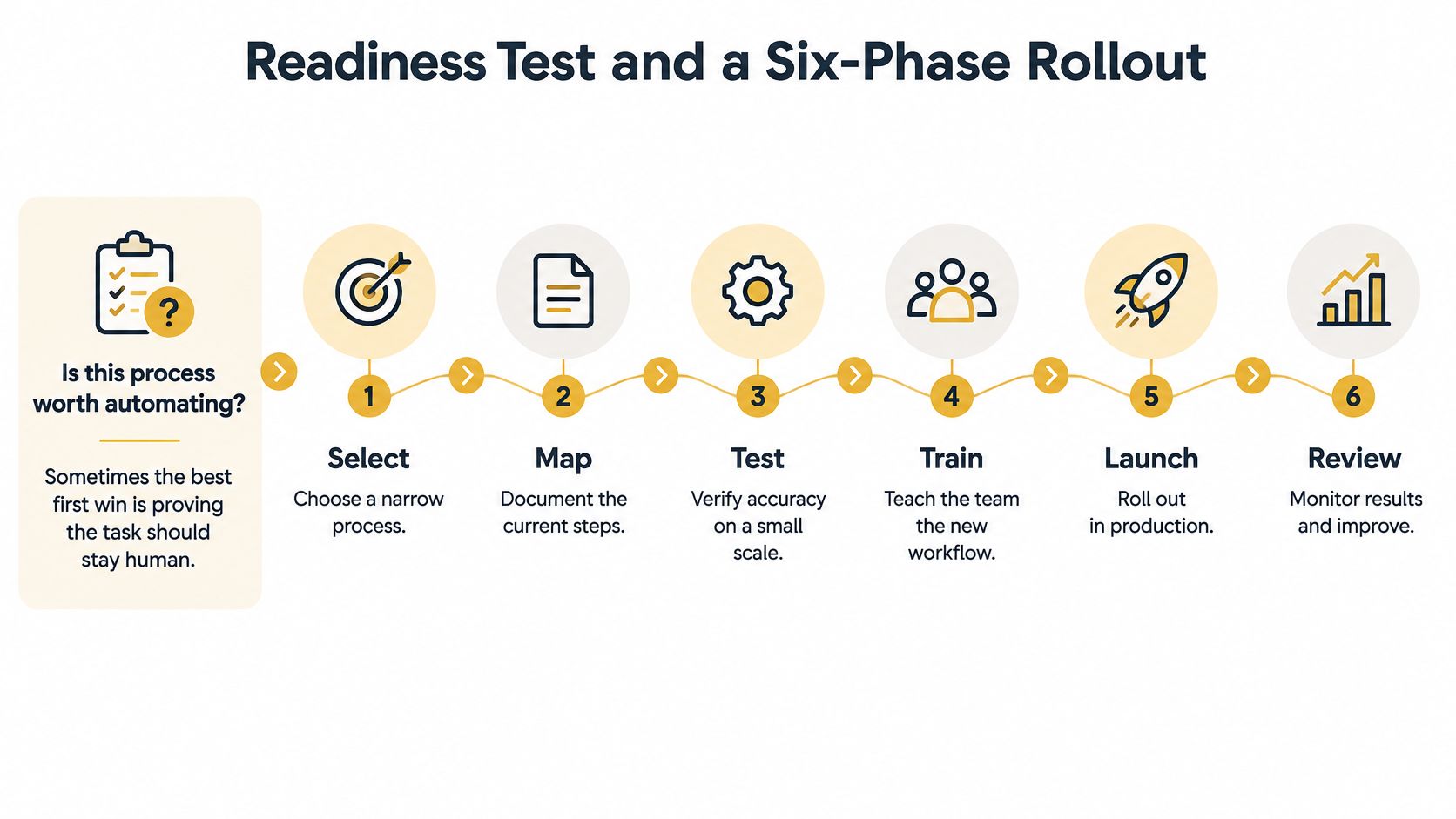
Use the rollout diagram to coordinate the operational and technical work.
Move through evidence-based gates
-
Check readiness. Confirm process ownership, usable source records, stable steps, baseline cost, and the expected exception burden. Stop if a basic data-cleanup project would consume the available budget.
-
Map the complete process. Include handoffs, waiting states, duplicate entry, exception paths, and the actual completion event. Remove redundant steps before encoding them.
-
Design the controlled solution. Select the integration pattern and define review thresholds, permissions, and acceptance criteria. Keep policy decisions outside free-form generated text.
-
Build and test on past cases. Include difficult documents, missing fields, conflicting records, and system outages. Measure extraction accuracy and false approvals, then investigate failures by category.
-
Pilot a narrow scope. Limit the trial to a team or case type, with a staffed manual fallback and explicit stop conditions. Continue long enough to encounter representative exceptions rather than declaring success after clean demonstration cases.
-
Deploy and monitor. Review the fixed KPI set on an agreed schedule. Expand only when the evidence supports it; adjust or stop when review costs, quality failures, or maintenance erase the benefit.
We organize our AI consulting process around AI Readiness Assessment, Solution Design, Development & Testing, and Deployment & Support. For our Omaha chatbot work, Discovery & Planning assesses business needs and defines goals and channels.
Bring a candidate process, monthly volume, exception rate, current handling cost, and a named owner to discovery. Aim to choose a pilot for the next planning quarter, with success criteria fixed before development and permission to conclude that automation isn't justified.
Up North Media offers AI consulting, workflow automation, and custom integrations to connect AI capabilities with the systems your team already uses. Visit Up North Media to discuss a candidate process, bringing its volume, exception costs, and current performance so the conversation starts with a measurable business case rather than a tool demonstration.