

If you're running a growing business, there's a good chance too much of your day disappears into admin. A lead comes in. Someone copies it into a CRM. An invoice needs to go out. A customer follow-up gets delayed because the team is busy. A spreadsheet gets updated twice and still ends up wrong.
That kind of work doesn't just eat time. It makes the business fragile. When one employee is out sick, when demand spikes, or when the market shifts, manual processes start breaking first.
Business automation fixes that. Not by replacing people, but by taking repeatable work off their plate so the company can move faster, make fewer mistakes, and stay steady when things get messy.
What Is Business Automation and Why Does It Matter
Monday starts with a full inbox, two missed calls, three quote requests, and a team member out sick. By 10 a.m., the main problem is not volume. It is that too much of the business still depends on someone remembering the next step.
Business automation is the use of software, rules, integrations, and sometimes AI to handle repeatable work without constant manual input. It gives the business a reliable operating system for routine tasks, so work keeps moving even when the day gets messy.
A common example is customer intake. A prospect fills out a form, and the business needs to create a contact, assign an owner, send a confirmation, schedule follow-up, and alert the team. If that chain depends on a person doing each task in order, delays and missed steps are inevitable. If the workflow is automated, the handoff happens the same way every time.
Efficiency is part of the value. Stability is the bigger reason owners should care.
It strengthens resilience, not just margins
A lot of automation content frames the topic around labor savings alone. That misses the broader business case. Well-built automation helps a company stay responsive when demand jumps, hiring is difficult, or experienced staff leave. It reduces dependence on tribal knowledge and turns repeatable work into a process the business can rely on.
I use a simple test with clients at Up North Media. If a process breaks because one person is on vacation, the process is weak. Automation helps close that gap by making the work consistent, visible, and easier to hand off.
This shift is significant because automation is no longer limited to large enterprises. McKinsey explains in its research on the state of AI and automation adoption that companies across industries are building automation into core operations, not treating it as a side project.
For owners who want to go beyond basic workflows, intelligent process automation adds decision-making logic and AI to more complex processes.
What it looks like in everyday operations
For a non-technical business owner, business automation usually shows up in practical ways:
- Repetitive tasks follow a defined process
- Defined processes create fewer errors
- Fewer errors and faster response times create room to grow
- That extra capacity makes the business easier to run during busy periods, staff shortages, and market changes
Sales is a good place to see this clearly. This guide on what is sales automation software shows how lead routing, follow-up, and CRM updates can run on schedule instead of relying on memory and manual admin.
The best definition of business automation is not "software that saves time." It is a practical way to build a business that can adapt, keep service levels steady, and grow without adding chaos.
Understanding the Core Concepts of Automation
Most automation systems look complicated from the outside, but the mechanics are straightforward. They usually rely on four parts: a trigger, logic, actions, and feedback.
A good mental model is a row of digital dominoes. One event happens, and the system knows what to do next.
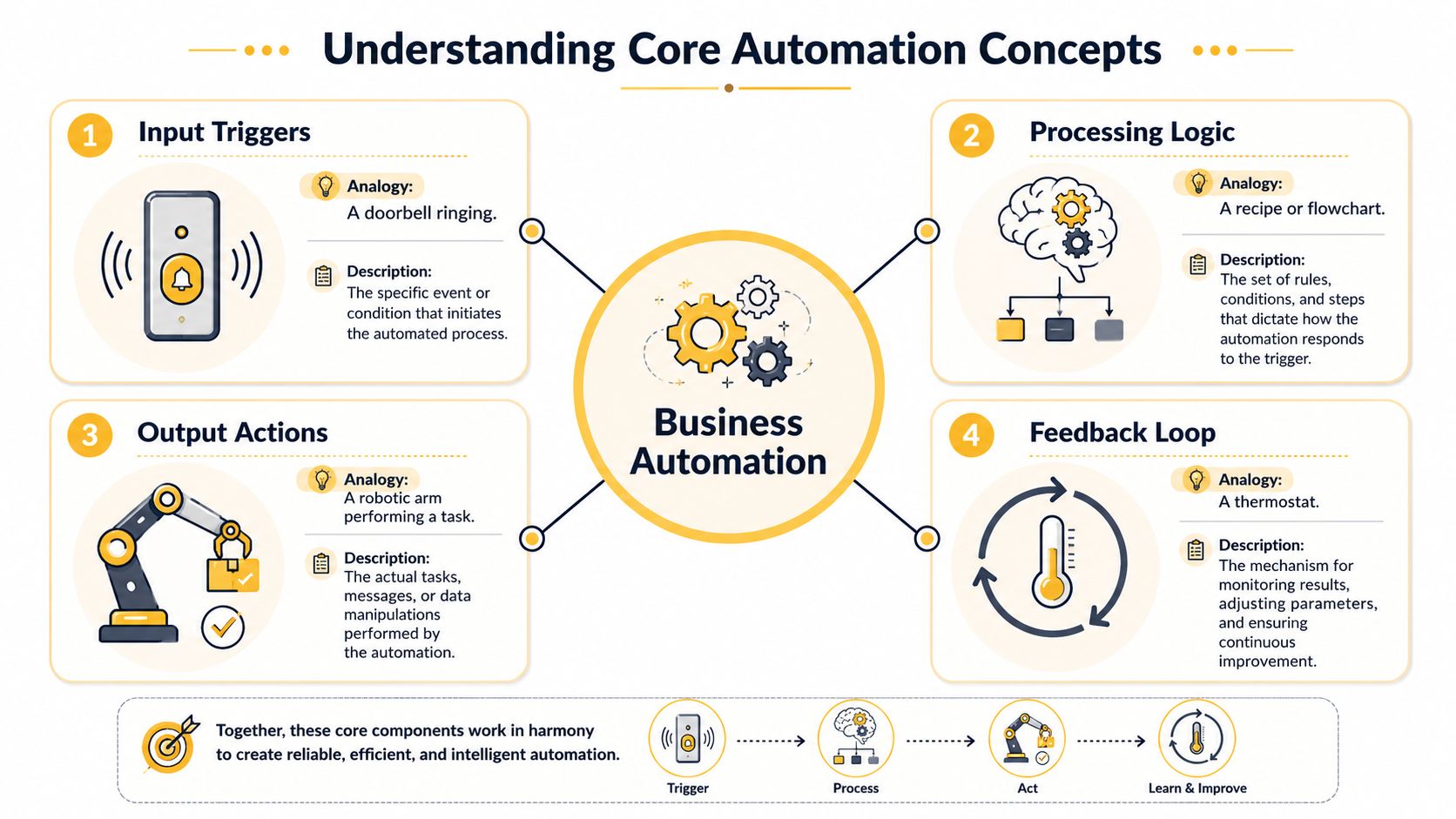
The four building blocks
Trigger means the event that starts the workflow. That could be a new form submission, a paid invoice, an approved estimate, or a support email arriving in the inbox.
Logic is the rule set. It tells the system what to do based on conditions. If the lead is local, assign it to one rep. If it's an enterprise inquiry, send it to another. If the invoice is overdue, send a reminder.
Actions are the actual tasks the automation performs. Create a record in HubSpot. Send an email through Mailchimp. Post an alert in Slack. Generate a document in Google Docs.
Feedback loop is the part many teams skip. It answers whether the automation worked, whether it saved time, and whether it needs adjustment. Good automation isn't "set it and forget it." It's monitored and tuned.
For a deeper look at AI-enhanced workflows, Up North Media has a helpful explainer on intelligent process automation.
Process, workflow, and task aren't the same thing
These terms get mixed together, but they refer to different levels.
- Task is one discrete action, like sending an invoice.
- Workflow is the sequence of steps around that task, like generating the invoice, emailing it, and updating accounting records.
- Process is the wider business function, like order-to-cash or employee onboarding.
If you confuse those levels, you end up automating a tiny piece while the larger process stays messy.
A short walkthrough makes this clearer.
Simple automation versus intelligent automation
Some automation follows fixed rules. It works best when the input is structured and the steps are predictable. Think status updates, reminder emails, or moving data between systems.
Intelligent automation handles messier work. Modern automation now integrates technologies such as Natural Language Processing and machine learning, which turns basic RPA into systems that can process complex documents and learn from experience, as explained in Automation Anywhere's overview of business automation.
That difference matters. If you're automating invoice routing, fixed rules may be enough. If you're processing emails, contracts, or support requests with inconsistent language, AI starts to matter.
Automation works best when the task is clear. AI becomes useful when the input is messy but the goal is still defined.
Key Types of Business Automation Explained
Business automation isn't one tool or one category. It's a family of approaches. The right one depends on what kind of work you're trying to remove, speed up, or stabilize.
Robotic Process Automation
Robotic Process Automation, or RPA, uses software bots to mimic the clicks and keystrokes a person would make inside an application. It's especially useful when a company still relies on older systems that don't offer clean integrations.
A common example is invoice handling in a finance department. A bot can open a file, pull out key details, enter them into an accounting system, and move the document into the right folder. RPA creates value when the job is repetitive and screen-based.
Best fit: finance, operations, back-office administration.
Marketing automation
Marketing automation manages repeatable communication and lead nurturing at scale. It handles things like email sequences, form follow-ups, campaign triggers, audience segmentation, and handoffs to sales.
A typical use case is a website lead downloading a guide. The system can tag the lead, send a thank-you email, place them into a nurture sequence, and alert sales if they take a high-intent action later. This kind of automation matters because it keeps marketing consistent even when the team is small.
Best fit: marketing, growth, customer acquisition.
Sales automation
Sales automation keeps reps out of admin as much as possible. It can assign leads, schedule follow-ups, create reminders, update CRM records, and trigger proposal or contract workflows.
One practical example is inbound lead routing. If a prospect requests a demo, the workflow can score the lead, assign the right rep based on territory or service line, and send a scheduling link immediately. That reduces lag at the point where buyers are most interested.
Best fit: sales, business development, account management.
Workflow automation
Workflow automation connects steps across departments and systems. It's less about one narrow task and more about making a multi-step process run smoothly.
Employee onboarding is a common example. Once a hire is marked as approved, the system can create accounts, assign training, notify payroll, send policy documents, and trigger manager checklists. Workflow automation is often the most practical entry point for small and mid-sized businesses because it cuts across tools you already use.
Best fit: HR, operations, service delivery, project management.
IT automation
IT automation focuses on technical operations. That can include user provisioning, ticket routing, system alerts, backups, security workflows, and access management.
A simple example is offboarding. When an employee leaves, the workflow can disable access, notify the manager, create a checklist for equipment return, and archive key records. This reduces both delay and risk.
Best fit: IT, security, compliance, internal support.
Comparing key types of business automation
| Automation Type | Primary Function | Common Example | Best-Fit Department |
|---|---|---|---|
| Robotic Process Automation | Mimic human actions in software | Entering invoice data into a legacy accounting platform | Finance |
| Marketing Automation | Manage campaigns and lead nurturing | Sending an email sequence after a form submission | Marketing |
| Sales Automation | Reduce manual sales admin | Routing new leads to the right rep | Sales |
| Workflow Automation | Coordinate multi-step processes across tools | Automating employee onboarding tasks | Operations or HR |
| IT Automation | Standardize technical support and access tasks | Disabling accounts during offboarding | IT |
Choose the type based on the bottleneck, not the buzzword. A business with slow onboarding doesn't need "AI transformation" first. It needs a cleaner workflow.
Automation in Action Real-World Examples
Examples make this easier to judge. Not theoretical use cases. Everyday situations where a team is overloaded, the process is clunky, and automation removes the friction.

A local service company with slow lead follow-up
A service business often has the same problem: inquiries arrive from the website, social channels, and referrals, but follow-up depends on whoever notices first. That creates delays, and delays cost opportunities.
A better setup is straightforward. Every form submission enters the CRM, creates a task, sends a confirmation email, and alerts the right salesperson or estimator. If nobody responds within the defined window, the system escalates it.
The immediate win isn't just speed. It's consistency. Every lead gets handled the same way, even during busy weeks.
An online store with avoidable fulfillment errors
E-commerce teams run into handoff issues fast. Orders come in, inventory changes, shipping details need to be validated, and customer updates have to go out. When those steps live in separate tabs and spreadsheets, errors multiply.
A practical workflow might connect the store platform, inventory system, shipping software, and customer notifications so the business doesn't rely on manual copying. If the item is out of stock, the system flags it. If an address fails validation, it routes the order for review instead of sending bad data downstream.
That same mindset applies outside logistics too. Agencies and internal teams can streamline web project feedback by centralizing comments and approvals instead of chasing revisions through long email threads.
A marketing team trying to scale without adding repetitive work
Marketing automation works especially well when the team already has demand but struggles to respond consistently. A common setup is lead capture plus segmented email nurturing based on what the person asked for or viewed.
On average, marketing automation is proven to increase qualified leads by 451% for businesses that adopt it effectively, according to workflow automation statistics from Gitnux.
That doesn't mean every business gets the same result. It does mean the upside is strong when the workflow is built around real buyer behavior instead of generic batch emails.
For more examples across operations, sales, and AI-driven workflows, this collection of AI automation examples is worth reviewing.
Calculating the Benefits and ROI of Automation
A good ROI discussion starts with a real business constraint. A service company is booked solid, but admin work keeps piling up. The owner can hire another coordinator, ask the team to work longer hours, or remove the repetitive work that keeps slowing everything down. Automation belongs in that third category.
That framing matters because ROI is not only about cutting payroll. It is about building a business that can keep operating when demand spikes, a staff member leaves, or the market gets less predictable.
Financial benefits you can estimate
Start with one process that happens often and follows a clear pattern. Lead routing, invoice follow-up, appointment reminders, data entry between systems, and approval requests are good examples.
Use a simple baseline:
Hours per week spent on the task × hourly cost × 52
Then add the cost of delays and rework. If proposals sit for two extra days, if invoices go out late, or if a missed handoff causes a customer to wait, the loss shows up in cash flow, close rates, and staff time spent fixing preventable issues.
For a more detailed breakdown of where ROI shows up, this guide on business process automation benefits is a useful companion.
One caution from client work. Do not assume 100 percent of that manual time disappears. Some of it shifts into review, exception handling, and maintenance. The strongest business case usually comes from reducing bottlenecks and errors, not from pretending humans vanish from the process.
Operational benefits that show up quickly
The first gains are often visible before they are perfectly measured. Teams stop copying data between tools. Fewer requests get stuck in someone's inbox. Customers get faster answers because the next step happens automatically.
Analysts at McKinsey & Company explain in their research on the state of AI in early 2024 that organizations are using automation and AI to reduce costs and redesign how work gets done. In practice, that usually means fewer manual handoffs, more consistent execution, and less dependence on one person remembering every step.
That matters because errors have a real cleanup cost. Someone has to correct the invoice, resend the form, update the CRM, or explain the delay to the customer.
Strategic returns matter more than many owners expect
The long-term return is flexibility.
A business with well-designed automation can absorb more volume without immediate hiring. It can keep service steady during turnover because the process is documented and triggered by systems, not memory. It can also adjust faster when margins tighten, because leaders can change routing rules, approvals, and follow-up logic without rebuilding the whole operation.
A practical test is to ask three questions:
- If demand doubled next month, would the process still hold up?
- If a key employee left, would work continue on time with fewer dropped steps?
- If hiring stayed difficult for six months, could the business keep growing without burning out the team?
If the answer is no, the ROI case is already stronger than it looks on a spreadsheet.
Reality check: A process that only works when experienced employees step in constantly is expensive, fragile, and hard to scale.
Your Roadmap to Implementing Business Automation
Most automation projects don't fail because the software is weak. They fail because the business automates the wrong thing, in the wrong order, with fuzzy goals.
The biggest mistake is easy to describe. Companies take a messy process, automate it, and end up doing the same bad process faster.
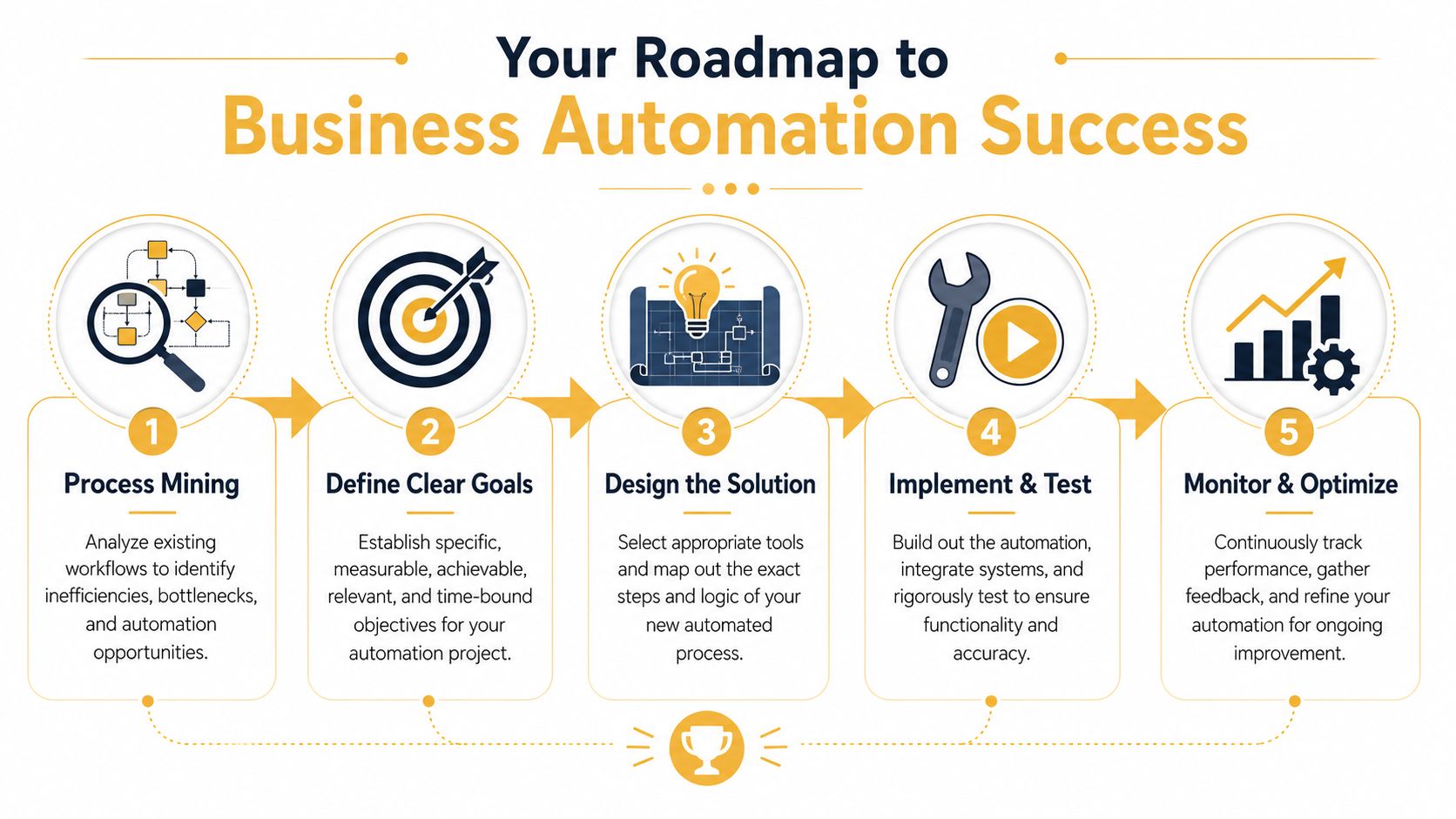
Start with process mining
Intelligent automation initiatives often fail because organizations automate inefficient processes rather than optimizing them first. Using process mining to analyze data from existing systems and find bottlenecks is the ideal starting point for success, as IBM explains in its piece on why business automation initiatives fail and how to avoid it.
Process mining sounds technical, but the idea is practical. Look at what happens in your systems, not what people think happens. Review timestamps, handoffs, delays, approval loops, and rework.
If a process has unnecessary steps, poor ownership, or bad data, fix that before you automate.
A workable five-step path
-
Identify a high-friction process
Look for tasks that are repetitive, rule-based, high-volume, and annoying to do manually. Good candidates include intake, onboarding, approvals, invoicing, reporting, and follow-up. -
Map the current workflow Write down the current sequence in plain language. What triggers the process? Who touches it? Where does it stall? Which step creates the most delay or confusion?
-
Define a narrow goal
Don't start with "automate operations." Start with something measurable like reducing response delay, removing duplicate entry, or standardizing client onboarding. -
Build and test the workflow
Use tools that fit your current stack. For simple cases, platforms like Zapier or Make may be enough. For more custom work, businesses sometimes need customized workflow development. Up North Media offers custom workflow automation as one option for companies that need processes built around their existing operations. -
Monitor and refine
Watch where the automation fails, where exceptions pile up, and where humans still need to review. Strong workflows improve over time because somebody owns the outcome.
What works and what doesn't
Some patterns are reliable.
-
What works
Start with one painful process. Keep the scope tight. Involve the people who do the work every day. Test edge cases before rollout. -
What doesn't
Buying a platform first, then hunting for a use case. Automating around bad data. Ignoring employee concerns. Assuming every exception should be handled by AI.
Good automation removes friction. Bad automation hides broken steps under a nicer interface.
Tool selection is more about fit than features
Business owners often ask which platform is best. That's usually the wrong question. The better question is whether the tool connects cleanly to the systems you already rely on, supports your approval logic, and gives the right people visibility.
The simplest workflow with strong adoption usually outperforms the elaborate one nobody trusts.
When to Hire an Automation Agency like Up North Media
Some automation is easy to handle in-house. If you're setting up a basic email autoresponder, a form notification, or a CRM reminder sequence, a no-code tool and a few hours of focused work can get you there.
The line gets crossed when your process involves multiple systems, custom logic, messy data, or AI-driven decision support.

DIY is usually fine when
- The workflow is short and only touches one or two tools
- The rules are simple, like sending an email after a form submission
- The downside of failure is low, so a missed step won't create financial or customer issues
Agency help makes sense when
- You need custom integrations between software platforms that don't naturally talk to each other
- The process includes conditions and exceptions that go beyond basic if-then rules
- Data integrity matters, especially in finance, operations, or customer records
- You want AI in the loop for document processing, routing, classification, or decision support
Technical fit matters here. Effective automation often depends on pre-built connectors and strong API support so data can move cleanly between systems without creating silos or integrity problems, according to Acronis on business process automation.
If your team is spending more time wrestling with the tooling than improving the process, bringing in outside help usually saves time and reduces risk.
If you're looking at your operations and seeing too many handoffs, too much copy-paste work, or too much dependence on memory, Up North Media can help you evaluate where automation fits, what should stay human-led, and how to build workflows that support growth without adding fragility.