
You're probably already doing business process optimization. You just aren't calling it that.
If you own or run a business in Omaha, the signs are familiar. Someone on your team is re-entering customer info from one system into another. Invoices sit in an inbox until the one person who knows the process gets back from lunch. Leads come in fast, but follow-up depends on who saw the email first. Work gets done, but it takes too many clicks, too many handoffs, and too much memory.
That's the point where process work stops being a “big company” idea and starts becoming an operational necessity. The businesses that grow cleanly are usually not the ones working harder. They're the ones removing friction before it multiplies.
What Is Business Process Optimization and Why It Matters Now
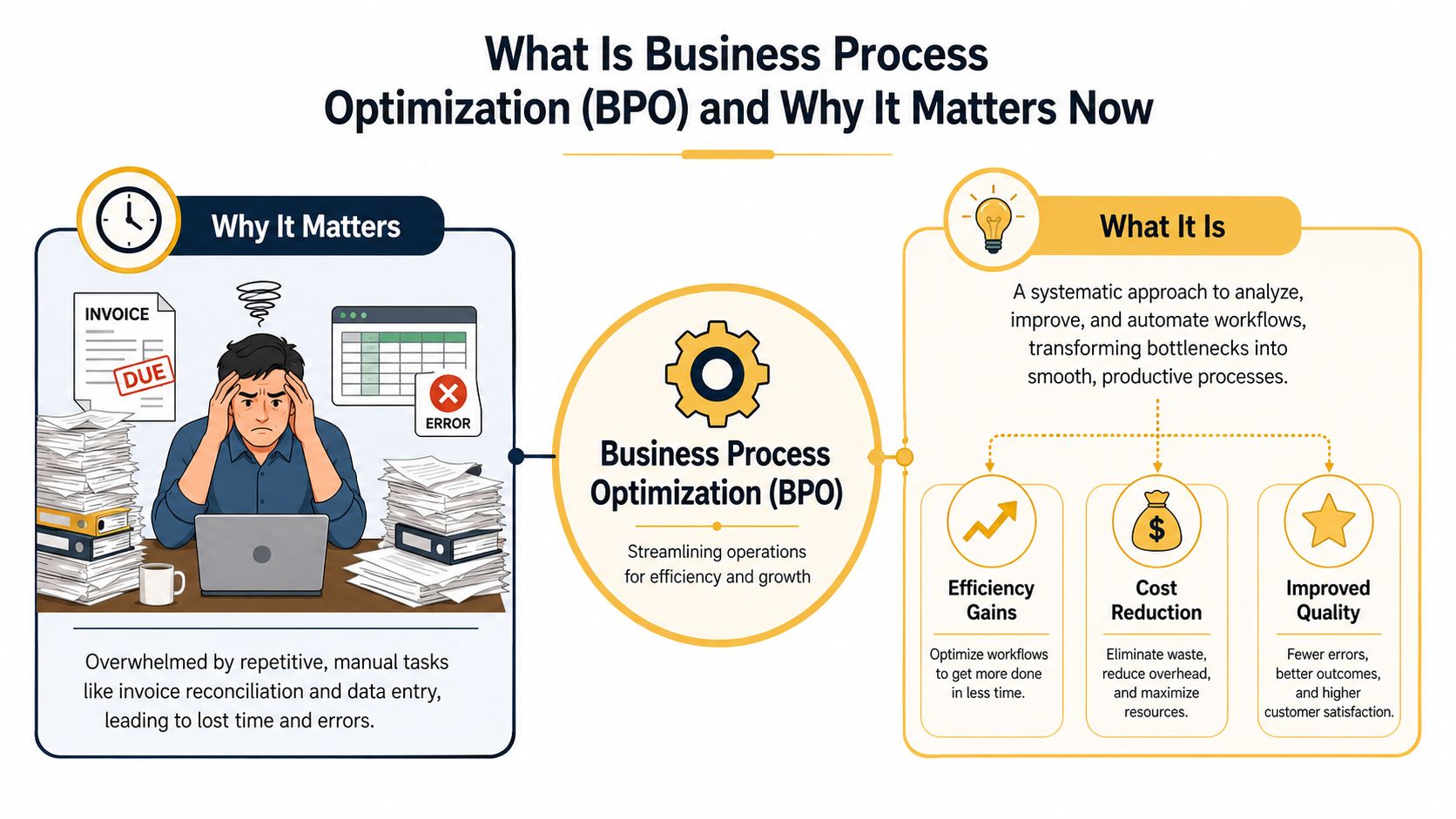
Business process optimization is the practice of improving how work moves through your business. Not in theory. In the day-to-day flow of requests, approvals, data entry, scheduling, fulfillment, and follow-up.
For most SMBs, it starts with one painful workflow. Maybe returns take too long. Maybe estimate requests get lost between the website and the sales inbox. Maybe your office manager spends half a day each week reconciling payments because customer records don't match across tools.
What it looks like in a small business
A lot of owners hear “optimization” and picture consultants with flowcharts and a six-month project. That's not what good process work looks like in a small or mid-sized company. Good business process optimization is usually more practical than dramatic.
It asks a few direct questions:
- Where does work slow down: Not where people complain the loudest, but where jobs sit idle, wait for approval, or bounce between systems.
- Where do errors repeat: Duplicate entry, wrong statuses, missed notifications, outdated spreadsheets, and handoffs that depend on tribal knowledge.
- What costs you the most to leave alone: Some broken processes are annoying. Others eat margin, delay revenue, or create customer churn.
If you want a plain-language overview of how teams optimize business processes, that resource does a solid job of grounding the concept in everyday operations. A similar practical guide on streamlining business workflows can also help if you're sorting through where to begin.
Why this matters more now
This isn't a niche management trend. Businesses are investing heavily in workflow redesign, automation, and monitoring because operational drag has become expensive. One industry summary projects the Business Process Management market to grow from $15.4 billion to $65.8 billion by 2032, according to Comidor's BPM market overview.
That projection matters for one reason. Companies are putting real money behind process improvement because cleaner workflows increase throughput without forcing overhead to rise at the same pace.
Practical rule: If growth always requires adding headcount to push the same tasks through the same bottlenecks, the process is the problem.
What business process optimization is not
It isn't buying software and hoping the software fixes the mess.
It isn't automating a bad approval chain.
It isn't shaving a few minutes off one task while the full customer request still takes days.
A useful way to think about it is this. Business process optimization is a management discipline first, and a tooling decision second. You measure the current state, find what causes delay or waste, redesign the flow, and then use software where software helps.
For an Omaha business owner, that usually means fewer heroics, fewer “who handles this?” moments, and fewer tasks that only work because one reliable employee keeps the whole thing in their head.
A Repeatable Framework for Optimizing Any Process
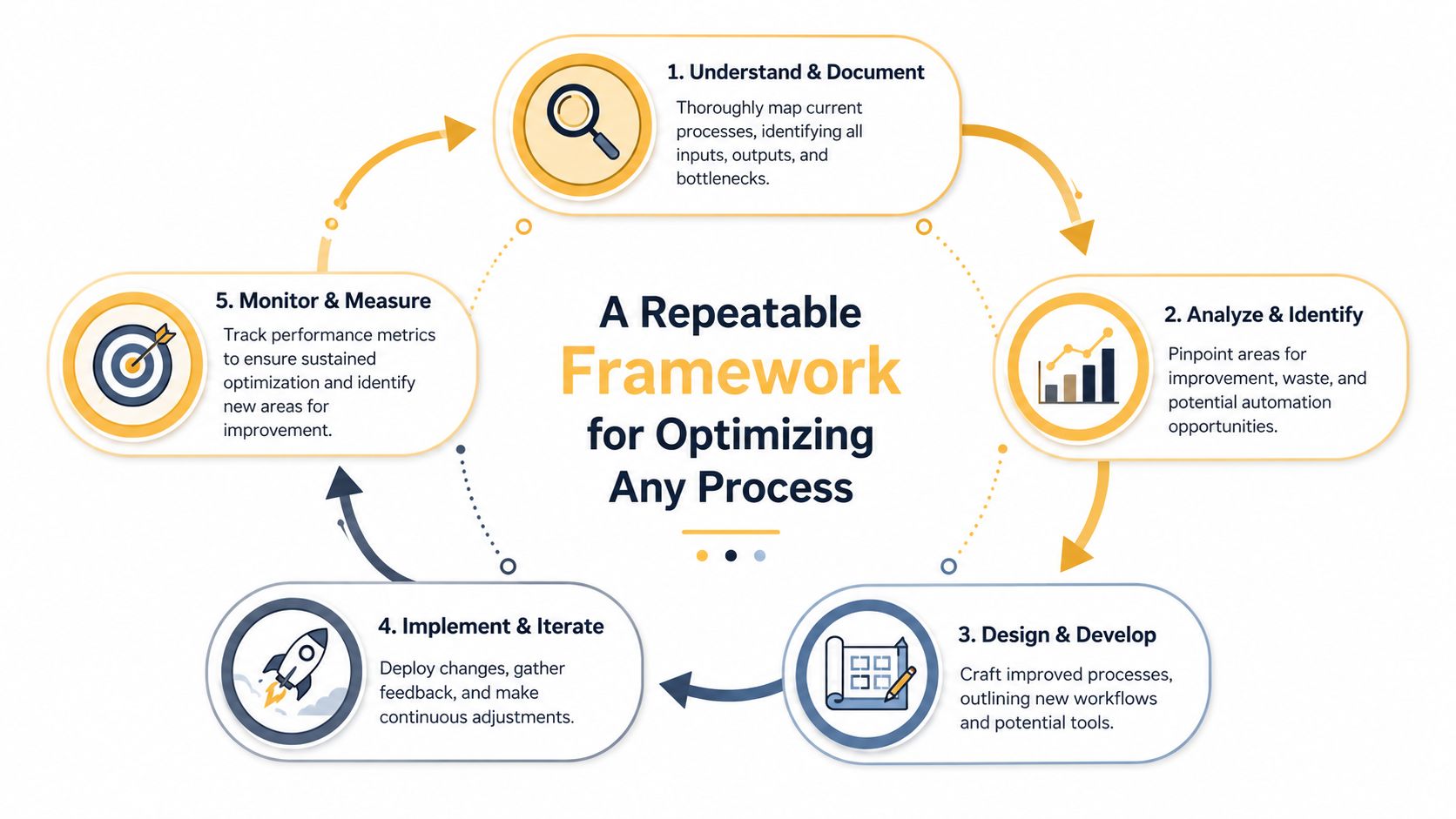
Most businesses don't need a giant transformation plan. They need a repeatable way to clean up one process, prove it worked, and apply the same thinking to the next one.
That's the right mindset. Trying to fix everything at once usually creates confusion, not efficiency.
Start with the work that already hurts
Don't begin with the most interesting process. Begin with the one that creates visible drag.
That could be:
- A high-volume workflow like lead intake, order updates, appointment scheduling, invoice handling, or support requests
- An error-prone process where people keep fixing the same mistakes
- A cross-functional workflow that moves between sales, ops, finance, and customer service
- A revenue-linked process where delays directly affect quoting, closing, fulfillment, renewals, or collections
That prioritization framework matters because many companies start in the wrong place. A more useful approach is to choose processes that are high-volume, error-prone, cross-functional, or directly tied to revenue, as outlined in Manifestly's guidance on business process optimization strategy.
The highest ROI process is often not the most broken one. It's the one whose true cost is highest.
Map the current process before you touch it
Business owners often want to jump straight to the fix. That's understandable, but it backfires.
If you don't document the current workflow, you'll miss the actual reason it's slow. What looks like a software issue may be an approval issue. What looks like a staffing issue may be duplicate entry. What looks like a communication issue may be a missing trigger between tools.
A basic process map should answer:
- What starts the process
- Who touches it
- What system each person uses
- Where approvals happen
- Where the process waits
- What counts as done
You don't need a giant BPMN diagram to do this. A whiteboard, Miro, Lucidchart, or even a shared doc can work if it captures the full path.
The first version of a process map is usually wrong. That's normal. The value comes from getting everyone to reveal the hidden handoffs and exceptions.
Audit with operational questions, not just opinions
Once the workflow is visible, pressure-test it. Ask direct questions that expose waste.
Questions that usually uncover the real problem
- Where does work pile up most often
- Which step creates rework
- What information gets entered more than once
- Which approvals are required by habit instead of policy
- What happens when the main person is out
- Where do customers feel the delay first
For many SMBs, the issue isn't a single task. Instead, it's the combination of manual inputs, unclear ownership, and fragmented tools.
Redesign around fewer handoffs
A better process usually has fewer moving parts. Not more.
That often means:
- Combining steps when two people are checking the same thing
- Removing approvals that don't protect quality or reduce risk
- Standardizing inputs so every request starts with the same required information
- Creating clear exception paths for edge cases instead of making every case heavy
Here's a simple test. If a process depends on someone remembering to send a follow-up email, update a spreadsheet, and notify the next person manually, the design is fragile.
Keep the cycle going
Optimization isn't a one-time cleanup. It's a loop. You document the current state, redesign the flow, implement changes, review results, and tighten the process again.
That cycle works because every process reveals the next bottleneck. Once intake is smooth, quoting becomes the issue. Once quoting improves, fulfillment exposes the next delay. That's healthy. It means you're managing the business as a system instead of reacting one fire at a time.
Redesigning and Automating with Smart Tools
Once the process is mapped and prioritized, the next move isn't “add AI.” It's to redesign the workflow so automation has something solid to support.
That distinction matters. Smart tools can accelerate a good process. They can also make a bad one fail faster.

Redesign the process before you automate it
A clean redesign usually starts with four questions:
- Can this step be removed
- Can two steps be combined
- Can the customer or employee enter the data once instead of twice
- Can the system trigger the next action automatically
That sounds simple, but it's where most of the value lives. A local service company, for example, often doesn't need a complex platform upgrade first. It may just need website form submissions to create a CRM record, assign an owner, and trigger a follow-up sequence automatically.
An e-commerce business may not need a brand-new ops stack. It may need a clearer return workflow, a standard intake form, status updates tied to the order system, and a rule for when a human reviews exceptions.
Tool choices that make sense for SMBs
You don't need enterprise software to improve a mid-market workflow. For many businesses, practical gains come from combining a few accessible tools well.
Common categories that work
- No-code automation platforms like Zapier and Make. These are useful for moving data between forms, CRMs, inboxes, spreadsheets, and project tools.
- CRM workflow tools inside platforms like HubSpot or other sales systems. These help assign leads, trigger reminders, route contacts, and standardize follow-up.
- Project and operations tools such as ClickUp, Asana, Trello, or Monday.com. These work well when the process depends on task ownership and visibility.
- AI tools for document-heavy work such as extracting key information from intake forms, invoices, or support requests before a human reviews them.
- Customer-facing AI assistants for simple triage, FAQ handling, or intake collection, especially when the alternative is an overloaded inbox.
If you're comparing platforms, this breakdown of business process automation tools is useful because it frames tools by operational fit rather than trendiness.
Where AI actually helps
AI is strongest when the work is repetitive, language-based, and structured enough to review.
Good fits include:
- Lead qualification support for sorting inquiries by urgency, service type, or territory
- Document intake for pulling names, dates, amounts, and categories from uploaded files
- Customer support triage for routing simple requests before a person steps in
- Internal summaries for turning long notes, emails, or transcripts into action items
Bad fits are just as important to recognize. If the process has unclear rules, poor source data, or high-risk edge cases, AI won't solve the core issue. It will just hide it for a while.
Watch for this: If your team can't explain the rule in plain English, don't automate it yet.
A quick walkthrough can help if you want to see workflow automation in practice:
A practical rollout approach
For SMBs, the safest rollout is usually narrow and testable.
Pick one workflow. Define the trigger. Define the desired output. Decide where a human still needs to review. Then run the process with a small group before expanding it.
That beats the common mistake of automating five connected processes at once. When that happens, nobody knows whether the problem sits in the form, the logic, the handoff, or the reporting.
Smart automation should reduce clicks, reduce waiting, and reduce ambiguity. If it doesn't do at least one of those, it's probably just new software sitting on top of old friction.
How to Measure Success and Prove Your ROI
A process isn't improved because the team says it feels better. It's improved when the numbers move in the right direction and stay there.
That's why measurement has to be built in from the start. If you wait until after implementation to decide what success looks like, you'll end up arguing about impressions instead of performance.
The core metrics that matter
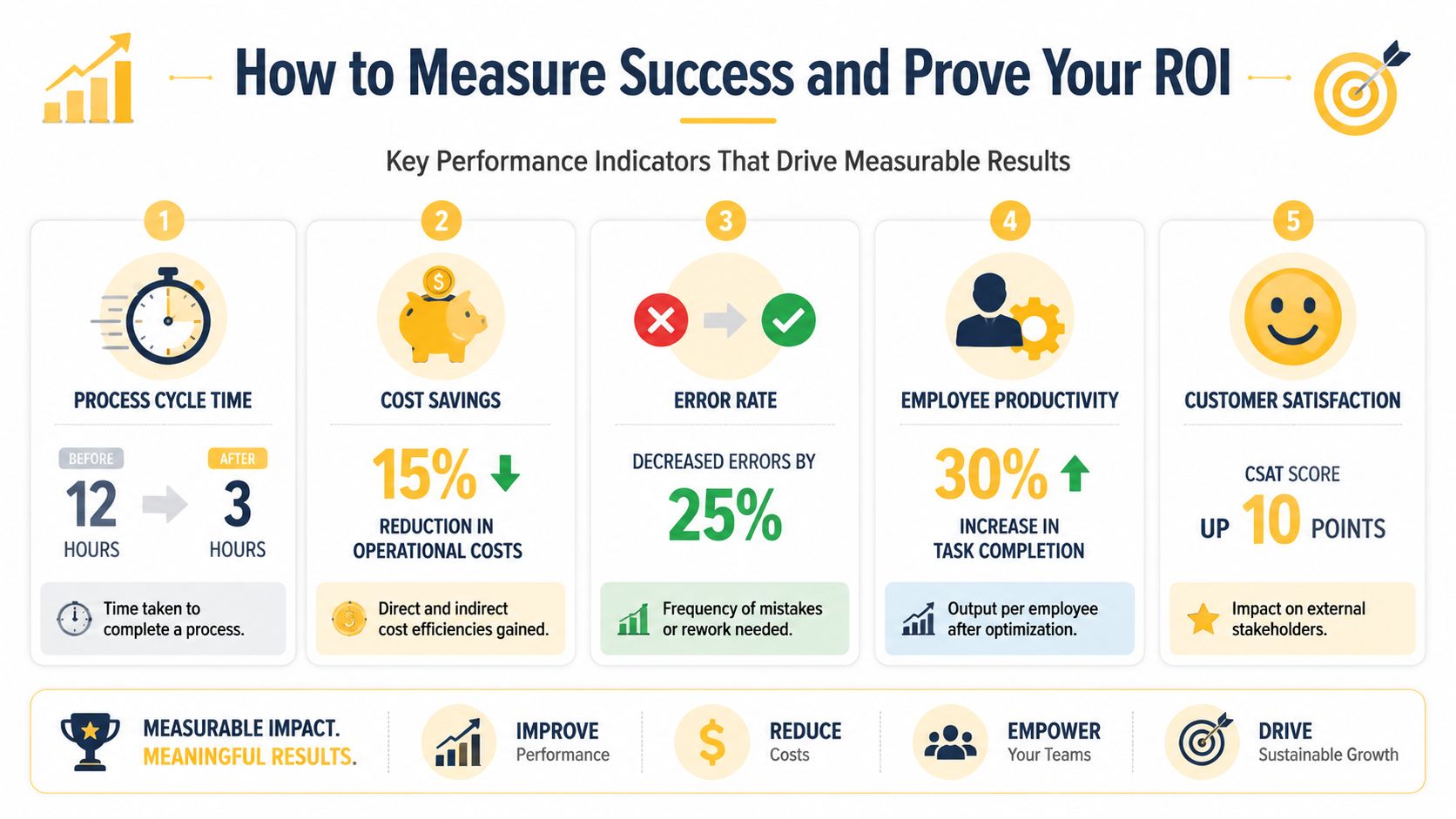
For most SMBs, a small KPI set is enough. You don't need a dashboard with twenty widgets. You need a few measures that reflect speed, cost, quality, and output.
Here are the most useful ones:
- Cycle time tracks how long the full process takes from start to finish.
- Task completion time looks at how long individual actions take inside the workflow.
- Error or rework rate shows how often the team has to fix, resend, correct, or repeat work.
- Cost per transaction helps you see the labor and process burden behind each order, request, or case.
- Throughput shows how much work gets completed in a given period without adding chaos.
One process-improvement source reports that optimized processes can cut task completion time by 40% to 60%, reduce overall process completion time by up to 50%, and deliver 15% to 25% cost savings through removal of redundant steps and waste, according to 6Sigma's overview of process optimization outcomes.
That doesn't mean every SMB should expect the top end of those ranges. It does mean that when a process is bloated, the upside is often large enough to justify doing the work properly.
A simple KPI table you can actually use
| Business Type | Process Example | Primary KPI |
|---|---|---|
| E-commerce | Returns and exchanges | Cycle time |
| Local services | New lead intake and scheduling | Lead-to-booked-job conversion rate |
| Digital publishers | Content review and approval | Throughput |
| Professional services | Invoice approval and billing | Cost per transaction |
| Field operations | Work order dispatch | Rework rate |
How to build the before-and-after view
Before you change anything, capture the baseline. Not a rough estimate. The actual current state as best you can measure it.
What to document before rollout
- Current processing time for the full workflow
- Typical delays between handoffs
- Error frequency and what causes it
- Labor touchpoints across people or departments
- Customer impact such as complaints, confusion, or slow responses
Then compare the redesigned process against that same baseline over a defined review period. Keep the scope tight. If you change staffing, pricing, and process all at once, you won't know what drove the result.
For teams trying to connect operational improvements to a business case, this guide on how to measure ROI is useful because it forces the conversation back to actual outcomes.
Better reporting doesn't create ROI. Better process performance does. Reporting just proves whether it happened.
What counts as a real win
A real win is not “the team likes the new tool.”
A real win looks more like this: the process takes less time, fewer requests need correction, work moves with less supervision, and customers stop feeling the internal mess. If you can show those changes clearly, process optimization stops sounding abstract and starts sounding like what it is. Better operations.
Common Pitfalls and How to Sustain Your Gains
Most process projects don't fail because the idea was wrong. They fail because the business cleaned up one piece of the workflow and ignored the rest of the system.
That's why some improvements look good for a month and then gradually fade. The team adds a form, an automation, or a new approval rule, but nobody owns the full process end to end.
The biggest mistakes I see
The first mistake is automating a broken workflow. If the underlying logic is messy, automation only locks the mess in place.
The second is assigning ownership by department instead of by process. Sales owns one part, operations owns another, finance owns the last piece, and nobody is responsible for how the work moves across all three.
The third is using local metrics that make one team look efficient while the total process gets worse. A department can close its tasks quickly while the customer still waits too long for the final outcome.
A process with no clear owner becomes a collection of handoffs, workarounds, and exceptions.
Measure the full flow, not one task
A frequent failure mode in business process optimization is the lack of end-to-end ownership. Guidance on end-to-end optimization recommends using a full measurement stack, including cycle time distribution, rework rate, straight-through processing rate, backlog age, and cost per transaction, to avoid improving one step while degrading the full flow, as explained in Bismart's article on end-to-end business process optimization.
That advice is especially important for SMBs because small teams often rely on informal coordination. Informal coordination works until volume rises. Then the hidden gaps show up fast.
What an end-to-end view changes
- Cycle time distribution shows whether the average hides a lot of ugly outliers.
- Rework rate tells you how often the process creates its own extra labor.
- Straight-through processing rate reveals how many cases move cleanly without intervention.
- Backlog age exposes work that isn't just sitting, but aging into a customer problem.
- Cost per transaction keeps the redesign tied to margin, not just convenience.
Sustaining gains takes operating discipline
Once a process is improved, protect it. That means documenting the new workflow, assigning an owner, training the people who use it, and reviewing the metrics on a recurring basis.
A few habits help more than people expect:
- Keep documentation current: If the process changes but the instructions don't, the old workarounds come back.
- Review exceptions monthly: Edge cases often become the new normal if nobody checks them.
- Tie KPIs to one owner: Shared visibility is good. Shared accountability usually isn't.
- Audit before adding new tools: Every new app or automation should support the workflow, not fragment it.
Continuous improvement beats one-time cleanup
The businesses that sustain gains treat business process optimization like maintenance, not a campaign.
They revisit high-friction workflows. They retire old steps when conditions change. They watch for new bottlenecks after growth, hiring, or software changes. Above all, they don't confuse implementation with completion.
That's how process work compounds. Not by one giant overhaul, but by repeatedly making the business easier to run.
Business Process Optimization in Action
A local e-commerce store doesn't usually describe its returns workflow as a process problem. The owner says support is swamped, customers keep asking for updates, and the team spends too much time checking order status across tools. That's still a process problem.
The fix often starts with a cleaner intake path. The customer selects a return reason through a standard form, the request ties back to the order record automatically, exceptions route to a human, and status updates go out without someone drafting them manually. The result is a workflow that feels faster to the customer and lighter for the team, even before you add more staff.
A local services example
A home services company usually feels the pain earlier in lead handling. Calls come in, website forms come in, referral texts come in, and someone has to sort them all. If the coordinator is busy, quotes slow down and jobs slip.
A better setup routes every lead into one system, tags service type, assigns ownership, and prompts the next action. AI can help categorize inbound requests or summarize customer needs, but the ultimate win comes from one intake path and one source of truth. That reduces missed follow-up and removes the daily “who responded to this?” scramble.
A publisher workflow example
Digital publishers deal with a different kind of drag. Drafts move from writer to editor to reviewer to upload, but each handoff happens in a slightly different way. Comments live in one tool, approvals live in another, and deadlines depend on reminders.
A stronger editorial process usually standardizes submission, review status, revision loops, and publishing readiness inside one shared workflow. Editors spend less time chasing updates. Writers know what's blocking approval. The business gets more predictable output without forcing the team into constant check-ins.
The best process improvements rarely feel flashy. They feel calm. Work moves, fewer people need to ask what's next, and customers stop seeing the seams.
If your business is dealing with manual handoffs, duplicated work, or tool sprawl, Up North Media can help you sort out where the friction is and build a practical plan to fix it. Whether you need workflow automation, AI integration, or a custom web app that fits the way your team really operates, their Omaha-based team focuses on process improvements that are measurable, realistic, and tied to growth.