
By 2025, 88% of organizations across 105 countries were using AI in at least one business function, up from 78% a year earlier, according to McKinsey survey summaries on AI workflow automation. That shift changes the question for small and mid-sized businesses. The issue isn't whether business process automation AI is coming. It's whether your company can adopt it without creating a network of brittle automations, untraceable decisions, and failures that spread from one system to another.
AI can classify documents, interpret customer messages, recommend actions, and execute multistep workflows. It can also misread context, make an unsupported decision, or pass bad information into an otherwise reliable system. The businesses that get lasting value treat automation as an orchestration and governance problem, not just a software purchase.
What Business Process Automation AI Actually Does
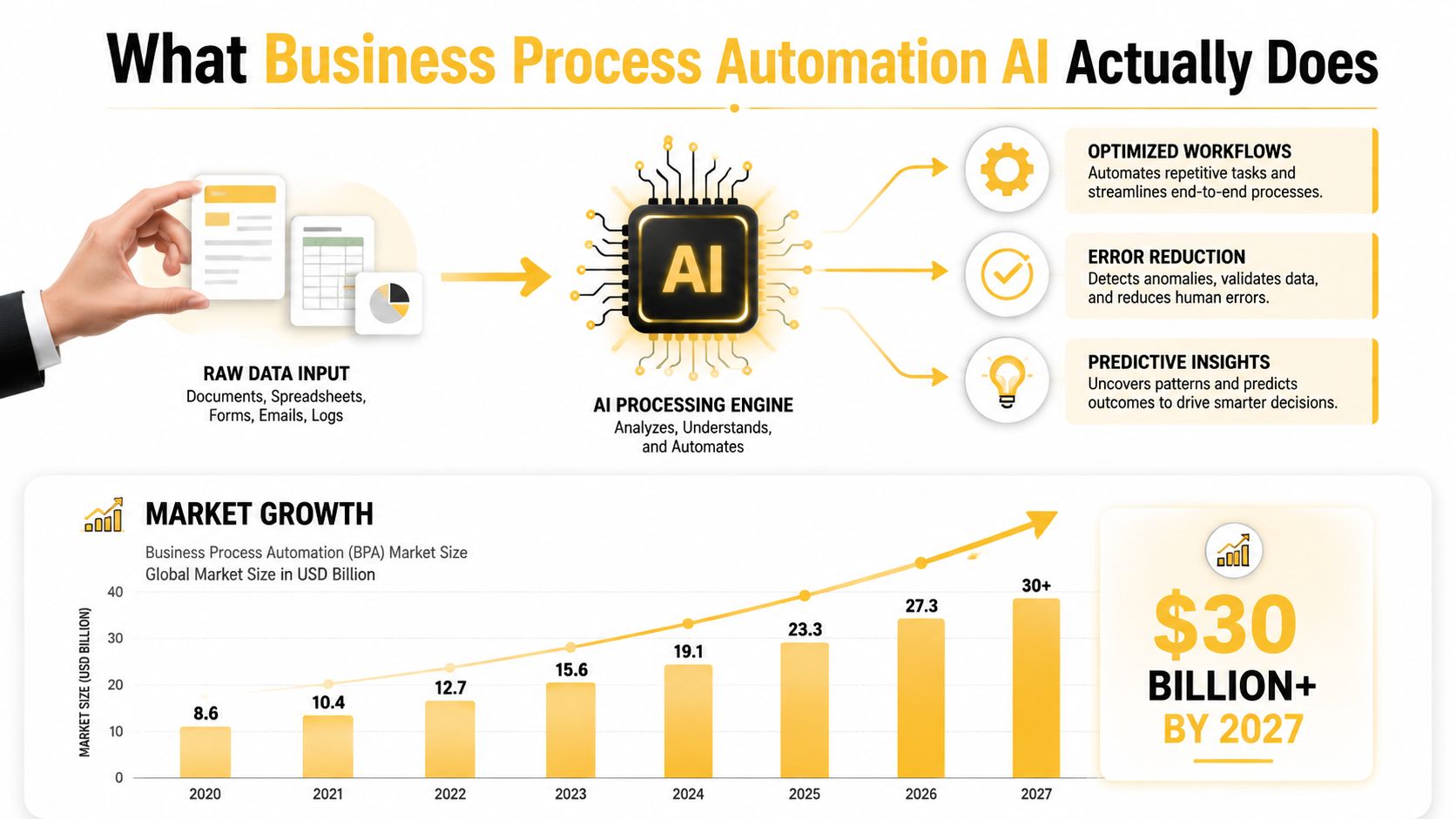
Industry estimates place the AI workflow automation market at roughly $12.65 billion in 2022, with projections reaching $35.72 billion by 2030 at a 14.1% CAGR, according to industry statistics on business process automation. That investment reflects a practical change. Automation is moving beyond isolated macros and fixed integrations toward systems that coordinate work across customer service, finance, operations, HR, and sales.
AI-powered business process automation combines workflow software with capabilities such as machine learning, natural language processing, document interpretation, and decision engines. A conventional workflow follows explicit instructions. An AI-enabled workflow can interpret an email, recognize the intent behind a document, compare information across systems, and choose the next permitted action based on context.
The difference between execution and interpretation
Consider invoice processing. A rule-based workflow might watch a mailbox, move an attachment into a folder, and route it according to a vendor name or file type. That works until a supplier changes its template, combines several purchase orders, or sends a scanned document with inconsistent formatting.
An AI-driven process can extract invoice fields and line items, match them against purchase orders and receiving records, identify anomalies, and send routine invoices through an approval path when they meet configured conditions. It can route ambiguous cases to a person rather than pretending that every document is safe to approve.
That distinction matters because AI doesn't merely execute a predefined task. It interprets inputs and helps coordinate decisions across interconnected systems. The workflow might involve an accounts-payable platform, an enterprise resource planning system, a shared inbox, a vendor database, and an approval tool. Each connection creates another dependency that needs ownership and monitoring.
Where the intelligence stops
The phrase “learns from outcomes” can mislead buyers. A production system shouldn't rewrite its own business rules because a model has observed a pattern. Teams need defined inputs, constrained outputs, approval thresholds, logs, and a way to review corrections before those corrections influence future behavior.
Research on automated business-process generation illustrates the problem. In a 2024 arXiv study of Text2Workflow, the system achieved 71.3% overall accuracy, while a strong baseline reached 64.2%. The baseline performed at 92.5% on easy requests but 30% on hard requests, showing that quality can fall sharply as workflows become more complex.
For an SMB, the practical lesson is straightforward: use AI for interpretation and prioritization, but place validation gates around consequential actions. The system should know what it can do automatically, what requires confirmation, and what must stop for human review.
How AI Automation Differs from Traditional Workflow Tools
Traditional automation remains useful. RPA, connector platforms such as Zapier, and basic workflow engines are excellent at moving predictable data between known locations. They become expensive to maintain when the business process contains ambiguity, changing policies, or unstructured information.
The comparison below captures the operational distinction.
| Dimension | Traditional Automation | AI-Powered Automation |
|---|---|---|
| Decision-making | Follows explicit conditions and fixed paths | Interprets context and recommends or takes permitted actions |
| Edge cases | Sends exceptions to a queue or breaks | Classifies variations and routes uncertain cases for review |
| Maintenance burden | Requires rule and mapping updates as processes change | Still needs oversight, model evaluation, prompt or policy updates, and integration maintenance |
| Unstructured inputs | Handles structured fields reliably | Can interpret emails, documents, images, and conversational requests |
| Best fit | Deterministic, repetitive tasks | Variable workflows that combine data interpretation with controlled execution |
| Main risk | Brittle logic and exception accumulation | Incorrect reasoning, drift, opaque decisions, and cascading system errors |
Fixed rules are powerful until the context changes
An e-commerce returns process shows the difference clearly. A conventional workflow might require a customer to complete a form, select a reason code, and upload an order number. If the customer instead emails a photograph of a damaged product, the workflow may place the message in a manual queue.
An AI layer can inspect the image, read the message, identify the likely issue, locate the order, and route the request according to return policy. That doesn't mean it should approve every claim. A safer design lets the model classify the request, while policy rules determine eligibility and a person handles ambiguous or high-value cases.
Traditional tools also tend to hide maintenance costs. Every new warehouse, discount rule, payment method, or shipping exception can create another branch. Over time, the automation may still run, but nobody can explain why a particular order took a particular path.
Practical rule: Use deterministic automation for deterministic decisions. Add AI where interpretation is the bottleneck, then constrain what the AI can change.
A useful explanation of this layered approach appears in this overview of intelligent process automation. AI shouldn't replace every connector or workflow rule. It should handle the messy input and variable judgment that fixed tools can't manage efficiently, while established systems continue to enforce permissions, calculations, and records.
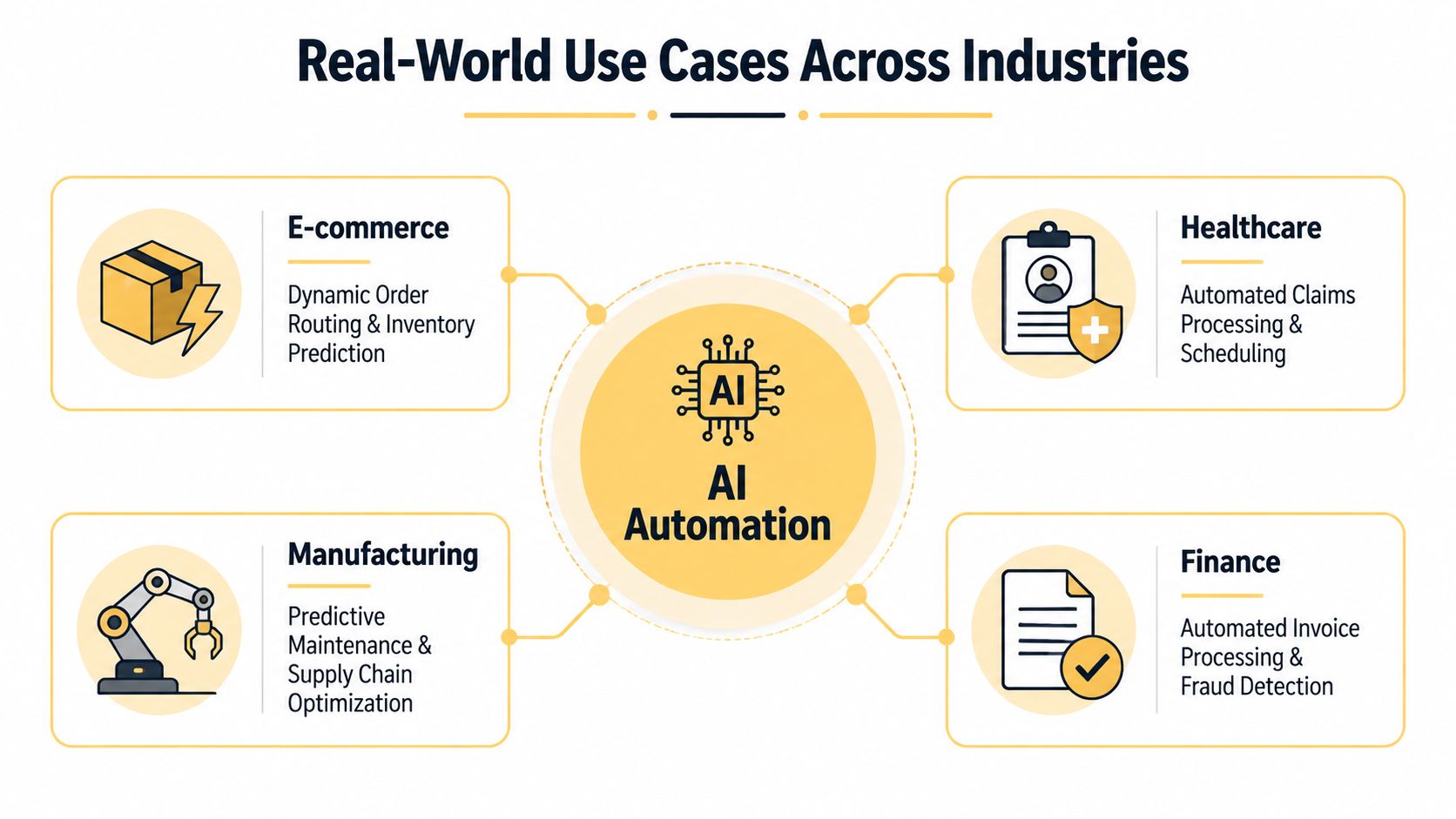
Real-World Use Cases Across Industries
The strongest use cases share a pattern: a clear trigger, several systems involved, repetitive interpretation, and an outcome the owner can measure. The AI component doesn't need to run the whole business process. It needs to remove a specific bottleneck without weakening accountability.
E-commerce order fulfillment
Trigger: A customer places an order containing products stored across multiple locations.
AI role: The system evaluates available inventory, shipping cost, promised delivery timing, warehouse constraints, and the consequences of splitting the shipment. It recommends or selects a fulfillment location, then sends the decision to the order-management and warehouse systems.
Systems involved: E-commerce platform, inventory-management system, warehouse software, shipping carrier APIs, and customer-notification tools.
What to benchmark: Measure split shipments, manual routing interventions, fulfillment cycle time, and orders that miss the promised service level. The objective isn't just to route more orders automatically. It's to make routing decisions consistently while preserving a clear override path.
Professional-services onboarding
Trigger: A prospective client submits an intake form, contract, identification document, or email attachment.
AI role: Natural language processing extracts names, entities, contract terms, billing details, and compliance-relevant information. The workflow populates CRM fields, creates tasks, identifies missing documents, and drafts engagement materials for approval.
Systems involved: Intake forms, document storage, CRM, practice-management software, e-signature tools, and compliance checklists.
What to benchmark: Track incomplete records, time from signed agreement to active matter, duplicate data entry, and the number of onboarding items returned for correction. Keep legal or compliance decisions with authorized staff when the consequences are material.
Retail inventory management
Trigger: Sales data, supplier updates, or a low-stock event changes the expected availability of a product.
AI role: A predictive model considers sales velocity, seasonality, supplier lead times, promotions, and current stock. It can recommend reorder points or surface items that need review, while purchasing rules and approval limits remain explicit.
Systems involved: Point-of-sale software, inventory platform, purchasing system, supplier feeds, and reporting dashboards.
What to benchmark: Compare stockouts, excess inventory, emergency purchasing, and manual purchase-order adjustments. Avoid letting a model place unrestricted orders until the business has tested how it reacts to promotions, supplier disruptions, and unusual demand.
Healthcare practice administration
Trigger: A provider submits a request that requires prior authorization.
AI role: The system gathers relevant information from permitted patient records, compares the request with payer requirements, identifies missing details, and prepares the submission form. Staff review the completed packet before submission when clinical or coverage judgment is involved.
Systems involved: Electronic health-record software, payer portals, scheduling tools, document systems, and internal work queues.
What to benchmark: Measure preparation time, incomplete submissions, status-follow-up workload, and authorization delays. Access controls, auditability, and human review matter as much as speed because a process involving patient information carries operational and compliance consequences.
The common thread is bounded autonomy. AI handles interpretation and coordination, while business rules and accountable people govern actions that can create financial, legal, clinical, or customer harm.
Building Your Implementation Roadmap
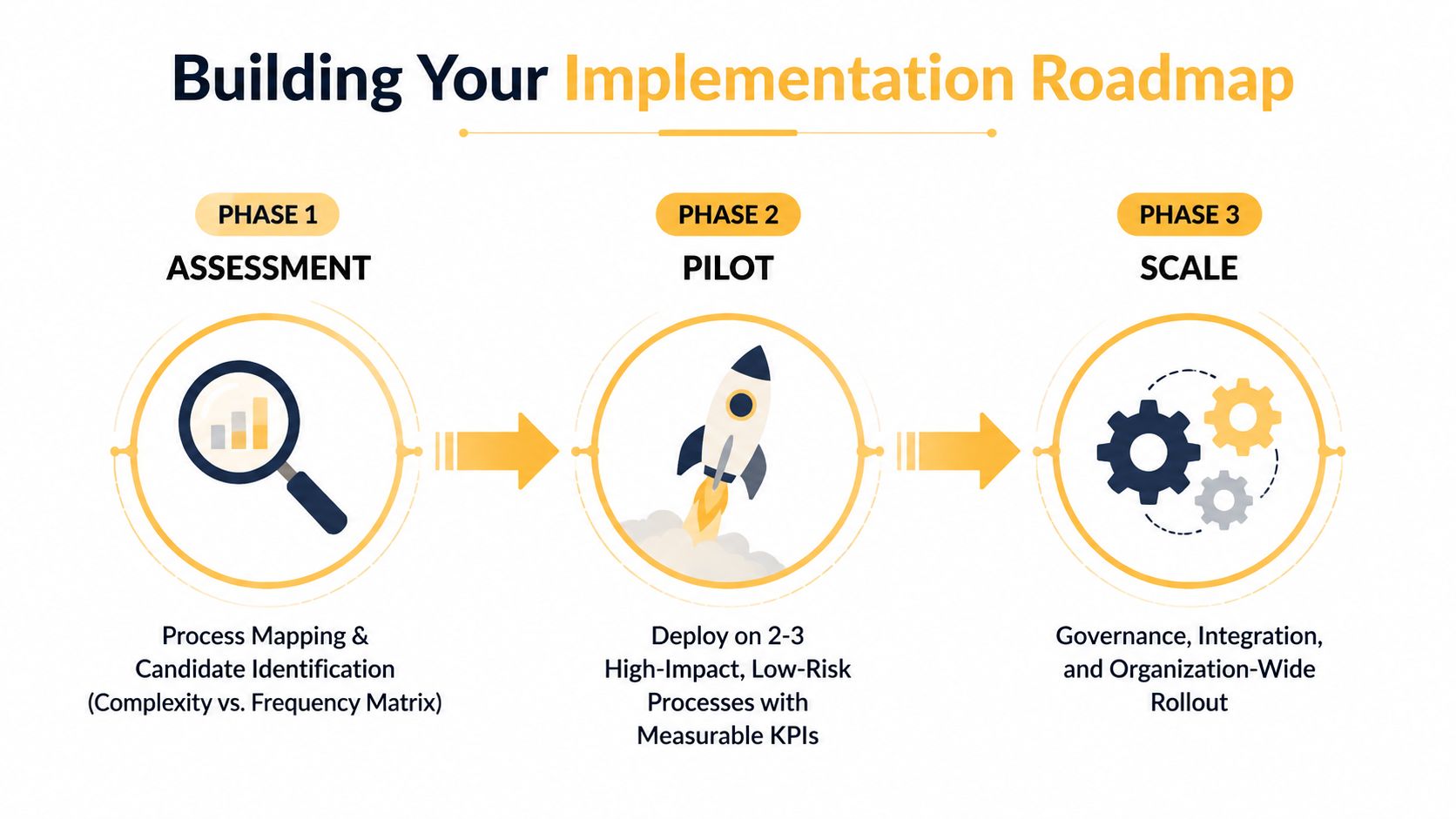
Most SMB automation projects don't fail because the team lacks a model. They fail because the company starts with a vague ambition, automates an unstable process, or connects systems without assigning ownership. A practical roadmap creates decision points before the project becomes difficult to reverse.
Phase one, assessment
Start with a process inventory, not a vendor demonstration. Document who initiates each workflow, what information enters it, which systems it touches, where people make decisions, and what happens when information is missing.
Plot candidate processes against frequency and complexity. High-frequency, low-complexity work often makes a good first target, but a high-frequency process with unstable rules may need redesign before automation. Exclude workflows where the data is inaccessible, ownership is disputed, or the expected outcome can't be measured.
The assessment deliverables should include:
- Process inventory: Current-state maps, system owners, inputs, outputs, exceptions, and approval points.
- Candidate matrix: A ranked view of business value, implementation effort, risk, and data readiness.
- Success definition: Baseline measures, target outcomes, review responsibilities, and stop conditions.
A decision gate belongs here. If nobody can describe the current process consistently, pause the AI project and fix the process definition first.
Phase two, pilot
Select one workflow with meaningful operational value and limited downside. Build a narrow version with explicit decision gates, test data, permissions, fallback procedures, and a human review queue.
Run the pilot under controlled conditions. A small business may complete this phase in several weeks, depending on integration complexity and stakeholder availability. The duration matters less than the quality of the evidence. The team should know how often the system completes the process, how often it asks for help, which errors recur, and whether employees trust the results.
Create a pilot success scorecard covering:
- Completion quality.
- Exception volume and categories.
- Human review time.
- Data and permission failures.
- Operational impact against the baseline.
Use the AI implementation roadmap from Up North Media as a planning reference, particularly when translating business goals into a staged technical rollout.
For transportation businesses, the process map may start with dispatch, order assignment, proof of delivery, and invoicing. A practical UK haulier TMS overview can help clarify how a transport-management system fits into the broader workflow before an AI layer is added.
Phase three, scale
Scaling means expanding responsibility, not copying a workflow into more departments. Map dependencies between automations, define shared data ownership, standardize logging, and establish a review process for model or policy changes.
The scaling deliverable is a governance checklist covering access, version control, exception ownership, monitoring, rollback, vendor dependencies, and audit requirements. Another decision gate should determine whether the pilot is stable enough to connect to a second process. If the team can't explain failures in the first workflow, adding more integrations will multiply uncertainty.
Preventing Digital Chaos as Automation Scales
The governance gap is already visible. A 2025 BearingPoint BPM Pulse Survey reports that 82% of organizations fear digital chaos, 77% say core business processes face a higher risk of failure, and 79% say they lack a way to control, manage, and sustain the automation already deployed.
Those figures reframe the buying conversation. Faster task completion isn't enough if an AI pricing service sends an incorrect value to an automated fulfillment system, or if a customer-service agent promises delivery that inventory cannot support. The risk comes from the connection between systems, not only from the individual model.
Design the control plane before adding more agents
AI-enabled workflows introduce risks that fixed rules don't fully address. Outputs can vary, models can drift as inputs change, and a failure in one process can trigger actions in another. A governance layer should make every important decision traceable.
Build controls around four areas:
- Version control: Record model versions, prompts, policies, workflow definitions, and approval dates. A change should be reversible.
- Exception handling: Define what happens when confidence is low, required data is missing, or systems disagree. Route the case to a named owner.
- Human checkpoints: Require review for high-impact pricing, refunds, hiring, healthcare, compliance, and customer commitments.
- Audit trails: Store inputs, outputs, actions, overrides, and timestamps so staff can reconstruct the path taken.
The safest automation isn't the one that never asks for help. It's the one that knows when it needs help and stops cleanly.
Manage interdependencies explicitly
Create a dependency map before connecting multiple automations. It should show which system supplies the data, which process transforms it, which process consumes it, and who owns each handoff.
Then add operational safeguards:
- Circuit breakers: Stop downstream actions when anomaly thresholds are breached.
- Rollback procedures: Restore the previous workflow or data state without improvisation.
- Monitoring dashboards: Surface unusual volumes, repeated exceptions, missing fields, latency, and failed handoffs.
- Release reviews: Test changes against representative edge cases before production deployment.
AutomationBench takes this production-oriented view by evaluating end-to-end workflow execution across 47 real tools and six business functions, using usage patterns from 3.7 million companies and 2 billion monthly tasks, as described in Zapier's AutomationBench announcement. Its significance is that it measures completed outcomes, API discovery, multistep execution, and guardrail compliance rather than judging the quality of a single written response.
Measuring ROI and Taking the Next Step
ROI becomes credible when the team measures the process before and after automation. “Time saved” isn't enough if employees spend that time correcting errors, monitoring unreliable outputs, or handling new exceptions. Track the complete operating path, including maintenance and review.
| Metric Category | Specific KPIs | Measurement Method | Typical SMB Benchmarks |
|---|---|---|---|
| Efficiency | Processing time, cycle time, throughput, hours spent per case | Compare a documented baseline with pilot results | Establish your own baseline before setting targets |
| Cost | Manual labor allocation, rework, error correction, software and maintenance cost | Calculate direct costs and the time required to supervise the workflow | Varies by process, data quality, and integration complexity |
| Revenue | Order-response time, conversion-supporting speed, repeat-service capacity | Connect operational changes to recorded sales or retention measures | Avoid attributing revenue changes without a clear comparison |
| Risk | SLA adherence, approval exceptions, compliance incidents, unresolved cases | Review logs, escalations, audit findings, and service records | Set thresholds appropriate to the process risk |
A simple calculation is:
Net automation benefit = measurable benefit minus implementation cost, ongoing maintenance, and supervision cost.
Then compare that result with the opportunity cost of leaving the process unchanged. If staff spend their time on repetitive reconciliation, the business may miss faster customer responses, better merchandising, or higher-value client work. Those benefits can be real, but they should be recorded separately from direct savings rather than folded into an inflated estimate.
Track the benefits that spreadsheets miss
Employee experience matters because repetitive queues create fatigue and encourage workarounds. Scalability matters because a better process can absorb demand without requiring every new task to receive a proportional manual response. Neither benefit excuses weak measurement, but both belong in the decision.
Look for evidence such as:
- Fewer manual escalations.
- More consistent service-level performance.
- Faster access to accurate operational information.
- Greater employee capacity for customer, creative, or analytical work.
- Clearer accountability when an exception occurs.
A useful guide to measuring automation ROI can help teams define baselines and connect operational metrics to business outcomes. Start with one process, document the current state, and refuse to scale a workflow that can't explain its own decisions.
Up North Media helps businesses assess existing workflows, identify practical AI automation opportunities, integrate tools with current systems, and build monitoring and training into the rollout. Visit Up North Media to request an automation readiness conversation focused on your top processes, measurable outcomes, and a pilot roadmap suited to your operation.