
Buying another AI tool won't fix a broken process. It may give your team a faster way to create duplicate records, route incomplete data, or trigger approvals nobody owns.
That's the uncomfortable reality behind the most useful business process automation trends. The winners in 2026 won't be the companies with the most agents or workflows. They'll be the companies that know which processes deserve automation, which decisions must remain human, and who is accountable when an integration fails at the worst possible time.
The Reality Behind the Automation Hype
Automation vendors often frame the buying decision as a technology upgrade. Add an AI agent, connect a few applications, and repetitive work supposedly disappears. In practice, automation exposes weaknesses that already exist in the operating model. If customer data is inconsistent, approval rules conflict, or no one owns the process, a new platform usually spreads the problem across more systems.
That's why business process automation should start with orchestration, not software selection. Orchestration means coordinating people, applications, data, approvals, and exceptions around a defined business outcome. A workflow that moves a clean invoice from intake to payment may be easy to automate. A workflow that handles disputed invoices, missing purchase orders, changing tax rules, and unclear approval rights needs a different design.
A practical BPA guide for SMBs is useful for establishing the basic distinction between automating individual tasks and improving a broader business process. Mid-market teams should go one step further by documenting the decisions surrounding each task, not just the clicks employees perform.
Practical rule: Automate a process only after someone can explain where its data comes from, who can approve an exception, and what happens when the system is wrong.
Why integration debt changes the calculation
Integration debt is the accumulated cost of connecting systems that were never designed to work together. It appears as brittle connectors, duplicated customer records, undocumented field mappings, manual exports, and workflows that fail when a vendor changes an API or a team changes a form.
The cost isn't limited to engineering time. Operations staff investigate failed runs, finance teams reconcile conflicting records, and managers create manual workarounds. Those costs can erase the expected savings from a superficially successful automation.
Leaders evaluating business process automation benefits should therefore ask a harder question than whether a tool saves employee time. Does the workflow reduce the total effort required to complete the process, including monitoring, maintenance, exception handling, and compliance review?
The market's direction supports the strategic importance of automation, but it doesn't eliminate the need for discipline. The workflow automation market is projected to grow from about US$23.0 to US$25.0 billion in 2025 to roughly US$70.0 to US$75.0 billion by 2035, at an estimated 11.5% to 12.5% CAGR, according to MarketsandMarkets' workflow automation analysis. More spending will create more options. It won't decide which processes your company should trust.
Intelligent Orchestration and Process Mining
Traditional automation works well when the inputs, rules, and outcomes remain predictable. A script can copy a value from one application to another, create a task, or send a notification with impressive consistency. It becomes fragile when a document is incomplete, a customer uses unfamiliar language, or two systems disagree.
Intelligent orchestration addresses that limitation by coordinating multiple systems and routing decisions according to context. It can combine document extraction, natural-language classification, business rules, approval logic, and human review. The goal isn't to remove people from every workflow. The goal is to send routine cases through a fast path and direct ambiguous cases to the person best qualified to resolve them.
Find the bottleneck before automating it
Process mining provides the evidence that many automation projects skip. It examines event logs from systems such as an ERP, CRM, ticketing platform, or commerce stack to show how work moves. The resulting process map can reveal rework loops, approval queues, unusual paths, and handoffs that employees may not recognize as bottlenecks.
That matters because the easiest task to automate isn't always the most valuable one. Copying data between two systems may be simple, but automating it won't help much if the actual delay happens later, when a manager reviews incomplete information. Process mining helps teams identify the point where work stalls and then determine whether the solution is better data, clearer policy, improved routing, or automation.
The technical shift is reflected in market forecasts. Business process automation is projected to expand from about US$16.9 billion in 2026 to US$34.3 billion by 2033, representing a 10.6% CAGR, with AI-enabled orchestration, hyperautomation, cloud platforms, and compliance requirements identified as drivers in Persistence Market Research's analysis. The implication for buyers is practical: automation is moving beyond isolated RPA scripts toward coordination across systems and decision points.
Where AI adds value
AI is most useful when it handles variation without hiding the decision. Consider an accounts payable workflow:
- A document-processing model extracts supplier, amount, and purchase-order details.
- Rules validate the extracted fields against the ERP.
- An orchestration layer checks whether the invoice matches the purchase order.
- Straightforward matches continue automatically.
- A mismatch is routed to a named reviewer with the reason for the exception.
- The final decision is recorded for audit and future process improvement.
This design is stronger than asking an agent to “process invoices” without defining its authority. It gives the system a bounded role, creates an escalation path, and preserves a record of why a human intervened.
The same pattern works in customer support, lead qualification, claims intake, and inventory management. Process mining identifies where the work breaks down. AI interprets variable inputs. Orchestration coordinates the response. Human review protects judgment-heavy decisions.
Independent analysis describes the BPM automation segment as expanding at a 21.8% CAGR and points to a move from rule-based workflows toward adaptive orchestration combining AI, process mining, and intelligent automation in Grand View Research's BPM market analysis. That combination is more valuable than task replacement because it targets the full path from detection to resolution.
Teams exploring this model can use intelligent process automation as a conceptual starting point, then test one exception-heavy workflow where the current manual process is well understood.
Low-Code Platforms and the Citizen Developer
Low-code platforms have changed who can build an automation. A marketing manager can connect a form to a CRM. An operations coordinator can create an approval path. A sales team can trigger follow-up tasks when a deal changes stage. That speed is valuable, especially when a department understands its own workflow better than a central development team does.
The risk begins when every department builds independently. A marketing automation may create contacts differently from sales. An operations workflow may rely on a spreadsheet that nobody else can access. An employee may leave, taking the only knowledge of how a critical integration works. Citizen development increases delivery speed, but it also increases the number of systems that need ownership.
Give experimentation a safe boundary
The answer isn't to force every prototype through a slow approval process. Establish a controlled path from experiment to production:
- Use sandbox environments: Let teams test triggers, data mappings, and permissions without affecting live customer or financial records.
- Define approved integrations: Maintain a supported list of applications, connectors, authentication methods, and data destinations.
- Require documentation: Each production workflow should identify its owner, purpose, inputs, outputs, dependencies, and failure procedure.
- Separate sensitive data: Restrict personal, financial, and confidential information according to business and regulatory requirements.
- Review handoffs: IT should validate architecture and security, while process owners confirm that the workflow reflects real operational needs.
An internal automation center of excellence can support this model without becoming a gatekeeper. Its role should include reusable components, naming standards, training, monitoring guidance, and a clear escalation route. Department teams retain the ability to prototype, while the organization prevents one-off solutions from becoming invisible infrastructure.
What low-code can't solve
Low-code tools don't repair bad data. They don't clarify who can approve a refund. They don't make an undocumented legacy application reliable. They also can't guarantee that a workflow remains valid when the business changes its pricing, staffing, or customer lifecycle.
Use low-code for bounded, observable processes with clear inputs and reversible outcomes. Treat workflows involving sensitive data, complex financial decisions, or many downstream systems as architecture projects, even if the platform makes them easy to configure.
The most effective citizen developers aren't just fast builders. They understand when to stop building and involve IT, security, finance, or legal stakeholders.
Governance and the Hidden Costs of Scaling
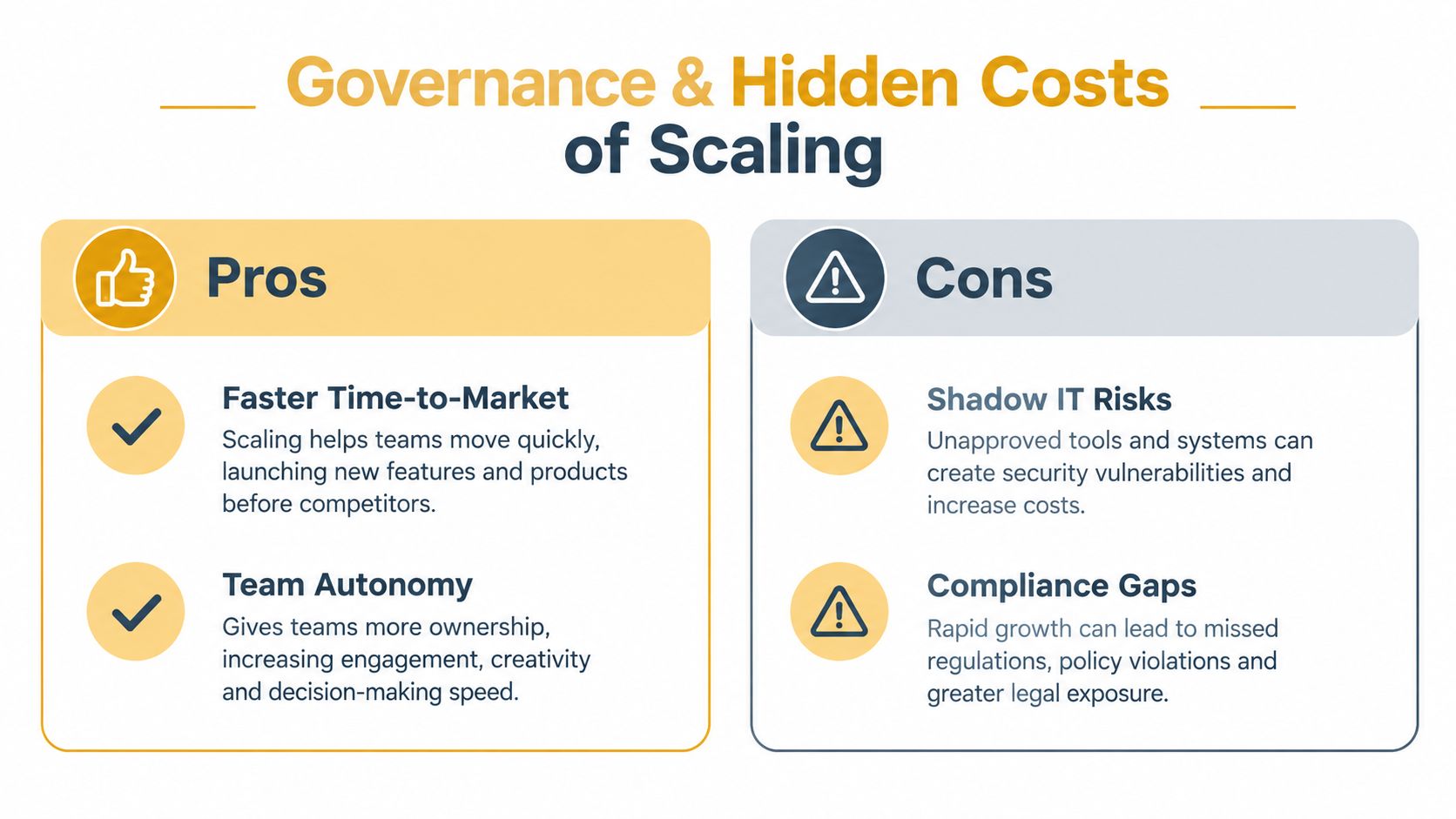
Governance is often treated as administrative overhead. For automation, it's a capacity multiplier. Without it, every new workflow adds another dependency, another access point, and another potential source of conflicting data.
The ownership problem is already visible in industry benchmarks. Jitterbit's 2025 benchmark found that 71% of organizations lack an end-to-end automation platform, while 70% of enterprise automation resource demand falls on IT, as reported in the Jitterbit Automation Benchmark Report. Those figures point to a structural problem. Departments may request automation, but technical teams remain responsible for connecting, securing, monitoring, and repairing it.
That model doesn't scale well. IT becomes a queue for every improvement, while business teams create unsupported workarounds when the queue moves too slowly.
Assign ownership before granting autonomy
Every production automation needs more than a technical owner. Create a small ownership model with distinct responsibilities:
- Process owner: Accountable for the business outcome and policy.
- System owner: Responsible for the applications, integrations, and access controls.
- Data owner: Defines acceptable data quality, retention, and correction procedures.
- Risk approver: Determines where human review, audit logs, or additional controls are required.
- Support owner: Responds to failures and coordinates incident resolution.
This structure prevents a common failure pattern where everyone assumes someone else is monitoring the workflow. It also makes retirement easier. If an automation no longer delivers value, the process owner can approve its removal instead of allowing it to run indefinitely.
Why deterministic automation still matters
Agentic features can interpret context and make plans, but leaders still need predictable behavior for regulated, financial, and customer-impacting operations. Forrester's industry coverage identifies ROI and governance concerns as reasons organizations continue using deterministic automation even as vendors promote agentic capabilities, a tension discussed in Moxo's overview of BPM trends.
A deterministic workflow isn't automatically better. It's better when the rule is clear, the outcome is material, and the organization needs to prove exactly what happened. AI can assist with classification or recommendations, while deterministic controls define the boundaries.
Governance principle: Give automation authority in proportion to the quality of its inputs, the reversibility of its actions, and the cost of an incorrect decision.
Scaling also creates less visible work. Teams must reconcile bad records, investigate exceptions, update integrations, review permissions, and train employees on changed procedures. Count those activities in the operating model. Otherwise, the automation program will appear efficient only because its costs have moved into untracked labor.
High-Value Use Cases for SMBs and E-commerce
The best starting point is usually a process that crosses systems and creates visible friction. It has enough repetition to justify investment, but enough structure to measure whether the new workflow works.
Consider an e-commerce retailer selling through a web store, a marketplace, and a physical location. Inventory synchronization is a strong candidate when the same product data moves through each channel. A useful design doesn't blindly overwrite every quantity. It validates the source of truth, identifies conflicting updates, pauses suspicious changes, and alerts an operations specialist when available stock doesn't reconcile.
The human reviewer should see the product, the conflicting values, the timestamp of each update, and the recommended action. That's intelligent exception handling. The automation handles routine synchronization, while the operator deals with cases that could create overselling or customer-service problems.
Digital publishing workflows
A publisher can connect article intake, editorial review, SEO fields, content management, social distribution, and reporting. When an editor approves an article, the workflow can check whether required metadata exists, assign a content category, prepare distribution tasks, and notify the appropriate channel owner.
AI can help classify topics, identify missing fields, and suggest internal linking opportunities. It shouldn't publish unreviewed claims or alter sensitive editorial content without a clear approval boundary. The operational gain comes from coordinating the handoffs, not from pretending that editorial judgment is a button.
An intelligent email organizer can also help teams reduce inbox-based task management by sorting messages, identifying follow-up requirements, and bringing urgent items into a defined workflow. It becomes more useful when email actions connect to an accountable process rather than creating another isolated notification stream.
Local services and lead routing
A local service company may receive leads through forms, phone calls, chat, and third-party directories. Automation can normalize the contact details, identify the requested service, check location and availability, assign the lead to the right team, and create a follow-up task.
The workflow should pause when the address is incomplete, the service area is unclear, or the customer's request needs a specialist. A routing model that sends every lead to the same queue may look automated, but it merely moves sorting work downstream.
For onboarding, the system can collect documents, schedule a consultation, issue reminders, and flag missing information. The customer gets a clearer experience, while staff spend less time checking whether each administrative step occurred. More examples of where these patterns fit appear in intelligent automation use cases.
The right first automation removes a recurring handoff, not merely a few keystrokes.
Measuring ROI and Prioritizing Workflows
Automation ROI should reflect the complete operating cost of a process. Start with the current workflow, including employee time, delays, rework, manual checks, software fees, and the cost of errors. Then model the proposed workflow with integration work, platform costs, monitoring, maintenance, exception handling, and required human review.
A useful calculation is:
Net automation value = avoided operating cost and recovered capacity, minus implementation, maintenance, oversight, and exception costs.
Don't treat recovered capacity as cash savings unless the business can reduce spending or redeploy that capacity to revenue-producing work. A team that saves time but absorbs more demand may still gain strategically, but the financial result should be described accurately.
Score the process before choosing the tool
Assess each candidate against five questions:
- How often does the process run? Repetition creates more opportunity to recover effort.
- How consistent are the inputs? Clean, structured data lowers implementation risk.
- How costly are errors? High-impact errors require stronger controls and human review.
- How many systems are involved? More dependencies increase integration debt.
- Can the outcome be measured? If nobody can define success, the project will drift.
Use the matrix below to make trade-offs explicit.
| Process Type | Automation Potential | Hidden Costs | Recommended Action |
|---|---|---|---|
| Repetitive data transfer between stable systems | High | Connector maintenance, field mismatches, access reviews | Automate after validating the source of truth |
| Structured approvals with clear thresholds | High | Escalations, policy changes, audit requirements | Automate routing and retain approval logs |
| Document intake with variable formats | Moderate | Extraction errors, exception queues, human verification | Pilot with confidence checks and review |
| Customer or employee decisions requiring judgment | Moderate | Bias, inappropriate routing, unclear accountability | Use AI for recommendations, keep human approval |
| Processes built around inconsistent spreadsheets | Low to moderate | Data cleanup, version conflicts, undocumented logic | Standardize data before automating |
| Rare, complex workflows | Low | High maintenance relative to use, limited learning value | Keep manual or create assisted checklists |
Watch payback and exception behavior
A pilot should track more than completed tasks. Measure cycle time, rework, failure frequency, review volume, data corrections, and the time required to support the automation. A workflow that completes most cases automatically but creates difficult exceptions for staff may need redesign rather than immediate expansion.
The earlier benchmark finding that many organizations lack end-to-end platforms and place substantial demand on IT is also a warning about hidden cost. Before approving a project, ask who will own the workflow after launch, how failures will be detected, and whether the business can maintain the integration without creating another permanent queue for technical staff.
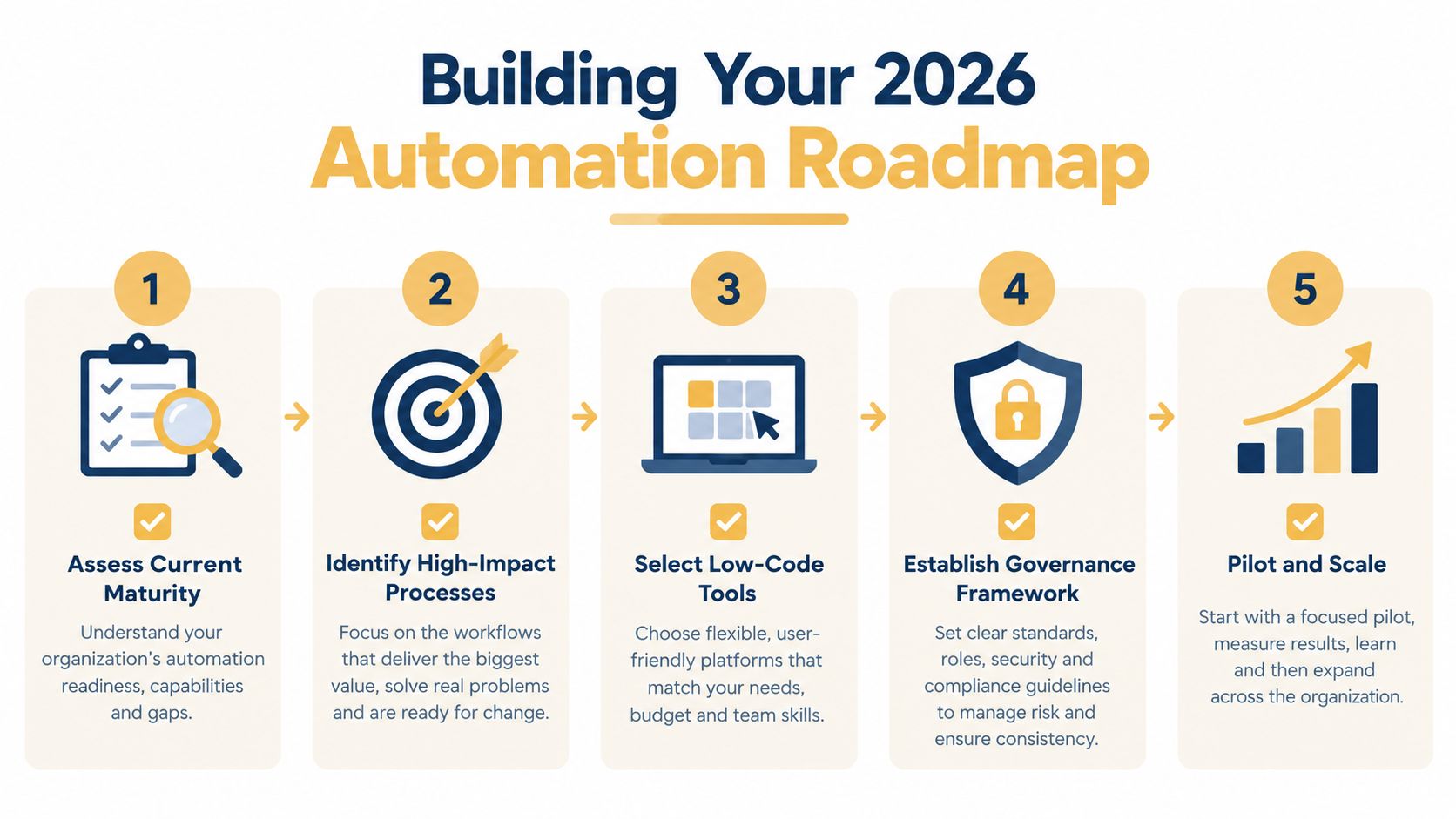
Building Your 2026 Automation Roadmap
A credible roadmap starts with an inventory, not a vendor demo. Map the systems, spreadsheets, approvals, manual handoffs, and recurring exceptions that shape each important process. Then consolidate duplicate tools where possible and nominate owners for the workflows that remain.
Use five practical gates:
- Assess current maturity: Document data quality, integration reliability, ownership, and monitoring.
- Identify high-impact processes: Prioritize recurring bottlenecks with measurable outcomes.
- Select low-code tools: Choose platforms that fit your security, API, reporting, and support requirements.
- Establish governance: Define approval rights, human-in-the-loop controls, documentation, and retirement rules.
- Pilot and scale: Test one bounded workflow, review exceptions, and expand only when the operating model can support it.
A cross-functional automation committee can keep priorities aligned across operations, IT, finance, security, and customer-facing teams. Its job isn't to approve every trigger. It's to decide where automation creates durable value and where a simpler process change would work better.
Use human review wherever errors are costly, inputs are uncertain, or decisions affect customers and employees.
The defining shift in 2026 is from collecting automation features to managing an automation portfolio. Leaders who establish ownership, measure total cost, and improve data quality will gain more from modest workflows than companies that deploy impressive agents without operational controls.
Up North Media helps businesses map operational workflows, identify practical automation opportunities, and build custom web, AI, and process solutions across connected systems. Visit Up North Media to discuss a focused automation roadmap built around measurable business outcomes, reliable integrations, and the right balance of human oversight.