
Google rewrote 76.04% of title tags in one widely cited 2025 analysis, retaining only 35.02% of the original content when it made a change (Ahrefs' summary of SEO statistics). That changes the question SEO teams should ask. A title tag isn't finished when you publish it. It's finished when the title Google displays still communicates the page's value, topic, and intent clearly enough to earn the click.
The most useful title tag best practices in 2026 therefore go beyond counting characters. You need to manage length, pixel width, keyword placement, brand framing, page alignment, and rewrite resistance as one SERP-presentation problem.
Why Title Tags Still Matter More Than You Think
A title tag performs two jobs at the same time. Inside the HTML, it gives search engines a concise signal about the page's subject. In the search results, it often becomes the clickable headline that determines whether someone notices your result or skips to the next one.
Those jobs overlap, but they aren't identical. A crawler can understand a technically relevant title that a human finds vague, repetitive, or unappealing. Conversely, a clever headline can attract attention while failing to explain what the page offers. Strong SEO titles have to satisfy both audiences.
Google's rewriting behavior makes this harder. Historical industry reporting cited by Search Engine Land's title tag guide placed Google's rewrite rate at roughly 76% as of the first quarter of 2025, up from earlier periods. That doesn't mean writing your own title is pointless. It means your submitted title acts as a recommendation, not an absolute command.
Practical rule: Write the title you want Google to preserve, then make the page content strong enough that Google has no obvious reason to replace it.
A rewrite can remove the phrase that established relevance, change the value proposition, or display a different angle from the one you intended. Truncation creates a similar problem. The title may still be technically present in the HTML, but users judge the visible version in the SERP, not the string your CMS stores.
Older SEO advice often reduced the task to placing a keyword inside a fixed character limit. That approach misses the modern problem. The title must now communicate entity clarity, match the page's H1 and body content, survive display constraints, and make sense for the query that triggered the result.
That's especially important for small teams handling SEO themselves. A practical do-it-yourself SEO guide from Affiliate Landscape can help with the wider process, but title work still requires judgment at page level. Templates save time, yet they shouldn't flatten every page into the same generic wording.
The highest-impact decisions are straightforward:
- Length and width: Keep the important meaning visible without treating character count as a perfect measurement.
- Placement and framing: Put the main topic early, add useful modifiers, and use the brand only where it helps.
- Rewrite resistance: Align the title with the H1, page copy, search intent, and the actual content users will find after clicking.
What a Title Tag Actually Is and How It Differs From the H1
The title tag is the HTML <title> element placed inside a page's <head>. It isn't the same thing as the visible headline on the page, and it isn't the same thing as the meta description.
Think of a web page as a book. The title tag is the cover displayed on the search shelf. The H1 is the title printed inside the book, where the reader begins. The meta description is the back-cover summary that may appear below the title in the search result.
A simplified page might contain:
<head><title>Title Tag Best Practices That Drive Real Clicks</title></head>
And the visible page might contain:
<h1>Title Tag Best Practices That Drive Real Clicks</h1>
The meta description sits separately and summarizes the page. It can influence how the snippet reads, but it doesn't replace the title element as the primary source for the clickable result heading.
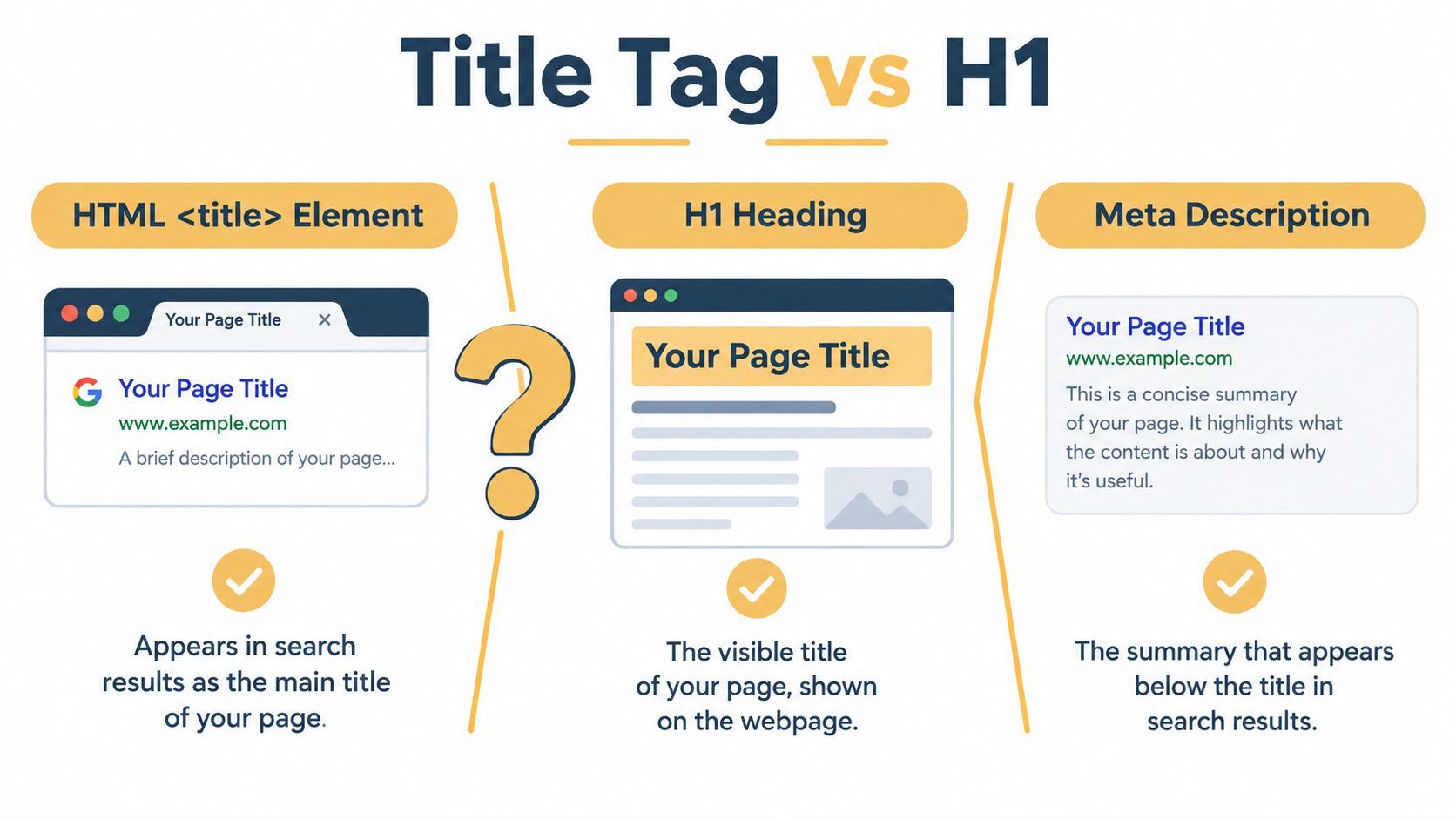
The title tag can also appear in browser tabs and link previews, while the H1 normally appears in the page layout. Google may use other page text when it generates a displayed title, but the title element remains the starting point web teams control.
That distinction explains a common mistake. Copying the H1 into the title tag isn't always wrong, especially when both versions are already clear and concise. It can become a missed opportunity when the H1 is written for an on-page reader while the title tag needs to add a search modifier, location, product attribute, or brand context.
For example, an H1 might be “Our Complete Guide to Choosing a Water Bottle.” A title tag could be more specific: “Best Insulated Water Bottles for Everyday Use | Northstar.” The two should describe the same page, but they don't need to be mechanically identical.
A useful technical explanation of HTML headers and SEO can help teams understand where each element lives. The operational test is simple: if a user clicks the SERP title and sees an H1 that appears to describe a different page, you've created a trust problem and given Google a reason to intervene.
The Right Length and Why Character Counts Are Misleading
Character counts help during editing, but they are not a rule that Google follows. Search results are shaped by available pixel width, the device, the search interface, and the width of each character. Google may also rewrite a title when it considers other page text a better match for the query or the visible result.
That makes title length a presentation problem, not a character-count checklist. A title can fit within a familiar range and still be rewritten, truncated, or displayed differently across interfaces. Aim for wording that remains clear if Google changes the presentation.
A narrow lowercase word and a row of uppercase “W” characters can contain the same number of characters while taking up very different space. Pipes, em dashes, decorative symbols, and emojis also use display room. A modest character count therefore does not guarantee that the full title will appear.
A large-scale benchmark found that pages ranking in positions 1 through 10 averaged 42 characters, while several industry analyses place the practical SEO title range around 40 to 60 characters (Backlinko's title tag analysis). The same source summarizes a commonly cited analysis in which titles in that range earned about 33.3% more clicks than titles outside it. These figures can guide editing, but they are not a universal formula for every query or page type.
A separate analysis of 80,959 titles across 2,370 sites found that titles in the 51 to 60 character range were rewritten least often, at about 39% to 42% (SEO Handbook's title tag research summary). The useful lesson is not to force every title to a specific length. Keep the subject and promise clear, remove excess wording, and check the rendered result.
Character count versus available width
| Element | Avg. Pixel Width | Example | Notes |
|---|---|---|---|
| Lowercase wording | Relatively compact | insulated water bottle | Often fits more meaning than all-caps text |
| Uppercase wording | Wider on average | INSULATED WATER BOTTLE | Uses space quickly and is harder to scan |
| Pipe separator | Narrow | Topic | Brand | Divides the subject from the brand |
| Em dash | Wider | Topic, Brand | Adds separation but takes more room |
| Emoji or decorative symbol | Variable | Topic ★ Brand | May render differently across devices |
“Title Tag Best Practices That Drive Real Clicks” communicates a clear topic, but extra qualifiers can push the useful message beyond the visible area. “Title Tag Best Practices for More Clicks” keeps the subject and outcome while removing clutter.
Over-shortening creates a different problem. “Title Tags” may fit almost anywhere, yet it does not tell the searcher whether the page covers writing, audits, templates, or technical implementation. Short is useful only when it still preserves the page's purpose.
A defensible working target
Where the wording allows it, aim near 51 to 60 characters and keep the rendered title below roughly 580 to 600 pixels, as summarized in the SEO Handbook analysis. Use a SERP preview tool before publication, then inspect the live result after Google processes the page. That second check matters because the published title is an input, not a guarantee of the final SERP heading.
Astrak's guidance on title tags supports placing the primary keyword near the beginning when that wording remains natural. Put the page's meaning first, remove filler, and use punctuation only when it improves scanning. A title that is concise, specific, and easy to reinterpret gives Google less reason to replace it.
Keyword Placement, Modifiers, and Branding That Earn Clicks
Start with the page's primary topic. If the page targets title tag best practices, that phrase or a natural close variant should appear early enough that both the searcher and the search engine can identify the subject immediately.
Front-loading matters for two reasons. Users scan from left to right, and truncated titles preserve the beginning more reliably than the end. The opening should therefore carry the page's core meaning, not a vague brand slogan or a long promotional phrase.
Modifiers add useful context when they reflect the page. Words such as guide, for beginners, near me, a current year, a product attribute, or a location can distinguish intent. They shouldn't be added as decoration. A modifier earns its place when it tells the searcher what kind of result they'll find.
Consider a page about title tags:
- Bare keyword:
Title Tags - Stuffed version:
Title Tags | SEO Title Tags | Best SEO Titles | Title Tag Optimization - Balanced version:
Title Tag Best Practices for More Clicks | Northstar
The first version lacks a clear promise. The second repeats related terms and reads like a keyword list. The third identifies the subject, gives a useful outcome, and reserves space for the brand.
| Version | Title | Intent Match | Modifier Value | Truncation Safe | Brand Policy |
|---|---|---|---|---|---|
| Bare | Title Tags | Partial | Low | High | Brand omitted |
| Stuffed | Title Tags | SEO Title Tags | Best SEO Titles | Title Tag Optimization | Confused | Repetitive | Low | Brand omitted |
| Balanced | Title Tag Best Practices for More Clicks | Northstar | Strong | Clear outcome | Better | Brand trails |
Brand placement depends on the page and the way people search for the business. A known brand usually works well at the end of a non-homepage title, after a pipe or colon. A navigational query may justify leading with the brand because the user is already looking for that entity. On the homepage, the brand normally deserves the most prominent position.
You can also omit the brand on a high-intent commercial page when the product or service needs every available pixel and the brand adds little decision value. Make that an explicit policy, not an accidental omission.
Use one separator consistently. A pipe is compact and familiar. A colon can work well when the second phrase completes the first. A dash can be readable, but wider punctuation may reduce available display space. Avoid patterns such as “Keyword | Brand | Keyword”, which duplicate meaning and make the title resemble a template rather than a useful result.
For more guidance on separating search snippets from other page metadata, see this guide to writing meta descriptions. Before publishing, score the title against four questions:
- Does it match the page's search intent?
- Does every modifier add useful context?
- Will the main message survive display limits?
- Does it follow the site's brand policy?
Title Templates for E-commerce, Publishers, and Local Businesses
Templates help teams work consistently across large sites, but the best template is one that leaves room for the page's distinguishing detail. A product title needs different information from a news article, and a local service page needs a location signal without turning into a list of cities.
E-commerce product pages
Use this structure:
[Product name] + [key attribute or use] + [modifier] + [brand]
Examples:
Stainless Steel Insulated Water Bottle, 32oz | HydroFlaskRunning Shoes for Trail Training | Northstar Athletics
The product name belongs near the front because it establishes what the page sells. The attribute or use case answers the next question, while the brand closes the title when brand recognition supports the decision.
A promotional variation might use a concise offer or availability modifier, but don't let the promotion replace the product identity. The most common abuse is stuffing every product attribute into the title: color, size, material, category, collection, and repeated brand wording. Put only the details that distinguish the page or match the query.
A useful overview of Open Graph and SEO can help teams separate search titles from the metadata used when pages are shared. Those fields may work together, but they serve different presentation surfaces.
Publisher pages
Use:
[Headline hook] + [topic or year] + [site brand]
Examples:
How to Build a Content Brief That Writers Use | Northstar JournalLocal Search Changes Reshape Retail Marketing | Market Desk
For evergreen guides, lead with the practical outcome and add a year only when the page reflects a current edition. For news, lead with the event or development that makes the article timely. Publishers often bury the news hook beneath the publication name or a generic category label, which weakens the reason to click.
Local business pages
Use:
[Service] + [city or neighborhood] + [trust signal] + [brand]
Examples:
Emergency Plumber in Omaha, Available Day and Night | Northstar PlumbingFamily Dentist in Dundee, New Patient Care | Omaha Dental Studio
The service and location establish relevance. The trust signal differentiates the business without making an unsupported promise. Local teams often cram several areas into one title, such as “Plumber NYC | Manhattan Plumber | Brooklyn Plumber.” That structure looks repetitive and doesn't clearly identify which page serves which audience.
Create a distinct page only when the business has useful, location-specific content. Otherwise, rewrite the existing title around the primary service and actual service area.
Templates are starting points, not rules. Rewrite resistance matters more than formula adherence, so every generated title should still match the page a visitor finds after clicking.
Duplicates, Pagination, and Other Patterns That Trigger Rewrites
Google has less reason to preserve a title when the title sends weak or conflicting signals. The most common problems aren't isolated character-count errors. They form a diagnostic pattern: many pages use the same template, the title differs sharply from the H1, or the page content doesn't deliver what the title promises.
Faceted navigation creates this problem on e-commerce sites. A category may produce titles such as:
Red ShoesRed Shoes, Size 9Red Shoes, Size 10
If those filtered URLs don't provide unique search value, control their indexation with the site's canonical and noindex strategy rather than allowing every filter combination to compete. If a filtered page deserves organic visibility, give it distinct content of its own and a title that reflects that purpose.
Pagination needs a different treatment. A series should identify the page's position without making every title meaningless boilerplate. A useful structure might be “Best Laptops 2026, Page 3 of 10 | Northstar.” The title tells users what the series is and where they are in it. The page should also contain the appropriate canonical and pagination signals for the site's implementation.
| Bad Pattern | Example | Why It Triggers Rewrites | Recommended Fix |
|---|---|---|---|
| Duplicate facet titles | Red Shoes on many filter URLs | Pages look interchangeable | Consolidate, canonicalize, or noindex unhelpful facets |
| Generic pagination | Best Laptops, Page 1 of 47 | The title lacks date, brand, or page context | Add unique series context and review pagination signals |
| CMS placeholder | Home or Archive | It doesn't describe the page's purpose | Replace it with a specific page title |
| Repeated product template | Product Name, Category, Site Name across variants | Important distinctions disappear | Add the attribute or use case that differentiates the page |
| Title and H1 mismatch | Title promises a guide, H1 presents a product page | Users and search systems receive conflicting signals | Align the title, H1, and body content |
WordPress, Shopify, and Wix can all generate default titles from page names, categories, or site settings. Review those templates rather than assuming the CMS made a strategic choice. “Product Name, Category, Site Name” may be acceptable for a simple catalog, but it often becomes weak when every variant needs a different selling point.
A rewrite can also follow a mismatch between the title and the on-page copy. If the title promises a complete comparison and the page contains only a short product description, improving the title won't solve the underlying problem. Expand, reorganize, or reposition the page before asking Google to preserve a more ambitious claim.
Testing, Auditing, and Automating Title Tags at Scale
Title optimization becomes more reliable when teams treat it as an operating process rather than a one-time copy task. Start with a regular inventory that combines Google Search Console data with a crawler such as Screaming Frog or Sitebulb.
Export the indexed URLs that matter to the business, crawl the site, and create a working sheet with the submitted title, H1, indexation status, target query, page type, and observed SERP title. Flag titles that are too long for their rendered width, duplicated across multiple URLs, missing the main topic, or visibly rewritten.
Monitor what users actually see
Search Console shows performance data for the page and query, but it doesn't guarantee that the title you wrote is the title every searcher sees. Sample branded and non-branded queries manually, record the rendered title, and compare it with the HTML title.
Look for patterns rather than isolated anomalies:
- Consistent shortening: Google may be removing boilerplate or an unnecessary brand suffix.
- Topic substitution: The page may emphasize a different phrase in its H1 or body copy.
- Query-specific variation: The displayed title may change depending on the search wording.
- Persistent mismatch: The page sends conflicting signals that need editorial or structural work.
For testing, select pages with meaningful impressions and stable enough conditions to compare before and after. Change one title, document the publication date, and use a consistent comparison window in Search Console. Review clicks, impressions, CTR, and average position together. A CTR change without a comparable position shift is more informative than a raw click increase caused by broader visibility.
Don't rewrite an entire site and then claim that any performance movement came from titles. Large simultaneous changes can overlap with ranking updates, seasonality, internal-link changes, and content revisions.
Automate the repetitive work carefully
Dynamic templates are useful for product, article, and location page types. In Shopify, define title patterns that pull the product name and a meaningful attribute. In WordPress, Yoast SEO or Rank Math can provide editable fields and fallback rules. For older sites, a regex-based audit can find repeated suffixes, empty fields, and legacy patterns that manual review would miss.
Automation should generate candidates, not remove editorial judgment. Before a bulk release, sample pages from each template, check for awkward combinations, and confirm that the change won't create new index bloat by making low-value URLs look unique.
Up North Media offers data-driven SEO marketing alongside web application development and AI consulting, so it can be considered by teams that need title governance connected to broader digital workflows. Keep the selection criteria practical: access to crawl data, clear approval steps, transparent reporting, and the ability to connect recommendations with the CMS.
Your Title Tag Checklist for the Next Quarter
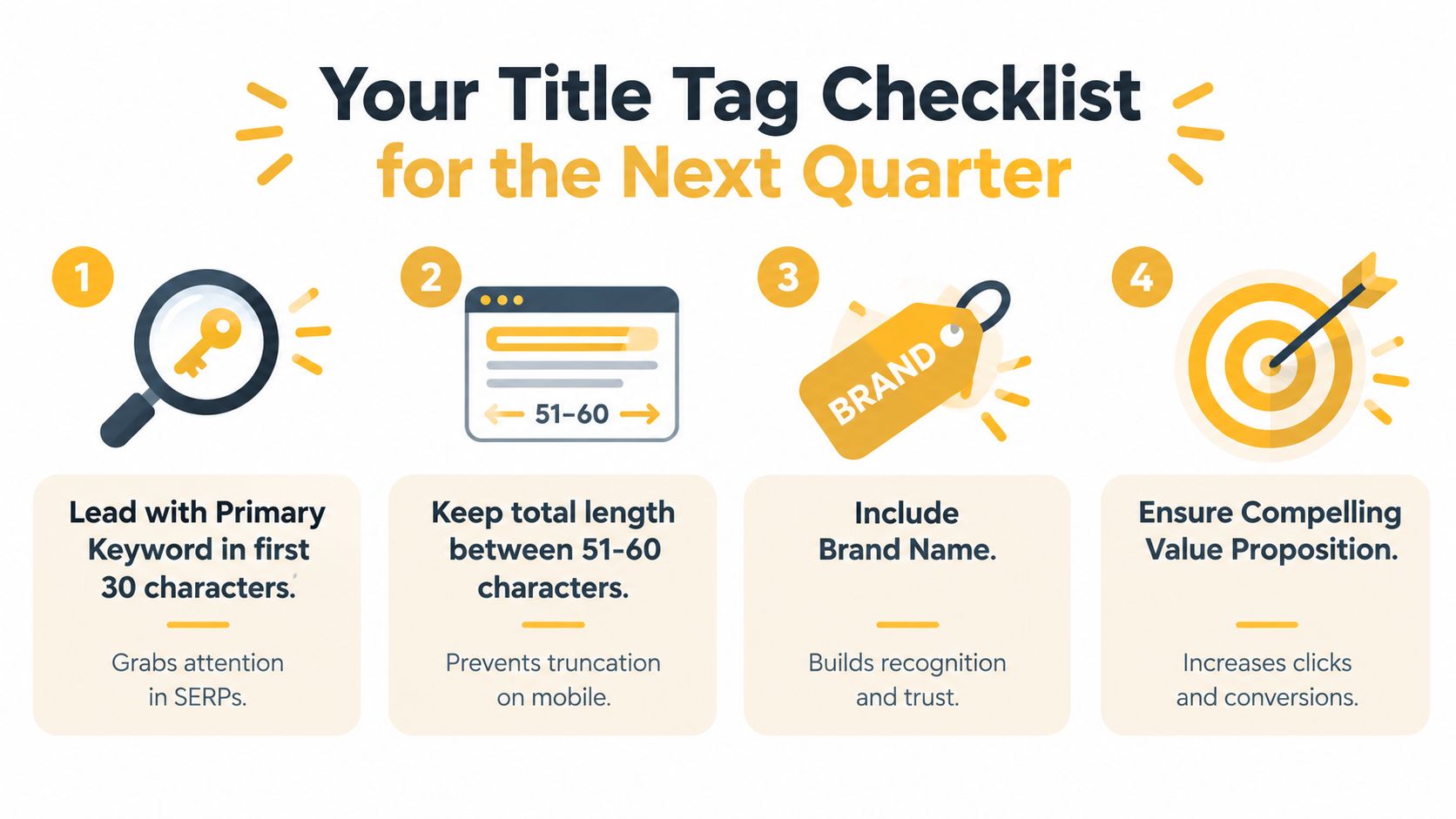
A title tag checklist should improve rewrite resistance, not just hit a character limit. Use these checks:
- Lead with the primary topic: Put the main keyword or a natural close variant near the beginning.
- Target a practical length: Treat the 51 to 60 character range as a working band, not a rule. Check pixel width in a preview tool, since Google may rewrite titles that are too wide or poorly aligned with the page (SEO Handbook's analysis).
- Use the brand deliberately: Add it after a separator on most non-homepage pages when recognition helps. Put it first when users are searching specifically for the brand.
- Write for preservation: Align the title, H1, visible page copy, and search intent. Like matching labels on the same file, consistency gives Google fewer reasons to replace the title.
Review the site in stages rather than changing every URL together.
- Week 1: Crawl the site, record titles, find duplicates and mismatches, and establish a baseline for observed rewrites.
- Weeks 2 to 4: Rewrite high-value landing pages first, especially pages with strong impressions but weak click appeal.
- Month 2: Improve reusable templates for product, article, category, and location pages.
- Month 3: Compare CTR, impressions, average position, and rewrite patterns with the baseline.
Tomorrow, choose one important page. Compare its title with the H1 and visible SERP version, then publish a concise revision that states the page's real value first.
Up North Media helps businesses improve SEO strategy, build conversion-focused web applications, and apply AI consulting to marketing workflows. Visit Up North Media to discuss a title tag audit or scalable content system.