
A retailer in Omaha can publish strong buying guides, add new product categories, and improve its internal linking, yet still watch organic visibility stall. The problem may not be the content plan. Googlebot may be spending its available attention on filter combinations, session URLs, redirecting links, empty search pages, and slow responses instead of the pages that generate revenue or readership.
That's the operational meaning of crawl budget optimization. Google defines crawl budget as the combination of crawl rate and crawl demand, meaning the number of URLs Googlebot can and wants to crawl on a site. The practical question isn't whether Google can technically reach a URL. It's whether your architecture, server, and indexing signals help Google spend its crawl activity on pages that deserve discovery and revisiting.
Why Your Site Is Wasting Its Most Valuable Asset
A mid-sized e-commerce retailer may have a clean catalog, a useful buying guide, and thousands of product variations. The team checks a few important URLs in Google Search Console and sees that they're accessible, so the site appears healthy. Then server logs reveal a different picture: Googlebot repeatedly requests parameter combinations created by sorting, filtering, and session tracking while newer product pages receive little attention.

Google's definition matters because it combines capacity with interest. Crawl rate reflects what the server can handle, while crawl demand reflects what Googlebot wants to crawl. Google says a site can increase its crawl budget in only two broad ways, by adding server resources when host load is exceeded and by improving content quality for the relevant Google product, as explained in its crawl budget documentation.
The invisible cost appears in wasted requests and delayed discovery. A thin URL still consumes server work. A redirecting internal link still requires Googlebot to request the old address before reaching the destination. A faceted navigation system can expose combinations that have no distinct search value, creating a large crawl surface without expanding the useful index.
The waste usually starts in the architecture
Consider a retailer with category filters for brand, color, size, material, and price. Each selection can create a different URL, even when the visible product set barely changes. If internal links expose those combinations freely, crawlers can follow them through an effectively unproductive part of the site.
That doesn't mean every parameter URL should be blocked immediately. Some parameterized pages may have a genuine search purpose, and blocking them can prevent Google from seeing canonical signals or other page information. The audit has to distinguish useful landing pages from combinations that only rearrange the same inventory.
A practical faceted navigation SEO guide can help teams map those URL patterns before changing robots.txt or navigation templates. For the page templates that should rank, sound on-page fundamentals still matter. This on-page SEO guide for small businesses is a useful companion when content quality and page-level relevance need attention.
Measure the operational loss
Google Search Console provides a 90-day Crawl Stats report showing crawl requests, download size, and response time across that rolling window. Use it to identify broad changes, but don't treat the report as a substitute for logs. Search Console tells you how Google's crawling activity is behaving at a high level. Logs show which URL patterns receive that activity and whether those requests serve business priorities.
Audit rule: If you can't connect Googlebot requests to URL patterns, response behavior, and page value, you aren't managing crawl budget yet. You're only observing it.
The Mechanics Behind Googlebot Crawl Behavior
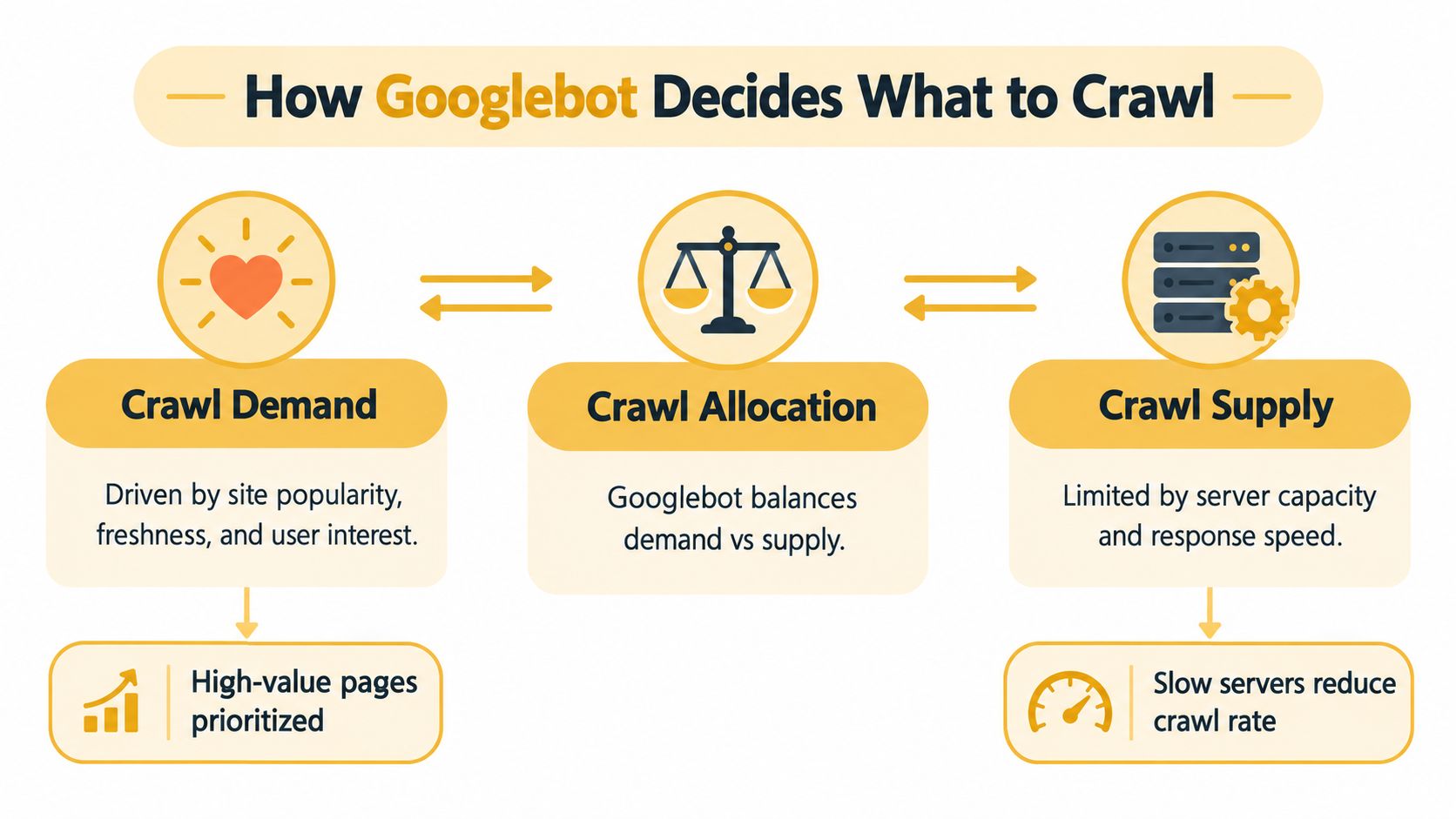
Googlebot doesn't assign a single static allowance and crawl URLs in a simple queue. Its behavior reflects two separate conditions. Crawl demand determines how much Google wants to revisit or discover, while crawl rate limits how aggressively it can request pages without creating excessive host load.
Crawl demand tends to follow the signals that make a URL or site worth revisiting. Important pages, recently changed content, and pages with meaningful user interest can attract more attention. Internal linking also affects discovery because Googlebot needs paths through the site. A product page buried behind a complicated filter interface has a weaker discovery path than one linked directly from a relevant category and an XML sitemap.
Crawl rate is the infrastructure side. Googlebot observes how the host responds and adjusts its activity to avoid overloading the server. Slow responses, timeouts, unstable application behavior, and resource contention can reduce the practical supply of crawling, even when the site has plenty of pages worth visiting.
Demand and supply create a prioritization problem
Think of the process as an allocation decision:
| Signal | What it represents | What an auditor checks |
|---|---|---|
| Crawl demand | Google's interest in discovering or revisiting URLs | Freshness, page value, popularity, and internal prominence |
| Crawl supply | The requests the server can reliably support | Response times, errors, timeouts, and host load |
| Crawl allocation | How Googlebot balances interest with technical capacity | Which URL groups receive requests and which are delayed |
The key mistake is assuming that better server performance automatically solves every crawl issue. Google's documentation makes clear that crawl budget increases through server resources when host load is exceeded and through improved content quality for the target product. A fast server can't create demand for weak pages. Conversely, valuable content can struggle to receive timely attention if the host responds slowly or returns unstable results.
Robots.txt is part of the allocation strategy, but it isn't a universal cleanup tool. It can prevent crawling of URL spaces that shouldn't consume requests, yet it also prevents Googlebot from fetching blocked pages and seeing signals on those pages. The robots.txt file guide is useful for understanding the file's scope before you deploy broad rules.
A block should remove a known crawl trap, not conceal an unresolved canonical or internal-linking problem.
Server logs supply the missing evidence. They show whether Googlebot requests valuable HTML pages, repeats obsolete URLs, encounters redirect chains, or spends time on parameters generated by templates. For teams planning broader technical work, the Big Moves Marketing SEO approach provides useful strategic context for connecting site structure, content priorities, and technical execution.
Step-by-Step Diagnostic and Fix Workflow
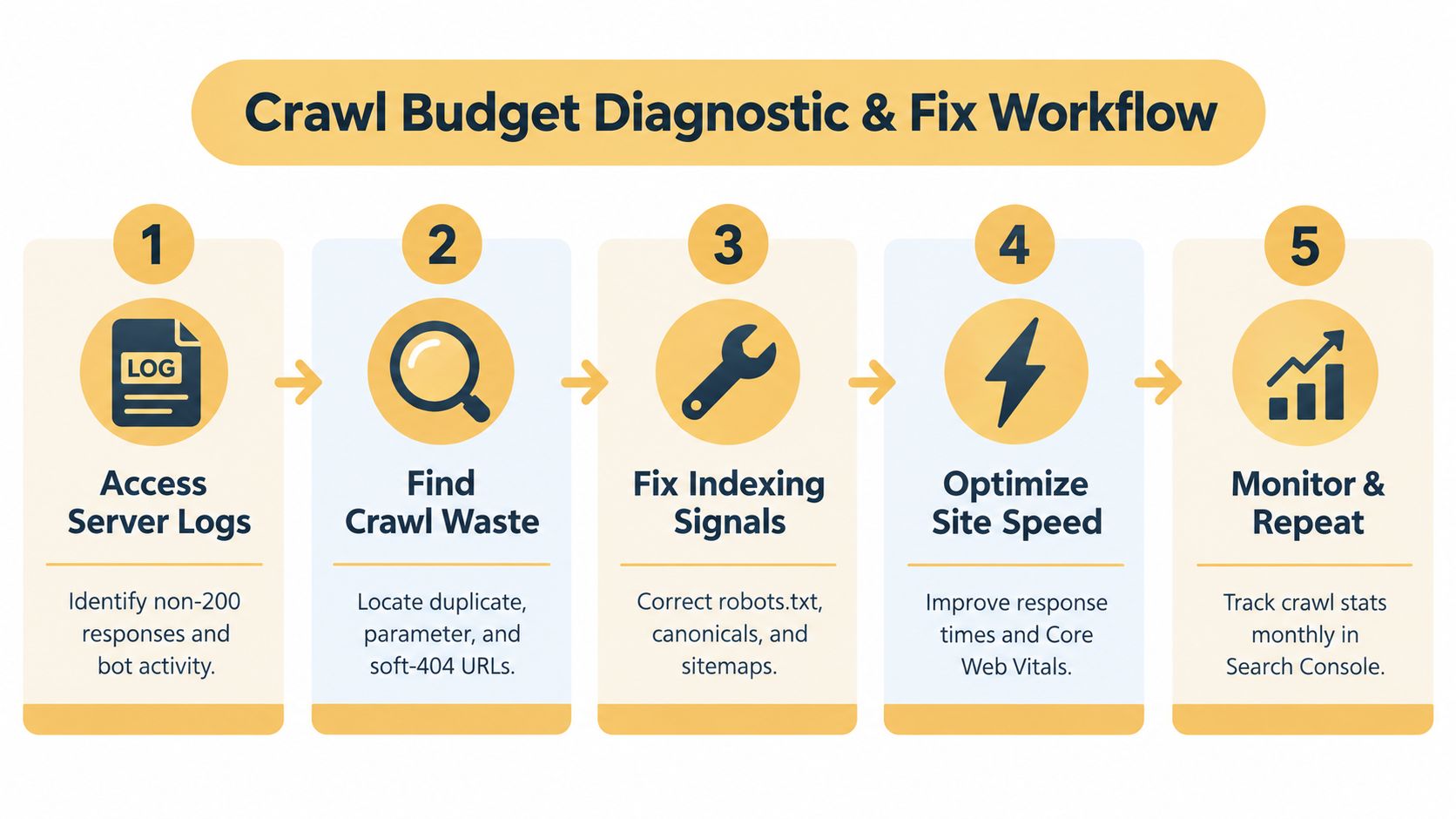
Start with evidence, not directives. A robots.txt edit can reduce visible crawling while leaving the underlying architecture unchanged, and a sitemap submission can spotlight important URLs without stopping Googlebot from finding low-value ones elsewhere. The reliable workflow follows the request path from server logs to templates, signals, and monitoring.
Phase one starts in the server logs
Collect a representative log sample and isolate verified Googlebot activity. Review the requested URL, status code, response duration, referrer where available, and user-agent information. Don't assume every crawler claiming to be Googlebot is genuine. Your technical team should validate bot identity through an appropriate verification process before drawing conclusions.
Group requests by pattern rather than reviewing URLs one by one. Useful groups include:
- Status codes: Separate successful responses from redirects, client errors, server errors, and apparent soft 404 behavior.
- URL families: Identify parameters, faceted paths, search results, session identifiers, duplicate host variants, and obsolete URL structures.
- Page purpose: Compare commercial pages, editorial content, navigational pages, and utility URLs.
- Response behavior: Find templates or endpoints that consistently respond slowly or fail under crawler demand.
The question is simple: where does Googlebot spend requests, and what does each request produce? A high request volume isn't automatically good. It may indicate healthy interest in important content, or it may expose an uncontrolled URL generator.
Phase two identifies crawl waste
Trace each suspicious URL back to the link or template that created it. If a session ID appears in internal links, remove it from crawlable URLs and use a cookie-based approach for session information. If sorting and filtering create near-duplicate addresses, decide which combinations deserve indexable landing pages and which should remain user-interface states without crawlable discovery paths.
Check internal search results, calendar-like URL systems, infinite scroll implementations, and empty category pages. These areas can create URLs that return technically valid responses while offering little distinct value. Fix the generator first. Blocking the output without removing internal links can leave users and crawlers encountering the same problem through other paths.
Phase three fixes indexing signals
Robots.txt rules should reflect a deliberate URL policy. Block sections that have no search purpose and create substantial crawl waste, but don't use robots.txt to manage every duplicate page by default. If Google must see a canonical tag on a URL to consolidate signals, blocking that URL prevents the fetch needed to read the tag.
Canonical tags should point from duplicate or variant pages to the preferred indexable URL, and the preferred URL should be consistent across internal links, sitemaps, and redirects. An XML sitemap should contain the URLs you want discovered and evaluated, not every address your CMS can generate.
Redirects deserve a direct cleanup pass. Replace internal links to redirected URLs with links to the final destination. For a permanent move, use a 301 redirect and update references rather than relying on a temporary 302. Remove chains so Googlebot doesn't have to request several intermediate addresses before receiving the page that matters.
Phase four improves server delivery
Use the log findings to identify slow templates and expensive application requests. Work with developers on caching, database queries, rendered HTML, asset delivery, and server capacity. The right fix depends on the bottleneck. Compressing assets won't resolve an overloaded product API, and upgrading hosting won't repair a template that generates thousands of unnecessary URLs.
Page speed also affects users, so prioritize the templates that carry organic value and conversion intent. Test representative category, product, and article pages under realistic conditions. Watch for timeouts and intermittent failures, not only an attractive average.
Phase five closes the loop
After deployment, compare the affected URL groups in logs with Google Search Console's Crawl Stats report. Look for healthier distribution, fewer repeated waste patterns, more reliable responses, and better discovery of priority URLs. Don't chase a larger crawl count as the sole objective. The useful result is a crawl pattern that aligns with the site's commercial and editorial priorities.
For a broader review of related issues, use this technical SEO audit checklist alongside the crawl-specific workflow. It helps prevent teams from fixing crawler symptoms while missing sitemap, indexability, rendering, or architecture defects elsewhere.
Tools and KPIs for Ongoing Crawl Monitoring
No single tool explains crawl behavior completely. Google Search Console is the baseline because its Crawl Stats report provides Google's view of crawl activity, including requests, download size, and response time over a rolling 90-day period. It's accessible and useful for trend detection, but it won't replace URL-level server evidence.
Server logs offer the deepest operational detail. They reveal the exact paths requested, status responses, repeated patterns, and crawler behavior against specific templates. The trade-off is implementation effort. Log formats vary, data can be noisy, and teams need a reliable process for filtering genuine Googlebot activity and grouping URLs meaningfully.
Match the tool to the decision
| Tool | Strongest use | Limitation |
|---|---|---|
| Google Search Console | Monitoring Google's crawl activity and response trends | Limited visibility into every URL pattern and request context |
| Screaming Frog | Reproducing a crawl and auditing links, directives, canonicals, and responses | A crawler simulation isn't the same as Googlebot's production behavior |
| Ahrefs | Combining technical observations with broader SEO and link analysis | Its crawl data reflects its own crawler and settings |
| Loggly | Centralizing and searching log data for recurring request behavior | Requires useful log collection, parsing, and interpretation |
| Custom log analysis | Connecting bot requests to revenue, content type, and application behavior | Demands technical ownership and maintenance |
Screaming Frog is especially useful before and after a release. Crawl the site with controlled settings, export redirect and canonical findings, then compare the results with real Googlebot requests. Ahrefs can add competitive and link context, while Loggly can help engineering teams search crawler errors alongside other application events.
Teams evaluating marketing software and discovery tools can also review IndieTool listing credits as part of their broader tool-selection process. The important choice isn't the largest platform. It's the workflow that turns findings into assigned fixes and verifies the result.
Track quality, not vanity volume
Use KPIs that show whether crawling is becoming more useful:
- Priority URL coverage: Are important product, category, and article URLs appearing in logs and remaining technically accessible?
- Waste share: Is Googlebot requesting fewer parameter, duplicate, obsolete, and utility URL patterns?
- Status health: Are 404, server-error, redirect-chain, and soft-404 patterns declining?
- Response behavior: Are priority templates returning reliably and without avoidable delay?
- Indexing alignment: Does the set of indexed URLs correspond more closely to the pages you intend to rank?
- Crawl distribution: Is Googlebot spending activity across valuable sections rather than concentrating on generated URL spaces?
An increase in requests can be positive when it reflects valuable fresh content. It can also signal a crawl trap or an uncontrolled publishing system. Read every KPI against logs, releases, and URL-level intent.
Implementation Checklist and Real-World Success
A crawl budget program becomes useful when someone can execute it during a release cycle, assign ownership, and verify the outcome. Keep the checklist tied to URL purpose and server behavior.
The implementation checklist
- Export evidence: Pull Google Search Console Crawl Stats data and obtain server logs covering meaningful crawler activity.
- Validate the bot: Confirm that requests attributed to Googlebot are genuine before using them in decisions.
- Group URL patterns: Separate priority pages from parameters, session URLs, faceted combinations, duplicate variants, redirects, errors, and utility paths.
- Map the architecture: Identify which templates generate each waste pattern and which internal links expose it.
- Protect priority pages: Strengthen direct internal links, maintain clean XML sitemap entries, and remove unnecessary discovery barriers.
- Set canonical policy: Choose the preferred URL for each duplicate family and apply consistent canonical, redirect, sitemap, and internal-link signals.
- Repair redirects: Point internal links directly to final destinations and reserve permanent redirects for genuine permanent moves.
- Correct responses: Return appropriate status codes for removed pages, moved content, and invalid URLs.
- Improve delivery: Address slow application paths, unstable templates, heavy rendering, and server constraints with development support.
- Monitor after release: Recheck logs and Search Console rather than assuming that a successful deployment produced a healthy crawl pattern.
Use a realistic success standard
A hypothetical mid-sized retailer discovers that its internal links expose filter combinations, product pages point through outdated redirects, and the category template responds slowly during busy periods. The team removes session identifiers from crawlable URLs, limits indexable filter combinations, updates internal links to final destinations, aligns canonicals and sitemaps, and improves the slow template.
The expected success isn't a dramatic crawl spike. It's a cleaner distribution of Googlebot requests, fewer wasted responses, more reliable access to priority pages, and stronger alignment between the crawlable site and the pages the business wants to rank. Organic visibility may improve as important pages are discovered and processed more efficiently, but the audit should report only observed changes, not promise a predetermined lift.
Maintenance principle: Treat every new URL-generating feature as a crawl-budget change, not just a product change.
Review crawl behavior after navigation updates, catalog imports, CMS migrations, and major content launches. A site can regress through a small template change that adds parameters to every internal link or turns an expired product page into a soft 404. Sustainable SEO depends on keeping architecture, server delivery, and page value aligned over time.
Up North Media can audit crawlability, indexability, XML sitemaps, site structure, and performance, then support the technical implementation needed to protect valuable pages. Visit Up North Media to discuss a crawl budget audit and a practical fix plan for your site.