
A robots.txt file is a plain-text file at your site's root that gives compliant bots advisory instructions about which paths to crawl, not a security or indexing control. It began as a voluntary convention in 1994 and became an official Internet standard in September 2022, about 28 years later, through RFC 9309 (RFC 9309).
You've published a new set of product pages, then noticed crawler activity hitting search results, internal filters, login paths, and other areas that offer little search value. Or perhaps a developer tells you that one line in robots.txt will “remove” an old page from Google. Both situations are common, and both can lead to costly misunderstandings.
Introduction to What a Robots.txt File Really Does
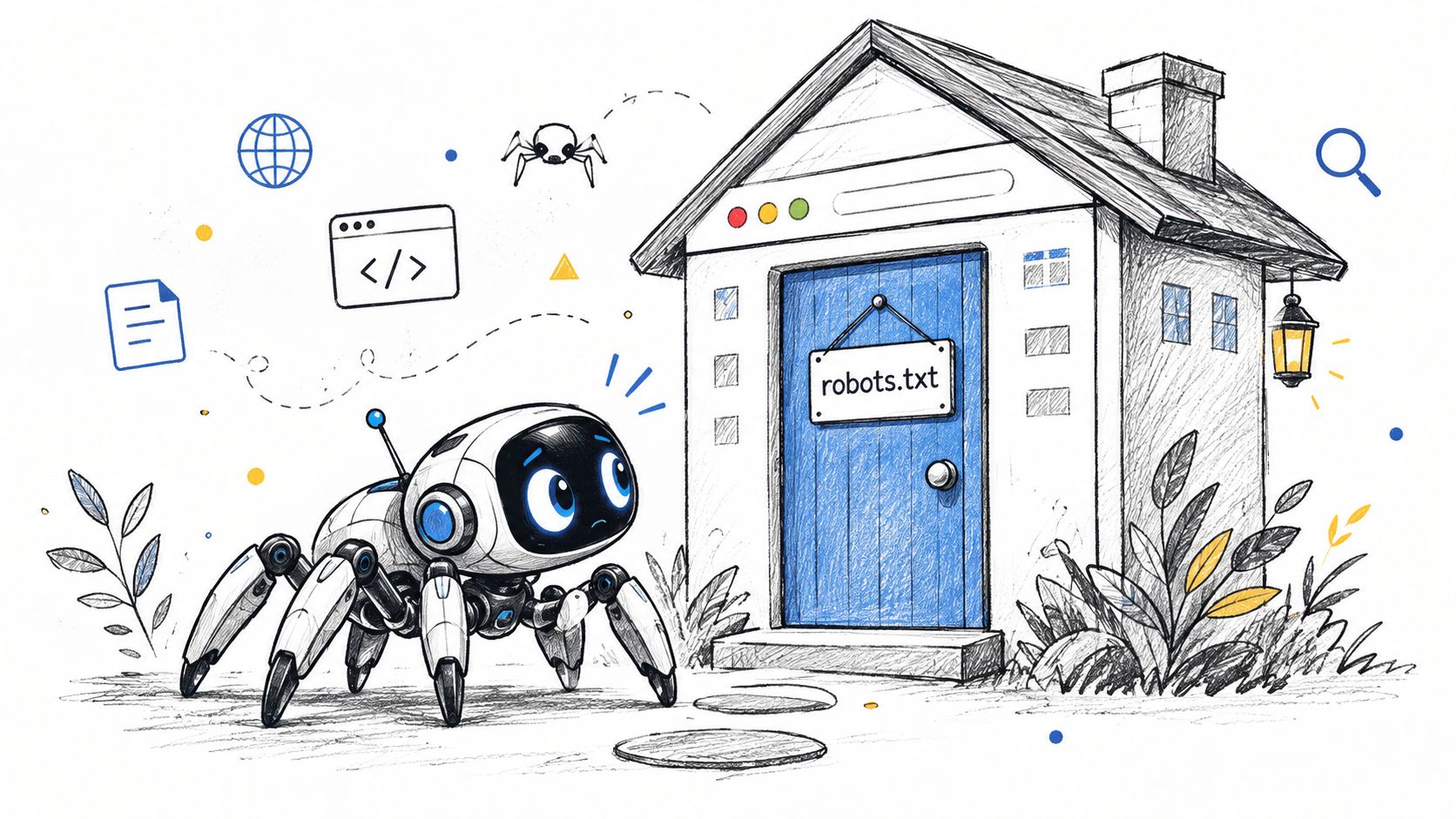
A crawler arrives at your website much like a visitor approaching a building. Before walking through every room, it checks the sign at the entrance. That sign might say, “Please don't enter the staff area,” or “The public rooms are open.” A robots.txt file plays a similar role for web crawlers.
It tells compliant bots which parts of a site they may fetch and which paths they should avoid. It doesn't authenticate users, encrypt information, stop malicious scrapers, or guarantee that a URL disappears from search results. The Robots Exclusion Protocol standard describes these instructions as crawl rules, while Google's documentation explains that robots.txt isn't a mechanism for keeping a page out of Google.
Practical rule: Treat robots.txt as an advisory traffic sign, not a locked door.
For many sites, a simple file that allows normal crawling is enough. Others use it to reduce fetches of duplicate filter combinations, private-looking application areas, or low-value technical paths. That can help search engines spend their available crawling effort on URLs that matter more, although it won't solve every indexing problem.
Your XML sitemap has a different job. It provides a list of important URLs rather than instructions about what crawlers should avoid. Keeping both files accurate is part of a sensible technical SEO process, alongside XML sitemap best practices.
The safest way to work with robots.txt is to start with its limits, then learn the syntax, test every change, and monitor the production file after deployment.
How Robots.txt Works for Crawling and Indexing
A robots.txt file normally lives at the root of the host it governs:
https://example.com/robots.txt
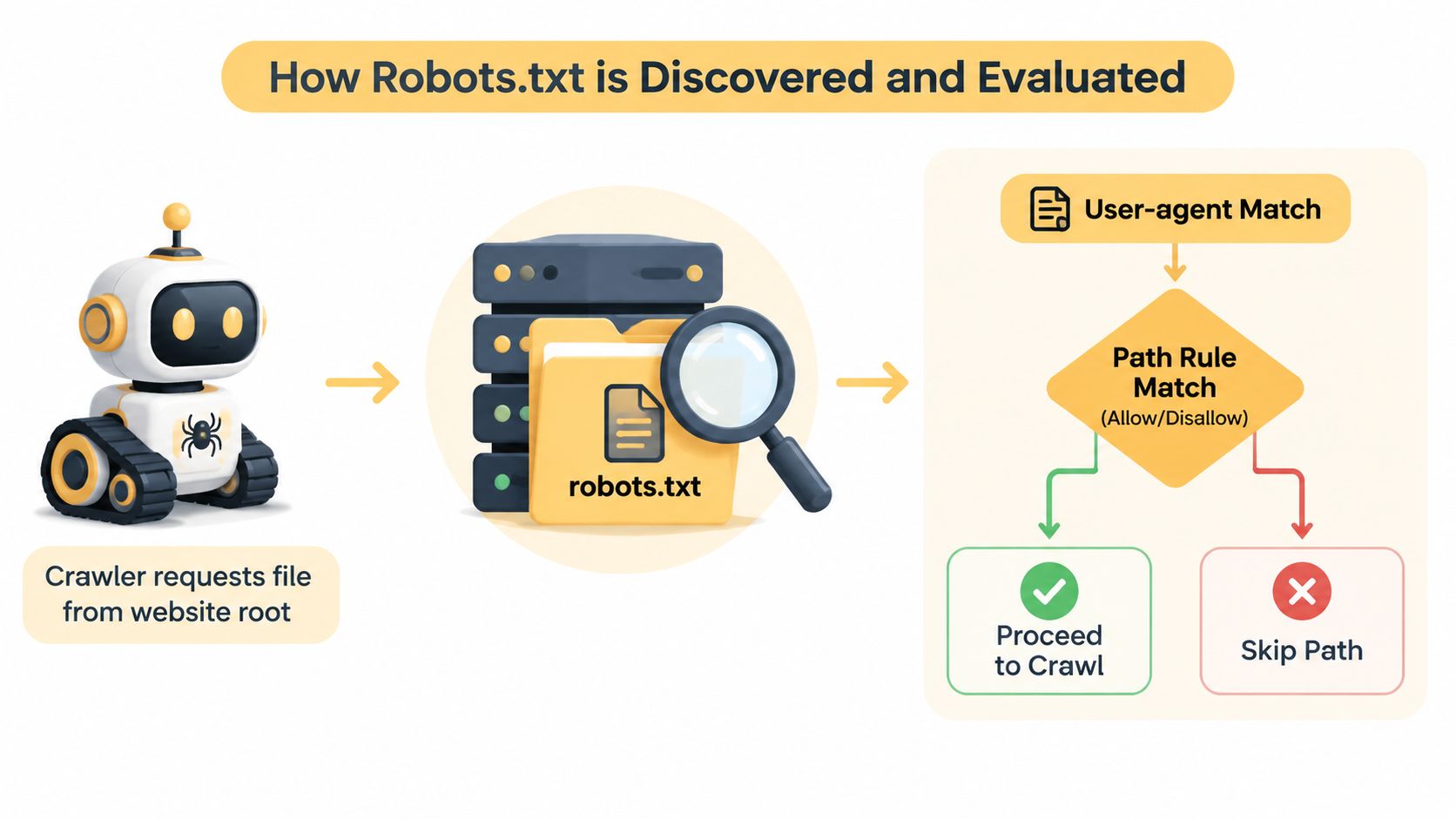
That location determines its reach. A file at /blog/robots.txt does not control the entire domain. When a crawler visits a site, it requests the root file, checks the instructions for its user-agent name, then compares those rules with the path it wants to fetch.
The process works like a road-sign system:
- The crawler identifies itself. It sends a user-agent name, such as a search engine crawler or another bot.
- The crawler finds the matching group. A
User-agentline identifies which bot the following rules address. - The path is evaluated.
Disallowtells a compliant crawler to skip a matching path, whileAllowcan permit a more specific path. - The crawler chooses an action. It requests the URL or avoids it based on the applicable rules.
Crawling is not indexing
Crawling means fetching a URL and examining its response. Indexing means deciding whether information about that URL should be stored and potentially shown in search results. These actions are related, but a crawl instruction does not decide the indexing outcome.
If you disallow a URL, Google may still discover it through an internal link, an external link, or a sitemap. Because Googlebot may not fetch the page, it might not see the content or a noindex directive. A robots.txt rule therefore does not reliably remove an already discovered URL from Google's index, as explained in the robots.txt introduction.
Where crawl budget fits
Google defines crawl budget as the set of URLs Googlebot can and wants to crawl. Blocking low-value paths can reduce unnecessary fetching, particularly on large or parameter-heavy websites. It does not make weak pages valuable, repair internal linking, or force important pages into the index.
The file is voluntary guidance for compliant crawlers. Some automated agents ignore it, interpret it differently, or refresh it on another schedule. That makes robots.txt an advisory traffic sign, not an access-control system. AI bots can also be blocked when they identify themselves, but a bot that ignores the file can still request the content. Include robots.txt in a technical SEO audit checklist and review the production file after changes.
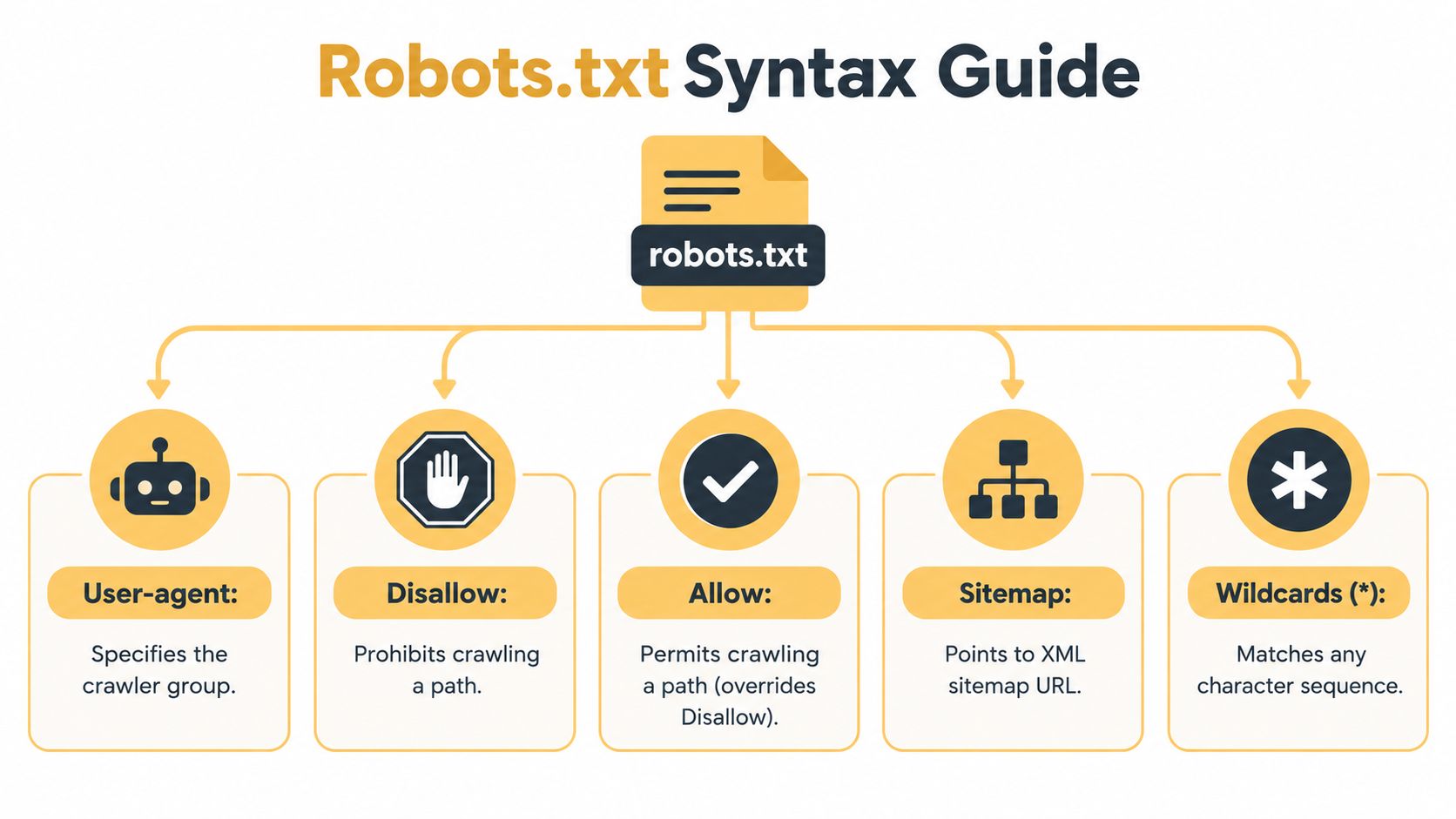
Understanding Robots.txt Syntax and Key Directives
Robots.txt is deliberately readable. A useful file usually consists of a crawler group followed by one or more path rules. Start with the smallest rule that expresses your intent, then test it against real URLs.
User-agent groups
User-agent names the crawler affected by the following directives. An asterisk represents all user agents:
User-agent: *
Allow: /
This tells compliant crawlers that every path is allowed. You can target a specific crawler instead:
User-agent: Googlebot
Disallow: /internal/
A group aimed at one bot shouldn't be assumed to control every other bot. If you need a broad rule, use the wildcard group. If you need separate policies, keep each group clear and review which directives belong to which user agent.
Disallow and Allow
Disallow identifies a path that a compliant crawler should avoid:
User-agent: *
Disallow: /admin/
This rule covers URLs beginning with /admin/. It doesn't protect the area from someone who knows the URL, and it doesn't replace login controls.
Allow signals that a path may be fetched:
User-agent: *
Disallow: /assets/
Allow: /assets/public/
Specific matching behavior can depend on the crawler's implementation, so don't rely on an intricate rule set without testing it. Keep paths precise, and remember that matching is case-sensitive in the way specified by the protocol and the server environment. /Private/ and /private/ shouldn't be treated as interchangeable.
Wildcards and end markers
The asterisk wildcard can match a sequence of characters:
User-agent: *
Disallow: /*?filter=
This is intended to catch URLs containing a filter parameter. A dollar sign can indicate the end of a URL pattern:
User-agent: *
Disallow: /*.pdf$
Use patterns sparingly. A broad wildcard can block valuable content along with unwanted variations. Test both the URL you want to block and a nearby URL you want to retain.
Sitemap declarations
A sitemap line points crawlers to an XML sitemap:
Sitemap:
It isn't a crawl permission rule. It helps discovery and provides a list of URLs you consider important, while Allow and Disallow provide crawl guidance.
Comments begin with # and help humans understand why a rule exists:
# Avoid crawling internal search results
User-agent: *
Disallow: /search/
Write one directive per line, avoid accidental spaces or copied legacy rules, and document the business reason for unusual patterns. A future developer should be able to tell whether a rule protects crawl efficiency, supports a migration, or was added temporarily.
Practical Robots.txt Examples for Common Scenarios
A robots.txt file works like an advisory traffic sign for compliant crawlers. It can suggest which paths to visit, but it does not lock a staging site, remove a page from search, or control every later use of downloaded content. Choose each rule according to the URL pattern and the result you need.
Common patterns
A staging environment should use authentication or another access control. Robots.txt can add a crawl signal, but it cannot keep a nonproduction site private.
User-agent: *
Disallow: /
On a live site, limiting routine access to administrative paths may be appropriate:
User-agent: *
Disallow: /admin/
Disallow: /login/
A retailer with filter URLs might target specific parameters:
User-agent: *
Disallow: /*?color=
Disallow: /*?sort=
Check the URL format first. Parameters may appear in different positions or combine in several ways, so a pattern can miss variants or block useful pages. Guidance on faceted navigation SEO can help separate crawl waste from index bloat and navigation problems.
Before blocking any path, confirm that it does not contain content, scripts, stylesheets, or media required to render important pages. A blocked resource can affect how a crawler understands the page.
AI-related rules require a separate decision. A site can identify a compliant user-agent group such as GPTBot and request that it avoid the entire site:
User-agent: GPTBot
Disallow: /
That instruction addresses crawling by the named bot. It does not automatically govern model training, AI search indexing, answer generation, cached copies, or other downstream uses. Those outcomes depend on the provider's policies and the technical controls available to the site owner. Robots.txt should therefore be treated as guidance, not a universal AI-use switch.
Choosing the Right Control for Common Goals
| Goal | Use Robots.txt | Better Alternative |
|---|---|---|
| Reduce crawling of duplicate filters | Use a carefully tested path or parameter pattern | Improve faceted navigation, canonical signals, and internal linking |
| Keep an admin area private | Don't rely on it alone | Authentication and server-side access control |
| Remove a public page from search | No, blocking can prevent crawlers from seeing removal instructions | noindex, removal workflows, or authentication |
| Stop a specific compliant AI crawler | Target its user-agent with Disallow | Review provider policies and use technical bot controls where appropriate |
| Prevent access to confidential data | No | Authentication, authorization, and secure storage |
Robots.txt vs Meta Robots and HTTP Status Codes
A common assumption sounds logical: “If I don't want a page in Google, I'll block it in robots.txt.” That choice can create the opposite of the intended workflow because Google may need to crawl the page to see a noindex directive.
Robots.txt answers, “May this compliant crawler fetch this path?” A page-level meta robots tag answers, “After fetching this page, should the search engine index or follow it?” The X-Robots-Tag HTTP header provides similar indexing instructions for responses that might not contain HTML, such as PDFs.
<meta name="robots" content="noindex, follow">
If the page is crawlable, Google can request it, read the directive, and process the indexing instruction. If robots.txt blocks the same URL, the crawler may not retrieve the HTML and therefore may not see the meta tag.
Match the control to the job
| Control | Scope | Primary job | Typical example |
|---|---|---|---|
robots.txt | Site host and URL paths | Guide compliant crawler access | Disallow: /private-area/ |
| Meta robots | Individual HTML page | Provide indexing and link-following instructions | noindex, follow |
X-Robots-Tag | HTTP response | Provide indexing instructions in headers | X-Robots-Tag: noindex |
| HTTP status | Individual response | Communicate resource state | 404 Not Found or 410 Gone |
Use authentication for confidential material. Use a status code when content has been removed or relocated, with redirects where an appropriate replacement exists. Use noindex when a public URL may be crawled but shouldn't remain in search results. Use robots.txt when your primary objective is to guide crawling of a path, not to guarantee deindexing.
The same URL shouldn't receive conflicting signals without a clear reason. A blocked page with a noindex tag is a classic example of a rule that prevents the crawler from seeing the instruction you intended to use.
Common Mistakes and How to Test Your Robots.txt File
A robots.txt file may follow the syntax and still cause serious problems. The risk often comes from where the file is deployed and which URLs its rules match, rather than from a misspelled Disallow.
Check the production file first
Open the root URL on the live host and confirm that it returns the intended text. Check both non-www and www versions when they serve separately, along with protocol or host variations that crawlers can reach.
Review these common failure points:
- Accidental sitewide blocking:
Disallow: /remains from staging after launch. - Blocked rendering resources: CSS, JavaScript, images, or other assets fall under a broad directory rule.
- Overwide patterns: A wildcard catches product pages as well as unwanted parameters.
- Wrong path assumptions: A rule names a folder that does not match the production URL structure.
- Unreviewed AI rules: A bot-specific block is added without separating search discovery, AI input, and model training decisions.
Google Search Console's robots.txt testing tools can show how a rule applies to a URL. Use URL Inspection for important pages, then review the live result and rendering signals after deployment. Test one URL you intend to block, one you intend to allow, and an important page that relies on shared assets.
Do not assume every bot behaves alike
Google's refresher describes the Robots Exclusion Protocol as allow and disallow rules for specific robots, while also explaining that crawler compliance and refresh timing vary. Some scraper bots may not reliably follow or refresh robots.txt on the same 24-hour cadence Google recommends, as discussed in Google's 2025 robots.txt refresher.
A rule change may therefore take time to affect one crawler and have no effect on another. Robots.txt is an advisory traffic sign, not a lock. For abusive or noncompliant traffic, use server-side controls, authentication, WAF rules, or bot-management measures. Those controls are also more appropriate when you need to restrict access or address AI-bot activity directly. A robots.txt rule can express a preference about crawling, but it does not by itself control indexing or guarantee that content will not be used for model training.
Maintenance check: After every major launch, migration, URL restructure, or faceted-navigation change, review robots.txt in production and retest representative URLs.
Keep a short change log recording who changed the file, which paths were affected, and why. Confirm that the XML sitemap still contains the URLs you want discovered, and check that important content has not been placed behind a crawl rule unintentionally.
Up North Media offers technical SEO audits, data-driven SEO marketing, custom web development, and AI consulting for businesses aligning crawling and content controls with broader digital goals. Visit Up North Media to request a consultation about your robots.txt setup.