
Breadcrumbs aren't a ranking shortcut, and they're no longer primarily a search-result decoration. Google removed breadcrumb trails from mobile search results in January 2025, so the old pitch about making every mobile snippet look cleaner is outdated. The practical case for breadcrumb navigation SEO now rests on something more durable: clearer site architecture, useful internal links, better orientation for visitors, and structured data that helps Google interpret page relationships.
That shift changes how I evaluate implementations. A breadcrumb trail that merely passes a schema test but points to weak taxonomy pages is best-practice theater. A visible, canonical-aware trail that reflects the site's real hierarchy can make a large catalog easier to use and easier for search engines to understand. Google describes breadcrumbs as a way to show a page's position within a site hierarchy, and its documentation explains that BreadcrumbList structured data can help Google understand page content and produce a richer search appearance (Google's Breadcrumb structured data documentation).
Do Breadcrumbs Still Matter After Google's Mobile Changes
Breadcrumbs still matter, but the strongest case is no longer a mobile SERP decoration. After Google removed breadcrumb trails from mobile search results in January 2025, teams lost a visible snippet benefit. They did not lose the links on their pages, the hierarchy those links communicate, or the ability to process BreadcrumbList markup.
The change affects how breadcrumb navigation SEO should be evaluated. A trail that only satisfies a schema validator offers limited value. A visible trail that matches the canonical site structure can strengthen internal linking, clarify parent-child relationships, and give visitors a direct route back to broader sections. Structured data remains part of the technical SEO workflow, although valid markup does not guarantee rankings or a search enhancement.
What changed and what didn't
The mobile SERP presentation has narrowed. Desktop results can still display breadcrumb-rich formatting, while mobile results show the domain name instead, according to the post-2025 breadcrumb SEO analysis. Mobile snippet appearance should therefore stop carrying the main business case.
The on-site benefits remain practical:
- Internal linking: Child pages link to relevant parent categories, distributing contextual paths through the site.
- Hierarchy clarity: Product, article, and application pages appear within an explicit logical structure.
- User recovery: Visitors who enter on a deep page can move upward without reopening the main menu.
- Crawl support: Repeated links expose important parent pages, though breadcrumbs cannot repair weak taxonomy or disconnected architecture.
Breadcrumbs work as one layer of a larger system. They do not replace HTML navigation, XML sitemaps, useful category pages, or sensible URL design. If the trail points to thin, duplicate, or irrelevant taxonomy pages, it can reinforce the wrong structure.
Breadcrumb value before and after the mobile change
| SEO Signal | Pre-2025 Impact | Post-2025 Impact |
|---|---|---|
| Mobile breadcrumb appearance | A visible SERP presentation benefit | No longer the primary mobile payoff |
| Desktop rich result presentation | Useful when Google chooses to display it | Still relevant |
| Site hierarchy communication | Useful | Still useful |
| Internal links to parent pages | Useful | Still useful |
| Visitor orientation | Useful | Still useful |
| Search Console monitoring | Available through structured-data reporting | Still available |
An independent implementation case study reported a statistically significant 5% organic traffic uplift after visible mobile breadcrumbs were reintroduced with server-side schema. It also reported 15-30% higher click-through rates for breadcrumb-rich snippets than for standard URL displays (the breadcrumb implementation case study summary). Treat those results as implementation evidence, not a forecast. Outcomes depend on the architecture, the parent pages receiving links, and whether Google chooses to show the enhancement.
Practical rule: Keep breadcrumbs when they clarify a complex site and connect meaningful parent pages. On a simple site, remove them if they add visual noise. The mobile SERP change alone is not a reason to remove useful on-site navigation.
Understanding Breadcrumb Types and Site Hierarchy
Site hierarchy determines whether breadcrumbs strengthen internal navigation or merely repeat labels on the page. The useful trail reflects the site's intended relationships, while a visitor's temporary route belongs to the interface, not the canonical architecture.
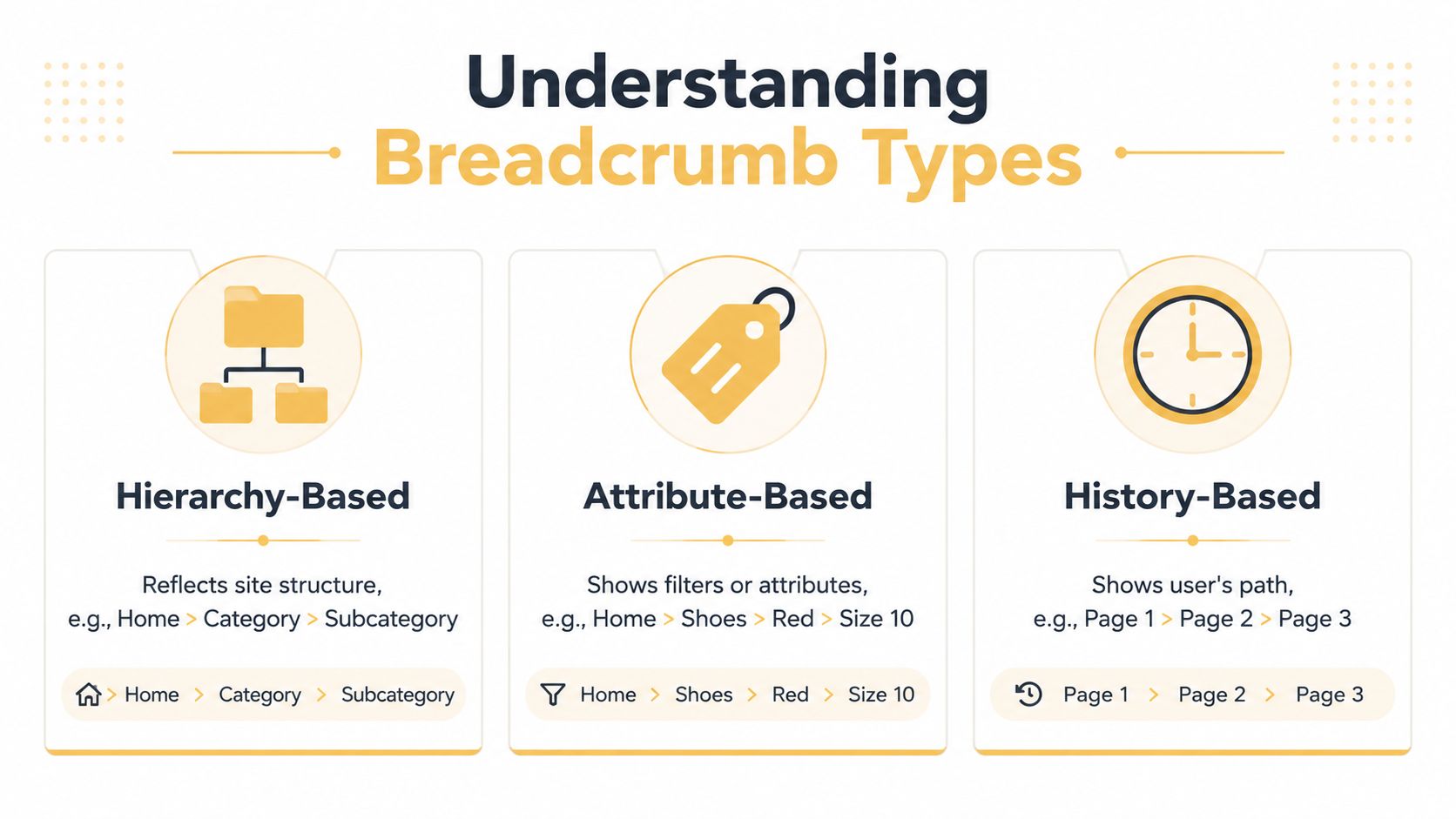
The three established models are hierarchy-based, attribute-based, and history-based breadcrumbs. For SEO, start with the hierarchy model. Add attribute navigation only when a selected filter represents a meaningful, supportable page in the information architecture.
Hierarchy-based trails
This model suits e-commerce, publishing, documentation, and most public websites. A product trail might be:
Home > Men's Clothing > Jackets > Leather Jackets > Product
Each linked level should represent a parent page in the planned taxonomy. The sequence should stay consistent whether the visitor arrives from organic search, a paid campaign, email, or internal search. Consistency gives crawlers repeated paths to parent pages and gives users a reliable route upward.
A SaaS documentation trail could be Dashboard > Integrations > CRM > Salesforce. Labels should express the application's conceptual structure rather than copy every URL segment. A page at /docs/salesforce/setup can logically sit under Integrations and CRM even when the URL is flatter.
The model works when primary navigation, category pages, canonical URLs, and internal links describe the same hierarchy. For broader information architecture decisions, compare the trail with these website navigation best practices, which address menus, hierarchy, and page discoverability.
Attribute-based trails
Attribute breadcrumbs display selected properties instead of permanent parent-child relationships. An e-commerce interface might show Home > Shoes > Red > Size 10 after a visitor applies filters.
That path can clarify active selections for shoppers, but it should not automatically become an SEO taxonomy. A filter state may create a parameterized URL, a non-indexable result, or a combination with no durable search value. Treat it as interface state unless the filtered page has a deliberate indexation strategy, unique content value, a canonical URL, and a defined place in the site structure.
History-based trails
History-based breadcrumbs reproduce the visitor's route, such as Page 1 > Page 2 > Page 3. They function like a custom back control and can help someone return to a filtered result set.
They do not describe a stable hierarchy. Two visitors may reach the same product through different paths, producing inconsistent labels, links, and structured data. Use a separate “Back to results” control when session context matters. Keep the SEO breadcrumb tied to the canonical hierarchy.
Measurable SEO Signals From Breadcrumb Implementation
Breadcrumbs are an architecture feature first and a SERP feature second. That distinction matters more after Google removed breadcrumb trails from mobile search results. The visible snippet benefit is now limited, while internal links, crawl paths, and hierarchy remain measurable.
Separate the outcomes into architecture signals, search presentation, and user experience. A product breadcrumb can link to its product type, subcategory, and department page. These links give crawlers more routes to parent URLs and give users a direct path to broader collections. They also provide descriptive anchor text when labels accurately match their destinations.
Breadcrumbs cannot repair thin category pages, orphaned URLs, contradictory canonicals, or an unusable internal search system. Their value depends on whether the surrounding information architecture already makes sense.
Evidence worth monitoring
The same study also reported average crawl depth moving from 4.2 clicks to 2.8 clicks on large sites, suggesting a measurable architecture benefit distinct from the traffic uplift noted earlier.
That result is not a universal benchmark. It does show which signals deserve a place in an implementation review:
- Parent-page discovery: Check whether important category pages receive more internal links and crawler access.
- Organic traffic by template: Compare equivalent product, category, or article groups after a controlled deployment.
- Search appearance: Monitor desktop breadcrumb enhancements and relevant Search Console reports. Mobile results no longer provide the same breadcrumb-trail display.
- Crawl depth: Use crawling software to determine whether deep pages have practical paths to their parent pages.
- Engagement with parent links: Review analytics events or navigation paths where those measurements are available.
SearchPilot's breadcrumb placement test found no statistically significant organic change from moving the breadcrumbs, with the results described as inconclusive (SearchPilot's breadcrumb placement test). The finding challenges claims that placement alone produces a ranking gain. Moving an already accessible trail may do little. Adding coherent internal links to a hard-to-reach hierarchy is a different intervention.
Ranking impact versus UX-only value
| Signal Type | Ranking Impact | UX Impact | Measurement Method |
|---|---|---|---|
| Contextual internal links | Indirect architectural support | Helps users move to parent pages | Crawl reports and internal-link analysis |
| BreadcrumbList markup | Helps Google interpret hierarchy | Usually invisible to users | Rich Results Test and Search Console |
| Desktop rich presentation | Can improve result clarity and clicks when shown | Helps users judge page context | Search Console and query-level CTR review |
| Current-page indication | Usually not a direct ranking mechanism | Strong orientation benefit | Usability testing and accessibility review |
| Filter-state display | Depends on indexation architecture | Helps shoppers track selections | Facet analytics and crawl controls |
| Placement changes alone | May be neutral | Can affect discoverability and readability | Controlled testing |
The practical test is straightforward: measure the links and hierarchy breadcrumbs create, then assess search appearance and usability separately. A validator returning green checks confirms markup syntax. It does not prove that the trail improves crawl efficiency, internal linking, or user orientation.
Implementing BreadcrumbList Schema Markup
JSON-LD is usually the cleanest implementation because it keeps structured data separate from presentation HTML. Describe the breadcrumb trail users can see. Represent the final page as the current item, and omit its item URL because users do not need a destination link to revisit the page they are already viewing.
For an e-commerce path such as Home > Electronics > Headphones > Wireless, use this pattern:
{
  "@context": "https://schema.org",
  "@type": "BreadcrumbList",
  "itemListElement": [
    {
      "@type": "ListItem",
      "position": 1,
      "name": "Home",
      "item": "https://www.example.com/"
    },
    {
      "@type": "ListItem",
      "position": 2,
      "name": "Electronics",
      "item": "https://www.example.com/electronics/"
    },
    {
      "@type": "ListItem",
      "position": 3,
      "name": "Headphones",
      "item": "https://www.example.com/electronics/headphones/"
    },
    {
      "@type": "ListItem",
      "position": 4,
      "name": "Wireless"
    }
  ]
}
@context identifies the Schema.org vocabulary, while @type defines the object as a BreadcrumbList. Place each entry in itemListElement, and assign every position a sequential integer beginning with 1. The terminal item may omit item, since it identifies the current page.
URL strings and Thing objects
The item property can contain a URL string or a Thing object with an @id. The object form can connect the breadcrumb destination to a more explicitly identified entity:
{
  "@type": "ListItem",
  "position": 2,
  "name": "Electronics",
  "item": {
    "@id": "https://www.example.com/electronics/",
    "@type": "CollectionPage"
  }
}
For standard breadcrumb trails, stable canonical URLs as strings are easier to maintain. Use a Thing object only when the site's entity model and validation process benefit from the additional type information. Extra schema structure creates another maintenance point without improving interpretation by itself.
A SaaS dashboard hierarchy could use this JSON-LD:
{
  "@context": "https://schema.org",
  "@type": "BreadcrumbList",
  "itemListElement": [
    {
      "@type": "ListItem",
      "position": 1,
      "name": "Dashboard",
      "item": "https://app.example.com/dashboard"
    },
    {
      "@type": "ListItem",
      "position": 2,
      "name": "Projects",
      "item": "https://app.example.com/dashboard/projects"
    },
    {
      "@type": "ListItem",
      "position": 3,
      "name": "Project Alpha",
      "item": "https://app.example.com/dashboard/projects/alpha"
    },
    {
      "@type": "ListItem",
      "position": 4,
      "name": "Settings"
    }
  ]
}
Properties teams should control
| Property | Required | Type | Implementation Note |
|---|---|---|---|
@context | Yes | URL | Use the Schema.org context. |
@type | Yes | Text | Set it to BreadcrumbList. |
itemListElement | Yes | List | Include the ordered breadcrumb items. |
@type inside each item | Yes | Text | Set each entry to ListItem. |
position | Yes | Integer | Start at 1 and keep the sequence continuous. |
name | Yes | Text | Match the visible label and keep it meaningful. |
item | Usually | URL or Thing | Use canonical destination URLs for linked crumbs; the terminal item can omit it. |
Validate the output with Google's Rich Results Test and the Schema.org validator. A passing result confirms that the markup is parseable. It does not confirm that Google will display a breadcrumb enhancement, particularly after the mobile presentation change. Review crawl reports, internal-link analysis, and Search Console separately if the goal is better hierarchy interpretation rather than a visual search feature.
For broader guidance, see this resource on schema markup for SEO. For local organizations, keep breadcrumb markup separate from LocalBusiness structured data, including work intended to boost local search visibility.
Keep the JSON-LD aligned with the visible trail. Shorter interface labels are acceptable when their meaning remains equivalent and the choice is documented. If the HTML identifies Headphones while JSON-LD assigns the page to an unrelated parent, the implementation creates conflicting signals instead of useful hierarchy context.
Breadcrumb Placement and Architecture Decisions
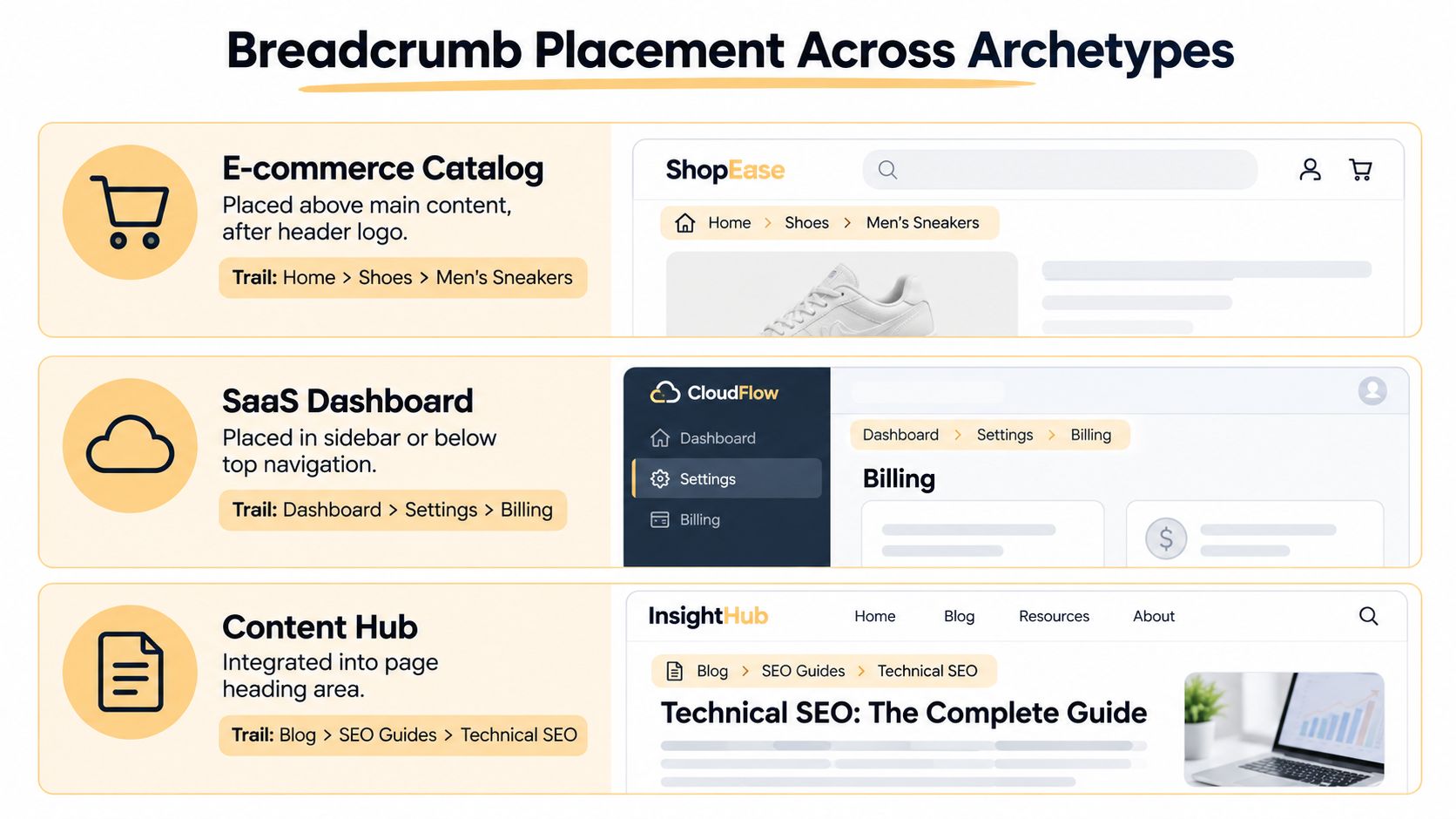
Placement should follow the user's task and the site's information architecture. On an e-commerce product page, a trail directly below the primary header and above the page heading is easy to find. In a SaaS application, it may work better below top navigation or within a persistent sidebar, where it reflects the user's current workspace and record context. Since Google removed breadcrumb trails from mobile search results after January 2025, placement now earns its keep mainly through usability, internal linking, and clearer crawlable relationships, not search-result decoration.
Match the trail to the site archetype
| Site Type | Effective Pattern | Main Risk |
|---|---|---|
| E-commerce catalog | Home, department, category, product type, product | Excessive depth and conflicting category paths |
| SaaS application | Dashboard, workspace, feature area, record, current view | Exposing internal states that aren't meaningful destinations |
| Editorial hub | Blog, topic, subtopic, article | Inventing taxonomy levels that don't exist |
Large catalogs need a deliberate canonical path. If a product belongs to several collections, select one primary category for the SEO breadcrumb, generally the category represented by the canonical product path. A context-aware trail can support shoppers arriving through a campaign or filter, but it also creates inconsistent markup and spreads links across paths that may not be indexable.
Full paths, flat paths, and URL differences
A full trail exposes each meaningful level. Use it when intermediate category pages are valuable, crawlable destinations. A flatter trail fits taxonomies with redundant layers or intermediate pages that offer little standalone value. Do not shorten a path only to reduce its visual length. Removing a meaningful category hides a relationship from users and removes a useful internal link.
The visible trail should express logical hierarchy, rather than copy the URL mechanically. Technical segments, locale folders, identifiers, and legacy structures often have no place in user-facing navigation. The reverse problem is just as damaging: never add a parent that does not exist or redirects to an unrelated destination.
Apply consistent conventions across headers, sidebars, and secondary trails. These Australian hosting nav bar tips offer useful context for organizing navigation, while breadcrumb logic still needs to reflect the site's own structure.
A breadcrumb is trustworthy when every linked crumb leads to a useful destination, rather than filling an invented level.
Test placement as a usability change, not as a guaranteed ranking lever. Moving the trail alone may produce little SEO effect. Review link targets, crawl access, canonical paths, and the value of the destination pages before prioritizing cosmetic repositioning.
Accessibility and Semantic Markup Requirements
Accessible breadcrumb navigation and crawl-friendly architecture usually point toward the same implementation. Both benefit from explicit relationships, meaningful labels, and a predictable sequence.
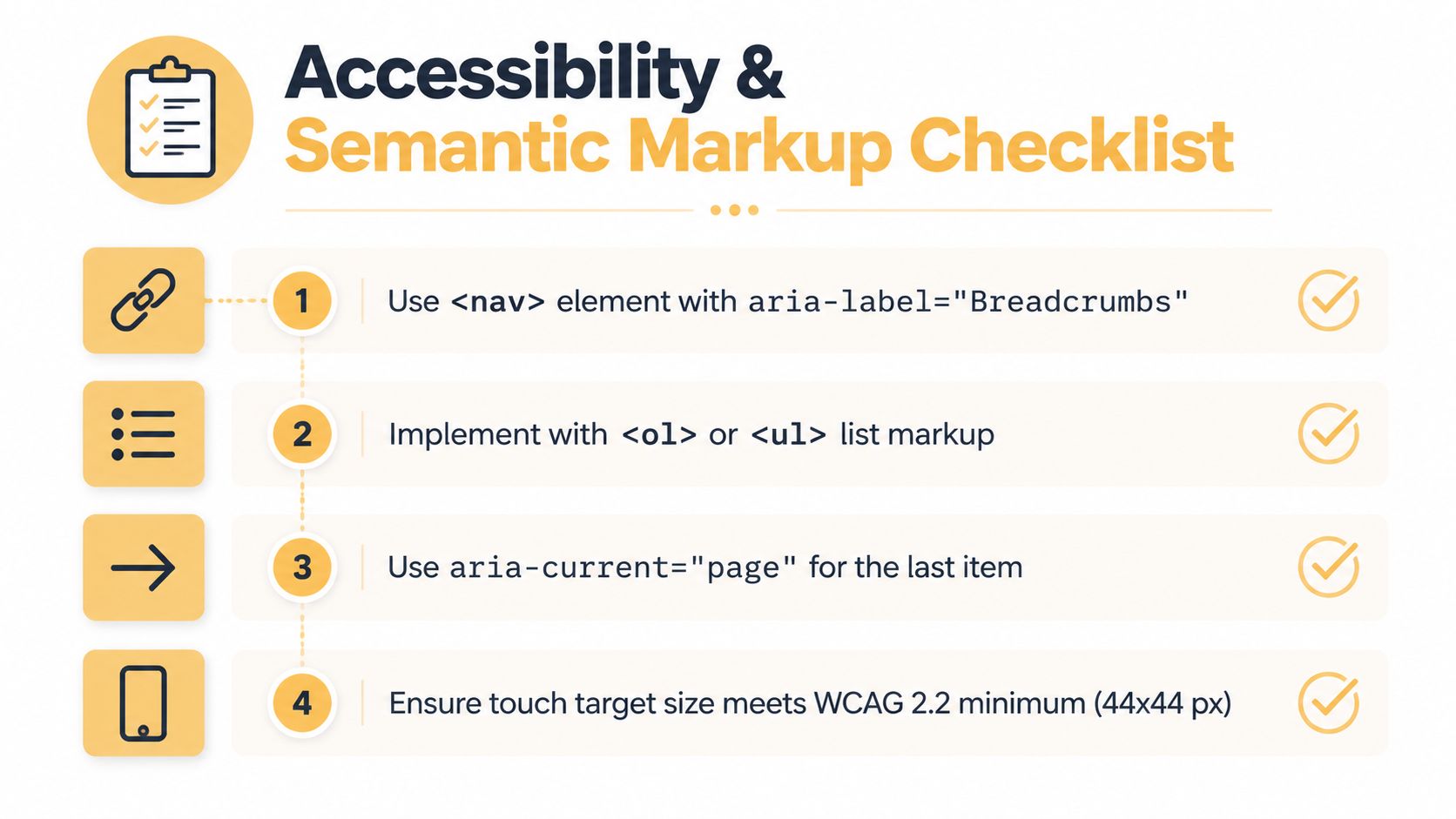
Use a <nav> landmark with an accessible label such as aria-label="Breadcrumb", so assistive technology can distinguish the trail from primary navigation, utility navigation, and the footer. Put the crumbs in an ordered list, because the sequence communicates progression through the hierarchy. Each linked crumb should be individually focusable, while the current page should be identified with aria-current="page" and should not be presented as a link to itself.
The UK Government Design System guidance recommends a semantic navigation pattern using a navigation landmark and ordered list, with separators hidden from screen readers (breadcrumb accessibility guidance). Separators such as > are visual punctuation. They shouldn't create confusing announcements between links.
A practical HTML pattern
<nav aria-label="Breadcrumb">
<ol>
<li>
<a href="/">Home</a>
<span aria-hidden="true"> > </span>
</li>
<li>
<a href="/electronics/">Electronics</a>
<span aria-hidden="true"> > </span>
</li>
<li aria-current="page">Wireless</li>
</ol>
</nav>
Don't cram keywords into labels that users wouldn't recognize. Electronics is better than an awkward phrase created solely to target a query. Concise, accurate anchor text helps users predict the destination and gives crawlers a clearer relationship signal.
Check the trail with keyboard navigation, NVDA on Windows, and VoiceOver on Apple devices. Confirm that the landmark has a useful name, the order sounds logical, separators aren't announced as distracting content, and the current page is clear. Also test zoom, narrow screens, and long category names. A technically valid breadcrumb that wraps into unreadable or inaccessible controls still fails its practical purpose.
For teams handling broader compliance work, website accessibility compliance offers a related reference point. The key principle here is not separate SEO markup for search engines and special markup for users. A well-structured visible trail can serve both audiences without duplicating or concealing its meaning.
Troubleshooting Common Breadcrumb Errors
Breadcrumb errors usually begin with a split content model. The template renders one hierarchy, while the JSON-LD generator reads another. Filters, legacy routes, and single-page application parameters make these inconsistencies harder to spot.
| Error / Issue | Root Cause | Fix |
|---|---|---|
| Visible trail and JSON-LD disagree | Separate systems generate different parents or labels | Use one canonical hierarchy service for HTML and schema |
| Crumb points to a redirect or non-canonical URL | Template uses a legacy route or filter URL | Resolve each destination against the canonical URL map |
“Missing field itemListElement” | Invalid object structure or empty server-side data | Return a valid ordered list every time |
| Filter pages create strange trails | Facet parameters are treated as permanent categories | Fall back to the canonical category hierarchy |
| SPA validation fails | Client route parameters aren't mapped to known page entities | Render deterministic data for each route, server-side where practical |
| Terminal item links to itself | Generic component makes every crumb an anchor | Remove item from the current item and set aria-current |
Faceted navigation needs a clear rule. A filtered listing can help shoppers without belonging in the SEO hierarchy. Build the breadcrumb from the canonical category, and keep filter state in the interface. This protects internal linking signals from temporary combinations of parameters.
Test single-page applications through direct loads, client-side transitions, refreshed routes, and unknown parameters. A trail that appears after internal navigation can still produce empty or stale structured data when a crawler requests the URL directly.
Add automated checks to deployment workflows with Schema App, Lighthouse audits, or a custom structured-data test. After release, test representative URLs with Google's Rich Results Test, inspect rendered HTML, verify canonical destinations, and review the Breadcrumb enhancement report in Search Console. Validation confirms structure, not search visibility.
Up North Media helps businesses align breadcrumb navigation with technical SEO, internal linking, and custom web application architecture instead of treating schema as an isolated audit item. Visit Up North Media to discuss an implementation review for an e-commerce site, SaaS platform, or content-heavy website.