

You launch a cleaner category experience. Customers can filter by brand, size, color, price, material, fit, and availability. Conversion teams are happy because the store feels easier to shop. Then organic traffic stalls, Google starts indexing strange filtered URLs, and key category pages lose visibility to pages you never meant to rank.
That pattern is common in e-commerce. It doesn't mean filters were a mistake. It means the site needs tighter SEO controls around them.
Faceted navigation SEO sits right at the line between user experience and crawl management. You want shoppers to narrow choices fast. You don't want search engines wandering through every possible filter combination like they're exploring an infinite aisle map. If you're also thinking about how search is changing beyond classic blue links, Algomizer's AI search guide for e-commerce is a useful companion read because it frames product discovery in a wider search context.
The Paradox of E-commerce Filters
A furniture retailer adds filters for style, color, width, material, room, and price. On the storefront, it feels like progress. A shopper looking for a narrow oak console table can get there in seconds instead of scrolling through hundreds of products.
From an SEO standpoint, that same improvement can become a mess if every selection creates a crawlable URL.
The paradox is simple. The same filters that help humans reduce noise can create noise for search engines. A merchandising team sees a better browse experience. Googlebot may see a flood of near-identical pages, thin combinations, zero-result states, and duplicate sorting paths.
Why this happens so often
Most e-commerce platforms make faceted navigation easy to launch and hard to govern. Filters get added over time by category managers, dev teams, and app plugins. Nobody is trying to create SEO problems. They're trying to improve merchandising, searchability, and conversion.
Then the side effects show up:
- Category pages compete with filtered variants that shouldn't exist in search
- New products get discovered slowly because bots spend time elsewhere
- Reports become noisy because URL patterns multiply
- Teams can't agree on what should rank because the site generates pages faster than strategy can keep up
Reality check: You usually don't need fewer filters. You need fewer indexable outcomes.
The fix isn't to remove useful navigation. It's to decide which filtered experiences are only for users, which deserve to exist as shareable URLs, and which are strong enough to act like true landing pages in search.
That distinction is where most faceted navigation projects either recover or keep leaking performance.
Why Faceted Navigation Wrecks SEO Performance
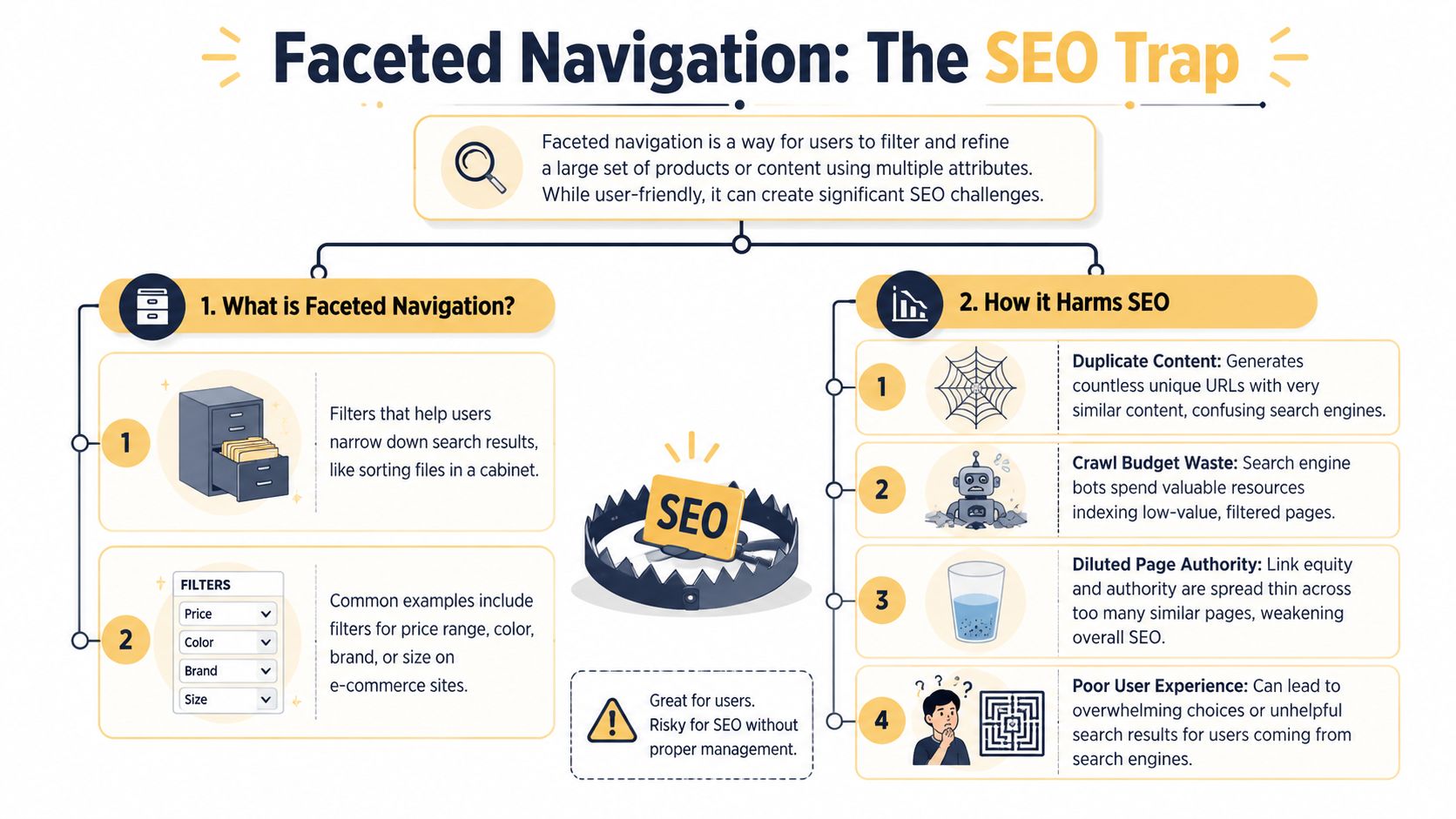
Faceted navigation is the filtering system that lets users refine a product listing by attributes like brand, color, size, or price. This process mirrors that of a digital filing cabinet. The shopper opens one drawer, then narrows the contents with labels until only the relevant items remain.
That's great for humans. It gets risky when each label combination creates a unique URL that search engines can crawl.
The combinational problem
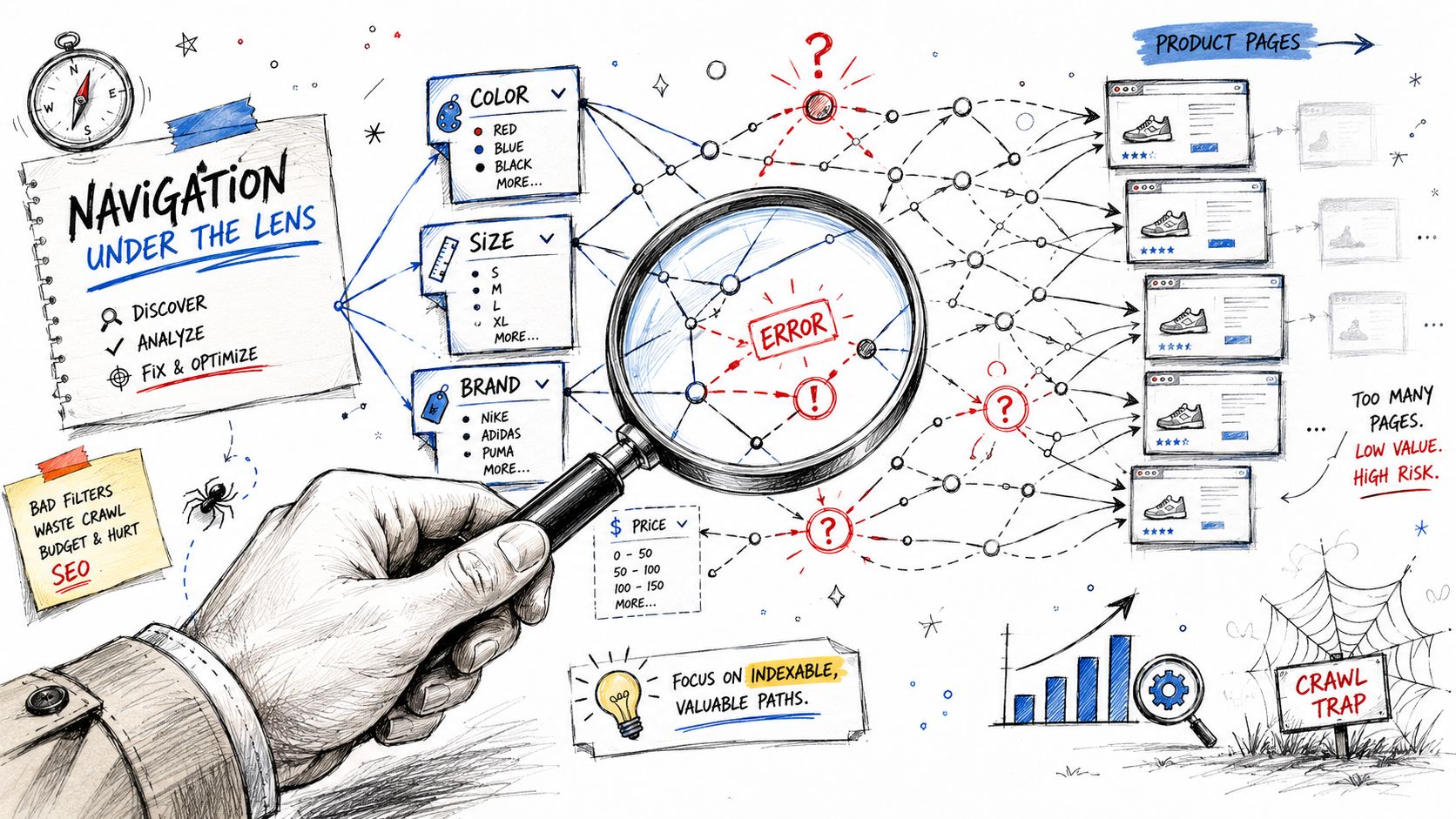
Take a simple t-shirt category. Add filters for color, size, fit, brand, and price. Now add sort options and multi-select behavior. The number of possible URL states grows fast, even before you get into pagination.
You don't need millions of pages for this to hurt. You just need enough low-value combinations to distract crawlers and split signals.
A single shopper sees one filtered result set. Search engines can discover a web of variants.
The three core failures
According to SeoClarity's faceted navigation overview, faceted navigation is a major SEO risk because it can create an almost endless set of URL combinations, leading to duplicate content, diluted internal link equity, crawl waste, and crawl traps. That summary matches what technical SEOs see in the field.
Here's how the damage usually plays out:
| Problem | What search engines encounter | What the business feels |
|---|---|---|
| Duplicate or near-duplicate pages | Many URLs with very similar product sets | Important category pages struggle to stand out |
| Crawl waste | Bots spend time on low-value URLs instead of priority pages | New products and updates get noticed slower |
| Internal equity dilution | Link signals spread across too many variants | Ranking strength gets fragmented |
Duplicate content isn't always identical content
This part trips teams up. A filtered page doesn't need to be word-for-word identical to be weak. If the difference between one URL and another is just one selected attribute, the page often isn't distinct enough to deserve separate indexation.
That's why faceted navigation can start resembling the problem described in this guide on doorway pages and SEO. Not because every filter page is a doorway page, but because you can end up mass-producing low-differentiation pages aimed at slight query variations.
Search engines don't reward every possible refinement. They reward pages that solve a clear search need.
Crawl traps are operational, not theoretical
Botify's explanation, cited in the SeoClarity piece above, points out that even a simple sorting or filter system can generate many near-identical pages, and Google may spend crawl budget on those duplicates instead of high-value URLs. That's the real cost.
This isn't just an “SEO purity” issue. It affects inventory visibility, promotion timing, category rankings, and how fast search engines revisit the pages you care about.
How to Diagnose Faceted Navigation Issues
Most sites don't need a full rebuild to understand the problem. They need a structured check of what Google is already discovering, crawling, and indexing.
Start by looking at the site the way a bot would, not the way a merchandiser or shopper would.
Check what Google has already indexed
In Google Search Console, open the Page Indexing views and look for patterns that don't match your intended URL inventory. Parameter-heavy URLs, filtered states, and sorting variations tend to stand out once you know the pattern.
Then use Google directly with a few manual checks:
- Search parameter patterns: Try
site:yourdomain.com inurl:?color=or another known facet parameter - Search rewritten facet paths: If your platform uses clean URLs, search for repeated path fragments tied to filters
- Compare indexed URLs to sitemap intent: If Google is surfacing many URLs that aren't part of your desired search footprint, that's a signal
A related symptom often shows up in exclusion reports. If you keep seeing filtered URLs under statuses that indicate crawling without indexation, review what that usually means in practical terms through this explanation of how to fix crawled currently not indexed.
Look at crawl behavior, not just index counts
Index bloat is only half the picture. A faceted navigation setup can be inefficient long before the URLs fully index.
Review Crawl Stats in Search Console and ask:
- Are low-value HTML URLs getting repeated attention
- Are important category and product pages being revisited as often as expected
- Do crawl patterns spike around parameterized paths after navigation changes
- Are bots spending time on sorted, filtered, or paginated variants
This video gives a useful visual primer on how faceted URL behavior creates crawl problems in practice:
Run a mini URL behavior audit
Click through your filters yourself. Don't just inspect templates. Test combinations.
Use a quick checklist:
- Apply one filter: Does the URL change with parameters, rewritten paths, or fragments?
- Change filter order: Does the same product set generate multiple URL versions?
- Test sort options: Do “price low to high” or similar sorts create crawlable pages?
- Force empty results: Does a no-product combination return a useful status and UX response?
- Inspect link elements: Are filters exposed as crawlable links or controlled UI elements?
Practical rule: If the same result set can be reached through multiple URL orders, your cleanup job gets much harder.
Use crawler tools to map the sprawl
Screaming Frog, Sitebulb, Lumar, and similar crawlers help you visualize the patterns quickly. You're not just hunting individual bad URLs. You're identifying URL classes.
Look for repeated parameter templates, duplicate title patterns, canonicals that all point to category roots, and indexability mismatches. The point isn't to make the crawl report pretty. The point is to isolate which facet behaviors are creating search noise.
Your Technical SEO Toolkit for Faceted Navigation
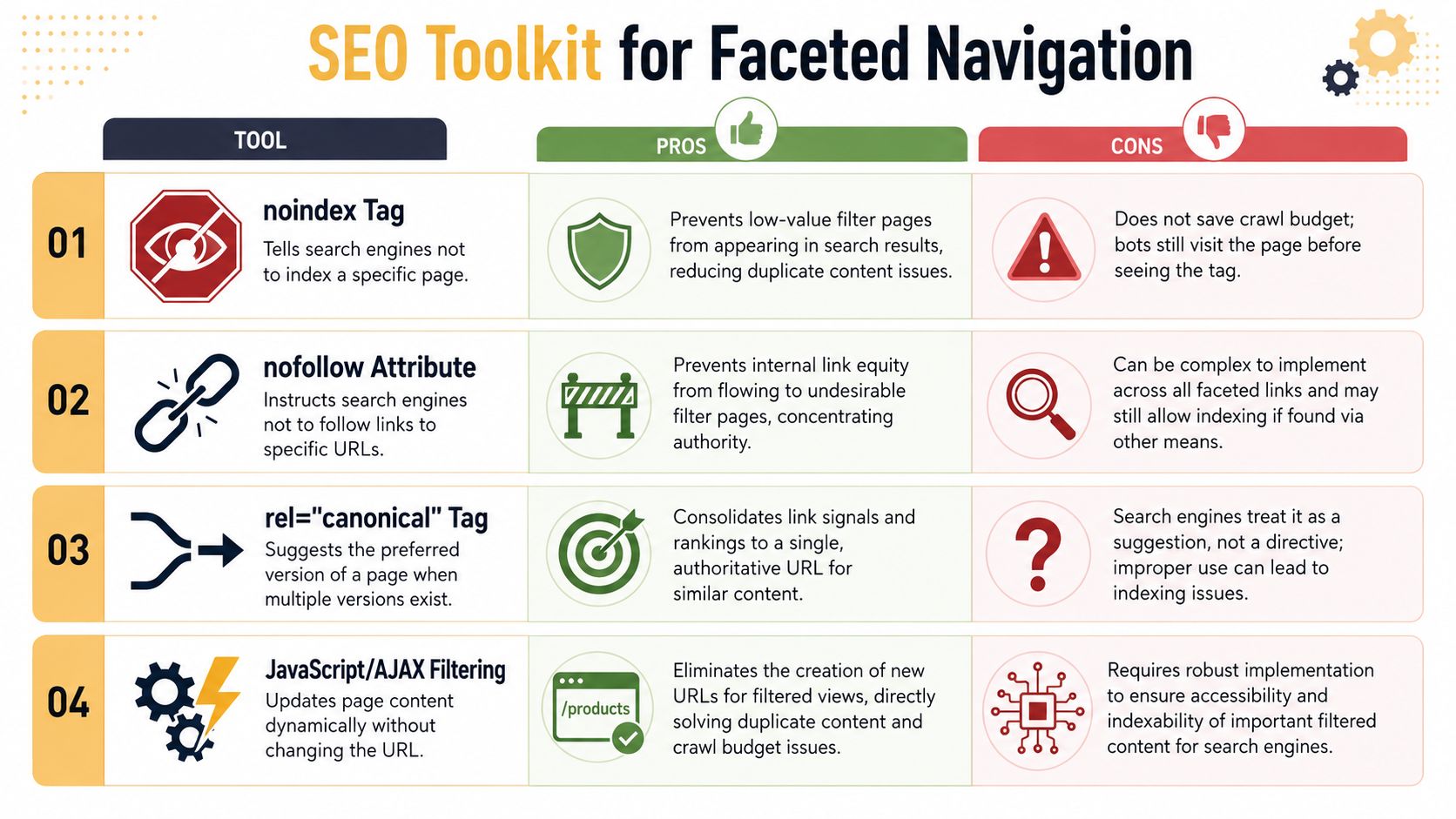
There isn't one universal fix for faceted navigation SEO. Different URL types need different controls. A high-value brand filter might deserve indexation. A price-plus-size-plus-sort combination almost never does.
The strongest setups use a toolkit, not a single rule.
JavaScript or AJAX filtering
If you're building or redesigning faceted navigation, this is often the cleanest starting point. Filters update results without generating a new crawlable URL for every state.
That reduces the problem at the source. Instead of creating URLs and then trying to suppress them, you avoid exposing most of them in the first place.
Best use case: UX-focused refinements that help shoppers but don't deserve search visibility.
Trade-off: Implementation matters. If the site needs some filtered states to rank, you still need a deliberate way to expose those as stable, indexable URLs.
Canonical tags
Canonical tags are useful when a filtered page should exist for users, but ranking signals should consolidate to a preferred URL. They help with duplicate and near-duplicate states.
Lumar's guidance is especially aligned with modern practice. It recommends consolidating duplicate URLs with canonicals and including only relevant facet URLs in XML sitemaps through its best-practice guide to faceted search SEO.
Best use case: Similar variants that shouldn't compete in search.
Trade-off: Canonical is a hint, not a command. If the filtered page looks materially different or internal links strongly support it, search engines may treat it differently than you intended.
Noindex
Noindex tells search engines a page shouldn't remain in the search index. It's direct and effective for low-value filtered pages that still need to be accessible.
Best use case: URLs that users may need, but the business doesn't want showing in search.
Trade-off: It does not prevent crawling by itself. Bots still need to access the page to see the directive.
Robots.txt disallow
This is the blunt instrument. It's useful when the main problem is predictable crawl waste across known facet patterns.
Best use case: Parameter classes or filter states that should not be crawled at all.
Trade-off: Robots.txt doesn't reliably solve indexation alone. If a blocked URL is discovered through links, it can still appear in search without useful page-level signals.
Internal link control and parameter hygiene
One of the most overlooked fixes is reducing crawlable pathways. If every filter link is exposed as a standard crawlable link, directives have to work much harder.
A good technical SEO workflow for e-commerce usually treats faceted navigation as part of broader architecture design, not just a cleanup task. This overview of technical SEO for ecommerce fits that mindset well.
Here's a simple comparison table for control selection:
| Control | Helps indexation control | Helps crawl control | Main caution |
|---|---|---|---|
| JavaScript or AJAX filtering | Yes | Yes | Needs careful implementation for intended landing pages |
| Canonical | Sometimes | Limited | Search engines may not follow the hint |
| Noindex | Yes | Limited | Page still needs to be crawled first |
| Robots.txt disallow | Limited | Yes | Can block signals you wanted crawlers to see |
The best faceted setups don't try to make every filter SEO-friendly. They choose a small set that deserves search demand and suppress the rest.
Strategically Choosing Which Facets to Index
A common deficiency in faceted navigation advice lies here. “Index pages with search volume” sounds sensible, but it doesn't tell you what to do with borderline cases like seasonal filters, localized demand, or combinations that don't show obvious volume yet still drive valuable revenue.
The better question is this: Which filtered pages behave like true landing pages, and which are just browsing tools?
Sitebulb recommends mapping facets to keywords and checking search volumes, while Botify says faceted pages should be judged by organic traffic and off-site search demand, not just by their existence on the site, as summarized in Sitebulb's guide to faceted navigation for SEO. That's the right starting point, but a repeatable operating model is often necessary.
Use a scoring mindset, not a binary rule
Don't treat indexing as a yes-or-no decision based on one keyword tool check. Score each facet combination against business and search criteria.
A practical framework:
-
Search intent match Does the combination reflect how people search, not just how your filters are labeled internally? “Black leather ankle boots” is closer to a real query pattern than “boots + color + material + shaft type.”
-
Demand evidence
Use external keyword research, internal site search logs, and organic landing page trends. Thin demand doesn't always mean no opportunity. It may mean a niche page deserves seasonal or temporary promotion instead of permanent indexation. -
Result quality
Does the page return a stable, relevant set of products? If the assortment changes wildly or often becomes sparse, it's a weak search asset. -
Commercial value
Some pages won't look exciting in a keyword tool but still align with high-margin categories, strategic brands, or profitable inventory. -
Geographic or seasonal logic
Regional inventory, climate-driven products, or event-driven buying patterns can justify selective indexation windows.
A practical decision matrix
| Facet type | Likely action | Why |
|---|---|---|
| Brand plus category | Often indexable | Strong commercial intent and common query behavior |
| Color-only filters | Sometimes indexable | Works when shoppers actually search that way and inventory is stable |
| Price bands | Usually not indexable | Weak standalone search intent and unstable relevance |
| Multi-select combinations | Usually blocked or canonicalized | Creates too many low-distinction states |
| Seasonal attribute pages | Temporary or campaign-based indexation | Better treated like short-lived landing pages |
Treat some facet pages like temporary landing pages
This is the overlooked move. Not every useful facet page should live forever.
If a combination matters during a season, sale window, or regional buying cycle, treat it like a managed landing page. Make it indexable when demand is active. Pull it back when the value fades. That approach is often more realistic than pretending every curated facet deserves permanent SEO support.
Decision test: If you wouldn't be comfortable building internal links, custom metadata, and sitemap support for a filtered page, it probably shouldn't be indexed.
Inputs that matter most
When I evaluate facet candidates, I don't rely on search volume alone. I look for alignment across several signals:
- Keyword phrasing users use
- Internal search refinements that repeat over time
- Category performance gaps where a refined intent isn't well served
- Merchandising support for enough products on-page
- A clean URL pattern the dev team can maintain
If a facet page scores well on only one of those, it usually stays out of the index. If it scores well across several, it can earn a place in the curated subset.
That's the heart of modern faceted navigation SEO. Not broad indexation. Selective indexation with a business case.
A Step-by-Step Implementation Checklist
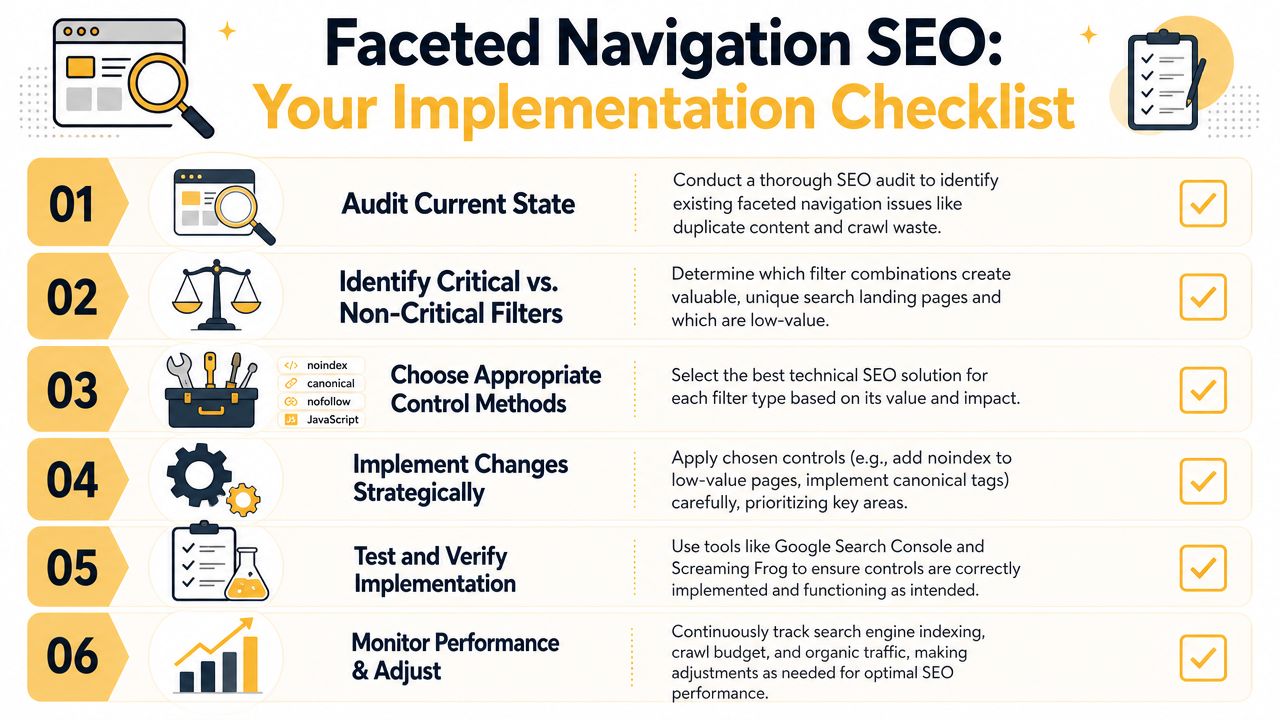
Once the strategy is set, execution needs to be disciplined. Faceted navigation problems usually persist because teams implement one control, assume it's solved, and never validate what changed.
Use a sequence that can be assigned across SEO, development, and merchandising.
Audit and classify
- Map URL patterns: Document every filter behavior that creates URLs, including sorting, pagination, and multi-select states.
- Group by intent: Separate pages into indexable candidates, crawlable but non-indexable utility pages, and URLs that should be blocked.
- Check current signals: Review canonicals, noindex directives, robots rules, internal links, and sitemap inclusion.
Build the allow and block lists
This step matters more than the directives themselves.
Create a documented policy for:
- Allowed facet pages: Curated combinations with clear search and business value
- Suppressed facet pages: Useful for shoppers but not for search
- Blocked patterns: URL classes that create waste, duplication, or traps
A spreadsheet is fine. A decision tree is better if multiple teams touch the navigation logic.
Implement controls in layers
Don't rely on one mechanism.
- Apply canonical rules where duplicate-like variants should consolidate.
- Add noindex to low-value pages that need to stay accessible.
- Use robots controls carefully for URL classes that should not be crawled.
- Limit crawlable links to low-value filter combinations.
- Add only approved facet pages to XML sitemaps.
Validation habit: If a page is meant to rank, support it like a landing page. If it isn't, stop linking to it like one.
Test before rolling sitewide
Use a controlled QA process:
| Check | What to verify |
|---|---|
| Rendered HTML | Canonical and noindex signals appear where expected |
| Internal links | Low-value facets aren't being promoted unintentionally |
| Sitemaps | Only approved facet URLs are included |
| Status behavior | Empty or invalid combinations don't return misleading page states |
Re-crawl and review search engine feedback
After launch, run a fresh crawl and compare:
- Did URL counts contract where expected
- Are indexable facet pages still self-consistent
- Did blocked classes stop appearing in crawl paths
- Are unexpected variants still discoverable through internal navigation
Then confirm in Search Console and manual search results. Implementation isn't complete when the code ships. It's complete when search engines respond the way you intended.
Measuring Success and Maintaining Control
Faceted navigation SEO isn't a one-time cleanup. Filters change. Product catalogs change. Merchandising rules change. Search behavior changes with them.
That's why the best teams treat this as ongoing governance, not a technical patch.
What success actually looks like
You're looking for a healthier search footprint, not just fewer URLs.
Monitor for:
- Fewer low-value facet URLs showing up in indexing reports
- Cleaner crawl patterns on important category and product pages
- Better visibility on the curated facet pages you intentionally allowed
- Organic traffic and conversions tied to approved filtered landing pages
- Reduced noise in technical audits and sitemap validation
Keep the review cycle active
A practical maintenance rhythm usually includes:
- Regular facet audits: Review whether newly added filters changed crawl behavior
- Search demand checks: Reassess which combinations still deserve indexation
- Inventory stability reviews: Remove support for pages that no longer return a strong result set
- Internal linking checks: Make sure templates or plugins didn't reintroduce crawl paths
Good faceted navigation SEO is controlled restraint. The site keeps the filtering experience shoppers want, while search engines see a smaller, sharper set of pages worth crawling and indexing.
When that balance is in place, category pages perform better, strategic filtered pages have room to rank, and technical SEO stops fighting the navigation system every quarter.
If your store is dealing with bloated filter URLs, crawl waste, or uncertain indexation rules, Up North Media can help you turn faceted navigation into a controlled growth asset instead of an SEO liability. Their team works across technical SEO, e-commerce architecture, and data-driven strategy to identify which filtered pages deserve visibility and which ones should stay out of Google's way.