
You've got the audit spreadsheet open. Crawl errors are cleared, XML sitemaps are current, and every technical column is green. Organic traffic still feels flat, important pages sit deep in the site, and editors keep publishing articles that nobody remembers to connect to the rest of the content.
That's usually not a link-count problem. It's a graph-health problem. A website's internal links determine how users and crawlers move through its pages, but the graph starts changing as soon as URLs are published, renamed, redirected, archived, or edited. On fast-growing sites, publishing speed often exceeds maintenance speed.
A healthy internal linking strategy gives priority pages clear incoming paths, keeps related content close together, uses varied descriptive anchors, and prevents valuable URLs from becoming isolated. A degraded graph develops rising click depth, orphan pages, repetitive anchors, broken paths, and category pages that compete with the long-tail content they should support.
Why Your Internal Links Are Probably Underperforming
The first mistake is treating internal links as completed tasks. A content brief says to add links, an editor inserts a few, and the spreadsheet marks the URL as finished. That process may produce links without producing a coherent site graph.
A healthy graph has multiple relevant paths to important pages. A service page can be reached from a related guide, a service hub, breadcrumbs, and perhaps a navigation element. A publisher's current article connects to its topic hub and to closely related coverage. A product page connects to the collection that defines its category and to complementary products that help shoppers make a decision.
A degraded graph looks different:
- Click depth increases: Valuable pages drift farther from the homepage as new categories, tags, filters, and archive layers appear.
- Orphans accumulate: URLs remain live in a sitemap but receive no meaningful internal links.
- Anchors collapse: Editors and templates repeat the same phrase until every destination looks interchangeable.
- Hubs cannibalize support content: Category pages target the same intent as articles or product collections instead of organizing them.
- Redirect paths linger: Internal links continue pointing to old URLs after migrations or slug changes.
A large-scale study of 23 million internal links across 1,800 websites and roughly 520,000 URLs compared internal-link patterns with Google Search Console click data. Pages receiving 40 to 44 incoming internal links averaged about four times the Google clicks of pages receiving 0 to 4 links, according to the Linkstorm internal links study. That doesn't create a universal target. It shows that connected pages often perform differently from isolated pages.
Practical rule: Don't ask whether a page has “enough” links until you know whether those links come from relevant, discoverable pages and lead users toward a clear next step.
The rest of the work is maintenance. Audit the graph, identify pages worth supporting, repair the paths that have decayed, and build publishing habits that keep the structure usable after the next wave of content goes live.
Running an Internal Link Audit You Can Trust
Start with a crawl, not a spreadsheet assembled from memory. Use Screaming Frog, Sitebulb, or Ahrefs to crawl the live site and export the fields you can act on: URL, status code, indexability, crawl depth, incoming internal links, outgoing internal links, source URL, anchor text, target URL, and redirect destination.
Keep the first export narrow. A giant file with every available field becomes an archive, not a work queue. I usually create a working workbook with separate tabs for orphan pages, depth problems, anchor issues, and broken or redirected links.
Crawl in an order that exposes causes
Orphan pages come first. Compare crawl-discovered URLs with indexable URLs from the XML sitemap and Google Search Console. A page that appears in the sitemap but has no incoming internal link may still be discoverable elsewhere, but it has no reliable path through the site graph. Confirm whether it deserves to remain live, then either link to it from a relevant page, consolidate it, or remove it from the sitemap.
Next, review click depth from the homepage. Flag anything beyond four clicks as a practical review point. That isn't a ranking law. It's a useful signal that the page may be buried behind weak architecture, excessive archive layers, or template decisions that don't reflect business priorities.
Then examine anchors by destination. Flag a destination when more than 20% of its anchors use the same phrase. Look for generic labels, repeated exact matches, brand-heavy wording, and anchors that describe the source page rather than the destination. Finally, isolate links returning 4xx responses, links pointing to redirected URLs, and any redirect chain longer than one hop.
| Metric | Healthy Range | Red Flag |
|---|---|---|
| Homepage click depth | Within the site's intended hierarchy | Beyond four clicks |
| Indexed URLs with no incoming internal link | Minimal and explained | Above five percent of indexed URLs |
| Same anchor phrase pointing to one destination | Varied across relevant sources | More than 20% of anchors |
| Internal redirect path | Direct destination URL | Chain longer than one hop |
For a broader technical review, use the technical SEO audit checklist alongside the crawl. The point isn't to collect every possible warning. It's to turn the crawl into assigned actions, with an owner, source URL, target URL, proposed anchor, reason for the link, and publish status.
Make the sheet usable for editors
Editors shouldn't have to interpret crawl exports. Give them a short queue such as “add link,” “replace redirect,” “vary anchor,” or “review page.” Include the sentence where the link belongs and the destination's preferred intent. That small amount of preparation is what turns an SEO audit into changes that ship.
Prioritizing Pages and Mapping Link Equity
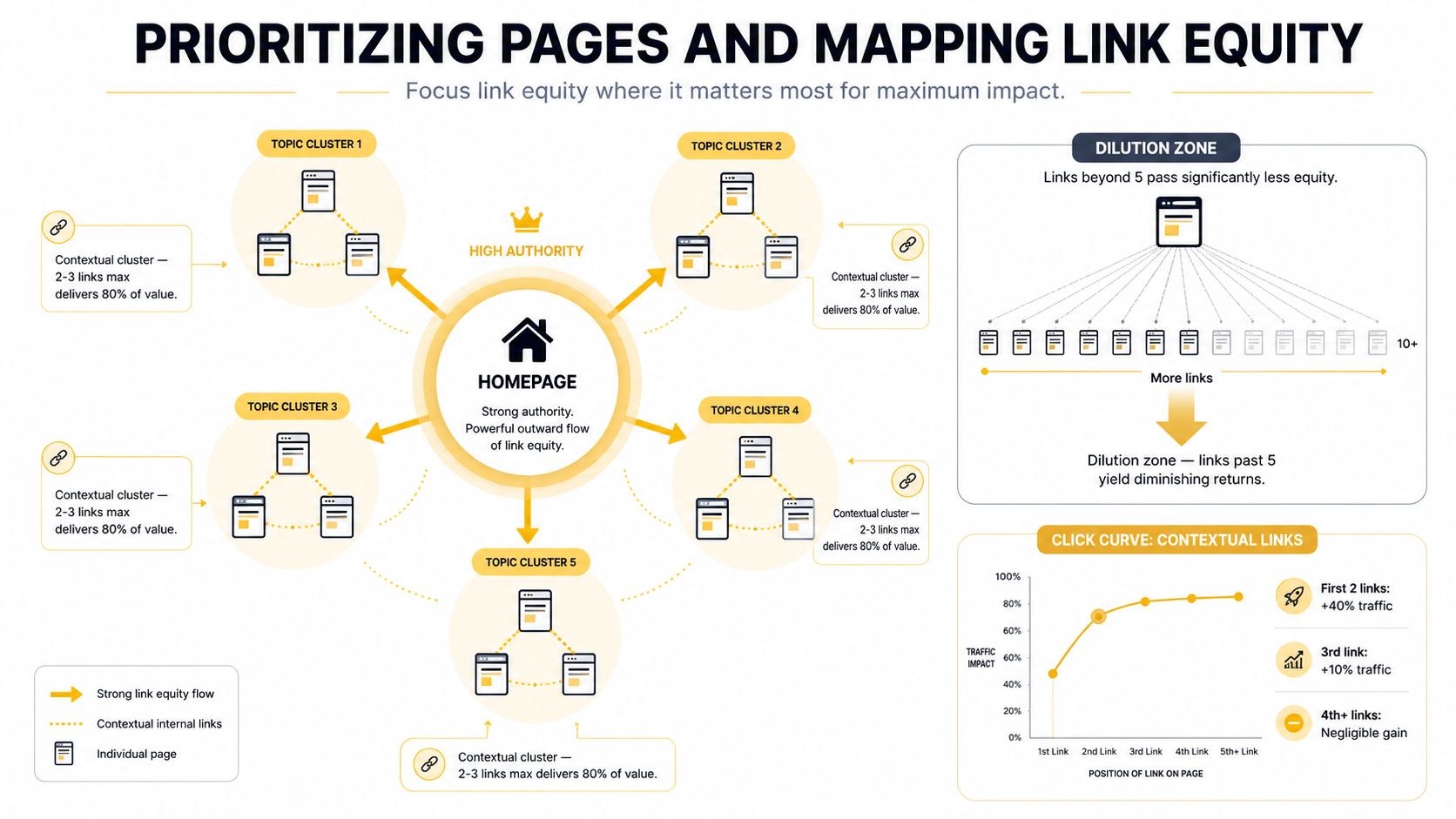
A flat rule such as “add a fixed number of internal links to every page” is easy to explain and usually wrong. Internal links support relevance and discovery, but their value depends on the source page, destination, placement, intent, and the number of competing links around them.
The large internal-link analysis cited earlier found that pages with 0 to 4 internal links averaged about 2 Google clicks, while pages with 40 to 44 averaged about four times as many clicks. It also found that traffic began declining beyond 45 to 50 internal links, as reported in the SEO study from Zyppy. The practical conclusion is not to push every page toward a large number. It's to build a relevant cluster, add links incrementally, and watch for diminishing returns.
Build clusters around decisions
Group URLs by topic and commercial intent, not merely by tags. A publisher might separate “home energy efficiency” from “home energy news.” An ecommerce store might distinguish “running shoes” from “shoe care.” A local business might separate “roof repair” from “roof replacement,” even if both appear under roofing.
Choose one primary page for each cluster. That page might be a service hub, category page, buying guide, or evergreen editorial resource. Supporting URLs should link up to the primary page when the relationship helps the user, while related supporting pages can link laterally when the connection is natural.
I score candidate destinations using three inputs:
- Ranking proximity: Is the page already visible for relevant queries and close enough to justify support?
- Business value: Does a visit to the page create a meaningful opportunity, such as a lead, sale, subscription, or high-value content journey?
- Supporting depth: Does the site already have enough relevant content to form a useful cluster, or would new links only point at a page in isolation?
That creates a priority list based on effort and likely value. A commercially important page with several relevant supporting URLs usually outranks a low-value archive page that would require a broad template rewrite.
The topic cluster strategy guidance is useful when you're deciding whether a page should act as a pillar, a supporting resource, or a lateral connection. Keep the map tight. A long chain that forces users through unrelated pages is less useful than a compact mesh with clear topical relationships.
A strong cluster also gives editors a repeatable decision. When a new article is published, they know which hub should receive the link, which older pages should point toward the new article, and which related pages deserve a lateral connection.
Crafting Anchor Text and Placement That Works
Anchor text should help a reader predict the destination before clicking. “Commercial roof inspection checklist” tells the user what they'll get. “Read more” forces them to guess, while a repeated exact-match phrase inserted into every related-content module makes the site sound automated.
A study of 2.5 million contextual internal links across 1,700 real websites found that around 81% of anchors were keyword-rich, while roughly 15% were generic labels and about 3% were naked URLs, according to the Linkstorm contextual internal links research. The same study found that 61% used 1 to 3 meaningful words, only 8% showed strong similarity to the target page title, and 28% showed no similarity at all. Those patterns point to a familiar problem: many sites use keyword-shaped anchors, but don't consistently make them descriptive enough to clarify the destination.
Write anchors for the sentence first
Use a precise phrase when it reads naturally. Use a partial match when the exact query would make the sentence awkward. Branded anchors work for company pages, generic anchors can be acceptable when the surrounding sentence supplies the context, and a naked URL is usually the weakest editorial choice.
Avoid forcing every variation into a rigid percentage formula. Instead, review anchors by destination and source type. If a product page receives the same exact phrase from navigation, blog posts, comparison tables, and automated widgets, change some editorial links to describe the use case or product category.
| Anchor Type | Target Share | Example | Risk if Overused |
|---|---|---|---|
| Descriptive topical | Majority of editorial links | commercial roof inspection checklist | Can become repetitive if copied everywhere |
| Partial-match | Regularly mixed into body copy | planning a roof inspection | May become vague if it omits the destination's purpose |
| Branded | Used for brand and company destinations | Up North Media services | Weak topical clarity for non-brand pages |
| Generic | Occasional, with strong surrounding context | view the service options | Gives little information by itself |
| Naked URL | Rare and functional | example.com/service | Looks editorially thin and interrupts reading |
Placement matters as much as wording. Contextual body links generally carry more interpretive value than footer dumps or repeated sidebar modules because the surrounding copy explains why the destination matters. Put the link where the reader reaches the relevant decision, not where a widget happens to render it. A homepage link in body copy usually needs to appear only once or twice on a page, unless the content requires more.
The study also found that 71% of contextual links appeared within the first two levels of site hierarchy, reinforcing how link placement and architecture shape crawl paths. Don't interpret that as permission to stuff links near the top. It's a reason to make important relationships visible within the main content and core hierarchy.
Before publishing, an editor can ask:
- Would a human click it? The link should answer a real next question.
- Does the anchor describe the destination? Remove vague wording when the sentence allows something clearer.
- Is the source relevant? A link should belong to the topic, not merely contain a matching phrase.
- Is this the first useful link to that URL? Repeated links to the same destination rarely improve the page.
- Does the link support the page's job? Informational pages should guide learning, while commercial pages should help comparison or conversion.
Implementing Changes in Your CMS
An internal linking strategy fails when every update requires an SEO specialist to edit templates by hand. The workable model has three layers: editorial links for judgment, template rules for repeatable relationships, and bulk operations for controlled cleanup.

Use editorial links where context matters
Add a link prompt to every content brief. The prompt should name the proposed destination, the user question it answers, and a suggested anchor that the writer can adapt. In WordPress, a related-posts block should pull from a curated topic field or taxonomy, not only publication date. A recent article isn't automatically relevant.
For navigation and hierarchy, breadcrumb navigation for SEO can help teams decide which relationships belong in templates and which belong in body copy. Breadcrumbs shouldn't replace contextual links. They solve a different navigation problem.
Keep programmatic rules narrow
On Shopify, use product and collection metadata to define complementary relationships. A Liquid pattern can render only selected recommendations rather than every item sharing a tag:
{% assign related = product.metafields.custom.related_products.value %}
{% for item in related limit: 4 %}
<a href="{{ item.url }}">{{ item.title }}</a>
{% endfor %}
In WordPress, a PHP template can use a controlled taxonomy query, while Webflow can use CMS reference fields to connect a guide to a specific service or collection. The rule should require semantic relevance, exclude the current URL, and suppress empty modules.
Make bulk edits reversible
For WordPress, WP-CLI can support a scripted replacement after a staging test. Shopify metafields can hold approved destination handles, and Webflow CMS fields can store related references. A small Python script can compare the old and new link graph, identify changed incoming-link counts, and output a review file before anything reaches production.
Guardrails matter more than automation:
- Cap template output: Set a max-links-per-page rule for each module.
- Exclude comments: Never inject links into user comments or unmoderated fields.
- Preserve relevance: Don't link merely because two pages share a tag.
- Test on staging: Check rendered HTML, canonical destinations, and mobile layout.
- Schedule recovery: Keep a quarterly orphan-page sweep after migrations and redesigns.
The cadence can stay practical: a 15-minute link pass whenever new content publishes, a monthly cluster review, and a quarterly full audit. Up North Media offers SEO marketing and custom web application work for teams that need this kind of workflow connected to their broader digital system, but the operating principle remains the same regardless of who implements it.
Applying the Strategy Across Site Types
A publisher, a Shopify store, and a local services site can all have broken internal graphs, but they won't benefit from the same fixes. The destination's business role determines which relationships deserve prominence.
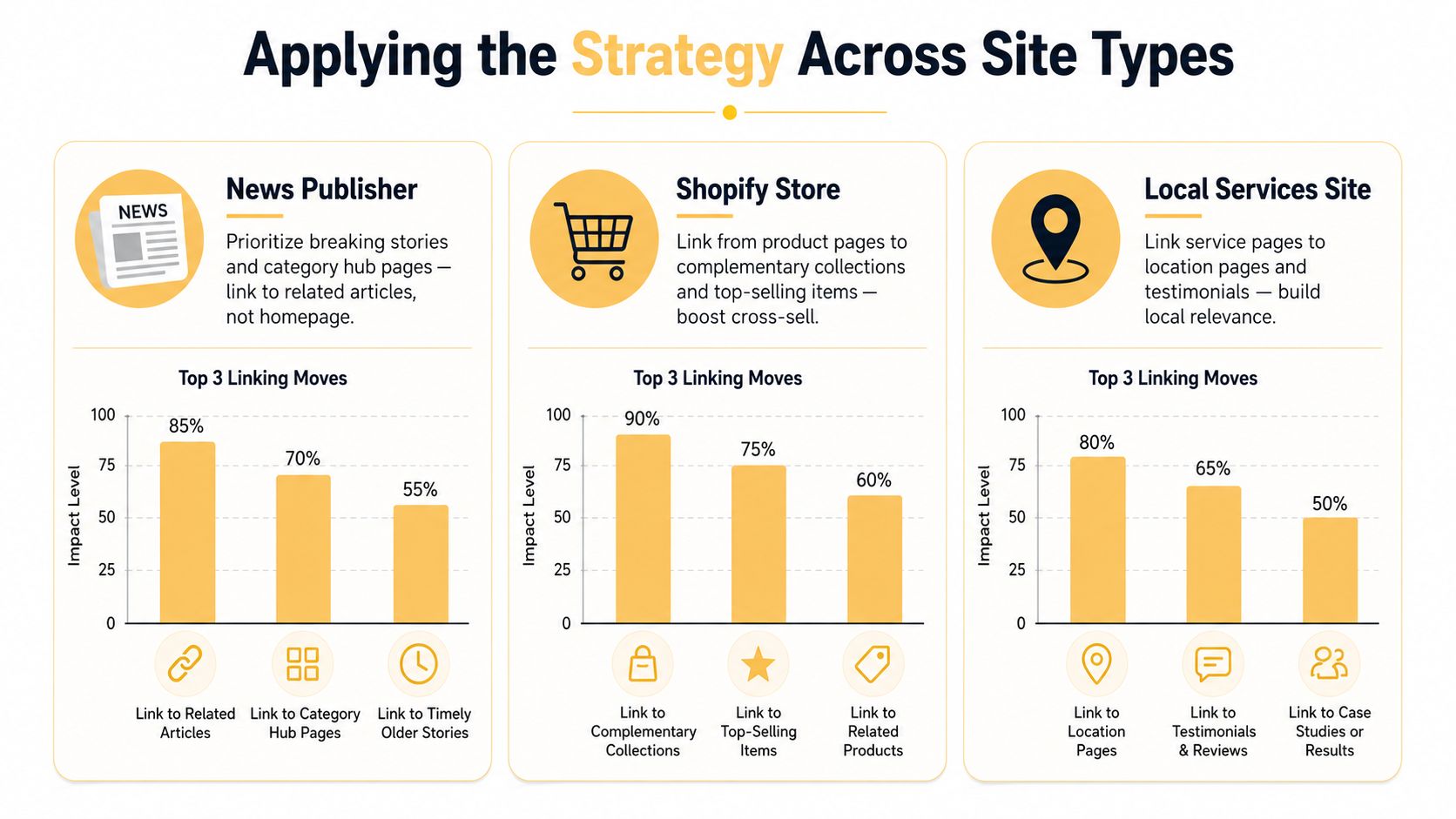
| Site Type | Highest-Value Connections | Maintenance Focus | Tactics to Skip |
|---|---|---|---|
| News publisher | Current stories, topic hubs, and related coverage | Re-link older articles into active coverage | Sending every story back to the homepage |
| Ecommerce store | Collections, products, complementary products, and buying guides | Product availability, collection overlap, and template output | Showing the same broad cross-sell block everywhere |
| Local services | Service pages, location pages, proof pages, and relevant guides | New locations, renamed services, and geographic relationships | Linking every service to every city page |
Publishers need recirculation with editorial judgment
A publisher's graph changes quickly. A breaking story may become the strongest entry point for a topic, while older coverage remains valuable but loses its connection to current reporting. Editors should link current stories to the relevant topic hub and to related background articles. When a story becomes part of an ongoing subject, revisit older high-traffic pages and add links forward to the current hub or update.
Skip automatic “related stories” blocks based only on shared tags. Those blocks often connect articles with a label but no meaningful reader relationship.
Stores need a path from research to purchase
For ecommerce, the main bridge is blog-to-collection or blog-to-product. A guide about choosing running shoes should help the reader reach the relevant collection, while product pages can link to care guides or complementary products. Collection pages should clarify the category rather than compete with several near-identical collections.
Shopify teams should inspect whether products become buried beneath layered collections, filters, and sorting URLs. Don't solve that by adding every product to every template. Use curated collection relationships, product references, and focused cross-sell modules.
Local sites need service and place relationships
A local services site usually needs clear connections between a core service, the locations served, supporting FAQs, and proof such as testimonials or project pages. Link a service page to an appropriate location page when the service is offered there, and link the location page back to the relevant services.
Skip city-page networks that exist only to manufacture internal links. If the location page doesn't offer distinct, useful information, adding more links can make the architecture look broader without making it more helpful.
Measuring Results and Avoiding Common Pitfalls
Measurement should tell you whether the graph is becoming easier to traverse, not merely whether the site contains more links. Track indexation for linked pages, average clicks from the homepage to priority URLs, internal authority distribution from crawl tools, and Search Console impressions for pages that received new contextual links.
Use Search Console for impressions and clicks, Screaming Frog crawl diffs for changes in depth and incoming links, and Botify or Sitebulb exports for larger technical issue reviews. The important part is comparison. A single crawl tells you what exists. Repeated crawls show what the publishing system keeps breaking.
| KPI | Source | Cadence |
|---|---|---|
| Indexed status of newly linked pages | Google Search Console | Weekly review |
| Orphan and incoming-link changes | Screaming Frog or Sitebulb crawl diff | Weekly and quarterly |
| Homepage-to-page click depth | Screaming Frog, Sitebulb, or Ahrefs | Quarterly |
| Internal authority flow | Crawl tool visualization or export | Quarterly |
| Impressions for newly supported landing pages | Google Search Console | After meaningful changes |
Run a short weekly check for new orphans, broken links, and links pointing to redirected URLs. Run a deeper quarterly crawl that compares the current internal graph with the previous quarter. One independent report recommends weekly monitoring of crawl stats, orphan counts, priority-page link counts, and anchor diversity, with quarterly re-crawling because internal linking can degrade fast as content is added and edited, as described in the internal linking maintenance report.
Watch for quiet sources of decay
Templated related-post widgets can create over-optimized exact-match anchors across large portions of a site. CMS migrations can leave live pages with no incoming links even when the sitemap remains intact. Faceted navigation can generate crawl-trap link spirals, and aggressive cross-selling blocks can push the same products into every template cluster.
A recent guide describes a large-site case study where revising internal linking reportedly raised Googlebot crawl coverage from 40% to 70%, a roughly 30 percentage-point gain, while also warning against treating a fixed link count as universal. Read that result as a case-specific illustration, not a promise. The large-site architecture guide for 2026 makes the more useful point: page purpose, site size, relevance, and noise determine the right structure.
For broader SEO workflow context, how to improve website SEO is a useful companion resource because internal links work best when they support a broader content, technical, and conversion plan.
Before a new URL goes live, editors should confirm:
- It has a clear parent: Identify the hub, category, service, or collection it belongs to.
- A relevant page links in: Add at least one contextual relationship from an existing page.
- Its anchors vary naturally: Avoid copying the same exact phrase across every source.
- The destination is live: Check status code, canonical URL, and redirect behavior.
- The page has a next step: Link to the next useful resource, comparison, service, or product.
- The graph record is updated: Log the source, destination, anchor, and reason for the change.
If your site is growing faster than your team can maintain its link graph, start with the orphan report and the highest-value clusters this week. Then schedule a quarterly crawl review so the same problems don't return.
Up North Media helps publishers, ecommerce teams, local businesses, and growing companies rebuild internal link graphs, improve SEO workflows, and connect CMS automation with practical editorial controls. Visit Up North Media to discuss an internal linking audit, SEO engagement, or custom system that keeps your site architecture healthy as it expands.