
Your storefront works, but your business has outgrown the decisions baked into it. The checkout needs exceptions your platform can't support, operations staff are copying orders between systems, and every new feature depends on another plugin, workaround, or vendor approval. You're no longer buying software. You're managing a fragile operating model.
Custom ecommerce development can fix that, but it can also become an expensive engineering project with no commercial payoff. The right question isn't whether custom software sounds more flexible. It's whether your products, processes, data, and growth plans justify owning more of the stack.
The ecommerce market has expanded from $1.34 trillion in global sales in 2014 to a projected $8.03 trillion in 2027, with the market first passing $5 trillion in 2022 at $5.31 trillion, according to Swell's custom storefront development statistics. That scale creates opportunity, but it also exposes weak architecture quickly. This guide explains when custom ecommerce pays off, which architecture fits which scenario, what budgets and timelines look like, which integrations matter, and how to choose a partner without accepting a vague proposal.
When an Off-the-Shelf Platform Stops Being Enough
A founder notices the problem first in the admin panel. The store has accumulated 14 extensions, several of which overlap. One controls product options, another modifies checkout fields, a third synchronizes inventory, and a fourth promises better search. Each solves a narrow problem. Together, they create a system nobody fully understands.
Then a campaign sends traffic to the site. Checkout buckles under 800 concurrent users, the payment extension logs inconsistent errors, and the team waits for the SaaS vendor's next quarterly release notes to learn whether a critical limitation will be addressed. The founder now faces a choice that should have been made months earlier: keep patching the platform or fund a custom build.
That's the moment a plug-and-play platform can cost more than it saves. The license may remain predictable, but the business pays through slower releases, manual operations, constrained customer journeys, and revenue risk during peak demand. Before making that jump, compare your current option against alternatives in this ecommerce platform comparison.
The warning signs are operational
Custom ecommerce development becomes reasonable when the platform interferes with a must-win business process, not merely when the team wants a more distinctive design.
Look for these signals:
- Critical workflows need workarounds: Pricing, product configuration, fulfillment, subscriptions, or account rules don't fit the platform's native model.
- Integrations create manual work: Staff export and re-enter data between the store, ERP, PIM, OMS, or CRM.
- Performance depends on plugins: Nobody can identify which extension causes slow requests or checkout failures.
- The roadmap is externally controlled: Your most valuable improvements depend on a vendor's release schedule.
- Migration would be painful: Data, URLs, customer records, and operational rules are so embedded that switching becomes a major transformation project.
Custom isn't automatically the answer. If your catalog, checkout, and fulfillment are conventional, a configured platform may remain the better commercial decision. The rest of this guide will help you distinguish a genuine architectural constraint from ordinary platform frustration.
What Custom Ecommerce Development Actually Means
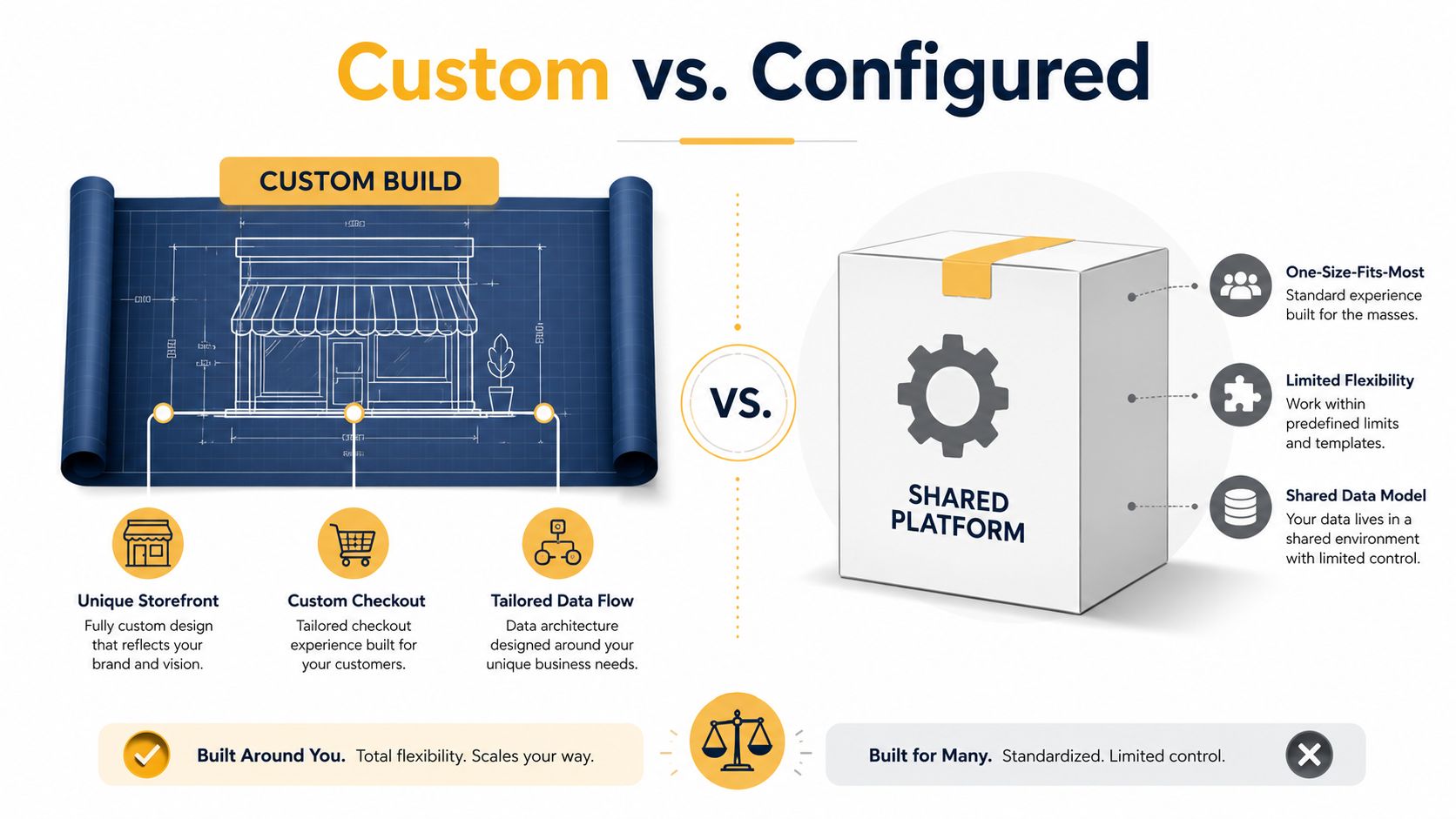
Custom ecommerce development means building the storefront, checkout, commerce logic, and supporting data flows around your business rather than forcing your business into a shared template. Think of an off-the-shelf platform as an off-the-rack suit. It may fit adequately, arrive quickly, and cost less. A custom build is made to your measurements, but the tailor, fittings, alterations, and future care all cost more.
The distinction isn't "SaaS versus custom." Most serious ecommerce projects sit on a spectrum:
- Configuration: Use native themes, settings, and workflows with minimal code.
- Extension: Add approved apps, custom front-end components, or middleware.
- Headless implementation: Keep a commerce backend while replacing the presentation layer.
- Custom platform: Own the core storefront, commerce services, data model, and operational workflows.
What you gain and what you inherit
SaaS platforms such as Shopify and BigCommerce offer rapid deployment, managed infrastructure, established payment options, and more predictable operating costs. Their constraints are part of the product. The platform decides which checkout behaviors, data structures, and integrations it supports cleanly.
A custom build gives you control over the customer journey, business rules, data ownership, and release process. That control comes with obligations:
- Engineering ownership: Someone must maintain application code, infrastructure, dependencies, and integrations.
- Integration debt: Every external service creates a contract that can fail, change, or require monitoring.
- Longer delivery: Discovery, design, migration, testing, and launch require deliberate sequencing.
- Operational responsibility: Security, observability, incident response, and performance become your concern.
Practical rule: Customize the parts that differentiate your business. Rent the commodity parts that don't.
A custom storefront doesn't require rebuilding every service from scratch. You might use a managed commerce backend, Stripe for payments, Algolia for search, and a custom experience layer. The best solution often preserves proven components while replacing the specific areas where your operating model needs control.
Business Cases Where Custom Builds Make Sense
A configurable industrial product, a complex B2B account, or a multi-market operation can turn a standard store into a collection of costly workarounds. Custom development earns its keep when business rules create a real advantage or shared software creates expensive friction. The broader market growth noted earlier, from $5.31 trillion in 2022 toward a projected $8.03 trillion in 2027, raises the pressure to operate well online, but it does not justify custom software for every retailer.
Strong candidates for a custom build
A manufacturer selling configurable equipment may need rules for compatible components, installation requirements, delivery limits, and quote requests. A standard product page rarely handles that journey without a maze of extensions and manual checks.
A wholesaler may require customer-specific price lists, negotiated terms, approval workflows, minimum order quantities, account-level catalogs, and sales-representative access. A consumer-style cart is often the wrong foundation for those buying processes.
Multi-region retail adds another layer of operational complexity. Localized catalogs, tax handling, inventory visibility, payment methods, and market-specific content must work together. A brand operating stores, warehouses, subscriptions, and online channels may also need one order model that coordinates the business instead of splitting each channel into a separate system.
Custom development also fits businesses where checkout is part of the product. Made-to-order goods, memberships, financing, rentals, bundles, and eligibility checks all change how customers decide and buy. If fewer steps and clearer decisions affect conversion, checkout deserves architectural attention rather than another collection of plugins.
| Scenario | Best Fit | Why |
|---|---|---|
| Standard catalog and conventional checkout | Off-the-shelf | Speed and managed operations usually matter more than deep control |
| Configurable products or complex bundles | Custom or hybrid | Product rules can shape discovery, pricing, and checkout |
| B2B accounts with negotiated pricing | Custom or specialized commerce platform | Account permissions and commercial terms need first-class support |
| Multiple warehouses and sales channels | Hybrid or custom | Inventory and order orchestration become central operating concerns |
| Distinctive content-led shopping experience | Headless or hybrid | The front end can evolve without replacing commerce services |
| Regulated or market-specific workflows | Custom or specialized platform | Compliance and process requirements may exceed template capabilities |
The trade-off is direct. You will spend more upfront, take longer to launch, and need an ongoing engineering relationship. A unique theme alone is a poor reason to fund custom ecommerce development. Revenue constraints, margin pressure, or operational bottlenecks make the case stronger. If the current platform blocks those areas, staying with it may cost more than replacing the specific layer causing the problem.
Choosing the Right Architecture for Your Build
Architecture determines cost, flexibility, and delivery risk before developers write production code. The choice should follow your catalog complexity, traffic behavior, integration needs, content needs, and engineering capacity. It shouldn't follow whichever architecture appears most often in agency presentations.
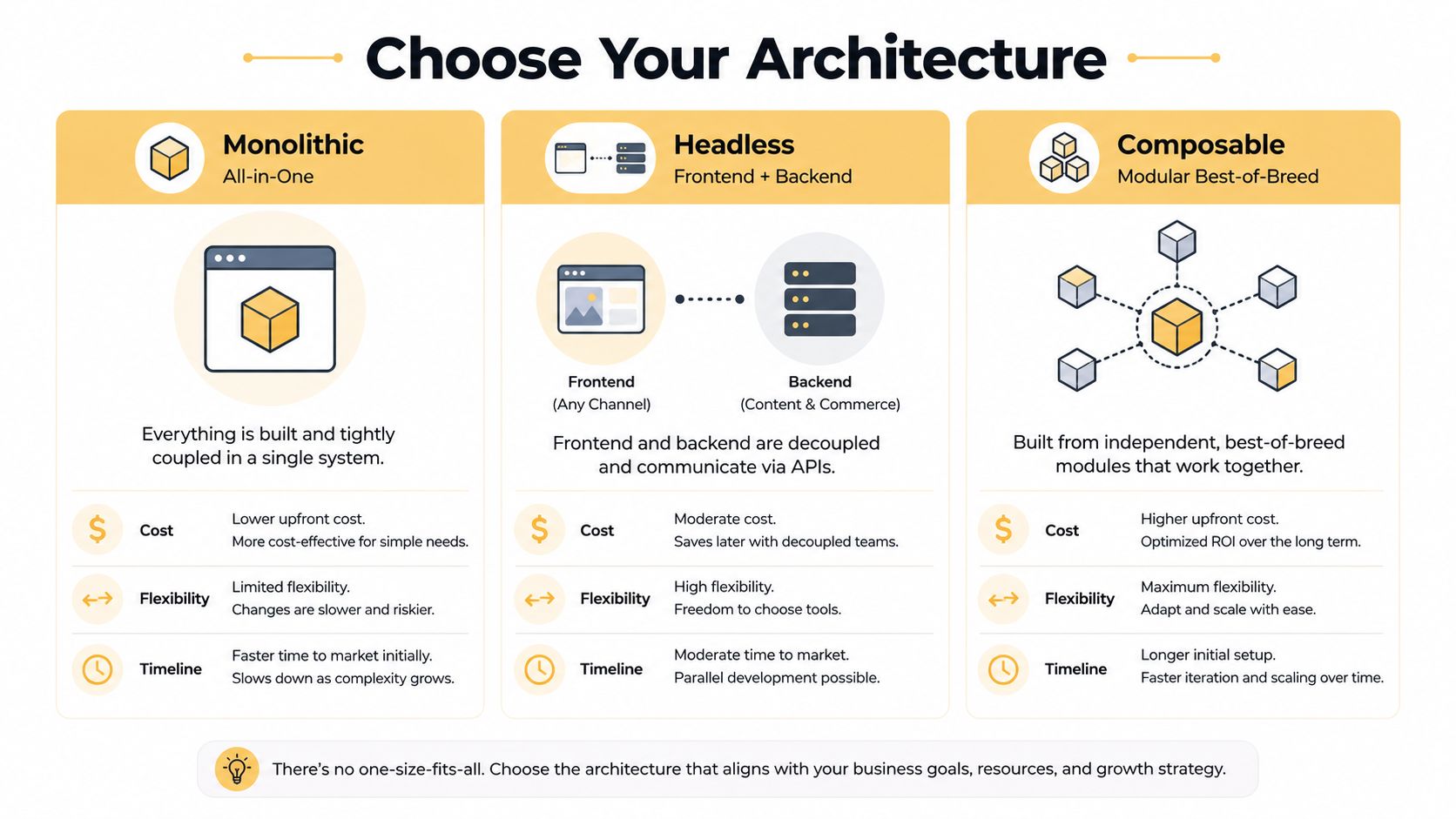
A monolithic system bundles the storefront, cart, commerce backend, and administration into one application. It's usually the simplest model to operate and can reach launch quickly. The downside appears when teams need independent release cycles, multiple experiences, or substantial front-end experimentation.
A headless system separates the customer-facing layer from the commerce backend through APIs. It gives front-end teams greater control and can support web, mobile, kiosks, or other experiences from shared commerce services. It also introduces API coordination, preview challenges, caching decisions, and another layer of technical ownership.
A composable system assembles specialized services for commerce, search, content, payments, pricing, customer data, and order management. It offers the most modularity, but each service adds cost, integration work, monitoring, and failure points.
Use decision criteria, not trend language
Headless adoption has moved beyond a niche approach. A 2025 industry summary reports that 73% of businesses use headless architecture, while 98% of non-users plan to evaluate it within 12 months, as reported in Swell's headless commerce trends overview. That momentum matters, but adoption isn't proof that every business should choose headless.
A brand with a standard catalog, one primary storefront, and limited engineering depth may gain little from composable services. A smaller retailer can lose time and margin maintaining a system whose flexibility it rarely uses. Conversely, a multi-region retailer managing six content surfaces, complex integrations, and frequent front-end releases may find a monolith too restrictive.
Evaluate:
- Catalog and pricing complexity
- Traffic spikes and performance requirements
- Number and criticality of integrations
- Internal engineering and product management capacity
- Number of customer-facing channels
- Release independence and experimentation needs
This ecommerce web application development guidance can help frame the broader application requirements. Choose the least complex architecture that supports your next meaningful stage of growth. Flexibility has value only when your team can operate it.
Inside a Custom Ecommerce Tech Stack
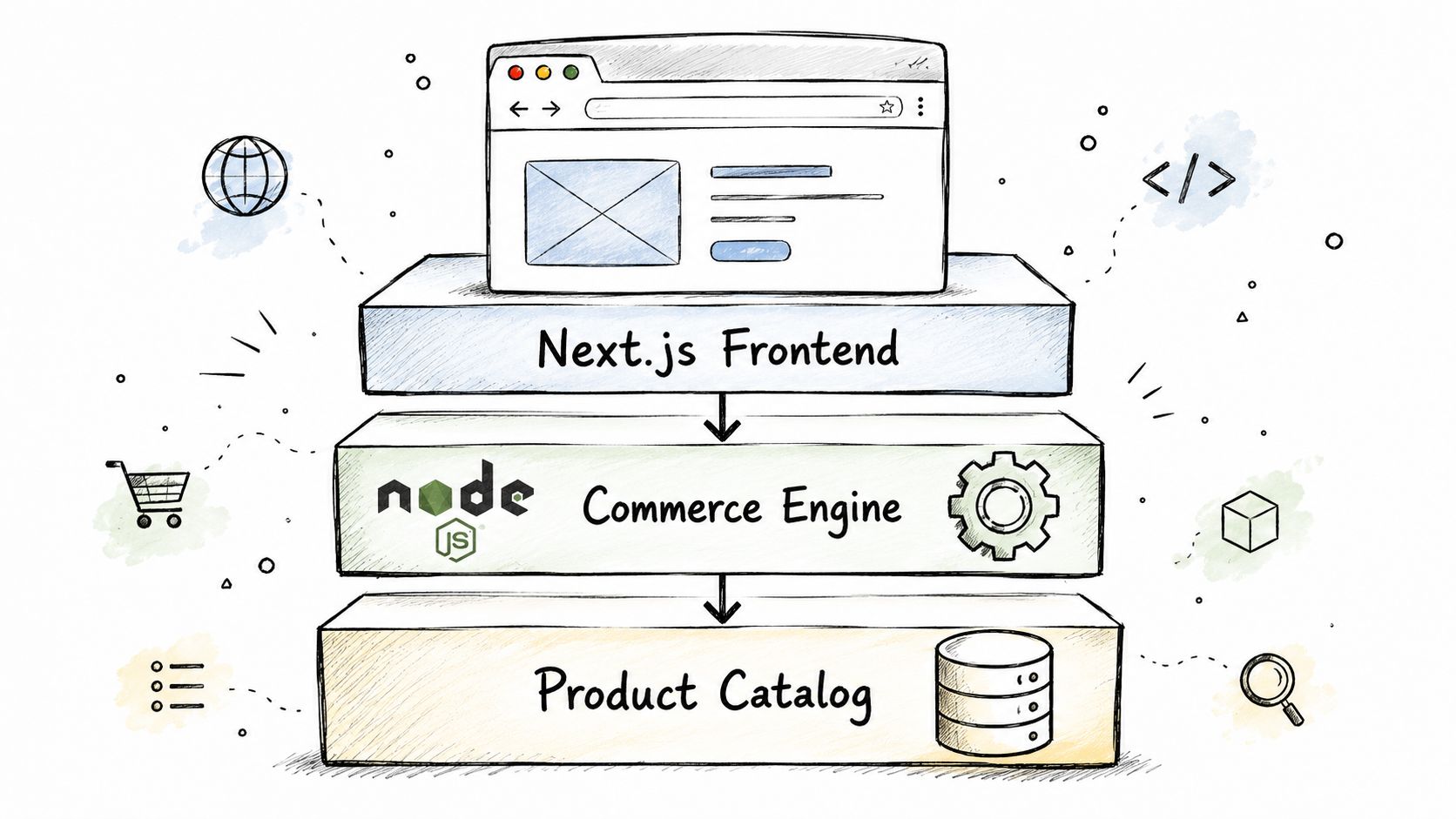
A custom ecommerce stack should be designed as a set of operating layers, not a list of fashionable technologies. The front end has to serve customers quickly, the commerce engine has to protect transaction integrity, and the data layer has to keep product, customer, and order information consistent.
Build from the customer journey inward
A typical stack might include:
- Experience layer: Next.js or Remix for server rendering, routing, accessibility, and responsive interactions.
- Commerce engine: A custom Node.js or Go service, or a headless backend such as commercetools or Saleor, for carts, pricing, promotions, customers, and orders.
- Catalog layer: A product information system that manages attributes, variants, media, relationships, and market-specific content.
- Discovery layer: Algolia or Elasticsearch for indexing, filtering, autocomplete, and relevance controls.
- Delivery layer: A CDN, image optimization, edge caching, and carefully managed third-party scripts.
- Transaction layer: A payment abstraction supporting providers such as Stripe, Adyen, and regional gateways without coupling checkout to one processor.
- Operations layer: An OMS for allocation, fulfillment, returns, and status synchronization.
- Reliability layer: OpenTelemetry, Datadog, structured logs, alerting, and deployment pipelines through GitHub Actions or GitLab.
Performance work must cover the entire rendering path. Benchmark data covering more than 25 billion page views and 200 leading retailers found that each second removed from load time produced a 5.7% mobile conversion lift and a 3.3% desktop lift, while overall bounce rates fell by 12.2%, according to ecommerce speed benchmark data from SpeedHub. The same benchmark found that sessions under four seconds captured 59% of conversions. Budget for server response, caching, script execution, CDN placement, and Core Web Vitals monitoring from the beginning.
Security belongs in the architecture too. Use tokenization to reduce payment-card scope, WAF rules at the CDN, dependency scanning, rate limits, secure secrets management, and a documented incident-response runbook. Teams evaluating whether a builder is sufficient should also weigh the cost and SEO of site builders against the ownership and operational demands of a custom system.
Realistic Budget Ranges and Build Timelines
Custom ecommerce budgets should be ranges, not confident single quotes. Scope expands through integration count, data migration, design depth, checkout rules, testing requirements, and post-launch ownership. A proposal that hides those variables behind one fixed number hasn't removed uncertainty. It has postponed it.
The working ranges below are planning frames, not universal market rates.
| Build Tier | Budget Range (USD) | Timeline | Primary Cost Drivers |
|---|---|---|---|
| SMB custom storefront | $80,000 to $180,000 | 3 to 5 months | Experience design, headless backend configuration, core integrations, checkout, QA |
| Mid-market platform | $200,000 to $500,000 | 6 to 9 months | PIM, OMS, multi-currency, migration, custom pricing, operational workflows |
| Enterprise composable program | $750,000 and above | 9 to 18 months | Multiple markets, services, teams, data governance, phased rollout, change management |
What the schedule actually contains
A credible project starts with discovery. The team maps customer journeys, data ownership, integration contracts, operational exceptions, and launch constraints before finalizing the build plan.
Design then establishes the component system, product templates, checkout states, accessibility rules, and content workflows. Development follows in vertical slices, so the team can test a complete journey instead of producing disconnected features. Quality assurance should include payments, promotions, inventory, returns, browsers, devices, accessibility, performance, and failure recovery.
Mid-market projects should launch through a controlled pilot before a full rollout. Enterprise programs should use phased releases, with each phase producing operational value and reducing migration risk.
The cost drivers that move a quote most sharply are:
- Integration volume: Each ERP, PIM, OMS, tax engine, and gateway adds mapping and failure handling.
- Checkout behavior: Guest purchase is straightforward. Eligibility, financing, subscriptions, bundles, and account rules are not.
- Legacy data: Poor product or customer data creates cleanup work before migration.
- Design maturity: A mature design system reduces repeated decisions and front-end rework.
- Ownership model: An in-house team and an agency retainer create different ongoing costs.
Use this ecommerce website development cost guide as a planning reference, then request a discovery-led estimate. Any vendor offering a fixed price before examining your systems, data, and workflows deserves scrutiny.
Integrations, Security, and the Personalization Reality Check
Integrations determine whether a custom store becomes the operational system your business needs or another isolated sales channel. Start with business ownership. The ERP may own financial records, the PIM may own product attributes, the OMS may own fulfillment status, and the CRM may own customer relationships. Your ecommerce application should coordinate those systems without creating conflicting sources of truth.
| Integration | What It Connects | When It Becomes Essential |
|---|---|---|
| ERP | Orders, finance, purchasing, inventory, and accounting | When commerce must align with financial and supply-chain operations |
| PIM | Product attributes, variants, media, and market content | When product data is complex or managed across channels |
| OMS | Allocation, fulfillment, shipping, and returns | When orders move across warehouses, stores, or carriers |
| CRM | Customer accounts, service history, and commercial relationships | When sales and support teams need a unified customer view |
| Payment gateway | Checkout, authorization, capture, refunds, and fraud controls | Always, but especially for multiple markets or payment methods |
| Tax engine | Tax calculation and jurisdiction rules | When selling across regions with differing requirements |
| Marketing automation | Consent, audiences, campaigns, and lifecycle messages | When customer activity must trigger coordinated marketing |
Security is part of delivery
Tokenization can reduce exposure to payment-card data. CDN-level bot mitigation, dependency patching, access controls, audit logs, vulnerability testing, and an incident-response plan protect the rest of the system. Treat security review as a release requirement, not a post-launch service ticket.
Checkout deserves equal attention. Research cited by PaymentsJournal's coverage of checkout friction found that 96% of ecommerce sites had at least five checkout errors, while 20% of consumers would abandon ecommerce altogether if checkout took longer than one minute and 17% had abandoned a cart because checkout was too slow or complicated. Keep guest checkout visible, reduce fields, disclose shipping costs early, and show payment options before the final step.
Personalization is where many custom builds become performative. Mastercard reports that 82% of retailers identify maintaining real-time customer data as their biggest personalization challenge, as described in its 2025 ecommerce personalization maturity report. Recommendations can't stay relevant if product data, consent, identity resolution, inventory, and behavioral events aren't governed.
Architecture decision: Build the data pipeline first. Add AI recommendations only when someone owns the inputs, quality checks, experimentation, and ongoing maintenance.
Vendor Checklist and Your Next Steps
Choose a custom ecommerce partner as if you're hiring an interim CTO. The agency will influence your architecture, operating costs, security posture, and ability to change direction later. A polished portfolio isn't enough. Ask how the team made decisions, what failed, and who will maintain the system after launch.
What to verify before signing
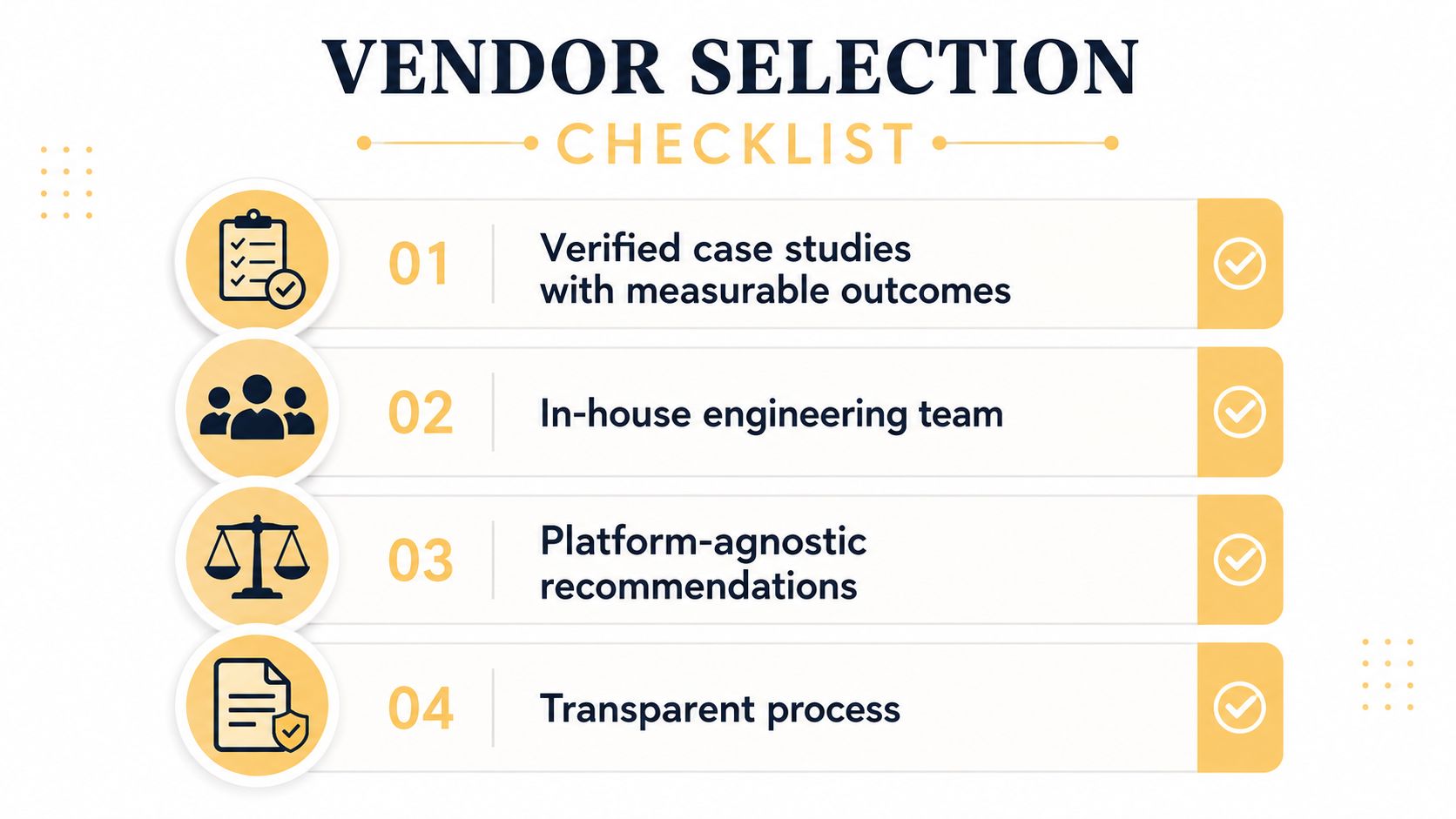
- Verified ecommerce work: Request relevant case studies with measurable business outcomes, not screenshots alone.
- In-house engineering: Confirm who writes the code, reviews architecture, handles QA, and responds to incidents.
- Platform neutrality: A credible partner should recommend monolithic, headless, hybrid, or composable approaches based on your constraints.
- Transparent discovery: Look for workshops that document journeys, data ownership, integrations, risks, and acceptance criteria.
- Post-launch support: Review service levels, monitoring, defect response, release management, and ownership transfer.
- Security discipline: Ask about access control, dependency scanning, payment scope, testing, incident response, and relevant certifications.
Red flags include a fixed-price proposal with no discovery phase, a proprietary CMS that makes migration difficult, a promised launch date without a dependency plan, and a recommendation that defaults to headless or AI personalization without discussing staffing and maintenance. Ask for a delivery plan that identifies what won't be built in the first release.
Your next steps should be concrete:
- Audit current constraints: Record slow workflows, failed integrations, checkout issues, platform limitations, and manual tasks.
- Document three must-win journeys: Describe the customer, business rule, data required, failure state, and success measure for each.
- Shortlist two or three partners: Give each the same requirements and ask for a scoping workshop.
- Plan financial resilience: Reserve a contingency of 10% to 15%, as a planning recommendation rather than a guaranteed cost, for discovered data, integration, or migration issues.
- Define ownership: Decide who maintains code, infrastructure, content models, integrations, analytics, and security after launch.
Custom ecommerce development is an operational architecture decision. Up North Media helps businesses plan and build custom ecommerce platforms, custom web applications, SEO programs, and AI-enabled workflows around measurable commercial requirements. Visit Up North Media to discuss your current platform constraints, customer journeys, and the right scope for a build that can ship.