
Your checkout just accepted an order, your dashboard updated, and nothing looks wrong. Then support finds a negative quantity, finance finds a total that doesn't match its line items, and marketing finds the same customer three times. Data validation rules are how you stop that mess at the door, before a bad value becomes a shipped order, a wrong report, or an automated decision.
What Data Validation Rules Are and Why They Matter
A checkout form accepts an order dated in the past and a quantity of minus four. The warehouse cannot ship a negative number of items, and someone must track down the record before it causes further confusion.
Validation works like a checkpoint: each record faces predefined tests before it moves into a database, dashboard, or automated workflow. A record that passes can proceed. One that fails can be blocked, flagged, or logged for review.
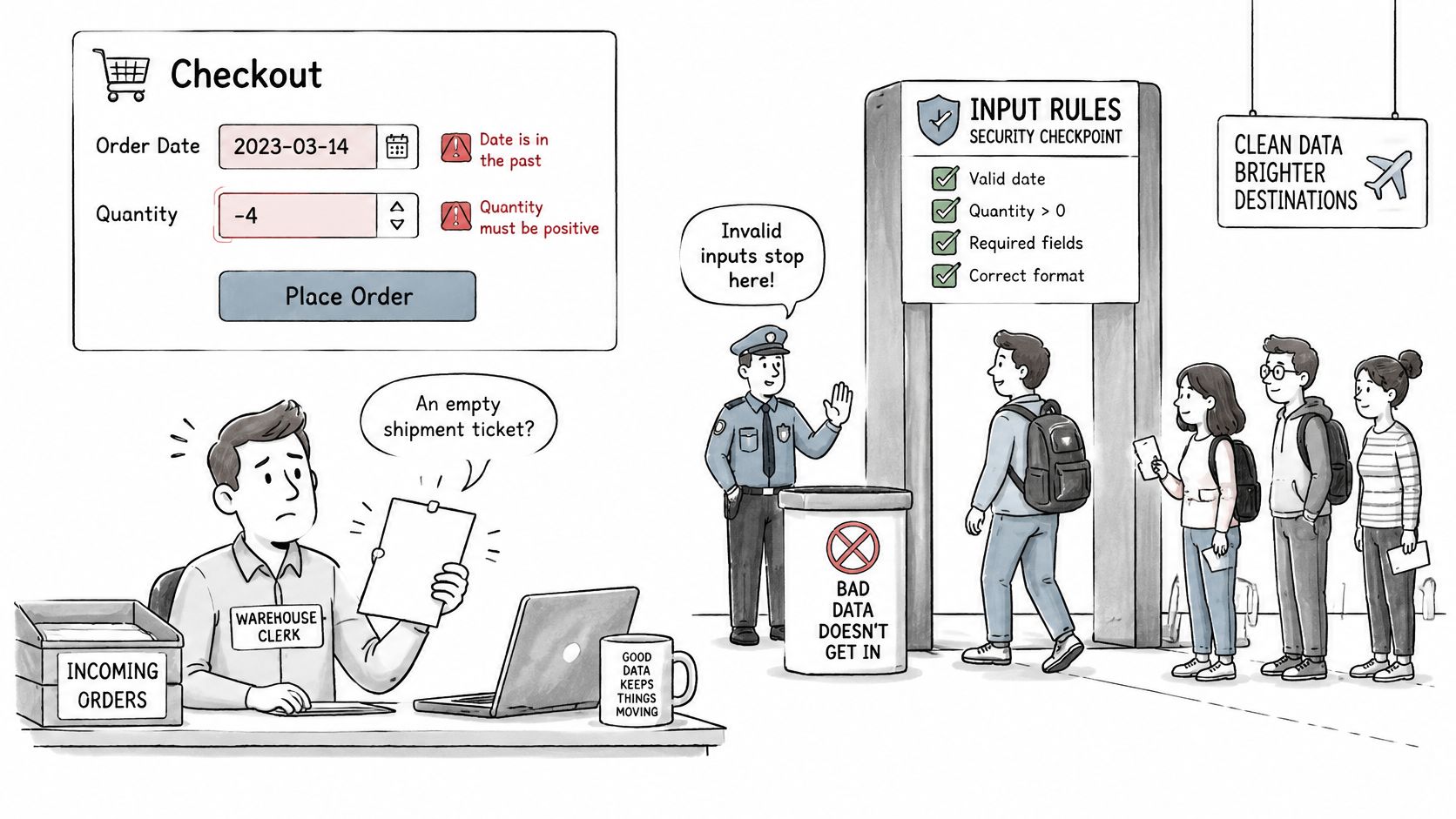
A data validation rule is a predefined test that decides whether incoming data is acceptable.
What a rule actually tests
- Presence: Is a required field filled in?
- Type: Is this value the right kind of value, such as a number instead of text?
- Range: Does a number or date fall inside allowed limits?
- Date logic: Is this date consistent, and can its timestamp be read the same way every time?
- Relationships: Do fields agree with each other, and do references point to records that exist?
Validation connects data acceptance to a business requirement. An order total should reconcile with its line items; a postal code should match an accepted format. The same discipline can help teams prevent pet travel paperwork errors, such as a missing field or inconsistent date.
A single rule cannot catch every problem. A required-field check can reject a blank, but it cannot tell whether a filled-in value makes sense in context. Treat rules as layers: block clear errors, flag questionable values, and log rejected records so teams can review patterns and adjust rules after launch.
For web apps, SEO reporting, and AI workflows, downstream tools may rely on whatever they receive. Every rule should answer a business question. If that question is unclear, the rule needs more thought before it is applied.
Types of Data Validation Rules at a Glance
These eight families build on each other. Start with presence and type, because a missing or wrongly typed value breaks everything downstream. Then add format, range, and length. Finish with rules that look across fields and tables, since those catch the errors that look fine one field at a time.
New developers often stop after the first two rows. That's understandable, because they're the easiest to write, but most expensive bugs live lower in the table. A quantity of minus four is present and numeric. It only fails when you test range and cross-field logic.
The eight families
| Rule type | What it checks | Example | Typical failure caught |
|---|---|---|---|
| Required (presence) | Field is not empty | Email field on a signup form | Blank submission |
| Data type | Value matches the expected type | Age stored as an integer | The text 'twenty' entered in an age field |
| Format (pattern) | Text matches a defined pattern | Postal code or ZIP+4 format | Letters inside a ZIP code |
| Range | Number or date sits within limits | Quantity between 1 and 100 | A quantity of -4 |
| Length | Character count within limits | Password between 8 and 128 characters | A 3-character password |
| Uniqueness | No duplicate values allowed | One account per email address | Two customer records with the same email |
| Referential integrity | Value exists in another table | order.customer_id must match a customer | An order linked to a deleted customer |
| Cross-field logic | Relationship between two or more fields | End date later than start date | Checkout dated before check-in |
How to choose among them
Use hard rules for structural facts that can't be argued with. An order must reference a real customer. An end date must come after a start date. There's no legitimate version of either failure.
Reserve pattern checks for values with a clear, stable standard, like a postal code in a single country you serve. Names, street addresses, and phone numbers vary far more than most pattern writers expect, so treat those patterns cautiously and consider a warning instead of a block.
Uniqueness deserves special care because it's the rule users feel most. Blocking a second account with the same email is correct. Blocking a second person who shares a household email may not be, which is a product decision, not a technical one.
Try this first: List your own fields in a spreadsheet and mark which of the eight types apply to each one. Empty rows are your real risk.
That exercise usually reveals two things. You'll find fields with no rules at all, and fields with three rules that contradict each other. Both are worth fixing before you write any code.
Where Validation Runs in Browser, Server and Database
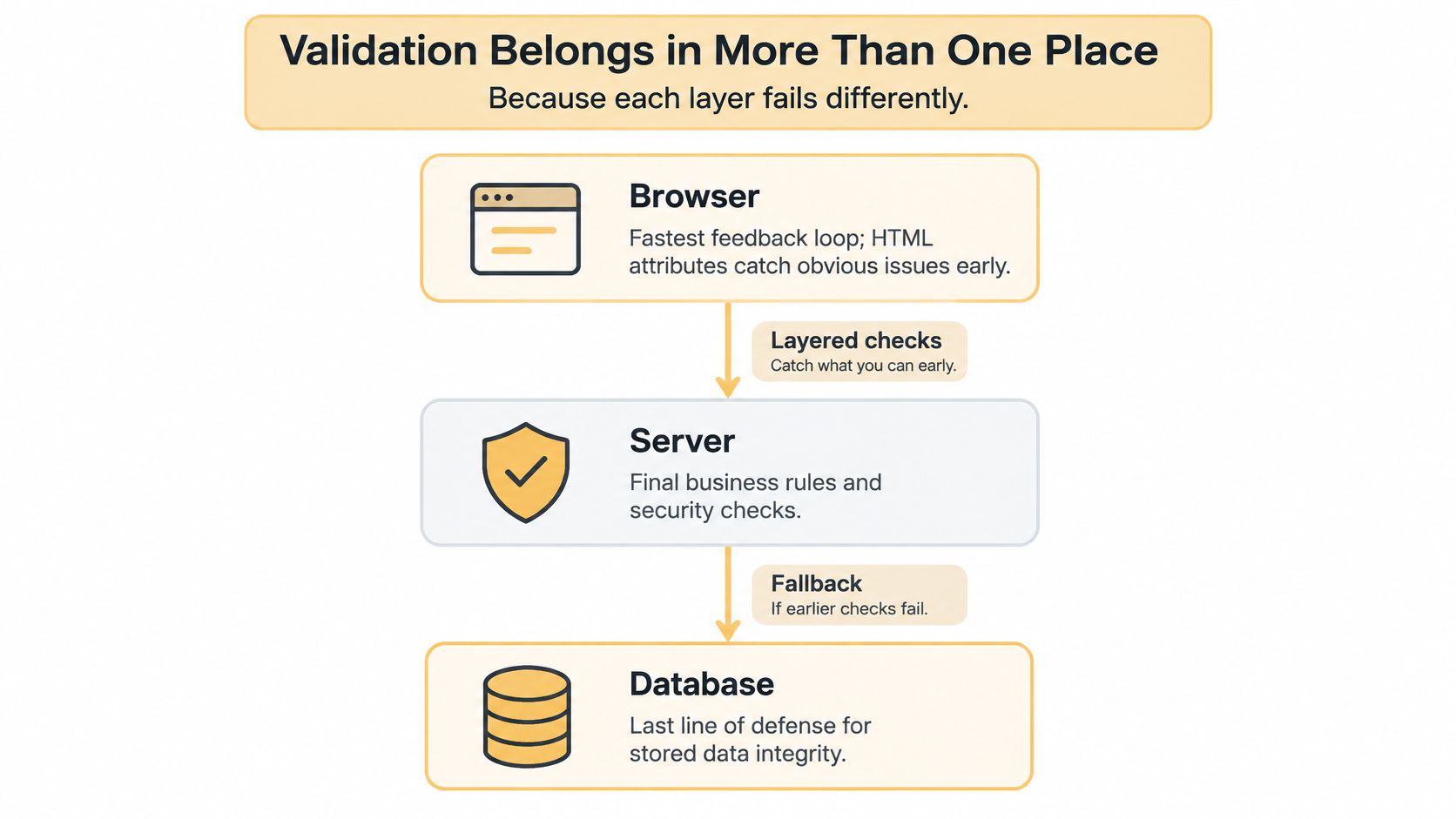
Validation belongs in more than one place, because each layer fails differently. This is the point teams resist, usually because writing the same rule three times feels wasteful. It isn't duplication for its own sake. Each layer protects against a different way bad data gets in.
The layout below shows the three layers as a stack, with fast feedback at the top and durable protection at the bottom.
What each layer is good at
The browser gives the fastest feedback. HTML attributes and JavaScript tell a person they've mistyped an email before they ever hit submit, which is good user experience. But anyone can bypass it with browser dev tools or by calling your API directly, so it can't be trusted.
The server is where business logic lives, because it's the one path every channel shares. Your web form, mobile app, bulk import, and admin tool should all hit the same server rules. If a rule only exists in one interface, the other interfaces are unguarded doors.
The database is the last line of defence. Constraints like NOT NULL, CHECK, UNIQUE, and FOREIGN KEY hold even when a script, a migration, or a tired developer writes to the table directly.
| Layer | Typical tools | Main strength | Main limitation |
|---|---|---|---|
| Client (browser) | HTML5 attributes, JavaScript | Instant feedback without a server trip | Easy to bypass, so never trusted alone |
| Server (application) | Django forms, Laravel validation, express-validator | Central business logic reused across channels | Adds request latency and must match the UI rules |
| Database | NOT NULL, CHECK, UNIQUE, FOREIGN KEY constraints | Protects data from every writer, including scripts | Error messages are technical and complex logic is hard to express |
The short walkthrough below shows how a single field moves through these layers in practice.
Two more places count. Spreadsheets use data validation lists and formulas, and CRMs use property rules, and both are real entry points for the data your reports depend on.
Keep the model simple. Browser for speed, server for rules, database for integrity. A rule that exists only in the UI isn't a rule at all. It's a suggestion.
Writing Rules in HTML, JavaScript and SQL
Let's use one signup throughout, with a name, email, age, join date, and an optional referral customer. Same fields, same rules, three layers. Watching one rule change shape teaches you more than three unrelated examples.
Step 1 HTML for instant feedback
Start with the browser. Set required on name and email so the form won't submit blank. Use type="email" so the browser applies its own basic email check and shows the right keyboard on phones. Add minlength="2" to name to catch obvious accidents.
For age, use type="number" with min="13" and max="120", which gives you a spinner and a range check for free. For a postal code field, add a pattern attribute such as [0-9]{5}(-[0-9]{4})? and a title explaining the expected format, because the browser's own message won't tell the user what went wrong.
HTML attributes are cheap and friendly. They're also the weakest layer you've got, so treat them as a courtesy to honest users, not as protection.
Step 2 JavaScript for named errors
Next, write a validateSignup function that checks the same fields and returns a list of named errors rather than a single true or false. Each error names the field and the rule, for example email.format or age.range. Named errors let you highlight the exact field and write a message a person can act on.
The function blocks submission when the list isn't empty and renders one message beside each failing field. Write those messages for the person typing, not for yourself. "Enter an age between 13 and 120" beats "Invalid input" every time.
JavaScript also earns its keep on cross-field logic that HTML can't express, like checking that a join date isn't in the future or that a discount code only applies above a minimum order value.
One discipline matters here. Your JavaScript rules must mirror your server rules exactly, same limits, same messages. When they drift, users pass the form and then get rejected by the server, which feels like the site lied to them.
Step 3 SQL for durable constraints
Finally, define the table. Put NOT NULL on name and email so neither can ever be missing. Add UNIQUE on email so one address can't create two accounts, even if two requests race each other.
Add CHECK (age BETWEEN 13 AND 120) to enforce the range at storage level. Add CHECK (join_date <= CURRENT_DATE) so nobody can join next week. Then add a FOREIGN KEY on the referral column pointing back to the customer table, so a referral must name a real customer.
Notice the difference in behaviour. The browser shows a friendly message inline. The database raises an error, and your application has to catch it, translate it, and log it. If you don't catch it, your user sees a raw constraint name, which helps nobody.
That's also why database errors should be rare in normal use. They mean something got past two layers, and that deserves a log entry, not just a retry.
Good table design makes most of this natural, and it's worth pairing this work with sound database design practices before you add constraints to a schema that's already fighting you.
Copy this pattern into your own schema one table at a time, starting with the table that holds money or identity. You don't need to retrofit everything in one sprint.
Backend, Spreadsheet and CRM Validation in Practice
Backend frameworks
In a Node.js route, express-validator lets you declare checks inline, such as body('email').isEmail() and body('quantity').isInt({ min: 1, max: 100 }). You then collect the results and return them as structured errors, keyed by field, so the front end can place each message where it belongs.
A Django form does the same job through field definitions and clean methods for cross-field logic. Laravel's $request->validate() takes an array of rules like 'email' => 'required|email|unique:customers' and redirects back with errors automatically. The syntax differs, but the pattern is identical across stacks. Declare rules once, return field-level errors, and never trust the request.
Structured errors matter more than they look. When your API returns quantity: must be between 1 and 100, every client, including future ones you haven't built, can show a useful message without guessing.
Spreadsheets
In Google Sheets or Excel, set a data validation list on a status column so people pick from New, Completed, or Cancelled instead of inventing spellings. Add a custom formula rule that flags any row where the end date is earlier than the start date, and pair it with conditional formatting so the problem is visible at a glance.
Know the limit, though. Pasting values into a sheet can bypass list rules entirely, and a well-meaning colleague can overwrite your formula. Sheets are fine for working data. They aren't a system of record, so validate again when that data is imported anywhere that matters.
CRM property rules
CRMs such as HubSpot let you set rules at the property level. Make lead source required so attribution reporting has something to work with. Apply a regex to phone numbers so formats stay consistent, and use a picklist for deal stage so pipeline reports don't splinter into near-duplicates.
The trap is assuming those rules cover every path in. A rule applied to a form may not apply to a CSV import, an API write, or a workflow automation. Test each path separately, because vendors enforce rules unevenly across them, and it's worth measuring CRM data quality improvements so you can see whether a new rule cleaned anything up.
- Forms: Check that the rules fire where people type.
- Imports: Confirm rejected rows are reported, not dropped.
- API and integrations: Send a deliberately bad record and watch what happens.
- Admin and bulk edit tools: Test these too, since staff often bypass form rules.
Check every write path, not only the main form. Bad data rarely arrives through the front door you polished.
Common Pitfalls and Their Security and Performance Costs
The most common mistake is validating only in the browser. It feels complete during development because you're testing through the interface you built. Meanwhile your API accepts anything, your import script writes straight to the table, and the first person who posts a hand-crafted request owns your data quality.
The rest of these show up in almost every codebase sooner or later.
| Pitfall | Why it happens | Fix |
|---|---|---|
| Validating only in the browser | Client checks feel sufficient during development | Repeat every rule on the server and in database constraints |
| Over-strict format rules | Rules assume one name, address or phone shape | Accept Unicode and international formats, and use warnings for soft rules |
| Silent rejection | Errors are discarded without records | Log rule ID, field, timestamp and the rejected value, with a clear user message |
| Catastrophic regex backtracking | Nested quantifiers in patterns | Use simple patterns and cap input length before matching |
| Rules drifting across layers | Logic is copied rather than shared | Keep rules in one schema or shared validation library |
| Heavy checks on hot paths | Full table scans run on every request | Cache reference lists and move bulk checks into batch jobs |
| Sensitive data echoed in errors | Verbose messages repeat the submitted input | Return generic messages and never echo passwords or tokens |
Two of these deserve emphasis. Catastrophic regex backtracking is a real availability risk. A pattern with nested quantifiers can take a very long time on a crafted string, so cap input length before you match and prefer simple patterns or a dedicated parser for emails and URLs.
Silent rejection is quieter and just as damaging. If a record disappears with no log, you can't tell whether your rule caught fraud or blocked a paying customer. Keep the rejected record, the rule that fired, and the reason.
On security, be clear about what validation is. It's an input control, not an authorisation control. It doesn't decide who may do something, and it doesn't replace output encoding or parameterised queries. It sits beside them, which is why it belongs in any serious review of web application security practices.
Every fix in that table should be testable. If you can't write a test that fails before the fix and passes after, you haven't fixed it yet.
How to Test Validation Rules in QA and AI Workflows
Testing rules is a procedure, not a spot check. Work through it in order, and write the results down where the next developer can find them.
The flow below lays out the sequence, from mapping entry points to recording failures.
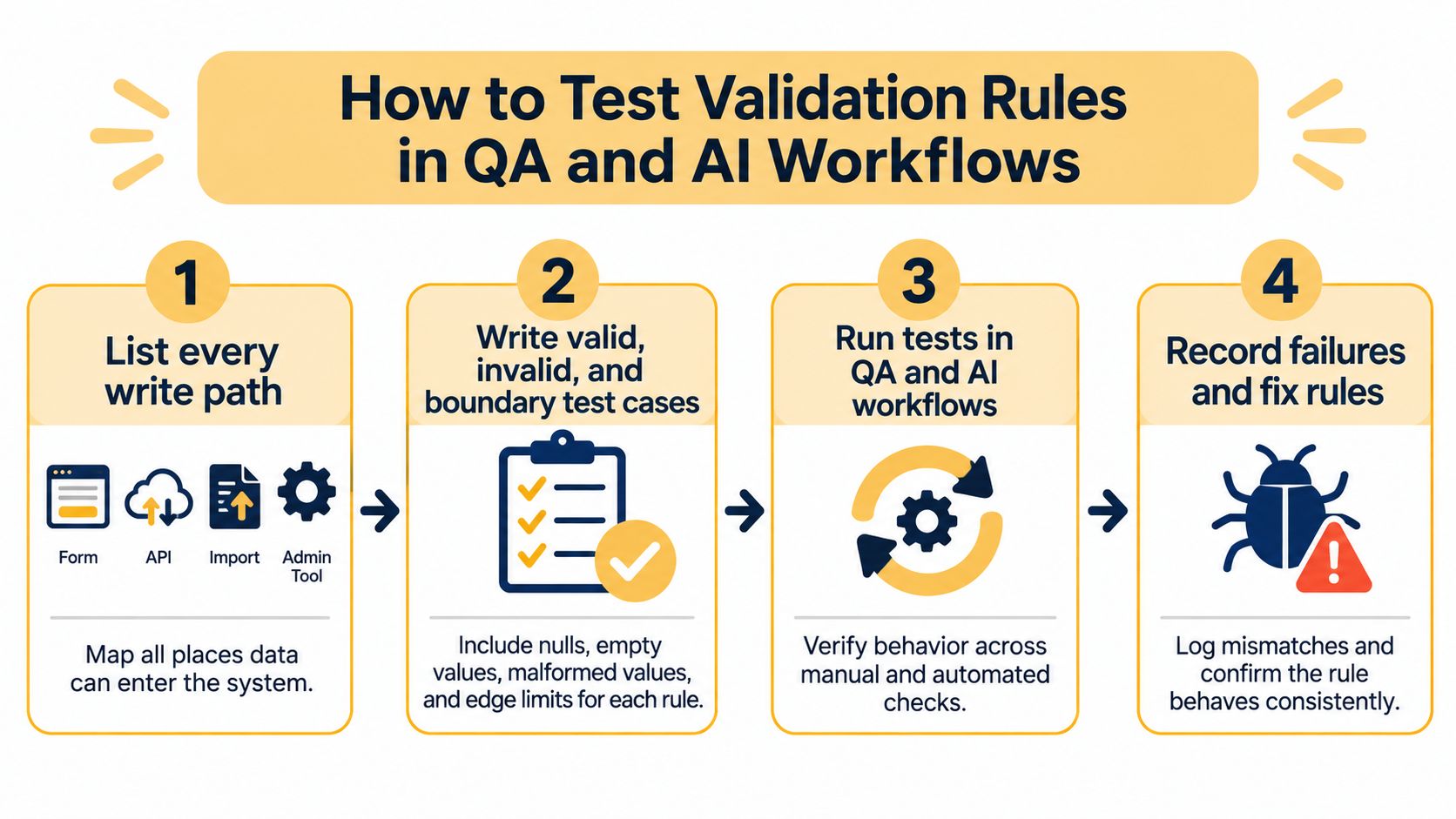
- List every write path. Forms, APIs, imports, admin tools, webhooks, and background syncs. If data can enter there, it needs tests there.
- Write valid, invalid, and boundary cases for each rule. Include nulls, empty strings, values at maximum length, and dates sitting exactly on the edge of an allowed range. Boundaries are where off-by-one mistakes hide.
- Automate those cases in your QA pipeline. They should run on every change, not when someone remembers. Teams that are new to this find integrating automated tests into CI/CD a practical place to start, and it pairs well with broader quality assurance practices.
- Record how often each rule fires and whether it was right. Sample rejected records and judge them by hand. A rule that fires often and is usually wrong is worse than no rule.
- Review rules when schemas or integrations change. A new field, country, or data source can invalidate assumptions your rules were built on.
Measuring whether a rule works
Don't judge a rule by a single pass rate. The NIST method-validation guidance identifies precision, bias, sensitivity, and specificity as four major performance areas, and says all four outcomes should be considered through true positives, false positives, true negatives, and false negatives. Sensitivity is the true-positive rate, and specificity is the true-negative rate.
In business terms, an overly strict address rule rejects legitimate customers, while a permissive fraud rule lets harmful records through. Counting both error types shows you which way to move the threshold.
AI-assisted workflows
Generated rules need the same testing as hand-written ones, and AI-generated test cases should be reviewed by a person before you trust them. Our own Development & Testing work builds AI models and tests them before deployment, and validation rules deserve that same gate. Keep a rule log with the rule ID, owner, test cases, and change history, so an auditor can trace why any record was accepted or rejected.
Keep Validation Working After Launch
Validation doesn't stop at deployment. Rules age, markets change, and integrations start sending values you never anticipated. A postal code rule that suddenly rejects a large share of orders after you launch in a new market is telling you the business changed, not that customers got careless.
Build a monitoring view that shows, for each rule, how often it fires, which field it hits, and how many rejected records were later confirmed correct. Then run this routine.
- Log every rejection. Capture rule ID, field, timestamp, and reason, and keep a quarantine queue that a named owner reviews.
- Inspect both extremes. A rule that never fires may be irrelevant or broken. A rule that fires constantly may be too strict for the data you now receive.
- Record provenance. Note who wrote each rule, which business requirement it serves, and which data source it assumes.
- Re-test on change and on schedule. Re-test whenever a product line, country, integration, or schema changes, and hold a recalibration review every quarter.
Ongoing testing under real-world conditions beats a single predeployment check, whether the input is a web form, an import, or a CRM sync. Treat your rule set as a living control with a documented owner, not a one-time setup you finished last spring.
Choose the Right Method and Ship
Not every rule deserves the same enforcement. A 2025 systematic review of healthcare data-quality research found substantial variation in the dimensions assessed and their definitions, with methods ranging from rule-based checks to statistical approaches and external gold standards. Automatically generated constraints can also be too strict or too permissive, so they need expert adjustment.
The checklist view below frames the choice as a decision about consequences, not about technology.
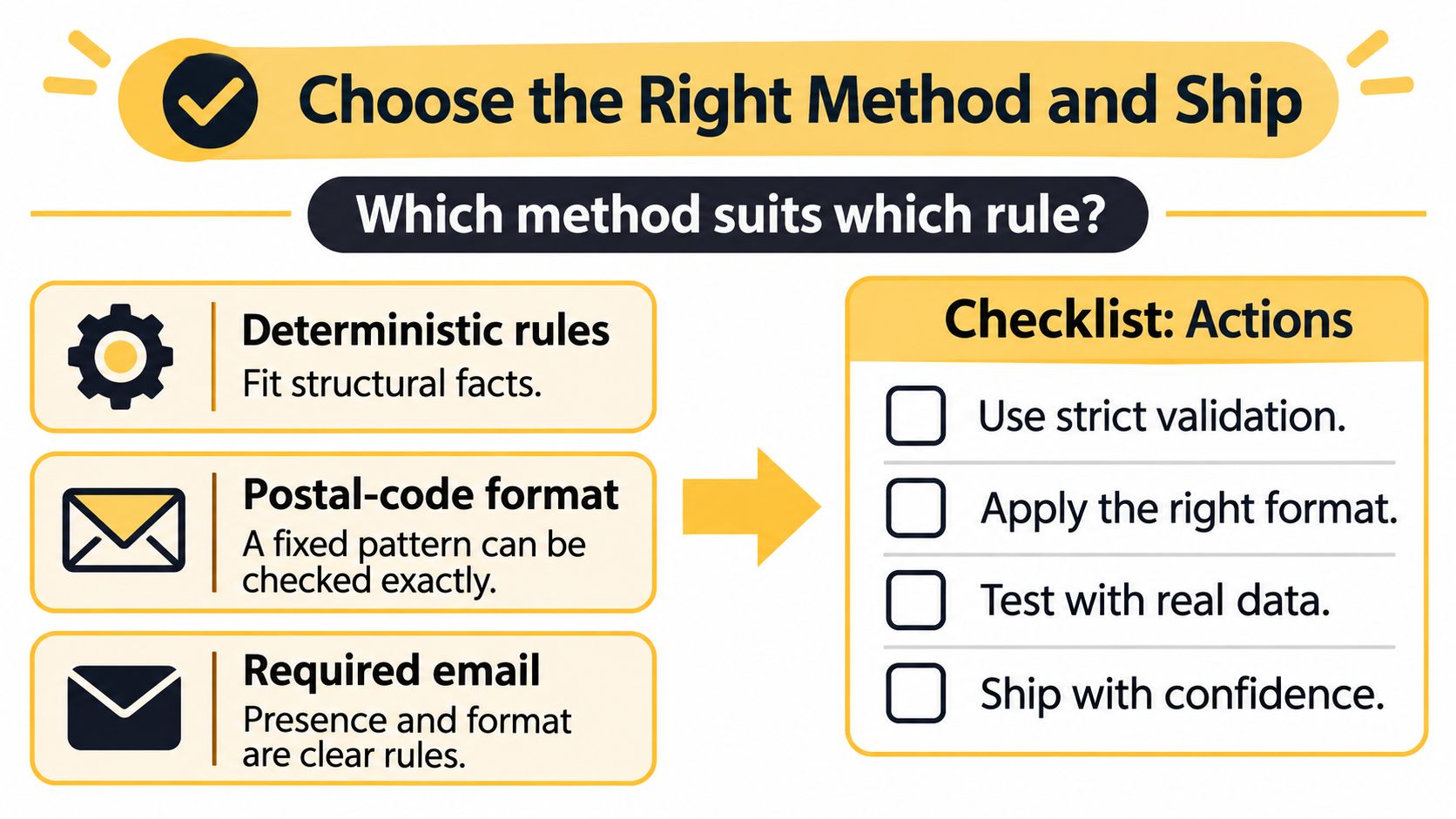
| Rule case | Method | Action |
|---|---|---|
| Required email on signup | Deterministic (hard) | Block submission |
| Postal code format | Deterministic (hard) | Block at ingestion |
| Unusually large order value | Statistical anomaly | Raise alert for review |
| Near-duplicate customer names | Semantic or fuzzy match | Route to review queue |
| Ambiguous or disputed records | Human review | Sample and decide with owner |
Layer it. Enforce structure at ingestion, quarantine records that break hard constraints, then run similarity or review checks on what passes. SHACL can check consistency across integrated knowledge graphs, but it depends on domain-specific modeling and can be affected by missing data and integration order.
Ship with this checklist. Separate blocking errors from warnings, keep rejected records for investigation, assign an owner to each rule, set confidence thresholds and sampling for review queues, and judge success by reduced business risk and faster fixes rather than rejected row counts. Automation doesn't remove judgment, and since clients must provide accurate and timely information and materials, exception workflows still need a person accountable for the call.
Start today. List every field, label each rule as hard, soft, or review, and write down the business requirement that justifies it.
If your forms, imports, CRM, and AI workflows are each enforcing different rules, or none at all, we can map every write path, define hard errors and warnings, and build the logging that shows which rules are helping. Up North Media builds custom web applications, data-driven SEO, and AI automation for businesses that need their numbers to be trustworthy. Visit Up North Media to book a free consultation and talk through your validation gaps.