
Your accounts team is closing the month, but someone is still retyping invoice numbers from scanned PDFs. Another person is chasing a missing purchase order, while a blurry attachment waits in an inbox because nobody knows whether it's already been entered. The work isn't difficult because every document needs judgement. It's difficult because the routine documents and the troublesome ones arrive together.
Document processing automation works best as a measured, partial process. Let software handle the documents it can verify, give people a usable exception queue, and measure the cost of both paths before committing to a wider rollout.
What Document Processing Automation Is
Document processing automation takes incoming documents, reads their contents, extracts relevant information, and sends validated data into the systems where people work. Those inputs might be paper, scanned PDFs, emails, photographs, or digitally generated files. The destination might be an accounting ledger, a CRM, or a case-management system.
For the accounts team, that means turning an invoice attachment into a supplier record, invoice number, date, and payable amount without asking someone to retype every field. It doesn't necessarily mean authorizing payment. Reading a document and approving a transaction are separate responsibilities.
Think of the system as a tireless clerk who needs clear instructions and a supervisor for unusual cases.
The basic operating pattern
Every implementation has four underlying functions:
- Capture: Receive the document and preserve its original file and origin.
- Extract: Pull out the text and business fields that matter.
- Interpret: Identify what those fields mean and whether they satisfy the workflow's rules.
- Transfer: Deliver approved information to the destination system, with a record of what happened.
The technology is already established in enterprise operations. In 2025, 78% of enterprises were operational with AI for document processing, according to AIIM and Deep Analysis. That's adoption context, not a promise that any particular small-business workflow will pay for itself.
Specialist workflows also need specialist boundaries. Ares' guide to intelligent document processing for PI firms is a useful legal-sector resource when considering how document handling connects to case work rather than simple data entry.
For business owners, the purchasing question is practical: can the system process your actual documents, identify uncertainty, and reduce the total work required? A polished extraction demonstration answers only part of that question.
How OCR, NLP, ML and RPA Work Together
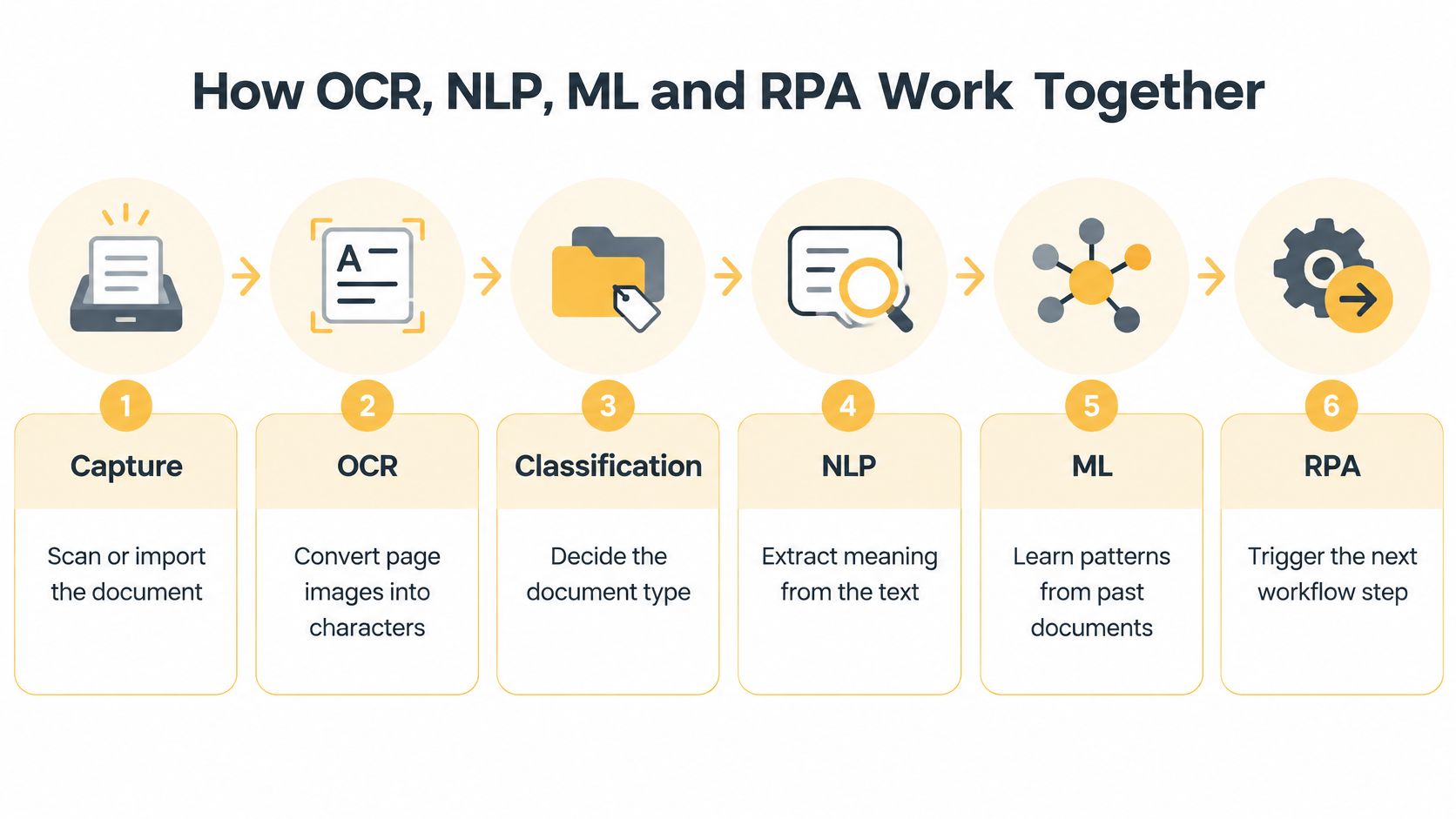
A production pipeline combines different tools rather than asking one model to do everything. OCR reads characters, language tools interpret text, machine learning recognizes patterns, and automation delivers the result. Each component needs a defined job.
The following flow shows how those technologies connect.
Follow the document through the pipeline
- Capture the input. Import the attachment or scan the paper. Preserve the original, identify its source, and check for missing pages before processing.
- Read the page with OCR. Optical character recognition converts page images into machine-readable characters. A digital PDF with usable embedded text may not require image recognition.
- Classify the document. Decide whether it's an invoice, statement, application, or another supported type. That choice determines which fields and rules apply.
- Extract the business fields. NLP helps distinguish an amount due from a subtotal or previous balance. This introduction to natural language processing explains the distinction between recognizing words and interpreting their meaning.
- Validate the result. Check required fields, arithmetic, supplier records, and purchase-order references. Confidence scores help prioritize review, but they don't replace these checks.
- Transfer and route. Use an API where practical, or RPA when the destination requires screen interaction. Confirm successful posting before marking the document complete.
Machine learning supports classification and extraction by learning from labelled examples. It can reduce layout-specific rules, but corrected documents don't automatically improve a system unless someone incorporates those corrections into a controlled training or configuration process.
What each technology does in the document pipeline
| Technology | Job in the pipeline | Strongest at | Typical limit |
|---|---|---|---|
| OCR | Turns page images into characters | Printed or typed text on clean scans | Errors rise with skew, blur and faint print |
| NLP | Interprets text and labels fields such as vendor name or contract date | Free text and varied wording | Ambiguous phrasing needs surrounding context |
| ML | Learns document types and extraction patterns from labelled examples | Recurring layouts once trained | Needs labelled data and periodic retraining |
| RPA | Moves data between systems and runs routing rules | Structured handoffs into ERP, CRM or archives | Breaks when screens, forms or formats change |
For predictable forms, templates can be cheaper and easier to audit than a broad language-model solution. For changing wording and layouts, contextual extraction may justify the additional testing and governance.
Commercial OCR development began in the mid-20th century, with banks, statistical offices, and post offices among early adopters, as documented in this history of OCR commercialization. Those organizations had repetitive, standardized records. Modern intelligent document processing adds language and learning capabilities, but the underlying task remains converting documents into usable business data.
Measuring Accuracy at Each Stage
Fine-grained classification can be substantially harder than identifying broad document types. In a government-document automation study, classification of three major document types reached 95.24% accuracy, with macro-F1 of 0.952, while classification across fifteen subcategories fell to 82.86%; OCR accuracy was 89.00%.
More labels create more opportunities for overlap. An application, amendment, and supporting declaration may share vocabulary and layout, while less common categories provide fewer examples for evaluation.
Reported accuracy and error rates by stage
These are results from different collections and tests, not a vendor leaderboard.
| Stage or test | Metric | Reported result | What it means |
|---|---|---|---|
| Raw OCR on digitised newspapers | Character accuracy | 71% to 98.02%; at 71%, about 145 wrong characters per 500-character paragraph | Searchable text isn't necessarily transaction-ready text |
| OCR in a government-document system | Accuracy | 89.00% | Recognition errors can affect later stages |
| Classification of three document types | Accuracy and macro-F1 | 95.24% and 0.952 | Strong routing across major categories |
| Classification across fifteen subcategories | Accuracy | 82.86% | Finer labels need stronger review rules |
| NIST degraded-page test | Character error rate | About 1% to 74% | Poor page quality can sharply increase errors |
Read the table by stage. Character accuracy measures transcription, not whether the correct invoice total reached the ledger. Classification accuracy measures routing, not whether the chosen extraction method captured the right bank account.
The NIST test also makes preprocessing an operational concern. Deskew tilted scans, remove image noise, normalize resolution, and detect clipped pages before attempting extraction.
Set acceptance criteria around business risk
- Separate the tests: Define acceptance criteria for recognition, classification, and each required business field.
- Inspect document classes: Measure character or word error rates by input type, including phone photos and faint scans, rather than relying on one blended average.
- Include macro-F1: This gives each category equal weight, helping expose weak performance on less common document types.
- Test the review boundary: Check whether low-confidence and incorrectly confident outputs reach the right reviewer.
A wrong invoice total carries a different cost from a misspelled footer. Amounts, account identifiers, and payment details should therefore require stronger verification than descriptive text.
Practical rule: A confidence score is a routing signal, not proof that a field is correct.
Compare confidence bands with observed field errors on a held-out set of your documents. Include examples the configuration team hasn't already corrected, and inspect high-confidence mistakes specifically. Those are the errors most likely to bypass review.
Business Benefits and How to Calculate ROI
In 2024, 75% of organizations were accelerating paper-digitization initiatives, according to Quocirca's survey of 502 IT and business decision-makers across the United States, United Kingdom, France and Germany. Digitization creates an opportunity, but savings depend on what happens after capture.
The operational shift is from handling every invoice to managing a controlled flow of approved documents and exceptions.
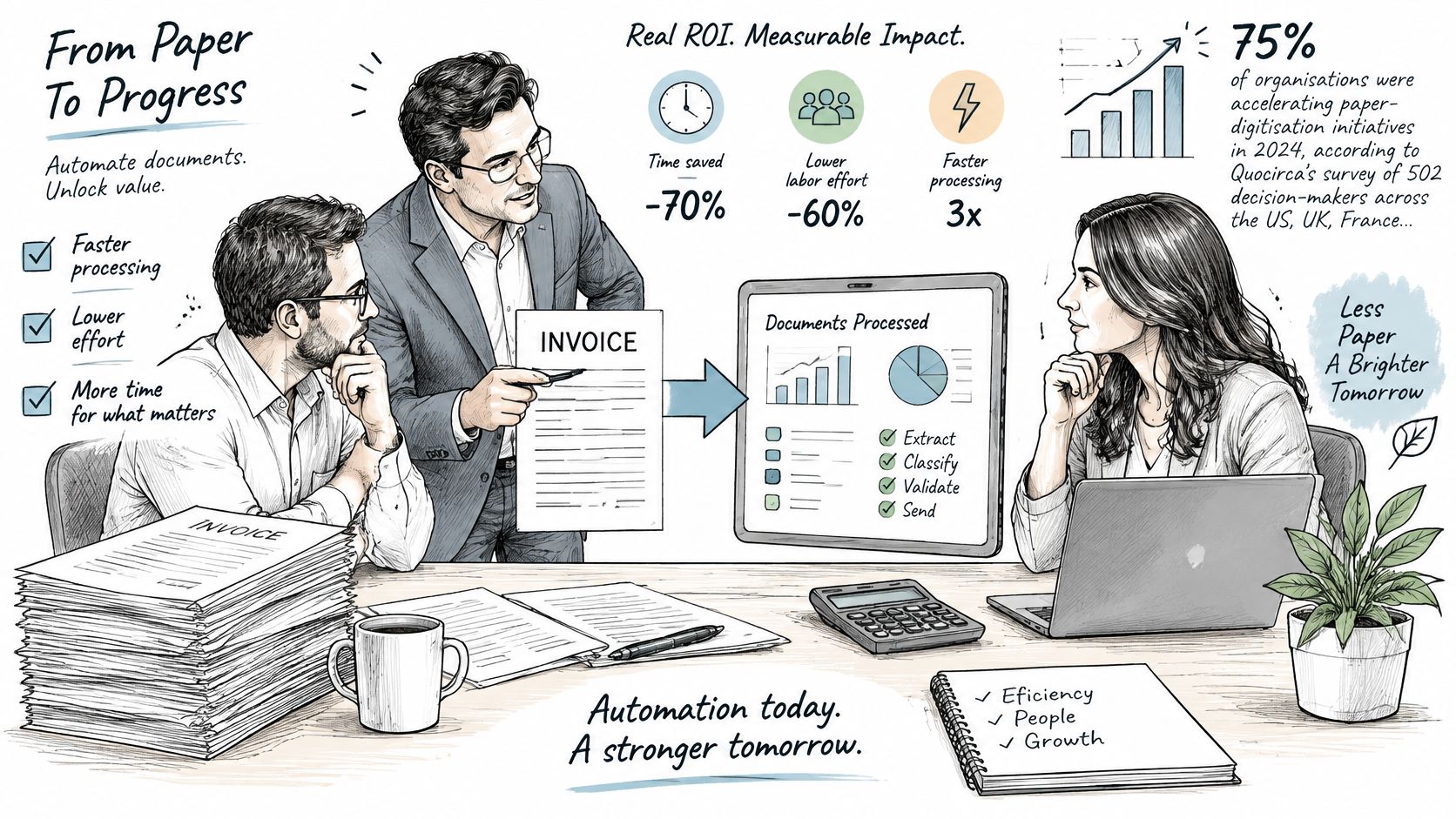
Useful benefits include shorter receipt-to-posting time, fewer keystrokes, fewer preventable payment delays, and more staff capacity for discrepancies. Treat released capacity separately from cash savings: saved hours don't reduce payroll unless staffing costs change.
A sound AI operational-efficiency assessment starts with the full workflow. Record handling time, correction time, waiting time, and exception rate for the document type you intend to automate.
A hypothetical supplier-invoice calculation
Every input below is an illustrative assumption, not a benchmark or vendor quote. The calculated results show how to replace those assumptions with your own figures.
| Calculation | Hypothetical input or result |
|---|---|
| Monthly volume | Assume 1,200 supplier invoices |
| Manual handling | Assume 6 minutes each at a loaded staff cost of USD 40 per hour |
| Current annual handling cost | 1,200 × 12 × 6 ÷ 60 × USD 40 = USD 57,600 |
| Automated share | Assume 70% pass all acceptance checks |
| Review workload | Assume the remaining 30% require 4 minutes each |
| Annual review cost | 1,200 × 12 × 30% × 4 ÷ 60 × USD 40 = USD 11,520 |
| Gross annual saving | USD 57,600 − USD 11,520 = USD 46,080 |
| First-year project cost | Assume USD 18,000 for licence and integration |
| Net annual saving | USD 46,080 − USD 18,000 = USD 28,080 |
| First-year ROI | USD 28,080 ÷ USD 18,000 = 156% |
This simplified scenario assumes no residual handling for accepted invoices. Add monitoring, correction, training, security review, and maintenance costs before approving a real investment.
For another perspective on the topic, watch the accompanying video.
Extraction accuracy alone isn't an ROI measure. Rework, duplicate postings, and stalled review queues can consume the apparent savings, even when individual fields look impressive in a demonstration.
Industry Use Cases With Mini Cases
High volume, recurring forms, and predictable destinations make a workflow a sensible candidate. Start with the fields that drive a bounded administrative task, not the most consequential decision in the business.
Document types and first automation targets by industry
| Industry | Typical documents | Automate first | Watch-out |
|---|---|---|---|
| Financial services | Invoices, statements, loan application forms | Invoice header and totals | Regulatory retention and audit trails |
| Government agencies | Permits, applications, benefit forms | Standard form fields | Varied scan quality and legacy paper archives |
| Logistics | Bills of lading, delivery notes, customs forms | Shipment identifiers and dates | Multilingual and handwritten entries |
| Healthcare | Referral forms, intake sheets, insurance claims | Patient identifiers and referral dates | Privacy rules and clinical-note accuracy |
| E-commerce and retail | Supplier invoices, returns paperwork, purchase orders | Order numbers and quantities | Photos taken on phones with poor lighting |
Illustrative composite case of a regional distributor
Consider a distributor receiving supplier invoices through a shared email inbox. Staff currently open attachments, identify the supplier, enter header details, and check the amount against purchasing records.
The proposed workflow extracts invoice headers and totals, then checks the supplier, reference, and arithmetic. Documents meeting the acceptance rules proceed to posting; missing references, inconsistent totals, and unfamiliar supplier layouts enter a review queue.
This is an illustrative composite, not a measured client result. In the pilot, the team would measure receipt-to-posting cycle time, exception rate, and rework after posting. Staff would retain responsibility for disputed charges, supplier changes, and payment approval.
The integration deserves its own test. If the accounting screen times out after submission, the automation must check whether the entry exists before trying again. These robotic process automation examples provide context for evaluating repetitive system handoffs.
Illustrative composite case of a clinic intake team
A clinic receives referral forms by fax and patient-submitted photo. The proposed automation reads patient identifiers and referral dates, while staff continue interpreting clinical notes and deciding clinical priority.
Matching requires more than recognizing a name. Where identifiers conflict or the image cuts off a field, the intake team verifies the source instead of letting the software create or merge a patient record.
This scenario is also an illustrative composite, not a measured outcome. The pilot would track intake cycle time, exception rate, and corrected records. Clinical interpretation and ambiguous identity matches would remain with authorized staff.
Automate the administrative handoff without quietly expanding the system's authority to make professional decisions.
For logistics and e-commerce teams, returns paperwork and supplier documents often combine physical labels, email attachments, and phone photographs. Test the complete submission package, including missing pages and handwritten annotations, rather than a clean PDF extracted from it. Define an acceptable capture process and a resubmission route so staff aren't left reconstructing unreadable evidence.
Roadmap From Pilot to Production
Begin with a bounded workflow and a named owner. Someone must be accountable for the review queue, configuration changes, and the decision to stop automated processing when quality deteriorates.
Use the roadmap to organize implementation, not to justify expanding before the pilot works.
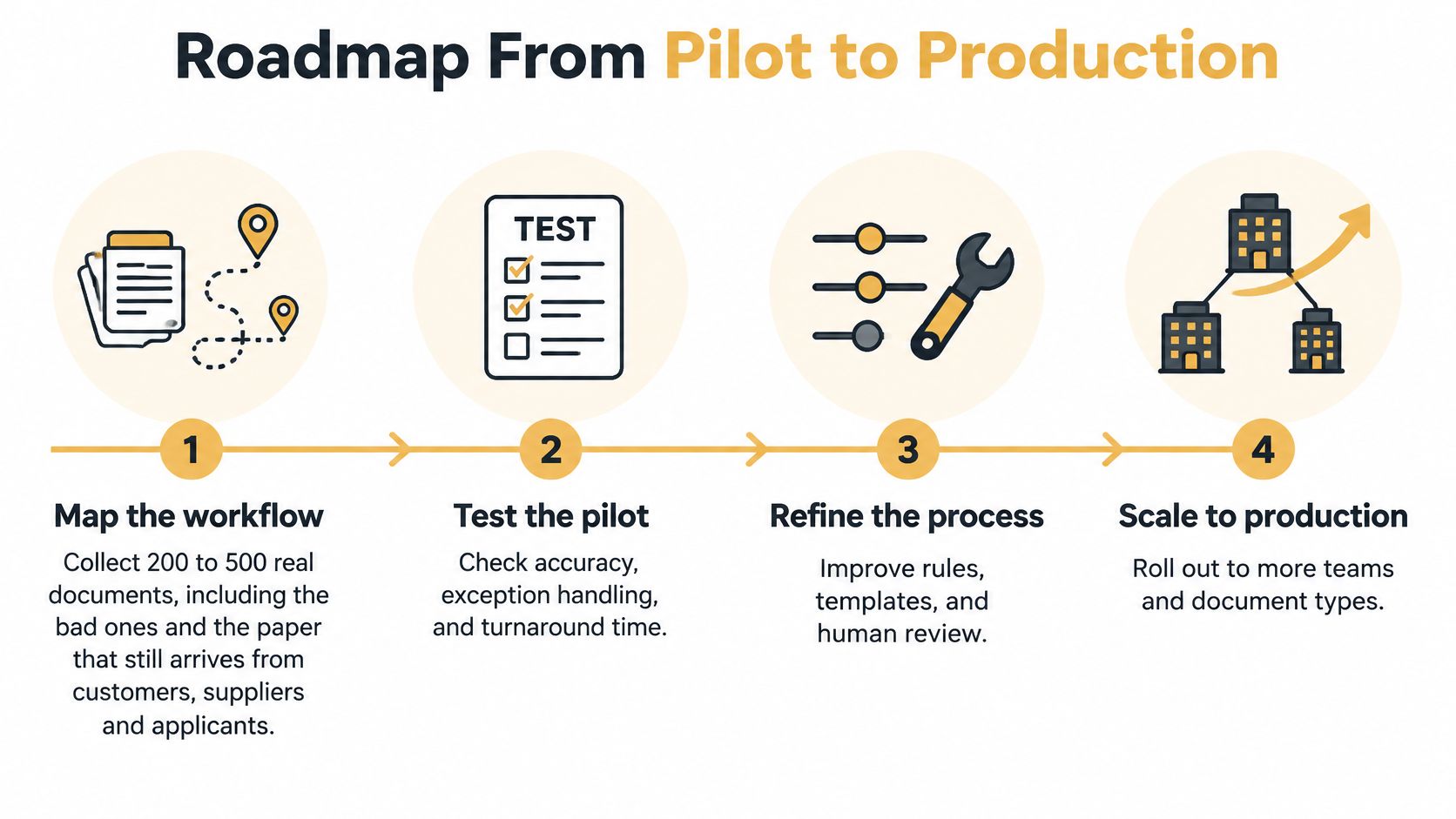
Build the workflow in controlled phases
-
Map the current process. Collect representative documents from customers, suppliers, and applicants, including rejected submissions and damaged scans. Identify who receives them, which fields matter, and where decisions occur. In DocuWare's 2025 enterprise research, 61% of intelligent-document-processing workflows still included paper, so don't design intake exclusively around digital files.
-
Pilot a bounded document type. Start with a clearly defined family, such as supplier invoices, rather than the whole accounts inbox. Record field accuracy, end-to-end cycle time, exception rate, and rework. Keep a held-out test collection separate from configuration examples.
-
Integrate and establish operating limits. Test destination-system failures, interrupted transfers, and corrections after posting. Set confidence thresholds using observed errors, then confirm that reviewers can see the original page, highlighted field, and reason for escalation.
-
Expand deliberately. Add document types individually, with their own acceptance tests. Recheck existing types after changes so improvements for one layout don't introduce regressions elsewhere.
Define when the system must refuse to decide
Stop automated action when confidence is insufficient, the source can't be verified, required evidence conflicts, or the document is a likely duplicate. Refusal should create an actionable review task, not an unexplained processing failure.
- Confidence thresholds: Set field-specific boundaries tied to the consequences of error.
- Human review queues: Assign an owner, priority, and escalation path for unresolved items.
- Source verification: Preserve sender information, submission channel, and the original document.
- Duplicate detection: Check file fingerprints and business identifiers before creating another transaction.
- Version control: Track document revisions alongside model, template, and rule changes.
- Decision logs: Record extracted values, checks, approvals, and downstream actions; associate errors with their workflow cost.
Give reviewers a way to request a better source image rather than forcing them to guess. Restrict access to sensitive documents, define retention and deletion rules, and establish a rollback procedure before enabling unattended posting.
The document-quality gap is substantial: a September 2025 Apryse survey of 465 organizations across North America, Europe, Australia, and New Zealand found that 76.6% stored 25–75% of their data in documents, yet only 38.1% rated that data excellent for AI use. Improve document hygiene and exception handling before assuming a more expensive model will solve the operating problem.
Choose a Vendor and Start With One Workflow
A vendor demonstration should expose failure handling, not just successful extraction. Request a pilot using your documents, with difficult examples included and the expected answers recorded independently.
Evaluate the operating system, not the headline score
- Document coverage: Can the provider process your layouts, languages, scans, and handwritten additions?
- Stage-level reporting: Can you inspect recognition, classification, and field-extraction results separately?
- Review controls: Are confidence scores, escalation reasons, and correction histories accessible?
- Integration behaviour: What confirms successful delivery, and what prevents duplicate submissions after a timeout?
- Change management: Who maintains the configuration when a supplier changes its form, and how are updates tested?
A cheaper system with transparent escalation can be more useful than one claiming near-total automation. Include review effort and maintenance in the comparison, and reject any evaluation that counts unreadable or unsupported documents outside the denominator without making that exclusion explicit.
Buy a workflow you can supervise, not an accuracy claim you can't reproduce.
Make a bounded commitment
Choose a high-volume document type with a clear destination system. Set an acceptance threshold, select a primary success measure such as cost per completed document, and agree on a fixed pilot period before expanding.
Our process follows AI Readiness Assessment, Solution Design, Development & Testing, and Deployment & Support. The important purchasing discipline is to require evidence before deployment, regardless of which provider you choose.
Review the workflow, collect representative samples, and score the pilot against the agreed criteria. If the results miss the threshold, identify whether capture, extraction, validation, or integration caused the gap before spending more.
Up North Media offers AI consulting, including workflow automation and chatbots, to help businesses reduce repetitive administrative work. Visit Up North Media to discuss a document-processing pilot, bringing sample documents, your destination system, and the acceptance criteria you want it to meet.