
You run a business in Omaha. You keep hearing that AI can write product copy, answer customer questions, summarize documents, help your team move faster, and somehow make marketing cheaper at the same time. Meanwhile, your staff is already stretched, your software stack is messy, and your real question isn't whether AI is interesting. It's whether it will help you sell more, serve faster, or waste six months.
That's where most small and mid-sized companies get stuck.
The problem usually isn't access to tools. You can open ChatGPT, Claude, Gemini, or Microsoft Copilot in a few minutes. The problem is deciding what belongs in your business, what should stay human, what can be automated safely, and how to connect any of it to the systems you already use. For Omaha SMBs, e-commerce teams, and digital publishers, that gap between curiosity and execution is exactly where generative AI consulting services make sense.
Your Business Is Ready for AI But Where Do You Start
A lot of owners are in the same spot right now. You've got a marketing team that needs more output, a customer service inbox that never really clears, and operations that still depend on people copying information from one system to another. AI sounds promising, but it also sounds like one more thing to evaluate when you already have enough on your plate.
The practical starting point is not “Which model should we use?” It's “Where is work getting stuck?” If an Omaha retailer needs faster product page creation, that's different from a publisher trying to speed up article packaging. A local service company with intake bottlenecks has a different problem again. Good generative AI consulting services start with the business choke point, not the software demo.
Here's the sequence that tends to work:
- Name the business goal: More conversions, faster support, lower admin load, better lead qualification, or stronger content throughput.
- Find the repeatable task behind it: Drafting, summarizing, tagging, classifying, routing, answering, or searching.
- Check what data and systems are involved: Shopify, WordPress, HubSpot, Google Drive, customer emails, internal documents, order records.
- Decide the level of risk: Internal use first, customer-facing later is often the safer order.
- Pick a pilot that's small enough to finish: One workflow beats a grand AI transformation plan that never ships.
Practical rule: If you can't describe the problem in one sentence without saying “AI,” you're not ready to buy an AI solution yet.
That's why a consultant is useful. The role isn't to sell mystery technology. It's to turn a fuzzy ambition into a scoped project with clear inputs, outputs, ownership, and guardrails. If you want a broader overview of that process, this guide on AI consulting for businesses is a useful starting point.
What Exactly Are Generative AI Consulting Services
Think of a generative AI consultant as an AI architect for your business.
An architect doesn't start by handing you a random building plan. They look at the land, budget, purpose, constraints, and timeline. A consultant does the same with AI. They look at your workflows, content, customer touchpoints, internal systems, and staff capacity, then design a solution that fits how your company operates in practice.
What they actually do
Some businesses need light guidance. Others need custom development. Most fall somewhere in between.
A consulting engagement usually includes a mix of these functions:
- Strategy work: Mapping business goals to AI use cases that are realistic, not trendy.
- Workflow design: Figuring out where a model should draft, summarize, classify, or answer, and where a human should review.
- Tool selection: Choosing between off-the-shelf products, API-based solutions, or custom software.
- Integration planning: Connecting AI to existing tools like CRMs, CMSs, support platforms, and document repositories.
- Governance and risk controls: Defining what data can be used, who can access it, and how outputs get checked.
The value is in the fit. Off-the-shelf tools are fine for general writing help. They usually fall apart when you need structured outputs, internal knowledge access, approval workflows, or a reliable customer-facing experience.
Why the category has grown so fast
This isn't a fringe service anymore. The global AI consulting services market is projected to expand from $11.3 billion in 2022 to $643.0 billion by 2028, implying a 34.2% CAGR, according to BCC Research's market forecast. That same analysis ties the growth to enterprise adoption across strategy, development, and customization.
That matters for a business owner in Omaha because it signals something simple. Companies aren't just experimenting with prompts. They're paying for implementation, integration, and operational use.
The gap in most businesses isn't access to AI. It's having someone translate business goals into systems that people will actually use.
What generative AI consulting is not
It's not just prompt writing.
It's not buying one chatbot and calling the project done.
It's also not replacing your team with a robot. In practice, the strongest projects use AI as a drafting, searching, routing, and support layer around people who still make the key calls. The best consultants know when not to automate. That matters as much as knowing what to build.
Common Services and Project Deliverables
Business owners usually want to know one thing fast. What am I buying?
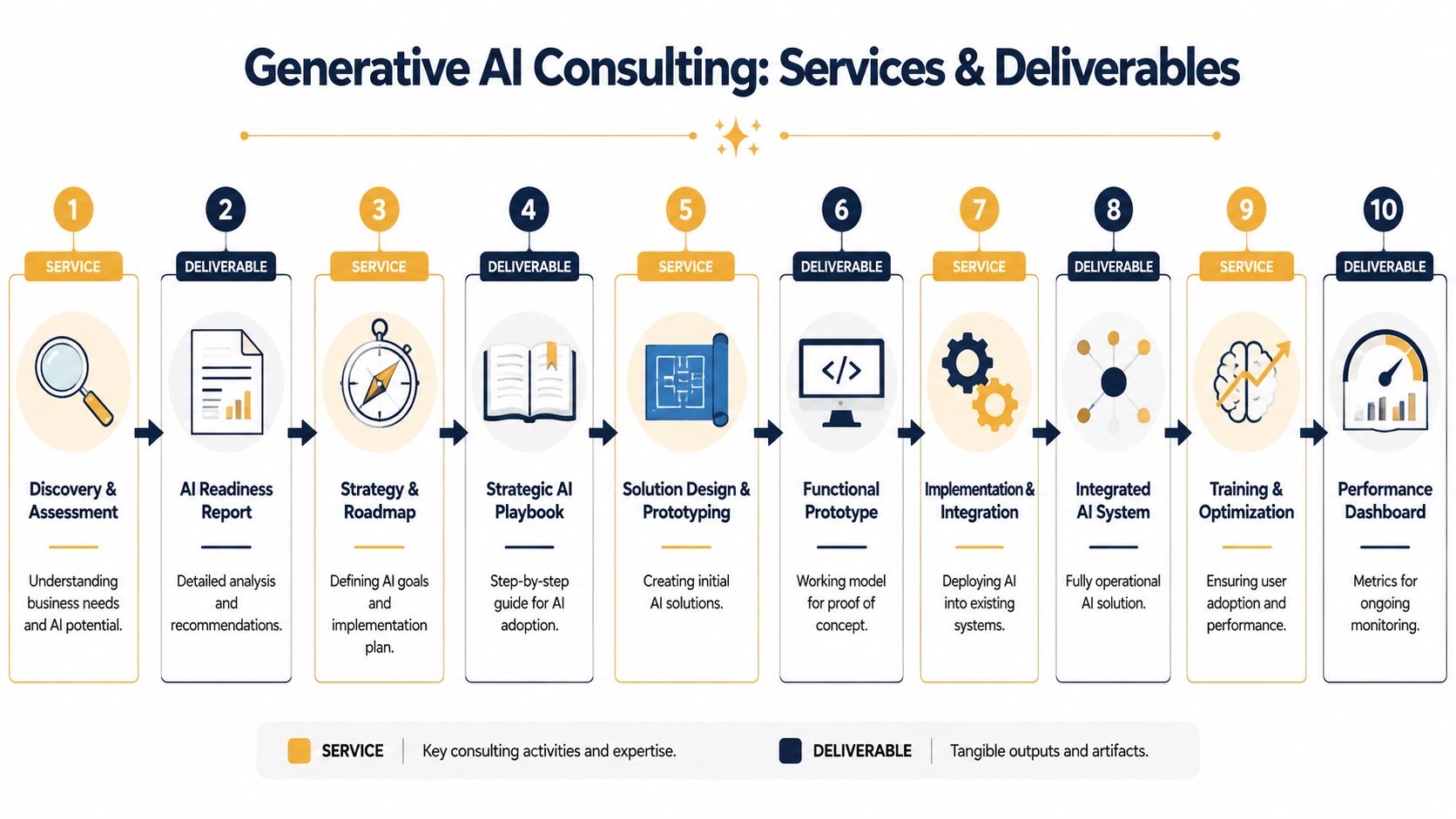
A real generative AI consulting project should produce tangible deliverables, not just meetings and slide decks. You should be able to point to documents, prototypes, workflows, integrations, and operating rules that move the project forward.
Discovery and readiness work
Here, good projects either get grounded or get exposed.
A key technical deliverable is the AI readiness assessment, which evaluates your data infrastructure, security, and governance. ITRex notes that this matters because weak data pipelines or unclear access controls often create significant rework during integration and deployment.
In plain terms, if your product data is inconsistent, your documents live in five places, or staff permissions are loose, AI won't fix that. It will amplify the mess.
Typical outputs in this phase include:
- Use case shortlist: Ranked by value, feasibility, and risk.
- Readiness report: Notes on data quality, security gaps, workflow issues, and integration constraints.
- System map: A practical view of which tools need to connect.
- Pilot recommendation: One scoped project with clear success criteria.
For businesses that want outside support with this phase, AI consulting services generally cover the assessment, prioritization, and implementation planning work discussed here.
A short explainer helps clarify what these engagements often look like in practice:
Prototype and workflow design
Once the use case is chosen, the next deliverable is usually a proof of concept or functional prototype.
This is the stage where a retailer might test AI-generated product descriptions from catalog data, or a publisher might test article-summary generation from editorial drafts. The point isn't perfection. The point is to see if the workflow works under real conditions, with your data, your tone, and your staff involved.
Common outputs here:
- Prompt and workflow library: Reusable instructions for recurring tasks.
- Prototype interface: Sometimes a simple internal tool, sometimes a connected app.
- Review rules: Who approves what before content goes live or customers see it.
- Failure log: Examples of where the model goes wrong so the team can tighten the process.
Field note: If a prototype only works when the consultant is driving it live on a call, it isn't ready.
Build, integration, and support
A pilot becomes useful only when it fits into daily work. That usually means connecting AI to existing systems and giving employees a process they'll follow.
Deliverables at this stage often include:
| Service area | Deliverable you should expect | Why it matters |
|---|---|---|
| Internal knowledge assistant | Connected document search and answer workflow | Reduces time spent hunting through files |
| Content automation | CMS-ready drafts, summaries, metadata, or social copy | Speeds publishing without changing editorial control |
| Support automation | Chat or intake assistant with escalation rules | Handles common questions while keeping complex cases human |
| Reporting and monitoring | Dashboard or review cadence | Shows where the system helps and where it needs tuning |
The difference between a useful deployment and an expensive experiment is usually boring stuff. Access permissions. Content review. Error handling. Version control. Staff training. Those details decide whether the tool becomes part of operations or gets abandoned after the kickoff call.
Real-World Use Cases for Omaha Businesses
Most owners don't need more abstract examples. They need to know what this looks like on an actual workday.
For Omaha e-commerce retailers
A regional retailer often has a catalog problem before it has an AI problem. Product descriptions are inconsistent. Collection pages are thin. Email campaigns repeat the same language. New product launches create a rush of writing that nobody on the team has time to finish well.
Generative AI can help by drafting first-pass product copy, rewriting descriptions for different audiences, generating email variations, and producing ad creative angles from a structured product feed. The key phrase there is drafting first-pass. If you let AI publish raw copy directly, quality slips fast. If you use it to give your merchandiser or marketer a strong starting point, output improves without losing brand control.
A practical Omaha example might look like this:
- Product team: Feeds specs, benefits, and category tags into a content workflow.
- AI layer: Creates title options, bullets, FAQs, and campaign snippets.
- Human review: Checks claims, tone, compliance, and duplicate wording.
- Marketing team: Publishes faster and spends more time on offers and testing.
That works best when the store already has decent product data. If the underlying catalog is sloppy, AI just writes polished nonsense.
For digital publishers and content teams
Publishers don't usually need AI to replace editors. They need it to handle packaging work that slows editors down.
That includes article summaries, social captions, SEO metadata drafts, newsletter blurbs, headline variations, transcript cleanup, and internal content tagging. A local publisher or niche media site can use AI to turn one piece of reporting into several supporting assets, while the editorial team still controls facts, framing, and final voice.
What doesn't work is asking a model to become your newsroom. That approach creates accuracy problems and weakens differentiation. What does work is using AI around the editorial process, not instead of it.
If your content business depends on trust, AI should accelerate your editors, not impersonate them.
For service businesses across Omaha
Local firms in legal, home services, healthcare-adjacent admin, professional services, and B2B operations often get the biggest lift from intake and knowledge workflows.
A custom chatbot or form assistant can answer common questions, qualify leads, collect first-round information, and route inquiries to the right person. An internal assistant can search policy docs, service procedures, and onboarding material so staff don't keep asking the same questions in Slack or email.
Three common wins show up here:
- Faster first response: Prospects get answers after hours.
- Cleaner intake: Staff receive more complete information up front.
- Less repetitive admin: Employees stop rewriting the same responses every day.
The trade-off is that customer-facing assistants need tighter guardrails than internal ones. For a service business, a wrong answer on pricing, timeline, or legal scope can create more work than it saves. That's why the best builds include escalation paths and clear boundaries.
Understanding Engagement Models and Pricing
Most businesses don't buy generative AI consulting services the same way. The right structure depends on whether you need a quick pilot, ongoing guidance, or a hands-on implementation partner.
The category is growing because companies want help with strategy, data engineering, model work, and integration. One market forecast projects the global AI consulting market will grow from $22.27 billion in 2025 to $257.60 billion by 2033, a 35.8% CAGR, driven by industries including finance, healthcare, and retail that need help streamlining operations and integrating AI into real business systems, according to Market Data Forecast.
The three common ways to engage
Some firms sell tightly scoped projects. Others work on a monthly retainer. Larger builds may require a dedicated team model.
Here's the practical difference.
| Model | Best For | Typical Pricing Structure | Example |
|---|---|---|---|
| Project-based engagement | Businesses testing one use case or needing a defined deliverable | Fixed fee tied to a workshop, assessment, prototype, or implementation phase | An Omaha retailer commissions a product-description pilot connected to its catalog |
| Monthly retainer | Companies that want ongoing strategy, prompt workflow tuning, governance, and iterative support | Recurring monthly fee for a set scope or advisory cadence | A publisher keeps a consultant on retainer to refine editorial automations and review new use cases |
| Dedicated team engagement | Organizations building a custom AI-enabled product or multi-workflow internal system | Monthly team allocation based on roles and time commitment | A service company builds a private knowledge assistant integrated with CRM, docs, and intake forms |
How to think about pricing without bad assumptions
There's no honest universal rate card for this work.
Pricing changes based on scope, data complexity, system integration needs, security requirements, custom software development, and the amount of change management involved. A workshop is one thing. A customer-facing assistant connected to your CRM, CMS, and knowledge base is another.
A better way to evaluate cost is to ask:
- What deliverable am I paying for? A roadmap, prototype, integration, internal tool, or full operating workflow.
- What internal time will this consume? Somebody on your team still needs to own approvals and subject matter input.
- What is the risk of getting it wrong? Internal draft tools are cheaper to test than public-facing bots.
- What needs to be maintained after launch? Prompts, retrieval logic, permissions, model settings, and review workflows all drift over time.
Which model fits which business
A small Omaha SMB usually does best with a narrow project first. That limits risk and forces clarity.
An e-commerce business with an active marketing calendar may benefit from a retainer once the first workflow proves useful. A digital publisher with a constant stream of content often needs ongoing refinement more than a one-time build. A custom team model makes sense when AI becomes part of your product, operations stack, or customer experience.
Buy the smallest engagement that can answer a real business question. Don't buy a transformation package when you still need a proof point.
Measuring ROI and Managing AI Implementation Risks

AI projects get approved or rejected for two reasons. Leaders either believe the workflow will create measurable business value, or they don't. That means you need a simple ROI frame before you need a fancy one.
What to measure
For most SMBs, ROI shows up in a few practical buckets.
- Time saved on repeat work: Drafting emails, summarizing calls, packaging content, tagging products, routing support requests.
- Higher output from the same team: More SKUs merchandised, more articles packaged, more inquiries handled without immediate headcount growth.
- Revenue support: Better follow-up speed, stronger product content, more consistent lead handling, and improved campaign execution.
- Quality consistency: Fewer missed steps, fewer copy-and-paste errors, and more standardized responses.
The trick is to measure the workflow, not the hype. If your content team used to spend hours creating metadata, compare that workflow before and after. If your service staff spends every morning answering the same intake questions, track whether the AI assistant reduces that queue.
What usually goes wrong
Most failures are predictable.
The first issue is bad grounding. If the model doesn't have the right context, it fills gaps with guesses. The second is poor process design. Teams skip review steps, publish raw outputs, or hand customer interactions to a tool that hasn't earned that responsibility.
Then there are the risks that should be discussed up front:
- Data privacy: Sensitive internal documents, customer records, and proprietary knowledge need clear rules.
- Access control: Not every employee should see every document or use every workflow.
- Accuracy and hallucinations: Generative models can produce polished but false answers.
- Intellectual property concerns: Teams need clarity on what inputs are being used and how outputs are approved.
- Operational drift: A workflow that works in month one can weaken when products, policies, or content formats change.
How smart teams reduce risk
They start with internal workflows. They limit the scope. They keep a human approval layer where mistakes are costly. They log failures and treat them as design feedback, not surprises.
A good operating checklist looks like this:
- Choose a narrow workflow: One department, one task, one owner.
- Define approved data sources: Don't let the tool pull from random content.
- Require review for high-stakes outputs: Customer, legal, financial, and brand-sensitive content needs human signoff.
- Track exceptions: Save examples where the model fails.
- Revisit after launch: The system needs tuning, not just applause.
If you can't explain how an answer was generated, who reviewed it, and what data informed it, the workflow isn't mature enough for an important business process.
How to Choose Your AI Partner and Your Next Steps
Picking a partner is less about who talks most confidently about models and more about who understands your business constraints.
A consultant should be able to discuss your margins, content operations, intake bottlenecks, staff workflow, and systems environment without hiding behind jargon. They also need enough product sense to say no when a use case is a bad fit.
A short vendor checklist
Use these questions in the first conversation:
- Have you worked on my kind of workflow before? Retail content, publishing operations, intake automation, internal knowledge search, or support workflows all have different failure modes.
- What do you need from my team? Weak answers here usually mean the consultant hasn't thought through adoption.
- What does the first deliverable look like? You want a concrete artifact, not a vague promise.
- How do you handle review, governance, and access? This tells you whether they think beyond demos.
- What happens after launch? AI systems need maintenance, tuning, and usage feedback.
- Can you explain trade-offs clearly? You want plain English, not buzzwords.
If you're evaluating options, this guide on how to hire an AI consultant gives a practical framework for the buying side.
Best first steps by business type
For an Omaha SMB, start with an AI opportunity workshop focused on one department. Customer service, sales admin, or internal knowledge search are usually good places to begin because the workflow is visible and easy to test.
For an e-commerce retailer, run a personalization or product-content pilot. Don't try to automate every customer touchpoint at once. Start with catalog copy, email drafting, merchandising support, or on-site FAQ generation.
For a digital publisher, do an automated content workflow audit. Look at summaries, metadata, newsletter packaging, social copy, and archive enrichment before touching core editorial judgment.
One more point matters now that search behavior is changing. Businesses also need to think about how AI systems discover and interpret their brands online. This article on powering AI brand visibility is useful context if you're thinking beyond internal automation and into discoverability.
The right first project should feel almost modest. Clear input. Clear output. Clear owner. Clear review process. That's how AI becomes useful instead of distracting.
If you're weighing generative AI consulting services and want a grounded second opinion, Up North Media works with businesses on AI consulting, web applications, and digital growth strategy. A practical conversation around your workflow, data, and goals can usually tell you whether you need a pilot, a roadmap, or no AI project at all right now.