
You're probably in one of three situations right now. You've been selling through social media and DMs and need a real store. You have a basic website, but it wasn't built for ecommerce and every update feels harder than it should. Or you're comparing Shopify, WooCommerce, and newer headless builds and realizing that most advice online is either too shallow or too technical.
That's where ecommerce projects usually go wrong. Owners jump into themes, apps, and logo tweaks before they've made the decisions that shape cost, speed, and conversion. A good online store isn't just a digital brochure with a cart. It's an operating system for products, payments, shipping, customer trust, search visibility, and post-purchase follow-up.
If you want a practical answer to how to build ecommerce website infrastructure that can grow with your business, start with strategy, choose the right architecture, design for mobile behavior, simplify operations, and launch with a testing discipline. That's the difference between a store that looks finished and one that performs.
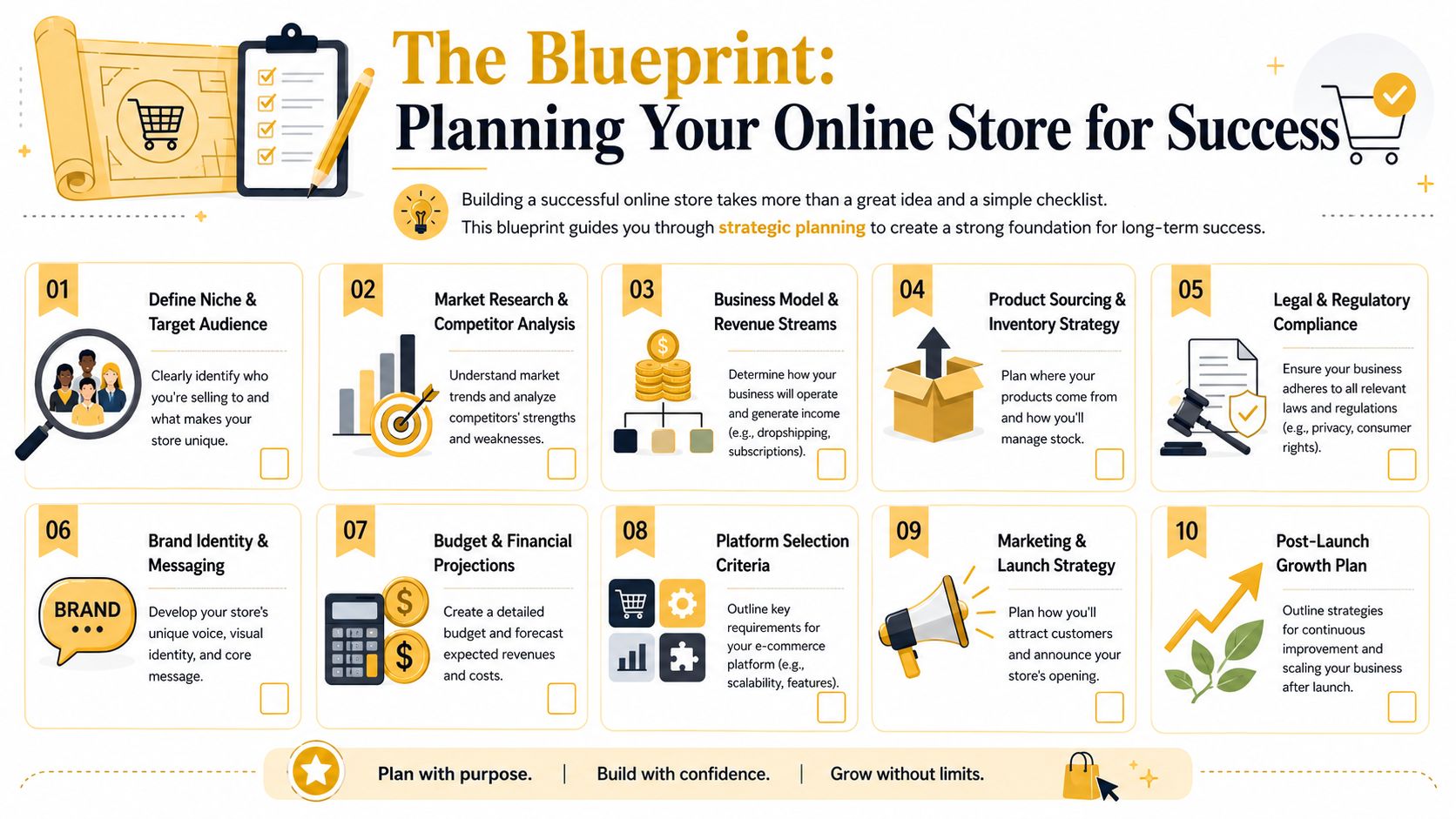
The Blueprint Planning Your Online Store for Success
Most rebuilds happen because the first build started with the wrong question. Owners ask, “Which platform should I use?” before they answer, “What is this store supposed to do for the business?”
The planning step needs to be more formal than a checklist in a notes app. A strong ecommerce build starts with a deliverables-based project plan. That means defining the business purpose, writing measurable SMART or CLEAR objectives, locking scope boundaries, identifying risks and dependencies, and then breaking the work into a deliverable-based work breakdown structure before assigning ownership and building the timeline. That sequencing is recommended in this ecommerce project planning guide, and in practice it prevents the most common SMB problem: vague expectations that turn into expensive change requests.
Start with business decisions, not software
Before anyone touches design or development, answer these questions:
- What role should ecommerce play? Is the store your main sales channel, a support channel for an existing retail business, or a catalog that helps customers order offline?
- Who are you selling to? A local service business selling branded products needs a different structure than a niche retailer with a large catalog.
- What must be true at launch? Separate launch-critical requirements from nice-to-have features like subscriptions, bundles, loyalty programs, or custom product builders.
- What internal constraints exist? Inventory systems, accounting workflows, shipping processes, and staff skill level matter more than most owners expect.
A lot of small businesses also benefit from stepping back and reviewing broader online business fundamentals before the build starts. Domain Drake's guide to online businesses is useful for that early-stage thinking because it helps frame the store as part of a business model, not just a website project.
Build scope around deliverables
A practical scope document should include concrete outputs, not abstract intentions.
For example:
- Discovery deliverables such as audience profiles, product taxonomy, and competitor review.
- Design deliverables such as homepage wireframes, collection page templates, product page layouts, and checkout UX decisions.
- Technical deliverables such as platform setup, payment configuration, shipping rules, analytics, and integrations.
- Launch deliverables such as QA, redirects, metadata, legal pages, and training.
Practical rule: If a feature can't be described as a deliverable with an owner and acceptance criteria, it's still an idea, not a committed part of the build.
Budget and timeline discipline
Most SMBs don't fail because they chose the wrong font. They fail because they under-scoped the hidden work. Product data cleanup, image prep, category structure, shipping rules, tax setup, and content writing often take longer than expected.
Treat the first version as a revenue-ready launch, not the final version of the business. That mindset keeps scope tight and helps you ship a store that's usable, manageable, and easier to improve later.
Choosing Your Foundation Hosted vs Self-Hosted vs Headless
Your platform choice will shape almost every future decision. It affects how quickly you can launch, how much control you have, how hard updates will be, and how painful major changes become a year from now.
For SMBs, the main decision usually sits between hosted, self-hosted, and headless commerce. None of these is universally right. Each one solves a different business problem.
What each model actually means
A hosted platform like Shopify gives you the storefront, hosting, security, and admin in one package. It's the fastest path to market for most smaller merchants, especially if the catalog is straightforward and the team wants simple day-to-day management.
A self-hosted setup like WooCommerce gives you much more control over the codebase, hosting environment, and plugin stack. That flexibility is useful, but it also means you're responsible for more maintenance, more testing, and more troubleshooting.
A headless architecture separates the frontend from the commerce backend. A common example is Shopify Plus powering the commerce engine while a custom frontend runs on something like Next.js. This can create a faster, more customized experience, but it also increases implementation complexity and ongoing development responsibility. If you want a plain-English overview of that model, this headless commerce explainer is a solid starting point.
Ecommerce Platform Comparison Hosted vs Self-Hosted vs Headless
| Factor | Hosted (e.g., Shopify) | Self-Hosted (e.g., WooCommerce) | Headless (e.g., Shopify Plus + Next.js) |
|---|---|---|---|
| Setup speed | Fast | Moderate | Slowest |
| Technical overhead | Low | Medium to high | High |
| Daily management | Easier for non-technical teams | Depends on plugin stack and host | Usually requires developer support |
| Design flexibility | Good within platform limits | High | Very high |
| Custom functionality | App-based and platform-dependent | Broad, but can become messy | Strongest, if budget and team support it |
| Maintenance burden | Lower | Higher | Higher |
| Performance control | Moderate | Variable | High |
| Content-commerce flexibility | Moderate | Good | Excellent |
| Total cost predictability | Usually easier to forecast | Can sprawl through plugins and fixes | Harder to forecast without clear scope |
| Best fit | SMBs that need speed and simplicity | Businesses needing control without enterprise architecture | Brands with advanced UX, integration, or content needs |
What usually works for SMBs
Hosted platforms work well when you need to launch without building a technical department. You'll trade some control for stability and operational simplicity. That trade is often worth it.
Self-hosted works when your business already depends on WordPress, needs unusual functionality, or wants deeper ownership of the environment. The mistake is assuming “more control” automatically means “better.” In practice, more control also means more responsibility.
Headless works when the frontend experience is a strategic differentiator. That might be true if you need custom content experiences, advanced search behavior, multi-region storefronts, or a highly tuned conversion flow. It's a poor fit when the business still hasn't nailed basics like clean product data, simple checkout, or internal workflows.
Don't choose headless because it sounds modern. Choose it because your business has a specific frontend or integration problem that a standard theme architecture can't solve cleanly.
A practical selection filter
Use these criteria to decide:
- Team capability: Who will manage products, pages, promotions, and fixes every week?
- Catalog complexity: Are you selling ten products, or thousands with variants and filters?
- Content demands: Does content drive discovery, or is this a straightforward transactional store?
- Integration needs: ERP, CRM, subscriptions, wholesale logic, marketplaces, and custom shipping rules all change the answer.
- Growth path: Are you validating a market, or building a more customized system from day one?
If you're still early, simplicity usually wins. You can outgrow a platform. It's much harder to recover from overbuilding one.
Designing for Conversions UX UI and Mobile-First Commerce
A store doesn't convert because it looks expensive. It converts because people can understand it, trust it, and complete a purchase without friction.
That starts with mobile. In 2024, smartphones accounted for nearly 80% of all retail website visits worldwide, and mobile devices generated the majority of online orders according to Statista's online shopping data. That's why mobile-first design isn't a design trend. It's the default operating condition for ecommerce.
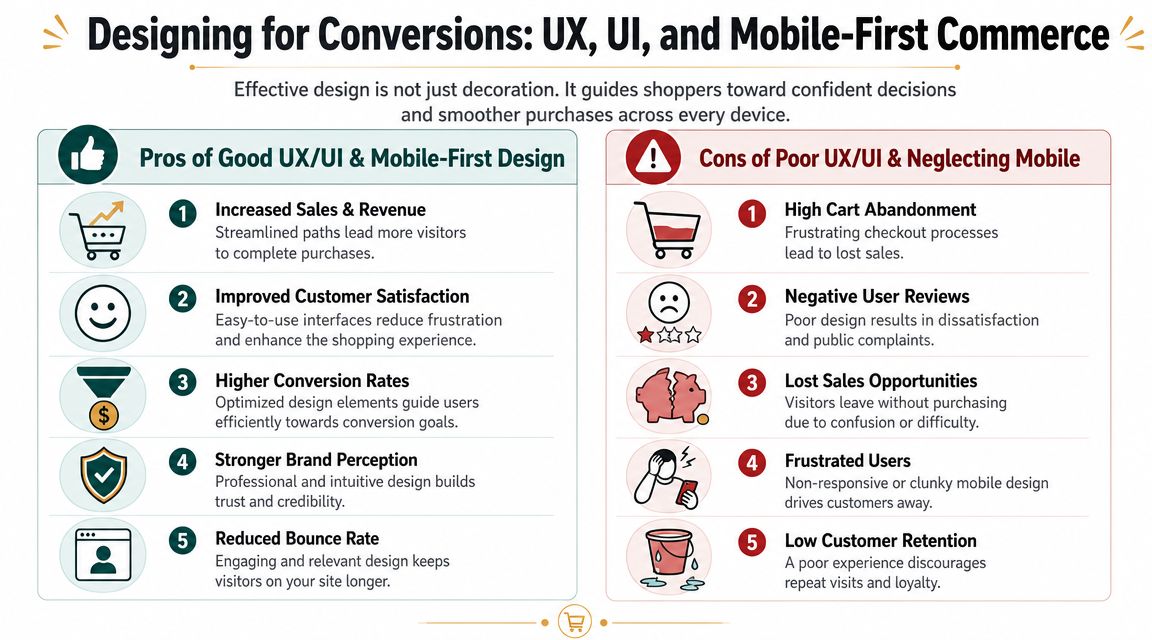
Mobile-first means prioritizing purchase actions
A lot of SMB stores are technically responsive but still designed like desktop sites squeezed into smaller screens. That's not enough.
On mobile, customers need to see the essentials immediately:
- Product image
- Price
- Variant selection
- Shipping or delivery clarity
- Add-to-cart button
If those elements get buried under oversized banners, stacked trust badges, long intros, or cluttered tabs, conversion suffers. Navigation also needs discipline. Search, cart, and category paths should stay obvious. A customer shouldn't have to hunt for the next step.
For a useful companion read on layout and conversion patterns, boost sales with ecommerce design covers practical design decisions worth reviewing during wireframing.
This video gives a good visual perspective on mobile-first ecommerce UX:
Accessibility belongs inside conversion work
Accessibility gets treated as a compliance footnote far too often. That's a mistake. Accessible ecommerce design improves usability for everyone, especially in checkout.
Independent accessibility guidance for ecommerce emphasizes practical requirements like alt text, keyboard navigation, clear form labels, readable contrast, captions or transcripts, and regular testing with assistive technologies, as outlined in this accessibility guide for ecommerce. Those aren't abstract standards. They directly affect whether users can browse products, understand information, and submit forms without confusion.
Here's the short version of what to build into your store from the start:
- Keyboard access: Menus, filters, forms, and cart controls should work without a mouse.
- Clear labels: Placeholder text isn't enough. Fields need proper labels and useful error messaging.
- Readable presentation: Contrast, spacing, and font sizing need to support real users on real devices.
- Media context: Images need alt text. Videos need captions or transcripts where relevant.
A checkout can be visually clean and still fail users if error states are vague, focus order is broken, or fields aren't labeled properly.
UX choices that usually help
Good ecommerce UX often looks less novel than owners expect. That's because familiar patterns reduce hesitation.
Use strong product imagery. Keep cart access visible. Make returns, shipping, and support information easy to find. Avoid experimental checkout ideas unless you have a specific reason to change a proven flow.
The stores that convert well usually feel obvious. Customers find products quickly, understand what they're buying, and finish checkout without getting lost.
Building Your Digital Showroom Products Payments and Shipping
When a store becomes operational, the design may look polished, but if your product data is weak, your payments are awkward, or your shipping setup creates surprises, customers will feel it fast.
The safest build approach is to think in three systems: catalog, checkout, and fulfillment.
Product structure comes before product copy
Owners often spend time writing homepage copy before they've cleaned up product naming, categories, or attributes. That's backwards.
Start with catalog structure:
- Categories and collections: Group products the way customers shop, not the way your warehouse thinks about stock.
- Product naming: Use names customers can understand at a glance.
- Attributes and variants: Size, color, material, compatibility, and other decision-making details need to be organized consistently.
- Images: Show the product clearly, then support the decision with angle shots, detail shots, and lifestyle context where useful.
Descriptions matter, but they should answer buying questions first. Focus on what it is, who it's for, key specs, what's included, and any limits or care instructions. If a return condition, lead time, or fit issue matters, say it clearly. Hidden friction becomes customer service debt later.
Payments should feel familiar
Payment setup is partly technical and partly psychological. Customers want to recognize the methods available and trust the process.
A few rules hold up across platforms:
- Offer mainstream payment options your audience already uses.
- Keep checkout fields to what you need.
- Avoid sending customers through a confusing chain of redirects unless there's a strong reason.
- Make billing, shipping, and contact details easy to correct without restarting.
The biggest mistake here is adding complexity in the name of flexibility. More payment options can help, but too many edge-case methods can also clutter the experience and create admin overhead. Start with the options that match your buyers and geography.
Keep cart and payment flows simple. This is one area where novelty usually hurts more than it helps.
Shipping clarity wins trust
Shipping setup affects conversion earlier than many owners realize. Customers often decide whether to buy before they reach checkout, based on how predictable fulfillment feels.
Build shipping around clarity:
- Rates: Decide whether you're using flat rates, live rates, free shipping thresholds, or a simple hybrid approach.
- Zones: Set realistic shipping regions based on where you can serve profitably.
- Methods: Standard, expedited, local delivery, and in-store pickup all need clean logic if offered.
- Communication: Show delivery expectations, processing times, and return policy details where shoppers can see them.
If you're dropshipping or using a third-party fulfillment provider, be extra careful with product availability and transit messaging. A beautiful storefront won't save a poor fulfillment experience.
Operational sanity matters
This is also the point where agencies and experienced developers can add real value. A build partner isn't just wiring up buttons. They're structuring categories, deciding how product templates should behave, making sure shipping logic reflects your operation, and reducing the amount of manual cleanup your team will deal with after launch.
That work doesn't always show in screenshots. It shows in fewer customer questions, fewer broken edge cases, and a store your staff can manage.
Launching and Getting Found SEO Security and Analytics
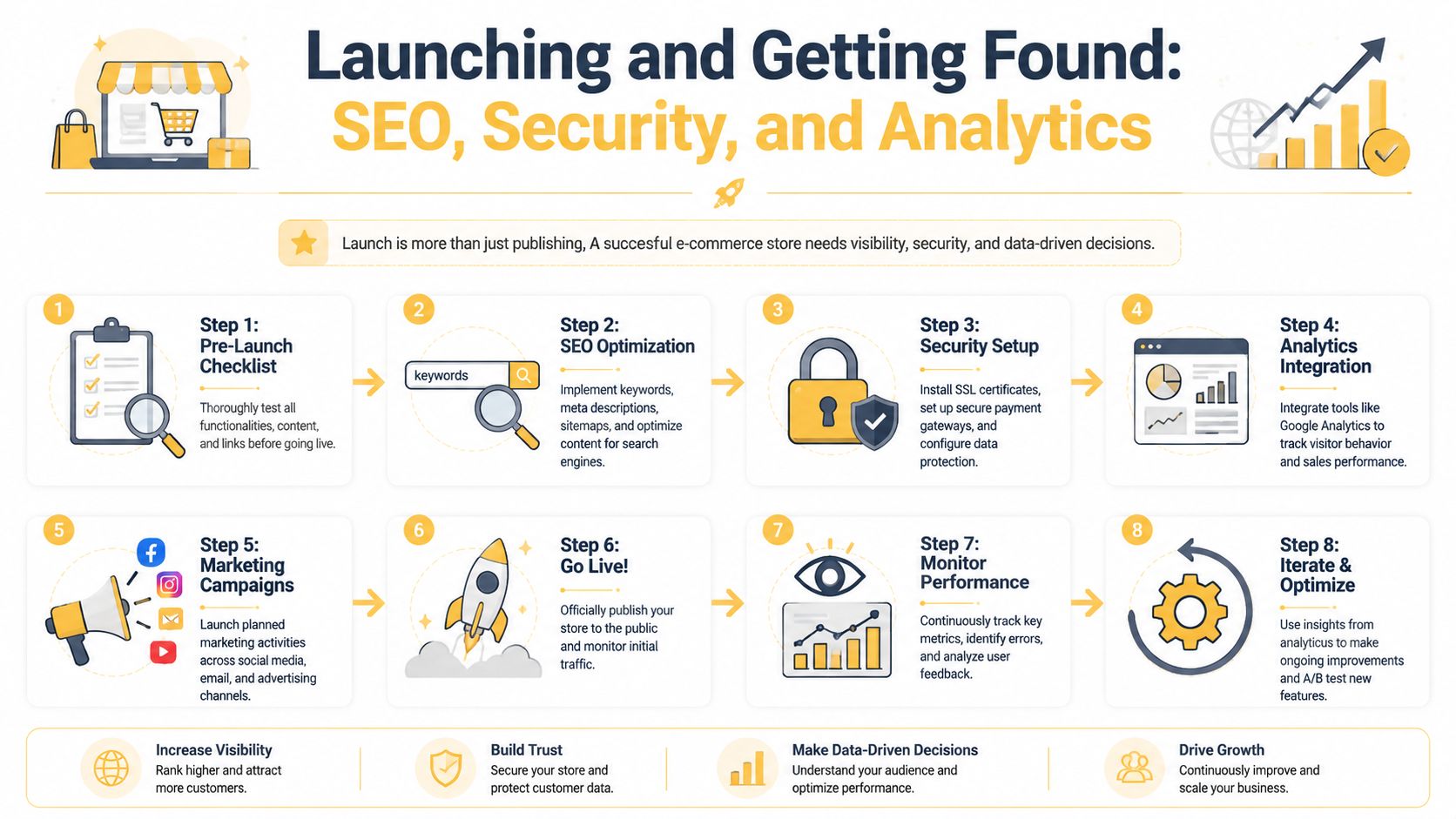
Launch day is not the moment to discover that your shipping rule is wrong, your metadata is missing, or your analytics never got configured. A store should go live only after it's been validated end to end.
Industry guidance on ecommerce launch workflow is straightforward: set up the platform and domain, configure product data, payment methods, and shipping, then test functionality before going live. That same guidance also notes that ecommerce builds typically take from a few weeks to several months, with duration driven by customization depth and feature count, as outlined in Business of Apps' ecommerce development process overview.
SEO before launch, not after
A lot of ecommerce SEO problems get baked in during setup. Fixing them later is slower than doing the basics well at launch.
Focus on:
- Page targeting: Each category and product page should have a clear search purpose.
- URL structure: Keep URLs readable and consistent.
- Metadata: Write title tags and meta descriptions that describe the page accurately.
- Internal linking: Categories, related products, and content pages should connect naturally.
- Indexation basics: Make sure the right pages are crawlable and low-value duplicates aren't competing with core pages.
If you want additional tactical guidance, both best practices for ecommerce SEO from CartBoss and this ecommerce SEO best practices resource are useful references while building product and collection templates.
Security and compliance checks
Customers don't see most security work, but they feel the trust signals when it's done correctly.
Your minimum launch checklist should include:
- SSL enabled
- Secure payment configuration
- Admin access hygiene
- Policy pages for privacy, returns, shipping, and terms
- Form handling review
- Backup and recovery plan
If you collect customer data, make sure your privacy and consent handling fit the regions you serve. Legal compliance isn't one-size-fits-all, so this is an area where legal review may be worth the cost.
Analytics and QA need real scenarios
Analytics shouldn't start with vanity dashboards. Start with the events that help you diagnose performance. Product views, add-to-cart actions, checkout starts, purchases, and major drop-off points matter more than generic traffic charts.
Then test the store like a customer would:
- Browse by category.
- Search for a product.
- Use filters.
- Add variants to cart.
- Apply a discount code.
- Complete checkout on mobile and desktop.
- Confirm order notifications and confirmation pages.
- Test edge cases like out-of-stock items or invalid form entries.
If nobody has completed a full test order from product page to post-purchase email, the store isn't launch-ready.
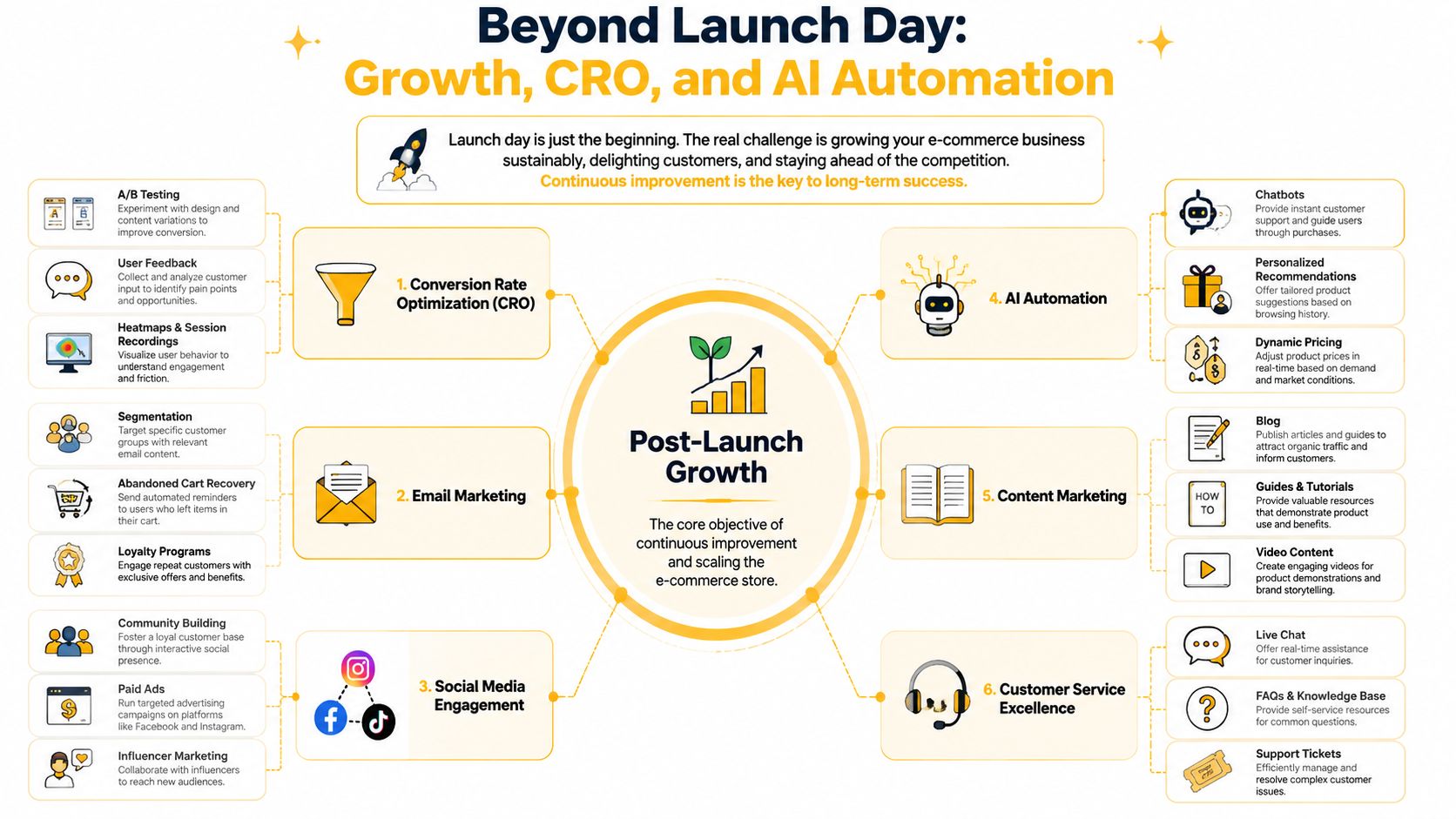
Beyond Launch Day Growth CRO and AI Automation
Most stores don't struggle because they failed to launch. They struggle because the business discovers how much work starts after launch.
That's especially true once catalog size grows, filters get messy, inventory accuracy slips, and checkout starts collecting too many exceptions. Practitioner experience has been clear on this point: the hard part isn't launching but managing taxonomy, faceted search, inventory accuracy, and checkout simplicity without over-optimizing, as discussed in this practitioner reflection on building ecommerce sites.
CRO starts with removing friction
Conversion rate optimization sounds technical, but the first wins are usually simple. You look for points where customers hesitate, get confused, or abandon the process.
Typical places to review:
- Collection pages: Are filtering and sorting helping or overwhelming?
- Product pages: Are key buying details visible without digging?
- Cart: Is the cart easy to edit without disrupting momentum?
- Checkout: Are form fields, shipping choices, and error messages clear?
A disciplined CRO process uses evidence, not opinion. Review analytics, watch user recordings if your toolset supports it, read support tickets, and compare behavior across devices. Then change one meaningful thing at a time. These conversion rate optimization strategies are the kind of framework worth applying once the store has enough traffic to reveal patterns.
Retention is usually cheaper than constant reacquisition
A store that relies only on first-time purchases becomes fragile. Post-launch growth gets stronger when you build return paths.
That usually includes:
- Email flows for welcome, browse abandonment, cart abandonment, and post-purchase follow-up
- Lifecycle segmentation based on purchase behavior or product interest
- Content support such as guides, FAQs, sizing help, or product education
- Customer service visibility so shoppers can resolve uncertainty before it kills a sale
You don't need a huge automation stack at the start. You need a few flows that reflect the actual customer journey.
AI should reduce workload, not add gimmicks
AI is useful in ecommerce when it removes repetitive work or improves decision support. It's not useful when it adds novelty with no operational payoff.
Practical applications include:
- Customer service automation: Chatbots can handle straightforward pre-purchase questions, order status prompts, and routing to human support.
- Recommendation logic: AI-assisted personalization can improve product discovery when the catalog is large enough for relevance to matter.
- Content assistance: Teams can use AI to draft product copy frameworks, FAQ outlines, support macros, and merchandising ideas, then edit for accuracy and brand tone.
- Operational forecasting: Some businesses use AI-assisted tools for demand planning, replenishment, or identifying unusual order patterns.
The key is restraint. If your taxonomy is messy and your product data is inconsistent, AI won't solve the root issue. It will just automate confusion faster.
This is one area where a specialized partner can help. For businesses that need custom ecommerce development, SEO support, or automation planning, Up North Media offers those services as part of broader digital delivery. That makes sense when the challenge is no longer “how do we launch?” but “how do we scale without creating more manual work?”
Your Ecommerce Questions Answered
Should I migrate my existing site or start fresh
It depends on what's worth preserving.
Migrate when you have useful assets such as established search visibility, strong product content, a recognizable URL structure, or a design system that still supports the business. Start fresh when the current site has structural problems, bloated plugins, poor mobile UX, or a backend your team avoids using.
A partial migration often works well. Keep what has value, then rebuild templates, navigation, and commerce logic cleanly.
How much time should I expect for an ecommerce build
The honest answer is that timeline follows complexity. Industry guidance says ecommerce builds can take a few weeks to several months, depending on customization depth, feature count, and integrations. That's already covered in the launch section above, and it aligns with agency experience.
What usually extends timelines isn't code alone. It's content delays, product cleanup, unclear approvals, and changing scope during design or QA.
What ongoing costs should I plan for after launch
Don't budget only for the build. Budget for the store as an ongoing business system.
Plan for platform fees, payment processing, apps or plugins, hosting where relevant, maintenance, product merchandising, content updates, SEO work, email marketing, and paid acquisition if you'll use it. You may also need development support for feature requests, template updates, and integration changes.
A store that isn't maintained slowly becomes harder to market and harder to trust.
When should I hire a freelancer versus an agency
Hire a freelancer when the project is narrow and well-defined. Good examples include theme edits, product uploads, or a small design refresh.
Hire an agency when the project crosses disciplines. If the work includes platform selection, UX, SEO, analytics, content structure, custom functionality, migration strategy, and automation planning, a single freelancer can become a bottleneck. Agencies also make more sense when you need process, QA, multiple specialists, and post-launch support.
Is headless commerce worth it for a small business
Usually not at the start.
Headless is worth exploring when the frontend experience or system integration needs are materially different from what a standard platform setup can support. If your store still needs better product organization, simpler checkout, and cleaner merchandising, solve those first.
What's the biggest mistake owners make when learning how to build ecommerce website projects
They overbuild early.
They add subscriptions before validating core demand. They chase unusual checkout ideas before fixing product pages. They install too many apps before defining operational rules. The better approach is to launch a store that's clear, fast, manageable, and measurable. Then improve it with evidence.
What should I simplify first if my store already feels messy
Start with the things customers touch most:
- Navigation
- Product taxonomy
- Filters and search behavior
- Product page clarity
- Cart and checkout fields
- Shipping communication
If customers can't find products or don't trust the buying process, more features won't help.
If you're planning a new store, rebuilding an underperforming one, or trying to sort out platform, SEO, UX, and automation decisions before they become expensive problems, Up North Media is one option to evaluate. They work on ecommerce development, SEO marketing, and AI consulting, which makes them relevant when you need help connecting the technical build to growth and day-to-day operations.