
You click a search result for a supplier page, product guide, or old blog post you know existed. Instead of the content, you get a broken page, a redirect, or something completely different from what Google seemed to promise.
For years, there was an easy fallback. Google often kept a saved copy of that page in its cache. If the live version disappeared, changed, or temporarily failed, you could still check the snapshot Google had stored. For business owners, marketers, and SEOs, that wasn't just convenient. It was one of the fastest ways to verify what Google had seen.
That's why the question what is a Google Cache still matters now, even after its public removal. The feature itself shaped how people debugged indexing problems, checked content changes, and recovered missing information. Today, understanding how it worked helps you replace it with better workflows instead of guessing.
The Ghost in Google Search
A supplier page ranks in Google, but the live URL returns a 404. A product spec has changed, and your sales team needs the old version. A developer pushes a bad template, and now the page Google indexed last week no longer matches what users see today.
That gap is why Google Cache mattered.
For years, Google gave searchers and SEO teams a quick way to view a saved copy of a page after Googlebot crawled it. If the live page broke, redirected, or changed without warning, the cached version often gave you a usable snapshot. For a business owner, that meant recovering information. For an SEO team, it meant checking what Google had access to at a specific point in time.
The practical value was simple. You could compare the live page against Google's saved version and spot problems fast. Missing copy, stripped headings, broken rendering, and accidental noindex deployments were easier to catch when you had a reference point inside search itself. That kind of diagnostic work sits squarely inside technical SEO fundamentals, because rankings often move when crawlable content and live content drift apart.
Google Cache worked like a snapshot left on your desk after the original file had been edited. It was not a perfect archive, and it was never a full replacement for proper monitoring, server logs, or third-party crawls. But it was fast, public, and close to the source that mattered most in SEO work: what Google had stored.
That is why the feature still deserves attention after its removal. The question is no longer just "what is a Google Cache." It is "what did businesses lose when Google removed public access, and how do you replace that workflow now?"
For companies that relied on the old shortcut, the answer is operational. If rankings drop, a page disappears, or a stakeholder asks what Google saw before a change, you now need other tools and a more deliberate process to get that answer.
How Google Cache Actually Worked
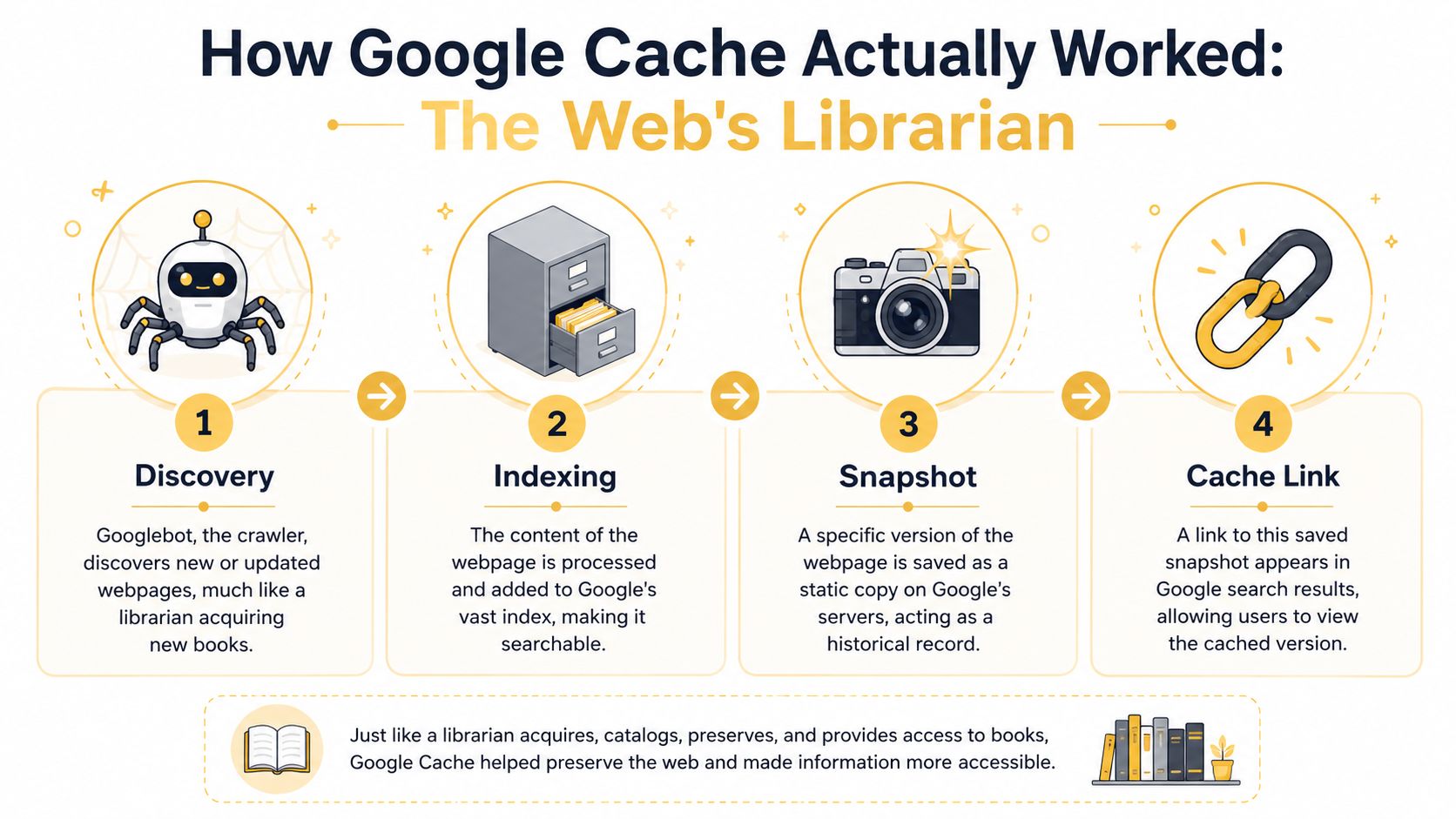
Google Cache worked like a librarian making a photocopy before putting a book on the shelf.
Googlebot discovered a page, processed it for indexing, and stored a snapshot of that page as part of Google's broader infrastructure. According to Seobility's explanation of Google Cache, Google Cache functioned as a permanent digital archive that stored a raw HTML snapshot of a webpage exactly as it appeared during the last crawl by Googlebot, preserving a verifiable historical record rather than only pointing users to a live page that might later change.
The basic sequence
Think of the process in four parts:
-
Discovery
Googlebot found a page through links, sitemaps, or previous crawls. -
Indexing
Google processed the page to understand what it contained and whether it should appear in search. -
Snapshot creation
Google stored a saved version of what it collected at that moment. -
Public access
Users could open the cached version from search results or through the oldcache:operator.
That's the simplified version. The important technical nuance is this: the cache wasn't the live website, and it wasn't a perfect emulator of the user experience. It was a stored copy of what Googlebot had collected.
Why raw HTML mattered
For SEO work, that distinction was gold.
If a page depended heavily on JavaScript, personalization, or client-side changes, the cached version could reveal whether key content existed in the source Google received. If a title, body copy, internal links, or structured elements were missing from the cached view, that often pointed to a rendering or delivery issue rather than a ranking mystery.
Practical rule: If the live page looks right but the stored version looks thin, broken, or incomplete, investigate rendering, blocked resources, and template output before touching keywords.
Technical SEO and caching intersect. If you're trying to diagnose crawlability, rendering, or indexation gaps, the cache used to be one of the quickest reference points alongside logs, crawlers, and Search Console. For a broader foundation on the technical side, this guide to technical SEO basics is a useful companion.
What the cache was not
It wasn't a ranking report. It didn't prove why a page ranked.
It also wasn't a complete archive strategy. A cached page was a snapshot, not a revision history. You could compare what was live now against what Google had stored then, but you couldn't treat it like a full content management backup.
That trade-off matters. The cache was excellent for quick verification. It was weaker for long-term historical analysis, deep rendering diagnostics, and preserving many versions over time.
Why Google Cache Was a Critical SEO Tool
Most SEO tools tell you what they think is happening. Google Cache often showed what Google had stored.
That made it one of the fastest diagnostic tools available when a page behaved strangely in search. If rankings stalled after a major content update, the first question wasn't always “Did the update work?” It was often “Has Google even seen the update yet?”

It exposed crawl timing problems
According to Eco York's explanation of cache freshness and SEO impact, the presence and freshness of a Google Cache entry served as an indirect but high-signal metric for crawl frequency and indexing health. In plain English, fresh cache entries usually suggested Google was revisiting the page regularly, while stale or missing entries could suggest lower crawl attention.
That never meant “fresh cache equals better rankings.” It did mean the cache could help answer whether Google was actively coming back to important pages.
A simple comparison helps:
| Scenario | What the cached page often suggested | What to check next |
|---|---|---|
| Recent content changes appear in cache | Google likely processed the update | Indexation status, internal linking, on-page relevance |
| Cache looks old | Google may not be recrawling quickly | Sitemap health, internal links, content importance |
| Cache misses major content visible to users | Rendering or delivery mismatch | JavaScript output, blocked assets, server-side rendering |
It helped debug what users saw versus what Google saw
This was where the tool earned its keep.
A live page can look polished while still failing technically. JavaScript might inject key sections too late. A tag manager script could interfere with content loading. A template update could remove headings from the source while still showing them visually through front-end tricks.
The cached version gave SEOs a practical way to compare the stored copy against the live page. If Google had indexed a thinner or broken version, the problem usually wasn't keyword targeting. It was access.
If your product copy, FAQs, or internal links don't appear in the version Google stored, improving page speed and rendering stability often does more than rewriting metadata.
That's one reason performance work matters so much. Faster, more stable delivery usually makes crawling and rendering less fragile. If that's an issue on your site, this resource on improving website loading speed is worth reviewing.
It gave context for competitor monitoring
Cache also had a quieter use. It let SEOs inspect how competitors' pages existed at a previous moment.
That was useful when a rival suddenly changed title structures, rewrote category copy, or rolled out a new page template. You could compare current and cached versions to spot strategic changes without relying only on memory or third-party rank tools.
It was useful, but not magic
Google Cache worked best as a verification layer. It didn't replace Search Console, crawling tools, or server-side diagnostics.
It also didn't always reflect the full modern web experience. Sites with dynamic content, logged-in states, or location-specific rendering often looked incomplete in cache. Smart SEO teams used it as one clue among several, not as the final verdict.
The End of an Era Google Retires Public Cache
A common SEO moment used to go like this. Rankings dip, a page starts behaving oddly, and the fastest sanity check was the cached version in search. You could confirm in seconds whether Google had seen the right page, an outdated version, or something partially broken.
That shortcut is gone.
In early 2024, Google removed the public Cached link from search results and retired public access to that feature. For businesses, the practical change was simple. One of the fastest ways to verify what Google had stored disappeared overnight.
What Google actually removed
Google did not remove crawling or indexing. It removed the public window into a stored page copy.
That distinction matters because many site owners heard “cache is gone” and assumed Google no longer kept any historical page state at all. The main loss was visibility. SEOs lost a quick external check that helped answer a specific question: what version of this page did Google have access to at that moment?
Three things changed immediately:
- The visible Cached link in search results disappeared, so there was no longer a one-click path to a stored copy
- The old
cache:search operator stopped being a dependable diagnostic shortcut - A simple fallback for checking dead pages, broken templates, or recently changed content was no longer public
For users, that was mildly inconvenient. For SEO teams, it changed troubleshooting speed.
Why the removal matters in practice
The old cache was like a storefront security camera. It did not show everything happening behind the scenes, but it gave you a reliable snapshot of what was visible at a specific point in time.
Without that snapshot, technical diagnosis takes more effort. If a page drops out of the index, renders incorrectly, or shows stale content in search, you now need to piece the answer together from multiple tools instead of confirming it with one public view. That slows down triage, especially during migrations, template releases, or JavaScript problems.
Teams often lose time starting to rewrite copy or change metadata before confirming whether Google could access and process the page correctly. In many cases, the better first step is a proper guide to fixing crawled currently not indexed issues, because the problem is often discovery, rendering, or page quality signals rather than on-page text alone.
What did not change
Google still crawls pages, renders content, and stores the data it needs to index the web. Public cache removal did not change that underlying process.
What changed was your ability to inspect it from the outside. That is a meaningful shift for SEO because public cache used to act as a quick reality check between what your team published and what Google appeared to have captured.
There is also a broader search context here. As search expands beyond ten blue links into AI summaries, answer engines, and multi-source result formats, public cache matters less as a consumer feature and more as a lost diagnostic tool for publishers. If your team is adapting content for that shift, this practical guide to AEO is a useful companion to the technical side of indexing.
The headline is simple. Google did not stop seeing pages. SEO teams lost one of the fastest public ways to verify what Google had seen.
Modern Alternatives and SEO Workarounds
The public cache is gone, but the underlying need hasn't changed. You still need ways to answer three basic questions: what Google saw, what changed over time, and whether the page is technically healthy.
The replacement workflow is less elegant, but it's workable.
Use Search Console as the primary replacement
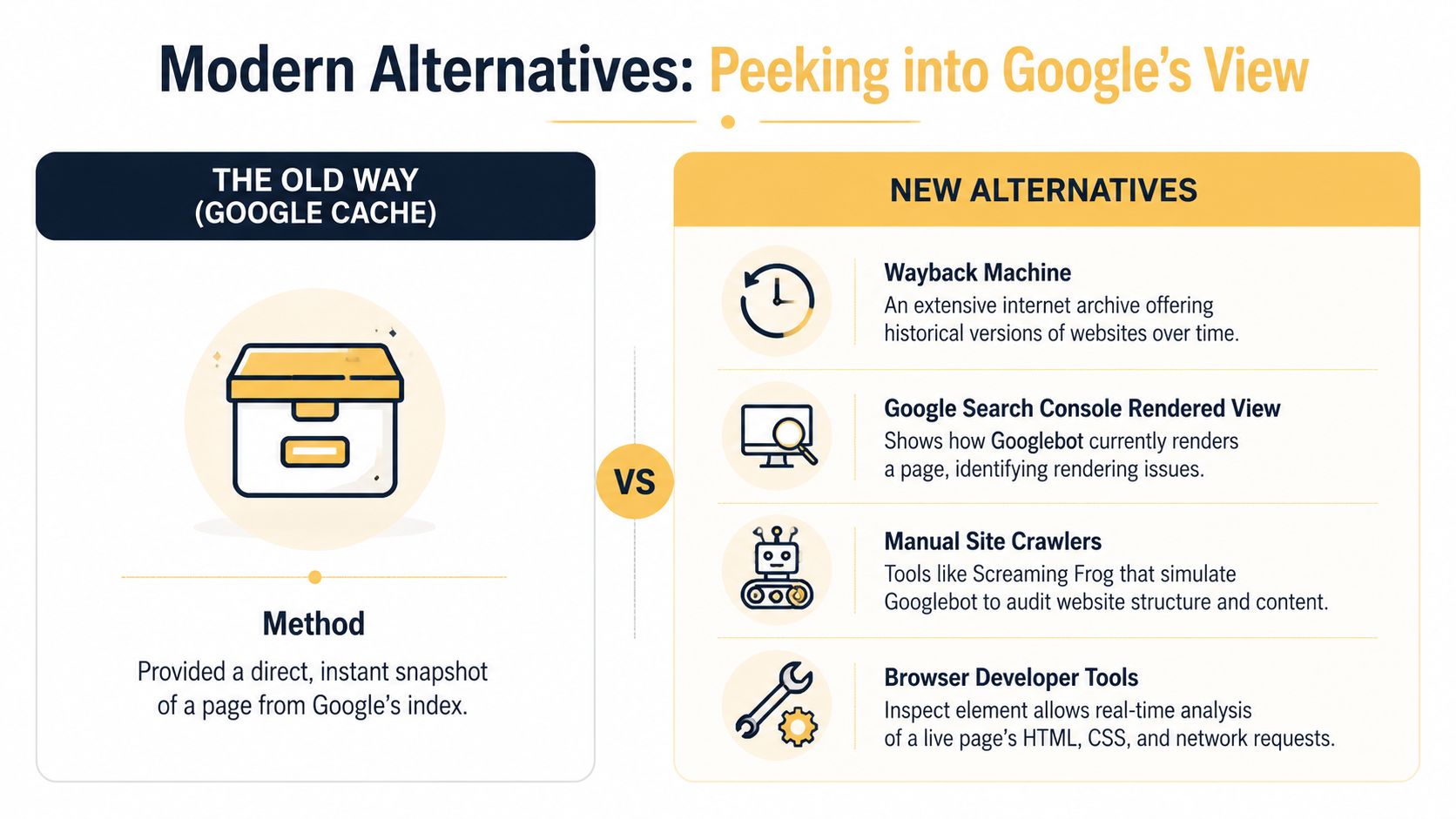
If you want the closest modern equivalent for SEO diagnostics, start with Google Search Console.
Open the URL Inspection Tool, enter the exact page URL, and review what Google reports. Pay attention to indexation status, last crawl details, and rendered output if available. This won't recreate the old public snapshot experience, but it's the best direct channel for checking whether Google can access and process the page properly.
For pages stuck in limbo, pair that check with a crawl and indexation audit. If you're dealing with weak discovery or delayed inclusion, this guide on fixing crawled currently not indexed issues can help narrow the root cause.
Test the old cache: operator with caution
Some SEOs still try the cache: operator out of habit. It's worth testing if you're troubleshooting, but don't build your process around it.
Based on this technical description of Google Cache behavior, Google Cache stored a compressed raw HTML snapshot of a page as Googlebot received it, and that snapshot was typically retained for approximately 90 days or until the page was recrawled. In practice, that old model was always temporary, and today public retrieval is unreliable enough that it's better treated as an occasional experiment than a dependable tool.
Use third-party archives for historical checks
When you need older versions of a page, use tools built for history rather than indexing.
The Wayback Machine is the obvious first stop. It's better for checking how a page looked over time, confirming whether content changed, and recovering information from removed URLs. It's not a Google view, but it solves a different problem well: web history.
This short walkthrough can help if you want a visual overview before changing your workflow:
Fill the gaps with crawlers and browser tools
Modern SEO teams usually combine several tools instead of depending on one.
- Screaming Frog SEO Spider helps you inspect titles, canonicals, internal links, directives, and rendered content at scale.
- Browser Developer Tools help you compare raw page source, rendered DOM, network requests, and blocked resources.
- Manual QA checks still matter. Open the page with scripts restricted, compare source output, and review whether important content appears consistently.
If your content strategy is shifting toward AI summaries, answer engines, and structured retrieval, the inspection mindset becomes even more important. This practical guide to AEO is useful because it connects content visibility to how systems extract and present answers, not just how traditional search lists links.
Working rule: Use Search Console for Google's current processing view, the Wayback Machine for page history, and crawlers for scale. No single replacement covers all three jobs.
Google Cache FAQs for 2026
Can I still force Google to remove a cached page?
You can still influence what Google indexes and how it treats pages, but the old public cache view is no longer the main issue because users can't access that public cached link the way they used to. In practice, the focus now is on controlling indexing, updating content, and using Google's own webmaster tools for removal or recrawl requests where appropriate.
Is Google Cache the same as the Internet Archive?
No. They solved different problems.
Google Cache was tied to Google's crawl and indexing process. The Internet Archive, including the Wayback Machine, is a separate archival system built to preserve historical versions of websites over time. If you want to know what Google likely processed, use Search Console and crawl diagnostics. If you want to know what a page looked like in the past, use the archive.
Does a noindex tag also prevent a page from being cached?
Treat indexing control and historical preservation as related but separate concerns. A noindex directive tells search engines not to keep the page in search results, but it doesn't function as a complete website archiving strategy. If a page contains sensitive or outdated information, don't rely on assumptions about caching behavior. Control access directly, remove the content properly, and verify what search engines can still fetch.
If your team wants help untangling indexing problems, crawl issues, and the technical SEO work that replaced the old cache workflow, Up North Media can help you audit what Google sees, fix weak spots, and build a search strategy that holds up without relying on vanished features.