
Building a Minimum Viable Product (MVP) isn't just about launching faster—it’s about launching smarter. For a startup, it's probably the single best tool you have to see if your big idea has legs before you bet the farm on it. Think of it as your direct line to the only opinion that matters: your customer's.
Why an MVP Is Your Startup's Secret Weapon
Here’s a hard truth: the number one reason startups die isn’t a lack of funding or a weak team. It’s because they build something nobody actually wants. An MVP is designed to tackle that risk head-on.
Instead of spending months—or even years—perfecting a product loaded with features based on your own assumptions, you flip the script. You build the absolute bare-bones version needed to solve one critical problem for one specific user.
It’s less of a stripped-down product and more of a strategic experiment. You’re not trying to wow the world; you’re trying to answer one question: "Am I on the right track?"
A Quick Look at the Two Paths
Before we get deeper, let's just lay out the core differences between going the MVP route versus the old-school, all-in approach. It really puts things in perspective.
MVP vs Traditional Development At a Glance
| Factor | MVP Approach | Traditional Approach |
|---|---|---|
| Focus | Solving a single, core problem | Building a comprehensive, feature-rich product |
| Goal | Learning and validation | Market launch and revenue generation |
| Risk | Low; minimal time and resource investment | High; significant upfront investment |
| Feedback Loop | Immediate and continuous | Delayed until after full product launch |
| Time to Market | Fast (weeks or a few months) | Slow (many months or years) |
Seeing it laid out like that, it's pretty clear why so many successful startups start small. The MVP path is built for learning and adapting, which is exactly what you need in the early days.
Dodging the Biggest Bullet: No Market Need
The stats don't lie. A staggering 42% of startups fail simply because they misjudged what the market actually needed. An MVP is purpose-built to stop that from happening to you.
This early feedback loop becomes your most valuable asset. It lets you:
- Confirm Problem-Solution Fit: Does this one feature actually make someone’s life easier? You find out fast.
- Identify Your First Fans: You’ll quickly discover the early adopters who "get it." These are the people who will champion your product.
- Gather Real Data: Stop guessing. You get actual usage data and real quotes from users to guide what you build next. Every future feature is then driven by demand, not assumptions.
An MVP forces you to make tough calls. It’s about prioritizing what’s truly “viable” over what would be “nice to have.” That discipline is what separates lean, successful startups from the ones that burn through cash building features no one ever asked for.
Ultimately, the MVP is the first step on a much longer journey of building, measuring, and learning. But even before you start thinking about features, you need to be sure you're solving a problem worth tackling in the first place. Make sure you know how to validate a business idea before you write a single line of code. This guide will give you the roadmap to do just that.
Finding the Core Problem Your Users Face
 Before a single line of code gets written, the success of your MVP hinges on one thing: a deep, almost obsessive, understanding of the problem you want to solve. Too many founders fall in love with their solution, but great products are born from a relentless focus on a customer's real-world pain point.
This isn't about commissioning expensive market analysis or running massive focus groups. It’s about being a detective, piecing together clues to find a genuine, nagging need. The whole point is to make sure the "minimum" in your MVP is defined by your user's most critical issue, not just your own assumptions. A solid first step is to confirm your idea actually solves something people care about. For a deeper dive, check out a practical guide to validating startup ideas.
Uncovering Market Gaps Through Competitor Analysis
Your competitors are a goldmine of information, but the trick is to look for what they aren't doing well. Don’t just catalogue their strengths; dissect their weaknesses and, most importantly, read their customer reviews. This is where you’ll find the gaps.
Let's say you want to build a project management tool. Your big competitors have a million features, but their review sections are filled with comments like, "It's too complicated for my small team," or "I just wish it had a simpler time-tracking feature." These complaints are your breadcrumbs. They're your entry points.
You can organize this research with a simple framework:
- Identify 3-5 Competitors: Look at both the obvious players and the indirect alternatives.
- Analyze Their Value Proposition: What specific problem do they claim to solve? How do they talk about it?
- Scour Customer Feedback: Comb through G2, Capterra, Reddit, and social media for recurring complaints or feature requests. People are surprisingly honest when they're frustrated.
- Pinpoint the Gap: Find the underserved niche or the frustrating user experience that your MVP can solve more elegantly.
Listening to Your Future Customers
You absolutely have to talk to actual people. Assumptions are the enemy of a successful MVP, and the good news is that gathering powerful user insights doesn't require a huge budget.
Start by creating simple, targeted surveys using tools like Google Forms or SurveyMonkey. The key is to ask open-ended questions that encourage detailed responses, not just "yes" or "no." Instead of asking, "Would you use an app that does X?" try something like, "Tell me about the most frustrating part of your current process for managing X."
Your first conversation with a potential user is more valuable than a week of internal brainstorming. The goal isn't to sell your idea; it's to listen. Let them tell you what they need.
Another killer technique is conducting short, informal user interviews. Find five people in your target demographic and offer them a coffee in exchange for 15 minutes of their time. This direct conversation can reveal nuances and pain points that a survey would never capture.
From Data to Direction with User Personas
All this research—competitor notes, survey responses, interview transcripts—needs to be synthesized into something actionable. This is where user personas and journey maps come in. A user persona is a simple, fictional character representing your ideal customer.
Give them a name, a job, and, most importantly, a list of goals and frustrations.
For example:
- Name: "Freelancer Frank"
- Role: Independent graphic designer
- Goal: Wants to spend more time designing and less time on admin tasks.
- Frustration: Juggling multiple spreadsheets to track project hours and send invoices is a time-suck and prone to errors.
This simple profile transforms abstract data into a relatable person. Now, when you're deciding on features, you're not just guessing; you're asking, "What does Frank absolutely need to solve his invoicing headache?" This laser focus prevents feature creep and ensures your MVP targets a real, tangible problem from day one.
Defining Your MVP's Core Functionality
Okay, you've done the hard work of understanding the problem and who you're building for. Now comes the really tough part: translating all those insights into an actual product. This is where you have to make some critical calls about what features make the cut for your MVP.
It’s a constant tug-of-war. You need enough functionality to be genuinely "viable," but you have to keep the scope tight enough to stay "minimum."
The biggest trap here is feature bloat. It’s that tempting voice that says, "Ooh, let's just add this one more thing." Before you know it, your lean MVP is a bloated mess that takes forever to build, costs a fortune, and makes it impossible to get clear feedback on your main idea. You have to be absolutely ruthless with your priorities.
Applying the MoSCoW Method for Clarity
A fantastic tool for this is the MoSCoW method. It sounds fancy, but it's a dead-simple way to categorize features and force your team to make decisions. This isn't just a theoretical exercise; it's a practical way to get everyone on the same page about what really matters for launch.
Here’s how it breaks down your feature list into four buckets:
- Must-Have: These are the non-negotiables. Without them, your product is broken or doesn't solve the core problem at all. Take one of these out, and the whole thing is pointless.
- Should-Have: These are important and add a ton of value, but the product can still launch and work without them. Think of these as the first things you'll tackle in your next development sprint.
- Could-Have: These are the "nice-to-haves." They're desirable improvements but have a smaller impact on the user's main problem. You might add them if you find you have extra time or resources, but don't count on it.
- Won't-Have (This Time): This is the most important category for keeping your scope in check. It’s where all the other great ideas go. Acknowledging them here keeps the team focused and manages everyone's expectations.
By forcing every feature into one of these categories, you create a clear roadmap. You’re not throwing away good ideas; you're just strategically putting them on the back burner so you can build a lean product that solves one problem incredibly well.
A Real-World SaaS Example
Let's say you're building a SaaS tool for freelance graphic designers. Through your research, you found their biggest headache is manually tracking billable hours and creating invoices. It's a huge time-suck.
Your team brainstorms a bunch of features: time tracking, project management boards, a client portal for collaboration, a fancy analytics dashboard, and integrations with accounting software. This is where you pull out the MoSCoW framework to make the hard calls.
| Feature Category | Features for the Designer SaaS MVP |
|---|---|
| Must-Have | • User account creation and login • Simple project creation • A basic time tracker (start/stop button) • Ability to generate a simple PDF invoice |
| Should-Have | • A visual analytics dashboard • Editing time entries |
| Could-Have | • Client collaboration portal (sharing project files) • Custom invoice branding |
| Won't-Have | • API integrations with QuickBooks • Team management features |
Suddenly, the scope is crystal clear. The MVP will only focus on the absolute core workflow: create a project, track time, send an invoice. That's it. Everything else can wait.
This approach lines up perfectly with the Pareto principle—you're focusing on the 20% of features that will solve 80% of the user's primary pain. In fact, studies show this kind of disciplined prioritization can lead to 60-70% faster product delivery. If you want to see how other companies pulled this off, check out these real-world examples of successful MVPs.
Focusing on the User Journey
Beyond just a list of features, you need to think about the primary user journey. This is the step-by-step path a user takes to solve their main problem with your product. For our designer SaaS, that core journey is "from project start to paid invoice."
Mapping this out, even just on a whiteboard, ensures your "Must-Have" features connect in a logical, streamlined way. It's not a random collection of functions; it's a workflow. This visual map often becomes the direct blueprint for your first wireframes and designs.
When you're ready to start sketching this out, our guide on how to create wireframes can help you turn that user journey into the first tangible screens of your app. This step is crucial for making sure the features you've prioritized actually deliver a coherent and valuable experience from day one.
Your MVP Development and Design Workflow
Alright, you've got your core features mapped out. Now it's time to roll up your sleeves and turn those ideas into something real. This is where the abstract concepts—user journeys, feature lists, all that planning—start to become actual, clickable software. A solid development and design workflow is what keeps this process from turning into chaos.
Remember, the goal here isn't perfection. We're building a streamlined pipeline to build, test, and learn as fast as we can. The whole point is to get a working version in front of real users, because that's where the most valuable feedback comes from.
From Sketch to Screen with Prototyping
Before your developers write a single line of code, you have to visualize the user experience. This is where prototyping becomes your best friend, saving you a ton of time and money down the road. Start with low-fidelity wireframes—we're talking simple black-and-white layouts. This lets you map out the user flow and screen structure without getting lost in colors and fonts.
Once the basic flow feels solid, you can graduate to high-fidelity, interactive mockups using tools like Figma or Adobe XD. These look and feel like a real app, which means you can test the entire user journey with stakeholders and even potential customers before committing to code.
A clickable prototype is one of your most powerful validation tools. If users can't figure out how to complete the core task in a mockup, they certainly won't be able to in the live product. Fixing a confusing user flow at the design stage costs virtually nothing compared to rewriting code later.
Choosing a Tech Stack That Fits Your MVP
Picking the right tech stack is a balancing act between speed, cost, and what you'll need in the future. The stack that works for a massive enterprise is overkill for a lean startup. For an MVP, your priority is almost always rapid development.
Here are a few things to chew on when you're making this call:
- Speed of Development: Frameworks like Ruby on Rails, Django (Python), or Node.js (JavaScript) are popular for a reason—they let you iterate quickly.
- Cost: Open-source tech is your friend here, as it cuts out licensing fees. The size of the developer talent pool for a language also affects cost; more available devs usually means more competitive rates.
- Scalability: You don't need to build for a million users on day one, but try to choose a stack that won't require a total overhaul the minute you start seeing some growth.
- Ecosystem and Community: A strong community means better documentation, more third-party libraries to borrow from, and less time spent banging your head against the wall trying to solve a problem.
There's no single "best" tech stack. The right choice really comes down to your team's skills and what your product actually needs to do. For a deeper dive into the technical side, especially for subscription models, our guide on how to build a SaaS application has some great insights on making these foundational choices.
Structuring Your Agile Development Sprints
An agile approach is practically built for MVP development. It breaks the whole process into small, digestible cycles called sprints, which usually last one or two weeks. This keeps your team delivering functional pieces of the product on a regular basis and makes it easy to adapt to feedback as it comes in.
First, take that prioritized feature list and translate it into user stories. A user story is just a simple description of a feature from the user's point of view. For instance: "As a freelance designer, I want to be able to start and stop a timer for a project so that I can accurately track my billable hours."
These stories get dropped into a product backlog and pulled into specific sprints. At the end of each sprint, your team should have something to show for it—a demonstrable, potentially shippable piece of the product. This creates a steady rhythm and keeps everyone focused. To get this right, looking into Agile Development Best Practices is a smart move.
The flowchart below shows how the MoSCoW method helps you prioritize these features, which is key for effective sprint planning.
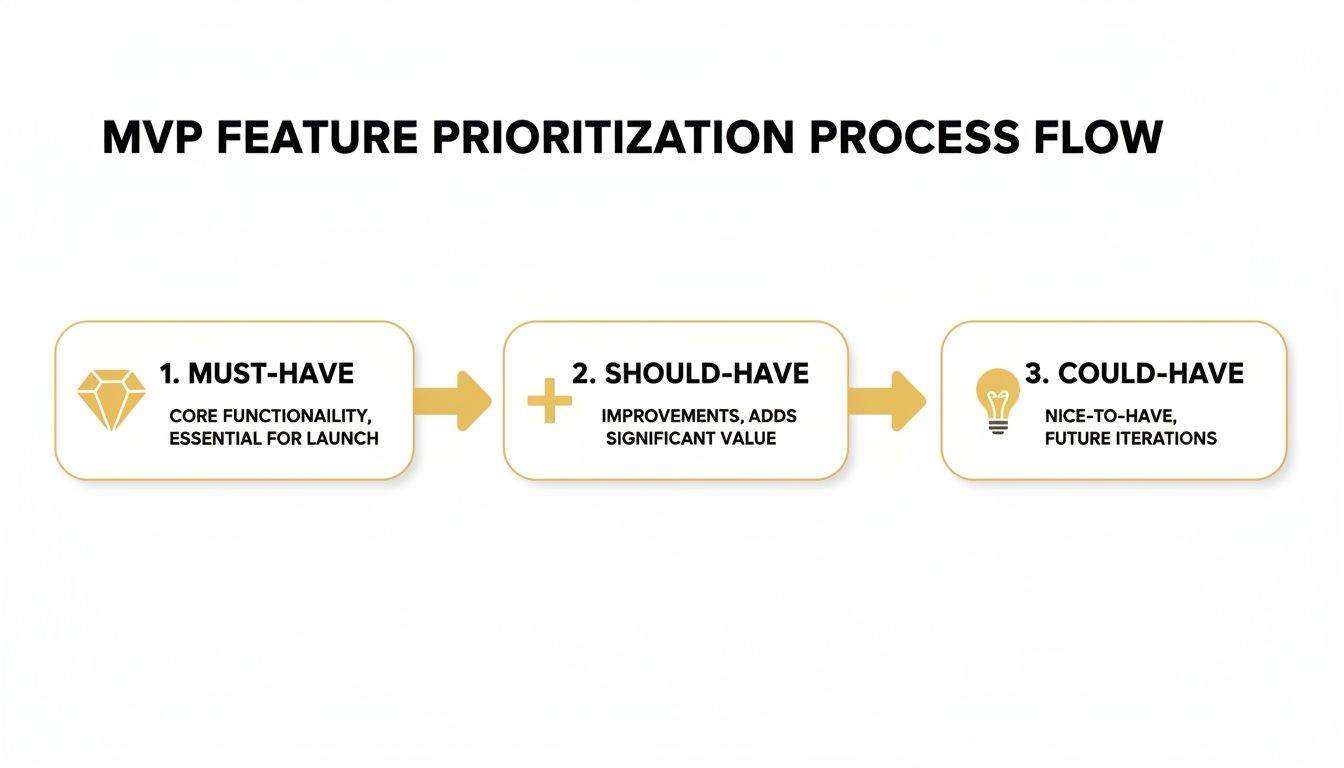
This kind of clear separation between the absolute must-haves and the nice-to-haves ensures your development effort is always aimed at what delivers the most value right now.
Why Quality Assurance Is Non-Negotiable
It’s tempting to skimp on Quality Assurance (QA) to get your MVP out the door faster. Honestly, this is a huge mistake. Your MVP might have limited features, but those features have to work. Early adopters are usually forgiving if a feature is missing, but they have very little patience for a buggy, frustrating experience.
A dedicated QA process, even if it’s just one person, is crucial. Their job is to:
- Write Test Cases: Create structured tests for each user story to make sure it does what it's supposed to.
- Perform Manual Testing: Click through the application like a real user to find bugs and usability issues that automated tests might miss.
- Conduct Regression Testing: Make sure that adding a new feature didn't accidentally break something that was already working.
Baking QA into the process from the start ensures your core product is rock-solid. A stable MVP builds trust with your first users and gives you a solid foundation to build on, making the whole journey a lot smoother.
How to Measure MVP Success After Launch
Alright, you launched. Take a breath. But don't get too comfortable, because launching your MVP isn't crossing the finish line—it's the sound of the starting gun. The real work is just beginning. Your job now shifts from building to learning, and success isn't about how many features you shipped. It's about what you can learn from real people using your product.
This is where the famous "build-measure-learn" feedback loop stops being a buzzword and becomes your operational playbook. Every piece of data, every user comment, and every bug report is pure gold. It's the fuel that will drive your product from a scrappy MVP to a full-fledged, market-ready solution.
You Need Both the ‘What’ and the ‘Why’
To get the full picture, you have to look beyond just the numbers on a dashboard. Quantitative data tells you what users are doing, but qualitative feedback is what tells you why they're doing it. You need both to make smart decisions.
For example, your analytics might show that a staggering 70% of new users drop off after the onboarding flow. That's a critical "what." But it doesn't tell you why. Is the UI confusing? Is the value prop unclear? The only way to find out is to actually talk to them.
Getting Actionable Qualitative Insights
Qualitative feedback is your direct line into your user's brain. It gives you the context, emotion, and nuance that raw numbers will never provide. The goal isn't just to collect opinions; it’s to find the friction points and those "aha!" moments in their journey.
Here are a few practical ways I've found to get this information:
- Quick User Interviews: Schedule short, 15-minute video calls with a handful of your first users. Keep it informal. Ask open-ended questions like, "Can you walk me through how you used the product yesterday?" or "Was there anything that felt confusing or just didn't work like you expected?"
- Targeted In-App Surveys: Use simple, one-question pop-ups after a user finishes a key task. For instance, right after they generate their first report, you could ask, "How easy was that to accomplish on a scale of 1 to 5?" Tools like Hotjar or Pendo are great for this.
- Make Feedback Easy: Put a "Feedback" button right in your main navigation. Making it dead simple for users to report a bug or suggest an idea will create a continuous stream of valuable insights.
Tracking the Right Quantitative Metrics
While conversations are invaluable, you need hard data to track progress and validate your assumptions at scale. It's easy to get lost in a sea of metrics, so for an MVP, you need to be ruthless about focusing on just a few Key Performance Indicators (KPIs) that directly tie back to user value.
Don't chase vanity metrics like total sign-ups or page views. An MVP's success is measured by engagement and retention. I'd rather have a hundred highly engaged users who keep coming back than ten thousand sign-ups who leave and never return.
So, what should you actually track? While every product is different, a handful of metrics are almost universally important for validating an MVP. I've put together a table of the essentials that will tell you if you're on the right track.
Essential KPIs for Your MVP Launch
This table breaks down the core metrics you should be watching from day one. They'll help you understand if your MVP is actually solving a problem and delivering value.
| Metric (KPI) | What It Measures | Why It's Important for an MVP |
|---|---|---|
| Activation Rate | The percentage of new users who complete a key action that signals they've experienced the product's core value. | This tells you if users "get it." A low activation rate is a huge red flag that your onboarding or core user experience is broken. |
| User Retention | The percentage of users who return to your product over a specific period (e.g., day 1, day 7, day 30). | High retention is the single best indicator of product-market fit. It proves your product is sticky and solving a real, recurring problem. |
| Customer Acquisition Cost (CAC) | The total cost of sales and marketing to acquire a new customer. | For an MVP, this helps you figure out if your acquisition channels are sustainable before you pour more money into marketing. |
| Net Promoter Score (NPS) | A measure of customer loyalty, based on asking users how likely they are to recommend your product. | NPS gives you a quick pulse on user sentiment. It helps you identify your biggest fans (promoters) and your harshest critics. |
Focusing on these KPIs will keep you honest about your MVP's performance. They provide the hard data you need to back up your qualitative findings and make informed decisions about what to build—or fix—next.
Common Questions About Building an MVP
Even with the best roadmap, building a minimum viable product can feel like you're stepping into the unknown. Questions always pop up, and that's a normal part of the process. I've pulled together answers to some of the most common ones I hear from founders and product teams.
How Much Does an MVP Typically Cost?
This is the million-dollar question, right? The honest answer is always, "It depends." The final number is tied directly to how complex your idea is, the tech you choose, and where your development team is located.
A super simple MVP, maybe built by a couple of freelancers, could come in at a few thousand dollars. A more involved one that needs specialized skills or integrations? That can easily run from $25,000 to $75,000, sometimes more. The key is to stop thinking of it as an expense and start seeing it as an investment in learning. You're spending money to get a real answer to one question: is this business idea going to work?
How Long Should It Take to Build an MVP?
Speed is everything here, but "fast" means different things to different projects. A well-defined MVP with a feature list that has been ruthlessly cut down should be built and launched within three to six months.
If your timeline starts creeping past the six-month mark, that’s a huge red flag. It almost always means you're suffering from feature creep. Your goal is to get into that build-measure-learn loop as fast as humanly possible. The longer you spend building, the longer you're just guessing instead of using real user data.
Remember, the point of an MVP isn't to build a perfect, polished product. It's to build a learning machine. Your primary goal is to get it into the hands of real users to validate your core hypothesis with minimal delay.
What Is the Difference Between an MVP and a Prototype?
This one trips a lot of people up, but the distinction is critical. They look similar on the surface but serve completely different purposes.
-
Prototype: This is basically a visual mockup. It might be interactive, letting you click around, but there's nothing functional happening behind the scenes. Its only job is to test a user experience or validate a design flow. A prototype answers the question, "Can people figure out how to use this?"
-
MVP: An MVP is a real, working product. It's bare-bones, sure, but it has a functional backend, it processes real data, and it lets users actually complete a core task. An MVP answers the question, "Will people actually use this to solve their problem?"
Think of it like building a car. A prototype is a clay model—it shows you what the car will look like. An MVP is a go-kart with a lawnmower engine and a steering wheel. It's not pretty, but it proves the core concept of personal transportation actually works.
How Do I Know When My MVP Is Ready to Launch?
It’s so tempting to add "just one more feature." I've seen it happen a hundred times. But the truth is, your MVP is ready when it reliably solves one core problem for your target user. It doesn't need to be perfect. It doesn't need to be polished.
Here's a good litmus test: "If we launched this thing tomorrow, could a user sign up and successfully do the single most important thing this product is supposed to do?" If the answer is yes, and the process isn't a complete disaster, it's time to ship it. The fear of launching something imperfect is real, but waiting for perfection is the fastest way to build something nobody wants.
Ready to turn your idea into a functional, market-ready MVP? The team at Up North Media specializes in building custom web applications that solve real-world problems and drive business growth. Get your free consultation today!