

Your feed probably looks fine at first glance. Products are in Merchant Center, ads are running, and the catalog sync says “successful.” But sales lag, some items get disapproved for reasons that seem arbitrary, and budget keeps drifting toward products that don't deserve it.
That's the trap. Most retailers treat the product feed like plumbing. It is merchandising, paid media, SEO, and conversion rate optimization rolled into one file. If the feed is weak, every downstream system gets worse inputs. If the feed is strong, campaigns become easier to scale because the platforms understand what you sell, who should see it, and what should happen after the click.
Why Your Product Feed Is Your Most Powerful Sales Tool
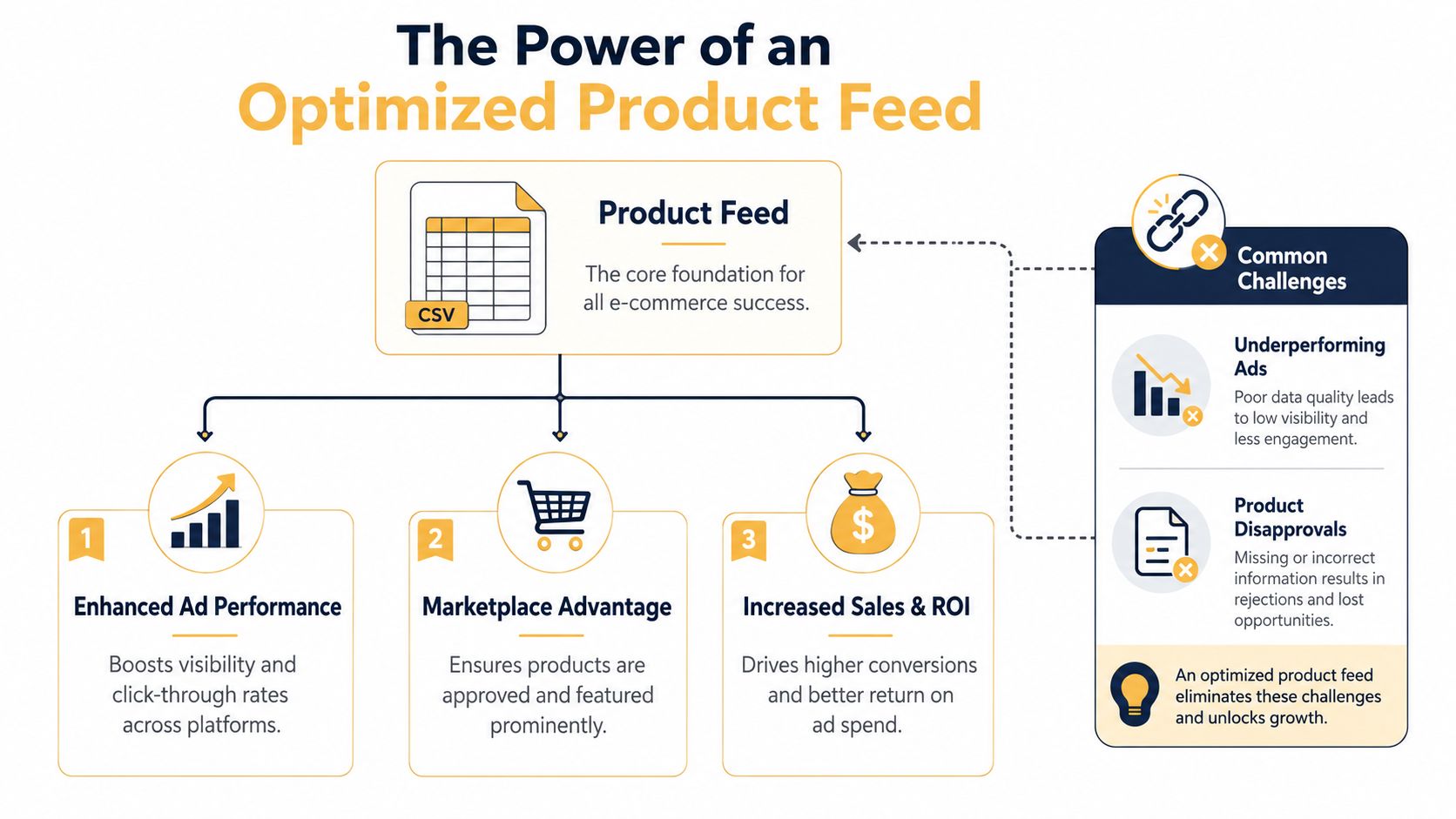
A product feed is the operating layer behind your shopping ads, marketplace listings, and many dynamic catalog experiences. It isn't just a spreadsheet with titles and prices. It's the source of truth that tells Google, Meta, and other channels what the product is, whether it's available, how it should be categorized, and why a shopper should click.
That's why product feed optimization deserves executive attention, not just a quick review when approvals drop. According to DataFeedWatch's overview of product feed optimization, optimizing feed attributes directly improves online product listings and shopping ad performance, while data accuracy and completeness help prevent disapprovals and inconsistencies that can lead to revenue loss.
Bad feeds create expensive problems
When the feed is messy, the symptoms show up everywhere:
- Disapproved products: Missing fields, outdated prices, and category mismatches can knock items out of visibility.
- Weak ad relevance: Generic titles and thin attributes make it harder for platforms to match products to useful searches.
- Wasted spend: Budget flows to listings that attract clicks but don't convert because the ad promise and product detail page don't line up.
- Customer distrust: If stock or pricing in the ad doesn't match the site, shoppers hesitate, bounce, or abandon.
Those aren't isolated technical errors. They're revenue leaks.
Practical rule: If your catalog changes often, your feed needs to change just as often. Static product data doesn't hold up in live shopping environments.
The retailers that win with feeds don't ask, “Is the file uploaded?” They ask, “Does this feed make our products easier to discover, easier to trust, and easier to buy?”
Your feed influences more than approvals
A clean feed gives platforms better signals. Better signals improve matching, visibility, and campaign efficiency. That applies across Google Shopping, Performance Max, Meta catalog ads, and marketplace environments that rely on structured product data.
It also creates alignment between paid media and organic visibility. The same discipline that improves feed titles, descriptions, images, and category structure often strengthens on-site merchandising and search relevance too. If you're tightening your broader store visibility at the same time, these e-commerce SEO best practices complement feed work well because they push the catalog toward clearer structure and stronger product language.
There's also a practical reason agencies prioritize feed work early. It compounds. A better landing page can lift one product. A better feed can improve thousands of listings at once.
For teams that want a wider paid shopping framework beyond the feed itself, this practical guide for e-commerce growth is useful because it connects feed quality to campaign execution instead of treating them as separate jobs.
The real job of the feed
The feed has one job. It must translate your catalog into channel-ready language without losing meaning.
Imagine it as a sales rep who never sleeps. If that rep gives the wrong color, wrong price, vague product name, or no identifier, the customer never gets a fair chance to buy. Feed optimization fixes that rep's script, updates it continuously, and makes sure every channel hears the same story.
Building a Rock-Solid Feed Foundation
The fastest way to improve a weak feed is to stop thinking about attributes as admin fields. Each one answers a specific buying or matching question. Your id tells the platform which exact item it's dealing with. Your title explains what the shopper sees. Your gtin helps algorithms identify the product precisely. Your price and availability determine whether the click is trustworthy.
When those fields are incomplete or inconsistent, the feed stops being reliable.
The audit process that catches structural problems
A disciplined overhaul starts with an audit, not rewrites. Power Digital's feed guide describes a six-step process that includes exporting the feed to review attribute coverage and validating titles, IDs, and GTINs. The same source notes that Google recommends product images at a minimum of 1500 x 1500 pixels and category attributes defined 2-3 levels deep for more precise matching.
That matters because broad fixes rarely solve feed issues. You need to inspect how the catalog behaves field by field.
A practical audit usually looks like this:
- Export the raw feed and scan for blank or duplicate values.
- Check identifiers first so each SKU has a stable record across systems.
- Compare feed values to the site for price, availability, color, and variant names.
- Review error logs in Merchant Center and channel diagnostics.
- Split top sellers from weak performers so you can see whether bad data correlates with bad results.
- Automate recurring checks once you know the common failure points.
Core Product Attributes for Google and Facebook
| Attribute | Google Shopping Requirement | Facebook Shops Requirement | Optimization Tip |
|---|---|---|---|
| id | Required | Required | Keep it stable. Don't recycle IDs across variants or discontinued items. |
| title | Required | Required | Put the most useful product details first so the listing stays readable on mobile. |
| description | Required | Required | Write for clarity first, then enrich with relevant attributes and benefits. |
| link | Required | Required | Send each product to the exact matching landing page, not a collection page. |
| image_link | Required | Required | Use clean, high-quality images and keep the primary image consistent with the selected variant. |
| availability | Required | Required | Sync from inventory data so channels don't advertise what shoppers can't buy. |
| price | Required | Required | Match site pricing exactly and update quickly when promotions or changes go live. |
| brand | Often expected for standard retail products | Commonly expected | Standardize naming so one brand doesn't appear in multiple spellings. |
| gtin | Required whenever available | Strongly useful for catalog quality | Treat GTIN like a product passport. If it exists, include it. |
| google_product_category | Important for Google matching | Not used the same way | Go deeper than a top-level category so the platform understands context. |
| custom_label | Useful for campaign segmentation | Not typically a core catalog field | Use it to group by margin, season, clearance status, or hero SKU status. |
Required doesn't mean sufficient
A compliant feed can still underperform. That's the difference between “valid” and “competitive.”
If your feed only satisfies minimum requirements, you've built a catalog that can appear. You haven't built one that can win.
This becomes obvious in categories with complex variants or incomplete manufacturer data. Handmade goods, private-label items, and custom apparel often need extra care because they may not have standard identifiers in the same way mass retail items do. In those cases, consistency across your own internal IDs, landing pages, and variant structure becomes even more important.
Teams that manage larger catalogs across marketplaces often pair feed work with stronger product information management. If you're also trying to boost Amazon profitability, this kind of PIM thinking helps because it forces cleaner source data before syndication starts.
What a strong foundation looks like
A healthy feed has a few recognizable traits:
- Stable identifiers: Products and variants don't change identity every time the catalog updates.
- Clear categorization: The platform can tell whether an item is a running shoe, a dress shirt, or a replacement part.
- Channel-ready imagery: Visual assets are large enough and consistent enough to support shopping placements.
- Reliable source sync: Price and inventory updates come from systems that reflect real availability.
Do that work well and optimization gets easier later. Skip it, and every title rewrite or campaign test sits on unstable ground.
Writing Titles and Descriptions That Convert
Titles do two jobs at once. They help the platform understand the product, and they help the shopper decide whether the click is worth it. Most underperforming feeds fail on one side or both.
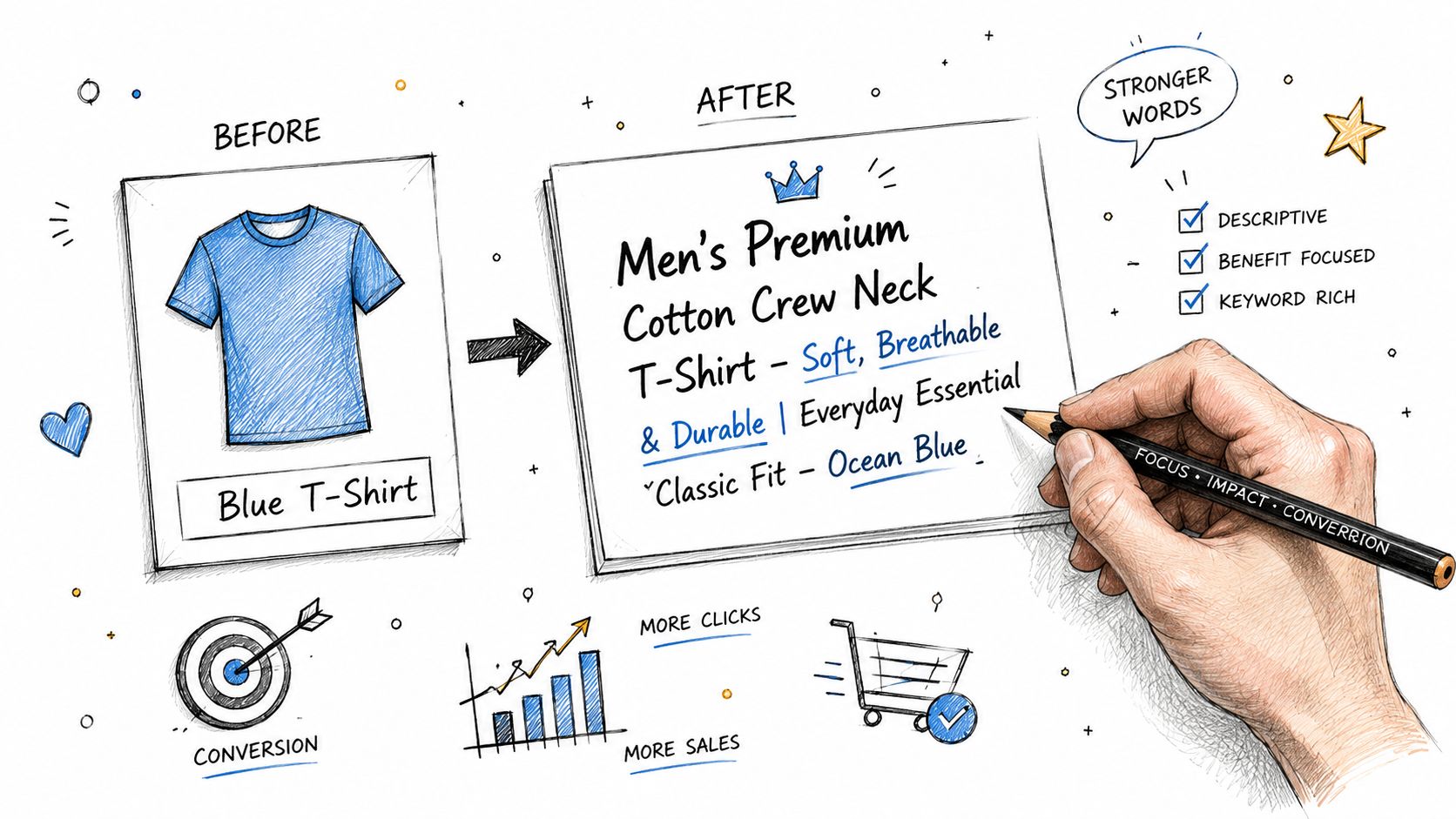
A title like “Blue T-Shirt” is technically a title. It's also a missed opportunity. It leaves out the brand, audience, fit, size context, and the exact phrasing someone might use when searching.
Put the useful information first
DataFeedWatch's title optimization guidance makes one point that many teams still miss. The most compelling details, such as brand, size, color, and gender, should appear at the front because mobile truncation often cuts off the end of the title. The same source also notes that missing GTINs, whenever available, can reduce visibility or trigger disapproval.
That has a direct writing implication. Don't save the important details for the end.
Here are practical title formulas that work better than generic naming:
- Apparel: Brand + Gender + Product Type + Core Attribute + Color + Size
- Electronics: Brand + Product Type + Model + Key Spec + Capacity or Size
- Home goods: Brand + Product Type + Material + Size + Color or Finish
Before and after examples
| Product Type | Weak Title | Stronger Title |
|---|---|---|
| Apparel | Blue T-Shirt | ComfortWear Men's Crewneck T-Shirt Navy Blue Large |
| Electronics | Wireless Headphones | SoundPeak Wireless Headphones Noise Cancelling Black |
| Home decor | Wooden Table | Northfield Dining Table Solid Oak Natural Finish |
| Beauty | Face Serum | LumaSkin Vitamin C Face Serum 30 ml Brightening |
The stronger versions aren't “creative” in the brand-copy sense. They're clearer, easier to match, and more useful at a glance.
Descriptions should close the relevance gap
A title earns the click. A description supports the decision.
That doesn't mean stuffing every product page with repetitive keywords. It means writing descriptions that answer the questions a shopper still has after seeing the image and title. What problem does the product solve? What's the material, fit, finish, or use case? Which details help a buyer choose confidently?
A good description usually includes:
- Core function: What the product is and who it's for.
- Decision details: Material, sizing, fit, compatibility, or included components.
- Use context: Where or how someone uses it.
- Search language: Phrases real customers use, written naturally.
For teams refining how short-form search copy works across channels, this guide to mattress product descriptions is a helpful example of turning plain specifications into buyer-friendly language.
Descriptions also work better when they align with broader metadata habits. The same discipline behind concise, intent-driven product copy tends to improve snippets and on-page messaging. That's why writing stronger meta descriptions is a useful parallel skill. Both require precision, clarity, and restraint.
A quick walkthrough helps if your team needs to see title construction in action:
Write titles like shelf tags for a rushed shopper. Write descriptions like a sales associate answering the next three questions before they're asked.
What doesn't work
Three patterns drag feeds down fast:
- Keyword dumping: Repeating color, category, and brand terms until the title becomes unreadable.
- Internal naming: Using ERP language, supplier abbreviations, or warehouse shorthand no customer would search.
- One-template-for-everything: A title structure that works for apparel often fails for tools, supplements, or furniture.
Good product feed optimization respects category behavior. Shoppers don't evaluate a sofa the same way they evaluate phone chargers. Your copy structure should reflect that.
Advanced Tactics for Images and Campaign Segmentation
Text gets most of the attention in feed projects. That's a mistake. Images and segmentation often decide whether a strong product gets enough visibility and whether the budget behind it makes financial sense.
If titles are your ad copy, images are your storefront window. They shape click quality before the shopper reads a word.
Better images improve both trust and eligibility

Large, clean product images do more than look polished. They help channels display your products properly, and they reduce uncertainty for the buyer. If the hero image is cropped badly, too dark, inconsistent across variants, or detached from the actual product state, conversion friction starts before the click lands.
The standard to aim for is simple:
- Use high-resolution images that meet channel requirements.
- Show the exact variant being advertised whenever possible.
- Avoid confusing backgrounds that make the product harder to read.
- Keep framing consistent across categories so the feed feels merchandised, not assembled.
If your product image work is weak on-site, the feed will inherit that weakness. These image optimization practices for the web help because they improve the source assets before they ever enter the feed.
Category depth matters more than most teams think
A shallow category tells the platform very little. A deeper category gives context.
If a product is only labeled under a broad top-level bucket, matching gets fuzzy. Going deeper improves precision. It's the difference between telling Google “this is apparel” and telling Google “this is a men's waterproof running jacket.” That context affects relevance, traffic quality, and how confidently the platform can place the item.
The practical fix is to map products to the most accurate available category path instead of settling for “close enough.” This takes time, especially in large catalogs, but it pays off because campaigns stop relying entirely on titles to carry the meaning.
Custom labels turn a feed into a bidding system
Feed work starts to drive margin, not just visibility. Adsmurai's guidance on feed optimization points to a tactic high-performing retailers use consistently: segment high-converting SKUs into separate campaigns and apply custom labels for lifecycle stage or margin so bids can support different ROAS targets by product group.
That means the feed can carry business logic into the ad account.
A useful custom label structure might include:
| Label Type | Example Use | Why It Helps |
|---|---|---|
| Margin tier | High, medium, low | Supports bid pressure where profitability can absorb it |
| Seasonality | Evergreen, holiday, summer | Helps teams scale or suppress spend at the right time |
| Lifecycle stage | New arrival, core, clearance | Changes how aggressively each product is promoted |
| Price competitiveness | Strong, average, weak | Helps decide where paid visibility is worth pursuing |
| Hero SKU status | Bestseller, support item | Protects budget for products that anchor account performance |
Operational advice: Don't build campaign structure first and hope the feed adapts. Build the labels first so campaign structure reflects how the business actually makes money.
What usually fails
The weak version of segmentation looks organized in a slide deck but doesn't change outcomes. Common examples include labels that nobody maintains, margin buckets based on outdated data, or campaign splits that are too granular to manage.
The best setups are simple enough to survive real operations. If merchandising changes a product's status, the feed should update the label automatically. If margin shifts, campaign logic should adjust with it. That's where feed quality and business systems have to work together.
Using Automation and AI for Scalable Feed Management
Manual feed management breaks down fast. It's manageable at a few dozen SKUs. It becomes risky at hundreds, and painful at thousands. Teams start making bulk edits in spreadsheets, one-off fixes pile up, and nobody is fully sure which rule changed what.
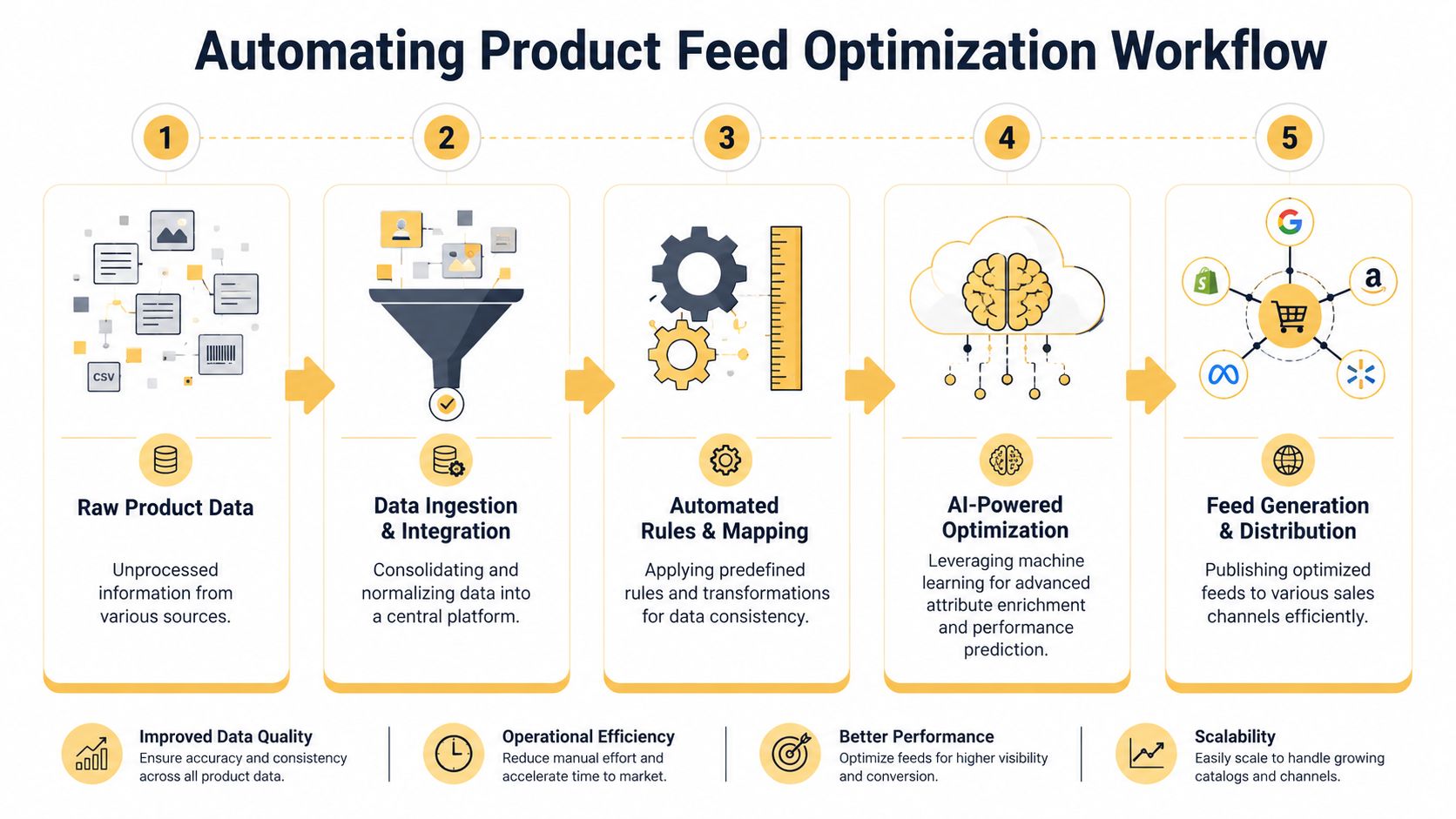
Automation solves the repetitive parts first. AI becomes useful after that.
Rule-based automation handles the boring work
Feed tools such as DataFeedWatch and GoDataFeed are valuable because they let teams apply transformation rules without rewriting source data in the ecommerce platform every time.
Examples of useful automation rules include:
- Color normalization: Convert “Midnight Blue,” “Dark Navy,” and “Navy” into one approved value when the destination channel needs consistency.
- Title appending: Add a standardized attribute for eligible products, such as material or compatible device family.
- Inventory suppression: Pause or exclude products that no longer meet merchandising rules.
- Category mapping: Route products into cleaner taxonomy paths based on product type or tag combinations.
These rules reduce manual cleanup and limit the chance that one person's spreadsheet shortcut creates account-wide problems.
AI changes how feeds adapt to demand
The more interesting shift is happening above basic automation. The strongest feed programs don't only clean data. They adapt it.
A useful idea emerging from the PPC community is dynamic search-query alignment. A discussion in Reddit's PPC community highlights that many guides still treat product feed optimization like a static checklist, while newer AI-driven tools can create sub-feed variations that swap attributes based on changing search phrasing and niche-specific trends.
That matters because search language moves. Shoppers don't always describe products the way your merch team does. Sometimes they search by style, use case, or problem solved. Sometimes they use seasonal language. Sometimes a feature suddenly becomes the phrase that matters most.
AI can help in three ways:
- Attribute enrichment by suggesting missing product context from existing catalog data.
- Description drafting that turns sparse product fields into readable, conversion-friendly copy.
- Sub-feed generation for different channel needs or search-intent groupings.
Most feeds are written per product. Smarter feeds increasingly adapt per intent.
Where automation ends and judgment begins
Not every feed task should be handed to AI. Price, availability, compliance-sensitive wording, and variant logic need strict controls. AI is best used as an assistant inside guardrails, not as an unsupervised publisher.
A workable model looks like this:
- Automation handles normalization and routing.
- AI proposes language or alternate attribute emphasis.
- Humans approve the logic for top categories and revenue-critical SKUs.
- Performance data decides which changes stick.
That balance gives you scale without giving up control. It also keeps the feed grounded in real merchandising priorities instead of generic generated copy.
Monitoring Performance and Avoiding Costly Mistakes
A feed overhaul doesn't hold its value unless someone monitors it. Catalogs change, prices move, inventory shifts, promotions expire, and new products inherit old mistakes. The “set it and forget it” approach is one of the most expensive habits in ecommerce.
The teams that keep feed performance strong build a review loop. They don't wait for a major disapproval event to learn something broke.
What to watch every week
You don't need a massive dashboard to spot feed trouble. You need a short list of indicators that reveal whether the catalog is healthy and whether your optimizations are helping.
Focus on:
- Item disapprovals: Look for spikes, repeated policy themes, and category-specific issues.
- Click-through rate by product group: If a segment loses engagement after a title or image change, inspect the feed before changing bids.
- ROAS by label or SKU cluster: This shows whether your feed segmentation is helping the account spend in the right places.
- Search term and query patterns: Use them to validate whether titles match how people shop.
- Landing page alignment: Check that the ad promise survives the click.
A good review cadence mixes platform diagnostics with spot checks on actual listings. Teams often trust the feed file but never look at the live result. That's where hidden problems survive.
The mistake most guides still underplay
One of the most damaging issues is mobile-first variant mismatch. This happens when a shopper clicks an ad for a specific color or size, but the landing page loads a generic product page and forces them to re-select the variant.
According to Google Merchant Center guidance referenced here, this friction can cause 20–35% higher abandonment rates on mobile, and feeds with variant-aligned landing pages can see 18% higher ROAS on mobile.
Those numbers are large enough that this shouldn't be treated like a minor UX annoyance. It's a feed structure problem and a landing page problem working together.
How to reduce variant mismatch
The fix usually requires coordination between feed logic and site behavior:
- Use distinct variant-aware IDs: Don't collapse every color and size into one generic parent when the ad is variant-specific.
- Match the image to the variant: If the feed shows blue-large, the hero image should reinforce that exact choice.
- Send traffic to variant-aligned URLs: The landing page should load the selected option by default.
- Keep variant naming consistent: Feed values and on-site labels must describe the same thing.
A shopper who already chose the variant in the ad shouldn't have to choose it again on the page.
Final checklist for ongoing feed health
Use this as a standing QA list before large promotions, catalog pushes, or campaign resets:
- Check price parity: Feed and site pricing must match.
- Review availability sync: Out-of-stock products shouldn't keep drawing paid clicks.
- Verify top-SKU titles: Your highest-volume products deserve manual review, not blind template trust.
- Inspect category mapping: Broad category assignments often hide until performance slips.
- Test mobile product pages: Confirm the clicked variant is the loaded variant.
- Audit custom labels: Make sure segmentation still reflects margin, lifecycle, and seasonal reality.
Retailers often look for one breakthrough tactic. In practice, product feed optimization wins through disciplined maintenance. The best feeds are not perfect. They're monitored, corrected quickly, and tied closely to how the business sells.
If your catalog is complex, your approvals are unstable, or your shopping performance has stalled, Up North Media can help you turn feed cleanup into a revenue strategy. Their team works across ecommerce development, SEO, and AI-powered automation, which is exactly the mix you need when product data, landing pages, and campaign performance all have to work together.