

SEO for web applications requires a rendering-aware approach because search engines may need to execute JavaScript before they can discover and understand content. In Google's JavaScript SEO guidance, crawlability, rendering, indexability, real HTML links, and valid server responses are architectural requirements, not finishing touches.
You've probably seen the warning signs already. The application feels fast in Chrome, navigation works without reloads, and every screen looks polished. Yet the public pages barely appear in organic search, important routes remain unindexed, and the team keeps adding metadata fixes without understanding why the results don't change.
This is the hidden technical debt of many single-page applications. Developers build an excellent product around client-side state, API calls, and dynamic components, then discover that search engines don't experience the application the way users do. Fixing that gap usually requires more than an SEO plugin. It requires decisions about rendering, routing, links, status codes, metadata, performance, and ownership between engineering and marketing.
When Your Web App Disappears From Search
A product team launches a marketplace built as a single-page application. The homepage loads correctly. A user can filter listings, open a detail view, and move through the interface without a full refresh. The browser displays everything because JavaScript fetches the data and assembles the page after the initial document arrives.
The first organic report tells a different story. Search engines see the application shell, but important listing content, page titles, and internal navigation may not be available in the first response. If a route depends on a script that fails, an API response that arrives late, or a click handler instead of a real link, the crawler may not reach the page or understand its purpose.
Google can execute JavaScript and discover links generated through it, but the page must be rendered before those links and content become available to indexing systems. Google's JavaScript SEO basics also establishes that web applications need valid HTTP status codes, descriptive titles and snippets, compatible code or polyfills, and real HTML anchor elements with href attributes.
The browser is not the crawler
A developer often tests a route by opening it from the homepage. That test proves the interface works for a human session. It doesn't prove that a crawler can request the deep URL directly, receive the right response, execute the required code, find the content, and connect the route to the rest of the site.
The failure can be subtle. A route may return a successful response while showing an error state. A product page may have the same title as every other product. A navigation item may look like a link but only respond to a JavaScript event. These defects rarely break the application for users, so they survive code review.
Practical rule: Treat every public route as a document that must make sense before a user clicks through the interface.
Teams also inherit decisions from the first version of the product. Hash-based routing, duplicate query parameters, client-only data fetching, and one global metadata template may have been sensible for a logged-in dashboard. They become expensive liabilities when the same architecture powers public landing pages, documentation, product records, or editorial content.
If a page has been crawled but not added to the index, diagnose the exact state rather than guessing. This guide to discovered but currently not indexed is useful when the URL is known to Google but the rendered page still isn't earning an indexed result.
The practical lesson is uncomfortable but useful: SEO debt is usually architecture debt with a delayed symptom. The earlier the team decides which routes need organic visibility, the fewer compromises a migration will require.
Understanding SEO Fundamentals for Web Applications
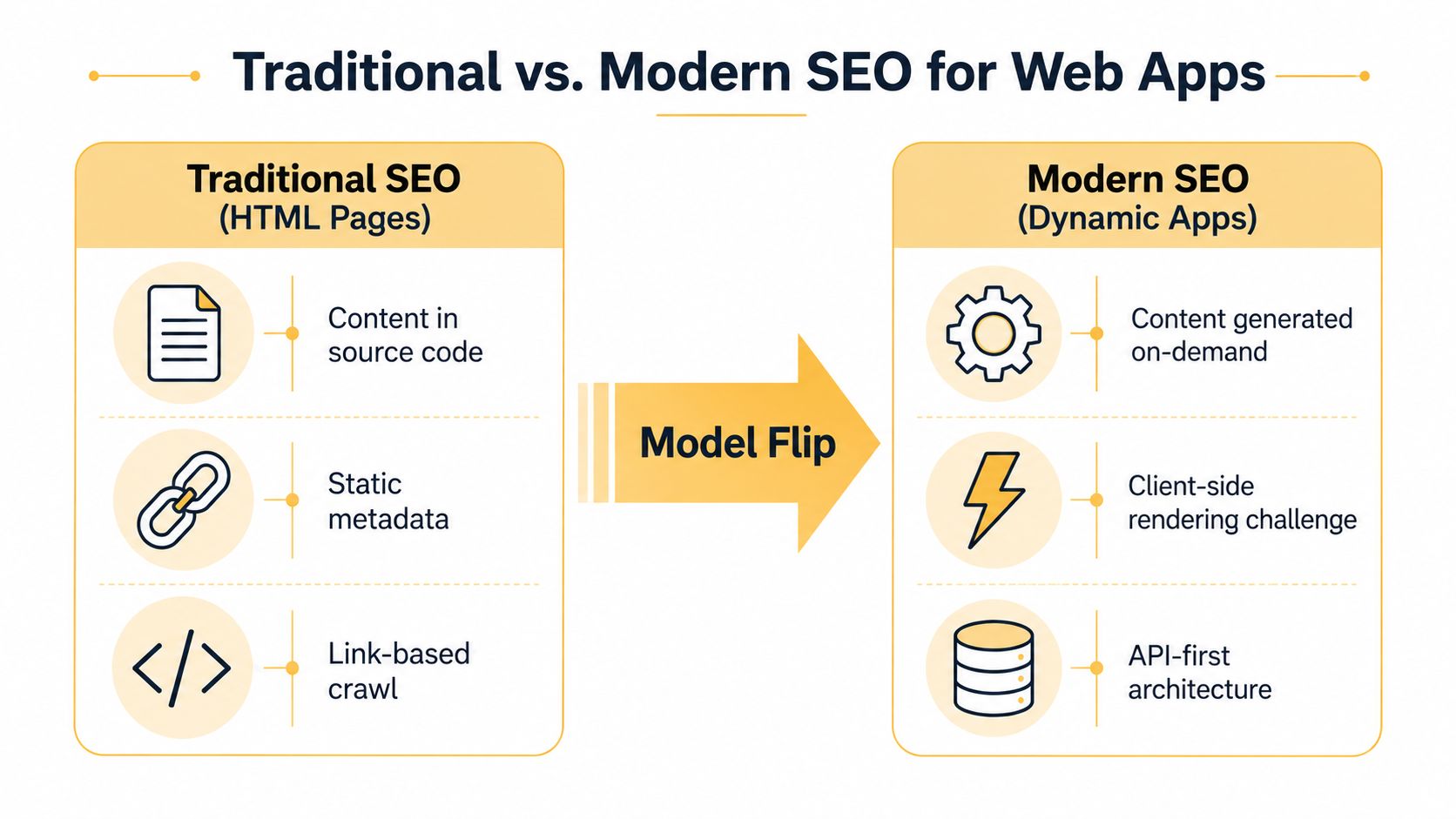
Traditional SEO assumes that a URL returns an HTML document containing the page's text, links, title, and other signals. A modern web application often returns an application shell first, then asks JavaScript to fetch data, construct the visible interface, update the document head, and handle navigation.
That change creates a model flip. Search optimization is no longer limited to words on a page. It also includes the sequence that makes those words available.
Three conditions every public route must satisfy
Google's documentation describes JavaScript-heavy pages in terms of crawlability, renderability, and indexability. These conditions overlap, but they aren't interchangeable.
- Crawlability: A crawler can discover and request the URL through accessible paths and links.
- Renderability: The required JavaScript executes successfully, and the resulting content can be understood.
- Indexability: The response and page signals allow the search engine to store and potentially serve the content.
A route can pass one condition and fail another. For example, a sitemap may expose a URL, satisfying discovery, while the route returns an incorrect status or renders an empty state. Likewise, a page can render visible text but lack a unique title, canonical signal, or useful internal links.
Google specifically recommends real HTML anchor elements with href attributes. A button that calls a router function may lead correctly for a human, but it doesn't provide the same dependable crawl path as an actual anchor. Server responses matter too. A missing route should return an appropriate error, while a valid public page should return a successful response that matches its content.
The same discipline applies to content planning. A dynamic page still needs a clear search intent, useful copy, and an understandable structure. Teams producing long-form or narrative content can also use resources such as content optimization for fiction writers to think carefully about audience intent, clarity, and page-level usefulness.
The central principle is simple: the application must expose its important information as reliable web documents, not only as interactive states. JavaScript can enhance those documents, but it shouldn't be the only bridge between a crawler and the content.
Comparing Server-Side and Client-Side Rendering Strategies
Rendering strategy sets the practical ceiling for SEO. Server-side rendering generates HTML for each request, client-side rendering sends a shell that JavaScript completes, and dynamic rendering serves a pre-rendered version to crawlers while preserving the application experience for users.
The choice depends on which routes need search visibility, how often their data changes, and how much infrastructure the team can maintain.
| Strategy | SEO Impact | User Experience | Implementation Complexity |
|---|---|---|---|
| Server-side rendering | Strong foundation because the initial response contains route content and metadata | Supports interactive enhancement after the first response | Requires server rendering, data coordination, caching, and monitoring |
| Client-side rendering | Search systems may need additional rendering before they can understand the page | Smooth transitions and rich app behavior after the shell loads | Often familiar to front-end teams, but route-level SEO requires careful engineering |
| Dynamic rendering | Provides pre-rendered HTML for crawler requests while users receive the application experience | Can preserve the existing interface with limited disruption | Adds detection, snapshot generation, cache management, and consistency risks |
The hidden cost is render budget
A single-page application can make every route transition look lightweight to a user while making it expensive for a crawler. The crawler first fetches the URL, then spends CPU resources executing JavaScript before the final content becomes visible to indexing systems.
That creates two related constraints. Crawl budget concerns how many URLs a search engine chooses to fetch, while render budget concerns the processing needed to execute those URLs. Thin routes, duplicate variants, soft 200 responses, and unnecessary application states consume resources without adding meaningful pages.
A practical architecture uses SSR or prerendering for public pages that need organic traffic. CSR remains appropriate for private dashboards, account areas, and workflows that shouldn't be indexed. Dynamic rendering can help an existing application improve crawlability without an immediate full rebuild, but it adds another version of the page that must stay accurate.
Teams comparing product architecture should also understand the broader differences in single-page applications versus multi-page sites. The correct answer often isn't one rendering method for the entire product. A hybrid application can serve public content through SSR or static output and keep authenticated experiences client-rendered.
Essential Optimization Strategies for Web Applications
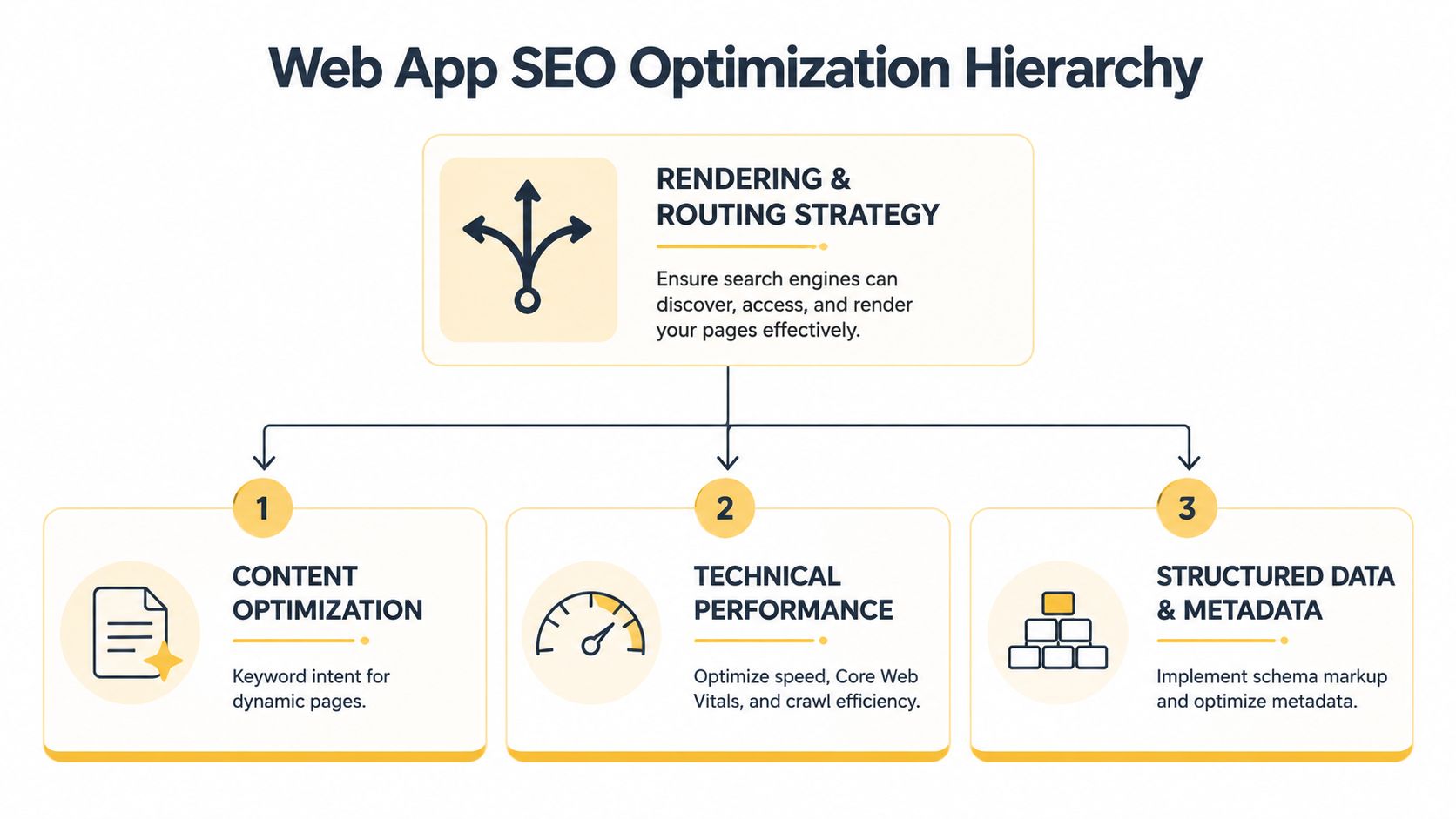
Once the rendering decision is clear, implementation should follow a dependency order. Fixing metadata before fixing route access is like labeling books in a library that visitors can't enter.
Start with routes and responses
Use the History API to give every valuable view a clean, unique URL. Each route should load directly, represent one meaningful page, and avoid unnecessary duplicate parameters. The server or edge layer must return the correct status code for that route, including a real not-found response when content doesn't exist.
Then make the document head route-aware. A product, category, article, and help page shouldn't inherit the same title and description from the application shell. Canonical URLs, Open Graph fields, and robots directives should reflect the specific route rather than the current client state.
Build links that crawlers can follow
Convert navigation that matters for discovery into real anchors with descriptive href values. Use buttons for actions, such as opening a filter or submitting a form. Use links for destinations, such as a product detail page or an article.
Generate sitemaps from the actual public route inventory. A static sitemap that lists deleted records or omits newly published pages creates a misleading map of the application. Keep private, temporary, and duplicate states out of the public route system.
Improve the page after it becomes accessible
Content should answer the intended query directly, use descriptive headings, and provide enough context for a visitor who lands on the route from search. Structured data can clarify entities such as articles, products, organizations, and breadcrumbs, but it can't compensate for missing or thin visible content.
Performance and accessibility belong in the same engineering conversation. Smaller JavaScript payloads reduce the work required to display a route, while semantic HTML, descriptive image alternatives, keyboard access, and clear heading structure help both assistive technologies and search systems interpret the document. For a practical explanation of the user experience metrics involved, review this guide to Core Web Vitals.
Prioritize work in this order:
- Public route access: Test direct requests, status codes, canonical URLs, and not-found behavior.
- Rendered content: Confirm that important text, links, and metadata exist after rendering.
- Information architecture: Connect related pages with crawlable internal links.
- Performance: Reduce unnecessary JavaScript and delayed content.
- Structured signals: Add valid metadata, schema, sitemaps, and social previews.
Tooling and Testing Your Web Application SEO
JavaScript SEO problems rarely appear in a normal browser session. You need to compare the source response, rendered document, and indexed result. That comparison turns a vague visibility complaint into a reproducible engineering issue.
Google Search Console should be the starting point for live indexing feedback. Its URL Inspection workflow helps teams examine individual routes, while search performance reports show whether pages are being discovered and served. A successful browser render doesn't guarantee that Google sees the same final document, so inspect representative templates rather than checking only the homepage.
Use several views of the same URL
A useful test sequence looks like this:
- Fetch the raw HTML: Check whether the response contains meaningful content, a unique title, internal links, and the expected canonical signal.
- Render the route: Use Google's rendering-oriented tools and JavaScript-capable crawlers to identify content that appears only after execution.
- Inspect status behavior: Request valid, redirected, deleted, and malformed routes. Confirm that each returns the intended response.
- Test deep links: Open an inner route directly in a new session. It shouldn't require a user to visit the homepage first.
- Audit performance and accessibility: Run Lighthouse and review loading, responsiveness, layout stability, and semantic structure.
| Tool Category | Specific Tools | Primary Use Case |
|---|---|---|
| Indexing diagnostics | Google Search Console | Inspect URL status, indexing signals, and search visibility |
| Search presentation | Rich Results Test | Validate structured data that may support enhanced results |
| Rendering checks | Google's Mobile-Friendly Test and JavaScript-capable crawlers | Compare crawler-visible output with browser output |
| Technical crawling | Screaming Frog or Sitebulb | Find route, link, metadata, canonical, and rendering issues across templates |
| Performance audits | Lighthouse | Review page experience and resource bottlenecks |
| Accessibility audits | Lighthouse and browser accessibility tools | Identify semantic and interaction barriers |
Google's guidance makes one link test especially important: verify that important navigation uses real anchor elements with href attributes. Also check that polyfills or code compatibility aren't required for the rendered page to become understandable.
The 2024 survey data reported by Sitebulb shows why teams shouldn't assume shared expertise. 59.8% of SEOs called it critical to understand what Googlebot sees, while only 10.6% said they perfectly understood how Google crawls, renders, and indexes JavaScript (Sitebulb's JavaScript SEO statistics). Testing should therefore be an explicit team process, not knowledge held by one specialist.
Real-World Migration Scenarios and Case Examples
A migration becomes easier to plan when the team separates public documents from private application behavior. The following scenarios are representative architecture patterns, not claims about measured outcomes from named businesses.
An e-commerce catalog
A retailer starts with CSR for the entire storefront. Category filters update the interface, but product detail routes depend on API calls after the shell loads. The migration team keeps the interactive filters, then moves indexable category and product templates to SSR.
Before the change, a direct request can return a generic shell with shared metadata. Afterward, each product URL returns its own HTML content, title, description, canonical signal, structured product information, and crawlable links to related products. The team also generates the sitemap from active catalog records and redirects retired paths to the closest relevant destination.
A SaaS marketing surface
A software company doesn't need its logged-in dashboard indexed, but it does need public feature pages, documentation, integration pages, and comparison content. Instead of forcing the dashboard into SSR, the team creates a route boundary.
Public routes use static output or SSR, depending on how frequently the content changes. The authenticated application remains CSR. This reduces migration scope and prevents the team from adding server rendering to screens that have no organic search purpose.
Here's a useful explanation of the single-page application rendering trade-offs when deciding which routes should receive pre-rendered HTML.
A digital publisher
A publisher has a large archive with frequent updates. A full SSR migration would require substantial data and caching work, so the team first implements prerendering for article and author routes. It adds unique URLs, server-generated titles, canonical links, proper anchors, and automated sitemap updates.
The team then compares raw HTML with rendered HTML during a staged rollout. It watches for stale snapshots, duplicate route variants, broken redirects, and missing article links before expanding the approach to additional templates.
The migration sequence matters more than the framework label:
- Inventory public routes: Separate pages that need search traffic from private application states.
- Choose the lowest-risk rendering upgrade: SSR, static output, or prerendering based on content volatility and infrastructure.
- Preserve discoverability: Keep old URLs redirected and maintain internal links during the rollout.
- Validate representative templates: Test category, detail, article, search, error, and pagination states.
- Monitor after release: Use Search Console and crawler audits to catch regressions.
A migration succeeds when the application remains useful to people and legible to machines. The rendering layer should support that goal, not become a second product that the team forgets to maintain.
Your Action Plan for Web Application SEO Success
Start with a route inventory, not a framework debate. Mark each URL as public and indexable, public but not indexable, authenticated, temporary, or obsolete. That classification tells you where rendering investment will create value and where CSR is perfectly reasonable.
A practical decision matrix
| Business priority | Recommended default | Why it fits | Main risk to control |
|---|---|---|---|
| Public marketing pages | Static rendering or SSR | The content should arrive as complete HTML with minimal runtime work | Stale builds or inconsistent publishing workflows |
| Frequently changing product or directory pages | SSR | The server can assemble current route content on request | Server load, caching, and data failure states |
| Existing SPA with a limited set of public routes | Prerendering | Improves crawlability without rebuilding every screen | Outdated snapshots and bot-specific behavior |
| Private dashboard or account area | CSR | The content doesn't need organic discovery | Accidental exposure of private routes or metadata |
| Editorial archive and documentation | Static rendering, SSR, or prerendering | Text-heavy pages benefit from direct, stable HTML | Incomplete sitemaps and weak canonical management |
Small and mid-sized businesses should usually begin with the routes tied directly to leads, services, products, or local discovery. A full rewrite isn't always necessary. A route boundary, prerendering layer, or server-rendered public template can address the highest-value technical debt while the core application stays intact.
E-commerce teams should audit product and category templates first. Check direct loading, unique metadata, structured data, internal links, unavailable-product behavior, and sitemap inclusion. A polished filter experience doesn't replace indexable category URLs.
Publishers and content platforms should focus on document integrity. Every article needs a stable canonical URL, a discoverable path from related content, accurate publication signals, and reliable inclusion in the sitemap. Build checks can catch duplicate titles, missing links, and malformed structured data before deployment.
Measure the right feedback loop
Use Search Console to monitor indexing and search performance. Run recurring crawls that execute JavaScript, compare raw and rendered HTML, and test route-level status codes. Review Lighthouse and accessibility findings alongside SEO results because a page that is difficult to load or understand creates problems beyond search visibility.
The knowledge gap remains practical rather than theoretical. Sitebulb's survey found that 41.6% of SEOs had not read, or weren't sure whether they had read, Google's JavaScript rendering documentation, and 31.9% were unsure how to determine whether a site significantly relies on JavaScript (the survey findings). Give engineering, content, and SEO teams a shared test checklist so the application doesn't depend on assumptions.
Finally, prepare for search environments beyond the traditional results page. Coverage of 2026 SEO trends points to AI Overviews, AI search engines, and generative engine optimization, while canonical tags, title tags, and HTTPS are described as near-universal basics (Evergreen Media's SEO trend coverage). Your durable advantage will come from clear entities, answer-ready content, trustworthy brand context, and a rendering architecture that makes the underlying information accessible.
Treat SEO as a product requirement during route design, not as a repair ticket after launch. Audit the public routes this week, choose one representative template, compare its source and rendered HTML, and document the rendering decision before adding more pages.
Up North Media offers custom web application development, technical SEO audits, data-driven SEO marketing, and AI consulting for teams that need their public application routes to support both users and search systems. Visit Up North Media to discuss a rendering, crawlability, or organic visibility plan for your application.