

You open Google Search Console to do a routine check. Instead of reassurance, you see a pile of URLs sitting under Discovered – currently not indexed.
That label bothers people for good reason. It sounds like Google saw your pages and decided they weren't worth keeping. If you've invested time into service pages, product pages, or blog content, that message can feel like silent failure.
Usually, it's not.
This status is frustrating because it's vague. It tells you something is stuck, but not what to fix first. That's where time is often lost. Teams then start rewriting content, resubmitting sitemaps, requesting indexing one URL at a time, and changing random settings without knowing which lever matters.
The faster approach is triage. Start with the easy, high-probability checks. Rule out pages that shouldn't be indexed at all. Then look for crawl blockers, weak internal links, sitemap clutter, and site performance issues in that order. That sequence saves time because discovered currently not indexed is usually a prioritization problem before it's a content problem.
That Sinking Feeling in Google Search Console
There's a specific kind of dread that comes from seeing an error you half understand. Discovered currently not indexed is one of those statuses.
Business owners often assume one of three things right away. The page is broken. Google is penalizing the site. Or the content effort was wasted. None of those should be your first conclusion.
What makes this issue so annoying is that the affected URLs often look perfectly normal. The page loads. It's in the sitemap. Maybe it was even published days or weeks ago. Yet Google still hasn't moved on it.
Why this status causes so much confusion
Most SEO problems are easier to categorize. A page is blocked by noindex. A redirect is wrong. A page returns an error. This one is murkier because the page may be technically fine, but still stuck.
That's why prioritization matters more than theory here. You don't need a giant forensic audit to start. You need a decision process.
Use this lens first:
- Is this page important enough to care about? Product pages, service pages, location pages, lead magnets, and cornerstone articles usually are.
- Is this happening to a few URLs or a whole pattern? A handful of low-value pages is different from an entire section.
- Did Google discover the page naturally, or only through a sitemap? That hint often points to weak internal linking.
Practical rule: If the URL isn't commercially or strategically important, don't spend premium time trying to force it into the index.
A lot of sites create more URLs than they realize. Tag archives, filtered pages, paginated variations, tracking-parameter URLs, search result pages, session-based URLs. Those can fill reports fast and make the problem look bigger than it is.
The useful way to think about it
Treat the report like a work queue, not a verdict.
Your job isn't to panic. It's to sort affected URLs into two buckets:
- Pages worth saving and pushing forward
- Pages better cleaned up, consolidated, or ignored
That shift alone prevents a lot of wasted effort.
What Discovered Currently Not Indexed Really Means
Google's definition is straightforward. Discovered – currently not indexed means Google knows the URL exists but hasn't crawled it yet. Google may have tried to crawl it and rescheduled the request to avoid overloading the site, which is why affected pages often show an empty last crawl date in Search Console. In practical terms, this is a crawl-priority issue rather than a confirmed quality judgment, and common causes include too many accidentally generated URLs, weak internal linking, or a site that's temporarily too slow or overloaded for Googlebot to fetch efficiently, as explained in this breakdown of Google's guidance on discovered currently not indexed URLs.
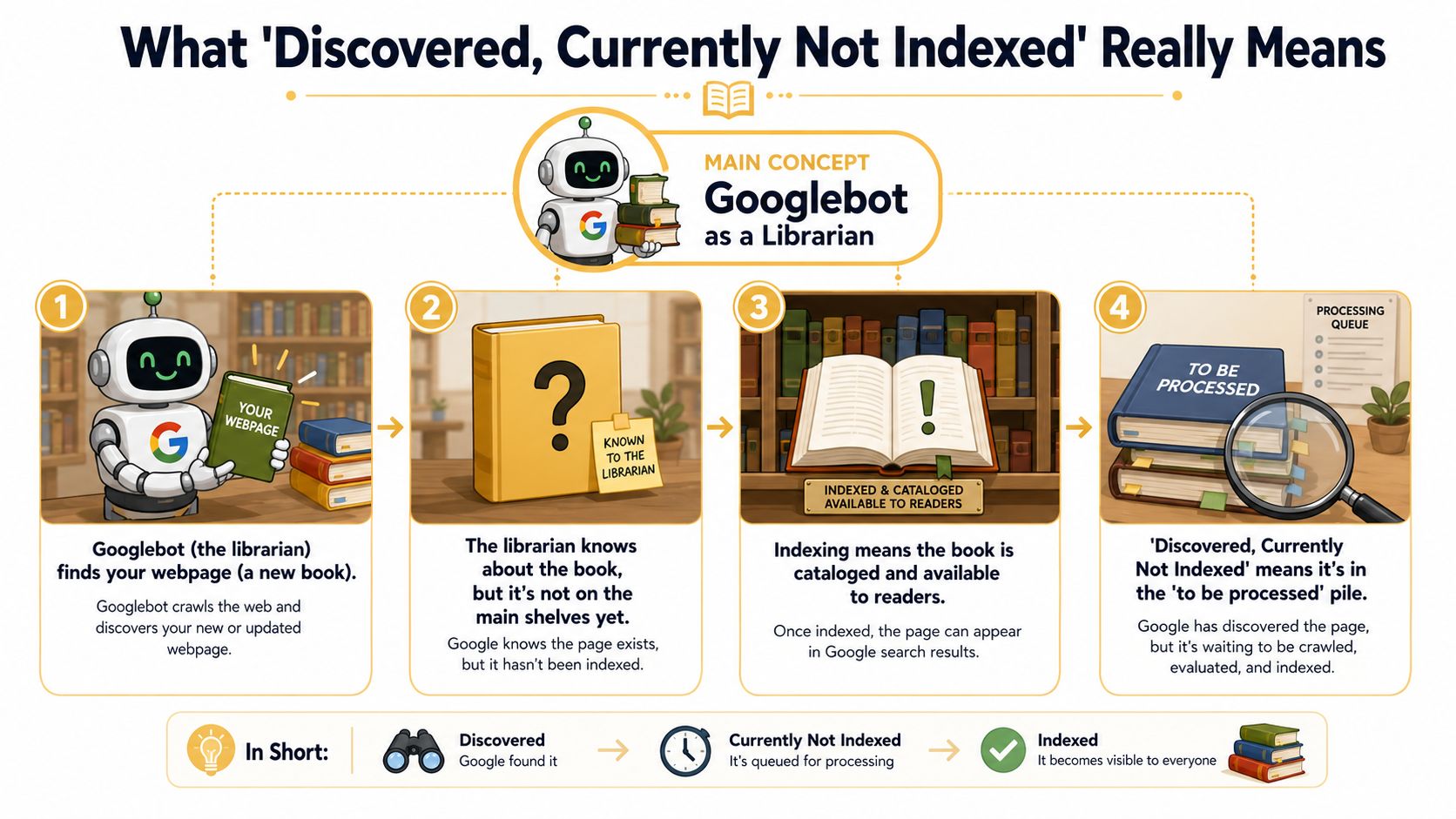
Think like a librarian
A good analogy is a library intake desk.
Googlebot is the librarian. Your page is a new book. The librarian knows the book exists and has put it in the intake pile, but hasn't opened it, cataloged it, or shelved it for readers yet. The book hasn't been rejected. It's waiting.
That distinction matters. If Google hasn't crawled the page, then Google hasn't fully evaluated what's on it. So this isn't the same as a page that was crawled and still left out of the index.
What this means for your SEO work
Operationally, this is less about “Why does Google hate this page?” and more about “Why isn't Google choosing this page yet?”
That changes your response.
Instead of jumping straight into rewriting copy, start by checking whether the page is discoverable from strong internal links, whether your XML sitemap contains too much noise, and whether your site is producing more crawl targets than it should. If Google sees lots of low-value URL patterns, your important pages can wait in line behind junk.
A page can sit in Search Console's coverage reporting while receiving zero crawl visits. That delays indexing, delays updates, and slows the impact of SEO work you've already done.
What it does not mean
It does not automatically mean:
- the page is penalized
- the page is low quality
- the page will never index
- your site has a manual action
- you need to request indexing for every URL one by one
Sometimes Google catches up on its own. Sometimes it doesn't. The practical question is whether the affected URLs are important enough to investigate and whether there's a repeatable cause behind them.
Diagnosing the Common Causes of Indexing Delays
Once you stop treating this like a mystery, the causes usually fall into recognizable buckets. In Google Search Console, Discovered – currently not indexed means Google has identified the URL but hasn't fetched it yet. Because the page usually has no last crawl date, it's best understood as a crawl-queue problem rather than an index-quality problem. URLs can remain there when Google deprioritizes them because of crawl budget constraints, weak internal linking, sitemap noise, or server performance issues that make crawling less efficient, as described in Onely's explanation of the status.
The patterns I see most often
The root cause is rarely exotic. It's usually one of these:
- Too many low-value URLs getting created by the CMS, faceted navigation, filters, or parameters
- Weak internal linking to pages you want Google to treat as important
- Sitemap clutter where the XML sitemap includes URLs that aren't clean, canonical, or useful
- Server sluggishness or instability that makes Googlebot back off
- Template-level quality issues where pages are technically valid but thin, repetitive, or hard to justify crawling quickly
The trap is assuming every page deserves equal crawl attention. Google doesn't work that way, and, indeed, it shouldn't.
Common causes and fix priority
| Cause | Symptom | Priority |
|---|---|---|
| Low-value URL sprawl | Many affected URLs follow the same parameter, filter, tag, or archive pattern | High |
| Weak internal linking | Pages are in the sitemap but hard to reach through normal site navigation | High |
| Sitemap noise | Sitemap includes redirected, duplicate, or unwanted URLs | High |
| Server performance issues | Important pages stay queued while the site feels slow or unstable | Medium to high |
| Thin or weak templates | Similar pages across one section remain unvisited for long periods | Medium |
Why low-value URL patterns cause so much damage
If your site generates lots of variants, Google has to choose where to spend attention. A bloated crawl surface can bury the pages you care about.
This is common on ecommerce and publishing sites. Filters, sorting options, search-result URLs, category pagination, tag archives, and old campaign URLs all add up. Individually they seem harmless. Collectively they create traffic for bots, not value for users.
Internal links are stronger than sitemap inclusion
A page in a sitemap is a suggestion. A page linked clearly from important sections of your site is a stronger signal.
If a URL only exists in your XML sitemap and nowhere meaningful in your HTML navigation or contextual content, Google often treats it as lower priority. That's especially true when the surrounding site structure sends mixed signals about what matters.
A note on false diagnoses
Some teams misread a weak page as a crawl issue when it's a soft 404 problem. If a page exists but offers almost no meaningful content, Google may treat it like an empty shell. If that possibility is on the table, this guide to soft 404 errors is worth reviewing before you spend time on crawl fixes alone.
If affected URLs share the same template, same directory, or same parameter pattern, assume there's a systemic issue before you assume Google is acting randomly.
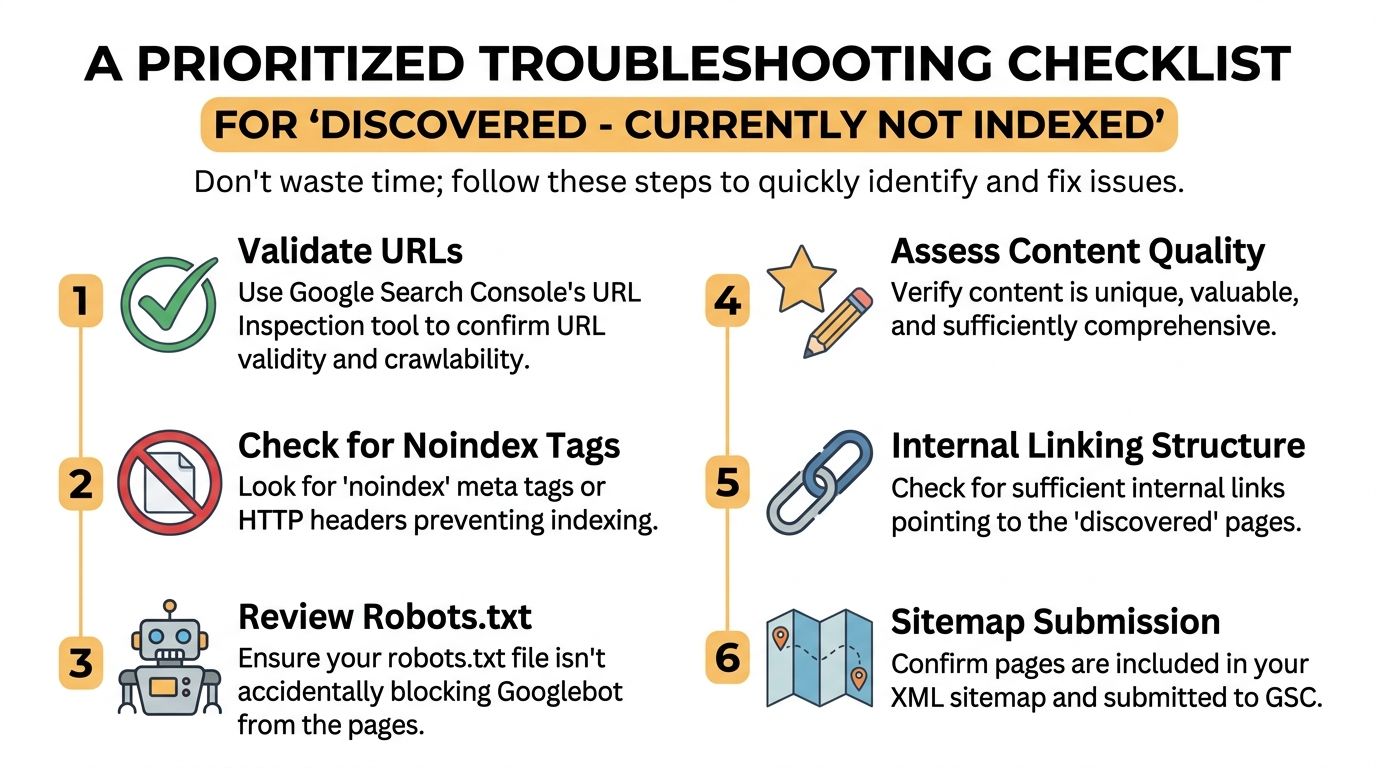
A Prioritized Troubleshooting Checklist
Most indexing advice fails because it throws every possible cause at you at once. That leads to overwork and underdiagnosis.
The better approach is to check issues in the order that gives you the fastest clarity.
Start with the URL itself
Before touching anything technical, inspect the affected URLs and ask a blunt question: Do you even want these pages indexed?
A lot of wasted effort occurs. Teams spend hours trying to rescue pages that should have been excluded from the start.
Check for patterns like:
- Filtered or parameter URLs that don't provide unique search value
- Old archive pages with no business purpose
- Thin utility pages created by plugins or platform defaults
- Duplicate intent pages that compete with stronger versions
If the answer is no, stop trying to fix indexing for them. Clean them up instead.
Then check for direct blockers
Use Google Search Console's URL Inspection tool on a sample of affected pages.
Look for obvious blockers first:
- Noindex signals in the page markup or headers
- Robots.txt restrictions on the section
- Unexpected canonicals pointing somewhere else
- Redirect behavior that sends the URL to a different destination
These checks are fast and save you from deeper guesswork.
A page can look fine in a browser and still send the wrong signal to Google.
Review internal links before touching content
If the page is important and crawlable, check how it's linked from within the site.
Ask:
- Is it linked from a top navigation, category page, hub page, or related article?
- Is the link in standard HTML, or hidden behind scripts and interactions?
- Is the page effectively orphaned except for the sitemap?
Important pages should be easy for both users and crawlers to reach. If they aren't, fix that before you rewrite a single paragraph.
Clean the sitemap after the obvious checks
A messy sitemap makes diagnosis harder because it mixes wanted URLs with low-value noise.
Review whether your XML sitemap includes only final, canonical, index-worthy pages. If it lists junk, you're giving Google a bad map. It's not the only issue, but it often compounds the primary one.
Escalate only after the basics are clean
If the URL is important, technically open, internally linked, and present in a clean sitemap, then move to broader site factors:
- page template quality
- section-level duplication
- server performance
- excessive URL generation elsewhere on the domain
That order matters. A one-line robots issue is easier to fix than a sitewide architecture problem, so rule out the simple failures first.
Step-by-Step Fixes for Common Indexing Problems
Once you know the likely cause, the fix tends to be straightforward. The hard part is matching the remedy to the actual problem instead of applying every SEO tactic at once.
If the problem is low-value URLs
When a site creates too many weak or duplicate pages, the answer isn't to push them all harder. It's to reduce noise.
Do this:
- Remove unnecessary URLs if they have no user value
- Apply noindex where appropriate if a page should exist for users but not search
- Restrict crawl paths in robots.txt for sections that create endless low-value combinations
- Consolidate duplicate intent pages into a stronger canonical destination
On WordPress, this often means reviewing category, tag, date, author, and search-result archives generated by plugins or theme defaults. On Shopify, it usually means checking collection filters, tag paths, and duplicate product discovery routes.
If the problem is weak internal linking
This fix is often simpler than people expect. Pick the important affected pages and link to them from pages Google already treats as central.
A practical framework:
- Identify your strongest pages. Home, service hubs, top category pages, major guides.
- Add relevant contextual links to the affected URLs.
- Add navigational support if the page deserves long-term prominence.
- Remove internal links to junk pages that distract from the section.
The goal isn't to scatter links everywhere. It's to make importance obvious.
If the sitemap is the problem
Your XML sitemap should be a clean list of URLs you actively want indexed.
For WordPress, plugins such as Yoast SEO or Rank Math make it easier to review which content types are included. For Shopify, sitemap generation is more platform-controlled, so the bigger task is reducing indexable clutter at the template and collection level.
Clean sitemap rules are simple:
- include canonical URLs
- include pages that return a normal successful response
- exclude pages blocked from indexing
- exclude duplicates, redirects, and obvious low-value pages
After cleaning, resubmit the sitemap in Google Search Console.
If the page may actually be in the wrong status bucket
Sometimes a page starts as discovered currently not indexed, then later gets crawled and still doesn't make it in. That's a different diagnosis.
If your affected URLs move into that category, this guide on how to fix crawled currently not indexed helps separate crawl-priority issues from post-crawl evaluation problems.
If pages are thin or misleading
Some pages shouldn't be patched. They should be retired.
If a page has almost no unique content, no clear search purpose, and no business role, improve it substantially or let it go. Also make sure empty or near-empty pages return the right response. A page with no meaningful content shouldn't pretend to be a full asset.
Clean architecture beats repeated indexing requests. Google responds better to better signals than to more button-clicking.
Monitoring Indexation Health for Long-Term Success
Fixing a batch of URLs is useful. Preventing the same mess from coming back is where the true SEO maturity shows up.
You don't need a huge tool stack for this. Search Console is still the core dashboard. The habit matters more than the platform.

What to review on a recurring basis
Check the Page Indexing report regularly and look for movement, not just snapshots.
Pay attention to:
- Growing discovered counts in one directory or template
- New URL patterns appearing after a plugin, theme, or platform change
- Important page types showing up in excluded reports
- Pages transitioning into different indexing states
A stable site can still drift into indexing waste if nobody watches what the CMS is generating.
What to do after you make changes
Use the Validate Fix feature after correcting a grouped issue in Search Console. That tells Google you've addressed the problem and want the affected set reevaluated.
For a handful of mission-critical pages, use URL Inspection and request indexing manually. That's appropriate for a key service page, a high-value category page, or a newly launched cornerstone article. It's not a scalable fix for a systemic issue.
Keep the monitoring process simple
A lightweight monthly workflow works well for most small and mid-sized sites:
| Check | What you're looking for | Action |
|---|---|---|
| Page Indexing report | New clusters or growing sections | Investigate pattern, not just single URLs |
| URL Inspection | Current state of priority pages | Confirm crawlability and live status |
| XML sitemap review | Unwanted URLs entering the feed | Remove noise and keep only wanted pages |
| Internal link review | Important pages losing visibility | Add stronger contextual links |
If your team already tracks technical SEO with a broader platform, a roundup of SEO software options can help you decide whether Search Console alone is enough or whether you need deeper crawling and monitoring support.
When to Call an SEO Expert for Indexing Issues
Some discovered currently not indexed problems are simple. Others are symptoms of deeper technical debt.
If you've checked URL value, blockers, internal linking, sitemap quality, and broad site patterns, but important pages still won't move, the problem may sit lower in the stack. Large ecommerce catalogs, location-page frameworks, faceted navigation, JavaScript-heavy builds, and unstable hosting setups often need a more technical diagnosis than a marketing team can do in-house.
You should also escalate when the issue affects pages tied directly to revenue. If product categories, service pages, or location pages aren't getting crawled, that's not a minor reporting annoyance. It's a visibility and lead-generation problem.
An outside expert is useful when you need someone to separate signal from noise. That might mean reviewing crawl paths, template behavior, section-level duplication, or coordination with developers. For companies that want a reference point for specialized support, SEO services for local businesses can be a useful example of the kind of focused help available when local visibility and indexing health overlap.
The key point is this: hiring help isn't about giving up on DIY SEO. It's about recognizing when the cost of delay is higher than the cost of getting the diagnosis right.
If your team wants help untangling indexing issues, improving crawl efficiency, or building a cleaner SEO foundation, Up North Media is a strong partner to talk to. They help businesses turn technical SEO problems into practical growth opportunities, with support that connects site architecture, content visibility, and business results.