
An SEO audit is a structured check of whether search engines can discover, crawl, index, understand, and rank a website's pages, and the outcome it supports is qualified organic traffic. Say your organic visits have slipped for two months. Your team can't tell if the problem is weak content, a site change, falling demand, or competitors taking the answer space.
That uncertainty is the situation an audit resolves. It doesn't start with rewriting pages or chasing keywords. It starts by proving whether Google can reach your important pages at all, then works outward to content, authority, and the business value of each fix.
What an SEO Audit Is and What It Measures
An SEO audit is a structured evaluation of a website's ability to be discovered, crawled, indexed, understood, and ranked by search engines. The Google Search Central documentation frames SEO around helping search engines crawl, index, and understand content so pages can attract more relevant traffic. That's broader than checking keyword positions.
Say a retailer sees organic traffic fall after adding new product categories. No one knows whether the copy is thin, the categories aren't indexed, or shoppers want something else this season. An audit separates those causes instead of guessing.
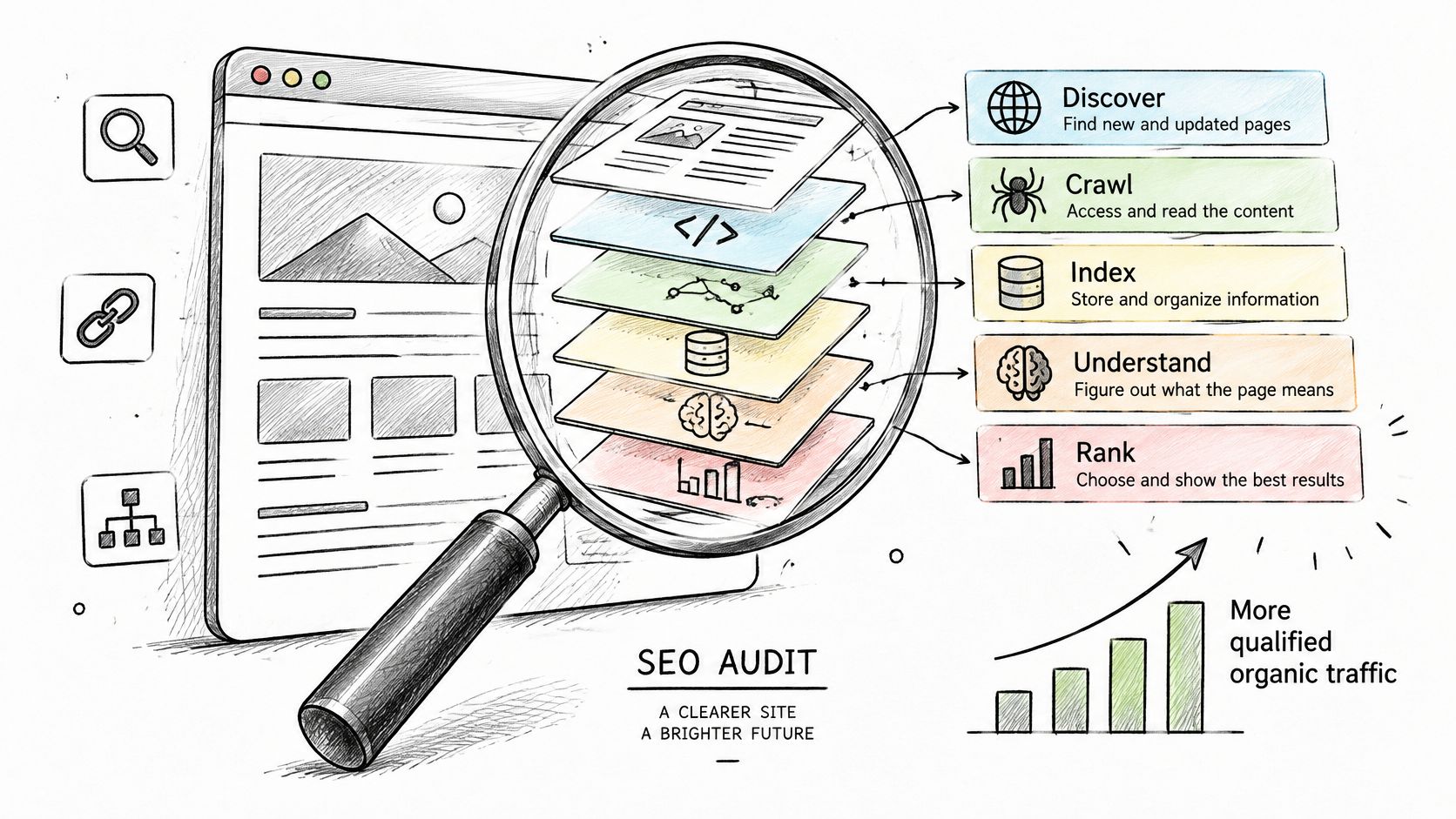
The Search Lifecycle in Four Steps
Think of it as a health check. A doctor takes vitals before prescribing. An auditor confirms Google can reach a page before anyone rewrites its copy.
- Discovery: A crawler finds a URL, mostly through links from pages it has already crawled. That's why internal linking and sitemaps matter.
- Indexing eligibility: The page isn't blocked, it returns HTTP 200, and it holds indexable content.
- Understanding: Google renders the page and reads titles, headings, image descriptions, and structured data to grasp its subject.
- Ranking: Google compares that page with others for relevant searches.
The diagram below follows that path from discovery to ranking.
What Gets Checked at Each Stage
Auditors inspect robots.txt rules, XML sitemaps, redirects, canonical signals, broken links, duplicate or thin pages, and mobile rendering. They also check whether blocked CSS or JavaScript stops Google from seeing the page the way a user does. If you're comparing audit scopes, this overview of website audit types and benefits shows how an SEO audit sits inside a wider website review.
If a page can't be found, read, or indexed, keyword work won't help it.
Rankings are one output among many. The deliverable is a prioritized diagnostic, technical barriers first, then content and site architecture, then authority and performance. It isn't a guarantee. It identifies conditions that can improve eligibility, comprehension, and qualified traffic.
The Six Components Every Audit Covers
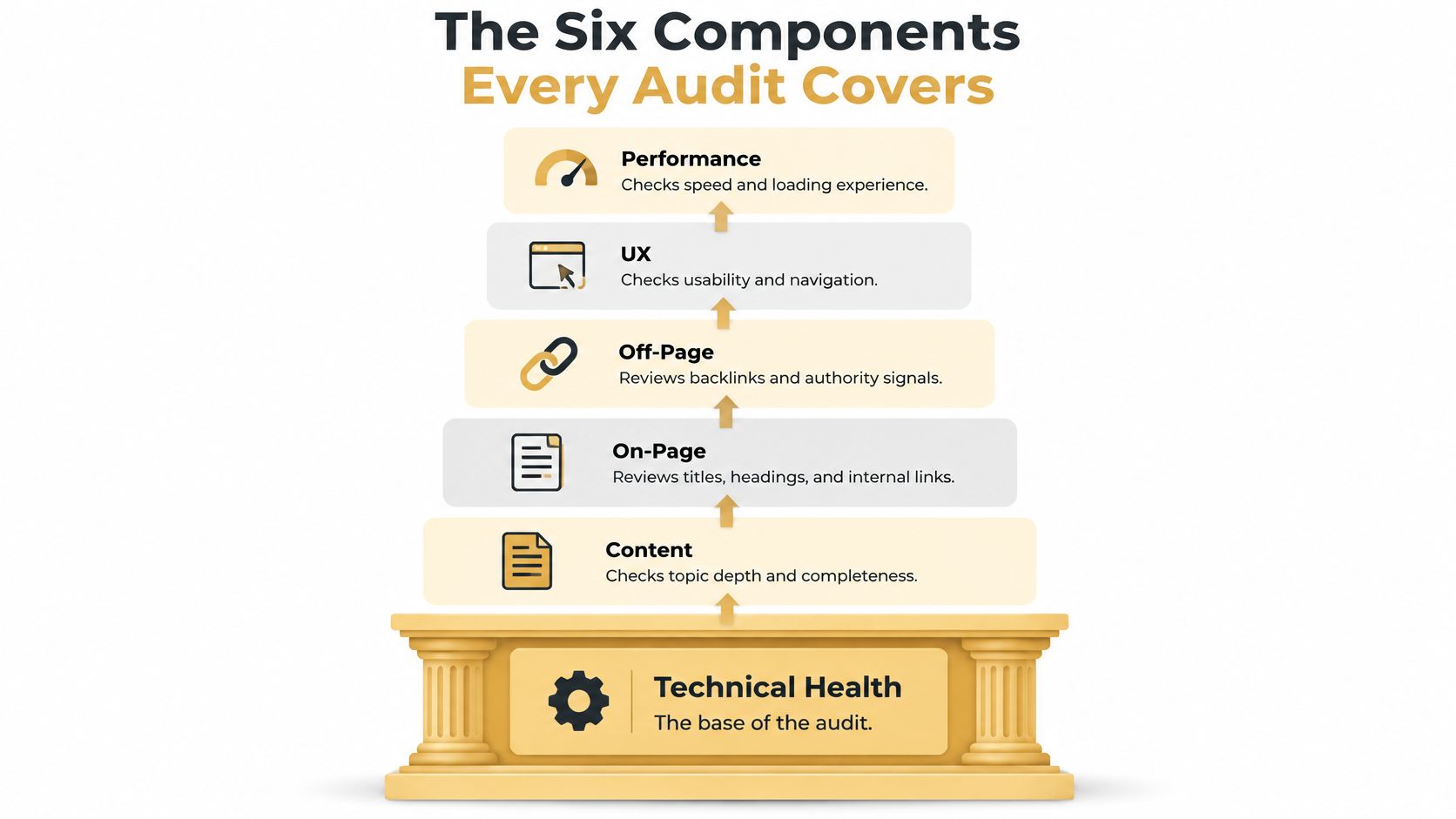
Picture the audit as pillars on a foundation. Technical health is the base. Content, on-page elements, off-page authority, user experience, and performance all sit on top of it, because none of them count if Google can't reach the page.
The pyramid below shows how those layers stack.
| Component | What It Checks | Typical Problem Found |
|---|---|---|
| Technical | Crawlability, indexing, redirects, canonicals, sitemaps | Blocked pages, redirect chains, orphan pages |
| On-page | Title tags, meta descriptions, headings, image alt text | Missing or duplicate titles and meta descriptions |
| Off-page | Referring domains, anchor text, brand mentions | Few or low-quality links, lost referring domains |
| Content | Search intent match, depth, duplication | Thin pages, overlapping topics, pages that answer the wrong query |
| UX | Mobile rendering, navigation, accessibility, blocked CSS or JavaScript | Tap targets too small, confusing menus, accessibility failures |
| Performance | Core Web Vitals, LCP, INP, CLS | LCP above 2.5 s, layout shifts from late-loading elements |
Technical, On-Page, and Off-Page
Technical checks answer the access question. Do key URLs return HTTP 200? Does robots.txt block a section by accident? Does each page point to one canonical version, and does the sitemap list only pages you want indexed?
On-page checks are about clarity. A title tag tells Google and readers what the page covers. Headings break the topic into scannable parts. Image alt text describes a picture for screen readers and, when an image is a link, acts as its anchor text.
Off-page checks look outward. Referring domains, anchor text, and brand mentions show whether other sites treat you as a credible source, and whether you've lost links you once had.
Content, UX, and Performance
Content checks ask a blunt question. Does this page match what the searcher wants, with enough depth, and without competing against a near-duplicate page on your own site? A page built for research won't satisfy someone ready to buy.
UX checks cover how the page works on a phone, whether navigation makes sense, and whether people using assistive technology can move through it. They also confirm Googlebot isn't blocked from the files it needs to render the layout.
Performance is measured with Core Web Vitals, and the Google Search Console help page on Core Web Vitals sets the good thresholds at LCP of 2.5 seconds or less, INP below 200 milliseconds, and CLS below 0.1. Read those as field data from real users at the 75th percentile, split by mobile and desktop, not as one lab score.
Each metric points to a different cause. Slow servers and oversized hero images push LCP up. Long JavaScript tasks hurt INP. Images, ads, or fonts loading late without reserved space cause CLS. The fix follows the cause, reserving media dimensions, cutting JavaScript work, or deferring noncritical assets.
This walkthrough shows how those components fit together in practice.
These components interact. A slow template can hide a content problem, and a blocked page makes strong content irrelevant. Fix technical access first.
Why Audits Matter for Business Results
A broken canonical on an old blog post and an under-indexed product category are not equal problems. The first is untidy. The second can hide your best-selling range from search entirely. Most SEO damage stays invisible that way until revenue drops.
A mobile checkout problem outranks a title tag tweak for the same reason. One blocks money. The other might earn a few more clicks.
Score Findings by Money, Not by Count
Audit tools hand you a long list of warnings. That list isn't a plan. Connect each finding to a funnel stage, from impressions and qualified clicks to conversions and revenue. Then score it by impact, confidence, effort, and urgency.
- Impressions lost: A category page that isn't indexed can't appear at all.
- Clicks lost: A vague title or missing meta description gives searchers no reason to choose you.
- Conversions lost: A page that attracts research traffic but offers no next step wastes visits you already earned.
That last gap is common. The 2024 HTTP Archive finding reported in this SEO audit statistics roundup found that 66.4% of mobile pages had a meta description, which means 33.6% lacked one. An audit spots that in minutes. Writing the missing descriptions for your highest-value pages is cheap, and you can measure whether clicks follow.
Separate Symptoms From Causes
A traffic dip isn't automatically a technical defect. Seasonality, falling demand, or a new search result feature can produce the same chart. Fixing your site won't restore demand that isn't there.
That's why the baseline matters. Record Search Console, analytics, rankings, and conversions before you change anything, then compare after. Our guide to measuring SEO return on investment works through how to tie those numbers to revenue.
Practical rule: Ask three questions before fixing anything. Does it stop a page from ranking? Does that page earn money? What will the fix cost in time?
How an SEO Audit Runs Step by Step
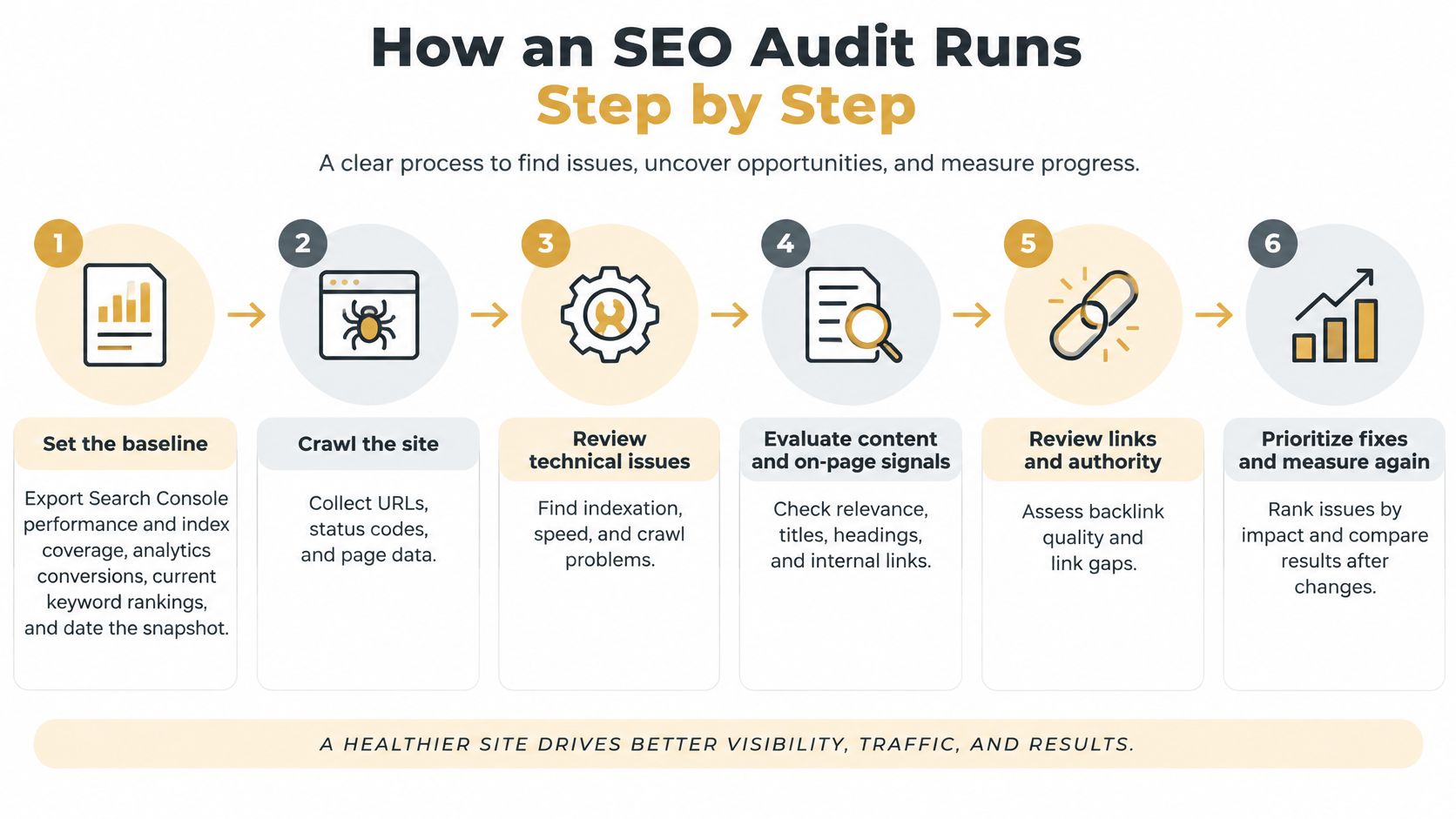
Order matters here. Each step produces evidence the next one depends on, so skipping ahead usually means redoing work. Our own process starts with an SEO audit and analysis of a business's current SEO performance, competitors, and improvement opportunities, and the sequence below is how that runs.
The flow below maps the stages from baseline to remeasurement.
Steps 1 to 4 Establish What Google Actually Sees
- Set the baseline. Export Search Console performance and index coverage, analytics conversions, and current rankings. Date the snapshot so later changes have something to compare against.
- Crawl the site. List indexable URLs, status codes, redirect chains, broken links, canonical tags, and noindex directives.
- Compare the crawl with index coverage. Find sitemap URLs that aren't indexed, orphan pages with no internal links, and parameter duplicates.
- Review on-page elements by template. Check titles, meta descriptions, headings, and structured data for each page type, not just the homepage.
Step 3 is where audits earn their keep. The Google technical requirements guidance identifies three minimum conditions for indexing eligibility, Googlebot must not be blocked, the page must return an HTTP 200 success response, and it must contain indexable content. Meeting all three still doesn't guarantee indexing.
So you compare crawl access with actual index coverage in Search Console. Blocking prevents discovery, a non-200 response prevents retrieval, and missing content prevents meaningful indexing. Each failure has a different fix. If your business also depends on local discovery, this guide to audit technical SEO and Google Maps visibility is a useful companion for the map side of that check.
Steps 5 to 8 Turn Findings Into a Plan
- Test performance with field data. Use the 75th percentile, mobile and desktop separately, and segment by template. One slow product template can drag down hundreds of pages.
- Assess content, competitors, and links. Map where your pages miss search intent, see what ranking competitors cover that you don't, and check referring domains for gaps or losses.
- Score and prioritize. Rank every finding by impact, confidence, effort, and urgency. Template-wide issues on revenue pages go first.
- Deliver the output. A prioritized issue list, a branded report, a roadmap, and a walkthrough that explains what each fix is for.
On e-commerce and content-heavy sites, auditing the sitemap against indexable URLs deserves extra attention. It exposes parameter URLs, redirects, duplicates, soft errors, and discontinued pages that dilute crawl efficiency and send Google muddled signals.
A finding without an owner and a date is just an observation.
Reporting closes the loop. Our SEO reports track organic traffic, keyword rankings, conversion rates, and ROI, so the next audit can show what changed rather than starting from scratch.
Tools and a Practical SEO Audit Checklist
Buy tools by job, not by brand. You need index and query data, a speed and accessibility test, a crawler, an analytics platform, and a way to inspect links and competitors. Five tools cover all of it.
The checklist graphic below groups those jobs so you can see what each one is for.
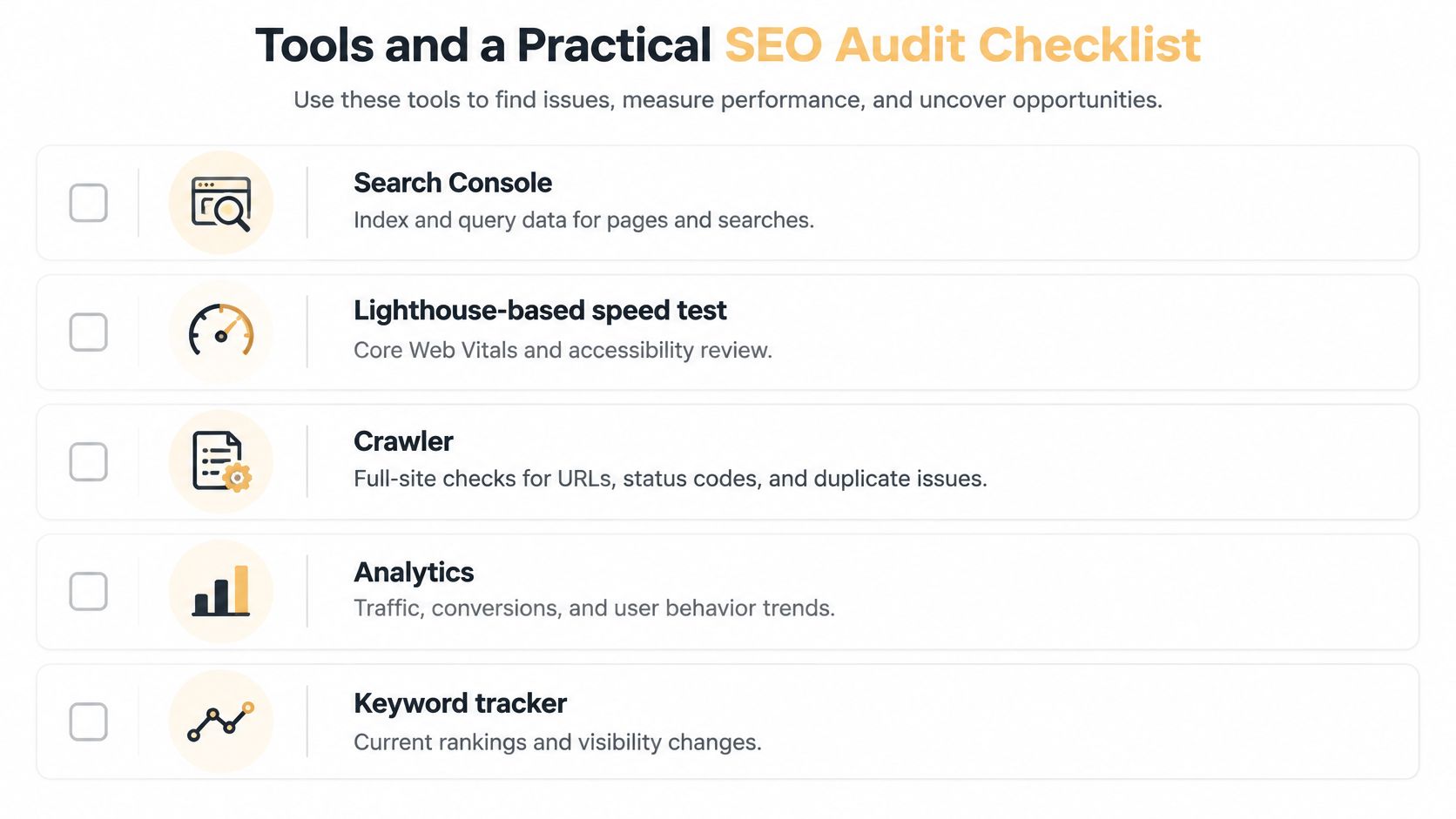
| Tool | Best For | Audit Area |
|---|---|---|
| Google Search Console | Index coverage, crawl errors, search queries | Technical, on-page |
| PageSpeed Insights (Lighthouse) | Core Web Vitals and accessibility checks | Performance, UX |
| Screaming Frog SEO Spider | Full-site crawl of titles, redirects, broken links | Technical, on-page |
| Google Analytics | Conversions, engagement and revenue | Business outcomes |
| Semrush or Seobility | Backlink profile and competitor gaps | Off-page, content |
A Checklist You Can Tick Off
Work through these in order. Each one is a yes or no answer.
- Access: Confirm key pages return HTTP 200 and aren't blocked by robots.txt or a noindex tag.
- Sitemap: Submit a sitemap containing only indexable URLs, no redirects or discontinued pages.
- Redirects: Reduce chains to a single hop and update internal links to the final URL.
- Canonicals: Set one canonical per page.
- Titles and descriptions: Give every indexable page a unique title and meta description.
- Headings: Use one H1 per page and order subheadings logically.
- Images: Compress them and add descriptive alt text.
- Mobile: Test each template on a phone, including tap targets and menus.
- Performance: Confirm LCP, INP, and CLS pass on field data.
- Internal links: Link priority pages from the main navigation and from related content.
- Links in: Review referring domains for recent losses.
- Tracking: Log each fix with an owner and a date.
Don't treat accessibility as a separate project. A 2024 Lighthouse audit reported in these website ranking statistics found that 83% of websites failed at least one accessibility check. Run it in the same technical pass, since missing labels and poor contrast often sit in the same templates as your SEO problems.
For a deeper technical pass you can work through alongside this list, see our technical SEO audit checklist.
Limits of an SEO Audit and AI Search Visibility
An audit can't promise rankings or traffic. It identifies conditions that improve eligibility and comprehension, and meeting technical requirements doesn't guarantee a page will be crawled, indexed, or served. A clean site with a high audit score can still lose clicks when competitors own the answer.
AI answer engines sharpen that limit. A summary can answer the query on the results page, so the searcher never visits anyone.
What the Click Numbers Show
A 2026 study using browsing data from 900 U.S. adults found that users clicked a cited source in only about 1% of visits containing an AI Overview. Traditional results received clicks in 8% of visits when an Overview appeared, versus 15% without one, and browsing ended on the page in 26% versus 16% of visits.
| Metric | With AI Overview | Without AI Overview |
|---|---|---|
| Visits with a click on traditional results | 8% | 15% |
| Visits where browsing ended on the page | 26% | 16% |
| Visits with a click on a cited source | about 1% | No AI citation shown |
Being cited, then, isn't the same as being visited. That's the trap in reporting citation counts as if they were traffic.
What an AI-Aware Audit Tracks Instead
Track query-level presence in AI summaries, whether your brand or URL is cited, and how accurately you're described. Add share of visibility against competitors, residual organic clicks, branded searches, conversions, and assisted revenue. Our overview of AI search optimization covers how to set that tracking up.
Split informational queries from commercial and transactional ones, because summaries disrupt research searches most. A how-to page losing clicks to an Overview needs a different response than a product page losing them.
Crawlability and clear, well-structured content still decide whether a system can identify and cite you at all.
Judge success by qualified visibility and business outcomes, not citations alone.
Decide Whether to Run the Audit In-House or Hire Help
Run it in-house if one named person can crawl the site monthly, read Search Console index data, and deliver the fixes. That last part is where most internal audits stall. Findings pile up in a spreadsheet while nobody owns the template changes.
Hire help if your site runs many templates, if there's no technical owner, or if you need to check AI search visibility as well. Agencies vary in scope, and if you're comparing regional providers, this page from an SEO audit agency Chicago shows one way that service gets packaged.
What Our Audit Covers
Our audit covers SEO fundamentals plus AI-specific layers, including Bing indexation, entity consistency, presence in sources LLMs read such as Reddit, directories, and transcripts, and answer-ready content structure. To request one, fill out a short form with your website and market, and we reply within one business day to confirm scope and pricing.
Delivery includes a branded report and a 15 to 20 minute recorded video walkthrough that explains every finding in plain English. You get the reasoning, not just a score.
If You Act Yourself This Week
- Run the baseline. Record Search Console, analytics, and ranking data today.
- List five issues. Pick the highest-impact ones using the funnel scoring, impressions through revenue.
- Assign owners. Give each fix a name and a date.
- Request help if capacity is short. An audit nobody implements changes nothing.
If your important pages aren't being found, indexed, or cited, we can run an audit that covers SEO fundamentals and the AI layers that now shape visibility, then walk you through every finding in plain English. Send us your website and target market and we'll confirm scope and pricing before any work begins. Start at Up North Media and tell us which pages matter most to your revenue.