

Your store may already have solid products, decent pricing, and pages that look fine to a human shopper. Yet traffic stalls, product pages don't get indexed consistently, filtered URLs multiply, and small template issues gradually chip away at revenue. That's the usual reality of technical SEO for ecommerce. The problem isn't one dramatic failure. It's a stack of friction points that make it harder for search engines to crawl, understand, and trust the pages that sell.
Most store owners don't need a bigger checklist. They need a smarter order of operations. If you fix the wrong things first, you can spend weeks on metadata and still leave crawl traps, duplicate URLs, broken links, and bad product data untouched. The right technical work does more than clean up reports. It helps your category and product pages get discovered faster, indexed more cleanly, and presented more accurately in search.
Your Technical SEO Audit and Prioritization Playbook
Technical SEO works best when we treat it like an operating system, not a one-off cleanup. The practical workflow for ecommerce is clear: benchmark current performance in Google Search Console, run a full crawl, fix crawlability and indexation issues, then address duplicate content with canonicals, breadcrumbs, internal links, and structured data before re-auditing, as outlined in Wix's ecommerce technical SEO guidance.
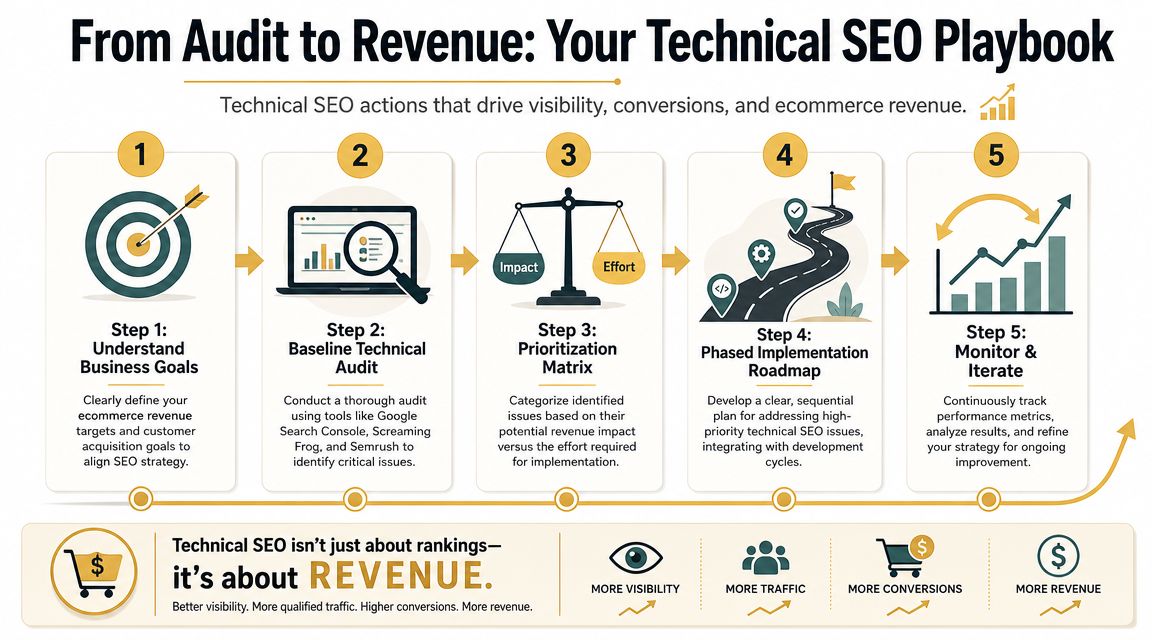
Start with the revenue pages
Don't begin by trying to fix every warning your crawler finds. Start with the pages tied most directly to sales:
- Primary category pages: Collections that rank for non-brand commercial searches.
- Top product pages: Best sellers, high-margin SKUs, or products with strong search intent.
- Supporting templates: Breadcrumbs, faceted navigation, internal search, pagination, and product variant handling.
If a technical issue touches these templates, it's usually worth moving up the queue. A broken canonical on a top category template matters more than a cosmetic issue on an old blog post.
Establish a baseline before touching anything
Open Google Search Console and review what your site is already telling you. Then run a crawl with a tool like Screaming Frog or Semrush. If you're comparing platforms and workflows, this overview of SEO tools for ecommerce is a useful starting point.
Focus your baseline on four questions:
- What isn't getting indexed that should be?
- What is getting indexed that shouldn't be?
- Where are users and crawlers hitting dead ends?
- Which technical issues affect high-value templates?
That baseline gives you a working map. Without it, teams tend to chase random fixes because a tool flagged them in red.
Practical rule: If an issue affects indexation, internal linking, or product data integrity on revenue-driving pages, it belongs near the top of the list.
Use a simple impact-versus-effort filter
Small and mid-sized stores rarely have unlimited dev time. That means prioritization has to be blunt and useful.
| Issue type | Likely business impact | Typical effort | Priority |
|---|---|---|---|
| Broken internal links on category and product paths | High | Low to medium | Fix first |
| Wrong canonicals on product variants or filtered pages | High | Medium | Fix first |
| Missing structured product data on key templates | High | Medium | Fix early |
| Slow image-heavy product pages | High | Medium to high | Fix early |
| Minor meta description inconsistencies | Low | Low | Later |
| Cosmetic HTML cleanup with no crawl effect | Low | Medium | Later |
This isn't perfect, but it's practical. If you have limited resources, go after the faults that affect crawling, indexing, page eligibility, and path-to-purchase pages.
Run the audit, then retest
A lot of technical SEO work fails because teams stop at implementation. They deploy a fix and assume the problem is gone. Ecommerce sites change too often for that. Apps update, products go out of stock, navigation changes, and developers ship new templates.
Use an audit, fix, retest loop:
- Audit: Search Console, crawl data, template review, and spot checks on live URLs
- Fix: Address one cluster of issues at a time
- Retest: Re-crawl, inspect affected URLs, validate schema, and monitor Search Console after release
That loop is what keeps a store healthy. Not the first audit.
Building a Rock-Solid Site Architecture
A store can have strong products, solid links, and decent content, then still lose revenue because category paths are messy and high-margin pages sit too deep in the site. I see this in ecommerce audits all the time. Search engines waste crawl budget on low-value routes, and shoppers hit dead ends, duplicate paths, or bloated collections that make product discovery harder than it should be.
Site architecture sets the rules for how authority flows through the catalog. It also determines whether your technical SEO work scales as the store grows. If the structure is loose, every expansion creates more cleanup. If the structure is clear, you can add products, collections, and filters without creating a bigger indexing problem later.
Build around buying paths
Good architecture follows how customers shop, not how the CMS happens to store pages.
For a shoe retailer, a useful path is simple:
- Home
- Men's Shoes
- Running Shoes
- Trail Running Shoes
- Product page
That path gives category context at every level. It helps the shopper narrow down options, and it helps search engines understand which pages deserve to rank for broader terms versus specific product intent.
A weaker setup usually grows from merchandising shortcuts. Pages get surfaced through Sale, New Arrivals, brand hubs, temporary collections, and filter states before a user ever reaches the core category. That can work for campaigns. It does not work well as the backbone of organic search.
For most stores, category and subcategory pages should carry the main SEO load. Keep names plain, URL patterns stable, and hierarchy shallow enough that priority pages are reachable within a few clicks. If you're reviewing menu structure, these website navigation best practices are a useful reference point for balancing usability with crawl efficiency.
Internal links should support revenue priorities
Architecture is more than top navigation. Breadcrumbs, related categories, featured collections, and in-content links tell search engines which sections of the store matter most.
Use internal links to support three practical goals:
- Push authority to money pages: Link prominently to top categories, seasonal winners, and high-margin subcategories
- Clarify relationships: Connect sibling categories where the overlap is real and useful to shoppers
- Preserve context on product pages: Use breadcrumbs and category links so products are not isolated from the rest of the catalog
A category page should work like a hub. It should help users move deeper, help crawlers discover products efficiently, and reinforce the topic of the section as a whole.
Breadcrumbs pull more weight than many teams expect. They improve backtracking for users, strengthen hierarchy signals, and reduce the chance that product pages feel detached from their parent categories.
Clean up structural decay before it spreads
Architecture problems rarely start as a major failure. They build up through small changes. A category is renamed. A product line is retired. Merchandising swaps one collection URL for another. Then the site starts linking through redirects, old seasonal pages stay in navigation, and orphaned URLs pile up.
That is why architecture work needs a maintenance standard, not a one-time cleanup.
Focus on these fixes first:
- Update broken internal links at the source: Do not rely on a redirect if the linking element can be changed
- Remove redirect hops from menus and modules: Main navigation should point straight to final destination URLs
- Retire discontinued pages deliberately: Redirect where there is a true replacement, or return the right status and remove internal links
- Watch orphaned pages: Important categories and products should be reachable through crawlable links, not just sitemaps or search
Architecture becomes a revenue issue, not a housekeeping task. If core collections sit behind weak internal linking while old URLs stay active in templates, search engines and users both get pushed toward the wrong pages.
Keep the sitemap aligned with the structure
Your XML sitemap should reflect the version of the site you want indexed. It is a supporting signal, not a fix for poor architecture.
For most ecommerce stores, that means including:
- Core category pages
- Important subcategories
- Canonical product URLs
- Key informational pages that support purchase decisions
Leave out redirected URLs, parameter-based duplicates, and non-canonical versions. The sitemap should reinforce your preferred site structure, not expose every URL the platform can generate.
This matters even more on larger catalogs with faceted search. If your architecture is clean but your sitemap keeps advertising low-value URL variants, you create mixed signals. The stores that hold up best over time are the ones that treat architecture as a controlled system: clear hierarchy, disciplined internal linking, and indexable paths that match real business priorities.
Eliminating Index Bloat and Duplicate Content
If you manage a large catalog, index bloat is often the technical issue doing the most hidden damage. Stores generate extra URLs faster than teams notice them. Filters create new combinations. Sort orders append parameters. Variants spin off thin pages. Internal search makes another layer. Before long, crawlers spend time on pages you never meant to compete in search.
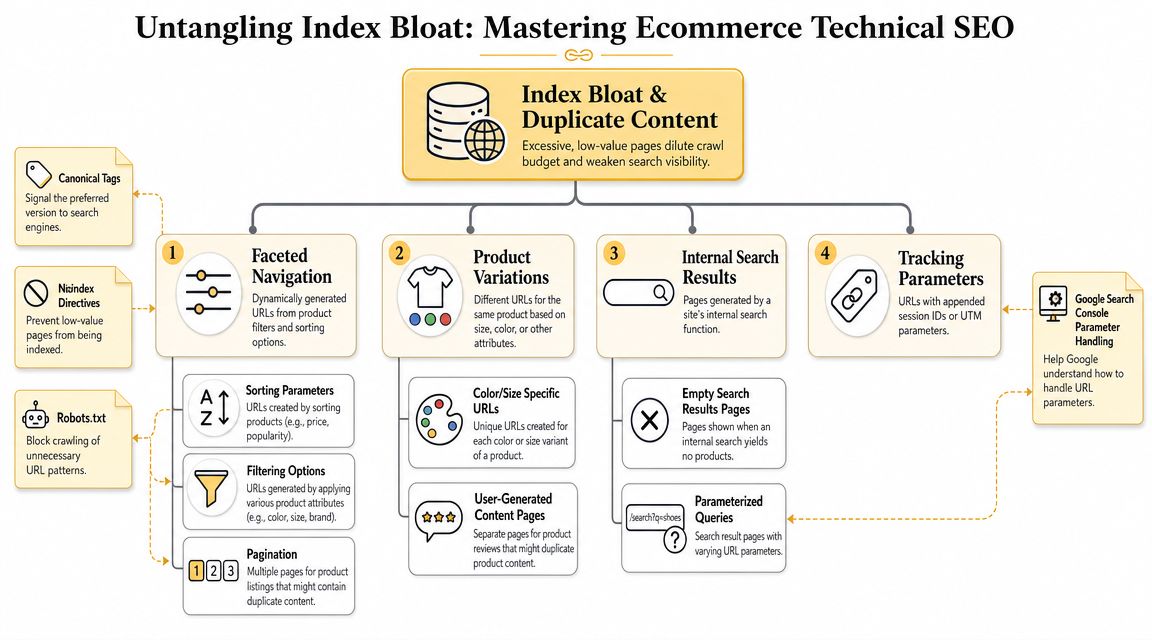
Know where the bloat comes from
The common sources are predictable:
- Faceted navigation: Color, size, brand, material, price, and multi-filter combinations
- Sorting parameters: Price low-to-high, best-selling, newest, and similar reorder options
- Product variants: Separate URLs for color or size versions that don't deserve standalone indexing
- Internal search pages: Query URLs, empty results pages, and parameter-based search states
- Tracking parameters: Marketing tags and session-based URL variants
Most platforms can generate thousands of low-value URLs from a relatively small product set. The issue isn't that these URLs exist. The issue is when they become crawlable, indexable, or internally linked in ways that confuse search engines.
Use a decision framework for faceted navigation
Many ecommerce guides stop too early. They say "use canonicals" or "block filters" and move on. That approach is too blunt.
The better framework is to map search demand to URL variations, then only index filter pages that have meaningful demand and enough product depth, as explained in Botify's guidance for midsize ecommerce.
That means asking:
| Filter URL type | Should it be indexed | Why |
|---|---|---|
| Broad, high-intent category refinement | Sometimes | It may match real search demand and support a useful landing page |
| Deep multi-filter combinations | Usually no | These often create thin pages with little standalone value |
| Sort-only URLs | No | They change order, not core intent |
| Tracking or session parameters | No | They don't represent a unique search destination |
A practical example helps. Suppose you sell running shoes.
/running-shoes/womens/could be indexable./running-shoes/womens/trail/might also be indexable if it's a real shopping category./running-shoes?color=blue&size=8&sort=price_ascusually should not be indexable.
The dividing line is not whether the URL is generated by a filter. The dividing line is whether it deserves to exist as a search landing page.
Decision test: If you wouldn't intentionally build unique copy, internal links, and merchandising for that filtered result, it probably shouldn't be indexed.
Place your video review point after you've mapped these decisions. This walkthrough is useful if you want a visual explanation of the problem space:
Pick the right control for the problem
Different duplicate-content problems need different controls. Teams run into trouble when they use one tool for everything.
Canonical tags
Use canonicals when several URLs are close variants of the same core page and you want one preferred version to consolidate signals. This is common with product variants or parameterized category URLs.
Canonicals work well when:
- The duplicate page still needs to exist for users
- The alternative URL is substantially similar
- You have a clear preferred destination
They work poorly when your templates generate inconsistent canonicals or point to self-conflicting destinations.
Noindex
Use noindex when a page can exist for users but shouldn't be included in search results. This often fits thin internal search results or low-value filtered pages that still need to be crawlable for discovery.
Noindex is not a substitute for architecture. If your navigation aggressively surfaces junk URLs, noindex can become a patch over a deeper issue.
Robots.txt
Use robots.txt carefully. It's best suited for controlling crawl access to low-value parameter spaces and other areas where crawling itself creates waste. It is not the main answer to every duplicate-content problem.
Blocking too much can backfire. If a page needs to pass through a noindex directive or consolidate signals through proper canonical handling, a blanket robots rule can get in the way.
Variants need consistent rules
Product variations are another common mess. If each color or size gets a separate URL, decide whether those URLs are true standalone pages or user states on one main product page.
Use one consistent rule set:
- Standalone variant page: Keep it indexable only if it has distinct demand and enough unique value
- Minor variant state: Consolidate to the main canonical product URL
- Outdated or accidental duplicate variant pages: Remove internal links and fold signals back to the preferred version
The stores that handle this well don't rely on one-off exceptions. They define the rule at the template level and enforce it consistently.
High-Impact Product and Category Page Optimization
A common ecommerce scenario looks like this. Traffic reaches category pages, product pages get impressions, and revenue still stalls because Google is indexing the wrong URLs, missing product details, or reading conflicting signals across templates. This is the point in the audit where we stop treating product and category pages as content assets and start treating them as revenue pages with technical requirements.
The goal is not to make every page "SEO friendly" in a generic sense. The goal is to help search engines understand the pages that can drive sales, then remove ambiguity from everything around them. On larger stores, that usually means setting rules at the template level so merchandising, development, and SEO stay aligned as inventory, pricing, and filters change.
Structured data needs ongoing QA
Structured data on commercial pages should describe what a shopper can buy. For product pages, that usually means accurate markup for price, availability, ratings, reviews, and the product itself. For category pages, breadcrumbs and clear page context matter more than stuffing in every possible schema type.
Schema problems are rarely isolated. They usually show up alongside template drift, inconsistent variant handling, or feed data that no longer matches the page.
On product pages, the schema stack usually includes:
- Product schema: Product name, description, price, availability, SKU, brand, and other key commercial fields
- Breadcrumb schema: Category context and hierarchy
- Review or rating markup: Only when the ratings shown on the page support the markup and meet Google's rules
The operational rule is simple. If visible content changes, structured data needs to change with it. If your pricing updates through one system and your schema through another, errors build up fast.
Keep page content, markup, and feeds in sync
This matters more as search results pull product information from multiple sources and as AI-driven search relies on consistent merchant data. OuterBox's ecommerce SEO strategy article makes the broader point well. Ecommerce SEO now depends on technical accuracy across structured data, feeds, and conversion paths, not just classic on-page optimization.
For store owners, the practical takeaway is straightforward. Product data cannot live in silos.
If your product page says "in stock" but markup says "out of stock," Google has to decide which version to trust. If the product feed carries a different price than the page template, shopping visibility becomes less stable. The same issue shows up with shipping, returns, sale pricing, and variant availability.
We treat this as a systems problem, not a copy problem.
A useful QA pass compares four sources on your top revenue-driving templates:
- Visible page content
- Structured data output
- Merchant feed data
- Source-of-truth values in the ecommerce platform
That process catches the issues that subtly hurt performance. It also helps future-proof the store for richer search experiences that rely on clean product data.
Category pages should earn their place in the index
A category page has a harder job than a product page. It needs to match shopping intent, help users narrow the set, and preserve crawlable paths into high-value subcategories and products. If it fails at any one of those, it tends to underperform.
The strongest category pages usually have:
- A clear H1 aligned with search demand
- Introductory copy that helps define the collection without pushing products below the fold
- Useful subcategory links
- Stable breadcrumb paths
- Filter behavior that helps users refine without generating endless low-value URLs
This is where prioritization matters. A top-level category that drives revenue deserves real optimization work. A thin collection with six products and no distinct demand usually does not deserve indexable status just because the platform generated it.
We look at category pages through a commercial lens. Which collections map to clear demand, carry meaningful margins, and deserve dedicated search visibility? Those get stronger copy, better internal linking, and tighter technical controls. The rest should support discovery without bloating the index.
Product pages should remove doubt fast
Good product pages answer technical and commercial questions quickly. Search engines need to identify the product, its status, and its relationship to the catalog. Shoppers need enough confidence to buy.
Use this review process on product templates:
| Area | What to check | What often goes wrong |
|---|---|---|
| Product schema | Price, availability, reviews, variants | Missing fields or mismatched values |
| Visible content | Unique product copy, specifications, return info | Reused manufacturer text or sparse content |
| Breadcrumbs | Correct hierarchy | Flat or broken paths |
| Canonical tags | Preferred product URL | Variant and duplicate conflicts |
| Internal links | Related products and parent category links | Orphaned products or weak context |
Unique copy still matters, but the standard should be practical. Every product does not need a long-form sales page. It does need enough original information to stand apart from supplier text, especially on products with many competing sellers.
A short, specific page usually beats a long, generic one.
That means prioritizing details that affect ranking and conversion: materials, sizing, compatibility, use case, shipping expectations, return terms, and variant differences. If shoppers ask customer support the same product questions every week, those answers belong on the page.
Audit high-impact templates before long-tail SKUs
Many teams waste time. They spend weeks polishing hundreds of low-traffic products while the highest-value category and product templates still have broken markup, weak internal links, and inconsistent content blocks.
Start with:
- Top revenue-driving categories
- Best-selling product templates
- High-impression, low-conversion product pages
- Products that appear in shopping campaigns or merchant feeds
- Templates shared across large SKU sets
That order gives you faster returns. It also keeps the audit tied to revenue, which matters more than chasing cosmetic fixes across the entire catalog.
If your team needs a plain-English refresher on the performance side of template optimization, this guide to Core Web Vitals for site speed and UX is a useful companion. Speed, stability, and mobile usability affect how well these pages convert once they rank.
What usually works
- Schema that matches the page exactly
- Category pages built around real shopping intent
- Product templates that answer common purchase questions
- Internal links that reinforce parent-child relationships in the catalog
- Feed management and on-page SEO managed together
- QA checks on templates after pricing, inventory, or platform changes
What usually causes revenue leaks
- Markup added once and never reviewed again
- Collection pages indexed by default with little or no unique value
- Supplier copy reused across large parts of the catalog
- Product data that conflicts across page templates, feeds, and the platform
- Merchandising changes that bypass SEO rules for variants, breadcrumbs, or internal links
When this section of the store is handled well, technical SEO starts doing what it should do for ecommerce. It helps the right pages rank, helps shoppers decide faster, and gives you a cleaner foundation for AI-driven search features that depend on accurate product data.
Supercharging Site Speed and Mobile Usability
A fast ecommerce site isn't just more pleasant to use. It's easier to crawl, easier to trust, and easier to convert on. Slow stores leak attention at every step. Product pages lag. Image galleries jump around. Mobile users fight sticky overlays and delayed taps. That friction costs money long before a ranking report reflects it.
Ahrefs reports that only 33% of websites pass the Core Web Vitals threshold, and only 11.9% of pages in its dataset had at least one Core Web Vitals metric measured successfully, according to Ahrefs' SEO statistics roundup. For ecommerce, that's useful because it shows performance is still a differentiator, not a solved problem.
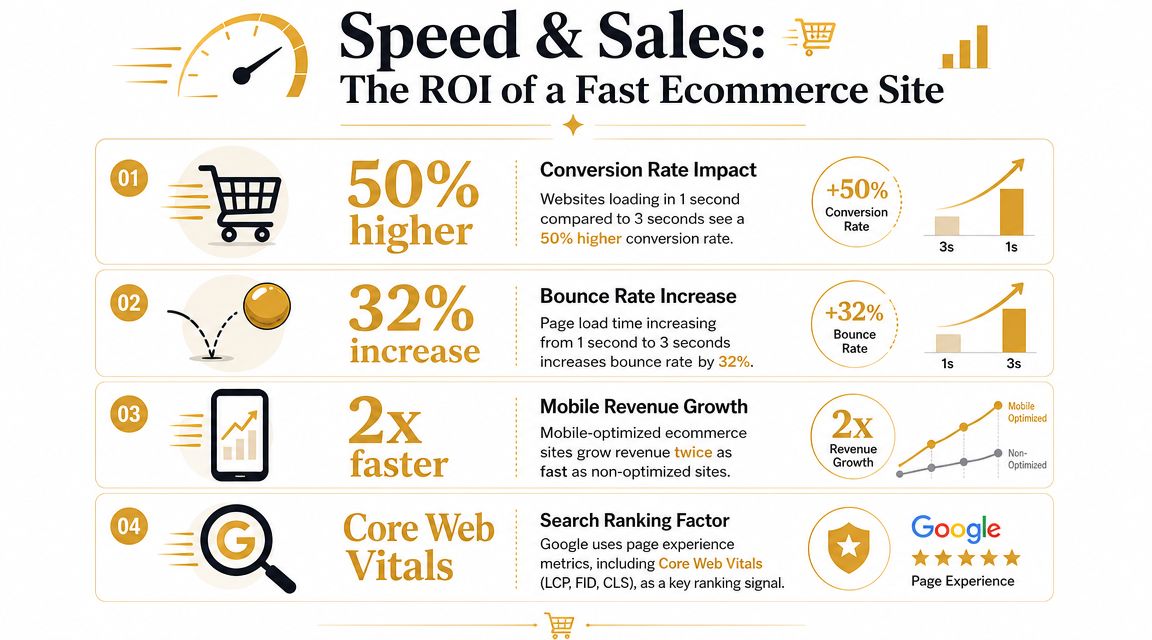
Treat Core Web Vitals as a competitive gap
If most sites still don't pass, then speed work can separate your store from slower competitors. This isn't a vanity metric exercise. It affects how quickly users can see products, interact with filters, and move through purchase paths.
If you need a plain-English refresher on the metrics, this guide to Core Web Vitals is a helpful companion.
The most common ecommerce performance problems are familiar:
- Oversized product and lifestyle images
- Too many third-party scripts
- App bloat from reviews, popups, chat tools, and personalization widgets
- Render-blocking CSS and JavaScript
- Mobile layouts that look responsive but still feel heavy
Fix the biggest performance offenders first
One ecommerce guide notes a 40% abandonment rate when pages take more than 3 seconds to load, and also states that more than half of ecommerce visits come from mobile devices, as cited in Passionfruit's ecommerce SEO guide. Even without overcomplicating the tooling, the operational takeaway is straightforward: mobile speed deserves direct development attention.
Start here:
- Compress and convert images: Product pages usually carry the heaviest assets. Use efficient formats such as WebP where supported by your stack.
- Audit scripts by business value: Remove tools that don't justify their weight. Many stores keep abandoned apps running for months.
- Use a CDN and solid hosting: Geography and server response still matter, especially on image-heavy pages.
- Reduce layout instability: Reserve image space and avoid interface elements that shift content after load.
- Test real product templates on phones: Don't rely on desktop scores to judge mobile usability.
A store can be technically responsive and still feel broken on a phone. Mobile-friendly code isn't the same thing as a smooth mobile buying experience.
Mobile usability needs merchandising context
At this point, many audits get too abstract. We don't just want a passing score. We want a shopper to browse a category, tap filters, open a product gallery, read shipping details, and add to cart without delay or layout friction.
Check these on live devices:
| Mobile element | What good looks like | Common failure |
|---|---|---|
| Navigation | Easy to open and scan | Hidden layers and awkward tap targets |
| Filters | Usable without blocking the page | Heavy overlays and laggy interactions |
| Product gallery | Loads cleanly and stays stable | Jumps, oversized files, slow swipes |
| Add to cart path | Immediate feedback | Delayed script execution |
| Content width | No horizontal scrolling | Elements wider than screen |
The practical win is simple. Faster pages and cleaner mobile rendering improve both discoverability and the buying experience. You don't need perfect scores everywhere. You need pages that load fast enough, stay stable enough, and respond quickly enough on the devices your customers use.
Monitoring Your Progress and Creating a Phased Roadmap
A store can pass an audit in January and lose traffic in March because a filter app changed URL behavior, a template update broke canonicals, or a feed started pushing inconsistent product data. Ecommerce sites do not stay still. Your monitoring process has to account for that reality.
The goal is not to keep a perfect dashboard. The goal is to catch technical changes before they suppress revenue on key category and product pages.
Watch the reports that expose revenue-risk issues
Search Console belongs in your weekly operating rhythm. So does a scheduled crawl of the site. We use both to answer a practical question: are search engines still reaching, understanding, and prioritizing the pages that matter most?
Watch these areas closely:
- Indexation and exclusions: Look for sudden growth in excluded URLs, unexpected indexed pages, or priority pages dropping out of the index
- Sitemap status: Confirm that submitted URLs match your preferred canonical set and that low-value URLs are not creeping in
- Core Web Vitals trends: Track template changes over time so performance regressions do not go unnoticed
- Crawl patterns: Check whether bots are spending time on faceted URLs, parameters, internal search pages, or other low-value paths
Patterns matter more than one-off alerts. A handful of excluded URLs is normal on a large store. A spike after a release usually points to a rules problem that will spread if nobody checks it.
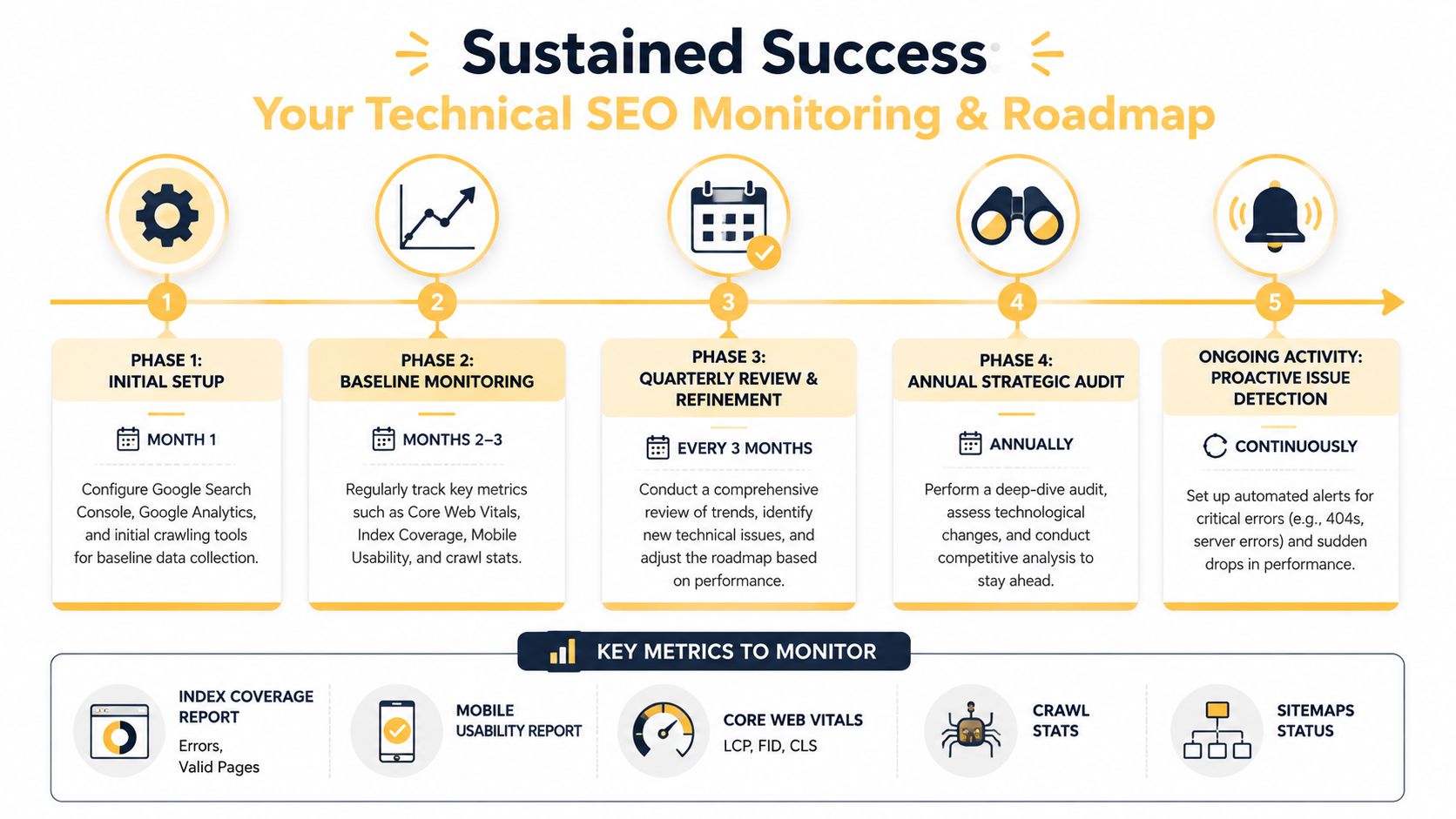
Build a phased roadmap your team can actually ship
Technical SEO work stalls when the plan is too broad. "Improve technical health" does not help a developer, an ecommerce manager, or a merchandiser decide what to do next. A workable roadmap ties fixes to business impact and implementation effort.
Start with the issues that block crawling, indexing, and template consistency.
First 30 days
Focus on fixes that can suppress visibility across large parts of the catalog.
- Benchmark the current state: Export Search Console data, crawl the site, and document baseline indexation, template rules, and major error patterns
- Fix hard blockers: Resolve broken links, accidental noindex directives, redirect chains on key templates, and sitemap errors
- Validate template behavior: Review product, category, variant, and pagination logic for canonicals, indexability, and internal linking
- Check structured data basics: Make sure product schema matches visible content and does not conflict with feed data
First quarter
Shift from cleanup to control. Through this shift, stores usually gain stability.
- Tighten site architecture: Improve internal linking paths, breadcrumb consistency, and category depth for high-value sections
- Reduce index bloat: Set rules for faceted navigation, parameter URLs, variants, and internal search pages
- Improve high-impact template performance: Prioritize category and product pages that drive the most organic sessions and revenue
- Standardize SEO logic in templates: Apply clear rules for canonicals, pagination handling, schema output, and crawlable navigation states
Ongoing
This is how you protect gains and prepare for the next round of changes, including AI-driven search systems that depend on clean, consistent site signals.
- Re-crawl after releases: Check app installs, redesigns, template edits, and feed changes before problems spread
- Review Search Console on a schedule: Monitor coverage issues, performance shifts, and signs that key pages are losing visibility
- Audit data consistency: Keep product feeds, on-page content, availability, pricing, and structured data aligned
- Reprioritize quarterly: Catalog changes, seasonality, and margin goals should influence what the SEO team fixes next
A checklist helps you find issues. A roadmap helps you decide what is worth fixing first.
Keep ownership clear
Technical SEO problems on ecommerce sites usually sit between teams. SEO spots the issue. Development controls the template. Merchandising owns product attributes. Ecommerce operations manages feeds and app behavior. If ownership is vague, the issue stays open until traffic drops.
Assign owners by issue type:
| Issue cluster | Primary owner | Support |
|---|---|---|
| Crawl and indexation | SEO | Development |
| Templates and speed | Development | SEO |
| Product data accuracy | Merchandising or ecommerce ops | SEO and development |
| Navigation and category logic | Ecommerce team | SEO |
The stores that sustain organic growth turn recurring issues into operating procedures with named owners, review dates, and release checks.
If you want a partner that can help translate technical findings into a workable SEO and development plan, Up North Media works with businesses on both sides of that equation.
Technical SEO for ecommerce is a prioritization problem before it is a checklist problem. The work that matters most is the work that protects crawl efficiency, index quality, and the pages that generate sales. If your store needs help prioritizing the fixes that affect revenue, Up North Media can help you turn audit findings into a practical roadmap across SEO, development, and site performance.