
A lot of business owners reach the same point at the same time. The spreadsheet is no longer enough, the off-the-shelf SaaS tool forces awkward workarounds, and the team keeps asking for one place to manage bookings, inventory, customers, reporting, or approvals. You know a custom web app would help. You just don't want to make an expensive technical decision that creates more problems than it solves.
That's where Python usually enters the conversation.
In agency work, web application development with Python tends to make sense when a business needs two things at once: a practical launch path today and room to grow later. It's a strong fit for internal platforms, customer portals, e-commerce operations, booking systems, dashboards, publisher tools, and products that may eventually need analytics or AI built into the same system. The code matters, but the bigger decision is architectural. The wrong setup raises maintenance costs, slows future changes, and turns every new feature into a custom engineering project.
Why Choose Python for Your Next Web Application
A familiar scenario looks like this. A local retailer wants a custom ordering portal because their current stack can't handle special pricing, approval flows, and inventory logic. A service business needs a booking system tied to staff schedules and customer history. A publisher wants better editorial workflows and gated content. In all three cases, the question isn't just “what language should we use?” It's “what gives us a stable product without overspending on version one?”
Python is often the practical answer because it supports fast iteration, readable backend code, and a large ecosystem of tools that let teams build useful features without reinventing standard parts. That matters when budget discipline is part of the project brief.
Think of Python as a business-friendly workshop. You can build a straightforward customer portal first, then add reporting, automation, or AI later without switching to a completely different foundation. That continuity saves money. It also lowers handoff risk when new developers join the project, because Python code tends to be easier to read and maintain than stacks that become overly fragmented early.
For a small or mid-sized business, that translates into a few real advantages:
- Lower friction during development because teams can move from business rules to implementation quickly.
- Simpler maintenance when features need to change after launch, which they always do.
- Better long-term flexibility if the app grows from “operations tool” into “core revenue platform.”
Practical rule: The cheapest app is rarely the one with the lowest initial quote. It's the one your team can still change confidently a year later.
Python also works well when your roadmap is still evolving. If you know you'll need customer accounts, admin workflows, APIs, database logic, and possibly automation, Python gives you a foundation that doesn't box you in too early. For SMBs, that's usually the right trade. You want a stack that can support current needs without punishing future growth.
Understanding Python's Role in Web Development
If Python feels abstract, use a restaurant analogy. The part customers see is the dining room. That's the frontend, usually built with HTML, CSS, and JavaScript. The part doing the work is the kitchen. That's where Python runs on the backend.
When a customer logs in, places an order, updates a booking, or submits a form, Python handles the logic behind the scenes. It checks permissions, processes data, talks to the database, sends information to payment or shipping services, and decides what response the browser should get back.
Python has been doing that work for a long time. The Python Developers Survey 2018 found that 56% of developers who use Python as their primary language used it for web development, making it one of the two most dominant use cases globally, according to the Python survey coverage from ADTmag. That's an important business signal. Python web development wasn't a side project for hobbyists. It was already mainstream, global, and established well before the recent AI wave.
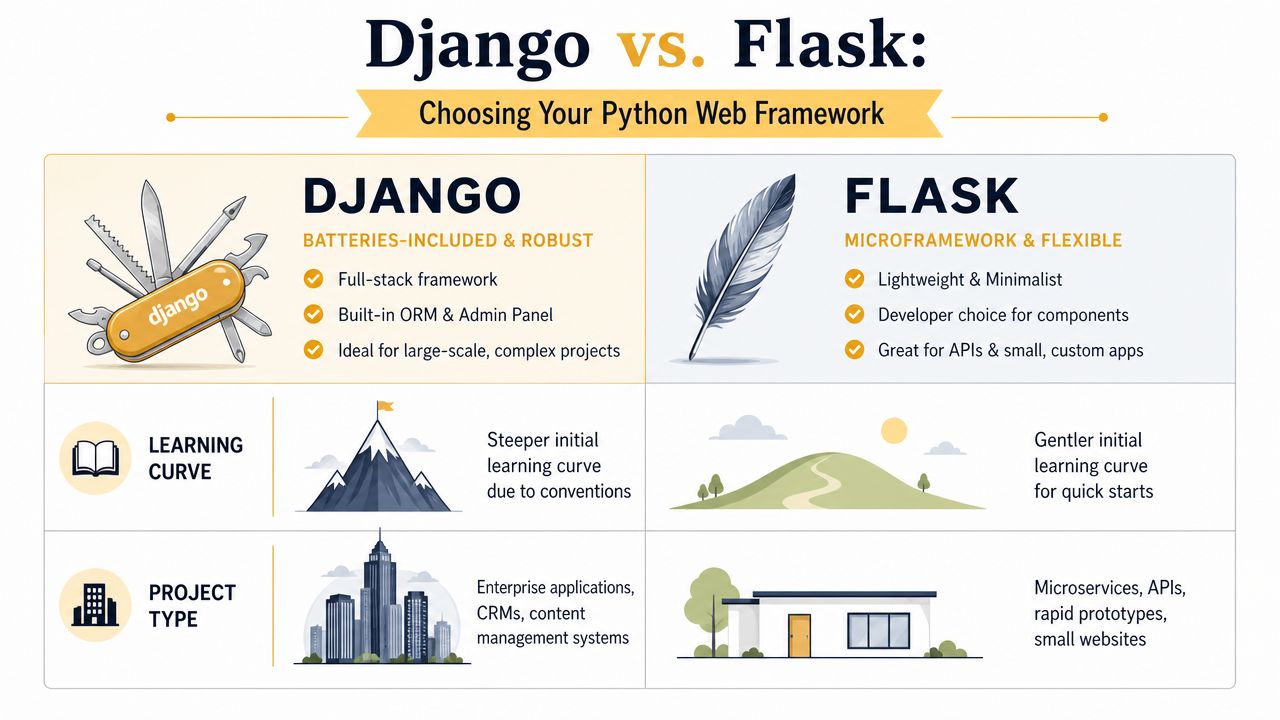
A framework comparison helps make the backend choice more concrete.
What Python actually handles
In production, Python usually sits at the center of these jobs:
- Business logic such as pricing rules, booking constraints, account permissions, discount conditions, and approval workflows.
- Data handling through database reads and writes, validation, and background processing.
- Integrations with payment providers, CRMs, shipping tools, ERPs, email services, and third-party APIs.
- Security-sensitive operations like authentication, session management, and permission checks.
A good backend isn't flashy. It's dependable. The best Python applications usually feel simple from the outside because the complexity is managed well on the inside.
Here's a useful way to understand it:
| Part of the app | What users notice | What Python does |
|---|---|---|
| Login and accounts | Sign-in feels smooth | Validates users, manages sessions, enforces permissions |
| Orders and bookings | Forms submit correctly | Applies rules, stores data, triggers workflows |
| Admin operations | Staff can manage content or customers | Powers dashboards, data models, audit-friendly processes |
| Integrations | Information stays in sync | Connects APIs, transforms data, handles failures |
For a visual walkthrough of how Python frameworks fit into web apps, this short explainer is worth a look.
Why this matters to a business owner
A business owner doesn't need to memorize backend terminology. You do need to know whether the engine can support growth, custom workflows, and future features without a rebuild.
That's why web application development with Python keeps showing up in serious business projects. It gives developers a dependable backend language while still fitting neatly into modern web architecture. The browser handles presentation. Python handles operations. The database stores the truth. That division of labor is mature, practical, and proven.
If your app needs rules, users, records, permissions, and integrations, you're not buying a website. You're buying an operating system for part of your business.
Choosing Your Framework Django vs Flask
The first major build decision is usually the framework. Here, strategy starts affecting budget.
A framework is the structure developers build on top of. In plain terms, Django is the move-in-ready house. Flask is the custom foundation and framing crew. Both can produce good results. The difference is how much you want included from the start, and how much custom assembly your team is willing to pay for.
The core trade-off is straightforward. The choice between a framework like Django (batteries-included) and Flask (lightweight) is a primary architectural decision that directly impacts build speed, maintainability, and how much custom infrastructure a development team needs to assemble, as outlined in Datamites' overview of Python web development.
When Django makes sense
Django earns its reputation because it comes with many of the things business apps need anyway. Authentication, admin tools, database modeling, and security defaults are built into the framework's standard way of working.
That makes Django a strong fit when the app includes:
- User accounts and roles for customers, staff, managers, or vendors
- A content or data-heavy admin area where non-technical teams need control
- Structured workflows like e-commerce orders, approvals, subscriptions, or publishing
- A longer roadmap where maintainability matters as much as launch speed
Django usually saves money when the product has familiar business components. You're not paying engineers to hand-build standard plumbing.
When Flask is the better choice
Flask works better when the product is narrower, more specialized, or API-first. It doesn't force as many opinions on the project. That freedom is useful when the team wants a lean service, highly custom integration layer, or lightweight backend without the extra structure.
Flask is often a better fit for:
- Small internal tools with limited screens and straightforward workflows
- Custom APIs that support mobile apps or JavaScript-heavy frontends
- Microservices where one service has one clear responsibility
- Projects with unusual requirements that don't map neatly to a full-stack framework
The catch is that flexibility isn't free. With Flask, teams often spend more time choosing and stitching together libraries, patterns, admin tools, and security layers that Django already includes.
A flexible framework helps when your product is unusual. It hurts when your needs are ordinary and your team keeps rebuilding common features.
A business-side comparison
| Question | Django | Flask |
|---|---|---|
| Need to launch with standard business features | Strong fit | Possible, but more assembly |
| Want a built-in admin for staff | Strong fit | Usually custom or added separately |
| Need a lightweight API service | Can do it | Strong fit |
| Expect a lot of custom architecture choices | More opinionated | More flexible |
| Want to reduce setup decisions early | Strong fit | Less ideal |
For most SMB web applications, Django is the safer starting point when the app is becoming a core operational system. Flask becomes attractive when the product is deliberately narrow or the engineering team has a very specific architecture in mind.
The framework choice shouldn't be ideological. It should match the shape of the business problem. If you're building an e-commerce operation, customer portal, or publisher platform, speed and standardization usually matter more than maximum flexibility. If you're building a small integration layer or specialized service, a lighter framework may keep the system cleaner.
Assembling Your Complete Tech Stack
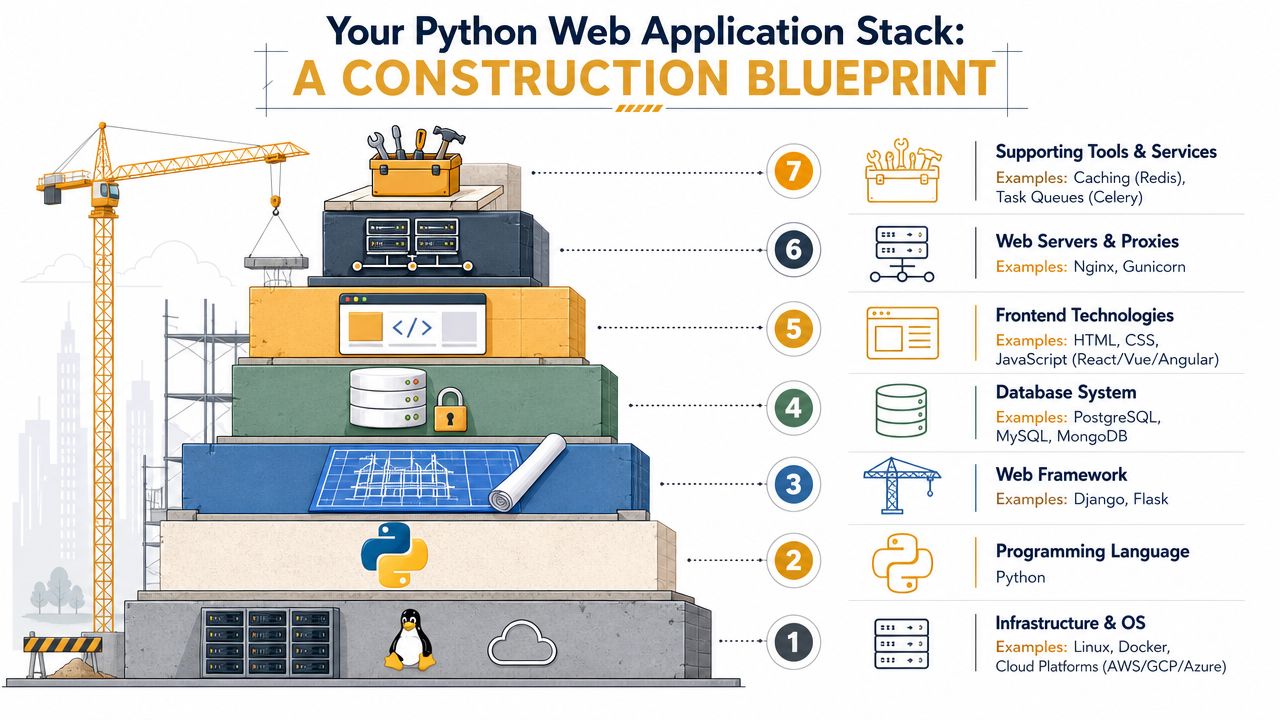
Python is important, but it's only one layer of the app. Businesses sometimes hear “we're building it in Python” and assume that answers the architecture question. It doesn't. A production web app is a stack, not a language.
Consider a commercial building. Python is part of the structure and internal systems, but tenants still need doors, wiring, plumbing, utilities, and security. In web terms, that means frontend technologies, databases, hosting, background jobs, caching, and APIs all have to work together.
Modern Python teams already work that way. In the JetBrains Python Developers Survey 2022, 86% of Python developers reported using other languages alongside it, with JavaScript, HTML/CSS, and SQL as the most common complements, according to the JetBrains survey results. That's the actual picture of production development. Python usually powers the backend, but the complete product depends on a broader stack.
What belongs in the stack
A solid Python web app usually includes these layers:
-
Frontend layer
HTML, CSS, and JavaScript shape what users interact with. If the app needs rich interactivity, teams may use React or Vue on top of the backend. -
Backend layer
Python handles request processing, business logic, authentication, integrations, and server-side workflows. -
Database layer
This stores customers, orders, content, permissions, and operational records. The schema design matters as much as the framework. -
Infrastructure layer
Hosting, deployment, environment management, and monitoring determine whether the app stays reliable after launch. -
Support services
Tools like caching, queues, and API gateways reduce strain on the main request cycle and keep the app responsive.
Where teams get stuck
The technical baseline for Python web apps isn't just “build the screens.” Teams need to think through HTTP request and response flow, REST methods, ORM-based data modeling, caching, reusable code, frontend integration, and low-latency data storage design. That's one reason architecture work pays for itself early. It prevents expensive redesigns later.
This is especially true when the app depends on outside services. Payment systems, shipping providers, AI models, mapping tools, CRMs, and accounting platforms all have one thing in common: they can fail, slow down, or throttle requests. If your app leans heavily on third-party APIs, understanding practical constraints like mastering API rate limits helps teams design retries, queues, and fallback behavior before users feel the pain.
A useful stack decision usually starts with business questions, not developer preferences. If you need help evaluating those trade-offs, a structured guide to choosing a tech stack for a web application can keep the discussion focused on requirements, budget, and growth plans rather than trends.
The stack should reflect the workload. A booking app, content platform, and AI-enabled portal may all use Python, but they shouldn't all be architected the same way.
A simple way to frame stack decisions
Ask these questions early:
-
Where does the complexity live
Is the hard part in the user interface, the backend rules, or the integrations? -
What has to happen instantly
Some actions belong in the live request. Others should go to background jobs. -
What data becomes mission-critical
Orders, appointments, memberships, and editorial content all need different data models and retention thinking. -
What will change most often
Pricing logic, workflows, third-party services, and permissions all deserve flexible design.
When web application development with Python goes well, it's because the team treated the full stack as a business system, not a coding exercise.
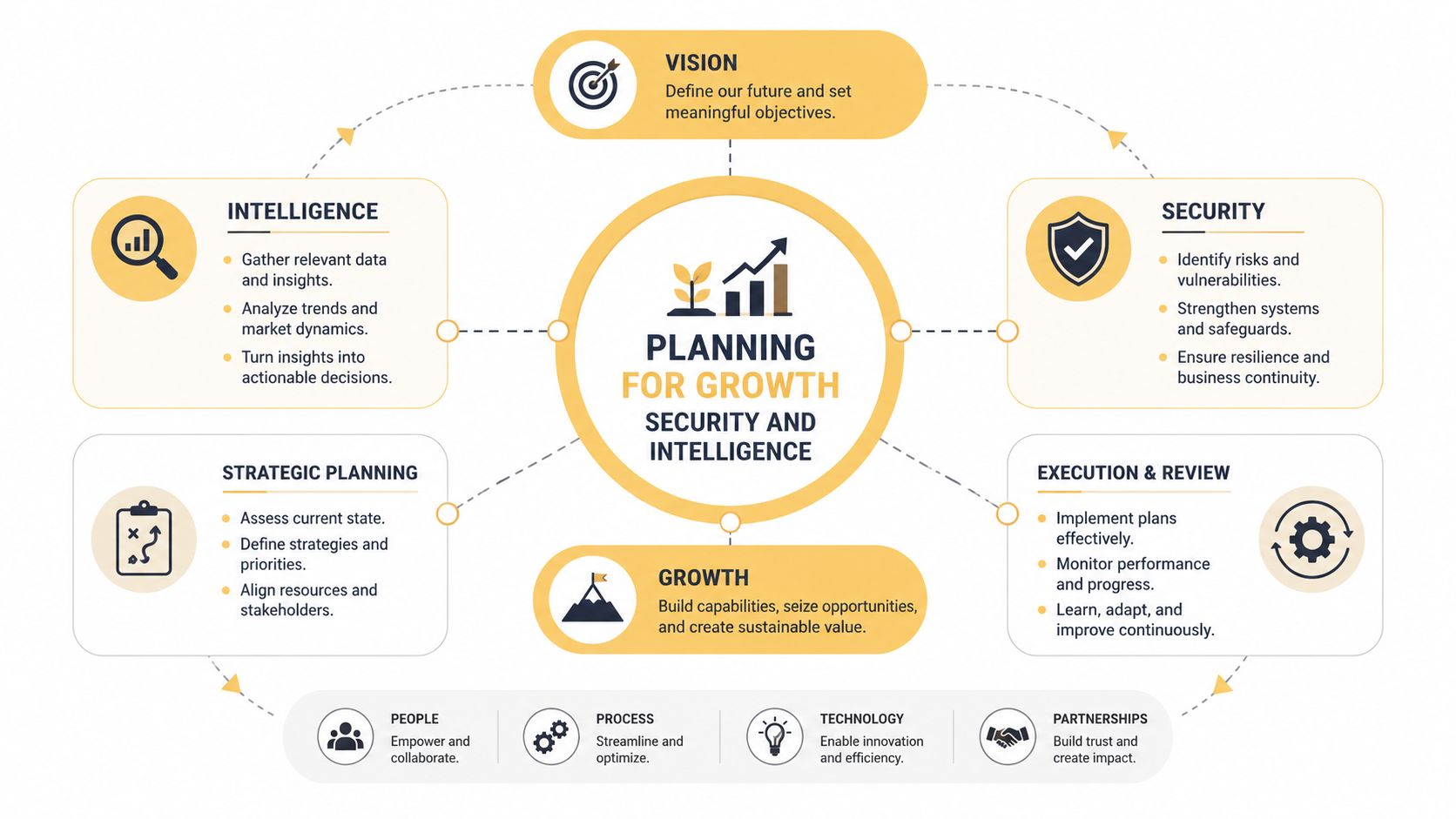
Planning for Growth Security and Intelligence
The apps that age well aren't just functional. They stay fast under load, protect data properly, support marketing goals, and leave room for automation and AI without turning every request into a bottleneck.
That's the part many businesses miss. They approve a feature list, the team builds it, and everyone assumes “done” means “ready.” In reality, launch is where the operational questions begin.
Growth depends on architecture, not optimism
Many teams assume Python is simple to scale because it's productive to build with. That assumption causes trouble after traffic grows, integrations multiply, and response times start slipping.
Key pressure points are usually boring and expensive: database contention, blocking API calls, poor async decisions, weak caching, and underplanned background processing. Performance work in Python web apps often comes down to disciplined choices around caching, asynchronous programming, database optimization, connection pooling, and profiling. That changes the business conversation. The question isn't whether Python can support growth. The question is whether the application was designed for its actual workload.
A customer portal with occasional logins needs one approach. A promotion-heavy e-commerce app with personalized content, third-party integrations, and search traffic needs another.
Security starts in the framework, but it doesn't end there
Django gives teams a head start with sensible defaults around common web security concerns. Flask can also be secure, but it asks developers to make more of those choices directly. Either way, the framework is only the beginning.
Security in a business app usually comes down to habits:
- Access control so staff only see what they should
- Input validation so forms and APIs don't become attack surfaces
- Session and authentication design that fits the sensitivity of the data
- Operational discipline around updates, logging, backups, and incident response
For a practical checklist, this guide to web application security best practices is a useful companion when you're turning requirements into implementation decisions.
Security work is rarely visible in a demo. It becomes visible when an app handles real users, real data, and real mistakes.
SEO is affected by backend decisions too
Business owners often separate SEO from application development. In practice, they overlap.
If your app includes public-facing pages, content sections, location pages, product detail pages, or editorial publishing, backend structure affects crawlability, metadata control, page speed, URL logic, and template consistency. A slow or fragmented application can nonetheless limit organic growth, even if the marketing team is doing everything else right.
For publishers and e-commerce brands, this matters a lot. The web app isn't just handling transactions or accounts. It's also shaping how content is created, rendered, and discovered.
AI features change the architecture
Many modern Python projects get interesting and risky at the same time.
A key challenge in AI-powered Python web apps is operationalizing the model, which requires attention to runtime reliability, monitoring, and deciding what happens in real time versus as a background task, as discussed in this piece on Python web development for AI-powered applications. In practice, that's often harder than connecting the model in the first place.
Businesses usually ask, “Can we add AI chat, recommendations, summaries, search, classification, or automation?” The more useful question is, “Where should AI sit in the workflow so the app remains stable?”
What should happen live and what should wait
A simple rule helps:
| Type of work | Better in live request | Better in background |
|---|---|---|
| Login, permissions, checkout validation | Yes | No |
| Long document processing | No | Yes |
| AI summarization for large records | Sometimes | Often |
| Sending notifications or sync jobs | No | Yes |
| Simple prediction that affects UI immediately | Sometimes | Sometimes |
If an AI call is slow or unreliable, putting it directly in the user-facing request path can damage the whole product experience. That's why teams start introducing queues, retries, monitoring, and error handling. Tools like Prometheus and Sentry are often part of that operational layer because someone needs to know when latency spikes, when a model call fails, or when background jobs start piling up.
A business owner doesn't need every implementation detail. You do need to know this: adding AI to a Python web app is not just a feature decision. It's an architecture decision. If the team treats it like a simple plug-in, the app will feel slow, brittle, and expensive to maintain.
Your Development Roadmap Costs and Timelines
Most business owners don't need a perfect estimate on day one. They need a sensible path. The safest Python projects follow a staged roadmap, because discovery errors are cheaper than rebuilds.
A practical sequence looks like this.
Discovery and strategy
Here, the team defines what the app needs to do, who will use it, what systems it must connect to, and what “version one” really means. This step also forces clarity around priorities. A must-have admin workflow is different from a nice-to-have dashboard, and getting that wrong affects every estimate after it.
Useful outputs at this stage include:
- Feature prioritization so the MVP stays focused
- User roles and permissions mapped to real workflows
- Technical constraints such as third-party integrations or compliance expectations
- Architecture direction including framework, hosting, and data model assumptions
Design and technical architecture
Once the business logic is clear, the app needs interface planning and system planning at the same time. A good team doesn't design screens in isolation from backend complexity.
This phase usually covers wireframes, user flows, data structure planning, API requirements, and decisions around admin tools, content management, and future integrations. If you want a grounded overview of how agencies typically frame budgets at this stage, this breakdown of web application development costs is a useful reference point.
Budget surprises usually come from hidden complexity, not from the visible screens. Integrations, permissions, and workflow edge cases are where estimates stretch.
Development and testing
Python proves its worth, especially when the backend involves structured business rules and operational workflows. The team builds the data models, application logic, admin controls, APIs, frontend interactions, and test coverage.
What matters here is not just shipping features. It's shipping features in a way that remains changeable. For SMBs, that often means resisting the temptation to cram every possible request into the first release.
Three examples show how scope affects the build:
-
Local service business booking app
This might include customer accounts, service selection, calendar logic, staff availability, confirmations, and an admin dashboard. Django is often the cleaner fit if staff need a strong internal management interface. -
Custom e-commerce operations portal
This could involve customer-specific pricing, order approvals, inventory visibility, and integrations with payment or fulfillment systems. The complexity usually sits in the backend rules, not just the storefront experience. -
Publisher workflow platform
Content statuses, editorial permissions, scheduling, metadata control, and search-friendly rendering can all live in the same product. The backend needs to support operations and discoverability at the same time.
Deployment and post-launch support
Launch isn't the finish line. It's the point where real usage starts revealing what matters most. Teams monitor errors, improve slow queries, tighten permissions, refine workflows, and add the next set of features based on actual usage.
Infrastructure costs can also shift after launch, especially for startups trying to preserve runway. In some cases, founders can reduce early cloud spend by looking into programs that find free credits for startups, particularly when hosting, data, or AI services are part of the stack.
A realistic timeline depends on scope, approvals, integrations, and how many unknowns exist at kickoff. Simple apps move faster when requirements are disciplined. Complex platforms take longer because the business itself is more complex. That's normal. The goal isn't speed at any cost. It's reducing rework while getting to a usable product with a clear path forward.
Making the Right Strategic Choice for Your Business
Python is a strong choice when the web app needs to do real business work. Not just display information, but manage users, process rules, connect systems, support operations, and stay adaptable as the company grows.
The strategic value isn't “Python is popular.” It's that Python gives businesses a practical way to balance speed, maintainability, and future expansion. Django works well when you need a more complete operating environment out of the box. Flask works when the product is narrower and the team wants more control. The stack around Python matters just as much as the language itself, especially once databases, APIs, frontend behavior, performance, and AI features enter the picture.
The businesses that get the best results from web application development with Python usually make three smart decisions early. They choose a framework that matches the business model, they design the stack around real operational needs, and they treat growth, security, and reliability as core requirements rather than cleanup work for later.
If that sounds like a lot, it is. That's also why experienced guidance matters. A custom app can become a revenue engine, an efficiency tool, or a long-term maintenance burden depending on the decisions made before the first release.
If you're weighing a Python-based web app and want help turning business requirements into the right architecture, Up North Media works with companies that need custom web applications, API development, SEO-aware platform planning, and AI integration aligned to real growth goals.