
Live attendees convert to pipeline at roughly 4 times the rate of replay viewers, while on-demand views can outpace live attendance by 2.3 times. A strong webinar marketing strategy therefore has to optimize the live experience and the replay journey, not just collect registrations.
That distinction changes how you plan the entire campaign. Registration is only permission to continue the conversation. Revenue depends on who attends, what they experience, which action they take, and how quickly your team follows up afterward. The most effective programs treat the webinar as a coordinated acquisition, engagement, and conversion system.
Why Webinar Marketing Has a Conversion Problem Most Guides Miss
Most webinar advice starts and ends with the registration page. Marketers discuss the headline, the guest speaker, the promotion channels, and the number of people who signed up. Those details matter, but they can distract teams from the more consequential question: what happens after registration?
A 2026 benchmark reports that registration-to-attendance fell to 38.4%, while on-demand views exceeded live attendance by 2.3 times. The same benchmark found that live attendees converted to pipeline at 4 times the rate of replay viewers. The 2026 webinar marketing benchmark makes the strategic implication clear. A large replay audience creates reach, but live attendance creates stronger commercial intent.
Practical rule: Treat every registrant as entering one of two journeys, live or asynchronous, and design both journeys before you publish the registration page.
The old model looks like this: promote the event, collect signups, deliver the presentation, send a recording, and report total registrations. The conversion-first model is different. It uses the registration form to identify fit, reminders to protect attendance, the live session to create interaction and urgency, and the replay to offer a lower-friction path to the same next step.
Why more registrations won't automatically fix pipeline
A registration number can rise while pipeline quality falls. Broad promotion may attract curious viewers who fit the topic but lack the problem, authority, timing, or budget required for a sales conversation. A narrower topic can produce fewer signups and still create better opportunities.
This is why the CTA can't be an afterthought placed on the final slide. The live audience needs a clear action while intent is high. Replay viewers need context, timestamps, a concise recap, and a CTA that works without the energy of the live room.
Webinars have become mainstream demand-generation channels. One 2026 industry roundup reports that 87% of businesses use webinars in their marketing strategy, and 52% rank them among their top three performing channels. It also reports webinar leads costing about $72 per lead, with potential ROI ranging from 200% to more than 1,200%, while another benchmark cited in the same reporting places the global webinar and virtual events market at about $4.4 billion by 2025. These webinar industry statistics explain why the format deserves a revenue system rather than a one-off event checklist.
Setting Goals, Audience, and Topic That Actually Convert
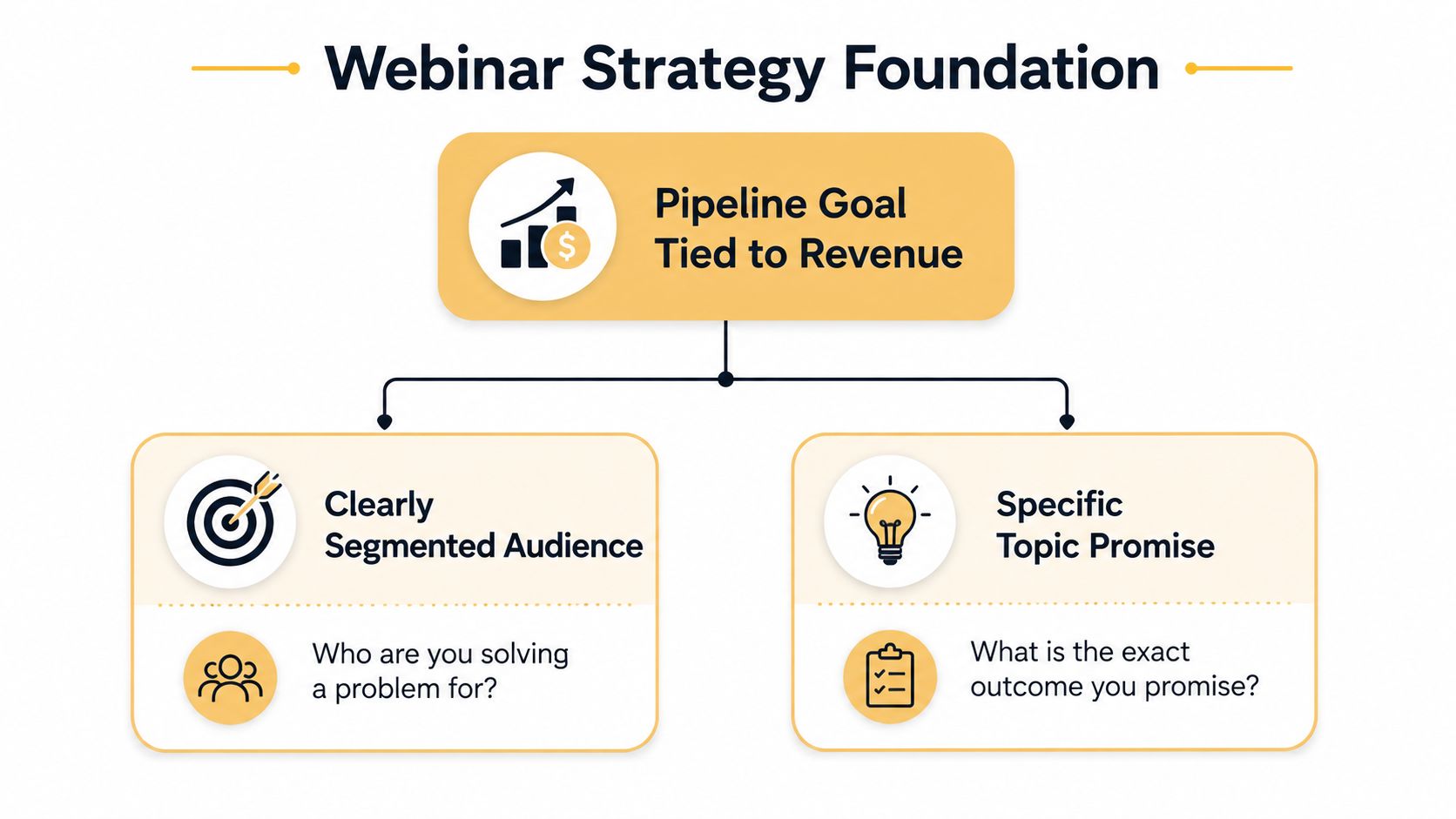
Start with the commercial destination, not the webinar format. “Generate leads” is too vague to guide topic selection, audience building, or sales follow-up. Define the pipeline outcome first, then work backward through the people who can create it and the problem that will make them act.
Connect the goal to a buying motion
Choose one primary action:
- Book a sales conversation: Use a problem-solving webinar for buyers who need evaluation help.
- Request a product demonstration: Show a workflow, comparison, or implementation path.
- Start a trial or consultation: Make the next step concrete and easy to understand.
- Advance an existing opportunity: Build a session around objections, risk, or internal alignment.
Set a pipeline target in your CRM and document the assumptions behind it. You can model expected results with your own historical attendance, qualification, and opportunity rates. Don't borrow generic benchmarks and pretend they describe your audience. The point is to make the math visible, so the team can identify whether the weakness sits in promotion, attendance, engagement, or sales execution.
Narrow the audience before you write the title
Choose one Ideal Customer Profile and one primary persona. A webinar for “B2B marketers” usually lacks the tension needed to earn attention. A session for marketing operations leaders who need to connect webinar behavior to CRM routing gives the speaker a clearer problem, vocabulary, and CTA.
Write down:
- The role and level of the buyer.
- The business problem they already recognize.
- The consequence of leaving it unresolved.
- The decision they may need to make next.
- The evidence that would make the decision safer.
If the persona is fuzzy, refine it with a practical buyer persona framework before developing creative.
Make the topic promise specific
A useful title names the audience's situation and the outcome they can expect. Avoid broad education without a decision attached. “Marketing Trends for the Modern Business” creates weak urgency. “How Marketing Operations Teams Turn Webinar Engagement Into Sales Follow-Up” gives the right buyer a reason to register and the wrong buyer a reason to leave.
Write one sentence that completes this prompt: “After attending, the right participant will be able to…” If the answer contains several unrelated outcomes, reduce the scope. Validate the promise with a small pre-launch test. Send the draft title and takeaway to a few customers, sales representatives, or existing subscribers, then ask what they expect to learn and whether they would give up time for it. Confusion is a signal to rewrite, not a reason to add more words.
Designing Content Flow and Tech Setup That Hold Attention
A webinar's content and production setup should be planned as one run-of-show. A polished presentation can't rescue poor audio, and reliable streaming can't rescue a session that delays its value until the final minutes.
Build the agenda around a clear progression:
- Hook: Name the costly or frustrating problem in the audience's language.
- Problem definition: Explain why common approaches fail.
- Framework: Give the audience a usable way to diagnose or solve the issue.
- Proof: Demonstrate the framework through examples, product views, or credible evidence.
- Offer: Present one relevant next step and explain who should take it.
A 45-to-60-minute session gives the speaker room to teach, interact, and convert without turning the event into an unstructured lecture. Front-load a useful insight. If attendees need to wait through introductions and company history before receiving value, many will leave before the CTA.
Build for two viewing modes
Benchmark reporting puts average live attendance around 49% of registrants, with total attendance including replays rising to 57%. The same reporting says 86% of webinar views happen live or within 24 hours, and reports an average CTA conversion rate of 22%. Zoom's webinar statistics and benchmarks support a practical design requirement: the live room and the replay need separate conversion cues.
For live viewers, use polls, chat prompts, questions, and verbal transitions into the CTA. For on-demand viewers, add chapter markers, visible CTA links, a short written recap, and an invitation that makes sense even if they watched only part of the recording. Put the offer in the body of the page and near the relevant segment, rather than hiding it after a long transcript.
Rehearse the operational details
Run a speaker rehearsal that covers more than slide order. Test microphone position, camera framing, screen sharing, poll launches, handoffs between speakers, recording permissions, captions, and the exact CTA URL. Assign a producer to monitor the room, manage questions, and troubleshoot privately while the presenter continues teaching.
Keep a backup plan for speaker failure, platform issues, and connection problems. Record a clean version when appropriate, and consider a simulive format when scheduling or consistency makes a fully live event impractical. The audience doesn't need to see your production process, but your team needs to know who owns every decision.
A webinar should feel spontaneous to the audience and heavily rehearsed to the production team.
A Four-Week Promotion Timeline That Builds Urgency
A reliable promotion arc gives every channel a job. It also prevents the common mistake of publishing the registration page, sending one announcement, and hoping social posts will fill the gap.
Consider a four-week campaign for a B2B session aimed at operations leaders.
Week one creates recognition
Publish the landing page and send the main invitation to the most relevant segment, not automatically to every contact. Put the problem and promised outcome in the subject line and email body. Create the LinkedIn event, publish a short article that addresses the problem without giving away the full framework, and send partners a ready-to-use description and tracking link.
A speaker video can help introduce the topic, but it doesn't need to consume the speaker's calendar. Record several short clips in one sitting. Each clip should answer a narrow question or challenge a familiar assumption.
Week two earns attention
Send a value-led teaser rather than another generic invitation. Share a checklist, a diagnostic question, or a short excerpt from the speaker. Publish related content on the blog and in relevant communities, then invite partner organizations to contribute their own perspective or promote the session to a matched audience.
Use paid LinkedIn promotion only when the audience definition and offer are strong enough to justify amplification. Paid traffic can increase reach, but it won't repair an unclear promise or weak registration experience.
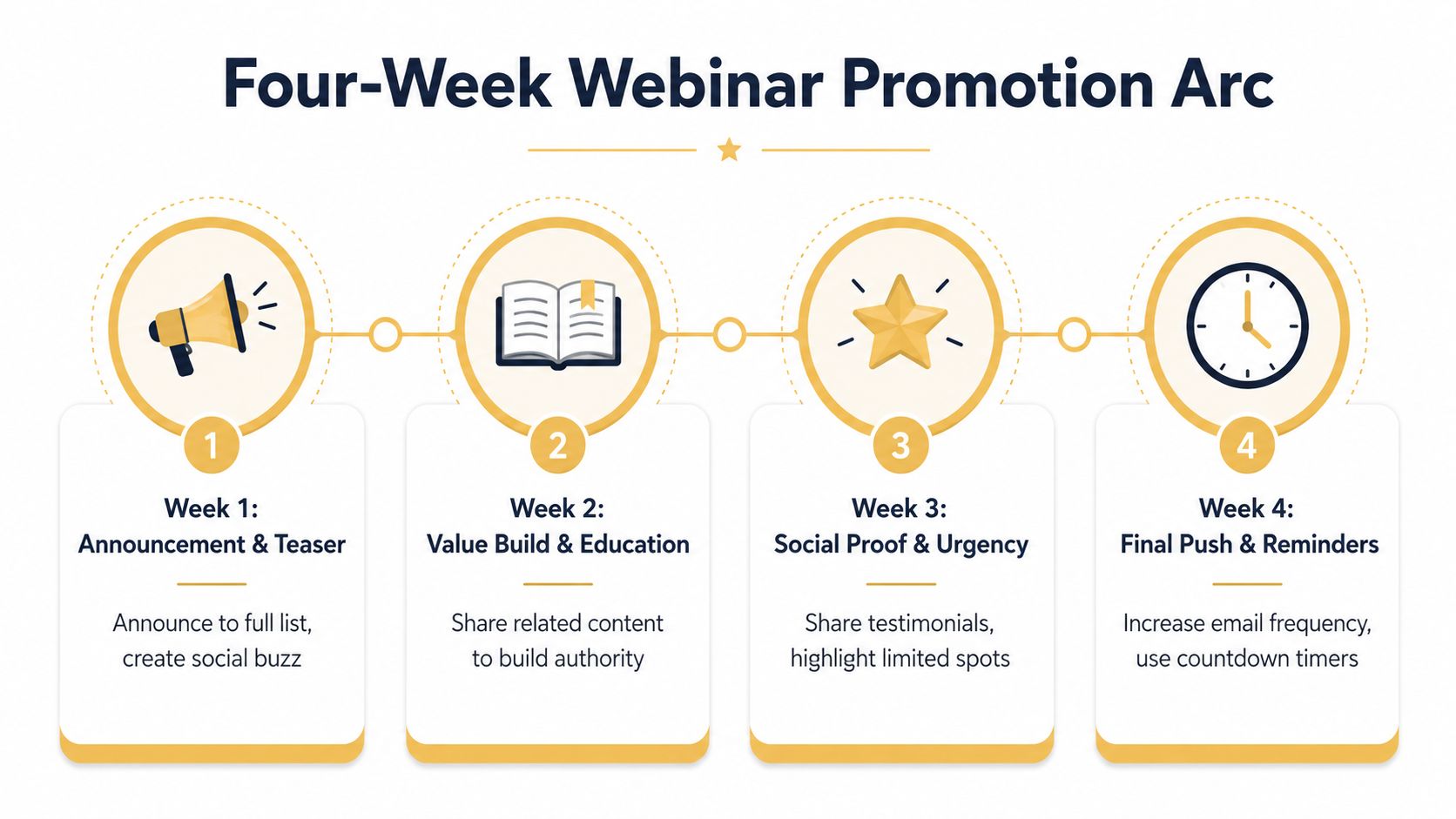
Week three supplies proof and urgency
Share a speaker credential, a relevant audience question, or a short preview of the framework. Avoid fabricated testimonials or vague claims. Proof should show relevance, such as the specific issue the session will address or the practical artifact attendees will receive.
Coordinate employee advocacy and partner mentions so they appear as a sequence, not identical posts published at once. Marketing automation can trigger source-specific reminders, suppress duplicate invitations, and route engaged contacts into appropriate workflows. A useful primer on the operational layer is this guide to what marketing automation is.
Week four protects attendance
Increase message frequency as the event approaches, but make each message useful. Send a final value email, then a 72-hour urgency message, a one-day reminder, and a short event-day note with the join link. Retarget registrants who haven't attended yet, and make the final email easy to scan on a phone.
The best campaigns compound because each asset reinforces the same promise. The weakest campaigns produce a flurry of disconnected posts that create awareness without giving the buyer a reason to reserve the time.
Registration Pages and Reminder Sequences That Maximize Show-Up
Registration pages set the promise, while reminder sequences remove the obstacles that cause no-shows. Build them as one conversion system. The page establishes relevance, and each email answers a practical question that becomes more important as the event approaches.
A strong page should resolve four points quickly:
- Who is this for? Name the role, business situation, or experience level.
- What will I learn? Describe a specific takeaway, framework, or decision the session will support.
- Why should I trust the session? Show the speaker's relevant experience and include credible proof where available.
- What happens after I register? Display the date, time, format, calendar option, access method, and replay policy.
Keep the form as short as the qualification process permits. Each additional field can reduce completion, while a form that captures no useful context creates noisy follow-up. Request only information that sales or marketing will use, such as role, company, or the problem the registrant wants to address.
Give every reminder a distinct job
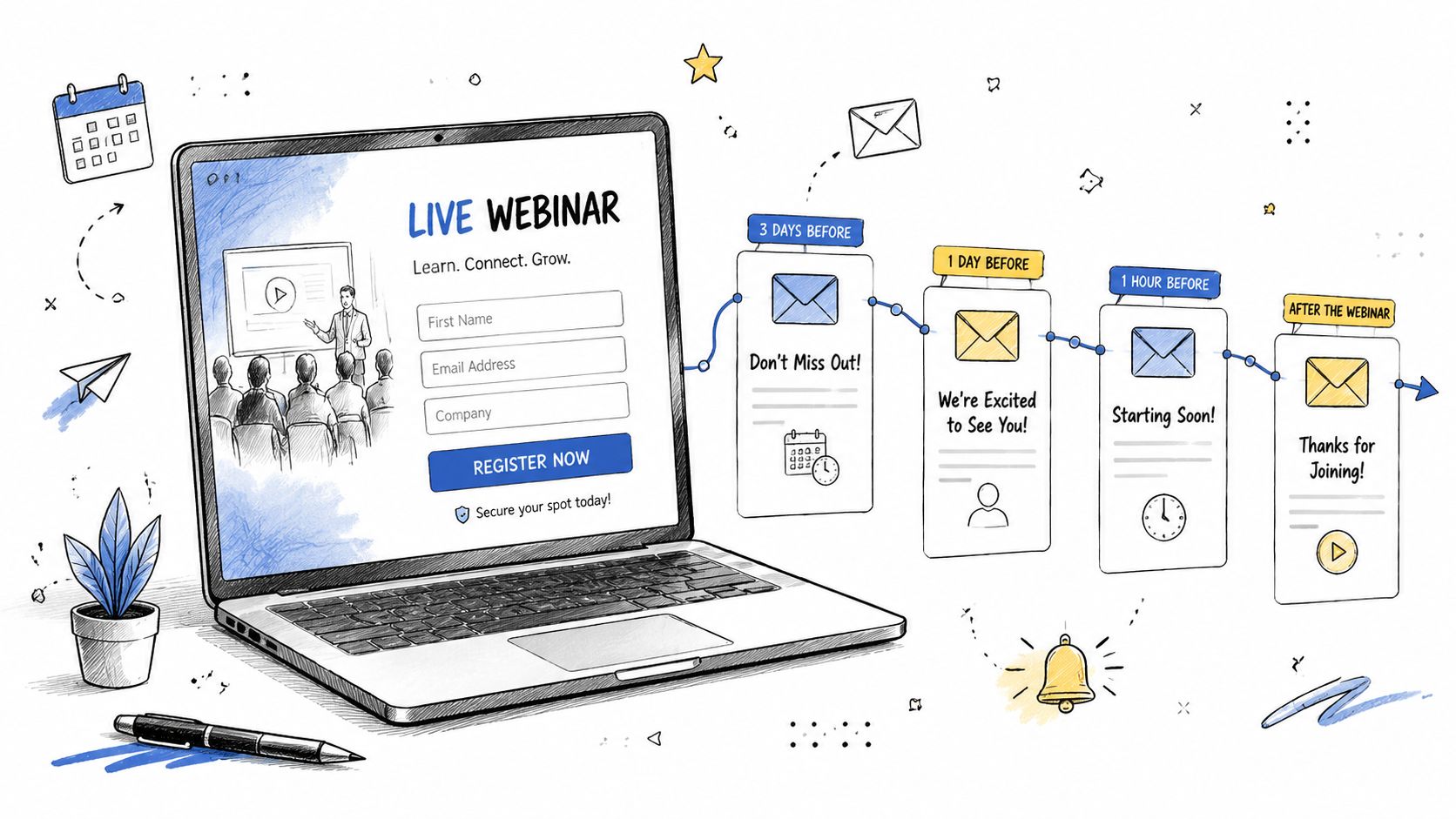
- Confirmation: Send the calendar event, access details, and a clear statement of what attendees will receive.
- One-week reminder: Restate the outcome and raise a question the session will answer.
- One-day reminder: Explain what to prepare, who should attend, and what attendees can gain by joining live.
- One-hour reminder: Put the direct join link and timing information near the top.
- Fifteen-minute reminder: Make joining immediate. Remove copy that competes with the button.
Ask registrants to add the event to their calendar immediately, and make the time zone explicit in every relevant message. If the webinar is recorded, state that clearly, while keeping the live session positioned around discussion, questions, and real-time access to the speakers.
The replay needs its own conversion path. Send it promptly, but include more than a recording link. Add a concise summary, chapters, key questions, and one CTA that matches the viewer's likely next action. Segment live attendees, replay viewers, registrants who did not attend, and people who clicked the offer without completing it. Their context differs, so their follow-up should differ too. Live attendees are typically closer to pipeline, making post-event segmentation and next steps as important as the initial registration experience.
KPIs and Dashboards That Tell You If the Webinar Worked
Registrations measure acquisition. They do not show whether the webinar created sales momentum. Build the dashboard around registration, attendance, engagement, and pipeline, then split live and replay behavior. That separation matters because live attendees convert to pipeline at roughly four times the rate of replay viewers, according to the 2026 benchmark.
Use benchmarks as context, not targets. Zoom's webinar benchmark reporting can help you compare campaign patterns, but your own history should set the operating baseline. A smaller audience with strong qualification, live participation, and sales follow-up may outperform a larger event filled with low-intent registrations.
| Dashboard area | Metrics to track | Decision the data supports |
|---|---|---|
| Acquisition quality | Registrations by source, company fit, role, and campaign | Which channels attract buying audiences rather than volume |
| Attendance behavior | Live attendance, arrival time, viewing duration, and replay starts | Whether scheduling, reminders, and content timing hold attention |
| Engagement quality | Poll responses, questions, chat activity, and content viewed | Which accounts show active interest and deserve sales review |
| Conversion behavior | CTA clicks, offer completion, and meeting requests | Where interest drops between the session and the next action |
| Pipeline impact | Qualified accounts, opportunities created, influenced revenue, and sales status | Whether the webinar contributed to a commercial outcome |
Track campaign and source data with UTM parameters, preserve the original values in the CRM, and connect webinar activity to account records. Record attendance duration, replay progress, question submissions, and CTA clicks, not just whether someone registered. A buying question should trigger different routing from a calendar download followed by no attendance.
Review the dashboard by audience segment and by source. A high registration rate from paid promotion can hide poor qualification, while a smaller partner or sales-led cohort may produce better opportunity creation. Compare live and replay paths separately, then inspect the handoff from marketing to sales. If qualified attendees receive no timely follow-up, the problem is operational rather than promotional.
For a broader framework, use this guide to measuring digital marketing performance. Leadership should see registrations, qualified attendance, engagement, pipeline created, and sales follow-up status on one page. If reporting ends at registrations, it measures demand capture, not webinar performance.
Follow-Up, Repurposing, and AI Workflows That Multiply ROI
The recording link isn't the end of the campaign. It starts a post-event program with separate tracks for people who attended live, people who watched only the replay, and registrants who missed both the live event and the first viewing window.
Live attendees should receive a concise thank-you, the relevant next-step CTA, and a reference to the question or topic they engaged with. Replay viewers need timestamps, a short recap, and an invitation that doesn't assume they experienced the live discussion. No-shows should receive the recording with a low-friction explanation of what they'll gain by watching it.
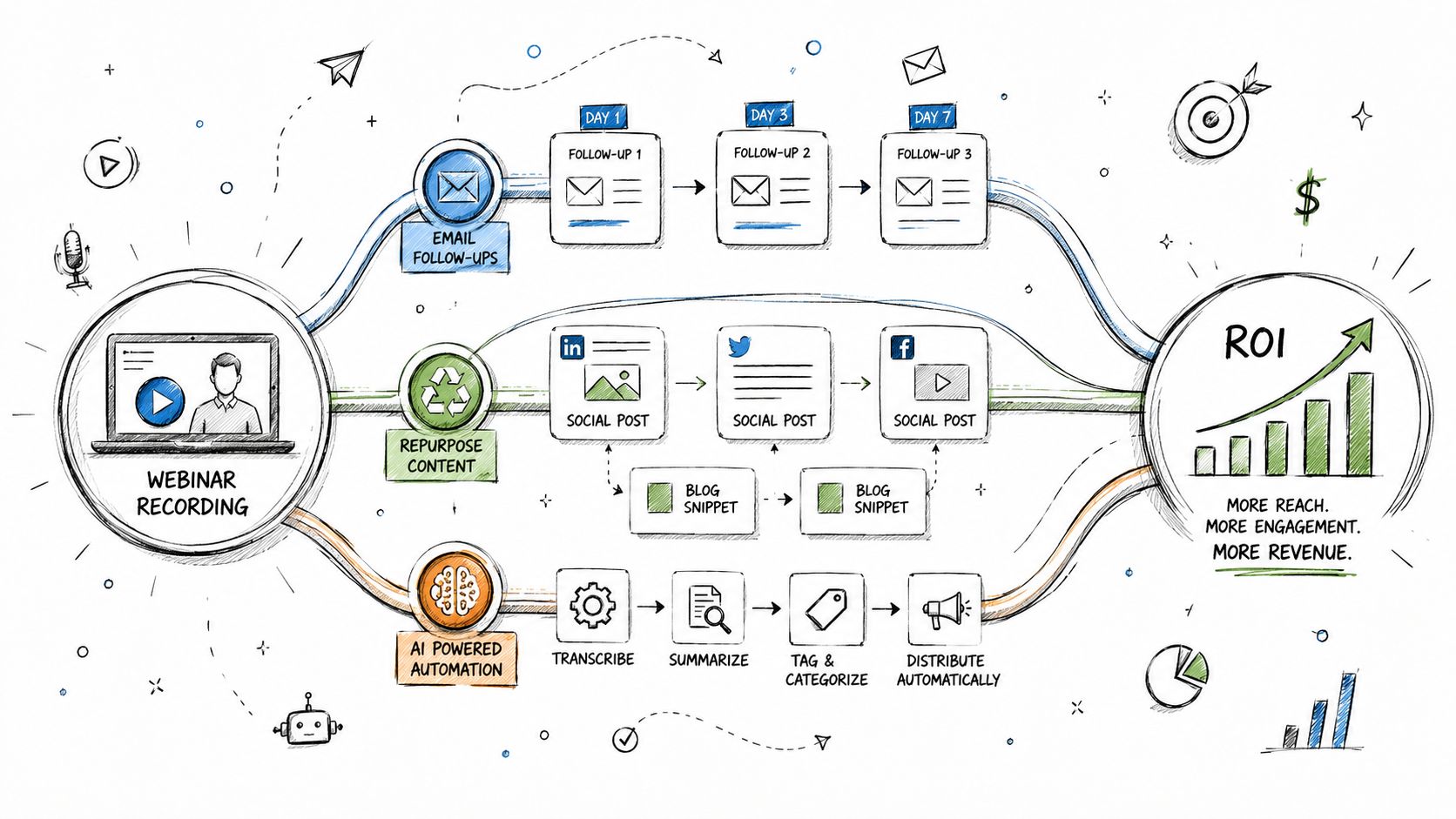
Repurpose the session into short social clips, a search-optimized written recap, a downloadable checklist, sales enablement excerpts, and podcast audio. Each asset should point to a relevant next step, not merely promote the original event after it has ended.
AI can reduce the manual workload through transcription, clip discovery, subject-line variations, attendee summaries, and first-pass qualification. Keep human review in the workflow, especially for technical claims, customer-sensitive material, compliance requirements, and sales routing. Automation should make segmentation and reuse faster, not replace judgment about buyer intent.
Up North Media helps businesses turn webinar activity into a measurable demand-generation system through data-driven SEO, conversion-focused web applications, and AI consulting. Visit Up North Media to discuss a webinar funnel, follow-up workflow, or digital strategy built around qualified pipeline rather than registration volume.