
Most advice on what is marketing automation starts in the wrong place. It jumps straight to email drips, welcome sequences, and “set it and forget it” software, then acts surprised when a small business ends up with more clutter, more sync issues, and more work for the team.
The better way to think about it is simple. Marketing automation is a connected operating system for data, content, triggers, and delivery, not a fancier scheduler. When it works, it helps a business respond to real customer behavior with the right message in the right channel. When it's built on messy data or vague process, it just automates confusion.
Marketing Automation Beyond Email Scheduling
Most owners first meet automation through email, because email is the easiest place to see a workflow at work. A welcome series goes out after signup. A reminder goes out after a quote request. A win-back sequence fires after a long quiet period. That's useful, but it's only the surface.
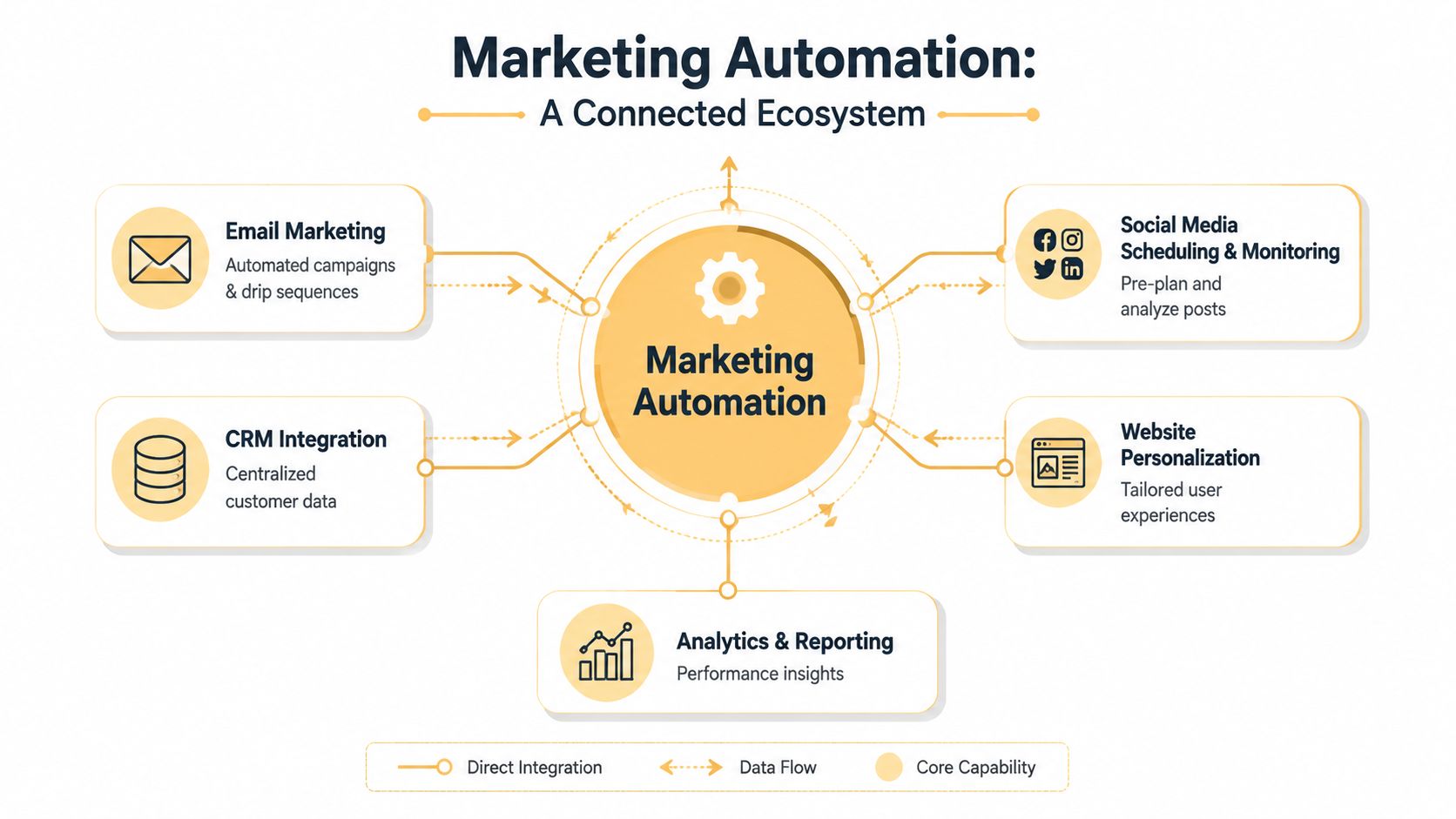
Modern marketing automation is broader than scheduled messages. It ties together behavioral data, workflow logic, and channel delivery across email, websites, mobile apps, social posts, and even AI answer engines through structured content and integration layers, as outlined in this martech architecture handbook. The practical difference is huge. Scheduling sends a message on a calendar. Orchestration reacts to what a person did, then chooses the next step based on that behavior.
The shift from broadcast to response
A business can send the same monthly newsletter to everyone and call it automation, but that's just mass emailing with better software. Real automation uses signals like page visits, form fills, cart behavior, or repeat engagement to choose the next action. That's why automation feels more personal even when the team doesn't manually touch each message.
Practical rule: if the workflow doesn't change based on customer behavior, it's probably scheduling, not automation.
SMBs need to be honest. Automation doesn't reduce workload just because it exists. It reduces workload when the business has enough structure for the system to make good decisions, and enough content for those decisions to matter. For readers who want a clean overview without the jargon, marketing automation without the overwhelm is a useful companion piece.
How Marketing Automation Architecture Works
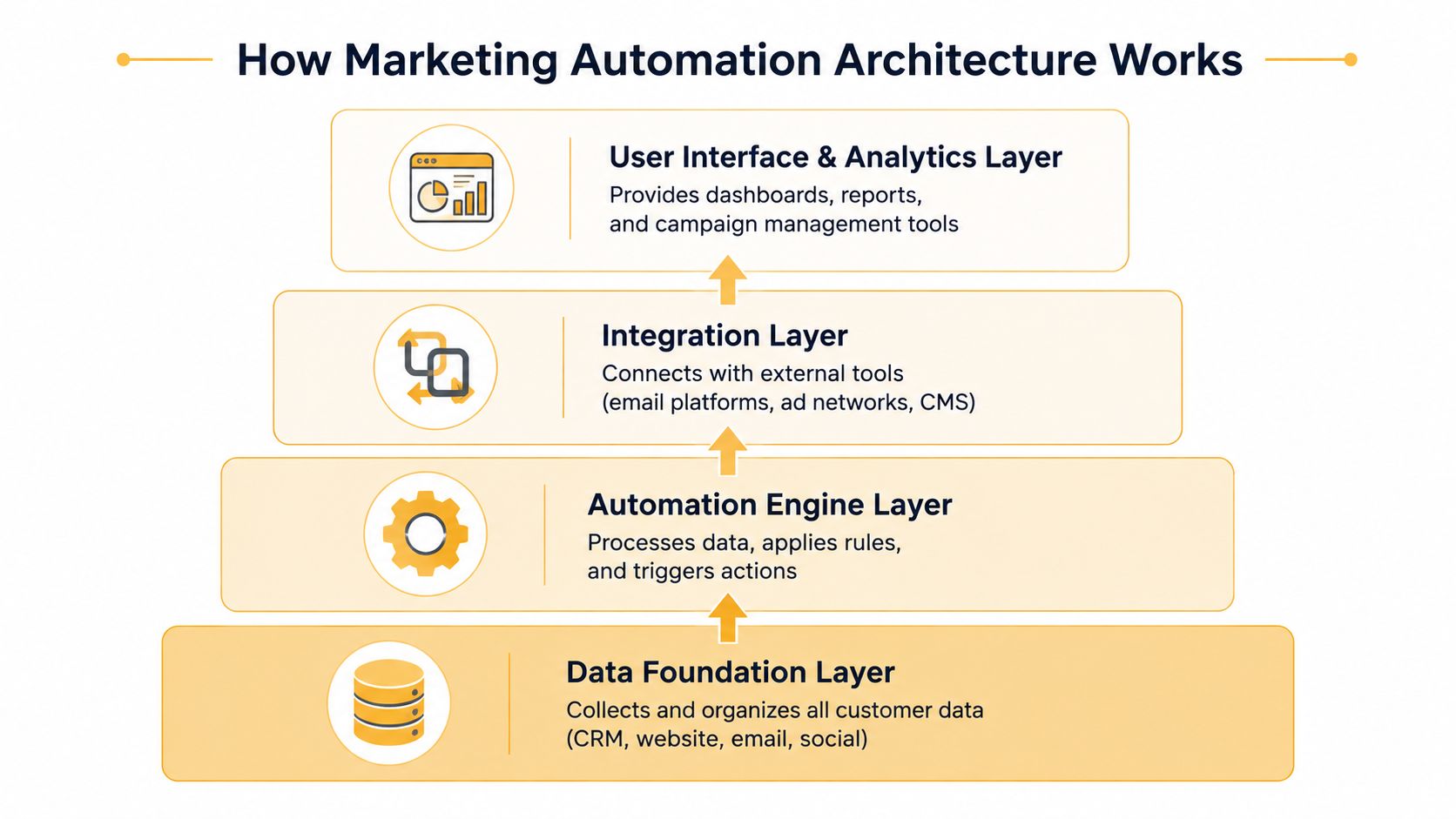
The easiest way to understand automation is to picture a house. The nice fixtures don't matter if the foundation is cracked. In the same way, a polished workflow can't compensate for bad data, broken syncing, or unclear identity rules.
At the base is the data foundation layer, where customer information lives. That can include a CRM, a CDP, a data warehouse, or a combination of systems that unify identity and behavior. Above that sits the content layer, where messages, offers, pages, and assets are structured so they can move across channels without being republished by hand. Then comes the intelligence layer, which applies logic, predictions, or rules to decide what should happen next. The delivery endpoints are where the customer experiences it, through email, websites, mobile, social, and related touchpoints.
Why the data layer matters first
Without clean, unified data, downstream automation starts making bad decisions. A duplicate contact can trigger the wrong message. A stale record can suppress a real lead. A missing consent flag can create a compliance problem nobody wanted. That's why the data foundation isn't a technical luxury, it's the part that keeps the rest of the stack honest.
The integration pattern matters too. Enterprise guidance favors a hub-and-spoke setup with a central CRM or warehouse, real-time sync, bi-directional flow, and open APIs rather than a tangle of point-to-point connections, because connector sprawl gets brittle as tools are added. It also recommends defining data contracts, identity-resolution rules, event triggers, and tested connectors before rollout, since stale batch jobs and weak governance lower trigger accuracy and slow response. For a practical look at API-driven integration work, see API integration services.
What the software is really doing
Most platforms are not “doing marketing” in the abstract. They're moving data between systems, evaluating rules, and firing actions. That's why implementation quality matters more than feature count. A simple workflow that is connected cleanly will outperform a flashy system that nobody trusts.
Clean data makes automation look smart. Messy data makes automation look expensive.
Why Businesses Are Adopting Marketing Automation at Scale
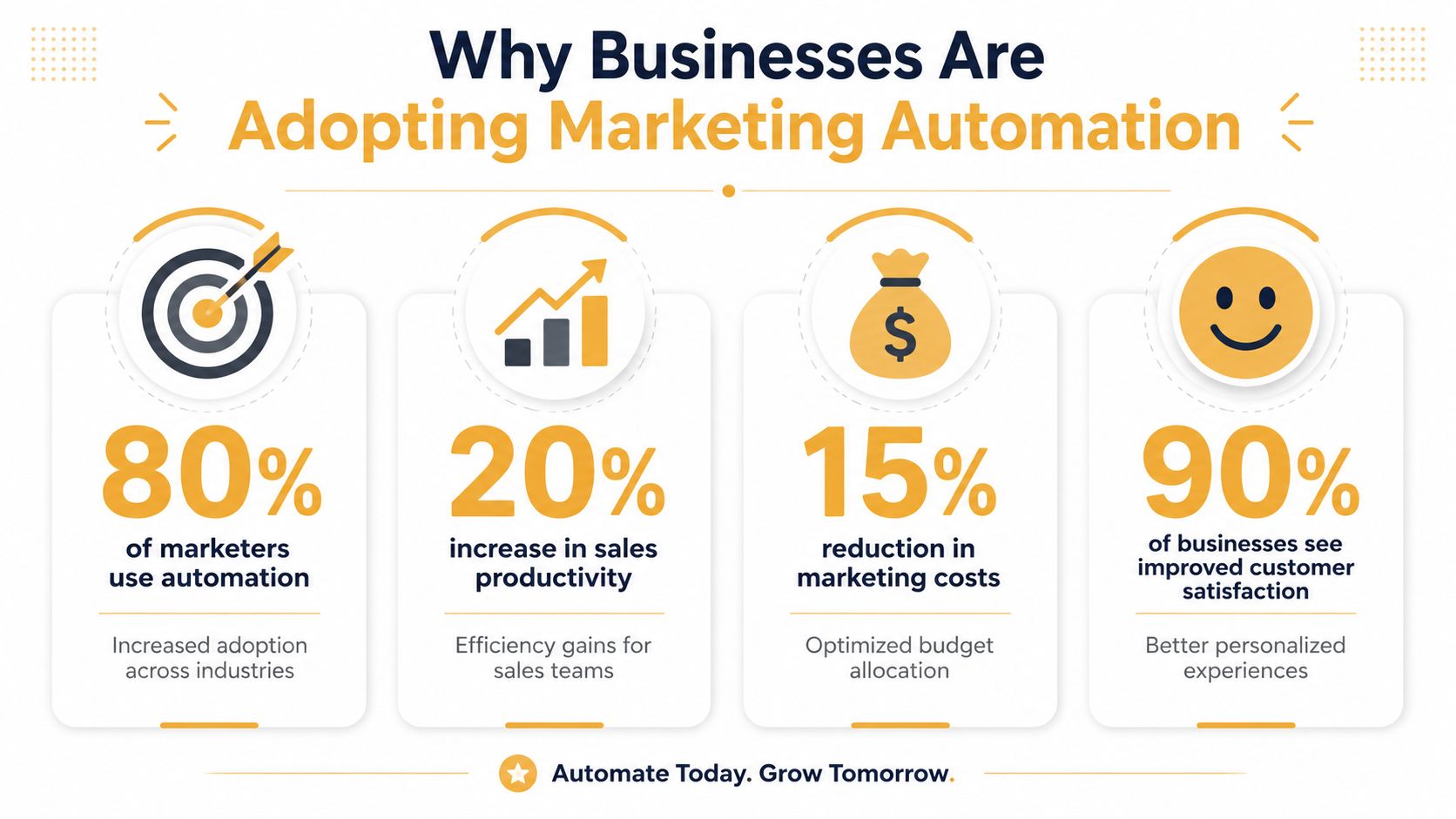
The adoption curve shows that automation has moved past the novelty phase. One 2026 industry roundup reports that 96% of marketers have used a marketing automation platform or plan to use one within the next year, while another found 75% of businesses already use at least one form of automation DataOpendia marketing automation statistics. That level of adoption points to a basic operational reality. Teams are using automation because the manual version of the work is already too slow, too inconsistent, or too dependent on one person remembering the next step.
The market follows the same pattern. Analysts put the global marketing automation market at about $6.65 billion in 2024 and project it to reach $15.58 billion by 2030. Growth like that usually comes from businesses solving practical problems, not chasing software for its own sake. Companies are using automation to connect CRM data, personalize offers, generate leads, and coordinate customer journeys at scale.
What SMBs are actually using it for
The usage data is even more direct. 76% of marketers integrate automation with CRM systems, 49% use it for personalization, and 63% use it to generate more leads. Those numbers line up with what small and mid-sized businesses need most. They want fewer dropped leads, more consistent follow-up, and less manual chasing across every stage of the funnel.
That matters in a local market too. If your sales cycle is short, missed timing costs you fast. If your sales cycle is long, inconsistent follow-up slowly drains pipeline quality. Automation does not replace the team, it reduces the number of places where the team has to remember to act, which is a real advantage when staff are wearing too many hats.
The catch is that automation only helps if the process underneath it already makes sense. If your list is messy, your handoffs are vague, or your CRM fields are a mess, software just makes the problem move faster. For SMBs, the value comes from repeating a clean process, not from adding more triggers for the sake of activity.
Why adoption keeps accelerating
Businesses are adopting because manual marketing does not scale cleanly. Every new lead list, channel, or customer segment adds work. Automation turns repeated actions into systems, and systems are easier to measure, audit, and improve. That makes the business case stronger than a generic promise to save time, because a key gain is tighter pipeline management and a more consistent customer experience.
Real-World Automation Workflows by Industry
The fastest way to understand automation is to look at the trigger, the logic, and the outcome. Different businesses use the same mechanics, but the workflows look different because the buying patterns are different.
E-commerce retailers
An abandoned cart flow starts when a shopper adds an item but doesn't finish checkout. The trigger is behavioral. The logic is simple, if the cart sits idle, send a reminder or a related offer. Post-purchase automation can then branch into accessory recommendations, replenishment reminders, or review requests based on what the customer bought.
That's also where automation stops being a sales tool and becomes a retention tool. A lapsed customer doesn't need the same message as a first-time buyer, so the workflow should reflect purchase history, not just email address status. For teams exploring how AI-assisted workflow ideas fit into this mix, 10 AI automation examples is a helpful internal reference.
Digital publishers
Publishers often use reading behavior as the trigger. If someone spends time with a topic, clicks related stories, or opens the same newsletter section repeatedly, the automation can adjust recommendations. That makes the next email feel like editorial curation rather than a generic blast.
Engagement can also drive subscription offers. A reader who keeps coming back should not get the same conversion nudge as someone who landed once from search and left. Automation helps publishers treat attention as a signal, not just a metric.
Local service businesses
Service businesses usually see the clearest payoff from operational workflows. Appointment reminders reduce missed visits. Review requests go out after service completion. Re-engagement campaigns target past clients who are likely to need the same service again.
The smartest local workflows feel boring on purpose. They remove friction before the customer notices it.
That's why service firms should not copy e-commerce sequences blindly. A plumbing company, a dental clinic, and a med spa may all use automation, but the business logic has to reflect the service rhythm, not the software template.
Prerequisites Your Business Needs Before Automation Works
This is the part many guides skip. Automation software doesn't create order where none exists. It just makes the existing mess happen faster. If a business wants automation to reduce workload, it needs a few things in place first.
The non-negotiables
- Clean first-party data: If you can't reliably track what people do, you can't build useful triggers. A good primer on that foundation is what first-party data is.
- CRM or CDP integration: Automation needs one source of truth, or at least a synchronized view of the customer.
- Consent management: If you're collecting and using customer data, your system has to respect permissions and retention rules.
- Meaningful volume: If the business gets very little traffic or few conversions, the trigger data can be too thin to guide automation well.
- Defined journeys: You need to know what happens after a lead, subscriber, or customer takes action.
When automation is a poor fit
Some businesses are too relationship-driven or too low-volume to benefit right away. If every deal requires a long human conversation and there are only a handful of prospects a month, heavy automation can create noise. In that case, a light system that supports follow-up and logging may be enough until volume grows.
The hidden test is simple. Ask whether automation will replace repetitive effort or just add another thing someone has to maintain. If the answer is maintenance, you're probably building too early. If the answer is follow-up, consistency, and visibility, you're on the right track.
Implementation rule: don't buy automation to fix process problems you haven't mapped yet.
Choosing the Right Marketing Automation Platform
Platform selection gets messy because every vendor claims to do the same thing. The right choice depends less on the demo and more on how your business runs.
What to compare
Start with ease of use versus customization depth. A lean SMB team usually needs something that staff can understand quickly, not a platform that requires a specialist to change every workflow. Then look at native integrations versus API flexibility. If your CRM, ecommerce store, calendar, or form builder sits outside the platform's happy path, API access matters.
Pricing deserves scrutiny too. Some tools price by contacts, some by feature tier, some by usage. The cheapest plan can become the most expensive once you count onboarding, training, and the time it takes to keep it running. Support quality matters for the same reason, because you're not just buying software, you're buying help when things break.
Questions worth asking before you commit
- Does it integrate cleanly with my CRM? If not, the rest of the workflow will feel delayed or incomplete.
- Can it handle the channels my customers use? Email alone won't fit every business.
- Will my team use it? A powerful platform nobody touches is a sunk cost.
- What does implementation really require? Some tools fit a DIY model. Others need technical support from day one.
For Omaha-area SMBs, I've seen teams choose tools that look advanced but never get fully adopted because nobody owns the setup or the follow-through. Up North Media, for example, works with businesses that need automation tied to CRM, web, and analytics workflows, but the important part is still the same, the platform has to match the team's capacity, not just its ambition.
Measuring What Matters in Marketing Automation
Automation creates lots of data, but not every metric is worth your attention. Open rates and click rates can tell you whether a message got noticed. They don't tell you whether the workflow improved the business.
The numbers that actually matter
Focus on trigger accuracy, workflow completion, and time to conversion first. Those tell you whether the system is firing at the right moment and whether people are moving through it the way you intended. Then look at lagging indicators like customer lifetime value, revenue attribution, and cost per acquisition. Those show whether the automation contributed to outcomes that matter to the owner.
How to keep the system honest
Test the logic, not just the creative. A good subject line can hide a bad workflow, and a strong offer can hide a broken segment. Run A/B tests on timing, trigger rules, and handoff logic, not only on copy. If the system starts sending too many messages or nudging people down the wrong path, you'll see fatigue before you see results.
The other mistake is automating every touchpoint just because you can. High-value prospects sometimes need a human response, especially when the risk of over-communicating is higher than the efficiency gain. Good automation knows when to hand off to a person instead of pushing one more message.
If you're ready to turn this into a working system instead of a stack of disconnected tools, Up North Media can help map the data, content, and workflow pieces together for your business. Visit Up North Media to talk through automation strategy, CRM integration, and the kind of implementation that reduces work instead of adding it.