

Your team has just launched a new product range, refreshed an archive of articles, and opened several landing pages for seasonal campaigns. The CMS has also added filter combinations, tag archives, and parameter URLs to the sitemap automatically. Google can fetch the file, but important pages remain undiscovered while the sitemap grows into a long list nobody trusts.
That situation is common because teams often treat an XML sitemap as a backup copy of the website. It works better as a curated inventory of URLs you want search engines to discover, crawl, and consider for indexing. The central principle behind effective XML sitemap best practices is simple: include the right URLs, exclude the noise, and keep every technical signal aligned.
Why XML Sitemaps Still Matter for Modern SEO
A sitemap isn't a replacement for internal linking. Search engines can discover pages through links, redirects, and other historical signals, so a sitemap rarely provides the only route to a URL. Its practical value is that it gives Google a clearly labeled selection of the pages your team considers important.
Consider an online store that exports every URL it can generate. The file contains product pages, category pages, color filters, size filters, sorting combinations, internal search results, and expired products. The crawler receives a large inventory, but the inventory doesn't distinguish a canonical product page from a temporary parameter variation. The important page may be technically present, yet its surrounding noise makes the sitemap less useful as a prioritization signal.
Practical rule: A sitemap should describe your intended indexable surface area, not your entire URL graph.
A carefully maintained file can support discovery of deep content, such as an archived article or a seasonal landing page that doesn't receive much internal prominence. It also gives your team a dependable comparison set for Search Console and crawl analysis. You can ask whether submitted URLs remain indexable, whether important templates are missing, and whether Google is processing an unexpected section of the site.
The failure mode worth avoiding is false completeness. Adding every possible URL feels safe, but it creates mixed signals when those URLs redirect, carry a noindex directive, duplicate another page, or exist only for navigation controls. Current guidance for large and complex sites favors restraint, especially where duplicate and parameter URLs are common. Google's sitemap documentation establishes the protocol foundation, while current sitemap and robots.txt guidance for 2026 emphasizes keeping only canonical, indexable URLs that return successfully.
Anatomy of an XML Sitemap
Start with the smallest useful mental model. An XML sitemap is a structured document with one outer wrapper, a collection of URL entries, and a set of tags describing each entry.
<?xml version="1.0" encoding="UTF-8"?>
<urlset xmlns="http://www.sitemaps.org/schemas/sitemap/0.9"
        xmlns:image="http://www.google.com/schemas/sitemap-image/1.1">
  <url>
    <loc>https://www.example.com/</loc>
    <lastmod>2026-08-20</lastmod>
    <changefreq>daily</changefreq>
    <priority>1.0</priority>
  </url>
  <url>
    <loc>https://www.example.com/products/blue-jacket</loc>
    <lastmod>2026-08-18</lastmod>
    <image:image>
      <image:loc>https://www.example.com/images/blue-jacket.jpg</image:loc>
    </image:image>
  </url>
  <url>
    <loc>https://www.example.com/categories/jackets</loc>
  </url>
  <url>
    <loc>https://www.example.com/blog/how-to-choose-a-jacket</loc>
    <lastmod>2026-08-12</lastmod>
  </url>
  <url>
    <loc>https://www.example.com/about</loc>
  </url>
</urlset>
What each element does
- XML declaration: Identifies the document format and UTF-8 encoding. UTF-8 is important when URLs or content references contain non-ASCII characters.
urlset: Wraps the complete document. The default namespace identifies the core sitemap schema.xmlns:image: Declares the image extension. If the namespace is missing or mistyped, image elements may be ignored or make the document invalid.url: Groups the information for one page.loc: Provides the page address. It must be an absolute URL, including the protocol and host.lastmod: Optionally records a meaningful modification date. Only use it when your system can keep it accurate.changefreqandpriority: Optional hints. Google doesn't rely on them as instructions, so they shouldn't become the focus of your implementation.image:imageandimage:loc: Add image information when image discovery has a genuine search role.
XML has stricter syntax than HTML. Escape reserved characters in URLs, so an ampersand becomes &, not a raw &. Keep the file at a stable, publicly crawlable path, and check that it returns HTTP 200 with an XML content type such as application/xml. A valid-looking link in Search Console isn't enough if authentication, a server rule, or a malformed namespace prevents Google from reading the document.
Choosing the Right URLs to Include
The inclusion list is the most consequential part of your sitemap strategy. Every URL in the file is an explicit request for search engines to consider that URL, so the decision should begin with the destination, not with whatever your CMS happens to export.
A URL belongs when it satisfies four conditions:
- It returns 200. The page loads successfully instead of redirecting, failing, or behaving like a missing resource.
- It is indexable. It isn't blocked by a
noindexdirective or an access restriction intended for non-public content. - It is canonical. The sitemap URL matches the page's preferred canonical version.
- It has unique search value. A user could reasonably land there from a relevant search and receive a distinct answer, product, service, or editorial experience.
Each condition prevents a different failure. A redirect adds an unnecessary hop. A noindex page contradicts the sitemap's purpose. A duplicate distributes attention across competing URLs. A thin or temporary page consumes crawl attention without representing a durable search destination.
For example, /shoes?color=red&size=10 may help a shopper interact with a catalog, but it doesn't automatically deserve a sitemap entry. Session IDs, sorting parameters, internal search results, and staging URLs behind basic authentication should usually stay out. A paginated archive also needs intent-based review. If page three exists only as a repeated listing with no independent search value, adding it can encourage crawling of a weak destination while a valuable seasonal page remains absent.
| URL Pattern | Include? | Why |
|---|---|---|
/products/blue-jacket | Yes | A canonical, public product destination with unique content |
/shoes?color=red&size=10 | Usually no | A faceted variation that may create many near-duplicates |
/search?q=jackets | No | Internal search results aren't usually intended as landing pages |
/old-product returning a redirect | No | The final canonical destination should be listed instead |
/account/orders behind authentication | No | It isn't a public search destination |
/blog/article with noindex | No | The indexing directive conflicts with inclusion |
/categories/jackets | Yes, if valuable | A strong category or hub page can be an intentional landing page |
Canonicalized duplicates don't belong merely because their canonical tag points to a valid page. The duplicate URL still isn't the version you want indexed. Compare the sitemap against canonical tags, robots directives, status codes, and the site's preferred HTTPS and host format. The sitemap, robots.txt, and page-level indexability rules should tell one consistent story.
Structuring Sitemaps for Large Websites
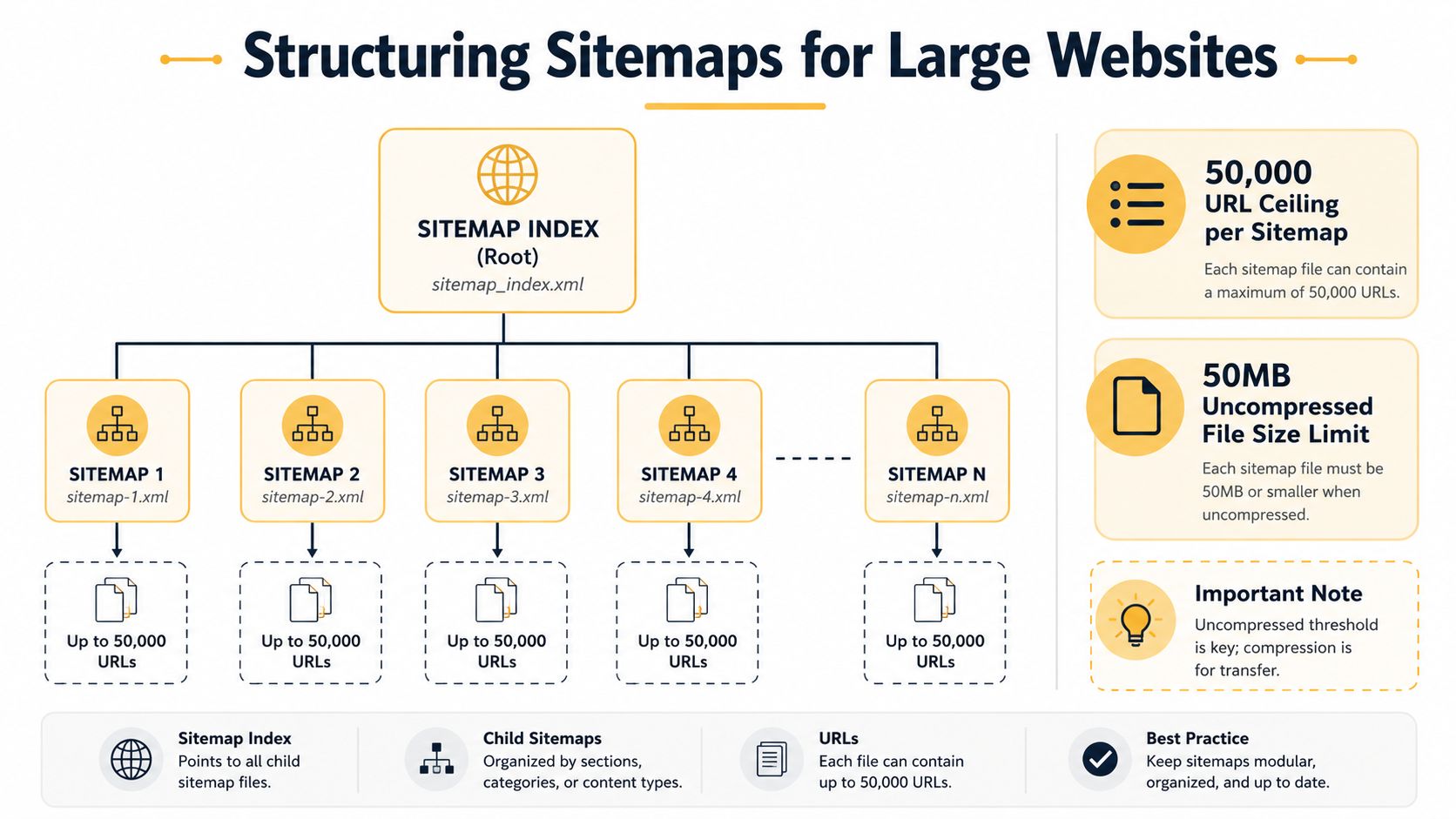
Large sites must plan around two protocol limits. A single sitemap file can contain at most 50,000 URLs and must be no larger than 50 MB when uncompressed, according to Google's documentation for building sitemaps. The uncompressed qualification matters because compression reduces transfer size, not the underlying document size that parsers must process.
Crossing either threshold creates an operational risk. A generator may produce an invalid file, a validator may reject it, or a crawler may fail to process part of the inventory. Don't wait for a file to reach the maximum. Leave room for content growth and keep each child sitemap comfortably below the ceiling.
A sitemap index acts like a master directory. Instead of listing page URLs directly, it lists the locations of child sitemap files:
<?xml version="1.0" encoding="UTF-8"?>
<sitemapindex xmlns="http://www.sitemaps.org/schemas/sitemap/0.9">
  <sitemap>
    <loc>https://www.example.com/sitemaps/products.xml</loc>
  </sitemap>
  <sitemap>
    <loc>https://www.example.com/sitemaps/categories.xml</loc>
  </sitemap>
  <sitemap>
    <loc>https://www.example.com/sitemaps/blog.xml</loc>
  </sitemap>
</sitemapindex>
Google supports an index with up to 50,000 sitemap entries, and Search Console allows submission of up to 500 sitemap index files per site, as documented in Google's guidance for large sitemaps. Those limits make indexes practical for enterprise publishers, marketplaces, and e-commerce sites with extensive inventories.
Group files around decisions
Group child sitemaps by content type, template family, or update behavior, not by arbitrary alphabetical ranges. Product files, category files, and editorial files give developers and SEO teams a useful diagnostic boundary. If product URLs begin returning errors after a deployment, you can inspect the product sitemap without sorting through unrelated blog entries.
A marketplace might use:
products.xmlcategories.xmlseller-pages.xmlblog.xml
Teams managing faceted navigation should also define exclusions before generating files. This guide to faceted navigation SEO provides useful context for separating valuable landing pages from filter combinations that create crawl noise.
Revisit the index whenever a section approaches roughly 40,000 URLs. That isn't a protocol limit, but it gives your team time to split the file before growth turns into an incident.
Specialized Sitemaps for Images, Video, and News
A regular sitemap tells search engines about pages. Specialized extensions add information about media or news content when those assets represent an important discovery channel.
| Sitemap Type | Namespace | Best For | Failure Mode It Prevents |
|---|---|---|---|
| Image | ` | Product photography, visual editorial content, and image-led catalogs | Important images remain difficult to discover |
| Video | ` | Video libraries, tutorials, demonstrations, and publisher watch pages | Search engines miss the relevant video, thumbnail, or watch-page context |
| News | ` | Newsrooms and publishers where fresh article discovery matters | Newly published news content lacks structured publication context |
An image entry connects a page to one or more image locations. That extra relationship can help clarify which visual asset belongs to the page, especially when an e-commerce template loads images through scripts or complex galleries. It earns its complexity when product photography drives how users discover and evaluate products. If images are decorative and don't support a search acquisition goal, a normal page sitemap may be sufficient.
Video extensions add fields such as the thumbnail location, title, duration, and family-friendly status. A video site should use them for pages where playback and watch-page visits matter. A company with a few embedded videos on otherwise text-led service pages may not need a separate operational layer.
News extensions identify details such as the publication name and language. A newsroom can maintain a dedicated news sitemap rather than mixing fast-moving article entries into a broad content file. Host each specialized file on the relevant domain, then reference it from the master index. Separating media types keeps the main sitemap readable and makes validation easier.
Using Lastmod and Priority Without Misleading Crawlers
The two most abused optional sitemap fields are lastmod and priority. They don't deserve equal treatment.
Google ignores the priority tag, so assigning a high value to a commercial page won't make Google crawl or rank it more aggressively. You can remove the field, or retain it only if your internal tooling uses it for reporting. The failure mode is wasted implementation effort and false confidence that a decimal value can override internal links, canonical signals, page quality, or actual change patterns.
lastmod has a more useful role when it records a genuine update. A meaningful change might involve revised product information, a materially edited article, or a substantive page update. A footer change, design adjustment, or automated timestamp refresh shouldn't rewrite the value for every URL.
Build the date from the record
Use a server-side rule tied to the content record. The generator should emit a new lastmod value only when the stored updated_at timestamp reflects a real change since the previously emitted value. Static pages that haven't changed can omit the field rather than publishing a guessed date.
The common failure is templated freshness. If every page receives today's date during every build, crawlers see a signal that doesn't match the content. Repeated inaccuracies can make the field less useful over time, which is why omission is safer than fabrication.
Audit question: Could an editor explain exactly what changed on the date shown in
lastmod?
A practical CMS audit checks three things:
- Data origin: Does the date come from the content record, not the sitemap generation time?
- Change definition: Does the system distinguish meaningful edits from template-wide changes?
- Stability: Does an unchanged URL keep the same value between builds?
That approach keeps the sitemap aligned with reality without requiring a complete rebuild of the site architecture.
Submitting Sitemaps and Monitoring Indexing Health
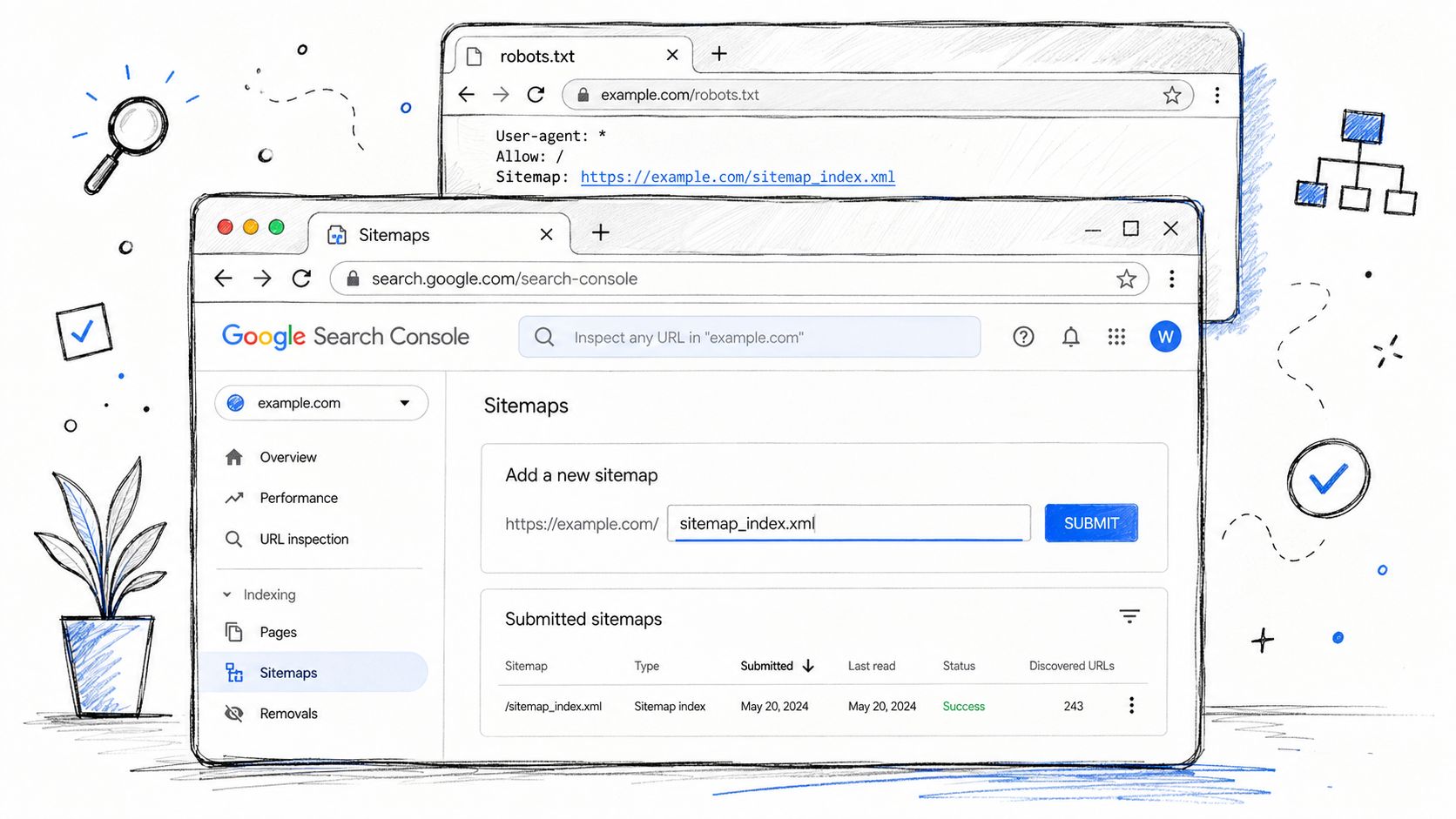
Publishing a sitemap is only the first operational step. Add the sitemap index URL to robots.txt as a discovery hint, then submit the index or relevant individual files through the Sitemaps report in Google Search Console. Bing Webmaster Tools accepts sitemap files but processes them independently, so a successful Google submission doesn't replace Bing's own monitoring.
Search Console status labels answer different questions:
- Success: Google fetched and processed the sitemap.
- Could not fetch: Google couldn't access or retrieve the file, often because of a path problem, access restriction, or server response.
- Has errors: Google reached the file but found invalid entries, formatting problems, or other processing issues.
None of those statuses guarantees indexing. A successful fetch confirms that Google can read the document, not that every listed URL deserves inclusion or will appear in search. If your team sees a growing set of pages that Google has discovered but not indexed, investigate the page quality, canonical relationship, internal linking, and duplication rather than assuming the XML syntax is the only issue. This resource on discovered but currently not indexed pages can help frame that diagnosis.
Watch the signals that indicate a regression
Escalate a sudden fall in the number of submitted URLs that Google reports as indexed, a spike in 5xx crawl errors, or repeated canonical warnings affecting URLs that should be canonical. Review these patterns by sitemap group. A problem limited to products.xml points toward a product template or feed rule, while a site-wide change suggests deployment, routing, or indexability logic.
For teams managing several properties, Synup can sit alongside Search Console and Bing Webmaster Tools as part of a broader visibility workflow. Keep the sitemap itself under technical ownership, and use monitoring tools to support, not replace, direct validation.
Re-validate the files weekly, alert when an expected 200 response changes, and maintain a changelog for sitemap and template edits. That record turns a silent indexing regression into a traceable deployment investigation.
A Practical Sitemap Audit Checklist
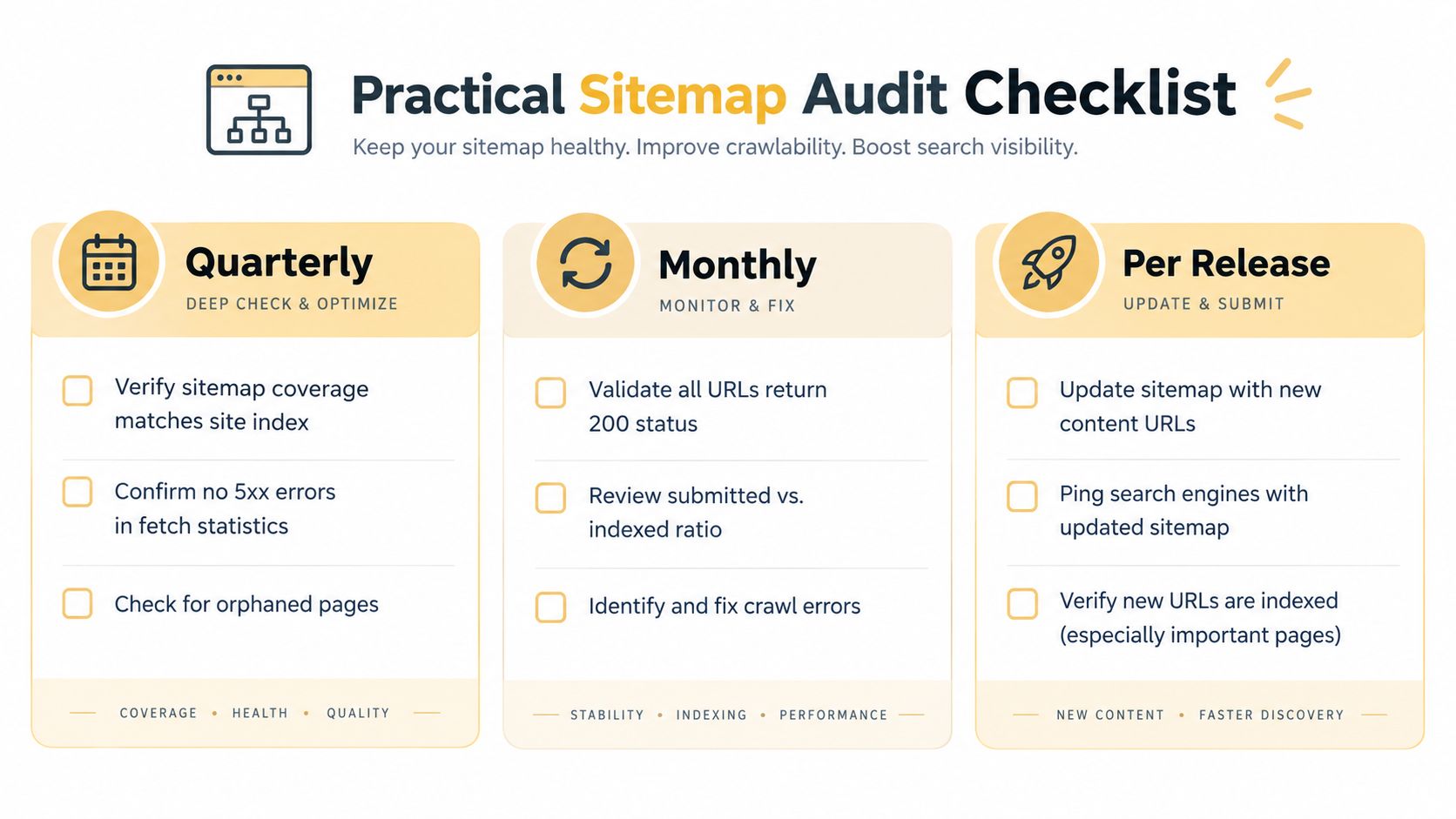
A sitemap audit works best when each check has an owner and a trigger. Organize the work around the moment when a failure is most likely to appear, rather than asking someone to remember every XML rule at once.
Quarterly review
- Confirm protocol compliance: Validate XML syntax, namespaces, encoding, absolute URLs, and response headers. This catches malformed documents before crawlers stop processing them.
- Check file capacity: Verify that every child sitemap remains comfortably below the 50,000 URL and 50 MB uncompressed limits documented by Google's sitemap requirements. This prevents emergency splitting after a content launch.
- Reconcile robots.txt: Make sure the published sitemap index is reachable and that its URLs aren't blocked by crawl directives.
- Review orphaned pages: Compare sitemap entries with internal links. If a page matters, give users and crawlers a path to it. If it doesn't, remove it and resolve its status appropriately.
Monthly review
- Validate live responses: Crawl every sitemap URL and flag redirects, 4xx responses, 5xx responses, noindex directives, and canonical mismatches.
- Compare inventories: Reconcile submitted URLs with the indexable database inventory. This exposes missing products, stale articles, and CMS rules that export non-indexable pages.
- Review Search Console patterns: Compare submitted and indexed groups by sitemap, then investigate meaningful gaps instead of treating every difference as a syntax error.
Per release
- Refresh content rules: Update generation logic when templates, faceted navigation, product variants, or URL structures change.
- Test before deployment: Run a sitemap-only crawl in staging or a controlled validation environment, then verify the production response after release.
- Record the change: Add the sitemap edit to the deployment changelog so later indexing problems have a clear starting point.
- Submit after launch: Resubmit the relevant sitemap or index in Search Console after a material release.
The most straightforward failures are invalid XML, inaccessible files, URLs that don't return 200, canonical conflicts, and unnecessary parameter or duplicate entries. A broader technical SEO audit can help connect those sitemap findings to crawlability, indexability, internal linking, and deployment controls. For a copy-ready version of the wider process, use this technical SEO audit checklist alongside your release template.
Up North Media helps businesses audit sitemap coverage, resolve canonical and indexability conflicts, and build scalable technical SEO workflows for growing websites. Visit Up North Media to discuss a practical sitemap audit, data-driven SEO strategy, or custom web solution for your team.