

You launch a new website. It looks polished, the copy is solid, and your team is proud of it. Then the leads don't come in, your service pages barely show up in search, and the blog posts you spent time writing seem to disappear into a void.
That situation is common, especially for small and mid-sized businesses that invested in design first and search visibility second. The hard part is that the site may not be failing because of the words on the page. It may be failing because search engines and AI systems can't efficiently access, interpret, or trust what's there.
That's where technical SEO comes in. If you've been asking what is Technical SEO, the short answer is this: it's the infrastructure layer of your website that helps search engines crawl, render, index, and understand your content. It's also becoming part of whether your site can be used in AI-driven search and answer engines, not just traditional Google rankings.
The Hidden Engine Behind Your Website's Success
A good way to think about technical SEO is to picture a storefront. Your branding, product displays, and sales team matter. But if the doors jam, the lights flicker, and half the aisles are blocked, customers won't stay long and some won't get in at all.
Your website works the same way. Content and design are the visible parts. Technical SEO is the foundation, wiring, hallways, and signage. It decides whether search engines can get through the building and whether visitors have a smooth experience once they arrive.
Why a good-looking site can still underperform
Business owners often assume SEO means keywords, blogs, and title tags. Those matter. But they only work if the site itself is technically healthy.
Common problems include:
- Pages that aren't discoverable: Important service pages may not be linked well internally.
- Slow loading experiences: Users bounce before they even see your offer.
- Indexing issues: Search engines crawl a page but don't keep the right version in their index.
- Confusing signals: Duplicate pages, broken redirects, or inconsistent structure dilute visibility.
Michigan Technological University notes that technical SEO focuses on the technical aspects of a website, including architecture, coding, and other elements that make pages easier for search engines to crawl and index. It also places technical SEO inside a rapidly expanding market. The global SEO services market was valued at $83.98 billion in 2026 and is projected to reach $148.86 billion by 2031 according to Michigan Technological University's overview of technical SEO.
Why this matters more now
Technical SEO used to feel like cleanup work. Today it's closer to operational infrastructure. If you want a broader practical overview, this 2026 technical SEO guide is useful because it connects the basics to how sites compete now.
Practical rule: If your site's technical setup is weak, every dollar you spend on content, paid traffic, or brand awareness works harder than it should.
For a business owner, that changes the conversation. Technical SEO isn't a side task for developers. It's the part of your website that determines whether the rest of your marketing gets a fair shot.
Why Technical SEO Is Non-Negotiable for Business Growth
Most business owners don't care about crawl paths or render budgets. They care about calls, form fills, purchases, and visibility in the markets they serve. That's exactly why technical SEO matters.
A technically weak website creates friction at every stage. Search engines struggle to access pages. Visitors wait too long for them to load. Mobile users hit awkward layouts. Migration mistakes wipe out discoverability. None of those issues show up in a branding meeting, but they affect revenue all the same.
Where business impact actually shows up
Technical SEO influences growth in a few direct ways:
- Visibility: Search engines can only rank pages they can crawl and index reliably.
- Conversion potential: Faster, cleaner pages remove friction from the buying path.
- Trust: Secure, stable experiences reduce hesitation, especially on service and ecommerce pages.
- Efficiency: Your content, ads, and email campaigns perform better when landing pages work properly.
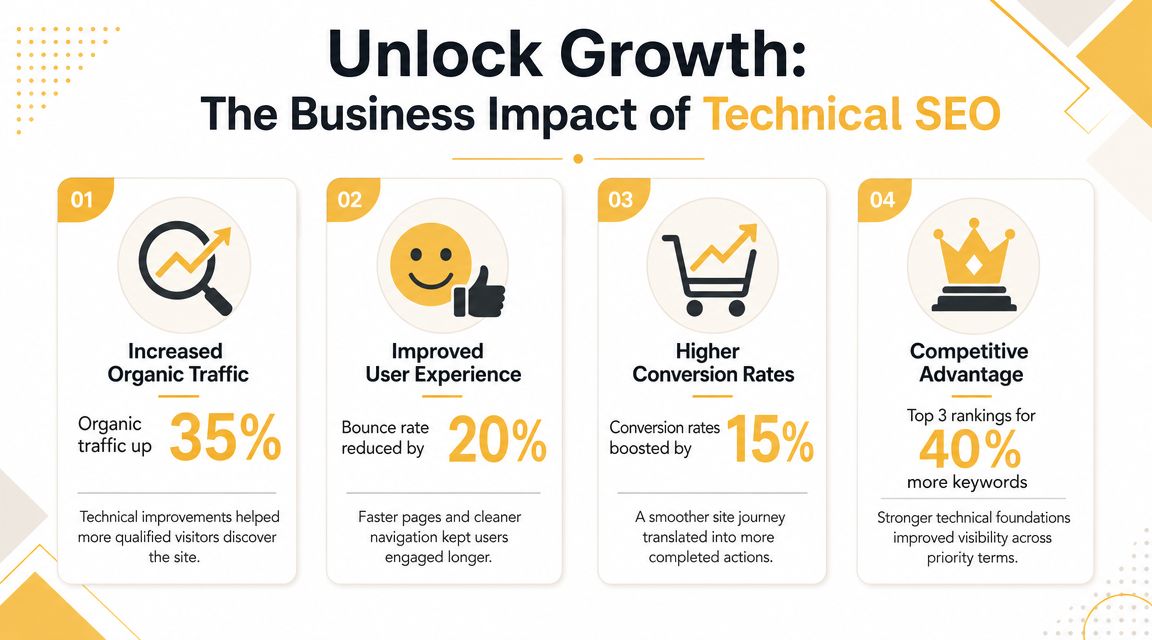
A simple ecommerce example makes this real. If a product page loads slowly, users drop off before they review product details, trust elements, shipping info, or the add-to-cart button. On a lead generation site, the same thing happens when a service page feels sluggish or jumps around while someone tries to tap a contact form.
The competitive opening most businesses miss
Urgency in technical SEO is critical. In 2026, industry statistics compiled by GTM 80/20 reported that only 33% of websites pass the Core Web Vitals threshold, meaning two-thirds still fail Google's baseline user experience standards. The same source also noted that 92% of practitioners rely on Google Search Console to monitor technical SEO. Both points come from GTM 80/20's technical SEO statistics roundup.
That matters because it turns technical SEO into an opportunity, not just a maintenance task. If most sites still fail the basics, a business that fixes speed, indexing, and site health can gain ground without publishing more content than everyone else.
A lot of SEO problems aren't content problems. They're delivery problems.
What works and what doesn't
Here's the trade-off in plain terms:
| Approach | What happens |
|---|---|
| Publish more content on a weak site | You create more pages that may struggle to rank or convert |
| Fix technical blockers first | Existing pages become easier to discover, use, and trust |
| Treat SEO as a one-time setup | Problems return after redesigns, plugin changes, and content growth |
| Monitor continuously | You catch issues before they quietly cut visibility |
Technical SEO is essential because growth compounds when the site works. It stalls when the infrastructure fights the rest of your marketing.
The 7 Core Pillars of a Technically Healthy Website
Most technical SEO advice overwhelms people because it throws every issue into one pile. A better way to understand it is to break it into seven pillars. If these are strong, your site is usually in good shape. If several are weak, performance problems tend to stack up.
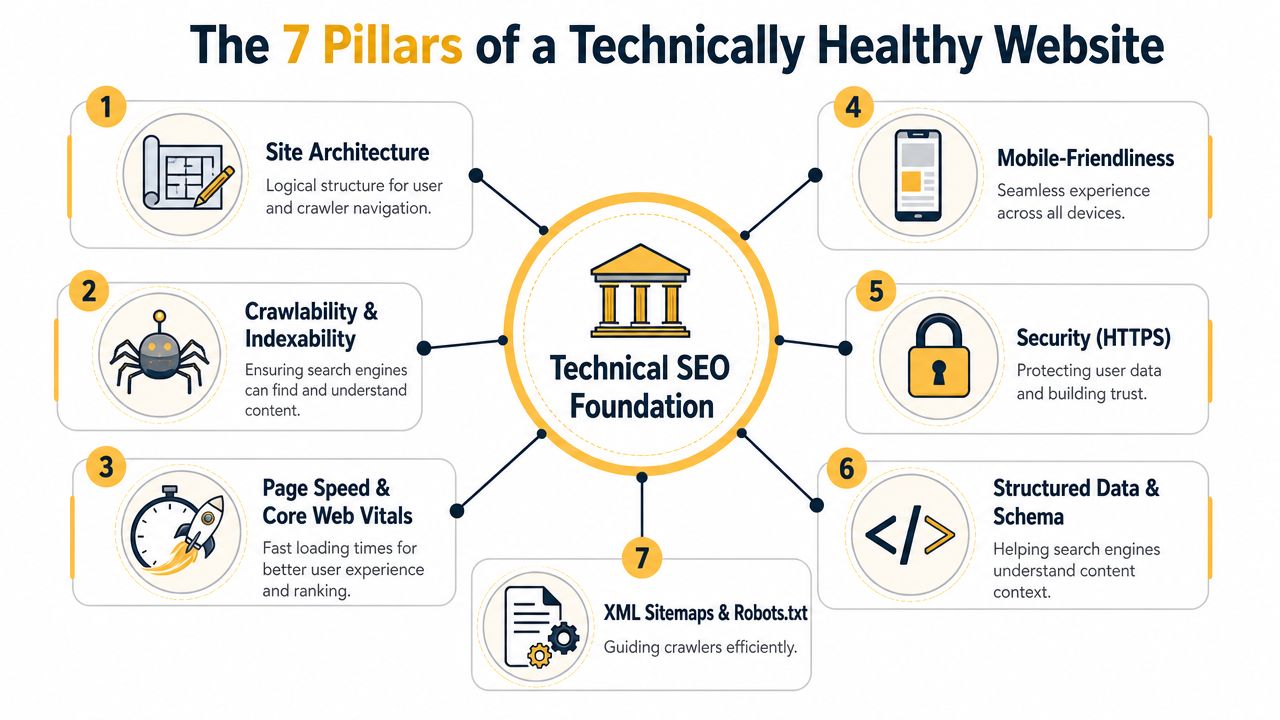
Site architecture and crawlability
Think of site architecture like aisle signs in a grocery store. If the store is organized, people find what they need quickly. If not, they wander or leave.
For a website, that means clear navigation, logical page groupings, and internal links that help users and crawlers move from broad topics to specific pages. A local service company should have clean paths from the homepage to service categories, city pages, and contact pages. An ecommerce store should make category, subcategory, and product relationships obvious.
Closely related is crawlability. This is whether search engines can reach your pages. Google specifically recommends using crawlable links, XML sitemaps, robots.txt for low-value URLs, and 301 redirects during migrations to preserve discoverability and equity across site changes, as explained by technicalseo.com's guidance on technical SEO fundamentals.
Indexability and canonicalization
A crawlable page still may not be indexed properly. That's where indexability comes in. Search engines need clear signals about which pages should appear in results and which pages should stay out.
Canonicalization helps when similar pages exist. It tells search engines which version is the primary one. This is especially useful on ecommerce sites with sorting, filtering, or variant URLs.
What doesn't work is letting duplicate or near-duplicate pages pile up. That muddies signals. What does work is deciding which pages deserve visibility and making that decision technically clear.
Here's a quick reference:
| Pillar | Plain-English purpose |
|---|---|
| Architecture | Organizes your site so people and crawlers can navigate it |
| Crawlability | Ensures search engines can access key pages |
| Indexability | Makes the right pages eligible to appear in search |
| Canonicalization | Consolidates duplicate or similar page signals |
A deeper look at performance metrics helps here if you want more context on Core Web Vitals.
Page speed and mobile friendliness
Performance is where technical SEO becomes visible to users. Slow pages hurt rankings, user experience, and conversion paths at the same time.
For performance-focused technical SEO, Core Web Vitals define healthy thresholds at LCP of 2.5 seconds or less, INP of 200 milliseconds or less, and CLS of 0.1 or less, according to Semrush's technical SEO guide.
That sounds technical, but the business interpretation is simple:
- LCP: The main content appears fast enough.
- INP: The page responds when a user clicks.
- CLS: The layout doesn't jump around.
Mobile friendliness sits beside speed, not below it. If your desktop site works but your mobile version hides content, crowds buttons, or loads awkwardly, your site underperforms where many customers first see it.
A practical explainer on the broader topic is worth watching:
HTTPS, structured data, and sitemaps
HTTPS is your digital front door lock. It protects user trust and signals a secure experience. For any site handling forms, logins, or transactions, this isn't optional.
Structured data is different. It helps search engines understand what a page is about, not just what words appear on it. A bakery can mark up recipes. A local business can mark up organization details. A product page can clarify product information. The key is accuracy. Markup should reflect visible page content.
Finally, XML sitemaps and robots.txt act like directions for crawlers. A sitemap points search engines toward important URLs. Robots.txt tells them where not to waste time. Used well, they guide discovery. Used carelessly, they can hide important pages by accident.
The best technical SEO changes usually make a site clearer, not more clever.
Your First Practical Technical SEO Audit
You don't need to become a full-time SEO specialist to spot the biggest technical issues. A useful first audit is less about mastering every tool and more about identifying obvious blockers.
Start with the free tools that show you where search engines and users are running into problems. The goal is to find the fixes with the highest business impact and the lowest implementation friction.
Step through the basics first
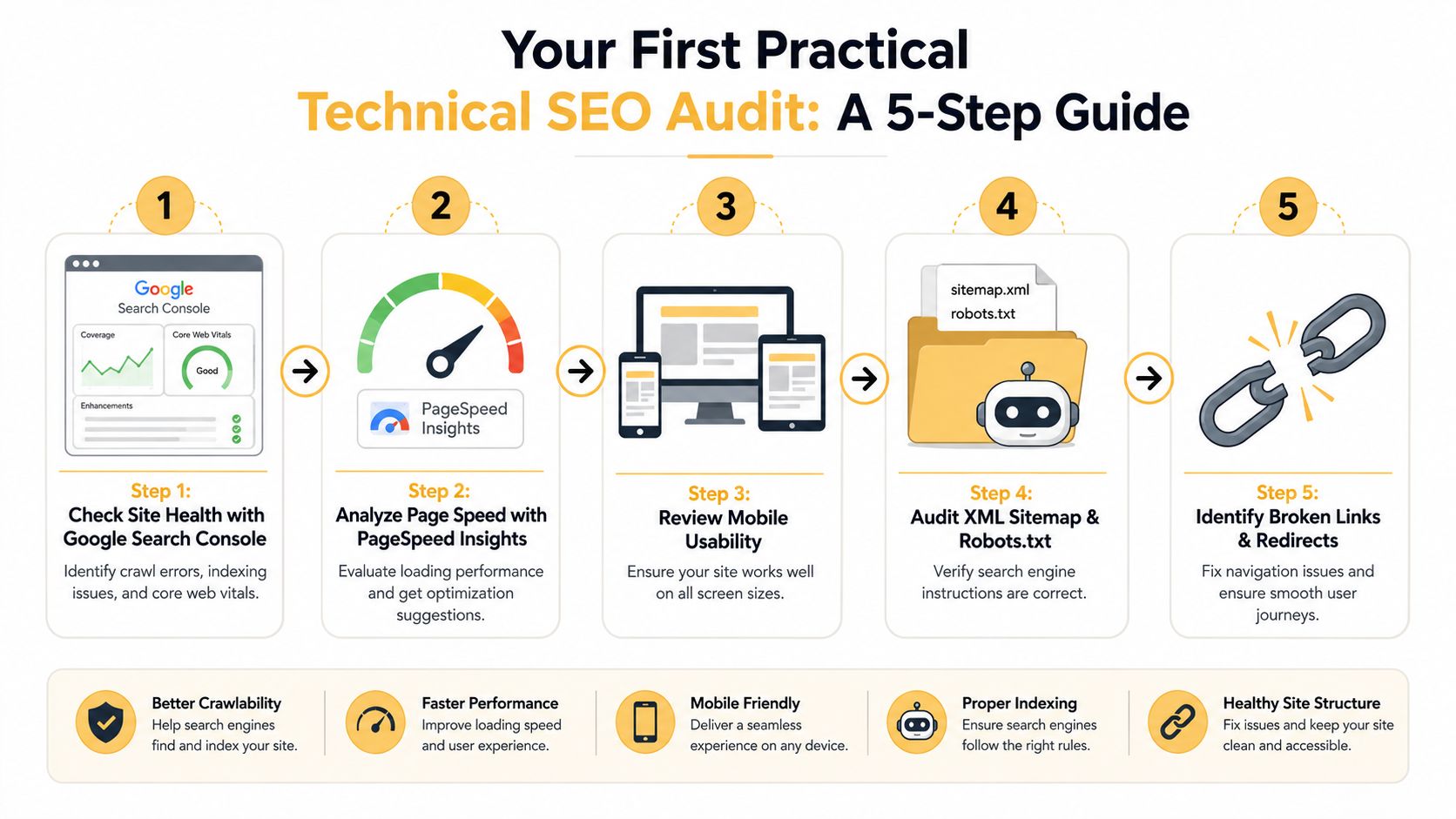
A straightforward audit often looks like this:
-
Open Google Search Console
Check for pages that aren't indexed, review any crawl issues, and look at the Core Web Vitals report. If a page matters to your business but isn't indexed, that's an immediate priority. -
Run key pages through PageSpeed Insights
Test your homepage, top service pages, top product pages, and lead forms. You're not looking for a vanity score. You're looking for issues that affect load time, interaction, and layout stability. -
Review your mobile experience manually
Open the site on an actual phone. Tap menus. Submit a form. Try to complete the same journey a customer would. -
Check sitemap and robots.txt setup
Make sure important pages are discoverable and low-value pages aren't consuming attention they don't deserve. -
Find broken links and bad redirects
A crawl tool like Screaming Frog is useful here, even at a small scale. Broken internal links and redirect chains create friction for both users and crawlers.
What counts as low-hanging fruit
Not every issue deserves the same urgency. Start with the fixes that affect money pages and important paths.
- Fix non-indexed priority pages: Service pages, category pages, and top products come first.
- Repair broken internal links: These are fast wins that improve navigation and crawl flow.
- Compress oversized images: Large images often drag down speed more than owners realize.
- Clean up redirect messes: Old campaigns, redesign leftovers, and deleted pages create avoidable waste.
- Check mobile forms: A form that technically exists but is hard to use still loses leads.
If you run Shopify, a focused resource on how to improve Shopify site speed can help you prioritize platform-specific fixes without getting buried in theory.
When to handle it yourself and when to escalate
Some fixes are simple. Others need a developer or SEO partner. That's normal. The key is knowing what to ask for.
Use your first audit to create three buckets:
| Priority bucket | Examples |
|---|---|
| Handle now | Broken links, missing metadata, oversized images |
| Hand to a developer | Render issues, template problems, redirect logic |
| Monitor monthly | Core Web Vitals trends, index coverage, crawl anomalies |
If performance is a concern, this guide on how to improve website loading speed is a practical next read. If you need deeper implementation support, your internal web team, a developer, or one technical SEO partner such as Up North Media can work from that audit list and turn it into fixes.
Useful mindset: Don't audit the whole internet. Audit the pages that drive revenue first.
Future-Proofing Your Site for an AI-Powered Internet
Technical SEO used to be about blue links. It still is, but that's no longer the full picture.
Search is shifting toward AI-assisted answers, summaries, and citation-based discovery. When that happens, your website isn't competing only to rank. It's competing to be understandable, extractable, and trustworthy enough to reference.

Why technical clarity matters for AI visibility
Recent guidance highlighted by Search Engine Land points out that technical SEO now affects eligibility for AI search and AI-generated answers, determining whether pages can be crawled, rendered, indexed, and even cited by AI systems. That's a major shift, and it's outlined in Search Engine Land's guide to technical SEO.
For business owners, that means the same technical issues that block search visibility can also reduce your chances of appearing in AI-driven discovery:
- Heavy client-side rendering can hide content from systems that don't process pages the same way a browser does.
- Weak structure makes it harder to identify what a page is about.
- Inconsistent naming across headings, copy, and markup creates ambiguity.
- Poor accessibility to important content lowers reuse potential.
What future-proofing looks like in practice
You don't need a separate "AI SEO" site. You need a technically sound one.
That means:
- Serve important content clearly: Don't hide core information behind interactions or scripts when possible.
- Use structured data where it fits: Help systems interpret entities, products, services, and organizations.
- Keep page meaning consistent: The title, headings, body copy, and supporting markup should align.
- Maintain clean internal linking: It helps machines understand topic relationships the same way it helps humans move through content.
If you're thinking beyond rankings and into broader AI visibility, this perspective on how to outrank AI is a useful extension of the same principle. The sites that perform well in emerging answer engines usually aren't gaming a new loophole. They're making their information easier to access, trust, and reuse.
AI systems can't cite what they can't reliably parse.
Technical SEO is how you prepare your site for that reality without rebuilding your digital strategy from scratch.
Your Next Steps in Mastering Technical SEO
If you've been wondering what is Technical SEO, the useful answer isn't a textbook definition. It's this: technical SEO is the operating system behind your website's visibility. When it works, your content has a real chance to rank, convert, and get reused in newer search experiences. When it doesn't, the rest of your marketing has to fight uphill.
Keep the process simple and continuous
The most effective next steps are usually straightforward:
- Run a first-pass audit: Use Search Console, PageSpeed Insights, and a crawl tool.
- Prioritize revenue pages: Fix the issues affecting your service, product, and lead-generation pages first.
- Bring in the right help: Send specific tasks to your developer or SEO partner.
- Review regularly: Technical SEO isn't a launch task. Sites change, platforms update, and new issues appear.
A solid outside resource on mastering technical SEO can also help if you want another practical perspective on the overlap between hosting, performance, and rankings.
Quick answers business owners usually ask
How long does it take to see results?
Some fixes help quickly, especially when they remove obvious blockers like broken redirects, slow assets, or indexing problems. Broader gains usually depend on how many issues exist and how fast your team can implement changes.
Is technical SEO a one-time fix?
No. Redesigns, plugin changes, new content, migrations, and platform updates can all create new technical problems.
Should I focus on content or technical SEO first?
If your site has serious technical issues, fix those first or at least in parallel. Publishing into a broken system is inefficient.
Do small businesses really need this?
Yes. Smaller sites often have fewer pages to fix, which means improvements can be more manageable and easier to prioritize.
Technical SEO doesn't need to feel mysterious. It needs to become part of how you manage your digital storefront.
If your team wants help turning technical SEO findings into a practical plan, Up North Media works with businesses on SEO, web development, and AI consulting so site performance, search visibility, and future AI-readiness are addressed together rather than as separate projects.