

The most popular advice about web app development is also the least useful: pick a framework, build quickly, and launch. That approach treats software as a one-time construction project. Businesses experience it differently. They pay for security patches, cloud infrastructure, API changes, accessibility fixes, monitoring, support, and feature decisions long after the first release.
So, what is web app development in practical business terms? It's the process of designing, building, deploying, and maintaining software that people access through a browser. The valuable question isn't only whether a team can produce working screens. It's whether the application will remain secure, usable, maintainable, and commercially useful as customers, data, integrations, and internal demands grow.
Defining Web App Development and Its Business Value
A standard website primarily publishes information. A web application helps users do something with information. Visitors might create accounts, search a catalogue, submit forms, manage records, make payments, track progress, or collaborate with other users. The distinction is purpose and behaviour, not visual appearance.
A business web app normally combines a client layer, usually HTML, CSS, and JavaScript, with server-side services, APIs, databases, authentication, and deployment infrastructure. The browser presents the interface, while application logic and data may run across web servers, cloud infrastructure, and databases. That architecture lets a company deliver an interactive service through a URL rather than requiring a separate installation for every operating system.
Website content versus application workflows
An informational website might explain a service and provide a contact form. A web application could qualify a lead, save the submission to a customer relationship system, assign it to a sales representative, trigger notifications, and display progress in a private dashboard. Both may use the same domain and branding, but only the second coordinates a business workflow.
The Web's development history helps explain this shift. Tim Berners-Lee invented the World Wide Web at CERN in 1989, and by the end of 1990 the essential foundations included a web server, browser, editor, HTML, HTTP, and URLs, as CERN's account of the Web's birth explains. CERN released the software into the public domain on April 30, 1993, removing licensing barriers and helping turn the Web into an open platform for software delivery.
Developers then added server-side processing, databases, authentication, APIs, and client-side JavaScript. By late 1993, CERN recorded more than 500 known web servers, while the Web represented approximately 1% of Internet traffic, an early sign that browser-based software was becoming a distinct computing platform rather than only a document system, according to the same CERN source.
Why browser access matters commercially
Browser delivery reduces friction. Customers don't need to download a dedicated program for each operating system, and employees can reach internal tools from supported devices without waiting for a traditional installation process. That reach matters, as the International Telecommunication Union reports that about 6 billion people, or 74% of the world's population, used the Internet in 2025.
The same ITU data also records 2.2 billion people offline in 2025. Global reach therefore isn't the same as universal access. A responsible web app needs responsive layouts, efficient data transfer, secure authentication, reliable operation on varied networks, and accessible interactions. For a business owner, those are not abstract engineering preferences. They influence how many people can complete a purchase, submit an application, use a portal, or return to the product.
Practical rule: Treat a web app as an operating system for a business workflow, not as a collection of attractive pages.
The commercial value comes from repeatable actions. An e-commerce platform can coordinate products, inventory, checkout, and orders. A customer portal can reduce support work by exposing account information securely. A publishing platform can manage editorial workflows and audience experiences. The right application turns browser traffic into transactions, retained users, usable data, or lower operating effort.
Types of Web Applications Driving Modern Business
Choosing the wrong type of web application creates avoidable cost. A company may need a focused customer portal, but commission an oversized platform. Another may force a generic SaaS product into a workflow that requires custom permissions and integrations. Start with the business constraint, then choose the application category.
SaaS platforms
A Software as a Service platform serves a recurring user need through an account-based product. Examples include project management tools, reporting dashboards, booking systems, and business operations software. SaaS products often need tenant separation, role-based permissions, billing, onboarding, usage limits, audit trails, and reliable administration.
The key decision is whether one configurable product can serve many customer types without making every account a special case. Multi-tenant design can improve operational efficiency, but it also raises the stakes for data isolation and authorization. If one customer can ever view another customer's records, the problem is architectural and commercial, not merely cosmetic.
E-commerce applications
E-commerce web applications combine discovery with transaction processing. They may connect product data, pricing rules, customer accounts, inventory, tax services, payments, fulfilment, returns, and marketing analytics. The checkout flow deserves more attention than the framework brand because every extra decision or confusing error can interrupt revenue.
A custom build makes sense when the company's merchandising, pricing, fulfilment, or customer experience cannot fit a standard platform. It doesn't make sense just because a team wants a newer frontend. Review the practical trade-offs in this e-commerce web application development guide before deciding whether custom software solves a constraint or adds one.
Progressive Web Apps
A Progressive Web App, or PWA, uses browser technologies to provide a more app-like experience. Depending on the device and implementation, a PWA may support installation, cached resources, and selected offline workflows. That can suit field teams, repeat customers, content products, or services where users need a fast interface without a separate native application.
PWAs aren't automatically a replacement for native apps. Device capabilities, operating system policies, notification support, offline data rules, and security requirements all matter. The useful comparison is not “web versus native” in the abstract. It's whether the browser can deliver the specific customer journey reliably enough.
Internal tools and customer portals
Internal applications focus on operational efficiency. They may manage approvals, scheduling, reporting, inventory, customer records, or staff workflows. Customer portals expose selected data and actions without giving every user access to internal systems.
These tools often generate value by removing repetitive work rather than attracting public traffic. A portal that lets a customer update details, download documents, or check status can shorten support interactions. An internal dashboard can consolidate information that staff previously assembled manually. In both cases, permissions, auditability, and integration quality matter more than visual novelty.
| Business need | Suitable application focus | Main risk to control |
|---|---|---|
| Recurring digital service | SaaS platform | Tenant isolation and permissions |
| Online transactions | E-commerce application | Checkout, payment, and inventory reliability |
| Mobile-friendly repeat use | PWA | Offline behaviour and device support |
| Operational efficiency | Internal tool | Workflow adoption and data accuracy |
| Self-service customer access | Portal | Secure authorization and integration boundaries |
The right category follows the measurable outcome. Revenue businesses should connect features to completed transactions and retention. Operations teams should measure time saved, error reduction, or faster handling. Building an application without an agreed business result is still an expensive way to spend money without learning whether the investment worked.
Navigating the Development Process and Tech Stacks
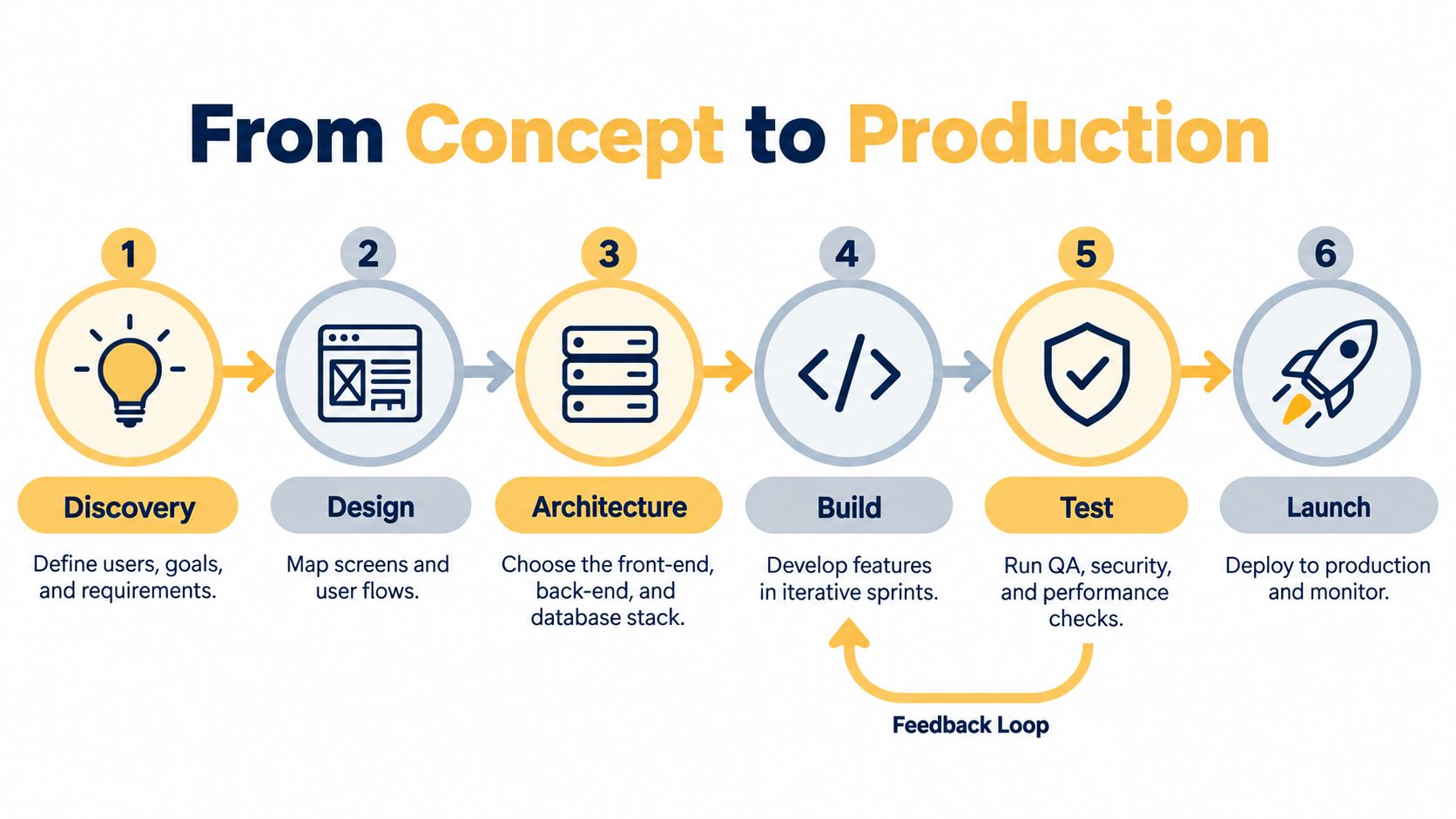
A production web app begins with decisions, not code. The development team needs to understand users, workflows, data, risks, integrations, and launch criteria before it commits to a stack. A polished prototype can expose a flawed business assumption early, when changing direction is cheaper.
From discovery to a usable release
Discovery defines the user and the job the application must complete. Design maps the screens, states, forms, errors, and handoffs. Architecture then describes how the frontend, backend, database, APIs, identity provider, and deployment environment connect.
Build work should proceed in increments that produce testable workflows. A team might implement account creation, a core record, and one complete business action before expanding into secondary features. This exposes missing requirements earlier than building isolated screens that don't yet work together.
Testing must cover more than whether a button responds. Include functional checks, authorization tests, accessibility evaluation, performance checks, integration tests, and realistic user flows. W3C's WCAG framework applies to interactive applications and organizes conformance into Levels A, AA, and AAA, as described in its conformance methodology. Automated tools help, but teams should also test keyboard operation, screen readers, dynamic states, form errors, and complete tasks.
Launch is an operational phase. Use separate development, staging, and production environments where appropriate, monitor errors and response behaviour, document rollback steps, and assign ownership for incidents. The product isn't ready because it works on a developer's laptop. It's ready when the business can support it under real conditions.
Choosing a stack by constraint
React, Vue.js, Node.js, Python, Flask, Django, PostgreSQL, serverless functions, and containers can all be appropriate. None is universally correct. Consider:
- Frontend needs: Complex browser state may justify a component framework. A content-heavy public experience may prioritize rendering, discoverability, and performance.
- Backend needs: Node.js can suit teams that want JavaScript across the stack. Python may fit data-heavy services or teams already experienced with its ecosystem.
- Infrastructure needs: Serverless can reduce server administration for event-driven workloads, but vendor dependence and execution constraints deserve review. Containers provide more control, but the team owns more deployment and operational decisions.
- Data needs: Relational databases suit structured relationships and transactional integrity. Other data models may fit less structured workloads, but flexibility doesn't remove the need for access controls, backups, and clear ownership.
- Team capability: A familiar, maintainable stack usually beats a fashionable one that nobody can confidently operate.
Teams comparing Python frameworks can use this practical resource on choosing between Flask and Django to assess structure, built-in capabilities, and project fit. For a broader framework discussion, review this guide to the best web app development framework, then ask which option your team can secure and maintain.
A useful architecture conversation starts with trust boundaries. OWASP distinguishes service-level authentication, gateway or ingress authentication, and network-layer authentication, each with different trust assumptions, as documented in its authentication patterns guidance. Authenticate external users at an appropriate edge, validate signed internal assertions at sensitive services, and use workload identity with mutual TLS for service-to-service traffic where the risk warrants it. Authentication proves identity, while authorization determines what that identity may do. Treating those as separate decisions prevents many expensive design mistakes.
Managing Security, Maintenance, and AI Integration
The launch date is often the least demanding part of a web app's useful life. After release, the product operates amid changing dependencies, browsers, vendors, users, threats, and business requirements. Security, API governance, maintenance, and AI validation determine whether the application keeps producing business value.
The maintenance burden grows with every integration. Research covering organizations in the United States and Canada found that they protect an average of 145 web applications and expect that number to reach 201 within 24 months, a 39% increase, while API usage was expected to rise from 32% of applications to 80% within two years, according to Fastly's application security trends. These figures are not a budget for your company, but they show why someone must own the application inventory and API rules.
The ownership work after deployment
A practical post-launch programme should cover:
- Dependency patching: Review libraries and frameworks, prioritize security updates, and test upgrades before production release.
- API inventory: Record every internal and external endpoint, its owner, data access, authentication method, rate limits, and retirement plan.
- Secrets management: Keep credentials out of client code, rotate them when necessary, and limit access by role and environment.
- Incident readiness: Define alerting, escalation, communication, backups, restoration procedures, and post-incident review.
- Access governance: Remove stale accounts, review privileged roles, and test whether authorization rules still match the business.
- Third-party oversight: Assess payment, analytics, messaging, identity, and AI vendors for data handling and failure behaviour.
Apply these web application security best practices to authentication, API governance, dependency patching, and access controls. A service-level agreement should then make responsibilities visible. This guide to SLA and security models helps define response expectations, support boundaries, monitoring, and managed service obligations. Your team should know who owns an outage at night, a compromised credential, an expired integration, and a failed deployment.
Using AI without outsourcing judgment
AI-assisted development can speed up scaffolding, test generation, documentation, code explanation, and data transformation. It can also produce insecure authorization logic, incorrect payment handling, inaccessible interfaces, or infrastructure changes that appear plausible during review.
Stack Overflow's 2025 Developer Survey covered more than 49,000 technologists. It reported that Python adoption rose by seven percentage points from 2024 to 2025, while trust in AI was described as being at an all-time low, as summarized in the survey results. The practical response is to match AI autonomy to risk.
AI boundary: Let AI accelerate low-risk production work. Keep humans accountable for authorization, payment flows, personally identifiable information, threat decisions, and infrastructure changes.
Require human review for generated code. Run automated tests, dependency scanning, accessibility audits, threat modeling, and staged releases. Test failure cases, not only successful prompts. If an AI feature handles customer data, define what it can access, where processing occurs, how outputs are logged, and how a user or administrator can correct an error. Faster generation increases the amount of output that requires disciplined validation.
Evaluating Costs, ROI, and Total Ownership
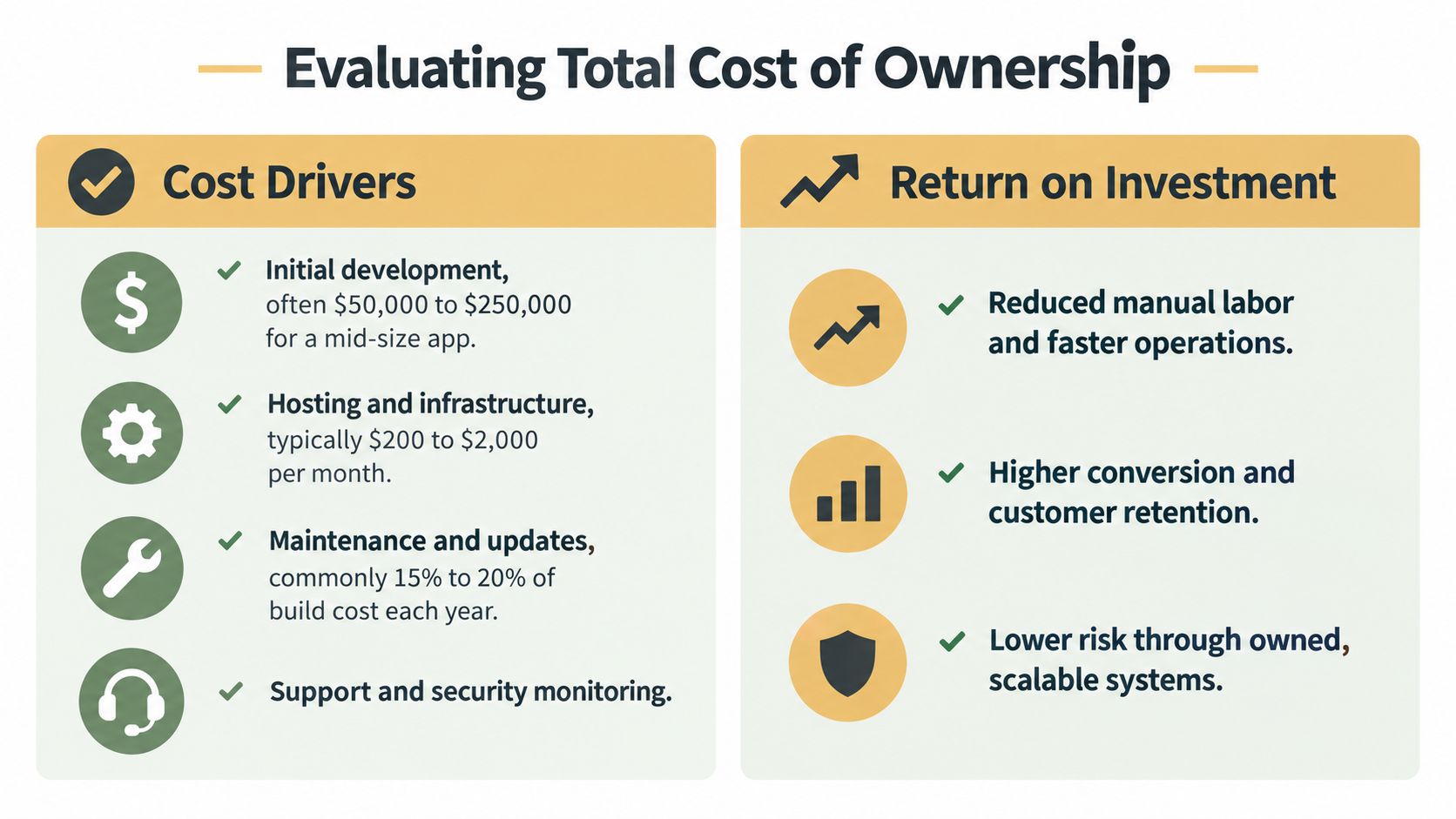
The initial development invoice is only one line in the financial model. A web application also consumes engineering time, hosting and infrastructure resources, security work, accessibility testing, monitoring, support, analytics, content, integrations, and future changes.
The comparison between buying and building should therefore begin with the business constraint. An off-the-shelf SaaS product may be the sensible choice when the workflow is common and configuration is enough. Custom development becomes more defensible when the workflow creates a competitive advantage, the existing tools force costly manual work, or the business needs control over data, integrations, and product direction.
Build a total ownership model
Separate costs into four groups:
- Creation: Discovery, research, UX, interface design, architecture, development, data migration, integrations, and launch preparation.
- Operation: Hosting, observability, backups, support, incident response, security reviews, and accessibility checks.
- Change: New features, browser and dependency updates, API changes, redesigns, compliance work, and performance improvements.
- Commercial growth: Acquisition, SEO, content, onboarding, experimentation, customer success, and analytics.
That structure prevents a common budgeting error: treating maintenance as an optional retainer. If the application processes customer data or payments, ongoing security work is part of the product's operating cost. If the application serves the public, accessibility and performance should be acceptance criteria, not retrofit projects.
Connect investment to a measurable outcome
ROI should use a baseline and an accountable owner. For an e-commerce app, track completed purchases, average order value, checkout completion, repeat purchasing, and support contacts. For an internal tool, measure processing time, manual steps, error rates, and staff capacity. For a customer portal, examine self-service completion and the volume of avoidable support requests.
Don't count logins as business value unless login activity leads to a commercial or operational result. A feature is worth funding when it improves a defined outcome, reduces a known cost, lowers material risk, or creates a capability the business couldn't reasonably obtain elsewhere.
A simple decision test is:
| Question | What a strong answer looks like |
|---|---|
| What problem is expensive today? | A named workflow, audience, or revenue constraint |
| Why won't an existing tool solve it? | A specific limitation, integration gap, or ownership need |
| What will improve after launch? | A baseline, target, measurement method, and owner |
| Who maintains the product? | Named responsibility for security, support, data, and releases |
| What happens if usage grows? | A documented plan for performance, capacity, and costs |
The cheapest build can become the most expensive choice if nobody can patch it, explain its integrations, restore its data, or extend its architecture. The right question isn't “How little can we spend to launch?” It's “What level of ownership can the business sustain while the application produces value?”
Choosing the Right Development Partner for Your Goals
A development partner should challenge the business case before discussing frameworks. Ask how the team will discover requirements, define a first release, test critical workflows, document decisions, secure integrations, measure adoption, and support the application after launch.
Portfolio screenshots aren't enough. Look for evidence that the partner understands operational software, not just presentation layers. A serious evaluation should cover:
- Business diagnosis: Can the team connect features to revenue, efficiency, customer experience, or risk?
- Technical judgment: Can it explain why a stack and architecture fit the problem, including what it would avoid?
- Delivery discipline: Does it use prototypes, milestones, version control, testing, staging, and documented acceptance criteria?
- Security ownership: Will it define authentication, authorization, secrets, API governance, logging, backups, and incident procedures?
- Accessibility practice: Does it test complete user flows with keyboard and assistive technology, rather than relying only on automated scores?
- Growth support: Can it monitor performance, manage dependencies, improve SEO where relevant, and prioritize changes using evidence?
A business owner should also ask for the uncomfortable details. Who owns the source code and deployment accounts? What happens when a third-party API changes? How are defects prioritized? Which services create vendor lock-in? What does the support agreement cover, and what does it exclude?
For Omaha-based businesses, local context can help when the partner understands the market, customers, and operational realities of smaller teams. That local perspective still needs to be matched with technical capability for applications that serve national audiences or complex internal processes. A partner working across custom web applications, data-driven SEO, and AI consulting can connect acquisition, product experience, automation, and measurement instead of treating them as unrelated projects.
Up North Media offers custom web application development, data-driven SEO marketing, and AI consulting for businesses that need browser-based products tied to measurable growth. Its services include planning, prototyping, development, testing, deployment, and ongoing optimization. Evaluate that option alongside other agencies by asking for a clear ownership model, a security plan, a measurement framework, and an honest explanation of trade-offs.
The best partner won't just promise a fast launch. It will help you decide what should be built, what should be bought, what must be tested, and who will keep the system healthy after release. That is where the economics of web app development become clearer. You aren't purchasing screens. You're investing in a business capability with continuing responsibilities.
If your business is evaluating a customer portal, e-commerce platform, internal tool, or AI-enabled web application, Up North Media can help define the requirements, architecture, SEO opportunities, and post-launch ownership plan. Visit the site to request a free consultation and turn your proposed web app into a measurable roadmap for growth.