
Installing GA4 isn't analytics implementation. It's only the point at which a platform begins receiving signals. A site can have a carefully configured tag manager, clean event names, and attractive dashboards, yet still leave marketers guessing, product teams waiting, and leadership exporting spreadsheets before every decision.
The operational test is harder: does reliable data reach the workflow where someone can act on it? A paid media manager needs trustworthy conversion and consent signals inside campaign routines. A product team needs behavioral evidence connected to backlog decisions. An agency needs a documented measurement system that survives client changes, platform updates, and staff turnover.
Analytics has always been about more than collection. Taylor's time-and-motion studies established an early foundation for quantitative operations analysis, while Hollerith's punch-card machine helped the U.S. federal government compile statistics for the 1890 census. By the late 1960s, businesses were moving toward computer-supported decisions, and relational databases and statistical software expanded analytical capacity in the following decades. This history of analytics explains why modern implementation still depends on the same core sequence, instrument activity, centralize records, and turn them into decisions.
Why Most Analytics Implementations Fail Before They Start
The popular advice says to install GA4, add Google Tag Manager, publish the container, and start building reports. That sequence solves data transmission, not implementation. If nobody has agreed what a conversion means, who owns the event schema, or which team will act on the output, the setup is technically live but operationally incomplete.
Enterprise adoption makes this distinction more important, not less. One industry summary reported that more than 78% of global enterprises had implemented at least one BI or analytics platform by 2025, while another reported that 91.9% of organizations gained measurable value from data and analytics investments. Those figures come from the same industry summary, but they don't prove that every deployment is mature. A platform can generate value in one workflow and remain ignored in another. The industry adoption summary also reported that 87% of previous Universal Analytics users completed migration, yet only 18% of GA4 users had configured BigQuery export. That contrast shows how migration completion can coexist with limited downstream access.
Collection isn't the same as usefulness
The most common production failure is a dashboard that answers no decision question. A marketing report may display sessions, users, and channel traffic, but the media team still can't tell whether a campaign generated qualified leads. An e-commerce dashboard may show purchases, yet the merchandising team can't distinguish a product view from an inventory-driven checkout failure.
Another failure appears when teams track only what the platform collects automatically. The same GA4 report said 41% of implementations relied only on auto-collected events, while 23% included custom event parameters. Auto-collected activity can establish a baseline, but it rarely captures the business context needed for optimization, such as plan type, lead quality, product category, or checkout status.
Practical rule: If an event doesn't change a decision, document why it exists before adding it.
Consent creates a second operational risk. A browser-only implementation may appear healthy in a developer session while losing important signals when visitors reject analytics storage, browsers restrict identifiers, or ad blockers prevent client-side requests. A resilient architecture treats consent state as part of the event contract. Every downstream destination should know whether collection is permitted, restricted, or withdrawn.
Governance belongs in the first sprint
Governance isn't a folder of old screenshots. It means assigning owners, documenting event definitions, controlling changes, and recording why a tag exists. Without those controls, naming conventions drift, duplicate tags appear, and the original implementer becomes the only person who understands the system.
Start by defining the business workflows that analytics must support. Then connect each workflow to a small set of decisions, events, data owners, destinations, and validation checks. That approach prevents the familiar waste pattern, months of collecting records that never influence spend allocation, product prioritization, or customer experience improvements.
Aligning Stakeholders and Defining What to Measure
Stakeholder alignment starts with decisions, not metrics. Ask each team, “What decision do you make repeatedly, and what evidence would change it?” A paid media manager might adjust budget between campaigns. A sales leader might decide whether a lead deserves follow-up. A product manager might prioritize an onboarding fix. Each answer points to a measurement requirement.
Run discovery around decisions
Bring marketing, sales, product, operations, engineering, and privacy owners into the same discovery process. Their priorities will conflict. Marketing may want more audience detail, privacy may require stricter collection, engineering may reject fragile front-end logic, and sales may distrust lead counts that don't match the CRM.
Document those conflicts instead of smoothing them over. A useful discovery record includes:
- Decision owner: Name the person or team responsible for acting.
- Business question: Write the question in plain language, such as “Which campaign produces sales-accepted leads?”
- Required evidence: Identify the event, parameter, system record, or qualitative input needed.
- Action threshold: Define what would cause the owner to change behavior.
- Data constraint: Record consent, retention, identity, platform, or implementation limitations.
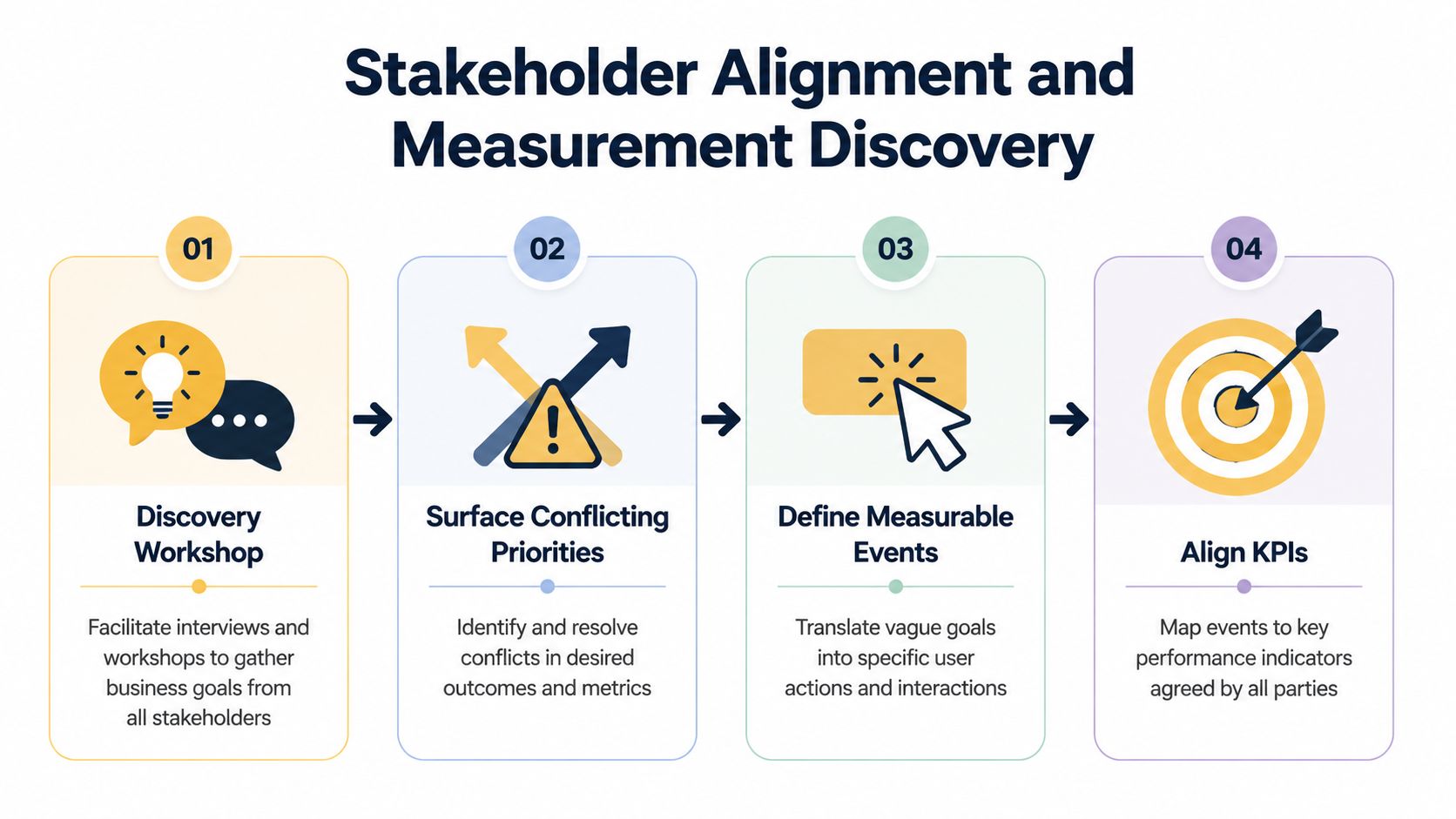
A vague request such as “understand user behavior” isn't ready for development. Convert it into observable actions. An e-commerce team might need product_viewed, add_to_cart, cart_abandoned, and checkout_completed. A SaaS team might need account_created, workspace_invited, trial_started, and feature_used. A lead-generation site may need form_started, form_submitted, qualified_lead, and appointment_booked.
Each event needs a stable definition. Specify when it fires, what identifies the object, which parameters are required, what consent state applies, and which destinations receive it. “Form submitted” should mean a confirmed successful submission, not a button click that fires before validation fails.
Separate useful KPIs from decorative metrics
A metric becomes actionable when an owner can respond to it. Traffic volume may provide context, but it isn't automatically a performance indicator. A conversion event becomes more useful when the implementation preserves source context, landing experience, device or journey context where permitted, and the business outcome recorded after the initial interaction.
Attribution needs the same discipline. Define whether the question concerns campaign influence, last-touch reporting, marketing-assisted revenue, or a backend-confirmed outcome. This guide to marketing attribution is useful when stakeholders use the word “attribution” to describe different analytical questions.
Prioritize requests by business impact and implementation risk, not by who asks first. A revenue event with a dependable backend source should usually outrank a low-value interaction that requires brittle custom JavaScript. When resources are tight, ship the smallest trustworthy schema that supports a real decision, then expand deliberately.
The measurement plan becomes the contract between stakeholders and implementation teams. Include event names, descriptions, trigger conditions, parameters, data types, examples, owners, destinations, consent behavior, QA status, and change history. Developers shouldn't have to infer business meaning from a ticket titled “add tracking.”
Building the Technical Foundation with GA4 and GTM
GA4 and GTM are tools inside an architecture, not the architecture itself. GA4 receives and organizes events. GTM manages deployment logic. The dataLayer provides a structured handoff from the website or application to the tag system. If those boundaries are unclear, every new request adds another workaround.
Create one authoritative Google tag configuration for the property, then build business events around a documented dataLayer. Use GTM's built-in variables for stable browser context, such as page location or click text, and reserve custom JavaScript for cases where a defined transformation can't be handled another way. Custom JavaScript scattered across tags becomes difficult to review, test, and hand over.
Design the dataLayer before the tags
A developer should push business facts, not instructions to fire marketing tags. For an e-commerce confirmation, the dataLayer might expose an event called purchase, a transaction identifier, currency, value, and an items array. For a SaaS application, an account_created event might include account type and acquisition context, provided those fields meet privacy and consent requirements. For a lead form, form_submitted can carry a form identifier and submission status, while qualification belongs in the CRM rather than being guessed from a button click.
Use consistent types and naming. Keep monetary values numeric, use stable identifiers, and avoid putting raw personal information into analytics events. Define whether an event can fire more than once, and make the deduplication key explicit. A purchase should be tied to a transaction identifier, not to the fact that a visitor refreshed a thank-you page.
Enhanced Measurement can provide useful baseline coverage, but review every automatically collected event against the measurement plan. Automatic scroll, outbound click, site search, video, file download, and form events may be helpful in one property and noisy in another. Disable irrelevant collection rather than forcing every report to explain incidental behavior.
Make GTM maintainable
Use a naming convention that exposes platform, business action, trigger, and status. Group tags, triggers, and variables by function, and keep one purpose per tag. Set firing conditions as narrowly as the business definition requires. A broad “all clicks” trigger might work during a prototype, but it can fire on redesigned components, hidden elements, or unrelated calls to action.
Cross-domain journeys deserve deliberate testing. If a main site sends visitors to a separate checkout or scheduling domain, configure the linker and confirm that the transition preserves the intended journey. Don't assume that seeing a request in the browser means sessions and attribution will remain coherent.
| Setting | Recommendation | Trade-off | Impact if Misconfigured |
|---|---|---|---|
| Enhanced Measurement | Keep only events that support a documented question | Less automatic coverage, cleaner interpretation | Reports fill with incidental events or duplicate custom events |
| Google tag configuration | Use one authoritative configuration per property | Requires ownership discipline | Page views and sessions can duplicate |
| DataLayer schema | Push stable business events with typed parameters | Requires developer coordination | Tags depend on fragile selectors and break during redesigns |
| Custom dimensions | Register only parameters used in analysis | Smaller reporting surface | Excess fields create naming drift and low-value maintenance |
| Cross-domain measurement | Test every domain transition and linker behavior | More QA across systems | Users, sessions, and attribution fragment |
| Trigger conditions | Use explicit event and state conditions | More setup time | Tags fire on invalid, repeated, or unintended interactions |
Teams comparing reporting connectors should also separate the measurement layer from the extraction layer. A resource such as compare vs Supermetrics can help evaluate how data-access tools fit after GA4 and GTM have produced a trustworthy schema. A connector won't repair duplicate purchases or undefined campaign logic.
Designing a Privacy-First and Server-Side Measurement Architecture
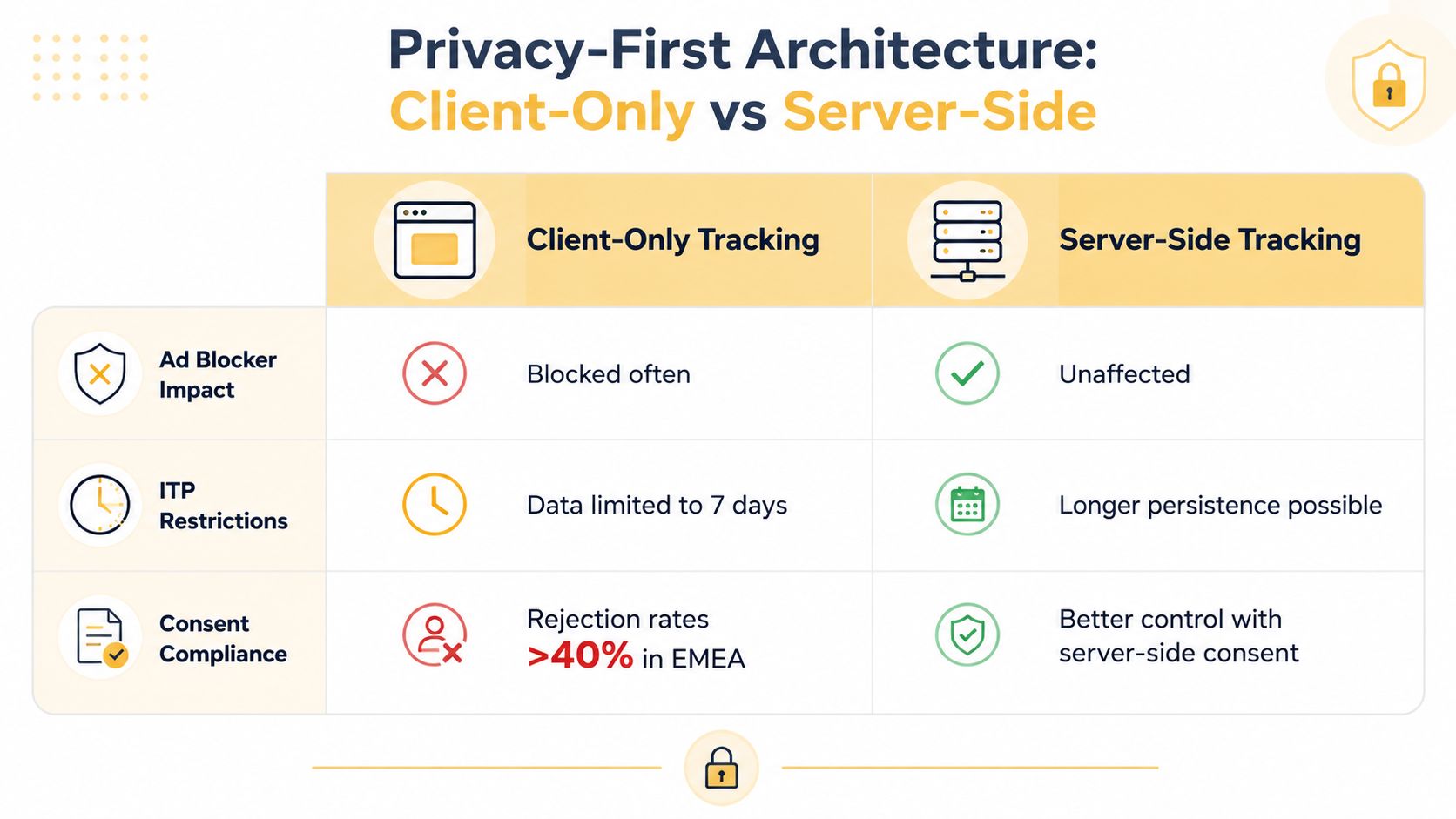
Privacy-first measurement starts with a question: which signals must be collected in the browser, and which can be routed through a controlled server environment? Client-only tagging is simpler to deploy and debug, but it exposes collection to browser restrictions, extensions, consent decisions, and front-end changes. Server-side tagging can reduce some client-side exposure and centralize transformations, but it adds hosting, monitoring, certificate, access-control, and debugging responsibilities.
The practical answer for many growing businesses is a hybrid stack. The browser captures only the permitted interaction and consent state. A first-party collection endpoint receives the request. A server container validates and transforms the payload before forwarding approved fields to GA4, advertising platforms, CRM systems, or warehouse destinations.
Choose architecture by risk
A client-only setup may be appropriate when the business has a simple site, limited destinations, no sensitive workflow, and a team that can maintain consent controls. Server-side tagging becomes more compelling when multiple destinations need consistent filtering, when CRM or offline events matter, or when the organization needs stronger control over which fields leave its collection layer.
The trade-off is operational. Server-side doesn't make an implementation compliant automatically. Someone still needs to define consent states, prevent prohibited fields from entering the request, manage retention, monitor delivery, and prove that withdrawal stops downstream processing. A server can centralize bad data just as efficiently as good data.
Consent must propagate across the client and server boundary. Establish default consent behavior before tags initialize, update the state when the user makes a choice, and make every destination honor that state. When consent is withdrawn, stop eligible downstream processing and avoid leaving queued or orphaned tags active. Treat identity matching as a separate design decision, especially when joining browser interactions to CRM or offline conversions.
Google's Measurement Protocol is designed to supplement browser tracking by sending server-side and offline interactions directly to Analytics. This practical guide to server-side tracking discusses the broader move toward consent-aware collection, server-side tagging, and offline event capture, including the governance and identity trade-offs that determine whether a hybrid stack remains trustworthy.
Before committing, model the full operating cost:
- Collection: Where does the request arrive, and how is consent represented?
- Transformation: Which fields are removed, normalized, or enriched?
- Routing: Which destinations receive each event, under what conditions?
- Deduplication: How do client and server copies resolve to one business event?
- Observability: Where do engineers inspect failures, latency, and rejected payloads?
- Exit plan: How can the business change vendors without losing the event contract?
A server-side container is valuable when it solves a defined control or resilience problem. It isn't valuable merely because it sounds more advanced.
For a deeper explanation of the architectural differences, see server-side tracking explained. The implementation should then be tested under consent granted, consent rejected, consent changed, ad blocker enabled, browser storage restricted, and offline conversion imported conditions.
Validating Data Quality Before Launching Dashboards
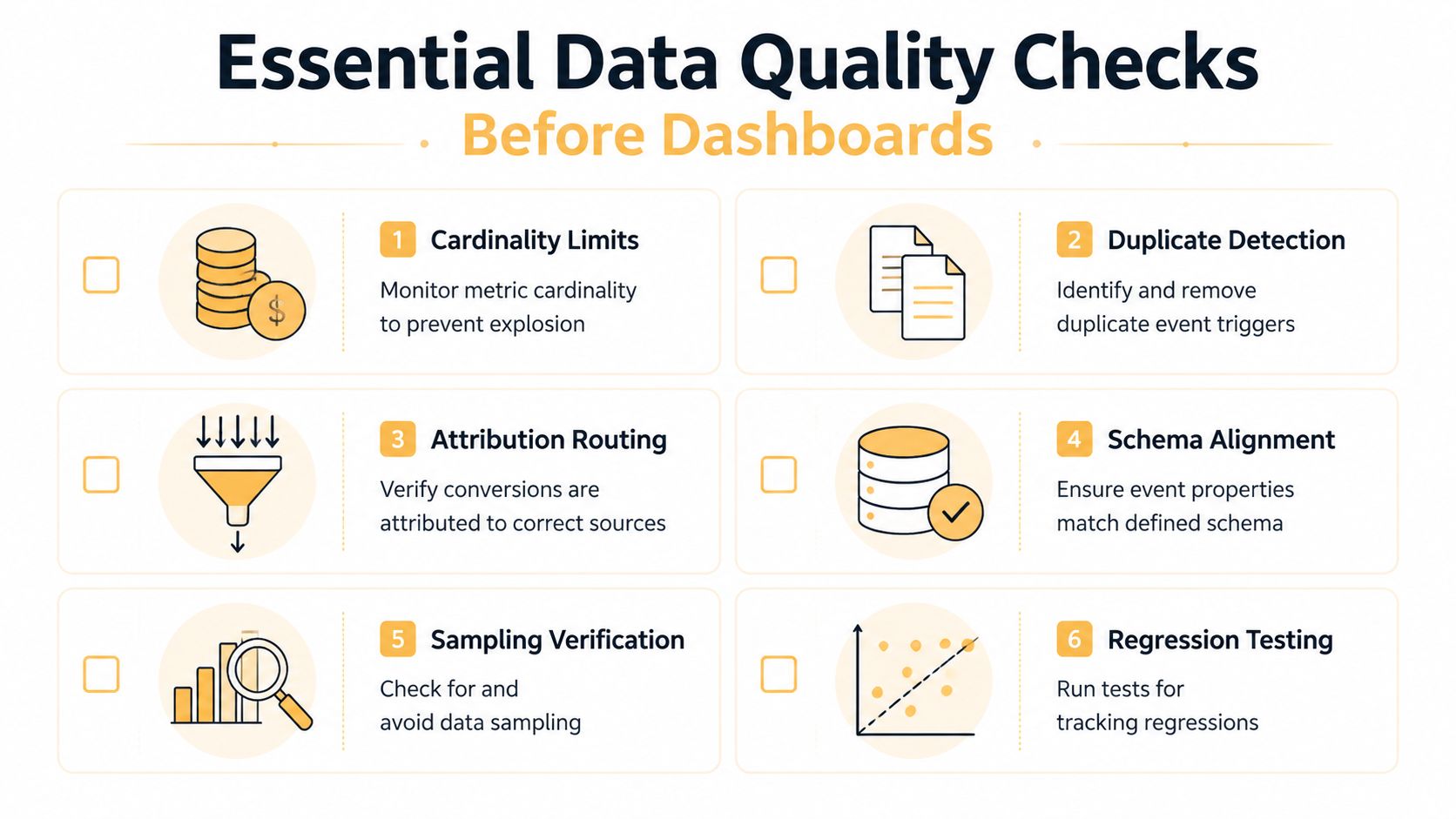
A dashboard can make broken data look official. Launch QA should therefore begin with event behavior and end with business reconciliation, not with visual polish. The question isn't whether a chart renders. It's whether the number behind the chart represents the event the business thinks it represents.
Start in GTM Preview. Confirm the expected event appears, the correct variables resolve, the intended tag fires once, and unrelated tags stay blocked. Then inspect GA4 DebugView to confirm that GA4 received the request and that the parameters arrived with the expected names and values. These tools answer different questions, so passing one doesn't prove the other.
Test the failures that matter
Use browser developer tools to inspect network requests, consent updates, linker parameters, and payload contents. For complicated integrations, a proxy tool can reveal whether a request changed between the browser, collection endpoint, and destination. Test dynamically rendered components, single-page application route changes, validation errors, refreshes, back-button behavior, and interrupted checkouts.
The most damaging defects are often ordinary:
- Duplicate page views: A history-change trigger and a page-view trigger both send the same route.
- Repeated purchases: A confirmation page refresh sends the transaction again without a deduplication key.
- Missing parameters: A dynamically rendered button fires, but the product or form identifier isn't available at trigger time.
- Consent races: A tag fires before the consent platform updates GTM's state.
- Broken domain transitions: Linker parameters are stripped by redirects, fragmenting sessions.
- Schema drift: A developer changes
plan_typetoplanName, leaving reports partially empty.
Use a priority tier to make release decisions. Block launch for duplicate revenue events, incorrect conversion definitions, prohibited data collection, broken consent withdrawal, or missing core transactions. Track lower-risk issues, such as an inconsistent optional label, as technical debt with an owner and remediation date.
Validate after collection
Post-collection checks should compare analytics records with a dependable operational source. E-commerce teams can reconcile transaction identifiers and order values with backend records. Lead-generation teams can compare successful form submissions with CRM-created records. Product teams can compare account creation events with application records.
For larger implementations, review exports and data-quality reports for null fields, unexpected values, event spikes, and cardinality problems. Don't let sampling, thresholds, or aggregation hide a broken funnel. This guide to measuring digital marketing performance provides useful context for connecting channel metrics to actual performance evaluation.
Keep a test evidence record with the scenario, consent state, expected result, observed result, screenshot or request reference, and owner. That file turns launch approval into an auditable decision instead of a memory-based signoff.
Maintaining Governance and Avoiding Common Pitfalls
Analytics implementations decay because businesses change faster than their documentation. A redesign introduces new components, a consent banner changes its categories, a CRM alters field names, or the person who created the container leaves. Without ownership and change control, the stack becomes a collection of plausible numbers with no reliable chain of responsibility.
Build a lightweight operating model
Assign an owner for each major area, including the measurement plan, GTM container, GA4 property, consent platform, CRM destinations, warehouse exports, and dashboard layer. Ownership doesn't mean one person performs every task. It means someone knows what changed, why it changed, how it was tested, and when it needs review.
Use GTM workspaces and approvals to create an audit trail. Every change should include a business reason, affected events, consent implications, test evidence, and rollback notes. Store the measurement plan and schema outside the tag manager so developers, analysts, agencies, and new staff can access the same definitions.
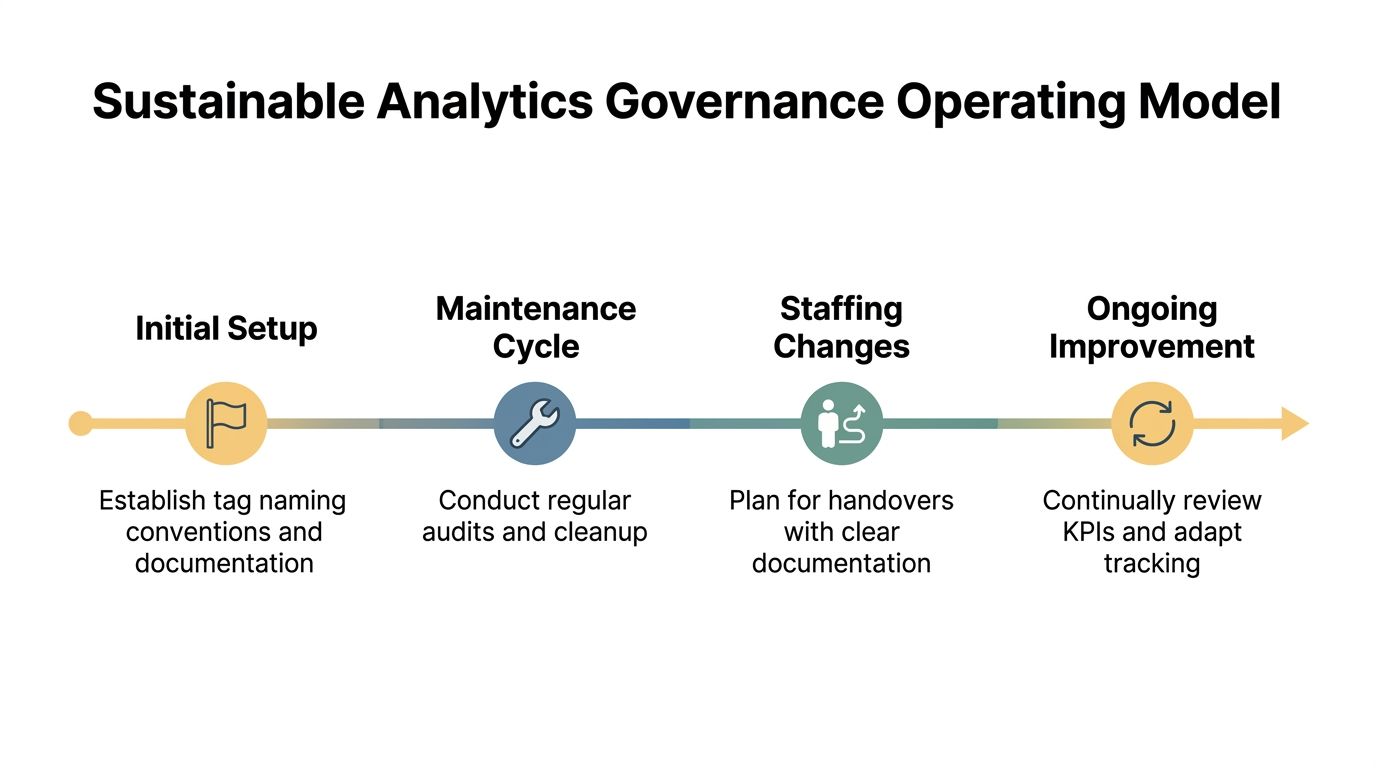
A workable cadence is more valuable than a complex committee:
- Monthly audit: Review conversion volumes, duplicate indicators, missing parameters, consent behavior, and destination delivery.
- Quarterly taxonomy review: Compare events and KPIs with product, campaign, website, and CRM changes.
- Annual architecture assessment: Reconsider destinations, identity rules, retention, server-side requirements, and warehouse access.
- Change-triggered QA: Test immediately after releases affecting checkout, forms, routing, consent, authentication, or campaign parameters.
Troubleshoot from the business record backward
A sudden traffic drop may reflect a consent banner update rather than a genuine audience change. A GA4 and backend conversion discrepancy may come from duplicate browser events, delayed server events, different transaction definitions, or timezone handling. A funnel may look weaker because a route-change trigger stopped firing, not because users changed behavior.
Start with the business event and trace backward through the system. Check the backend record, server receipt, client request, consent state, GTM trigger, dataLayer payload, and source configuration. This sequence prevents teams from “fixing” dashboards when the actual defect sits in collection or identity handling.
Governance should also address access, retention, personal-data restrictions, vendor review, and handover requirements. Teams looking for a broader operating model can use this resource on intelligent data platform governance to frame governance as an ongoing practice rather than a one-time implementation document.
The strongest analytics implementation is not the one with the most tags. It's the one a new team member can understand, a developer can extend safely, a privacy owner can audit, and a decision-maker can use without manually defending every number.
Up North Media helps growing businesses connect analytics implementation to practical marketing, web development, and AI workflows, from measurement planning and consent-aware tracking to dashboards that support real decisions. Visit Up North Media to discuss your current stack, identify where data is being lost between collection and action, and plan a maintainable implementation.