

Your store's ads are still running, checkout still works, and the payment processor says orders came through. Then you open analytics and the numbers don't line up. Some purchases seem to vanish, some form fills never show up, and your team starts debating whether the issue is the ad platform, the tag manager, or the checkout flow itself.
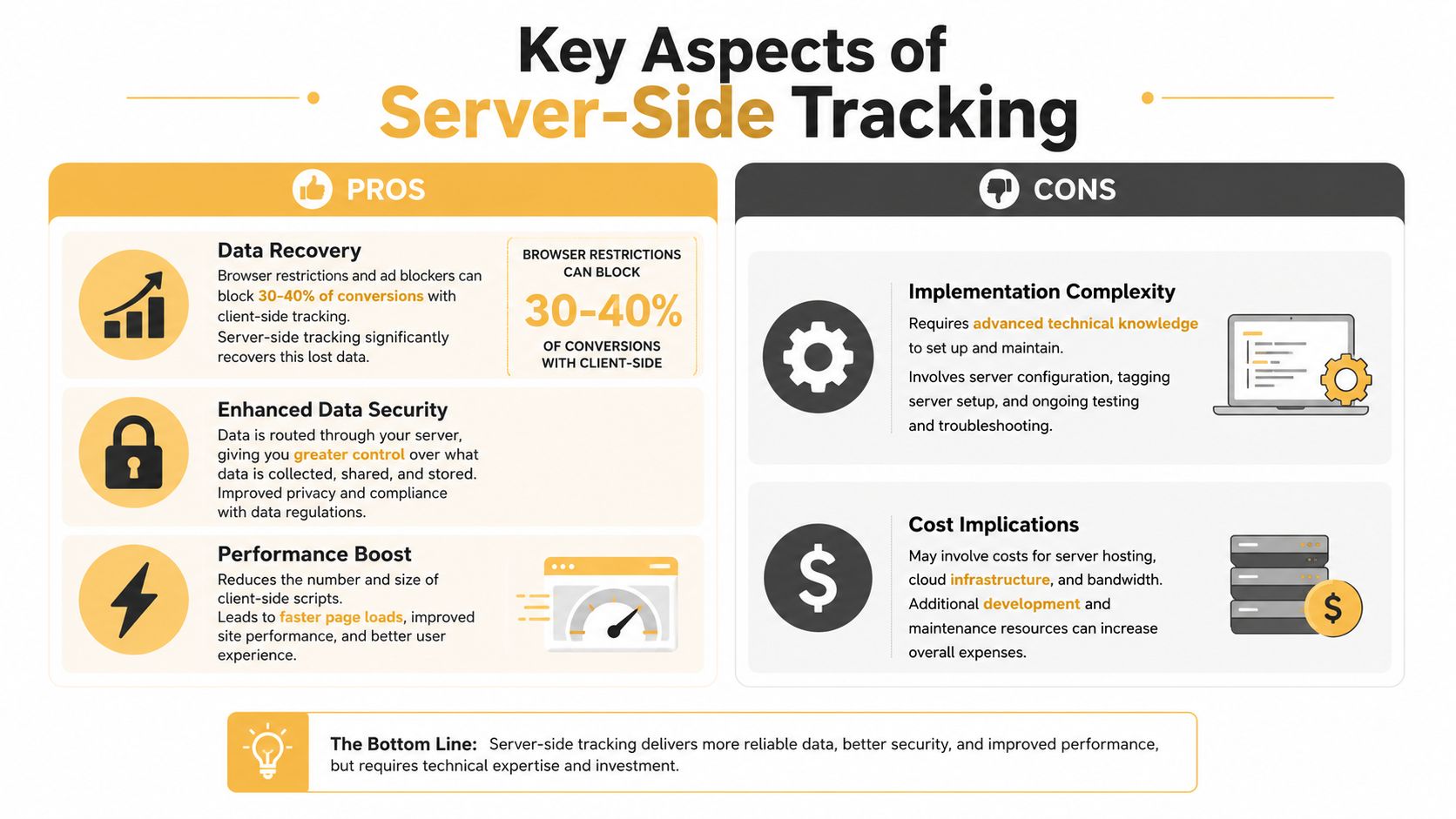
That gap is where server-side tracking enters the conversation. It moves important event collection away from the browser, where blockers and privacy features can interfere, and into a server you control before the data is sent on to analytics or ad platforms. For SMBs and e-commerce teams, that shift can mean clearer reporting, better attribution, and less guesswork around what drove revenue, especially when browser restrictions can block 30 to 40% of standard conversion data and server-side setups can recover 20 to 30% of lost conversions and interactions in some cases source.
Introduction to Server Side Tracking
A lot of teams first notice the problem at the worst possible time, after ad spend has already been committed. A shopper clicks through, fills a cart, and reaches the payment step, but the browser never finishes sending the tracking event because a blocker, a privacy setting, or a script issue gets in the way. The sale still happened, but the report says otherwise.
That gap is why understanding server-side tracking matters as a business topic, not just a technical one. It gives you a more controlled path for the events that matter most, especially purchases, lead submissions, and subscription upgrades. The browser sends the event to your server first, then your server forwards it to tools like Google or Meta through APIs, which reduces the amount of data lost to browser-side interference.
For SMBs, the value shows up in day-to-day decisions. If your team is trying to decide whether a campaign worked, whether a landing page converted, or whether a discount really paid off, missing event data creates expensive ambiguity. Server-side tracking does not solve every measurement problem, but it does make the highest-value parts of the customer journey much easier to trust.
A useful way to judge the tradeoff is to compare it with first-party data collection. Instead of letting every vendor script pull from the browser on its own, your team keeps a controlled copy of the event flow inside infrastructure you manage. That structure also supports better marketing attribution for profitable scale when sales and ad teams need a clearer picture of which touchpoints deserve credit.
The hidden cost for smaller teams is not only lost tracking. It is the time spent arguing over whether the numbers are wrong, retesting tags after browser changes, and patching gaps that no one planned for. Server-side tracking can reduce that drag, but it also asks for clearer governance, cleaner event definitions, and someone to own the setup so the system does not become another source of confusion.
Practical rule: if a missing event would change a budget decision, it deserves more reliable collection than a standard browser tag can usually provide.
Understanding Server Side Tracking Concepts
Think of client-side tracking as multiple messengers running from your site to different vendors. Each messenger carries a note from the browser, but each one can be slowed down, intercepted, or blocked on the way. Server-side tracking works more like a centralized post office you control, where the browser hands the event to your own infrastructure first, and that server then decides what gets cleaned, enriched, and forwarded.
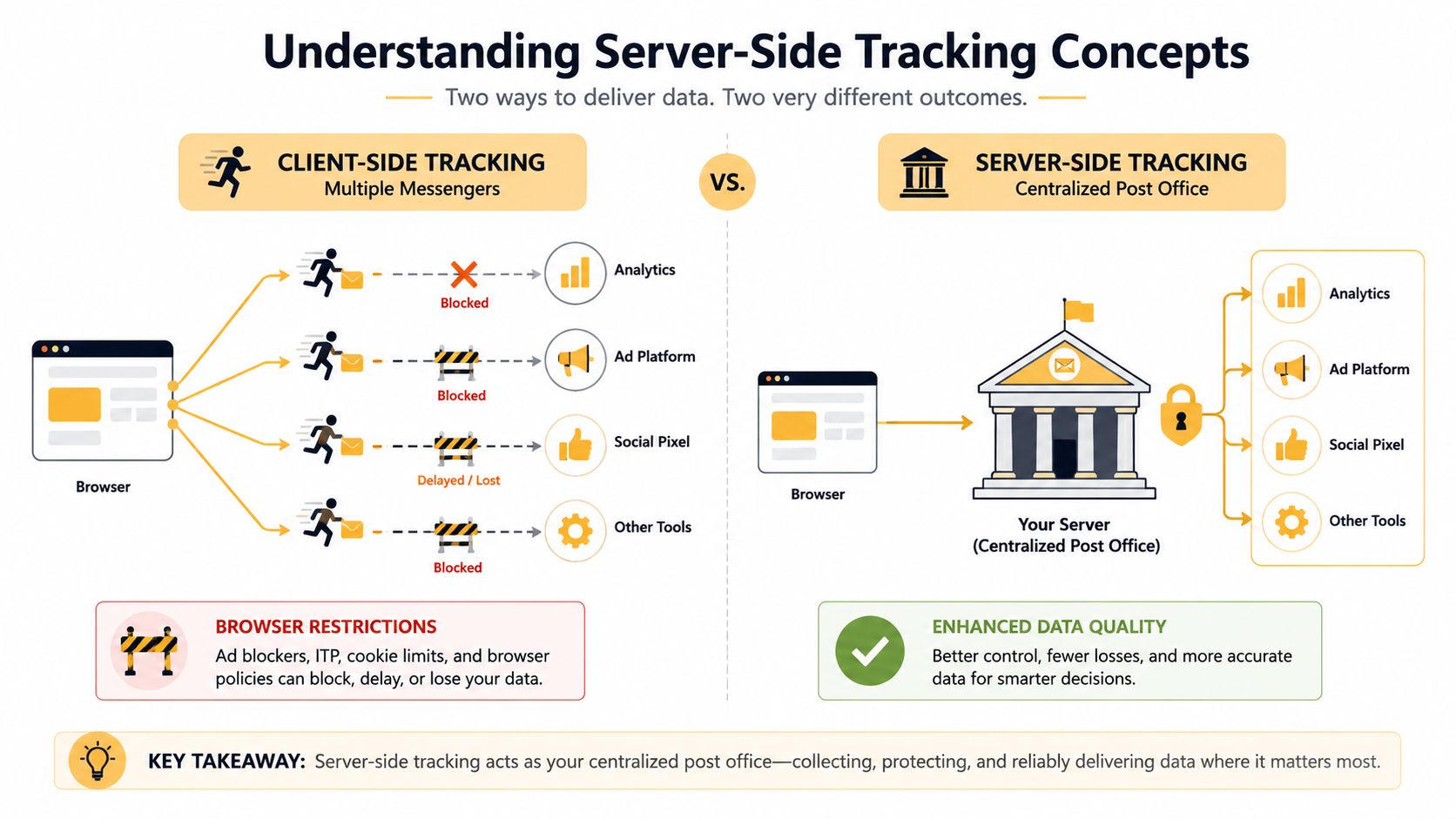
That flow usually has four moving parts. First, the browser captures an action such as a checkout, lead form, or signup. Next, the event lands on your server endpoint rather than going straight to every vendor script. Then the server can validate and enrich the event, which is where first-party customer data or order context may be attached. Finally, the server forwards the cleaned event to analytics or ad platforms through secure APIs.
Google Tag Manager introduced server-side tagging in 2020, which helped formalize the approach for marketers and gave teams a common implementation path source. Since then, many teams have treated it as a first-party-style pipeline, not a full replacement for browser tracking, but a stronger delivery layer for revenue-critical events. That's also why resources on marketing attribution for profitable scale matter so much, because attribution only works when the underlying event trail is trustworthy.
A helpful way to think about it is this, the browser catches the moment, the server decides how to package it, and the vendor receives a cleaner message. If you're also building out first-party data collection, the architecture starts to make even more sense because the server becomes the point where owned data and measurement data meet.
Key Aspects of Server Side Tracking
Where the value shows up
The clearest upside is data recovery. Browser limits, Safari ITP, and pixel blockers can remove a meaningful share of standard conversion data before it reaches your reporting tools. Moving the event flow server-side can bring back some of that lost signal, which makes the data sent to ad and analytics platforms more complete.
There is also a control benefit. Because the server validates, enriches, and then forwards data through secure APIs, teams can attach CRM or customer-value context before the event leaves the domain source. For e-commerce and lead-gen teams, that matters when the same purchase or lead should be judged differently based on margin, audience value, or fulfillment status.
For SMBs, the practical value is not abstract. Cleaner purchase and lead data can reduce wasted spend, improve reporting confidence, and give smaller teams a clearer view of which channels are contributing revenue.
What still doesn't disappear
Server-side tracking is not magic. The browser can still suppress events before they ever reach the server, so you are not eliminating every measurement gap source. Identity resolution, consent handling, and deduplication still need real attention. If those pieces are sloppy, the pipeline can become more complicated without becoming more trustworthy.
Rule of thumb: better collection does not cancel out weak governance. If your consent setup is weak, server-side tracking just moves the problem to a cleaner-looking place.
The hidden operational cost
This is the part many guides skip. A server-side setup can require hosting, implementation effort, event validation, deduplication logic, and ongoing maintenance source. For SMBs without dedicated analytics engineering, that overhead is the main tradeoff.
A lot of the marketing around server-side tracking focuses on privacy and speed, but those gains do not remove the need for consent wiring or data minimization. In practice, the value comes from control, not exemption. If you are comparing it with broader what is marketing attribution questions, the key issue is whether your reporting stack can justify the extra operational burden.
That is why governance matters as much as tooling. Someone still has to decide which events are allowed through, how duplicate conversions are handled, and who owns changes when a platform updates its API or rules.
A simple business lens
Use server-side tracking when a few events drive most of your revenue. Keep the setup narrow at first. That approach gives you the reliability benefits without forcing your team into a heavyweight rebuild.
For teams trying to measure revenue with less noise, Click Click Bang Bang's ecommerce tracking insights can help frame which events deserve the most attention and which gaps are worth fixing first.
Implementation Options and Architecture Patterns
Three patterns teams usually choose
A server-side setup usually starts with a decision about how much of the tracking work your team wants to own. For an SMB, that choice is less about technical elegance and more about how much ongoing maintenance you can realistically support without adding hidden overhead to the marketing stack.
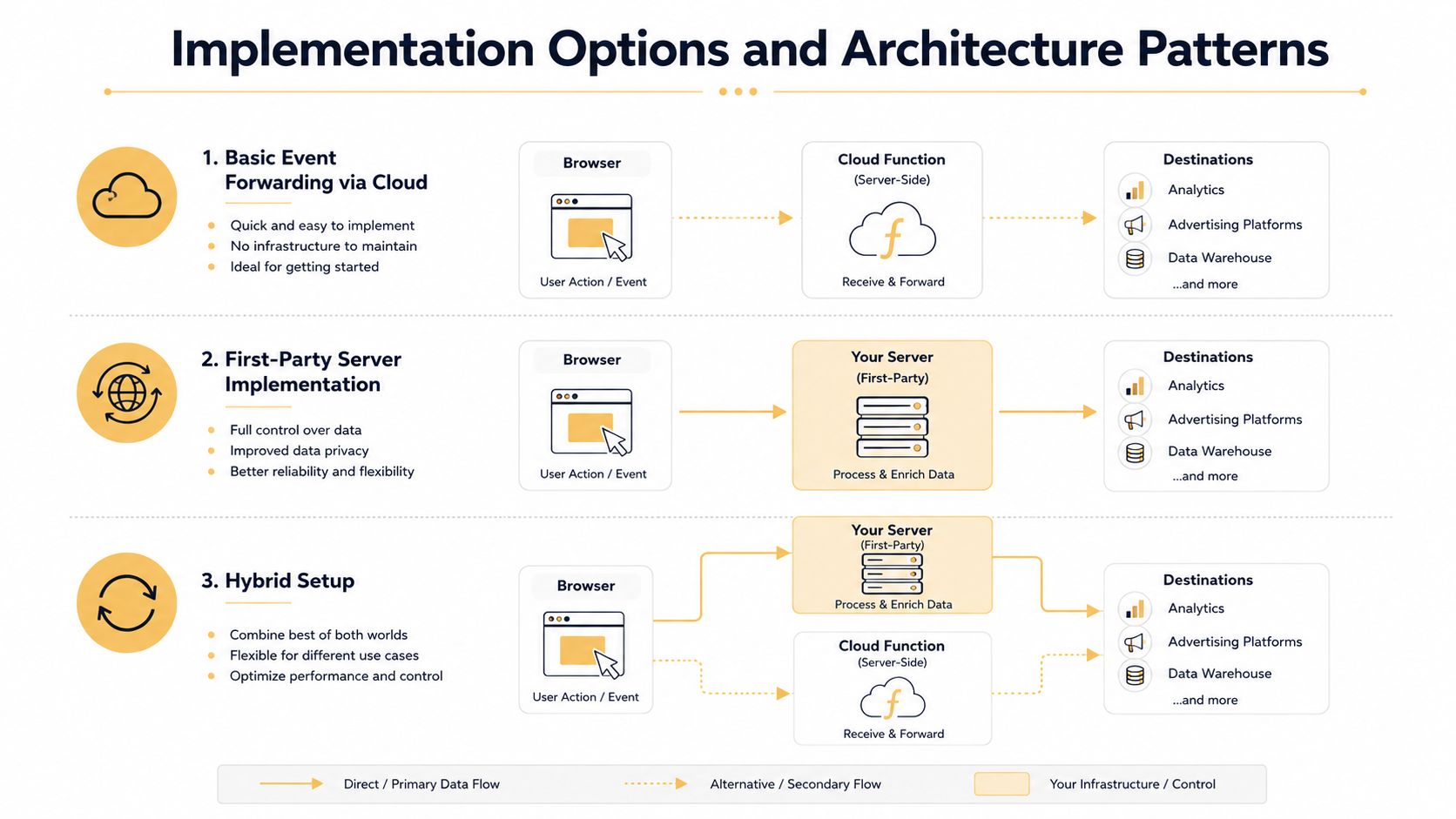
The lightest option is basic event forwarding via cloud functions. It suits teams that only need a narrow server layer to receive a specific event and pass it to one or more destinations. The setup is simple on paper, but it still depends on clean event naming, error checks, and regular monitoring so the flow does not drift out of sync unnoticed.
A more common setup is a first-party collector such as a GTM server container. In that model, the browser sends one event stream to infrastructure you control, and the server validates and enriches it before forwarding it to analytics or ad platforms through secure APIs source. For many ecommerce teams, this feels like moving from a cluster of individual vendor handoffs to one controlled checkpoint, which makes governance easier to explain and audit.
The third pattern is a fully custom pipeline. Teams use this when they need deeper enrichment, such as attaching CRM status, order value, or customer tier before transmission. It offers the most flexibility, but it also creates the most governance work, especially if several platforms depend on the same event and a small mapping change can affect reporting in more than one place.
For teams reviewing Click Click Bang Bang's ecommerce tracking insights, the practical lesson is simple, ecommerce tracking becomes more dependable when the architecture matches the business question. A purchase confirmation needs a different route from a button click, because one event affects revenue reporting and the other is mainly a signal of engagement.
What changes in practice
The flow becomes more centralized. Instead of the browser making many separate calls to vendors, the server acts as a single checkpoint for validation and forwarding. That reduces tag sprawl, but it also means your team owns more of the logic that used to live inside vendor tags.
That ownership is where hidden cost starts to show up. A server layer needs event schemas, deduplication rules, destination mapping, and error handling, so the work shifts from placing tags to managing an integration system. For teams that need help with that setup, API integration services often become part of the conversation because the same discipline used for other system connections applies here too.
The tradeoff is straightforward. A simple relay is easier to run, while a custom collector gives you more control over enrichment and routing. SMBs usually do best when they start with the smallest architecture that can reliably capture the money events, then expand only when they have a clear reason to add more logic.
Common Pitfalls and Migration Checklist
The mistakes that cause the most trouble
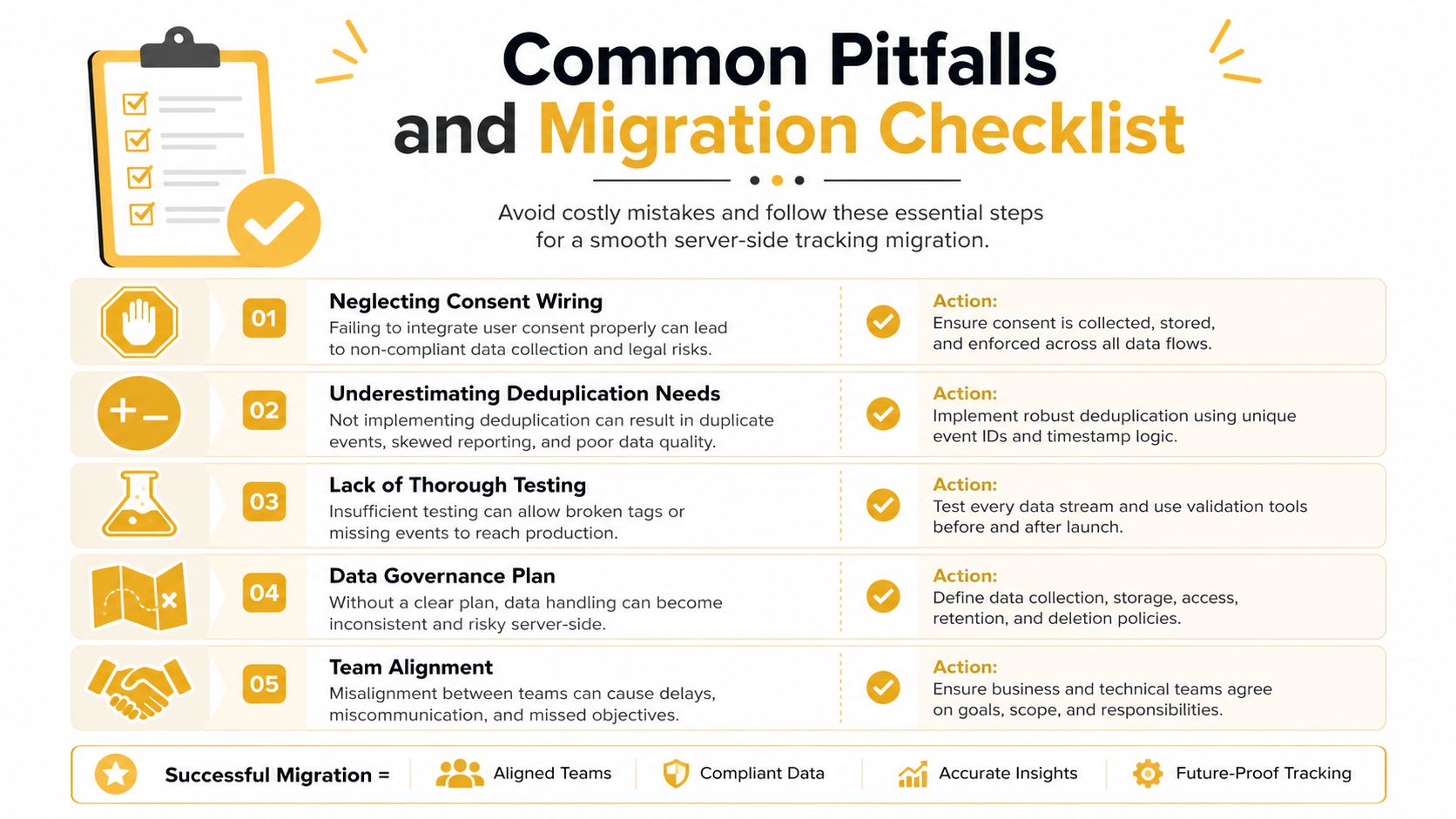
Server-side tracking can improve control over what leaves your domain, but it does not remove the need for consent handling and data minimization. If a team treats the server as a compliance shortcut, it is adding risk to the stack instead of reducing it source.
The next common mistake is underestimating deduplication. If the browser and server both send the same event and the platforms cannot tell which one to trust, reporting gets inflated or messy. A hybrid setup needs clear rules about which side sends which event and how the two layers match up.
A third mistake is trying to move everything at once. High-value conversion events usually belong on the server first, while engagement signals can stay client-side, because the browser still captures useful interaction data and the server protects the events that matter most source.
A migration checklist that will not wreck reporting
- Map the revenue events first. Start with purchases, qualified leads, or subscription upgrades.
- Confirm consent flow. Make sure the server only processes data allowed by your policy and setup.
- Define a deduplication rule. Decide which identifier, event name, or timestamp logic will prevent duplicates.
- Run client and server in parallel. Keep both paths active long enough to compare results and check consistency.
- Check against backend records. Compare the new pipeline with order data or CRM submissions.
- Document ownership. Someone has to monitor the server, the destinations, and the event mappings.
- Review after launch. Keep watching for missing values, duplicate counts, or consent drift.
Practical advice: if your team cannot name who owns validation, consent, and deduplication, the migration is not ready yet.
Why hybrid usually wins
The browser is still the best place for engagement signals. The server is the better place for revenue-critical actions. That split keeps the stack simpler and reduces the hidden operating cost for SMBs that do not have a dedicated analytics engineer.
Real World Examples for SMBs and E-commerce
A local retailer was dealing with a familiar problem, ad reports showed fewer purchases than the checkout system. The team moved order events into a server-side setup using a GTM Server container, and the cleaner purchase trail helped them recapture lost reporting confidence. In business terms, they were no longer making spend decisions based on incomplete browser data.
A niche subscription service took a different route. Instead of a standard template, it built a custom Node.js collector and enriched events with CRM loyalty tier data before sending them downstream. That gave the marketing team a more useful audience picture, because the platform wasn't just seeing a signup, it was seeing the customer's relationship value too.
The lesson from both examples is the same. Server-side tracking works best when it's tied to a specific business question, not treated as a blanket technical upgrade. Retailers usually start with order events, while subscription businesses often care more about renewals, upgrades, and lifecycle data.
A small team can get into trouble when it tries to solve every tracking issue at once. The cleaner path is to anchor the project on one revenue event, prove the data flow, and only then expand to additional touchpoints.
Conclusion and Next Steps
Server-side tracking gives SMBs more control over the events that matter most, especially when browser restrictions keep undermining the browser-only model. It can improve data quality, support better governance, and create a cleaner path for attribution, but it also adds real work around hosting, validation, consent, and maintenance. The smartest move is a scoped pilot, not a full-stack rebuild.
Start with one high-value event, run it in parallel with your current setup, and compare the results against backend records. Then decide whether the added operational burden is worth the reporting gain for your business.
If you're weighing whether server-side tracking makes sense for your store, SaaS product, or lead-gen site, contact Up North Media for a practical review of your tracking stack and a rollout plan that fits your team's capacity.