

You're looking at a quote that promises a new site in a few weeks, while checkout still runs on a CMS your last developer walked away from. Leads arrive through a form only one person knows how to edit. The homepage address hasn't changed since the first redesign, and a slice of old posts still brings in the calls. Moving feels overdue. It also feels like the week the phone goes quiet.
That tension is the job. A careful move carries the furniture, the address book, and the mail forwarding. Every missed box shows up later as a broken link or a lost lead.
What CMS Migration Services Cover
A redesign can pass visual review and still miss the business goal if product pages disappear from search or forms stop reaching the sales team. CMS migration services move a site's content, structure, media, users, integrations, and search signals to another content management system, or bring a custom-built or unmanaged site into a CMS. The work should protect revenue through cutover, with rollback triggers and monitoring defined alongside the build.
Four migration patterns carry different risks.
CMS-to-CMS moves a site between platforms, such as Joomla or Drupal into WordPress. W3Techs' historical tracking shows how platform use changes over time, but the practical question is what the destination can support. Content models, plugins, URLs, and editorial workflows may not map directly, so the team needs to identify what must be rebuilt before migration.
Custom-built-to-CMS brings unmanaged pages, files, and one-off scripts into a system the organization can maintain. The main risk is uncovering undocumented behavior that users or staff rely on. CMS-to-headless separates content editing from the front end, adding API and front-end work as well as new testing needs. Storyblok discusses headless CMS adoption, but the format is not automatically a fit: it can add operational complexity when a conventional CMS already meets the site's needs.
Hosting or version moves keep the platform and change its server or major release. They may involve less content restructuring, but compatibility, performance, and downtime still need testing. In every case, risk depends on which URLs, systems, and business processes change, not on the visual scope alone.
A typical engagement includes discovery, a content audit, URL mapping, redirects, data and media transfer, theme development, integration rebuilds, testing, launch support, and post-launch monitoring. Copywriting, new features, brand redesign, and paid media setup are often excluded. List exclusions, acceptance criteria, rollback triggers, and monitoring responsibilities in the scope. A suspiciously cheap quote may cover the transfer while leaving the revenue risks unpriced.
Before requesting a price, establish what is moving, what must keep working, and who owns the URLs after launch.
Timelines and Costs by Site Profile
Use the ranges below as a planning baseline, not a bid. Each row is a site profile with a typical scope and timeline for a provider-built move. Copywriting and new features sit outside these bands. Indicative cost is described, not priced, because a real number only exists after someone counts templates and integrations.
| Site profile | Typical scope | Timeline | Indicative cost (USD) |
|---|---|---|---|
| Brochure or service site, up to 100 pages | Basic design reused, core content moved | 2-4 weeks | Lowest band, set after a short audit |
| Small business or blog, 100-500 pages | Light redesign, plugin audit, redirects | 4-8 weeks | Mid band, driven by redirects and plugins |
| Enterprise multi-site or headless | Full re-architecture, multi-language, API layer | Often several months | Highest band, priced from architecture and languages |
What pushes a site up a row
Page count is a weak predictor. Template count is the better one. Ten page types cost more than 400 posts that share one template.
Add weight for each of these.
- Integrations: payments, CRM, search filters, and booking each need a rebuild and a live test.
- Media: old files with cryptic names and missing alt text slow the transfer.
- Languages and custom features: anything with no equivalent on the target CMS becomes new build work.
- Messy content: duplicated posts, orphan landing pages, and unpublished drafts inflate the audit.
Costs people forget to budget
Your own staff still has to approve content. Paid theme and plugin licenses, staging, and the new host are separate lines. Plan a 60 to 90 day SEO watch after launch. That window is part of the project, not a favor.
A quick estimate: count templates, add one unit per integration, and add one unit per custom feature. Pages only matter when they don't fit a template.
Practical rule: If a quote has no line for redirects, staging tests, or rollback, it is underpriced. The missing lines show up as lost orders, not as a discount.
How to Plan the Migration Before Building Anything
Build nothing until the old site is inventoried. In 2024, 38% of surveyed organizations named working across separate platforms and then migrating finished content into the CMS as a leading collaboration problem, per New Digital Age's coverage of Storyblok's survey. Planning is how you stop that chaos from becoming the new site.
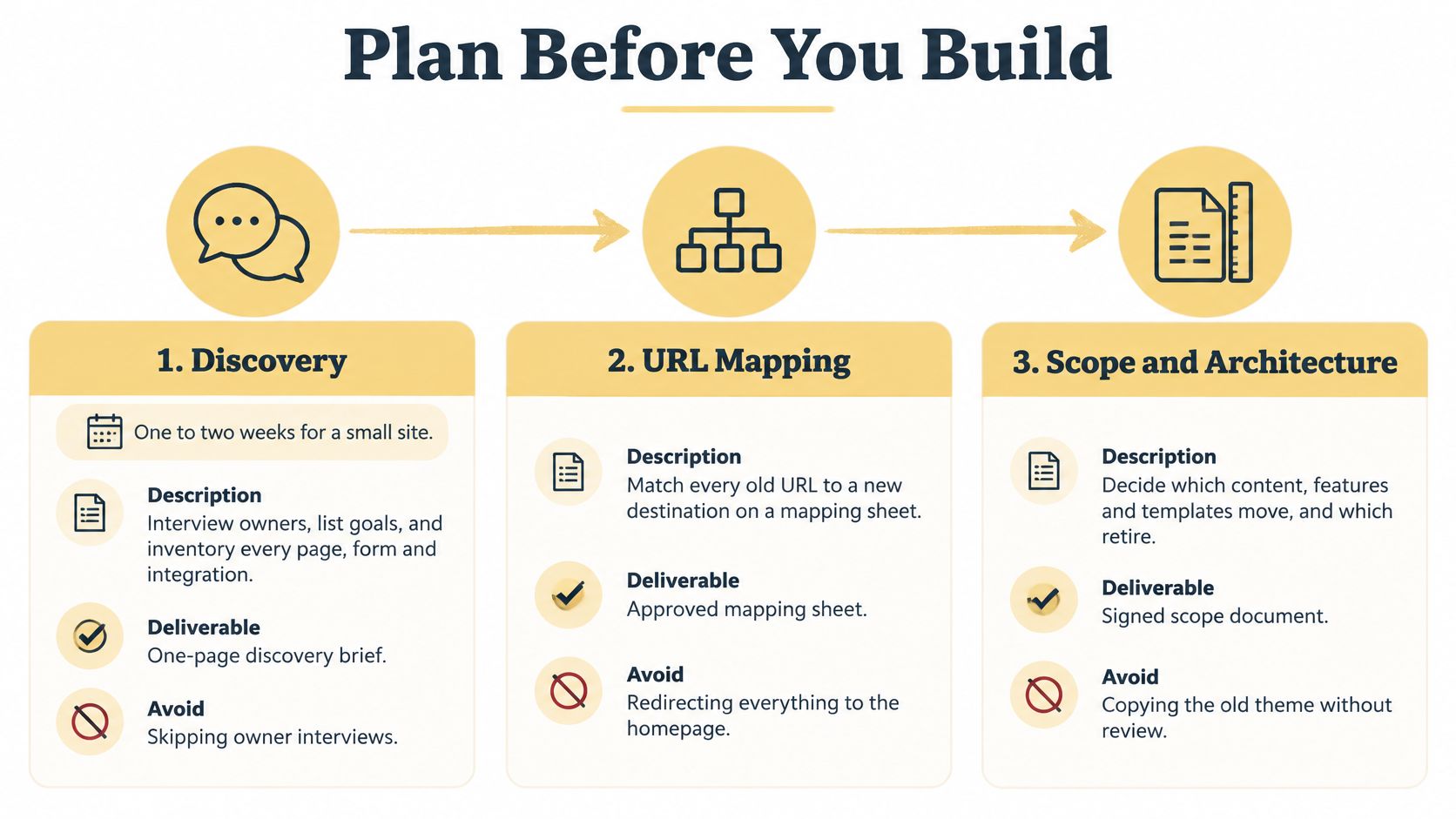
1. Discovery
For a small site, give this one to two weeks. Interview the people who own leads, orders, and publishing. List the goals in their words, not the agency's. Pull baselines from Google Search Console and analytics: organic clicks, impressions, top landing pages, conversions, and revenue. Later comparisons are useless without a fixed start.
Deliverable: a one-page brief. Mistake to avoid: skipping the owner interviews and letting the sitemap stand in for the business.
2. Content audit
Crawl the live site with a tool such as Screaming Frog. Export every URL with status, traffic, and inbound links. Tag each page keep, merge, rewrite, or retire. Dead pages you retire now never need a redirect or a new template. If the crawl is messy, a technical SEO audit is the right companion, because blocked pages and soft 404s hide inside "content" until launch day.
Deliverable: a tagged inventory. Mistake to avoid: moving everything because deleting feels rude.
3. URL mapping
One spreadsheet row per old URL. Columns: old URL, new URL, redirect type, owner. Flag orphans that still get traffic and decide them one by one. The sheet is the contract between the old site and the new one. A missing row is a lost page.
Pattern changes need their own rules. Moving /blog/slug to /news/slug is fine if every variant is listed, including tags, pagination, and author archives. A single catch-all to the homepage throws away the pages that still earn visits.
Deliverable: an approved mapping sheet. Mistake to avoid: redirecting unmatched URLs to the homepage and calling it done.
Scope and architecture come last. Decide which templates, features, and content actually move, and get that list signed before design starts.
How to Build, Redirect and Launch the New Site
The build phase is a sequence of proofs. Each step has one check that says it worked. Skip the check and you find the failure in front of customers.
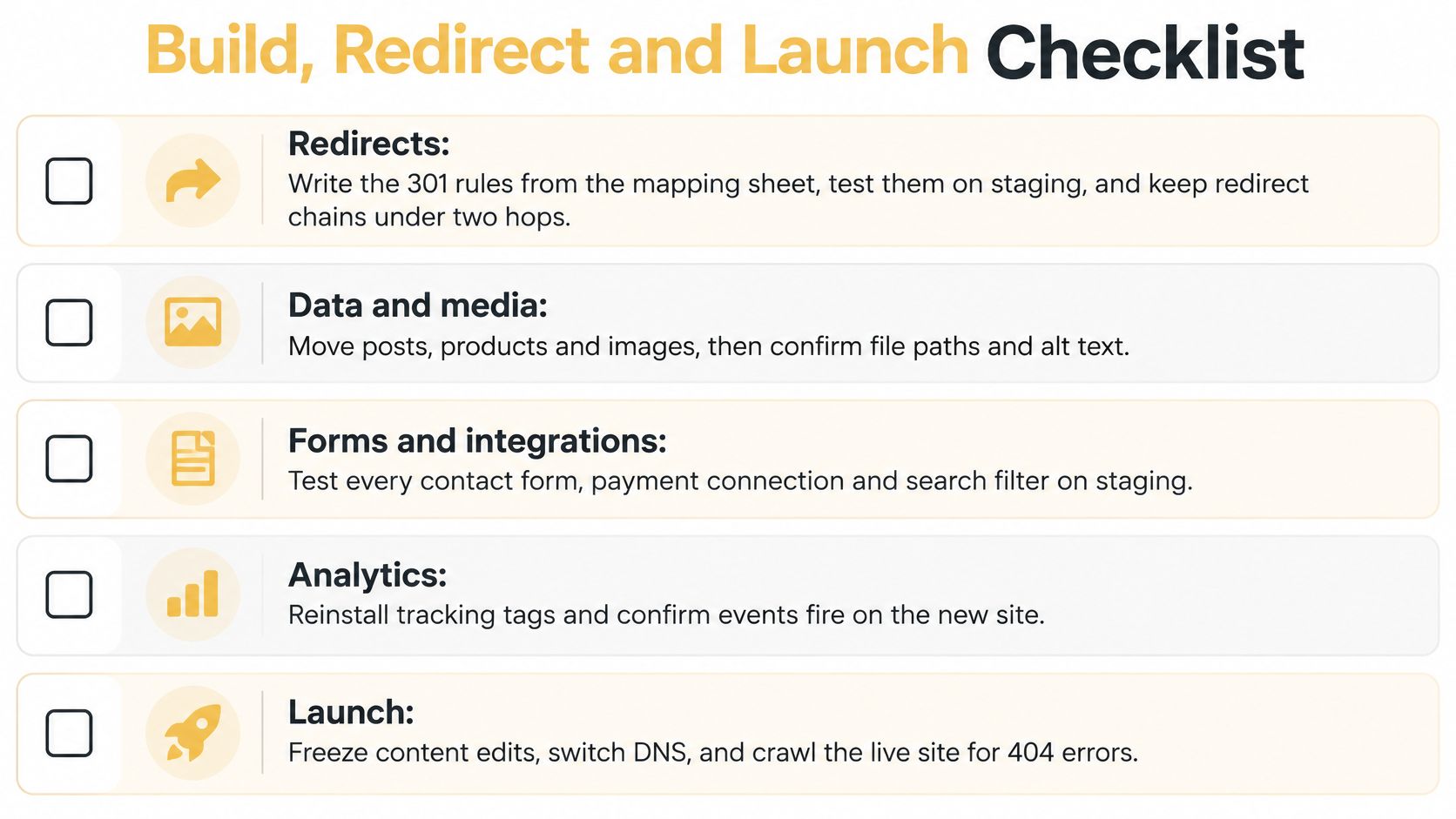
1. Redirects
Write the 301 rules from the mapping sheet, not from memory. Test them on staging. Keep chains under two hops, because a chain that wanders through three old addresses wastes crawl time and hides the final page. Check: a sample of high-traffic URLs lands on the right new page with a single permanent redirect.
2. Data and media
Map old fields onto the new content model before you import anything. Move posts, users, and taxonomies in batches. Rename image files to readable names and carry alt text with them. Compare record counts to the audit. Check: post totals, product totals, and media totals match, and a spot-check of old images still has its alt text.
3. Theme build
Rebuild a template for each page type from the audit. Compare old and new on desktop and mobile. Keep heading structure and meta titles intact unless a specific page was marked for rewrite. Check: H1s, titles, and canonicals match the mapping sheet on a sample of each template.
4. Integrations
Reconnect payments, CRM, forms, search filters, analytics, and consent tools. A page that looks finished and can't take a payment is not finished. Check: one live test order or form submission per integration, including the failure path (a declined card, an empty required field).
5. Testing
Crawl staging for broken links and stray noindex tags. Run speed and load checks on the templates that carry traffic, not on a blank homepage. The client signs off checkout or lead flows in writing. Check: the crawl shows no accidental noindex, and the signed flows completed on staging.
6. Launch
Pick a low-traffic freeze window. Run a final content sync. Switch DNS. Leave the old site reachable so you can roll back. Write the rollback trigger before you start, for example roll back if checkout errors last 15 minutes, or if lead-form submissions stop for an hour. Check: the trigger is written, the old environment is still up, and someone is assigned to call it.
Google's site-move guidance tells owners to monitor traffic on both old and new URLs. A redesign doesn't preserve visibility by itself. Search engines need signals that connect the old address to the new one, and hosting-only moves are a different risk from moves that change URLs.
This walkthrough covers the same sequence in practice, from staging checks through the DNS switch.
Protecting Rankings and Revenue Through Cutover and After
A correct redirect map can't recover sales lost to a broken form, a dead payment connection, a filter that returns nothing, or analytics that stopped recording. Watch those flows as closely as you watch URLs. A 2025 survey of 500 owners, developers, and IT decision-makers found an average of five hours of downtime a month, nearly half hit by hosting downtime, and one in five losing more than $2,500 a month. Nearly seven in ten had delayed a hosting change over downtime, cost, and complexity. The cheap quote is the expensive one when it skips staging, a freeze window, and a tested rollback.
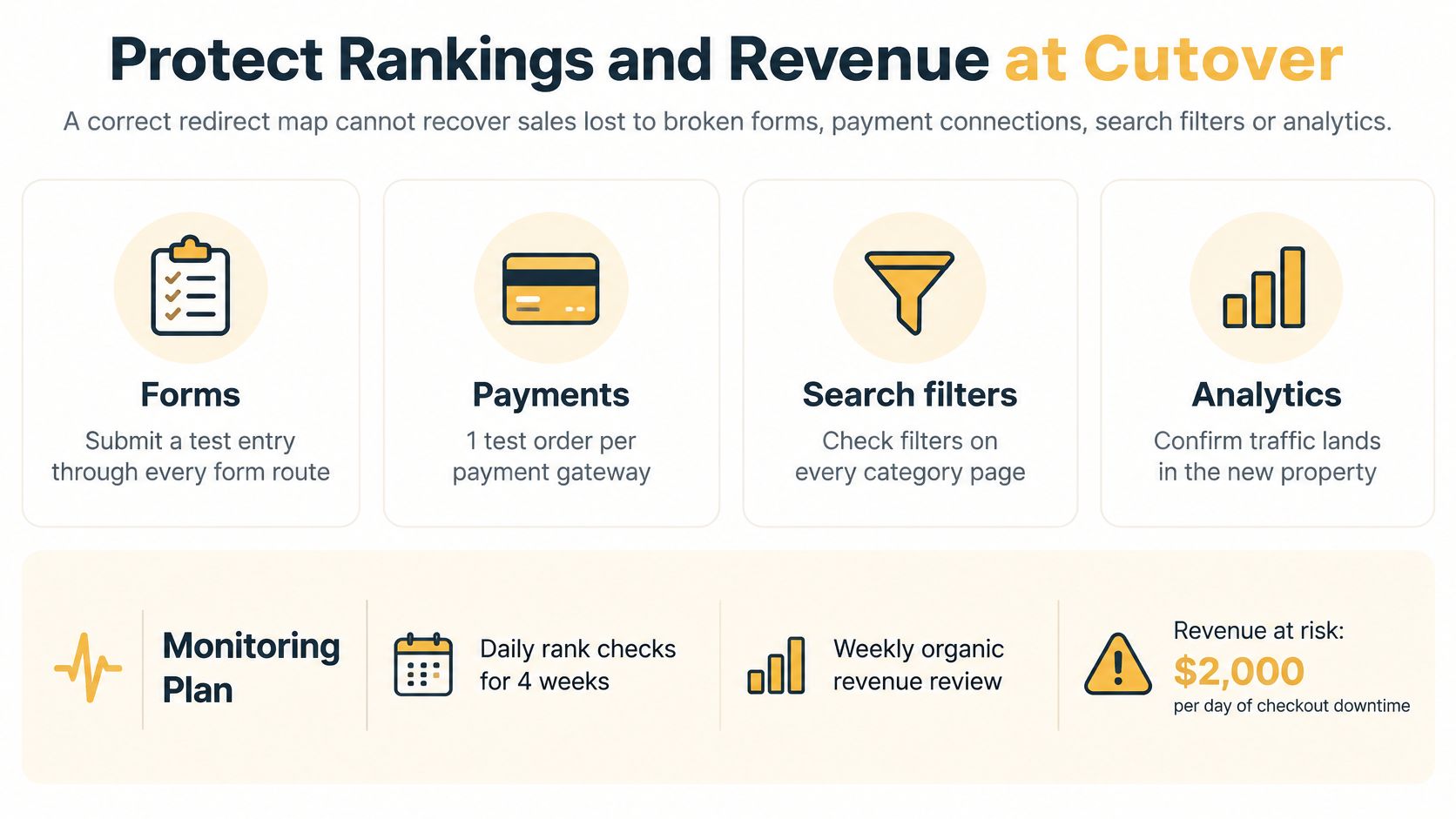
Compare before and after on impressions, clicks, average position, indexed pages, Search Console crawl errors, conversions on top landing pages, and revenue per session. A redesign that respects SEO uses the same comparisons, because visual change and address change fail in different ways.
Three watch windows
- First 24 hours: test every core flow by hand and read error logs. Rollback remains the safety net that matters most during this window.
- Days 2 to 14: compare daily clicks with the same weekday before launch. A Monday-to-Monday gap beats a raw total.
- Days 15 to 90: check indexing, fix not-found pages, and retire old redirects only after traffic has settled.
Keep a daily log of which fix went live. Without it, you can't tell a recovery from a coincidence. Seasonality can mimic a migration loss, so compare with the same weeks last year when you have the data.
| Pattern | Likely cause | First check |
|---|---|---|
| Drop concentrated on unmapped URLs | Redirect gaps | Match lost URLs against the mapping sheet |
| Drop across all pages with impressions falling | Blocked crawling or noindex tags | Check robots rules and scan for noindex tags |
| Stable traffic with falling conversions | Broken integration | Run a live test of forms, checkout, and filters |
| Drop matching the same weeks last year | Seasonality | Compare with the prior-year period before acting |
Each pattern points to a different fix. Treating every dip as an SEO problem wastes the first week, which is the week revenue is actually leaking.
Three Migrations and the Revenue Math Behind Them
These are composite illustrations, not client results. Use them to see the trade-off, then swap in your own figures.
The formula is simple. Take monthly revenue at risk, multiply by days of disruption, and divide by 30. Add any organic dip over the recovery period. The number you get is the loss a careful cutover is trying to avoid. It is not, by itself, the full case for the project.
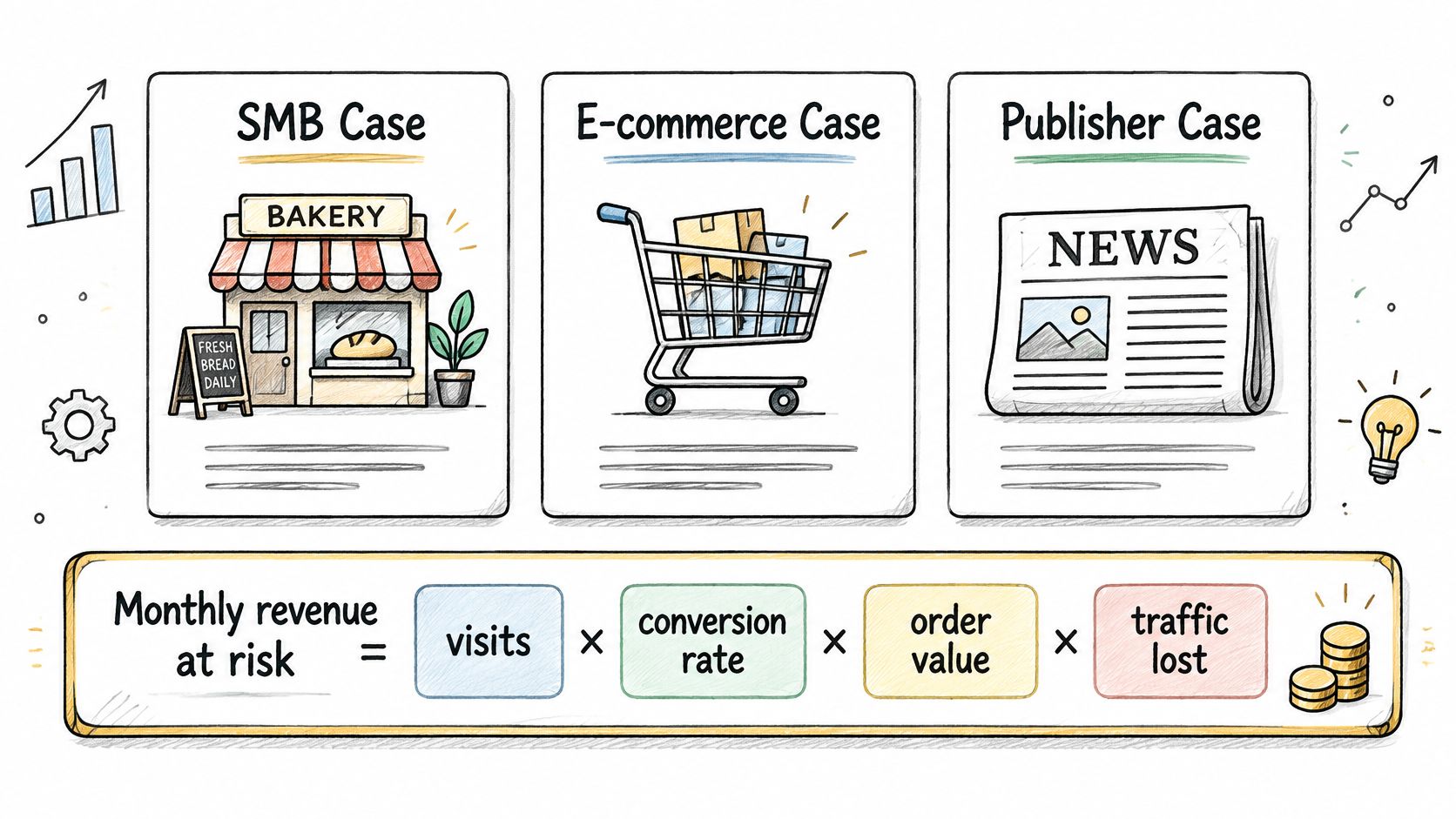
Local service firm, about 60 pages. A contact form dies for a few days. Inquiry value is real, but the cutover loss is small next to a full project fee. The case rests on speed, hosting, and security, not on the broken form alone. Lesson: don't sell a small site a large rebuild on downtime math.
Online retailer, about 2,500 SKUs. Filters and checkout fail for several days. That loss is painful and still doesn't carry a large re-architecture by itself. The case rests on platform limits you can't patch, plus a staged cutover that keeps catalog and checkout from failing together. Lesson: stage the risky flows.
Publisher. Organic traffic softens for weeks while redirects and indexing catch up. Redirects and a monitoring window cap that exposure. Payback depends on what the migration costs. Lesson: the value is the dip you prevented, which only shows up if you measured the baseline.
| Scenario | Revenue at risk | Cutover loss if a mistake happens | Migration cost | Verdict |
|---|---|---|---|---|
| Local service firm, 60 pages | Lead revenue from the main contact paths | A few days of missed inquiries | Often larger than the short outage | Weak payback on cutover loss alone; justify on speed, hosting, and security |
| Online retailer, 2,500 SKUs | Checkout and on-site filter revenue | Several days of failed orders and empty filters | A large re-architecture quote | Cutover loss alone does not justify it; the case rests on platform gains and a staged cutover |
| Publisher, 8-week organic dip | Organic revenue across top landing pages | Weeks of softer traffic while indexing settles | Set by templates, redirects, and monitoring | Redirects and monitoring cap this exposure; payback depends on the migration cost |
Choose a Vendor and Confirm Scope
Shortlist with the same sheet in every conversation. A portfolio of pretty homepages doesn't prove someone can move 400 URLs without dropping the ones that rank.
| Criterion | Strong signal | Red flag |
|---|---|---|
| Comparable projects | Past migrations on the same CMS pair with named results | Design portfolio only, no migration examples |
| URL mapping and redirects | Written URL map and redirect testing included in scope | Redirects listed as a one-line item or left out |
| Staging and rollback | Staging environment, rehearsed cutover, written rollback trigger | Launch straight to live with no fallback |
| SEO continuity | Baselines, a redirect map, and a 60 to 90 day measurement window | SEO promised as a result with no measurement plan |
| Integration inventory | Every plugin, API, and form listed before pricing | Integrations folded into a flat fee |
| Scope control | Fixed scope with a written change-order process | Open-ended hourly estimate with no cap |
| Support after launch | Named contact and a defined fix window | Support ends at go-live |
| Hosting and downtime | Hosting plan and uptime commitment stated in the contract | Hosting left entirely to the client |
Three requests before you believe a price
Ask each bidder for a sample URL map and redirect plan from a past project. Ask who owns the 60 to 90 day SEO window, by name. Confirm every plugin, API, and form is listed before the price is set. A bid that omits staging, redirects, and rollback saves money on paper and spends it at cutover.
Match the team to the site. In-house staff suit a simple brochure site when you already have someone technical. A freelancer suits a content-only move with a fixed page list. An agency suits ecommerce and publishers, where payments, filters, and templates interact. If you need extra engineering capacity beside an agency, Hire Developers is a practical place to look for contract developers who can cover a defined build slice. Up North Media, an Omaha agency that builds web apps and runs SEO and AI consulting, with free consultations and support through a project, is one local option. It should send the same artifacts as any other bidder, including a sample map. A website redesign agency engagement is a different scope from a migration, and mixing the two without a change order is how budgets slip.
Before you request quotes
- Choose the path: keep the CMS and fix it, migrate, or rebuild headless.
- Send the inventory from discovery, the audit, and the URL sheet.
- Write acceptable downtime in hours and revenue per hour, using your own numbers.
- Send the same scope sheet to three bidders.
- Ask for the sample URL map and a redirect test plan before you sign.
Ask what happens if cutover fails, who fixes a broken integration after launch, and what the fixed price excludes. If those answers are vague, the price isn't real yet.
Up North Media helps Omaha retailers, publishers, and service businesses plan a CMS move around revenue risk, redirects, and a monitored launch, not a theme swap. The work covers web apps, data-driven SEO, and support from the first inventory through the weeks after go-live. If you're weighing a quote, visit Up North Media and bring your URL list.