

The global average shopping-cart abandonment rate is 70.19%, according to Baymard Institute's aggregation of 49 cart-abandonment studies. That's roughly seven in ten shoppers who add a product without completing the purchase. Before you spend more to attract visitors, check whether your website lets interested buyers finish what they came to do.
What a Conversion Optimized Website Is and Where Sales Leak
A conversion optimized website removes obstacles between a visitor's first interaction and a successful purchase. It doesn't just look attractive or make checkout buttons prominent. It helps customers understand the offer, evaluate the full commitment, complete payment, and receive what you promised.
Say an Omaha retailer advertises a bulky household product. The ad describes the product clearly, and the landing page looks polished. But shoppers can't check delivery availability until they enter checkout, where they discover restrictions that should have appeared before they added anything to the cart.
Changing the headline won't solve that problem. The retailer needs to change when customers receive decision-critical information.
The funnel below illustrates the difference between purchase interest and a completed order.
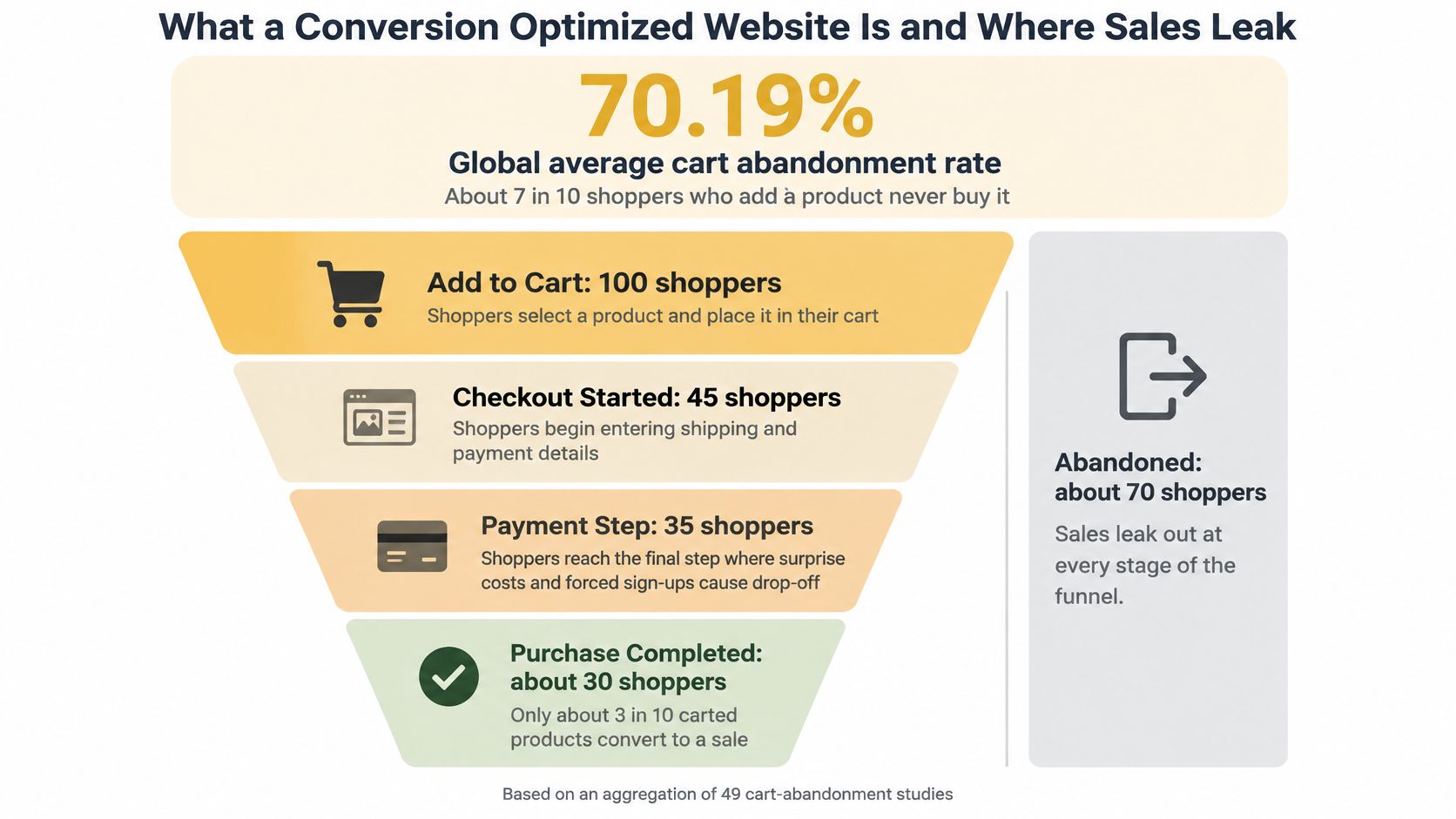
Follow the customer's decisions
Treat each stage as a separate diagnostic problem:
- Landing page: Can visitors immediately tell what you sell, who it's for, and why the offer matches the ad or search result?
- Product page: Can they evaluate suitability, price, availability, and delivery without searching through unrelated pages?
- Cart: Does the purchase still make sense when quantities, shipping, and other charges become visible?
- Checkout: Can customers enter accurate information, resolve mistakes, and pay without unnecessary interruptions?
- Post-purchase: Do confirmations, delivery updates, refunds, and support interactions match the expectations you created?
For an e-commerce store, calculate conversion rate as orders divided by sessions, multiplied by one hundred. Keep that definition consistent. Don't compare a session-based rate with a visitor-based rate and treat the difference as a business improvement.
More traffic won't seal a leaking pipe
Think of the buying journey as connected pipes. A leaking joint keeps dripping whether you send more water through it or not. Increasing traffic can increase orders, but it also sends more potential customers into the same unresolved obstacles.
Not every departure represents a recoverable sale. Some visitors are browsing, comparing alternatives, or saving products for later. Your job is to distinguish ordinary shopping behavior from problems your team can fix.
Practical rule: Investigate the point where customers can't answer a necessary question or complete a necessary action. Don't start with whichever page looks oldest.
That distinction changes the assignment from a cosmetic redesign to a measurable revenue project.
Conversion KPIs and Formulas to Track First
A single conversion rate hides where the problem sits. Track the journey by stage, then connect those measurements to revenue and customer outcomes.
Use this working reference to build your dashboard.
Conversion KPIs, formulas and what each diagnoses
| KPI | Formula | What It Diagnoses |
|---|---|---|
| Conversion rate | Orders ÷ sessions × 100 | Overall funnel health |
| Cart abandonment rate | 1 − (orders ÷ carts created), multiplied by 100 for a percentage | Checkout and cost friction |
| Step completion rate | Users reaching next step ÷ users reaching this step | Which checkout step loses people |
| Field error rate | Fields with validation errors ÷ fields completed | Form clarity and data quality |
| Mobile vs desktop conversion rate | Conversion rate per device class | Mobile speed and layout problems |
| Mobile LCP | Elapsed time from navigation start until the largest visible content element renders, measured from real-user visits | The load speed shoppers actually feel |
| Revenue per session | Revenue ÷ sessions | The value of traffic, not just order count |
| Refund and repeat-purchase rate | Refunded orders ÷ orders; repeat buyers ÷ buyers | Trust after the sale |
| Support contacts per 100 orders | Shipping or price tickets ÷ orders × 100 | Hidden cost or delivery confusion |
For repeat purchases, define an observation window and compare customer groups with the same amount of time to return. Otherwise, established customers and recent buyers won't be comparable.
Establish trustworthy measurement
Start with your order system, not the analytics interface. Reconcile purchase events against paid orders, exclude test transactions, and check that refreshing a confirmation page doesn't create duplicate purchases.
Then instrument meaningful transitions: product viewed, cart created, checkout started, shipping selected, payment attempted, and order paid. Record validation failures without collecting sensitive form contents.
A Google Analytics KPI dashboard can bring these signals together, but the dashboard needs agreed definitions. Specify whether revenue includes shipping, taxes, discounts, cancellations, and refunds. Use the same treatment throughout a test.
Separate mobile and desktop results. Also inspect acquisition channel, new versus returning customers, and product category when you have enough observations to make the comparison useful.
Interpret the metrics together
Suppose a checkout revision increases paid orders from unchanged traffic. That's encouraging, but it isn't enough to approve the change.
If customers now place smaller orders, revenue per session may decline. If weakened address validation produces delivery failures, support costs and refunds may rise after the apparent conversion gain.
A conversion improvement isn't a business win if you collect more payments and then spend the difference correcting preventable mistakes.
Use revenue per session as the primary commercial check, with refunds and support contacts as guardrails. Review repeat purchases over a suitable customer lifecycle rather than expecting an immediate answer.
Record a baseline for at least two full weeks before testing. That's a practical starting period, not proof that you've collected enough evidence. Extend it when order volume is low, promotions distort demand, or your customers take longer to decide.
Why Mobile Load Time Costs Sales
In retail, conversions can fall by up to 20% for every one-second delay in page loading, according to Google's mobile performance guidance. Google also states that more than half of visits may be abandoned when a mobile page takes longer than three seconds to load.
Treat these as warnings about exposure, not a calculator for forecasting your store's losses. Your customers, page types, and traffic sources determine the actual result.
| Signal in Google's guidance | What it means for your store |
|---|---|
| Retail conversions can fall by up to 20% for every one-second loading delay | Include performance work in revenue planning |
| More than half of visits may be abandoned beyond a three-second mobile load | Investigate slow entry pages before polishing downstream interactions |
As customers browse on phones rather than only on desktop computers, your team needs to test under mobile conditions. A responsive layout doesn't make a heavy page fast.
Examine the whole buying path
A slow category page can prevent visitors from reaching product details. A slow product page can interrupt comparison. An unresponsive shipping selector or payment screen can stop someone who has already decided to buy.
Measure those experiences separately. A fast homepage tells you little about a product page loaded with review widgets, oversized images, and recommendation scripts.
Use PageSpeed Insights to identify likely problems, then check real-user performance and inspect the experience on a mid-range Android phone over a mobile connection. Don't approve the site solely from a laptop connected to office Wi-Fi.
Fix the work the browser must perform
Prioritize changes that remove unnecessary loading and execution:
- Right-size product images: Serve dimensions appropriate to the display area, compress files, and use modern image formats where supported.
- Protect essential content: Don't delay the main product image or purchasing controls behind nonessential widgets.
- Review third-party scripts: Remove unused trackers and keep chat, personalization, and marketing code away from payment interactions unless they're necessary.
- Inspect server responses: Check caching, database queries, and application calls before assuming every delay comes from image size.
Use this guide to improving website loading speed to turn the findings into an implementation checklist.
Compare performance changes with device-specific funnel behavior. If mobile shoppers stop losing progress at the same point where you removed a delay, you have a useful test hypothesis. Speed belongs in conversion planning because it improves the opportunity to buy from traffic you've already earned.
Checkout Changes That Remove Friction
Checkout length is an interaction cost, not a matter of visual taste. Count what shoppers must interpret, enter, select, and correct.
Baymard's checkout analysis puts the average U.S. checkout at 23.48 form elements by default, compared with an ideal flow of approximately 12–14 elements, including 7–8 actual form fields.
| Checkout benchmark | Form elements |
|---|---|
| Average U.S. checkout displayed by default | 23.48 |
| Approximately ideal flow | 12–14, including 7–8 actual form fields |
Form elements and text fields aren't interchangeable. Customers also have to process selectors, checkboxes, and other controls. Removing a text box while adding several choices may not simplify the task.
Start with unnecessary decisions
Make the least disruptive fixes first:
- Hide optional inputs until requested. Put company details, gift messages, and secondary address information behind clearly labeled controls when they aren't universally needed.
- Combine related information carefully. Keep logically connected inputs together, but preserve the structure your payment and fulfillment systems require.
- Default billing to shipping when appropriate. Let customers change it without making everyone re-enter the same address.
- Make guest checkout obvious. Offer account creation after the purchase rather than making registration a prerequisite.
Use a visible progress indicator for a multi-step flow. Describe actual stages such as delivery and payment, rather than giving shoppers a vague sense that more pages might follow.
Our e-commerce checkout optimization guide provides a useful implementation reference when translating these decisions into a working checkout.
Improve error recovery before removing safeguards
Address autocomplete should assist customers, not force them to accept the wrong suggestion. Keep manual entry available, including for addresses the lookup service doesn't recognize.
Set appropriate input types and autocomplete attributes so phones present useful keyboards and saved information. Keep labels visible after a shopper begins typing. Placeholder text alone isn't enough to explain what belongs in a field.
Validate information inline at a sensible moment. Don't flag a field as invalid while someone is still entering it. Explain the correction beside the affected input, move focus appropriately after submission, and preserve everything the shopper entered.
Checkout safeguard: Remove redundant work, not the checks that keep an order deliverable.
A shorter form can produce worse results when customers accidentally submit incomplete addresses or miss required delivery instructions. Track step completion, field errors, and completion time by device alongside paid orders.
For a practical test, revise the shipping-address step while leaving the rest of checkout unchanged. Run the experiment through a full order cycle and long enough to gather reliable evidence. Compare completed revenue and delivery-related problems, not just how many people clicked the next button.
Delivery and Returns Promises Shoppers Check First
81% of shoppers would abandon a purchase if their preferred delivery option were unavailable, according to DHL's 2025 survey of 24,000 shoppers across 24 major markets. In the same survey, 79% would leave if the return option didn't meet expectations.
Those are different findings. Delivery choice and return terms each deserve explicit treatment rather than a generic reassurance about convenient service.
The following visual contrasts early operational information with promises shoppers must uncover late.
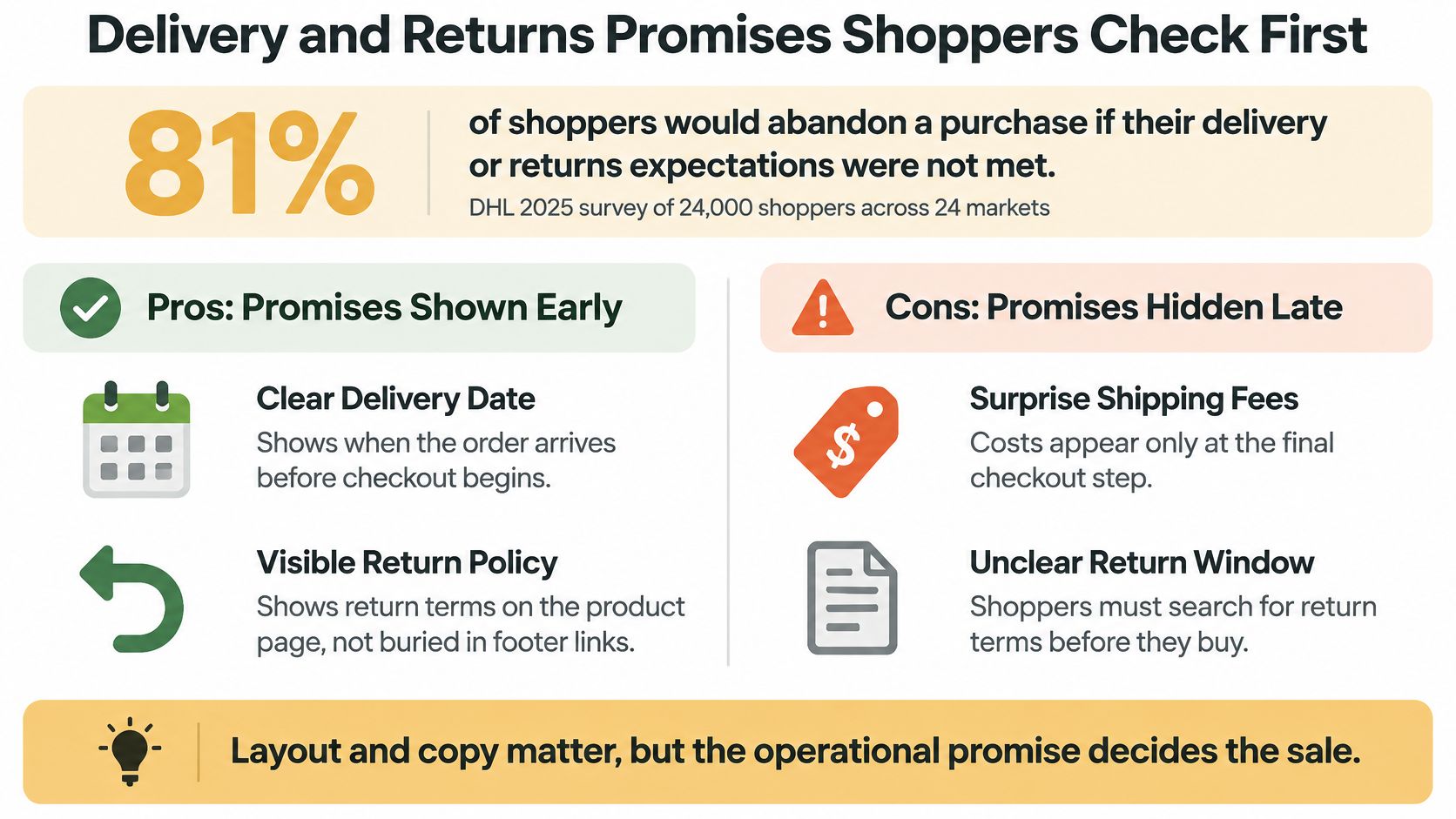
Replace vague reassurance with usable information
A fast-delivery badge doesn't tell a customer whether an order will arrive before they leave town. A footer link to returns doesn't explain whether a discounted garment qualifies.
| Vague message | Information the shopper needs |
|---|---|
| Fast shipping | A location-specific delivery estimate and order cutoff |
| Available now | Stock status that reflects what can actually ship |
| Flexible delivery | Eligible carriers, pickup locations, and service options |
| Easy returns | Eligibility, return window, condition requirements, and who pays |
| Prompt refunds | When processing begins and how repayment is handled |
Calculate shipping from the destination before customers commit to checkout. If an estimate can change, explain what information will finalize it. Distinguish dispatch timing from arrival timing, especially for made-to-order or split shipments.
State exceptions beside the promise they modify. Oversized products, remote locations, personalized goods, and final-sale items shouldn't require customers to interpret a separate policy document.
Make the promise operationally credible
Your website shouldn't advertise an option that warehouse staff or carriers can't fulfill. Connect availability and delivery estimates to the systems your team uses, and provide a fallback message when those systems can't confirm an answer.
For apparel retailers, product suitability belongs in this work too. ClothME's a retailer's guide to better sizing is a useful resource when reviewing size guidance alongside return eligibility.
Offer accurate information about delivery's environmental impact where you can substantiate it. Don't label an option sustainable without explaining the basis, and don't replace practical delivery details with broad environmental language.
Use the video below as an additional prompt for reviewing the customer journey.
Test fulfillment-message variants by market and product type, and by age group only when you have appropriate, consented information. Judge whether the clearer promise attracts orders your operation can fulfill, not whether the message merely encourages more checkout starts.
Conversion Myths That Waste Budget
A discount doesn't fix a purchase that becomes unexpectedly expensive at checkout. Urgency timers and promotional banners are poor substitutes for explaining what the customer will pay.
Digital Commerce 360's 2025 survey identifies these stated reasons for cart abandonment:
Reasons shoppers abandoned carts, Digital Commerce 360 2025
| Abandonment Reason | Share of Abandoners |
|---|---|
| Unexpectedly high total cost from shipping | 30.1% |
| Order did not qualify for free shipping | 26.6% |
| No guaranteed or estimated delivery date | 13.0% |
| Slow site loading | 9.3% |
Replace fashionable tactics with diagnostic rules
Myth one, discounts and urgency always lift sales. A promotion may encourage interest while leaving the underlying cost objection unresolved. Show an address-based estimate before account creation, distinguish shipping from taxes and duties, and explain free-shipping eligibility. You don't have to absorb every charge to disclose it openly.
Myth two, button colors are the fastest win. A color test won't repair missing payment options or an ambiguous error. Baymard's checkout usability benchmark identifies about 32 improvement opportunities in the average checkout. Audit task completion before debating decorative details.
Myth three, the shortest form always wins. Removing useful context can shift work from checkout to customer support. Require each proposed field removal to include a plan for preserving the information your team needs to process the order correctly.
Myth four, more traffic fixes a weak website. Buying more visits without investigating an existing bottleneck expands the same operational problem. Fix a demonstrated obstacle before increasing spend on the affected buying journey.
Evaluate the money you keep after fulfilling the promise, not just the number of customers persuaded to pay.
For cross-region sales, include currency, duties, payment charges, subscriptions, and return costs in the pricing review where relevant. A transparent offer may attract fewer unsuitable orders while producing a healthier business result. That's preferable to celebrating checkout completion and discovering the cost in cancellations.
Run a Conversion Audit Before You Redesign
Don't commission a redesign because the website feels dated. Build an evidence-based list of purchase obstacles, then decide whether fixing them requires targeted development or a broader rebuild.
Use an ordered audit
- Record the baseline. Capture the KPI table's metrics for at least two full weeks, separated by mobile and desktop.
- Measure mobile performance. Collect real-user LCP and inspect slow buying pages on an actual phone over a mobile connection.
- Walk checkout as a new customer. Document visible controls, unclear labels, validation messages, and places where entered information disappears.
- Compare fulfillment promises. Flag mismatches between product pages, cart estimates, checkout choices, and policy wording.
- Classify support conversations. Tag a recent batch of tickets by price, delivery, address problems, returns, and refunds.
- Prioritize the commercial leak. Choose the obstacle with the strongest combination of affected purchase intent, revenue exposure, and credible evidence.
- Test a focused change. Compare completed revenue, refunds, and support contacts through a full order cycle, with enough observations to support a decision.
Keep acquisition and conversion audits distinct
A site also needs to be discoverable. Wispra's guide to website audits for better AI search visibility offers a complementary perspective on acquisition, but search visibility doesn't establish whether customers can complete a purchase.
Write a test brief naming the observed problem, proposed change, primary metric, and guardrails. Assign an owner who can coordinate analytics, development, and fulfillment.
The focused experiment in the final audit step is the first test to run. Once its result is known, move to the next prioritized fix rather than launching a collection of changes you can't evaluate separately.
Up North Media offers web application development, data-driven SEO, and AI consulting for businesses improving their digital buying experience. Visit Up North Media to discuss your checkout bottlenecks, mobile performance, and fulfillment integrations, and define a focused project measured against completed revenue.