
Your front desk knows the problem before you do. Someone copies a booking from a calendar into a spreadsheet, retypes the same customer details into an invoice, then answers an email asking for information that's already sitting in another file. The tools aren't broken, exactly. They just don't talk to each other, and your team fills every gap by hand.
That's usually the moment a custom web app enters the conversation. Not because custom software sounds impressive, but because the workaround has become the job. The question isn't whether you can build something custom. It's whether owning it for five years costs less, in money and staff time, than renting software that almost fits.
What a Custom Web App Is in Plain Terms
Say a clinic receptionist juggles three spreadsheets, a paper intake form, and a separate booking calendar. A patient changes an appointment, so she edits the calendar, updates the spreadsheet, calls the clinician, and hopes nothing was missed. Replace that chain with one browser-based system built around the clinic's actual intake, scheduling, and reminder steps, and the double entry disappears.
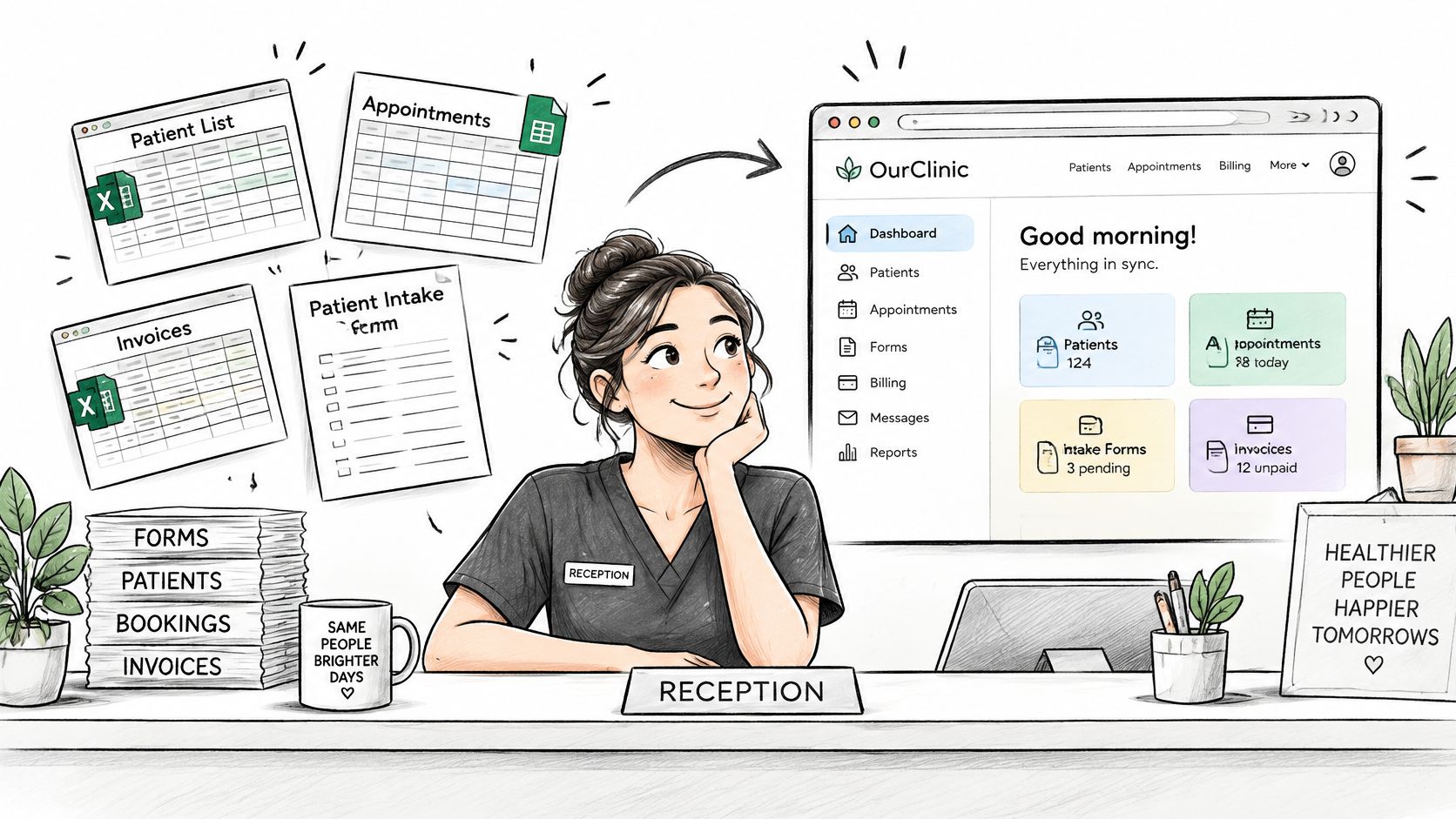
In one sentence, a custom web app is a web application built for one organisation's specific processes, usable in a browser on any device, with its own business logic, data, and user roles. Our Web App Development work means custom web applications, including e-commerce platforms and business tools.
A Website Shows, an App Lets People Act
A website mainly presents information. An application lets users log in, submit orders, update records, approve work, or see live results that change as they act. If nobody signs in and nothing gets saved or calculated, you probably need a better website, not an app.
Think of a custom suit. A standard product fits many people roughly and is ready today. A custom one fits one person's exact shape, but you pay for measuring, making, and future alterations.
That fit now has to work on phones first. The International Telecommunication Union Facts and Figures release reports that in 2025, approximately 6 billion people, 74% of the world's population, were online, and more than 96% of the global population was covered by a mobile-broadband network. Many of those users are on slower connections or modest devices, so responsive design, performance, and accessibility aren't extras.
A custom web app isn't a page you publish once. It's software you'll run, secure, and update for years.
Custom Web App Versus Off-the-Shelf Software
Off-the-shelf software is a standard product sold per seat or per month, configured to your settings but not rebuilt. Start with the side-by-side view, then judge it over five years, not the first invoice.
| Factor | Custom web app | Off-the-shelf software | Custom website |
|---|---|---|---|
| Upfront cost | Higher, scoped to the features you need | Low to moderate, often per seat or per month | Moderate, mostly design and content |
| Time to first use | Typically months for a first release | Days to weeks | Weeks |
| Fit to your workflow | Built around your actual steps | You adapt your process to the product | Limited to content and forms |
| Ownership of code and data | You own deliverables after full payment | Vendor controls the platform | Stated in your contract before you sign |
| Cost of change over time | Planned through a roadmap | Waits for vendor release schedule | Usually small edits |
| Integration with your systems | Built to connect to your CRM, payments and inventory | Limited to available connectors | Limited |
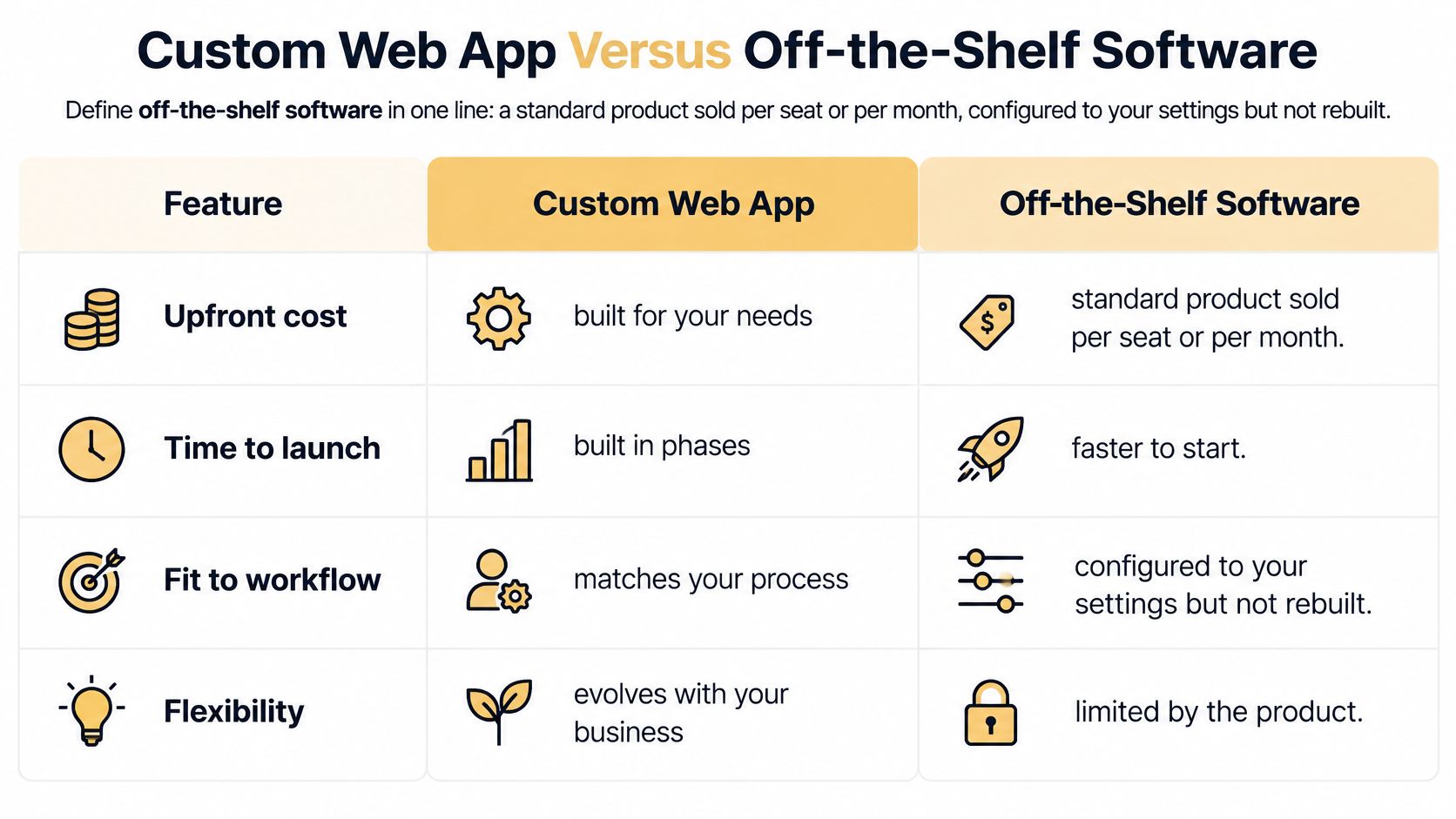
Read the Table Over Five Years
Off-the-shelf software wins on speed and low initial cost when your process matches the product's assumptions. Accounting, standard email, and routine payroll rarely justify a custom build. You'd pay to recreate mature features, then pay again to maintain them.
A custom build wins when the process is your competitive edge, when staff burn hours on workarounds, or when you must connect systems the vendor doesn't support. Licence fees recur every month for every seat. A custom app is a larger upfront investment plus maintenance, so compare the five-year total, including the staff time each option wastes or saves.
Practical rule: If a standard product needs three or more workarounds to match how you work, price a custom build before you commit.
Ownership Is a Contract Question
Don't assume ownership from a sales call. With us, upon full payment, the client owns the final deliverables and custom code created specifically for their project. For any provider, check who holds the code and data, whether you can export records in a usable format, and what happens if the relationship ends.
Most businesses end up with both. Keep standard back-office tasks off the shelf. Build custom only for the customer-facing or operational workflow that sets you apart, and connect the two where it saves real work.
Business Cases Where a Custom Web App Pays Off
A custom web app pays off when it removes a repeated, measurable chore or creates a way of selling that templates can't support. Match your situation against these signals.
Five Cases Worth Pricing
- Customer portal: Clients log in to view orders, invoices, and documents instead of emailing your team. Signal: your staff answer the same status questions every day.
- Internal dashboard: Sales, stock, and scheduling data sit on one screen. Signal: managers rebuild the same spreadsheet report every week.
- Booking tool: Customers reserve appointments on the site and get automatic confirmations. Signal: phone bookings eat front-desk hours and produce double bookings.
- E-commerce platform: You need customized catalogues, wholesale pricing, or account-specific terms. Signal: store templates force awkward workarounds at checkout.
- AI document tool: Staff ask questions and get answers from your own manuals and records. Signal: the same people repeat the same searches across shared files.
The dashboard case is concrete. In 2025, we built a React website with a custom dashboard for Pet Partners, a boutique pet sitting service in Chicago, IL. The value wasn't the technology label. It was giving a service business one place to run its work instead of scattered tools.
Why Commerce Pushes Businesses Toward Custom
UN Trade and Development data on business e-commerce reported that in 2024, the value of business e-commerce sales across 45 developed and developing economies reached approximately $28 trillion. UNCTAD counts a transaction when goods or services are sold or bought over computer networks through methods specifically designed to receive or place orders, even if payment happens offline.
That definition covers retail checkout, subscriptions, marketplaces, booking tools, and B2B ordering portals. Once orders flow through your system, you need authentication, inventory or workflow integration, secure payment handling, and analytics that match how you sell. Generic pages don't carry that load.
Run a quick self-test. If two or more signals above describe your week, get a discovery conversation and a scoped estimate before you settle for another template or plugin stack.
How the Build Process Runs, Step by Step
The build process matters because each stage gives you, the owner, a decision point where stopping or changing direction is still cheap. Here's how it runs, and where projects usually slip.
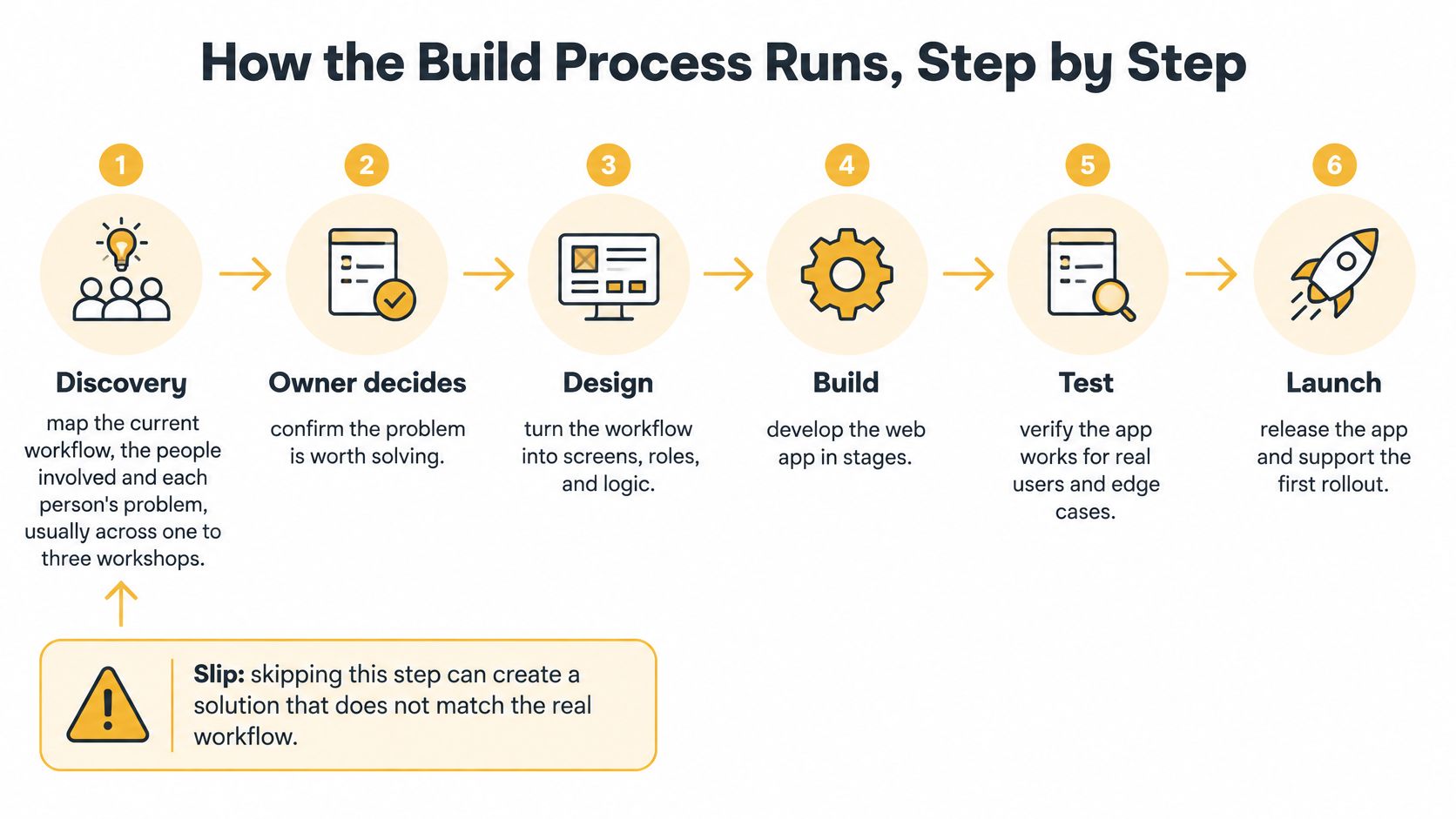
Stages One to Four
- Discovery: Map the current workflow, the people involved, and each person's problem, usually across one to three workshops. You decide whether the problem is worth solving. Skipping this produces features nobody uses.
- Scope and MVP: Rank features by value and cut the first release to the smallest set that proves the idea. You approve that scope and the deferred list. A wish list disguised as an MVP inflates cost and delays learning.
- Design and prototype: Build clickable screens and test them with two or three real users before code is written. You sign off the designs. Testing only with internal staff hides confusion outsiders will hit immediately.
- Build in sprints: Deliver working features every one to two weeks. You review each sprint and reprioritise. Waiting months to see anything means surprises arrive when they're expensive.
Our detailed walkthrough of the custom software development process shows how these stages connect in practice.
Stages Five to Seven
- Test: Check functions, mobile use, accessibility, login and permission security, and performance. The HTTP Archive Web Almanac performance chapter found that in 2025, 48% of mobile websites and 56% of desktop websites achieved good scores across all Core Web Vitals. Measure speed, don't assume it, and don't test only on desktop.
- Deploy: Launch to a small group first, watch errors and load, then open it to everyone. You approve the release. A big-bang launch with no rollback plan turns a small bug into an outage.
- Maintain: Set a 90-day roadmap covering fixes, updates, and new features. You fund the next cycle. With us, the client owns that roadmap outright. No update budget after launch is how good apps slowly rot.
This short video shows the rhythm of iterative delivery, where working software appears early and often rather than in one final reveal.
Your most important job isn't approving colors. It's making the scope decision at each stage while changing direction is still affordable.
Choosing a Tech Stack Without Overbuilding
A tech stack sounds technical, but it's really a hiring and maintenance decision. It has four layers: the front end users see, the back end holding the logic, the database storing records, and the hosting that runs it all.
| Layer | Common options | Choose when | Trade-off |
|---|---|---|---|
| Front end | React, Vue, Next.js | Interactive dashboards and logged-in tools | Needs more front-end maintenance than a plain site |
| Back end | Node.js, Python, Ruby, .NET | Matches your team's skills and hiring pool | Language choice shapes hiring and libraries |
| Database | PostgreSQL, MySQL | Structured records such as orders, clients and bookings | Schema changes need planning |
| Hosting | Managed cloud platforms, managed PaaS | Small teams that want less server work | Ongoing monthly cost that grows with traffic |
| Authentication | Framework or vetted identity service | Any app with logins or user roles | Mistakes here create account-takeover risk |
Our comparison of the best web app development framework options walks through these choices in more depth.
Match the Stack to the Team, Not the Trend
The newest framework doesn't help if nobody local can maintain it. Pick tools your future developers already know, with a healthy hiring pool and mature libraries for payments, email, and reporting. A small internal tool rarely needs microservices or multiple databases. A multi-user platform taking payments needs strict access rules from day one, but still doesn't need exotic architecture.
Overbuilding shows up as cost twice. You pay more to build it, then more every year to keep specialists who understand it. Boring, well-supported choices are usually the profitable ones over five years.
Security Belongs in the Architecture
The OWASP Application Security Verification Standard describes session management as the mechanism that converts stateless HTTP interactions into stateful interactions tied to a specific user or device. That means authorization must be checked on the server for every protected request. Hiding a button in the browser doesn't stop someone calling the API directly.
Require least-privilege roles, validation of every input crossing a trust boundary, and sessions that end on logout or timeout. Keep session identifiers out of URLs and logs, and restrict cookie scope. One compromised admin identity shouldn't expose every customer record.
Ask any provider three questions. Who maintains the code after launch? Which parts are proprietary? How could the stack be replaced if the partnership ends? Vague answers predict expensive lock-in.
What a Custom Web App Costs and How Long It Takes
Cost depends on scope, user roles, integrations, design depth, and team location, so treat the table as planning guidance, not a quote. Timelines describe a focused first release, not every feature you can imagine.
| App type | Typical scope | Typical timeline |
|---|---|---|
| Internal tool | One team, few roles, basic reporting | 6 to 12 weeks |
| Customer portal | Client logins, documents, status tracking | 3 to 6 months |
| E-commerce with custom features | Tailored catalogue, pricing rules, integrations | 4 to 9 months |
| Marketplace or AI-enabled platform | Multiple user types, payments, data pipelines | 6 to 12 months for a phased first release |
What Drives the Price Up
Rank the drivers accurately before you ask for estimates:
- User roles and workflows: Each role adds screens, permissions, and testing.
- Integrations: Payments, CRM, accounting, and inventory each add build and failure handling.
- Custom design: Original interfaces cost more than component templates.
- Data migration: Cleaning and moving records from old systems takes real hours.
- Compliance: Health or payment data adds controls, documentation, and review.
For a fuller worked example of phased spending, the guide to budgeting for a SaaS launch from ogBlocks is a useful companion when you're sanity checking quotes.
Lower the First Release, Not the Security
Start with the smallest MVP that proves value. Buy standard components for payments, email delivery, and authentication instead of building them. Phase the roadmap so later features are funded from results, not hope. Never cut access control, backups, or testing to hit a number. Those cuts return as incidents.
Then budget what most plans miss: hosting, updates, security patches, and small feature changes, every year after launch. Ask every provider to split the quote into discovery, build, launch, and maintenance, with the annual maintenance figure stated in currency. That's how you compare five-year cost line by line instead of comparing launch prices that hide the expensive part.
Choosing an Engagement Model With an Agency
How you pay shapes how the agency behaves. Three models cover most custom web app work, and each carries a different risk.
Three Ways to Pay
Fixed-price project fits a clearly defined first release with written scope. You know the total, but change requests become separate negotiations and can get expensive. It works when discovery already happened and the scope is stable.
Time-and-materials fits uncertain scope. You pay for hours, get weekly reporting, and can redirect work as you learn. The risk is overrun, so set a budget cap and a rule for what happens when you approach it.
Dedicated team fits an ongoing roadmap on a monthly retainer. You get continuity and speed, but cost continues even when your priorities slow down. It suits businesses with a steady queue of improvements.
The Safer Sequence
Buy a fixed-price discovery phase of one to three workshops first, then choose the build model based on the scope discovery produces. You're paying a small amount to find out what the big amount should buy.
Check any proposal for the named team, the discovery deliverable, sprint cadence, acceptance criteria for each release, and the change-request process. If you're also weighing design help, this guide on selecting design partners for product teams from Uxia offers helpful criteria. Ask for references from similar-sized projects and ask how code is handed over at the end.
A proposal missing acceptance criteria and a handover plan isn't a plan. It's a sales pitch with a price attached.
Confirm the Scope Before You Hire an Agency
Before you sign anything, confirm six items in writing. This checklist protects you regardless of which agency you choose.
Your Pre-Signing Checklist
- Problem statement: One page naming the three most important workflows and who suffers today.
- First-release scope: What's included, with deferred features listed explicitly.
- Data rule: Which customer and internal data may leave your systems, and to whom.
- Ownership: Who owns the code and data after payment, in the contract.
- Maintenance plan: What it covers, with its monthly cost stated.
- Fallback: What users do when a key feature fails.
If writing that problem statement feels hard, a structured guide to writing a product requirements document from Figr can help you turn scattered requests into testable requirements. Our own advice on how to choose a software development company covers the reference and handover questions in detail.
Watch for warning signs. A fixed price with no discovery phase, no named maintenance plan, or no plan for the data the app holds means the risk sits with you, not the agency.
One Rule for AI Features
Decide before the build which data an AI model may receive, who reviews its outputs, and what happens when it fails. OECD research on SME digitalisation reports that only 16% of SMEs have digital security, while a 2025 survey of 540 small-business decision-makers found AI use rose from 39% to 55% year over year. Adoption doesn't prove readiness. Start with a human-reviewed suggestion before any fully autonomous action.
Bring your one-page problem statement and this checklist to a first call. We offer a free 60-minute strategy call, bookable through our website, and that preparation turns it into a scoping session instead of a sales pitch.
If your team is losing hours to spreadsheets and workarounds, we can help you scope a custom web app that fits how you work, with clear ownership and a phased roadmap you control. Book a free strategy call with Up North Media and bring your one-page problem statement, and we'll map the smallest useful first release together.