
A typical ecommerce launch runs 6–14 weeks for semi-custom stores, 3–6 months for fully custom builds, and longer for enterprise or headless projects. The biggest schedule drivers are usually content readiness, approval cycles, and integration depth, not coding speed.
You may be asking because a launch date is already on the calendar. The product line is selected, the business name is ready, and someone has promised that the store can be live “soon.” Then the project begins, and the team discovers that product descriptions are unfinished, images use inconsistent formats, shipping rules aren't decided, and three stakeholders need to approve every page.
That pattern explains why a single answer to “how long does it take to build an ecommerce website” is rarely useful. A store can be technically assembled in one timeframe and still need additional time before customers can purchase confidently. The practical question is not only how long the build takes, but also how long it takes to reach a sellable, tested, revenue-ready launch.
The Honest Answer on Ecommerce Build Timelines
A store can look close to finished while its launch date keeps moving. Product copy still needs approval, images may require reformatting, shipping rules remain undecided, and several stakeholders may be reviewing the same checkout screen. In practice, these dependencies often determine the calendar more than the amount of code.
For a professional build, a realistic working range is about 3–16 weeks from kickoff to launch, based on ecommerce development timeline benchmarks. Smaller catalogs and limited customization sit near the shorter end. Custom storefront behavior, multiple integrations, data migration, and operational requirements push the schedule toward the longer end.
That range is a planning benchmark, not a delivery promise. A store with a modest catalog can still take longer than a larger one if approvals are slow or payment, fulfillment, and inventory systems are difficult to connect. Catalog quality, design decisions, and review ownership deserve as much attention as development capacity.
Build time is not launch readiness
Core templates may be implemented while the store remains unfit for customer orders. Product records can lack approved copy, payment settings may need verification, shipping zones may be incomplete, and checkout feedback may still be unresolved.
Use two milestones:
- Build complete: Core pages, catalog structures, checkout, integrations, and responsive layouts are implemented.
- Launch ready: Content is approved, transactions are tested, shipping and tax rules are configured, analytics are checked, and the team can support the first orders.
A six-week development estimate therefore does not mean the business can sell at the end of week six. Build work and launch preparation can overlap, but each still needs an owner and a clear sign-off.
Practical rule: Request a launch plan that assigns client responsibilities as clearly as developer responsibilities. Without content deadlines, approval dates, and integration dependencies, the timeline is only a coding estimate.
Start planning by defining scope, listing dependencies, assigning phase owners, and giving one person authority to approve decisions. “It depends” becomes actionable once those variables are visible.
The Seven Phases of an Ecommerce Build and Their Real Duration
A store can spend weeks in approvals, content preparation, and integration work before code becomes the schedule's main constraint. A practical execution model separates those workstreams and distinguishes build time from launch readiness. For semi-custom stores, the full process commonly falls within 6–14 weeks. The phased ecommerce development process places fully custom work at 3–6 months, while enterprise or headless implementations can take 6–12 months.
| Phase | Typical Duration | What It Produces | Common Stretch Risk |
|---|---|---|---|
| Strategy and requirements | 2–3 weeks | Goals, requirements, priorities, and constraints | Unclear scope or late business decisions |
| Platform and technical planning | 1–2 weeks | Platform choice, integrations, data approach, and technical plan | Undiscovered legacy-system requirements |
| Information architecture and SEO structure | 2–3 weeks | Sitemap, navigation, product taxonomy, and URL structure | Incomplete catalog logic or changing categories |
| UX and UI design | 3–5 weeks | Approved page layouts, components, and visual system | Slow feedback or too many reviewers |
| Frontend and backend development | 6–12 weeks | Functional storefront, catalog, cart, checkout, and admin workflows | Custom features and unstable requirements |
| Payments and third-party integrations | 2–4 weeks | Payment, shipping, tax, inventory, CRM, or other connections | API limitations, credentials, or compliance work |
| QA, launch, and support | Variable within the project plan | Tested release, launch checklist, and early monitoring | Unresolved defects or missing production content |
What each phase needs before it can move
Strategy must produce decisions rather than meeting notes. The team should define the launch feature set, buyer needs, deferred work, success measures, and the person authorized to approve changes.
Technical planning tests those decisions against the selected platform. It exposes integration constraints, data requirements, and legacy-system dependencies before development begins. Information architecture then establishes how shoppers find products and how search engines interpret the catalog. A late change to product taxonomy can force revisions to navigation, filters, templates, and content.
Design often loses time because stakeholders see mockups as their first decision point. Set review dates and consolidate feedback before approval. Development loses time when a “small” request adds new data models, account rules, fulfillment workflows, or external services.
Phases can overlap, but dependencies remain real. Design may start before every product description is complete. Development and QA still need representative, approved content to test layouts, filtering, product options, checkout messages, and transactional details. Placeholder content hides defects that appear during final review.
External dependencies usually create the hardest schedule risk. Payment verification, shipping rules, inventory synchronization, tax configuration, credentials, and compliance checks can all hold up a technically complete storefront. Assign an owner to each dependency and set its approval date in the project plan.
How Store Size and Complexity Change the Timeline
Product count is a rough workload signal, not a schedule. A catalog with fewer products can take longer than a larger one when it includes custom merchandising, subscriptions, account workflows, or several external connections. Content readiness and approval speed can outweigh the number of product pages.
The following tiers use the practical 3–16 week benchmark for professional ecommerce development, with longer ranges for more involved implementations, as outlined in ecommerce project timeline guidance.
Small stores
A store with under 50 products may take 3–5 weeks when it uses a proven theme or limited semi-custom work. That estimate covers catalog setup, product templates, cart and checkout configuration, payment setup, shipping rules, responsive adjustments, and launch testing. It assumes product information, brand assets, and decisions arrive on schedule.
Another industry summary places small professional stores with 10–50 products at 8–12 weeks, as described in independent ecommerce build estimates. The wider range usually includes strategy, custom design, content production, and longer review cycles. The difference is scope hidden behind the label “small store.”
Mid-complexity stores
A custom store with 50–500 products commonly needs 6–10 weeks when the catalog structure is settled and integrations are manageable. Product variants, filtering, redirects, promotional rules, inventory synchronization, and custom landing pages can move the work toward the upper end.
Catalog preparation becomes a schedule control at this size. A clean import with consistent attributes is easier to validate than a smaller catalog containing missing dimensions, inconsistent variant names, or manually maintained pricing rules. Each correction can affect templates, filters, search behavior, and QA.
Complex and large stores
Complex builds with integrations and custom features commonly require 10–16 weeks or more. Stores with 500+ products may require 4–8 months, particularly when migration, ERP or inventory connections, custom workflows, and extensive QA are involved.
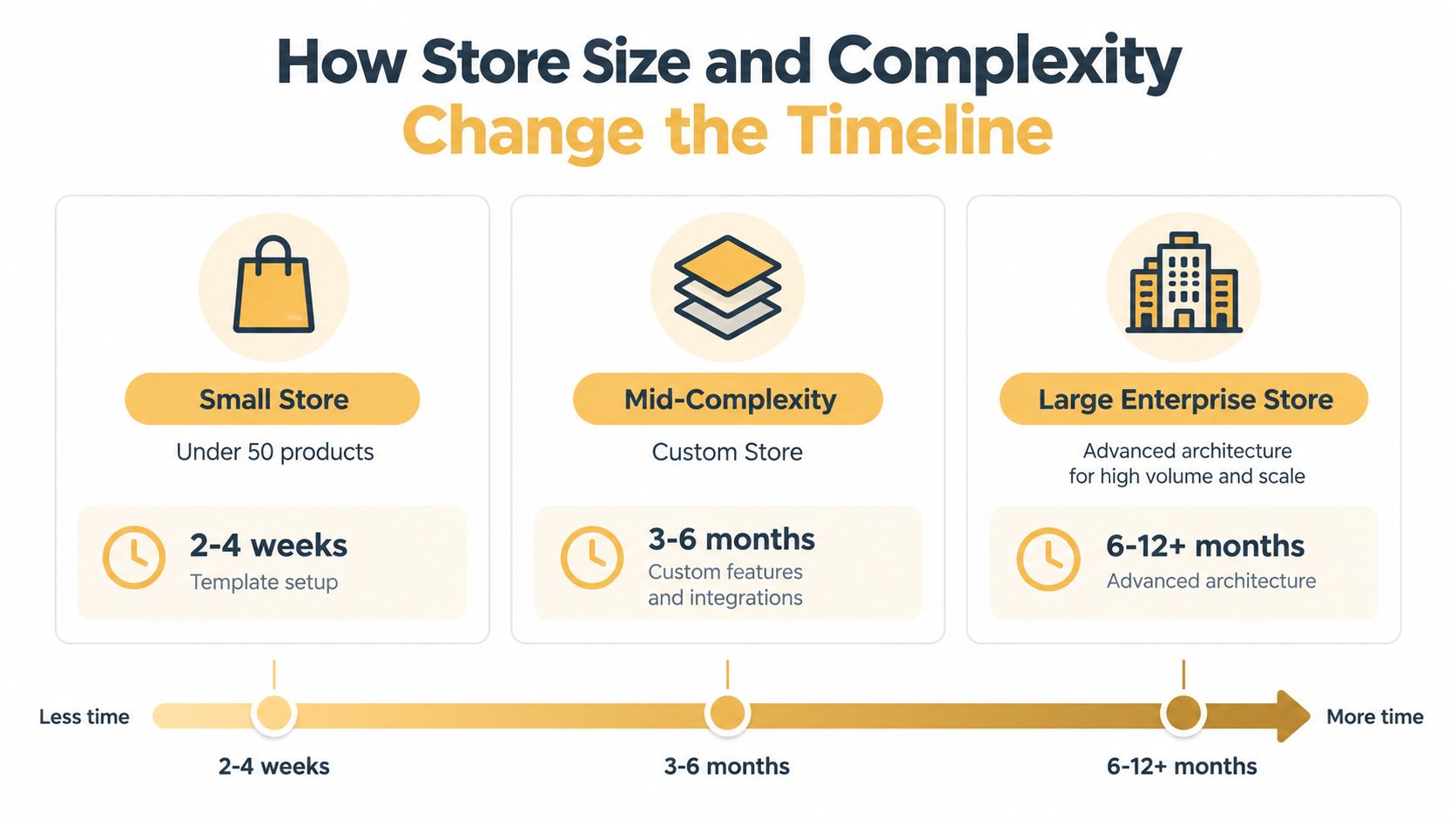
Use a simple diagnostic. Standard selling functions shift the schedule toward content and configuration. Custom behavior across several systems shifts it toward integration testing, data correction, and approval risk. Product count matters, but launch timing is usually governed by the work around the catalog.
How Platform and Architecture Choices Reshape the Schedule
Two businesses can sell similar products and still face very different schedules. A theme-based Shopify or WooCommerce store uses established commerce patterns. A semi-custom build changes the customer experience without replacing every underlying workflow. A fully custom platform asks the team to define, build, and test more of the system itself.
A standard Shopify implementation has been reported at a 6-week median in one industry benchmark, but that figure doesn't mean Shopify removes project risk. Migration, product normalization, fulfillment logic, design approvals, and third-party services can still control the schedule. Teams comparing platforms should review this ecommerce platform comparison against their actual requirements, not just the advertised setup speed.

Faster tools can expose slower business work
A hosted platform can shorten technical setup while leaving the difficult operational work untouched. If the business is migrating an old catalog, reconciling customer accounts, mapping inventory, or connecting a warehouse system, the platform won't decide those rules for the team.
Headless and composable architectures add another layer. Recent guidance places large or enterprise headless and composable builds at 16–24+ weeks, especially when the project includes omnichannel features, AI personalization, B2B workflows, or marketplace functionality, as discussed in modern ecommerce architecture timelines.
Choose a more scalable architecture when the business has a clear need for independent frontends, complex channels, or specialized experience logic. Don't choose it merely because it sounds modern. The additional governance, testing, content modeling, and integration work can extend time to launch, while a simpler platform may deliver the first commercial release sooner.
The trade-off is launch speed versus future flexibility. The right architecture reduces expensive rework only when its capabilities match a documented business requirement.
The Hidden Bottlenecks That Decide Whether You Launch on Time
A development team can finish the code while the launch remains weeks away. Product data, approvals, assets, and operational rules often determine the schedule. One execution benchmark attributes 73% of delays to client-side content delivery, including product photos, copy, and brand assets, as reported in ecommerce development process research.
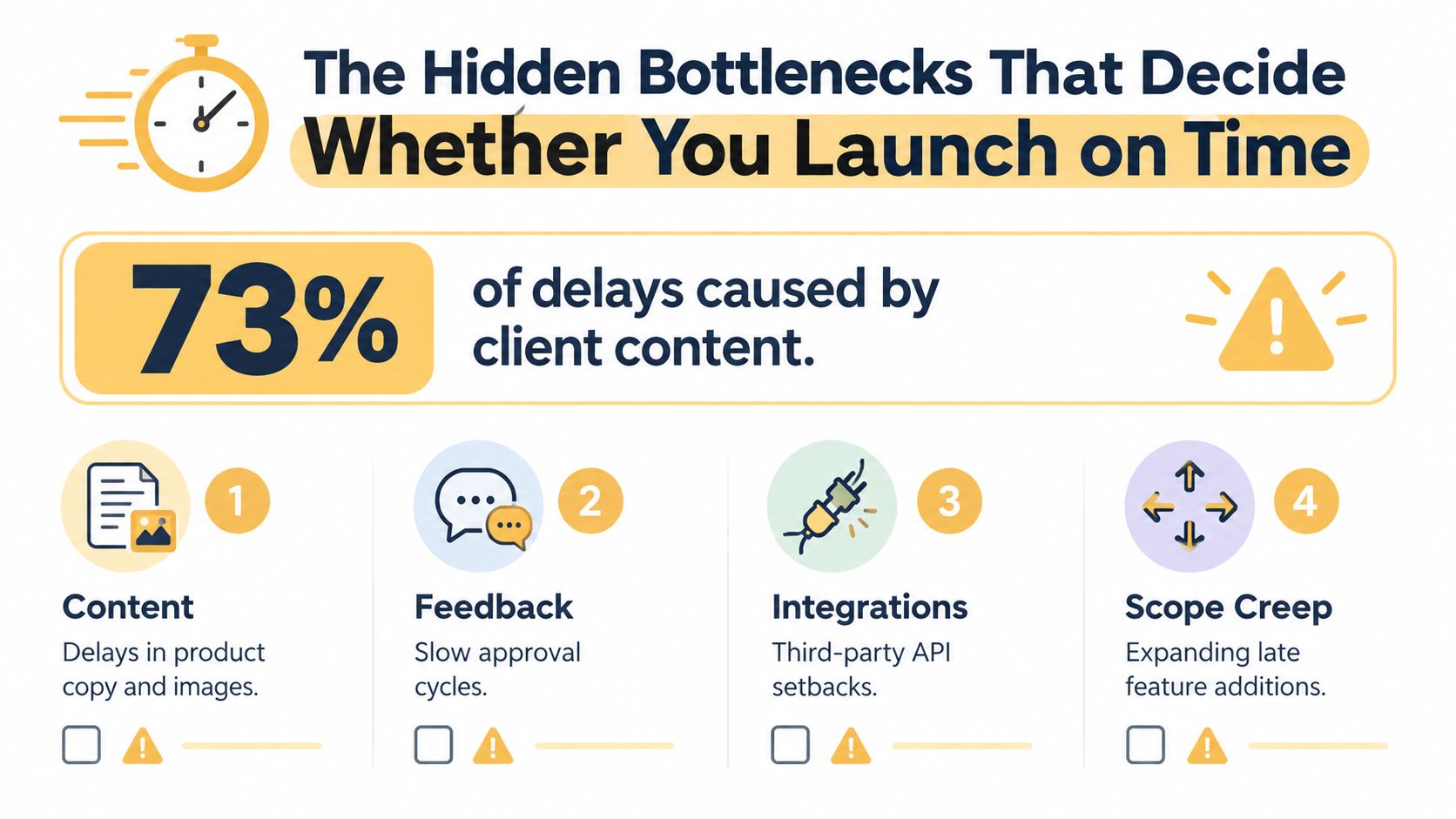
The four delays I check first
- Product catalog readiness: Confirm names, descriptions, prices, variants, attributes, and images before the population phase. A shared import template, with an owner assigned to each missing field, exposes gaps before they reach development.
- Brand and legal content: Product claims, shipping language, return policies, privacy content, and terms all require approval. One reviewer should consolidate comments instead of sending scattered revisions to the agency.
- Image and asset preparation: Cropping, naming, compression, and variant matching create repetitive rework when left until the end. Build a controlled asset library and connect each image to a specific product record.
- Shipping, tax, and payment configuration: These settings require business decisions and testing, not just installation. Document shipping zones, delivery rules, tax treatment, payment methods, and refund handling before checkout QA begins.
Payment deserves a separate workstream. A store may appear complete while credentials, webhooks, fraud settings, refunds, and failed-payment states remain untested. Review payment gateway integration considerations before selecting the implementation path.
Approval structure also controls elapsed time. One decision-maker with prepared assets can keep work moving. A committee reviewing each page separately creates waiting time, even when developers are available.
Late feature requests create another delay. A product filter can affect taxonomy, data, design, development, SEO, and QA. Treat each request as a scope decision, with its schedule and testing impact made explicit.
The practical diagnosis is direct: many ecommerce timelines are content-readiness projects presented as development projects. A realistic plan therefore separates build completion from launch readiness, because unfinished content or approvals can keep a coded store from going live.
DIY Versus Professional Versus Enterprise Timelines
DIY, professional, and enterprise launches aren't three speeds of the same service. They're different operating models with different responsibilities, review patterns, and tolerance for unfinished work.
A small DIY ecommerce store may take 3–6 weeks, while a solo founder can sometimes launch a simple SaaS store in 7–14 days when the scope and assets are ready, according to 2026 website timeline guidance. Professional semi-custom stores commonly fall within 6–14 weeks, while fully custom builds often take 3–6 months, based on the phased benchmark cited earlier.
Choose DIY when the business can absorb the work
DIY makes sense when the catalog is manageable, the design can follow established patterns, and one person can make decisions quickly. The owner must still handle product entry, content, shipping, tax, payment testing, customer emails, analytics, and ongoing maintenance.
The low agency invoice can become a false economy if the founder spends weeks learning the platform while delaying merchandising and marketing. DIY is a good fit when the founder wants control and has reliable time, not when the budget is limited.
Choose professional help when delay has a business cost
A professional team is useful when the business needs custom UX, migration support, conversion-focused information architecture, or integrations that the internal team can't confidently test. The project still depends on client inputs, but specialists can identify risks before they become production defects.
Before selecting a partner, compare the build estimate with the broader considerations in this guide to ecommerce website development cost. The cheapest path isn't automatically the fastest path to a stable store.
Enterprise work needs a different planning discipline. Multiple departments, complex permissions, legacy data, governance, and several sales channels create approval and integration dependencies that a small team doesn't face. The right question is whether the organization can staff decisions and testing, not whether a vendor can promise an aggressive date.
Ask yourself: Who supplies the assets? Who approves design? Who owns shipping rules? Who tests real orders? If those answers aren't clear, the timeline isn't ready to trust.
Putting It Together and Pressure-Testing Your Project Plan
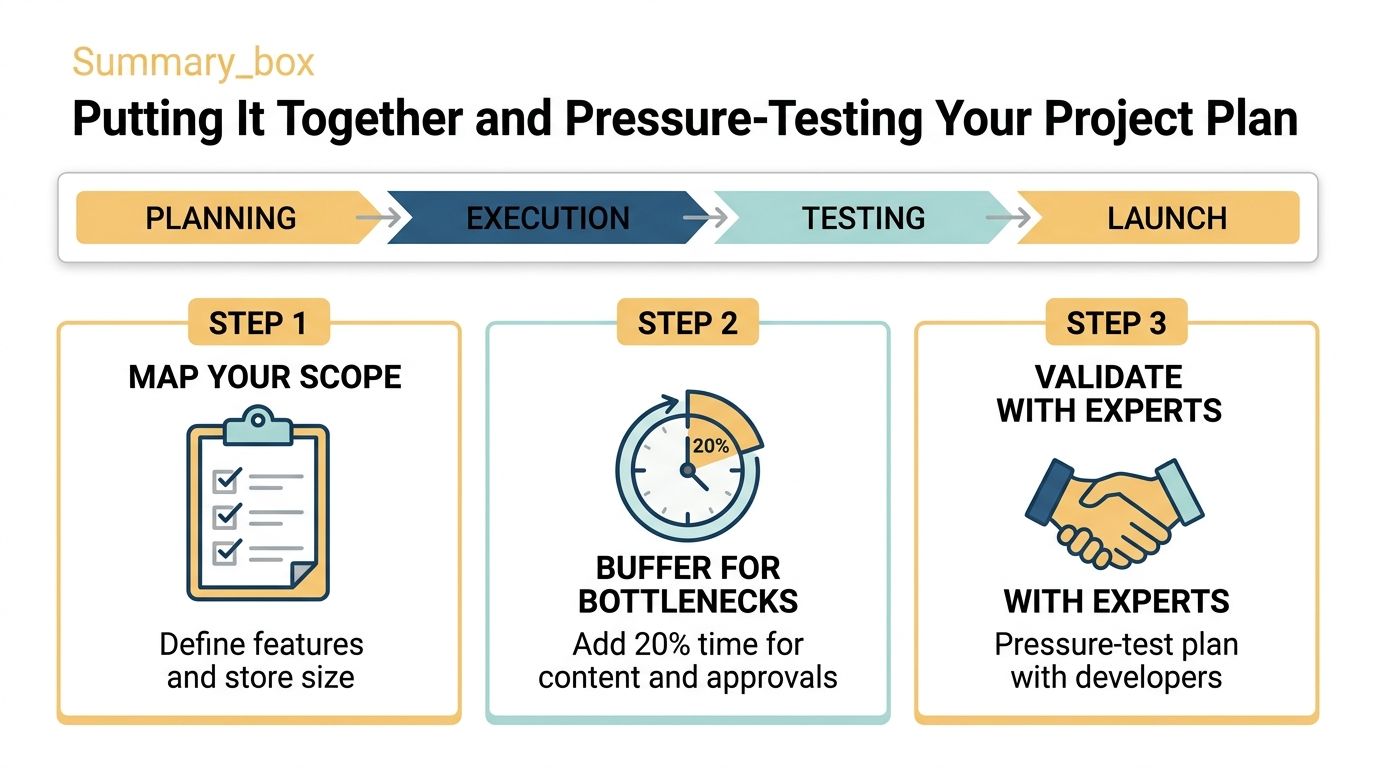
Use the scope ranges as a starting point. A semi-custom store usually belongs in the 6–14 week planning band, a fully custom build in the 3–6 month range, and enterprise or headless work may extend to 6–12 months, according to the phased ecommerce benchmark referenced above.
Check the project before you trust the date
A credible plan should make these checkpoints visible:
- Scope approved: The launch feature set separates required functionality from later enhancements.
- Catalog prepared: Product data, variants, images, and category rules have owners and deadlines.
- Architecture decided: Platform, integrations, migration approach, and data responsibilities are documented.
- Design approved: The team knows who provides consolidated feedback and when approval occurs.
- Commerce rules tested: Payments, shipping, tax, refunds, and transactional emails work in realistic scenarios.
- Launch criteria defined: The business agrees what must be true before customers arrive.
The single best question to ask an agency or freelancer is: “Can you break your proposed timeline down by phase and list every client-side input you're assuming?”
A strong answer names discovery, architecture, information architecture, design, development, integrations, QA, and launch support. It also states what the client must provide, who approves it, and what happens when an assumption changes. A weak answer gives one total duration and treats content, migration, and approvals as “to be determined.”
A timeline becomes credible when another person can inspect its assumptions.
Pressure-test the plan by asking which tasks can run in parallel and which tasks block others. Then identify the first decision that could stop progress. If product data is incomplete, design may proceed, but catalog population and QA won't. If payment requirements are unknown, checkout approval is premature.
Timelines are negotiable, but only when the inputs are visible. Define the scope, assign owners, set approval dates, and make the agency show its assumptions before signing.
Up North Media provides custom ecommerce development, web applications, ecommerce SEO, and AI consulting for businesses that need a store aligned with their operational requirements. If you want a phase-by-phase estimate grounded in your catalog, integrations, and launch goals, visit Up North Media to discuss the project.