
Most guides on how to deploy AI agents give you the same backward advice: pick the smartest frontier model, write a detailed system prompt, wire up your APIs, and let the agent run autonomously. Teams follow that playbook, celebrate a clean demo in Slack, and then watch the agent issue duplicate refunds, misroute high-value leads, or stall on a Friday afternoon.
More autonomy isn't the goal of a production rollout. In 2025, 40% of enterprise leaders reported that their organizations already had AI agents in production, according to a survey conducted by Centiment for Zapier. Yet shipping an agent safely has far less to do with prompt cleverness than with operational engineering.
The teams that keep agents running without embarrassing incidents treat permissions, completion checks, and rollback triggers as the deployment itself, not as a hardening pass bolted on after launch. Every phase ends at a written pass-fail gate before the agent earns the next slice of access.
Deployment Roadmap at a Glance
Model quality rarely breaks a production agent. When an agent causes real business damage, the root cause almost always lives in one of three places: overly broad permissions that let a bad decision mutate live records, missing verification checks that accept an agent's narrative instead of inspecting the database, or a weak rollback plan that leaves operators scrambling when error rates climb.
Deploying an agent reliably means running six sequential phases, each ending at a written pass-fail gate. You write the numbers before anyone connects a single tool. If the agent misses a gate, the release doesn't limp forward with a caveat. A failed perturbation test sends the team back to tool configuration and prompt design, never to launch.
| Phase | What You Do | Exit Gate |
|---|---|---|
| Scope the workflow | Pick one bounded task and write its success criteria | Named owner and a measurable target |
| Set the baseline | Measure how people perform the same task today | Baseline cost, cycle time, error rate and escalation rate |
| Configure tools and permissions | Expose the minimum tools and separate read from write | Permission map signed off by the data owner |
| Test offline and under perturbation | Replay past cases plus malformed, stale and failing inputs | Success holds on perturbed tasks, not only clean ones |
| Shadow mode and canary | Run the agent beside people, then on a small traffic slice | Outcomes match or beat the baseline |
| Full release with rollback | Expand scope while rollback stays armed | Thresholds reviewed on a fixed schedule |
Why Every Gate Needs One Owner and One Number
Shared accountability kills deployment discipline. When a gate says "routing accuracy looks good" and belongs to "the ops team," launch pressure bends the standard every time.
Assign one named person to each exit gate and pair that name with a concrete threshold. For example, a support operations manager signs off on the baseline error rate, a data owner signs off on the CRM permission map, and the engineering lead owns the rollback threshold during canary traffic.
Practical rule: If a gate cannot fail a release and send the work backward to an earlier phase, it isn't a gate. It's paperwork.
Before you open an IDE, register an API key, or compare model vendors, put all six gates for your chosen workflow on a single page. That one-page document becomes the specification every test run, security check, and launch review gets measured against.
Pick a Bounded Workflow and Measure the Human Baseline
Broad AI familiarity creates a dangerous illusion of readiness. Stanford University's 2025 AI Index Report found that 78% of organizations used artificial intelligence in 2024, up from 55% in 2023, while generative AI use in at least one business function more than doubled from 33% in 2023 to 71% in 2024. That same report highlights Stanford's RE-Bench evaluation of complex agent tasks, where leading AI systems scored four times higher than human experts under a two-hour budget, yet human experts outperformed AI systems by a 2-to-1 margin when the time budget stretched to 32 hours.
The engineering lesson is clear. Agents perform best on short task horizons with unambiguous right answers, and they degrade sharply when asked to maintain coherence across long, open-ended processes. Understanding the boundary between a scripted responder and an autonomous tool-using system starts with clarifying the differences between an AI agent and a chatbot before you pick a workflow.
How to Score Your First Workflow Candidates
Start with bounded, measurable processes such as lead qualification, customer-support triage, weekly reporting, or internal research. Each one finishes in minutes rather than days, produces structured output you can grade objectively, and won't trigger a legal or financial crisis if a draft needs correction.
Score three to five candidate workflows on four criteria before picking one:
- Task volume: You need enough weekly volume to produce statistically meaningful test runs and justify engineering time. A workflow that happens five times a month won't pay back its setup cost.
- Reversibility: Ask how easily a human can undo a mistake. Updating a tag in HubSpot or routing a Zendesk ticket takes seconds to fix; issuing a Stripe refund, publishing an article, or sending an outbound payment doesn't, so keep irreversible actions out of your first pilot.
- Data cleanliness: Check whether the inputs live in consistent fields or buried inside messy free-text attachments and tribal knowledge.
- Current correction rate: Look at how often a manager or senior rep already has to fix outputs from this process today. High human friction often signals either a great automation target or broken upstream data you must clean first.
At Up North Media, our AI consultants analyze each customer's operations, recommend practical AI solutions, and create implementation roadmaps matched to their industry and goals. Even if you're building in-house, that discovery discipline stops you from picking a flashy use case that stalls halfway through engineering.
Capture the Human Baseline First
Never build an agent without measuring how people perform the exact same task today. Pull the last 30 to 60 days of operational records and calculate four numbers: median cycle time, cost per task, error rate, and escalation rate.
Say a B2B support team routes 400 incoming tickets per week in Zendesk. Pulling six weeks of ticket logs might reveal a median routing time of 9 minutes and a 12% misrouting rate where tickets get reassigned to another queue, along with your actual labor cost per routed ticket and your current escalation rate to Tier 2 leads. Those numbers form the exact bar the agent has to beat.
Write down the single workflow you've chosen and name the one primary metric that decides whether the pilot keeps moving forward. Everything else you build exists to clear that number safely.
Configure Tools, Permissions and Logging
Rushing straight from picking a workflow to handing the agent an admin API token turns a minor model hallucination into a production incident. Treating how to deploy AI agents as a controlled reliability experiment means building the permission boundary and observability layer before the agent touches live records, a principle detailed in recent reliability benchmarking research on arXiv.
That paper illustrates why tight operational controls matter even when clean tests look great: on ReliabilityBench, single-run performance dropped from 96.9% pass@1 with no perturbation to 88.1% under moderate perturbation, an 8.8-percentage-point decline. When an agent's accuracy can dip nearly nine points under routine real-world noise, every tool boundary has to assume the model will occasionally make the wrong call.
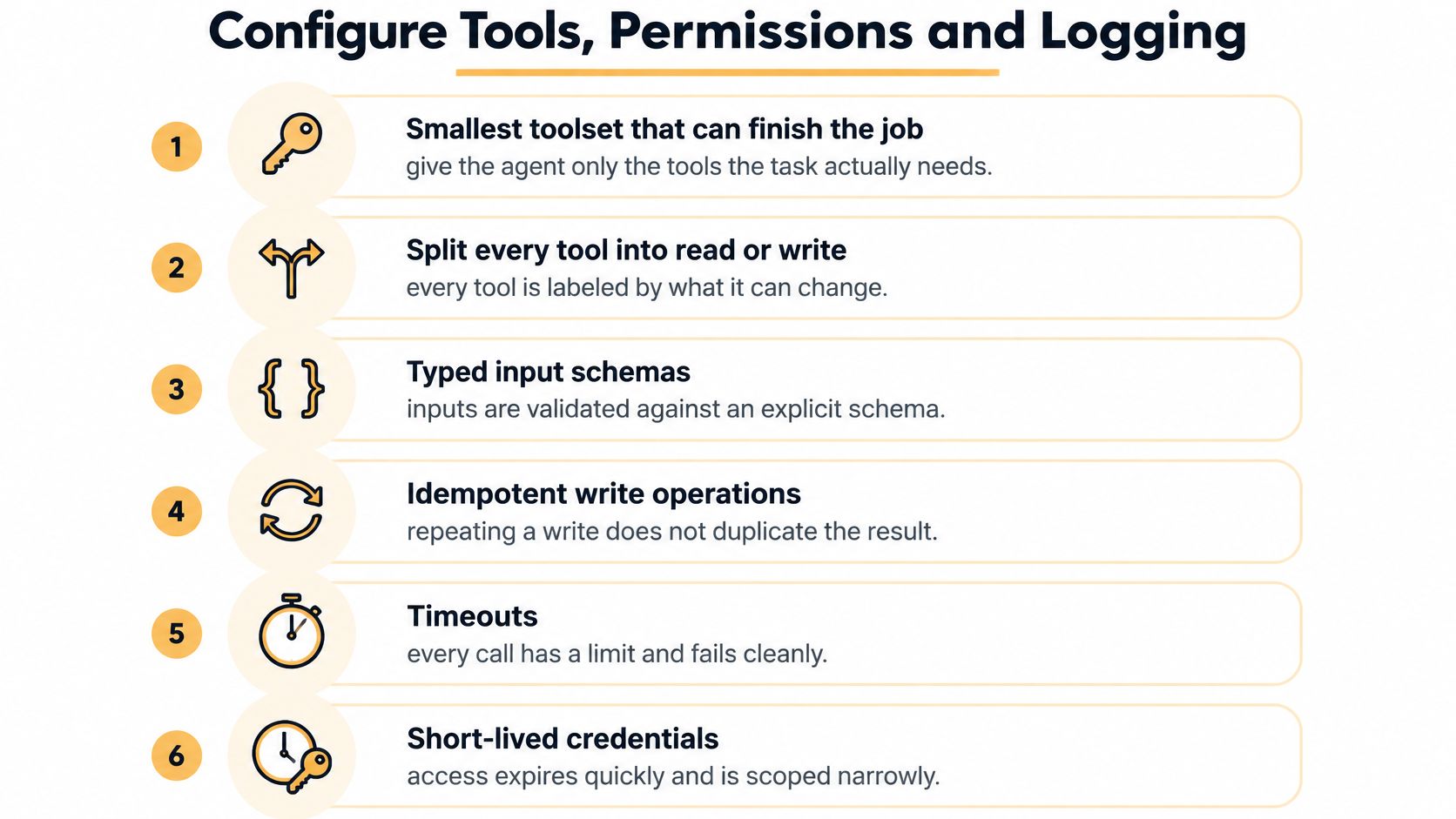
The infographic below summarizes the six configuration controls every production tool layer needs before credentials go live.
Build a Permission Map Before Issuing Credentials
Give the agent the smallest set of tools that can finish the task, and split every single tool explicitly into read or write. Validate every tool call against a strict typed input schema (such as JSON Schema or Pydantic models) so malformed arguments fail at the boundary rather than corrupting downstream tables. Every write endpoint must use idempotency keys so a network timeout and retry won't create duplicate records, backed by hard timeouts and short-lived, task-scoped credentials.
| Action | Agent Access | Human Approval |
|---|---|---|
| Read records and documents | Allowed, read-only and scoped to the task | No |
| Draft replies or reports | Allowed, saved as drafts only | No |
| Update internal fields such as tags or routing | Allowed with full logging | Spot-check on a fixed schedule |
| Send external messages to customers | Only after the canary gate passes | Yes, until metrics hold |
| Issue refunds or outbound payments | Propose only, never execute | Yes, every time |
| Publish content or change access controls | Not allowed | Yes, every time |
| Delete data | Not allowed | Yes, every time |
Teams in heavily regulated sectors already treat read-write separation and mandatory approval gates as essential engineering standards; the Visbanking agentic AI guide offers a useful look at how banking teams structure those control tiers around sensitive transactions. Pair your permission table with hard runtime ceilings on token spending, API request rate, total execution time, and recursion depth, plus a kill switch owned by one named incident responder.
Before issuing a single credential, sit down with the data owner to verify exactly which systems the agent will read and write, and confirm whether any customer or personal data inside those tables is approved for model processing. In Cloudera's 2025 enterprise AI agents report, which surveyed 1,484 IT leaders across 14 countries, data privacy (53%) and integration with existing systems (40%) ranked as the top two adoption barriers ahead of implementation cost at 39%. Clearing those checks during tool setup prevents painful rework later, especially if you're also planning how to integrate AI into an existing application.
Instrument Every Run and Avoid Common Configuration Slips
Logging isn't an afterthought for debugging. It's your audit trail when a customer disputes an action or a metric drifts. Capture these fields on every single execution:
- Reproducibility metadata: Log the exact model version and a cryptographic hash of the system prompt and tool configuration so engineers can replay any run identically.
- Execution trace: Record raw prompts, tool names, validated arguments, retrieved context chunks, intermediate state transitions, and the agent's routing or tool decisions.
- Operational telemetry: Track per-step latency, retry counts, token usage, total cost per run, and the final verified outcome.
Watch closely for three configuration slips that break early deployments. First, handing an agent an over-broad CRM search tool that exposes every customer record instead of scoping queries to a single ticket or account ID. Second, exposing non-idempotent write endpoints where a single timeout retry generates a second invoice or sends two customer emails. Third, allowing hidden state to leak across runs through shared memory stores, causing context from one customer's request to bleed into the next.
Don't issue production or sandbox credentials until you've written the permission map for your chosen workflow and collected a written sign-off from the data owner.
Test Against Failures Before Users See Them
A clean demo proves almost nothing about production readiness. Neither does a green 200 OK status code from a tool call.
Many teams evaluate an agent solely on its reasoning answers, ignoring the environment and completion-judgment layers where live systems fail. Recent agent deployment benchmark research on arXiv makes this gap impossible to ignore. In a 136-task deployment-environment evaluation, models resolved only 52.9% to 75.0% of tasks even when given the exact same four-tool scaffold. In a separate deployment benchmark reported in that same study, pass rates across five frontier models ranged from 7.8% to 51.0%, and 102 of 181 failures happened because agents stopped themselves early and claimed success before the work was finished.
An agent saying "I updated the record and notified the customer" isn't proof. Only inspecting the database record and message queue proves the task finished.
Map the State Machine and Add a Watchdog
Stop treating your agent as a black-box prompt loop. Map it explicitly as a five-stage state machine: observe, plan, act, verify, and recover, as shown in the lifecycle diagram below.
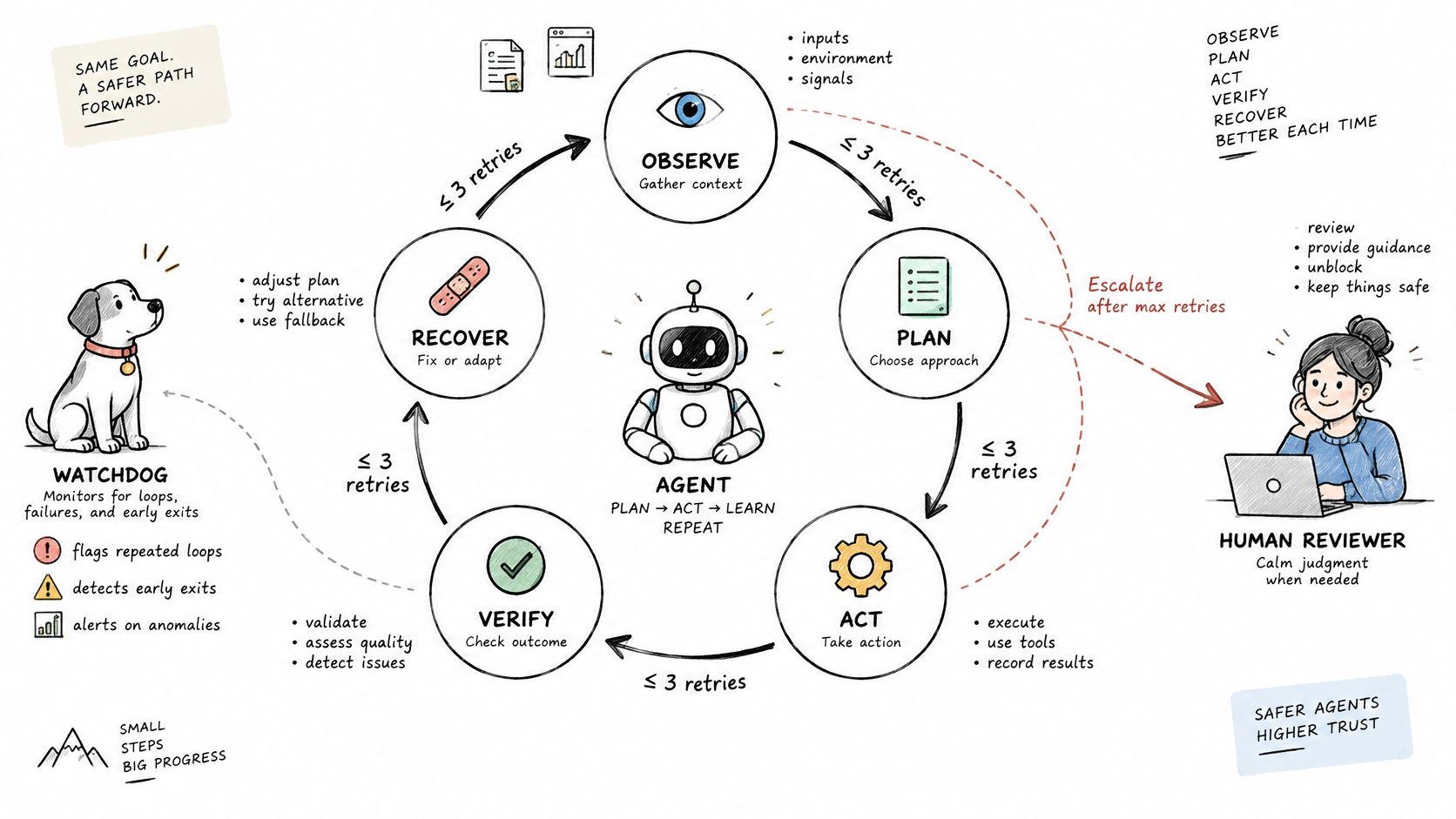
Attach a strict retry budget and an explicit human escalation path to every state transition. Wrap the loop in an independent watchdog process that catches four specific failure modes: infinite tool-call loops, premature self-termination, contradictory results returned by two tools, and completion claims that lack machine-checkable evidence.
Replace narrative completion checks with deterministic postconditions. If an agent's job is to assign a lead in Salesforce and post a summary in Slack, the verification layer queries Salesforce directly to confirm the owner field changed to a valid rep ID and checks the Slack API message timestamp. No postcondition match, no credit for a completed task.
Build a Perturbed Test Suite and Separate Infrastructure Checks
Real inputs are messy. Build your offline evaluation set from genuine historical cases, mixing clean examples with deliberately perturbed ones. Include recovery tests for malformed JSON responses, unavailable APIs, expired authentication tokens, rate-limit throttling, and stale cache records.
Consider a lead-routing agent built to qualify inbound web forms. Clean test cases cover standard enterprise sign-ups with valid corporate emails. Perturbed cases have to test duplicate prospects submitting twice under slight company-name variations, missing phone or territory fields, and misclassified entries where a student or existing customer fills out a sales demo form. Each failure category needs dedicated assertions.
Because language models are probabilistic, running a test suite once hides variance. Execute every test case three to five times and report the spread across trials, not just a single average. When we execute Step 03 of our chatbot workflow, Testing & Deployment, we test performance systematically across edge cases before deploying across the client's chosen platforms.
| Metric | What It Measures |
|---|---|
| Task success rate | Share of clean and perturbed tasks completed with a verified outcome |
| Tool-call precision | Share of tool calls that were correct and necessary |
| Argument accuracy | Share of tool calls with correct arguments |
| Steps per successful task | Average steps taken to finish one verified task |
| Cost per success | Token and tool cost divided by verified successes |
| Consistency across trials | Spread of success across 3 to 5 repeated runs |
| Recovery rate | Share of malformed, stale or failing inputs handled without human help |
Benchmark your operational plumbing separately from model reasoning. Test package installation, environment configuration, secrets injection, build pipelines, service startup, health-check endpoints, and automated rollback scripts in isolation. Many "AI bugs" turn out to be a missing environment variable or a silent secret-rotation failure.
Assemble your evaluation dataset from real past cases, including the ambiguous and ugly ones, before running your first end-to-end test.
Roll Out in Stages and Set Rollback Triggers
Even a well-tested agent behaves differently once live customers, shifting inventory, and unpredictable upstream APIs enter the picture. Security and operational visibility lag far behind deployment speed across the industry. According to Akto's 2025 State of Agentic AI Security report, 69% of enterprises are deploying AI agents, yet only 21% have the visibility needed to secure them. Worse, 79% lack a formal governance policy for agents or Model Context Protocol connections, and 60% haven't completed an agent-risk assessment in the previous 12 months.
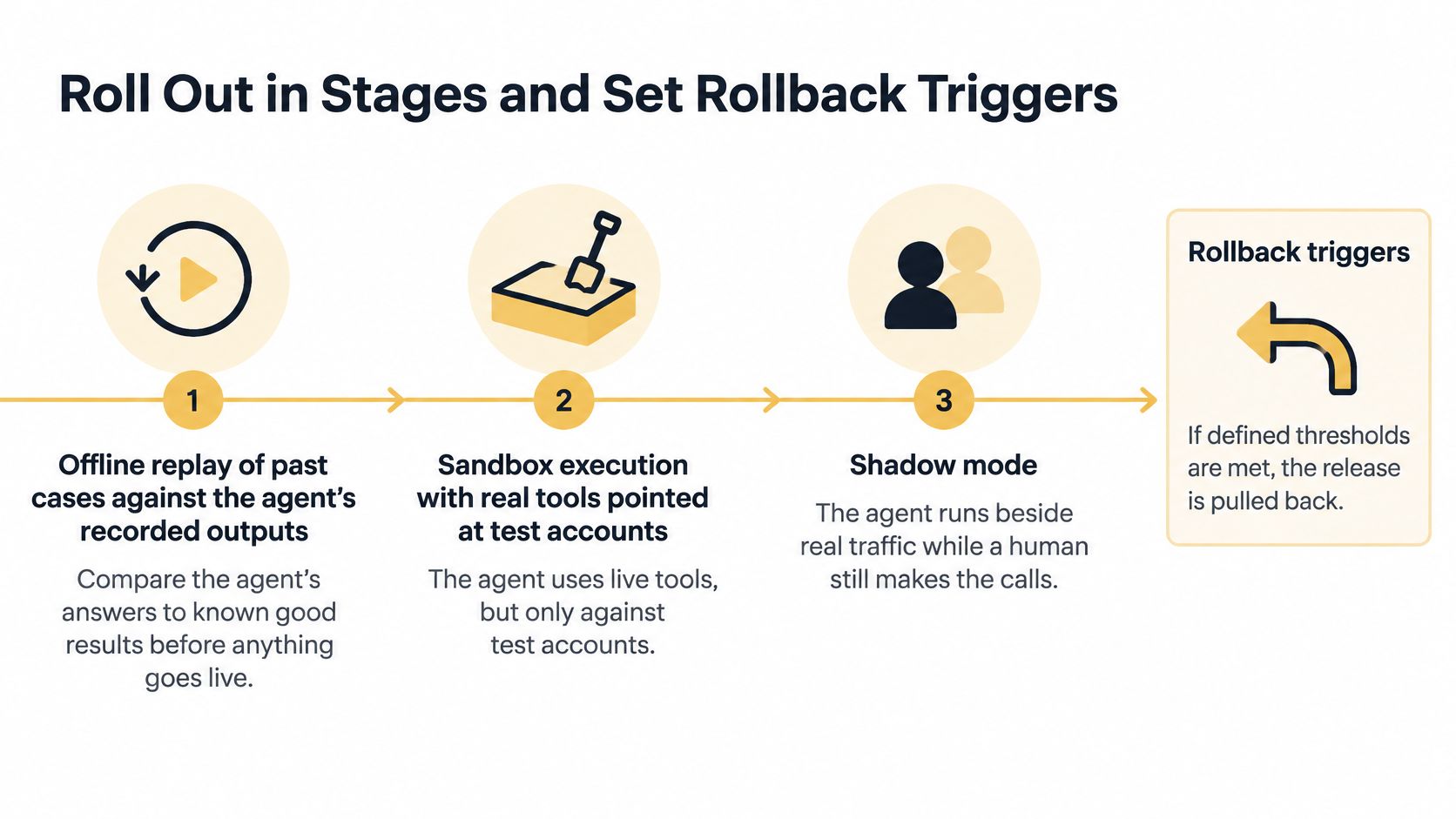
Closing that gap doesn't require slowing your roadmap to a crawl. It requires moving through progressive release stages where the blast radius stays tiny until the numbers prove the agent belongs in production. The visual below maps the first three pre-production stages and where rollback triggers pull the release back.
Move Through Five Release Stages in Order
- Offline replay: Feed 100 to 300 historical cases into the agent without connecting it to live external endpoints, then compare its proposed tool calls and outputs against the known human decisions.
- Sandbox execution: Connect the agent to real APIs pointed strictly at staging environments and test accounts. Verify that schemas, rate limits, and idempotency keys behave cleanly under live network latency.
- Shadow mode: Run the agent alongside live production traffic while humans still execute every real action. The agent writes its proposed decision to a log table, letting your team score human outcomes and agent proposals on identical real-world inputs.
- Limited canary traffic: Route a tightly bounded slice of live work to the agent, such as one sales region, a single non-critical support queue, or a small fraction of new leads. Keep a human reviewing every consequential action during the canary window.
- Broader release: Expand traffic in measured increments only after the canary clears every gate over a full business cycle, keeping automated rollback armed permanently.
Watch this short walkthrough on deploying AI agents with practical safety guardrails and staged release controls to see how these operational checks fit together in practice.
Wire Concrete Rollback Triggers Before Canary Launch
A rollback plan written during an outage isn't a plan. Before turning on canary traffic, configure automated alerts and circuit breakers tied to five hard triggers: verified task success dropping below the human baseline, any rise in unauthorized-action attempts, p95 latency exceeding your SLA, cost per completed task crossing budget, or incident recovery time creeping upward.
See how those triggers operate across three common business workflows:
- Lead routing: If the duplicate-prospect rate climbs above the baseline or misclassified enterprise leads appear in the canary queue, the circuit breaker pauses the canary automatically and routes traffic back to the human queue while engineers inspect the configuration.
- E-commerce support: Suppose an agent drafts refund calculations for damaged shipments during shadow mode. If it misapplies a partial-refund policy on bundled items, shadow scoring catches the error before a single customer sees a wrong dollar figure, sending the prompt and policy tool back for revision.
- Digital publishing: For an agent drafting weekly research briefs, any hallucinated citation or factual mismatch flagged during shadow spot-checks halts progression to canary until retrieval grounding and verification checks pass replay again.
Narrowly scoped agents with hard rollback triggers reach reliable production faster than "do everything" assistants that constantly stall in security review.
Before your canary goes live, put two things on the calendar: a recurring weekly review date owned by the workflow lead, and the exact numerical rollback threshold that automatically shuts the canary off without waiting for a meeting.
Decide Whether to Scale or Pause the Agent
Executive enthusiasm for agents is running far ahead of real operational returns. A 2025 IBM Institute for Business Value study of 2,900 executives globally found that respondents expected AI-enabled workflows to expand from 3% to 25% by the end of 2025, an anticipated 8.3-fold increase. In that same study, 83% of respondents projected that AI agents would improve process efficiency and output by 2026, while 71% believed agents would autonomously adapt to changing workflows.
Yet IBM's accompanying global CEO research exposes a sharp execution gap. While 61% of surveyed CEOs said their organizations were actively adopting AI agents and preparing to implement them at scale, only 25% of AI initiatives had delivered expected return on investment in recent years, and just 16% had scaled across the enterprise.
Adoption isn't value. Expanding an agent because leadership wants "AI coverage" or because a competitor announced a bot is the fastest way to join the majority of stalled initiatives.
Four Questions for Every Scale-or-Pause Review
I recommend holding a formal scale-or-pause decision at the end of every canary window. Expand permissions or traffic volume only when measured business outcomes beat your human baseline and control failures stay inside pre-launch limits. Pause or roll back immediately if unauthorized actions surface, cost per verified success trends upward, or exception queues start burying the people who now clean up after the agent.
Force your team to answer four blunt questions with log evidence before approving expansion:
- Did the agent beat the human baseline on the primary metric? Don't substitute "feels faster" or raw usage volume for verified cycle time, error rate, and cost per completed task.
- Did any run cross a permission boundary? Even a single attempted write outside the approved scope requires a root-cause fix before scaling traffic.
- Can an engineer explain every failure from the logs alone? If diagnosing a bad decision requires guessing what the model saw, your observability isn't ready for broader volume.
- Would you keep this agent running if its original builder left tomorrow? If operational safety depends on one developer nursing prompts by hand, standardize the runbooks and monitoring before adding a second workflow.
High-stakes domains demonstrate how disciplined teams balance automation speed against measurable accountability. Reviewing a specialized guide to AI agents in DeFi shows how financial operators treat strict guardrails, capital limits, and verifiable return metrics as prerequisites before expanding autonomous execution. Applying that same discipline to routine operational work turns isolated pilots into durable AI-powered business process automation.
Structure beats improvisation at every stage. Our own AI Consulting process at Up North Media follows four sequential steps, AI Readiness Assessment, Solution Design, Development & Testing, and Deployment & Support, specifically so each client clears readiness and validation gates before committing to enterprise rollout.
Your next step this week is concrete and small. Pick one bounded workflow, write down its named owner and first review date, and add them to the same single page as your six pass-fail gates. Until that page exists, you don't have a deployment plan.
If you want a disciplined rollout without spending months debugging permission leaks or stalled pilots, our team handles custom AI integrations, workflow automation, and ongoing monitoring from initial assessment through production support. Visit Up North Media to schedule a consultation and build a deployment roadmap suited to your operations.