

The usual advice on how to integrate AI into an app starts too early: get an API key, send a prompt, and start experimenting. That proves you can call a model. It doesn't prove you should build the feature.
The hard part of integration is deciding which workflow deserves automation, what the model is allowed to change, and when you'll stop if it doesn't help. Get those decisions right, and the code becomes a manageable engineering task. Skip them, and you can ship a convincing demo that creates more work than it removes.
Decide Whether AI Fits Your App
Small businesses don't necessarily need more AI education. They need a relevant use case: the SBA Office of Advocacy's research spotlight reports that nearly 82% of U.S. businesses with fewer than five employees that weren't planning to adopt AI cited lack of relevance as the reason.
That's a good reason to begin with workflow diagnosis rather than model selection. Support ticket triage, product description drafts, internal search over approved documents, and lead qualification from web forms all have identifiable inputs, outputs, and reviewers.
Use your existing process notes to find the bottleneck before sketching an AI interface.

Diagnose the work before choosing the tool
Run this exercise with whoever owns the process:
- List recurring tasks. Pick the five tasks your team repeats most each week, including the tedious administrative work.
- Record a baseline. Measure response time, conversion rate, error rate, or cost per completed task.
- Estimate the reviewable share. Separate cases a model could draft or classify from cases that require judgment.
- Choose accessible inputs. Prefer a workflow with clean records, clear permissions, and an available reviewer.
- Write a stop condition. Decide what result would justify stopping rather than adding more prompts.
For a hypothetical example, say a 12-person online retailer produces 300 product descriptions a month. The promising task isn't autonomous merchandising. It's turning approved product attributes into drafts that an editor accepts or corrects.
Measure editing time and factual corrections, not how polished the first draft sounds. A description that invents a material, compatibility claim, or warranty creates work even if it reads well.
Recognize the cases you shouldn't build
Exact arithmetic belongs in application code. A task where one wrong answer costs more than the likely time savings needs stronger controls or a different approach entirely.
An undefined process is another poor fit. If employees disagree about how to qualify a lead, the model won't resolve the business decision for them.
Decision rule: Integrate a well-defined workflow, not an unresolved disagreement about how the business should operate.
Use an AI implementation roadmap to assign ownership and sequence the work. The diagnosis should end with a clear outcome: integrate this workflow now, or fix the process first.
Choose Between a Hosted API and Self-Hosted Models
Model integration paths compared
| Path | Best for | Time to first version | Data control | Cost pattern |
|---|---|---|---|---|
| Hosted API | Chat, summaries, classification | Shortest path when inputs are ready | Provider terms govern retention | Pay per token |
| Retrieval over a hosted model | Answers grounded in company documents | After ingestion, indexing, and retrieval tests | Documents stay in your index; selected content reaches the provider | Per token plus search index |
| Fine-tuned hosted model | Consistent output format at high volume | After example preparation, training, and evaluation | Training data reaches the provider | Training fee plus per-token rate |
| Self-hosted open-weight model | Strict residency, steady high volume | After infrastructure and serving setup | You control data and logs within your deployment | GPU hosting plus staff time |
A hosted API removes model-serving work from your initial build. Retrieval adds relevant company documents to a request, but you must test whether the search layer finds the right evidence.
Fine-tuning adapts behavior using examples; it isn't a reliable substitute for retrieving changing business facts. Self-hosting gives your team operational control, along with responsibility for patching, capacity, availability, and model upgrades.
Choose the simplest path that meets the constraint
For the retailer's description drafts, structured product fields and a hosted model are a sensible starting point. A search index adds little if the necessary facts already fit in a clean product record.
For an employee policy assistant, retrieval makes more sense. Use a search tool such as PostgreSQL with pgvector or a managed search service, retrieve permitted passages, and include source identifiers with the answer.
Try schema-constrained output and better examples before fine-tuning for formatting. Consider self-hosting when a concrete residency requirement or measured workload justifies the infrastructure, not because owning a GPU sounds cheaper.
According to Stanford's 2025 AI Index, querying a model with GPT-3.5-level benchmark performance cost $20 per million tokens in November 2022, compared with approximately $0.07 per million tokens in October 2024. Those are historical benchmark-equivalent prices, not a quote for your application.
Keep the model replaceable
Define an internal interface that accepts your application's task format and returns a validated result. Keep vendor-specific request fields, response parsing, and error translation inside an adapter.
Route straightforward classification or drafting to a smaller model when evaluation supports it. Escalate difficult cases only when the larger model improves successful completion enough to justify its cost.
For regulated information, review retention, training defaults, subprocessors, residency, and data-processing terms before implementation. A provider's enterprise contract may offer different controls from its default developer account.
Shortlist competing providers and run the same labeled cases through each. Choose using task quality, latency, failure behavior, and tokens per completed task rather than a leaderboard.
Estimate Cost and Timeline Before You Build
For the hypothetical retailer, estimate the entire request, not just the generated description. Input tokens include instructions, examples, product attributes, and any retrieved text; output tokens include the draft and structured fields.
Use the provider's current input and output rates separately. Then add retries, search infrastructure, monitoring, and human editing.
Calculate the useful unit
Cost per successful description = total workflow cost ÷ accepted descriptions.
Keep inference cost visible, but don't confuse it with total operating cost. A cheap draft that requires extensive rewriting can cost more than the manual process.
Compare the assisted workflow with the editor's existing cost per accepted description. Set the pilot ceiling below the value created, leaving room for maintenance rather than spending every saved dollar on generation.
Budget for accepted work, not generated text.
Estimate delivery around dependencies
A hosted prototype is the shortest route, but a production feature also needs authentication, fallback behavior, evaluation, deployment, and an owner for incidents. Messy source records can take longer to fix than the model integration itself.
Assign an engineer to the integration, a domain expert to label outcomes, and a decision-maker to approve or stop the pilot. Use a software development cost estimate that separates initial delivery from recurring infrastructure and support.
Refresh the estimate when usage, pricing, or review requirements change. Don't assume the prototype's clean inputs or limited traffic represent production.
Build the Feature Step by Step
Build the smallest end-to-end workflow that can produce a measurable outcome. For the retailer, that means a draft button in the existing product editor, not a separate conversational workspace.
Use the flowchart as a build checklist, with budgets and release settings chosen for your application.
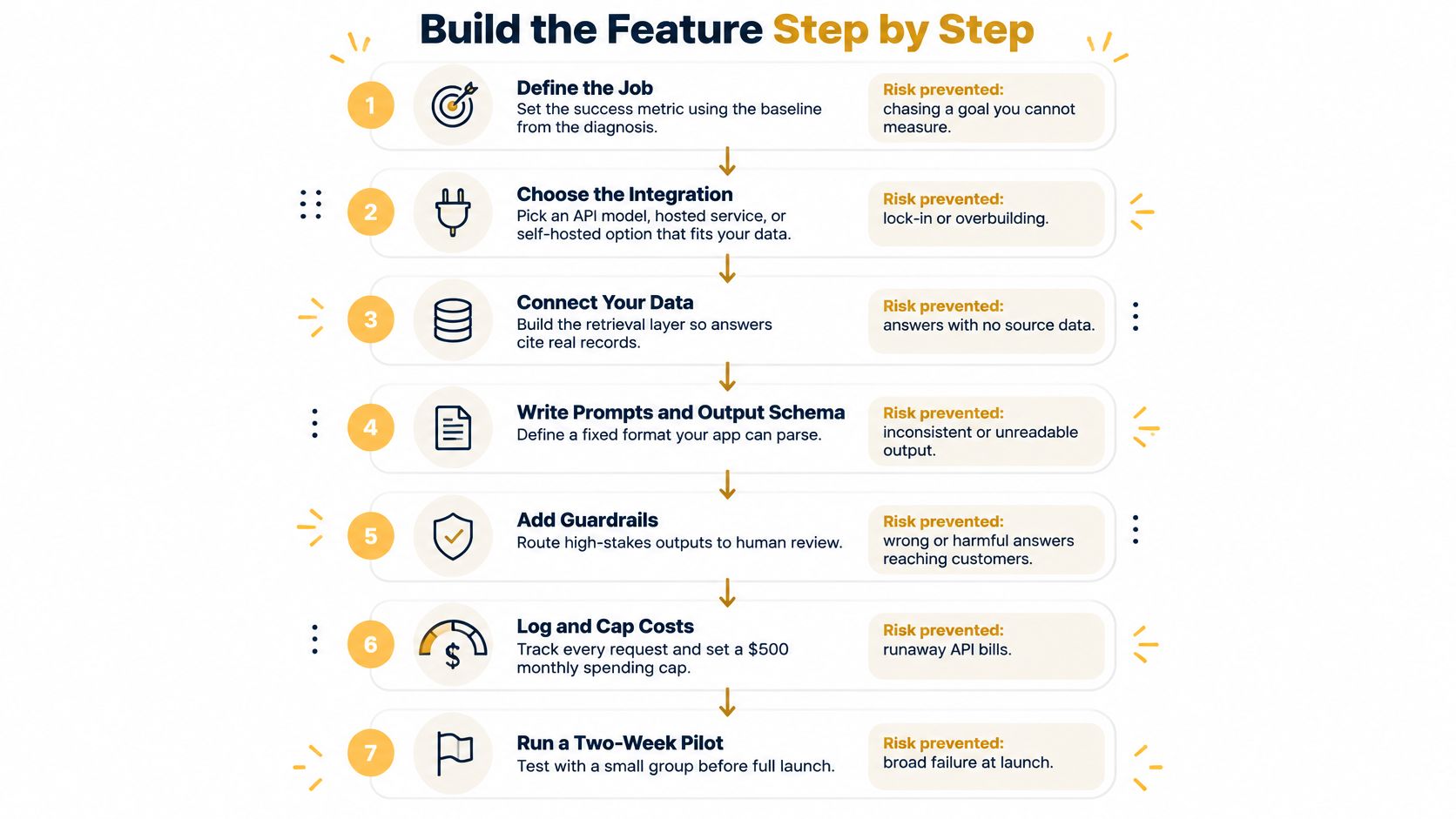
Deliver a narrow vertical slice
- Define the job and success metric. Specify the acceptable output and comparison baseline, preventing a feature nobody can evaluate.
- Choose the integration path. Match the architecture to the inputs and constraints, avoiding unnecessary infrastructure.
- Route calls through your backend. Keep credentials and enforcement server-side, preventing client-side key exposure.
- Build behind a feature flag. Preserve the manual workflow so an outage doesn't block the user's task.
- Evaluate labeled requests. Include ordinary work and difficult cases, preventing a launch based only on curated demonstrations.
- Set read and action permissions. Define the boundary before connecting tools, preventing accidental authority.
- Release to a limited cohort. Observe completion and cost before expansion, limiting the impact of undiscovered failures.
Trace a request through the application
The editor selects a product and requests a draft. The browser sends the product identifier to your endpoint, not a provider credential or a client-assembled prompt containing arbitrary records.
Your backend authenticates the editor, checks access to the product, and applies rate limits. It loads approved attributes from storage and rejects missing required fields rather than asking the model to fill factual gaps.
Next, it builds a prompt from a versioned template. For example, specify the intended audience, prohibited claims, allowed source fields, and required output schema.
Send only what the task needs. Customer details, purchase histories, and unrelated catalog records don't belong in a product-description request.
The provider adapter makes the model call and normalizes the response. If you need help connecting an existing catalog, CRM, or support platform, API integration services can address those system connections without making the model responsible for them.
Validate before displaying or saving
Use JSON Schema with a validator such as Zod or Ajv. Check required fields, allowed values, length limits, and whether returned product identifiers match the request.
Parsing successfully doesn't establish factual accuracy. Reject unsupported claims and keep generated copy visibly marked as a draft until the editor approves it.
For invalid structured output, allow a bounded repair attempt, then return the manual editor with a clear explanation. Don't keep retrying until something happens to parse.
Set an end-to-end timeout based on the interface's waiting budget. Use capped retries with backoff for transient failures, but don't retry authorization errors or repeat write operations without idempotency protection.
For chat, stream text to improve perceived responsiveness and provide cancellation. Don't execute actions from partial streamed output, and stop unnecessary backend work when the user disconnects.
If the feature calls business tools, Yellow.ai's guidance on testing AI agent integrations is a useful companion when planning integration checks. Test the handoff, arguments, permissions, and resulting application state, not merely the final message.
This video provides another implementation walkthrough to compare with your own request flow.
Set Governance Rules by Action Type
A technically valid answer can still expose confidential information or trigger the wrong business action. The OECD's SME digitalisation report describes survey findings in which about 80% of businesses viewed inaccurate information and copyright or legal issues as barriers.
The practical response isn't a longer disclaimer. It's a permission boundary enforced by your application.
Governance controls by action type
| Action type | Examples | Required control |
|---|---|---|
| Read-only assistance | Summaries, drafts shown to the user | Source citations where applicable, PII redaction, request logs |
| Reversible writes | Tagging a ticket, saving a draft | Undo path, validated confidence threshold, audit trail |
| Customer-facing messages | Email replies, push notifications | Human approval until the error rate is measured and accepted |
| Money or records | Refunds, inventory edits, price changes | Deterministic checks, named human sign-off, no direct model execution |
Separate information access from action authority
Classify information as public, internal, personal, or regulated. Redact personal information before external transmission unless the task genuinely requires it and the processing arrangement explicitly permits it.
Give the AI service account access only to the resources the feature requires. A drafting assistant doesn't need the ability to change prices, and a ticket classifier doesn't need access to every customer account.
Treat uploaded documents and retrieved passages as untrusted input. They can contain instructions designed to redirect the model, including requests to reveal data or call tools.
The model can propose an action. Your application decides whether that action is authorized.
For reversible changes, keep the previous value and expose an undo operation. If you use a confidence threshold, validate it against labeled outcomes; the model's own claim of confidence isn't a dependable permission check.
Make accountability inspectable
Get provider retention and training terms in writing. Review acceptable-use requirements too; a policy page such as 1chat's permitted uses and restrictions illustrates the contractual checks to make alongside a provider's technical documentation.
Keep an audit trail connecting the requesting user, permitted sources, proposed action, approval, and final result. Store sensitive prompt and output content only when justified, with redaction, restricted access, and a retention schedule.
For the retailer, approval should identify the exact draft being published. If someone changes the text after approval, require approval again rather than treating the earlier decision as blanket permission.
Expand authority only after independent evaluation shows the action is reliable enough for its consequences. Vendor demonstrations don't establish that your permissions, source records, or escalation process work.
Test, Monitor and Run the Two-Week Pilot
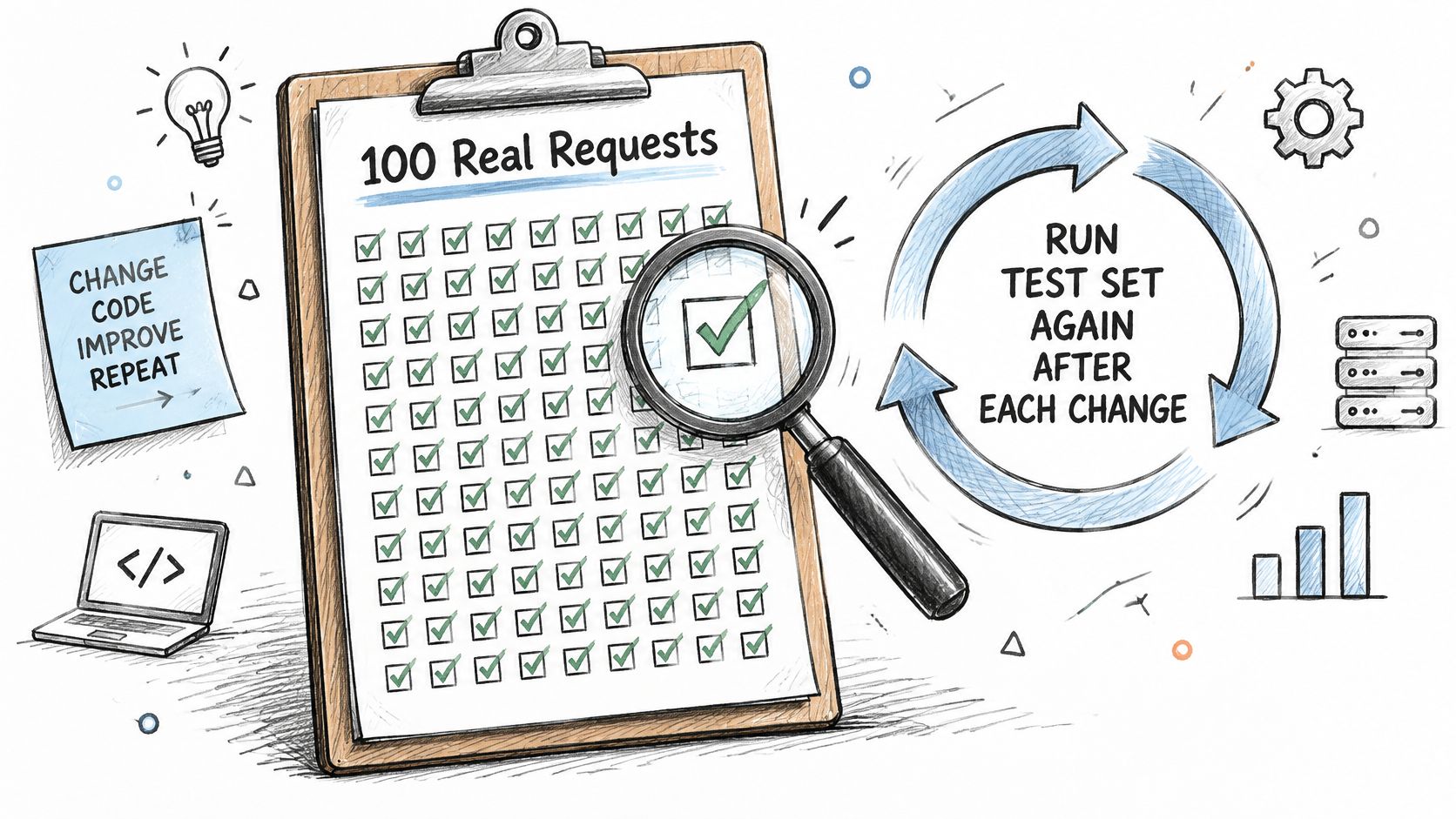
Start with past requests that a domain expert has labeled with the correct outcome. Include incomplete inputs, ambiguous requests, and cases where the correct response is to ask for clarification or decline.
Keep an evaluation set separate from examples used to develop prompts. Rerun it whenever you change the prompt, model, retrieval configuration, or tool definitions.
Test the failures that matter
For product descriptions, label factual support, prohibited claims, required attributes, and editing effort. A fluent draft with an invented certification should fail, regardless of its style score.
For retrieval, test missing documents, outdated content, contradictory passages, and documents the requesting user can't access. Enforce tenant and document permissions before the model receives retrieved text.
NIST recommends regular adversarial testing to measure generative-AI risks, including attempts to manipulate applications, as described in Stanford's AI Index coverage. Turn that into scheduled tests containing jailbreak attempts, hidden document instructions, malformed tool arguments, oversized inputs, and personal information.
Use the checklist to make these tests repeatable rather than relying on exploratory prompting alone.
Alert on completed work and harmful failures
Choose alert boundaries from your own baseline and user experience requirements. The examples below are operating rules to configure, not universal performance benchmarks.
Production metrics and example alert thresholds
| Metric | What it signals | Example alert threshold |
|---|---|---|
| Accuracy on the labeled test set | Quality before release | Falls below the release gate or materially below the previous version |
| Escalation rate to a human | Cases the AI couldn't finish | Exceeds the review capacity agreed for the pilot |
| p95 latency | Slow-end waiting experience | Exceeds the interface's response-time budget |
| Refusal or empty-answer rate | Overcaution or broken retrieval | Rises materially above the accepted baseline |
| Tool-call error rate | Malformed arguments or failed actions | Exceeds the tested tolerance; unauthorized attempts trigger immediate investigation |
| Cost per successful task | Real unit economics | Exceeds the value the task creates |
Define latency precisely. For streamed chat, time to first useful content and time to complete the response answer different questions.
Likewise, distinguish a correct refusal from an unnecessary one. A refusal that prevents an unauthorized disclosure is successful behavior, while an empty answer caused by a broken index needs repair.
Record prompt, model, index, and policy versions with each trace. Sample production outputs for human review, including successful-looking responses, because users won't report every factual error.
Keep the last known-good configuration deployable and test the feature flag's off switch. A rollback procedure that nobody has exercised is an assumption, not a safeguard.
Make the pilot a decision
Run the two-week pilot as a bounded operational test, not a soft launch with an indefinite extension. Put the owner, reviewer availability, and decision date on the calendar before enabling the feature.
- Confirm the comparison. Record the manual baseline and ensure the pilot covers comparable work rather than only easy requests.
- Write the release gates. Require improvement on the target outcome, affordable cost per successful task, and escalation within available capacity.
- Limit exposure. Choose a small cohort behind the flag and keep its existing workflow available.
- Make the decision. At the agreed endpoint, continue, revise, or stop based on the written gates rather than enthusiasm for the demo.
For a low-volume workflow, a short pilot may reveal usability and safety problems without establishing a dependable productivity improvement. Extend observation only for a stated evidence gap, not because the results are disappointing.
If the pilot passes, widen exposure separately from permissions. More users don't automatically justify allowing customer messages, record changes, or financial actions.
If it fails, inspect the actual bottleneck: missing attributes, poor retrieval, excessive editing, or an awkward interface. Adding a larger model won't repair an approval process that nobody owns.
Today, put the baseline and the outcome and cost thresholds on a single page. Add the permission boundary and the name of the person authorized to stop the feature.
Up North Media offers custom web app development and AI consulting for businesses that need help connecting models to real workflows and existing systems. Visit Up North Media to discuss a narrowly scoped integration, its permission controls, and the pilot criteria that will determine whether it's worth expanding.