
If the software looks cheap and the demo looks fast, why do so many automation projects stall once the pilot ends? Buyers often shop for features. The work that moves is a chain of rules, handoffs, and owners, and that chain is older than the current wave of AI tools. A Springer review of workflow systems traces workflow-management systems to the late 1970s, shaped by manufacturing methods and later by Business Process Reengineering in the 1990s, with a commercial expansion around 1995 through products such as Staffware, COSA, and IBM MQ Series Workflow. Workflow automation services are the modern version of that idea. Someone designs the path, builds the fixed steps, connects the apps, and stays on the hook when a step breaks.
What Workflow Automation Services Include
Think of a busy week as a relay. The baton is the order, the invoice, or the new customer file. People and systems are the runners. A workflow automation service designs, builds, and runs the rules that move that baton so nobody has to carry it by hand from inbox to inbox.
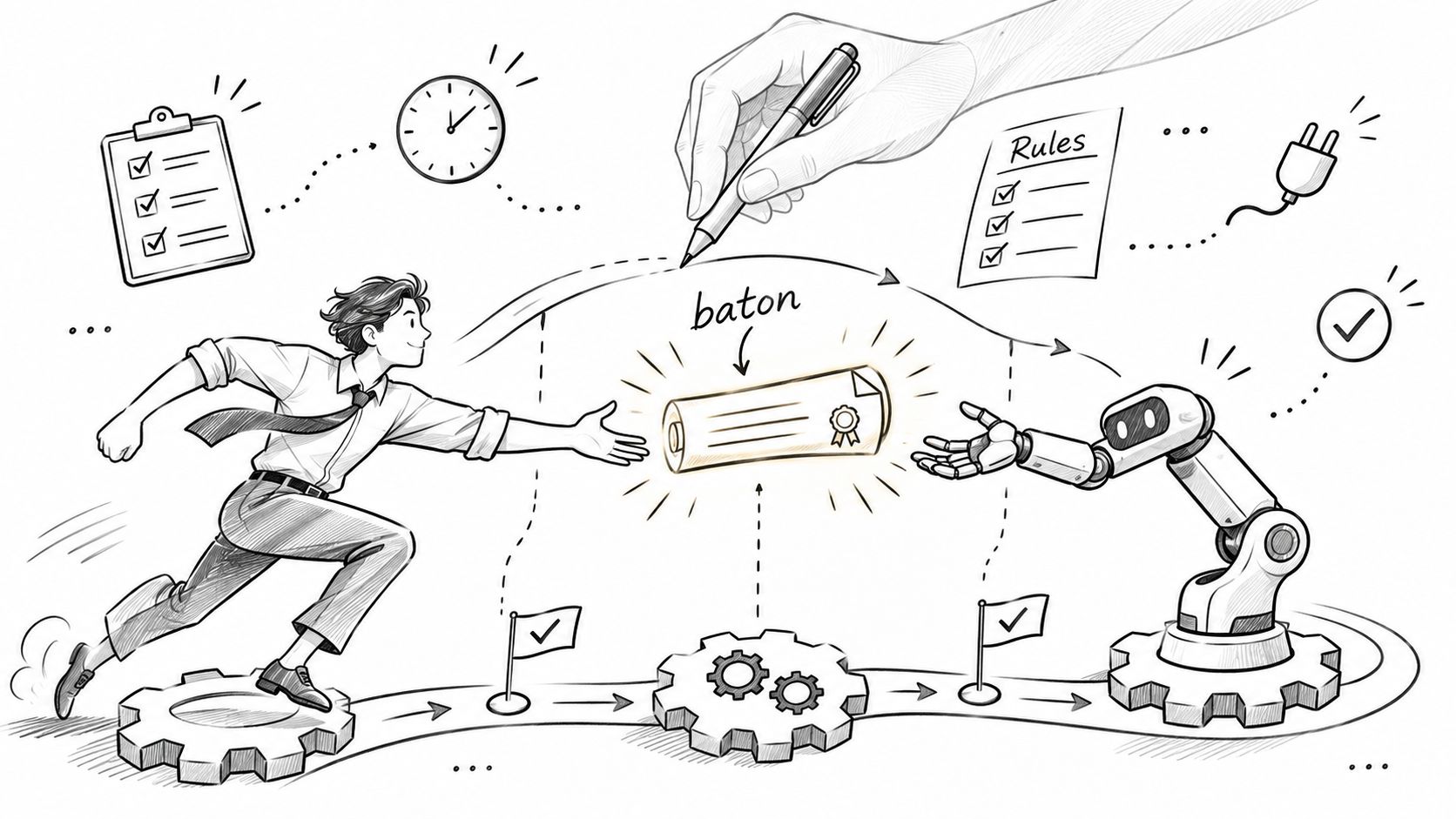
A serious engagement covers five parts, not a single connector.
- Discovery and process mapping. You write the rules, name the owner, and list what happens when a record is incomplete.
- Automation build. Fixed-rule steps get built so the same input produces the same result every time.
- Integration and data sync. The apps that must agree, such as email, a purchase system, and accounting, pass fields without retyping.
- Testing, documentation, and training. Staff learn the new handoff, including what they still touch.
- Monitoring, fixes, and updates. After go-live, someone watches failures and adjusts the flow when an app changes.
A supplier invoice, step by step
Say an invoice arrives by email. A document step reads the vendor, the total, and the purchase order number. A rules step checks that total against the purchase order. Under a set limit, the invoice posts to accounting. Above that limit, it routes to a manager. The read and the match are fixed rules. The manager's yes on a large amount is a person. Copying the approved total into the ledger is a data move.
That split is where people get confused. They buy one tool and expect the whole relay. A tool performs one piece, such as reading a PDF or sending an approval email. A provider owns the chain from the written rules through maintenance. Clinics see the same pattern when a chart, a referral, and a bill must stay in step. You can browse clinical workflow automation guides when the baton moves between reception, clinicians, and billing.
Demand for this work is large and still growing. The global workflow-automation market was valued at USD 17.6 billion in 2024 and is projected to reach USD 94.2 billion by 2033, according to Growth Market Reports. Size alone doesn't pick your first process.
Candidate test: Does the process repeat weekly or more often, follow written rules, and end in a record someone else needs? If you can't answer yes to all three, fix the process before you automate it.
Service Types and What Each One Automates
Match the problem to a service type before you compare vendors. These seven types cover what most small and mid-sized teams buy.
| Service type | What it automates | Typical example | Best fit when |
|---|---|---|---|
| Rules-based workflow automation | Approvals, routing, and status updates | Purchase request routed to a manager by amount | Steps and rules are stable and written down |
| Robotic process automation (RPA) | Repetitive clicks and data entry across screens | Copying order details from email into an ERP screen | Legacy software has no usable API |
| Integration and data sync | Moving records between apps | New CRM lead creates a project record and an invoice draft | Two or more tools must hold matching data |
| AI chatbots and customer support | Routine questions, lead capture, and routing to staff | Answering order-status questions around the clock | High volume of repeated customer questions |
| AI document processing | Extracting fields from invoices, forms, and contracts | Reading invoice totals and purchase order numbers | Documents arrive in varied formats |
| Booking and scheduling automation | Appointments, confirmations, and reminders | Online booking that feeds the calendar directly | Customers book appointments with a service business |
| Marketing and email automation | Triggered campaigns and content drafts | Maintenance reminder sent after a service visit | Repeat customers and renewals drive revenue |
How to read the table
The first column names the service. The second says what work leaves a person's hands. The last column is the condition that makes the spend worth it. If that condition isn't true, skip the row.
Types overlap on real projects. A chatbot that can't reach the CRM is a FAQ page with a nicer font. The integration row matters as much as the bot. Our AI consulting covers chatbots and workflow automation together, and we connect those chatbots to the CRM and the support desk so a captured lead and a ticket share the same record. Chatbots we build are aimed at handling up to 80% of routine customer interactions, with anything messy passed to a person.
RPA versus a direct connection
Robotic process automation drives the screens of software you already have. It clicks, copies, and pastes when no proper connection exists. Integration connects systems directly through an API or a connector. When both options exist, a direct connection is usually cheaper to keep, because a screen bot breaks when a vendor moves a button. If you're still weighing products rather than a managed build, our notes on business process automation tools separate the tool shelf from the service.
Document reading often sits next to another system. Trades that price jobs from plans can pair field extraction with Exayard AI estimating software so totals don't get retyped into a quote. Email follows the same pattern. Our email marketing runs automated campaigns for maintenance reminders, seasonal promotions, and customer retention once a visit or a purchase is already on record.
Ask any provider one question. Which of these types do you build yourselves, and which do you resell from another vendor? Most useful projects combine two or three rows. Start with the row that removes the most repeated handling, then add the connection that keeps the data honest.
Business Benefits Worth Measuring
Automation is worth the hours it hands back to people. The software is only the means.
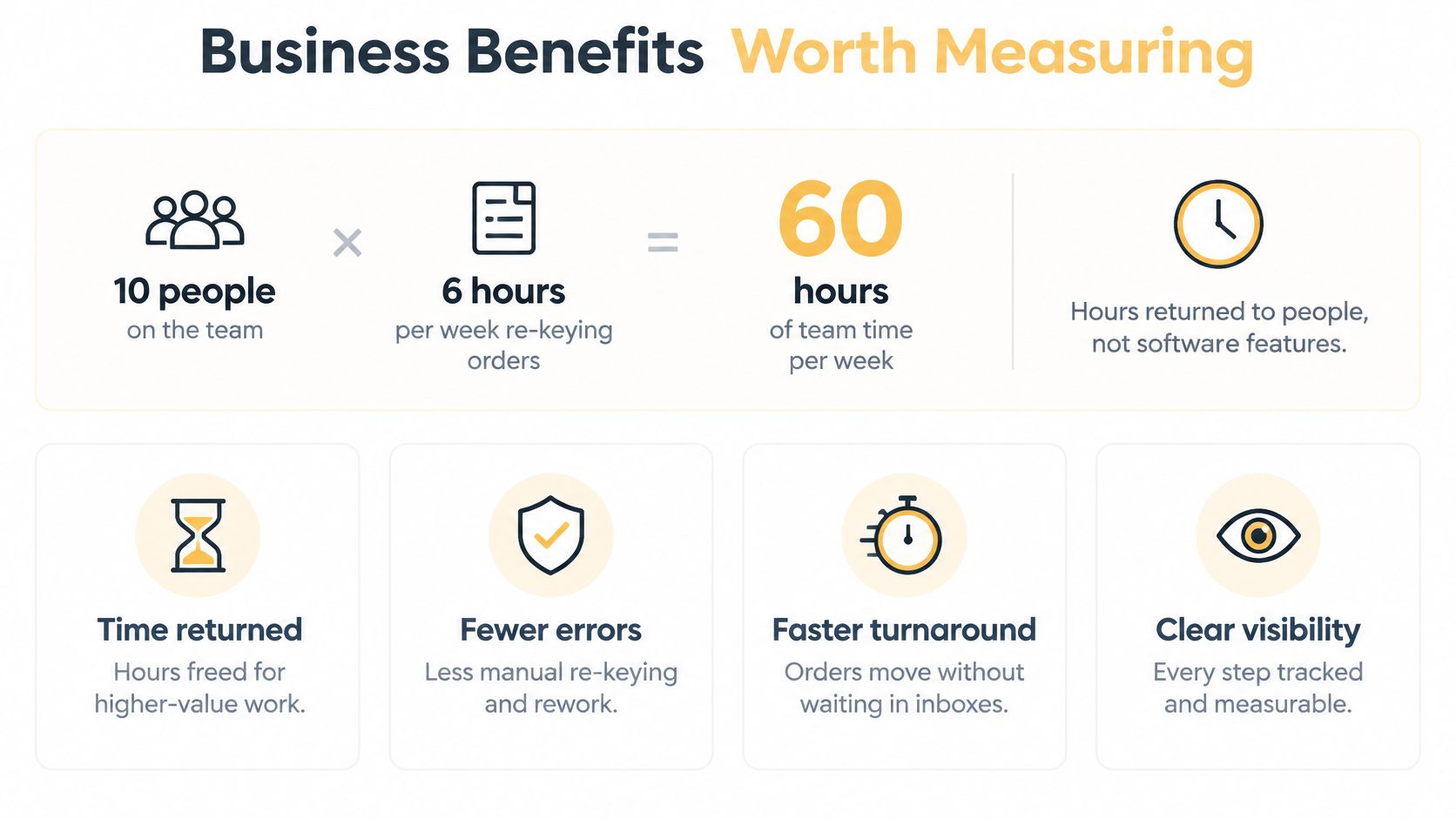
Take a ten-person team where each person spends six hours a week re-keying orders. That's 60 hours of team time every week. Over a year, at 52 weeks, you're looking at 3,120 hours. At a 40-hour week, that's about one and a half full-time employees of capacity, if those hours move into paid work.
Hours you can reassign
The same pattern shows up in large, regulated organizations, not only in software companies. In a survey of federal and state government IT officials, more than 6 in 10 federal respondents and 4 in 10 state respondents said their agency used robotic-process-automation tools, and one-third of respondents said RPA had saved between 5,000 and 50,000 hours of routine work that could be reassigned to higher-value activities, according to a FedScoop report on RPA in government.
Hours that sit idle don't count. Hours that move into customer follow-up, sales, or analysis do. A faster inbox is not a benefit until someone uses the freed time on work a customer will pay for. Our guide on how to improve operational efficiency is a useful companion when you're deciding where those hours should go.
Other gains sit beside the hours, in a rough order of what owners notice first.
- Faster turnaround. Requests leave the queue the same day instead of waiting for the person who "usually does that."
- Fewer re-keying errors. The field is copied once, from the source record, instead of typed again.
- Work outside office hours. Status updates and reminders run when the shop is closed.
- An audit trail. You can see which step ran, and when, without asking three people.
Hours only count when they land in paid work. If the team finishes early and the follow-up calls never happen, you bought idle time.
What to record before you start
For four weeks before anyone builds, write down three baselines. Weekly hours on the task. Cycle time from request to done. Error rate, counted the same way each week. Repeat those three measures after go-live. Write them down before the first sales call, or the project will be judged on a demo instead of on capacity you can point to.
Use Cases Where Automation Pays Off First
Start where the volume is high and the judgment is low. Group the candidates by who feels the pain.
Orders, invoices, and the first hello
Order processing for an online shop is usually validate, reserve, and notify. If the SKU, the address, and the payment status follow a written check, that check can run without a person opening each email. Invoice handling in finance is the same shape. Read the total, match the purchase order, route the exception.
Customer onboarding moves form fields into the CRM and sends a welcome email. The form is the stable input. The welcome is a fixed message. A person steps in only when a required field is blank or a credit check fails. Weekly report generation pulls figures that already live in your systems and drops them on a dashboard. If someone still copies cells into a slide every Monday, that copy step is the candidate, not the meeting where people argue about the numbers.
Support routing sends repeated questions to a bot and anything with anger, money, or a broken order to a person. The bot shouldn't invent a policy. It should recognize "where is my order" and hand off "you charged me twice."
Service businesses that live by the calendar
Plumbers, clinics, and similar shops lose hours to phone tag. We integrate online scheduling into the website so a customer books the appointment directly, and confirmations and reminders go out without a dispatcher retyping the slot. The fit is the same as an order. The slot, the service type, and the address are stable fields. A same-day emergency that needs a judgment call stays with a person.
The fit test, and the work you leave alone
A strong first process has high volume, written rules, stable inputs, and exceptions you can already name. A peer-reviewed study of a request-processing workflow found that 100 requests took about 1,000 minutes by hand and 135 minutes with RPA, an 86.5% cut in elapsed processing time and about 7.5× higher throughput, as reported in a Wiley empirical study of RPA. That result is processing duration, not full cost. Build time, fixes, security, and integrations still belong in the ROI math.
Measure the pilot as automated throughput per business day, the exception rate, and human minutes per transaction. Don't lead with "percent automated." An operation handling 200 orders a week with few exceptions is a better first pilot than a process that runs twice a month, even if the rare one feels more painful in the moment.
Leave these manual. Contract disputes. One-off pricing. Complaints that need empathy. A bot that "handles" those will create a second cleanup job.
Founders who are weighing marketing automation as a product bet, rather than as an internal reminder flow, can browse marketing automation investor contacts to see who funds that category. For your own shop, the first pilot is still the highest volume with the lowest exception rate.
The Costs Beyond the Software Subscription
The subscription is often the smallest line. The bill that surprises owners is the work around the tool. Redesign, cleanup, connections, training, watching the bots, and deciding who may change a rule.
UK government research found that one-third of businesses used at least one AI technology in 2026, up from 16% in 2025, yet 67% of adopters and 78% of planned adopters reported limited AI skills, expertise, or knowledge as a barrier, according to the AI Adoption Survey 2026 executive summary. That same research tied implementation difficulty more often to the time, effort, and resources required to embed AI than to direct tool costs.
Six lines to price before you sign
| Cost category | What it covers | Question to answer before buying |
|---|---|---|
| Process redesign | Simplifying steps and removing unneeded approvals before building | Who owns this process today, and is it written down? |
| Data cleanup | Fixing duplicate, missing, or inconsistent records the automation will read | What share of records would fail a basic completeness check? |
| Integration | Connecting applications through APIs, connectors, or custom code | Which systems must exchange data, and do they offer an API? |
| Training | Teaching staff new handoffs, exception queues, and override rules | Who handles exceptions on day one, and who trains them? |
| Monitoring and maintenance | Failure alerts, fixes after application updates, performance tuning | Who receives failure alerts, and how fast must they respond? |
| Governance and change control | Audit logs, approval for changes to bots, version control | Who may change an automated step, and how is the change recorded? |
Integration is where a "simple" project grows. If two systems must trade records and one has no API, you're choosing a screen bot or custom code, and both need upkeep. Our notes on API integration services spell out what a direct connection involves.
How providers price the work
You'll usually see four models, and they apply to different phases.
- Fixed-scope project fee. Discovery and the first build, with a written list of steps.
- Monthly managed-service retainer. Monitoring, failure response, and small fixes.
- Per-workflow or per-bot licence. The right to run a named automation, separate from labor.
- Hourly consulting. Changes after the original scope, such as a new approval limit.
Ask which model covers each phase, and what happens when you add a step. Recurring cost doesn't stop at the licence. App updates break bots. Exception volume grows with sales. Someone on your team still reviews output.
A cheap platform that needs custom workarounds can cost more over a year than a pricier option that fits the systems you already run, especially when no one inside the company owns the process.
Build a three-year picture. Separate the one-time build from recurring support and from the internal owner's hours. If you can't name that owner, you don't have a budget yet. You have a subscription.
Where People Must Stay in the Loop
The useful question isn't whether to automate. It's where a person should still step in, and that answer should change with the risk. Blanket approval on every step feels safe. It often recreates the manual process, adds waiting, and trains people to click approve without reading.
Research on agentic workflows points to hallucination propagation, goal misalignment, and cascading execution errors that compound across long task sequences, and it warns that fixed human checkpoints can add enough delay and mental load to wipe out the efficiency gain. A 2026 review of 28 peer-reviewed studies found that human oversight is often only procedural because of limited interpretability, automation bias, and organizational incentives that discourage a real challenge, as described in a Springer review of human oversight.
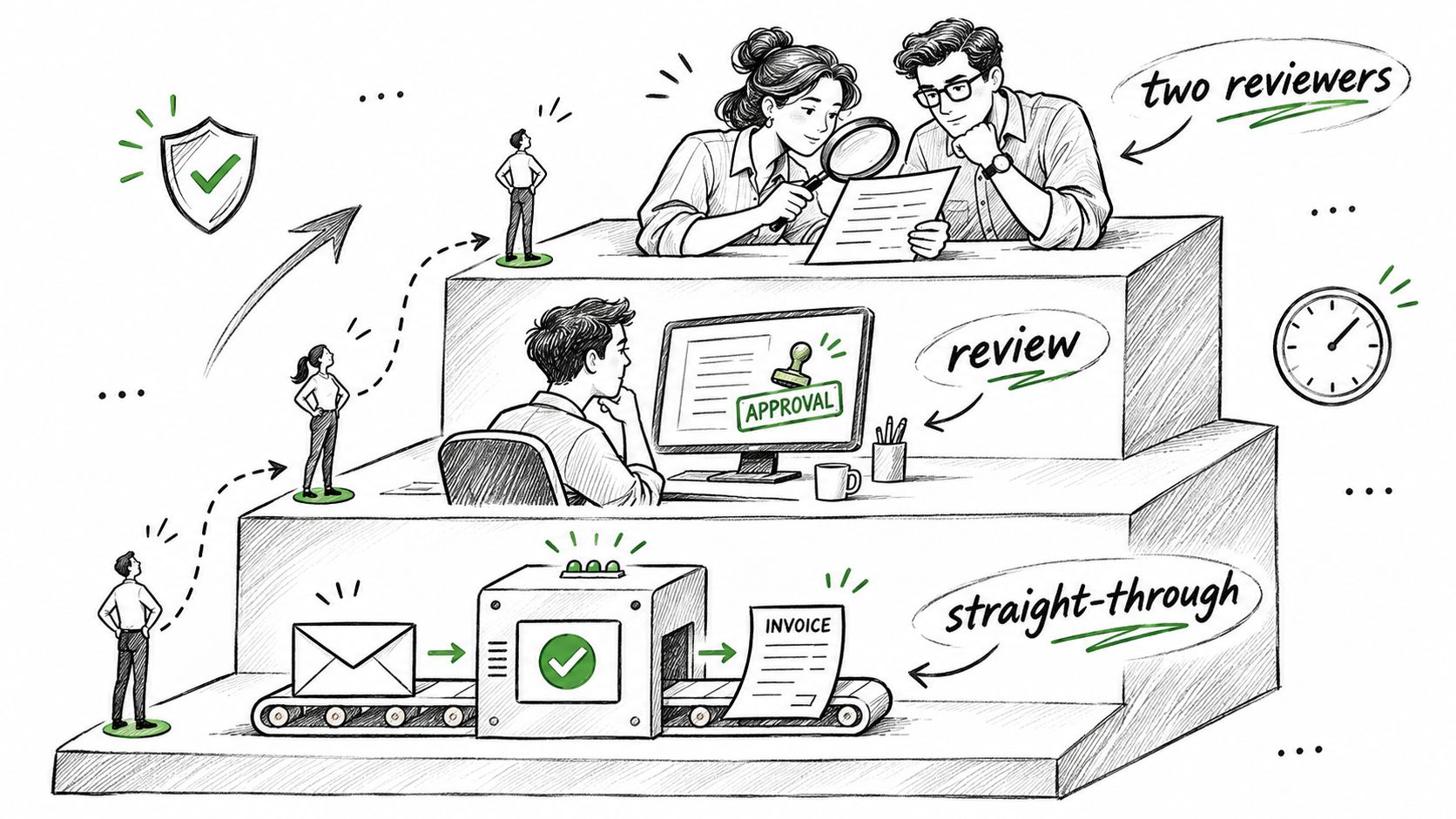
Three tiers, not one approval button
Straight-through fits reversible, low-impact work. Tagging a support ticket. Filing a document in the right folder. Sending an internal reminder. If it's wrong, you can undo it the same day, and a customer never saw it.
Sampled review fits moderate risk. Refunds under a set limit. Routine price updates. A person checks a regular sample each week, plus anything that lands in an exception queue. You aren't approving every row. You're checking whether the rule still behaves.
Explicit approval is for actions you can't casually undo. Payments above a threshold. Account closures. Compliance messages. Contract changes. These get a named approver, an audit log, and a real override. The workflow pauses. It doesn't "notify and proceed."
Oversight is real only if you can pause a bot quickly, if exceptions land in a queue a person opens, and if each tier has a named owner. A dashboard nobody watches is not a control.
For each step, ask what a wrong action costs and whether you can undo it within a day. Write the tier next to the step before you deploy.
E-commerce, publishing, customer operations, and revenue workflows are where a quiet error becomes a public one. Don't promise hands-off automation for those. Promise a tier, and stick to it.
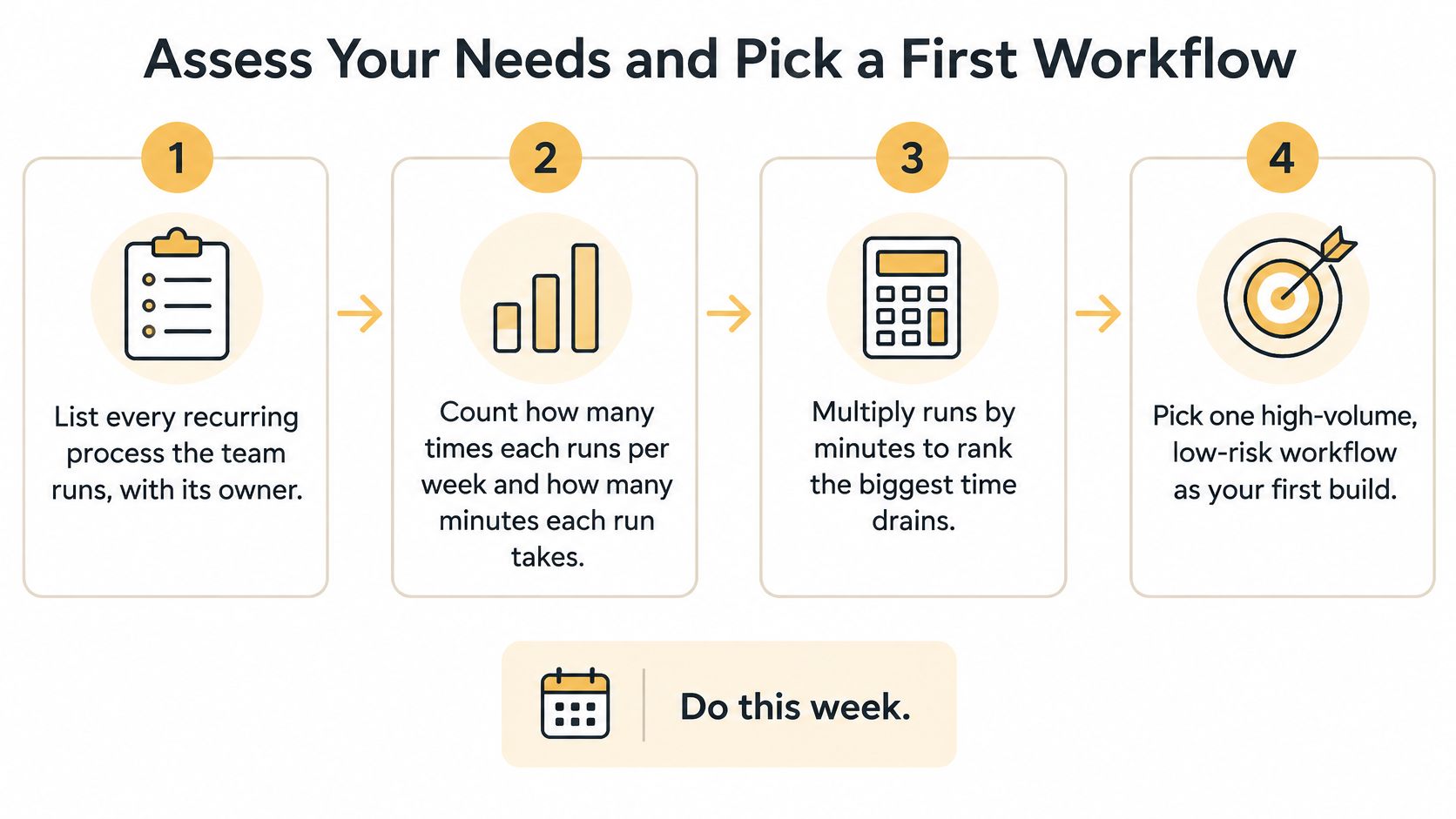
Assess Your Needs and Pick a First Workflow
You can do the sorting this week, before you talk to a vendor. The short version is four moves. List the recurring work, count it, rank the time, and pick one low-risk drain.
This week's procedure
- List every recurring process, with its owner. If nobody's name sits next to it, it isn't ready to automate.
- Count runs per week and minutes per run. Use a normal week, not a crisis week.
- Rate risk and reversibility with the three tiers. Straight-through, sample, or explicit approval.
- Map exceptions and data sources. Note where records are duplicate, blank, or stored in someone's spreadsheet.
- Price the top two candidates with the six cost categories. Split one-time build from recurring support and owner time.
- Choose one pilot and fix the measures. Throughput per business day, exception rate, and human minutes per transaction. Capture the baseline first.
- Decide who builds it. An in-house tool, a provider, or a packaged product. Don't mix all three on the first workflow.
Programs that skip ownership don't stay small and tidy. A governance review reports that approximately 30% to 50% of RPA initiatives have historically failed to scale beyond pilots or were abandoned, mainly from weak information flows, data practices, technical capabilities, and process governance, as discussed in a SciELO review of automation governance. One owned pilot beats five unowned bots.
A short walkthrough of how to rank those recurring processes is worth ten minutes before you fill in the sheet.
How to choose who builds it
If you hire a provider, ask for a fixed-scope discovery, references in your kind of business, a named process owner on both sides, and a handover plan for monitoring and later changes. Our own first step on chatbot work is discovery and planning. We assess the Omaha business need and define the goals and channels before anyone builds. That same order applies to a wider workflow. Map it, then build it, then test it.
Up North Media offers a free 60-minute strategy call you can book through our website if you want an outside pass on that shortlist. Bring the list, the weekly counts, and the one process you'd be willing to pause if the exception rate spikes.
Pick one workflow, one pilot, and one measure. Write them down before the first demo. If a vendor can't speak to that process, the hours, and the tier of human review, you're watching a product tour, not buying a service.
Up North Media helps Omaha businesses map operational workflows, build the automations and integrations that run them, and keep those systems monitored, adjusted, and understood by the team after launch. If you want the first workflow chosen from real volume, risk, and cost rather than from a feature list, visit Up North Media and book the free 60-minute strategy call. Bring one recurring process and the hours it takes today.