

Most advice about how to integrate AI in website builds stops the moment a chat widget appears in the corner of the screen. That's the easy part. The widget is a script tag and a knowledge base. The integration is everything that keeps it honest after launch: what the model is allowed to read, what each answered question costs you, and how quickly you can switch it off when the numbers turn.
Demand isn't the problem. Between July 2024 and February 2025, traffic from generative-AI referrals to U.S. retail websites rose 1,200%, according to Adobe Analytics. Visitors are already arriving from AI tools, whether or not your site has a feature to greet them.
So the question isn't whether to add AI. It's which single workflow you can prove is worth its running cost, and what you'll do when it isn't.
Pick One Use Case and Its Success Metric
The trap is predictable. A team decides to add AI, picks the public chatbot because it demos well in a budget meeting, ships it in two weeks, and then can't answer the only question that matters: did it earn anything? A chatbot produces conversations. Conversations are easy to count and hard to value.
The adoption numbers explain the herd behaviour without justifying it. Stanford University's 2025 AI Index reports that 78% of surveyed organizations used AI in at least one business function in 2024, up from 55% in 2023, and generative AI use rose from 33% to 71%. Those figures measure organizational use broadly, not website deployment. They prove the category is mainstream. They say nothing about your traffic, your margins, or your customers.
On the service side, the pull toward a chatbot is even stronger. In a survey of 187 customer-service and support leaders, Gartner found that 85% planned to explore or pilot customer-facing conversational generative AI in 2025. When most of your peers are piloting the same interface, a shared instinct starts to look like a strategy. It isn't.
The five builds worth comparing
A first AI feature should be a repeated workflow where a wrong answer is cheap to correct and the outcome is countable. Compare the options before you commission anything.
| Use case | Outcome to measure | Data it needs | Main risk | Build effort |
|---|---|---|---|---|
| Support chatbot | Resolution rate and escalation rate | Help articles, policies, order status | Wrong or unsupported answers | Medium |
| Product recommendations | Click-through and add-to-cart rate | Catalog, browse and purchase history | Privacy concerns and irrelevant suggestions | Medium to high |
| Semantic site search | Search exit rate and product findings | Product and content index | Missed results from poor indexing | Low to medium |
| Lead qualification assistant | Qualified leads per 100 visitors | Service pages, pricing rules, form data | Prospects routed to the wrong team | Medium |
| Editor content assistance | Time to publish and editor acceptance rate | Style guide and approved sources | Unreviewed claims reaching live pages | Low |
If the workflow you want to test is appointment booking, a hosted build such as instant AI chat that books appointments is a sensible way to prove demand before you pay for custom work.
The test I apply: if you can't name the number that would make you switch the feature off, you don't have a use case. You have a demo.
Three rules for the first build
- Pick frequency over glamour. A workflow that happens forty times a day gives you a readable result inside a month. A workflow that happens twice a week takes a quarter to say anything.
- Record the baseline first. Capture two to four weeks of the current conversion rate, qualified-lead rate, resolution time or whatever your metric is, before a single visitor sees the feature. Without that number, every later comparison is an argument.
- Write the stop-loss beside the metric. For example: roll back if checkout conversion falls more than a set percentage against baseline, or if escalation rate climbs past the level your team handled last quarter. Decide the trigger while you're calm.
The brief that secures budget is one paragraph: the use case, the metric, the baseline value, and the threshold that stops the work. Anyone signing the invoice should be able to read it in thirty seconds. That document is also what you'll test against in month three, when someone asks whether the AI is working.
Choose a Model, API and Integration Pattern
Pick the model last. Task fit, response speed, cost per request, the provider's data-handling terms and where the service runs decide more of the outcome than benchmark scores do. A model that writes graceful marketing copy is the wrong choice for a support flow that must answer in under a second and quote a return policy word for word.
Keep the model call behind one server-side function. A single module that takes a request object and returns text. Every widget, page and workflow calls that module. When you change provider, you edit one file and its prompt template, not forty pages. Teams that scatter model calls through components end up unable to swap anything without a rebuild, which is how a temporary vendor decision becomes permanent.
Integration patterns side by side
| Pattern | How it works | Best fit | Main trade-off |
|---|---|---|---|
| Hosted chatbot widget | Vendor-hosted widget embedded with a script tag | Fast pilot answering FAQs with no custom backend | Limited control over answers and data flow |
| Server-side model API call | Your server sends a prompt to a model API and returns the reply | Custom assistant with clear prompt rules | Keys and prompts must stay on the server, and cost scales with traffic |
| Retrieval-augmented generation | Server retrieves approved passages, then the model answers from them | Support and product questions tied to your own content | Needs an indexed, versioned knowledge base and retrieval tests |
| Embedding-based search or recommendations | Vectors compare items to queries or to past behaviour | Semantic search and related-product suggestions | Needs clean catalog data and a fallback for new items |
| Rules-based fallback | Conventional logic handles known cases and routes the rest | Any feature needing predictable output | Less flexible for open-ended questions |
For most small and mid-sized sites, the constrained retrieval pattern is the best choice. It answers only from content you approved, and it can show its source.
The request path for a constrained retrieval service
Six steps, in this order. Authenticate the visitor and pull their account context. Classify the intent so a billing question doesn't get a shipping answer. Retrieve approved passages from a versioned knowledge base, with source metadata attached. Generate a response under a fixed schema rather than free prose. Run policy and confidence checks on the output. Route anything uncertain to a person or to ordinary site search, and log the handoff.
Measure each stage separately: retrieval recall, citation and groundedness rate, answer acceptance, escalation rate, p95 latency, token cost and conversion impact. If you only watch one number, you can't tell whether a failure lives in indexing, retrieval, generation or the interface.
Before launch, build a golden test set and require every prompt or content change to pass it. NIST's guidance on documenting and validating AI systems sets out the fields worth recording before production integration: model purpose, training-data provenance, transparency, bias, explainability, testing and validation.
- Keys stay server-side. Browser code that calls a provider directly leaks the key to anyone who opens developer tools. Use server-side secret management and rate limits on your own endpoint.
- Strip fields before you prompt. Send the postcode, not the full address. Redaction is cheaper than a breach notification.
- Set a stale-content expiry. Retired pages should stop feeding answers on the date you retire them, not six months later when a customer quotes you back to yourself.
- Treat retrieved text as data. Content from a page must never be read as an instruction; a support article can't be allowed to override your system prompt.
If your team would rather not own the server-side wiring, API integration services cover the plumbing that keeps this maintainable.
Record three decisions before anyone writes code: the model, the pattern, and where the key lives.
Secure Data and Permissions Before and After Launch
A chatbot can follow every privacy rule in its prompt and still expose another customer's records if the data query ignores account permissions. Set access rules in the systems that retrieve data, and document who can read, change, and delete it before writing integration code.
The one-page permissions sheet
- Inventory every content source the feature may read, such as help articles, product data, and policy pages. Name an owner for each source and record when it was last reviewed. Remove documentation that no longer reflects current products or policies.
- Mask unnecessary personal information. Remove or redact emails, phone numbers, payment details, and free-text order notes at the query layer. A prompt instruction cannot reliably control what happens to data already sent to a model.
- Exclude stale pages. Set an expiry or review rule for indexed content. A discontinued policy should not remain available to ground an answer.
- Enforce permissions in the data query. A logged-in customer should retrieve only their own records. Apply authorization before results reach the model, rather than asking the model to decide what the user may see.
- Separate data by account. If one installation serves multiple clients, enforce tenant isolation in the index and retrieval logic. A naming convention alone does not prevent cross-account results.
- Set retention and deletion rules. Specify how long conversation logs remain, who can access them, and how deletion requests apply to every copy, including stored embeddings.
- Check accessibility in the interface. Make answers keyboard-accessible, label inputs, and ensure dynamically inserted replies can be announced to screen readers. Test the actual widget, not only the page around it.
AI tools that act on a user's behalf also raise questions about identity and authorization. Record which user or service is acting, what data it may access, and which actions require human approval. Use WCAG 2.2 accessibility criteria as acceptance tests for the interface. A widget that traps keyboard focus can block customers from using the feature.
Write permissions into the query, never into the prompt. Text the model can read is text it can repeat to the wrong person.
What to check every week
| Check | What it catches | Pass signal |
|---|---|---|
| Prompt-injection regression tests | Hidden instructions in page content or user input | The model ignores injected instructions in every test case |
| Access-control tests | One customer seeing another customer's records | No cross-account results across test accounts |
| Unsupported-claim review | Answers with no basis in approved content | Every factual answer carries a source reference |
| Data-leakage scan of logs | Personal data stored in prompts or logs | No personal fields in logged prompts after redaction |
| Latency and error monitoring | Slow replies that drive abandonment | p95 latency stays within the target set in the plan |
| Weekly conversation sampling | Tone, safety, and handoff failures | Issues are logged, assigned, and addressed |
Test the kill switch before launch. Confirm that disabling the feature also stops model calls and access to retrieved data. Use this web application security best-practices checklist to review the surrounding controls. Keep the permissions sheet current, assign an owner to each rule, and revisit it when data sources or user access change.
How to Build and Deploy the Feature Behind a Flag
A live AI feature is not a successful deployment by itself. Put it behind a flag so you can limit exposure, compare results with the existing workflow, and turn it off quickly if it causes harm.
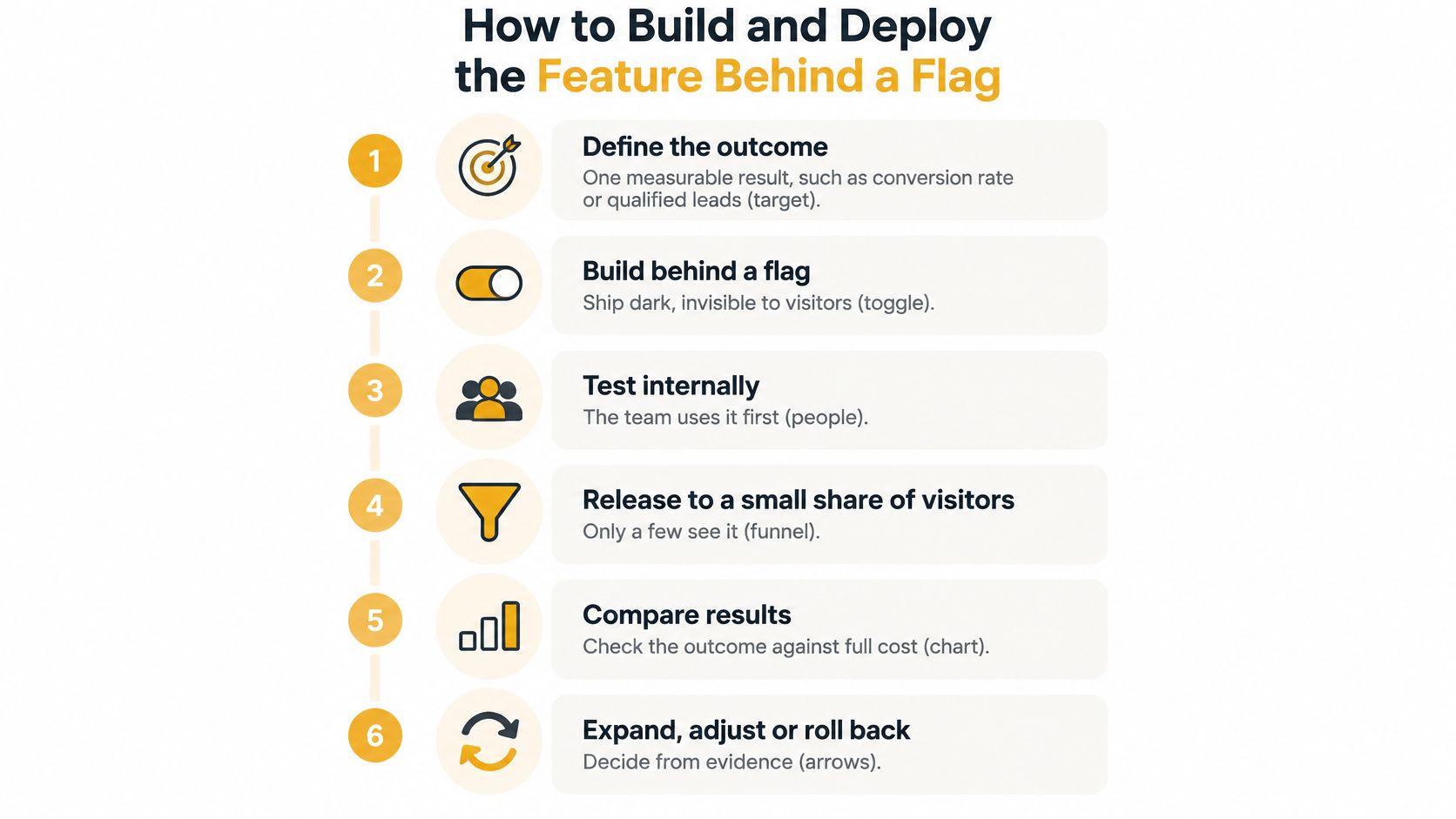
- Define one measurable outcome and record its baseline. Choose a result such as qualified leads, support resolution or task completion. Keep it separate from secondary measures so a rise in one metric cannot obscure a decline in another.
- Map the user journey, data sources and failure cost. Specify what a wrong answer could cost the customer, and name who takes over when the model cannot help. An escalation path needs a person responsible for handling it.
- Build an evaluation set from real questions. Include routine, ambiguous and adversarial queries, plus the languages visitors use and cases involving personal data. A smaller set of carefully chosen examples is more useful than a large set of generated ones.
- Compare the AI workflow with the existing one. Check accuracy, groundedness, latency, cost per request, abandonment and conversion against the same measures for the current experience.
- Release to a small, representative cohort. Use a feature flag to control who sees the feature. The cohort should reflect the usual traffic mix, not just visitors arriving at one convenient time.
- Expand only when guardrails and business thresholds hold over time. A single strong week is not enough to show that the feature works consistently.
The NIST AI Risk Management Framework covers governance, mapping, measurement and management. Its guidance includes validation, production integration testing, recalibration, user-experience testing and compliance checks before and after deployment.
Revenue gains from AI are often modest. Use a randomized A/B test to estimate whether the feature caused a change; a simple comparison before and after launch can confuse the effect of AI with other changes.
The pitfall that sinks otherwise good rollouts
Accuracy alone does not make a feature useful. A correct answer can still lead to abandonment if it arrives too slowly, appears below the fold or offers no route to a human. Treat latency, placement and handoff as part of the feature, and evaluate them alongside answer quality.
Rollback rule: Give the team a tested way to turn the flag off without waiting for a meeting.
Run automated regression tests for prompt injection, unsupported claims, unsafe outputs, access-control failures and data leakage. Review sampled conversations regularly, assign a reviewer, and record failures so the team can fix them.
Here's a walkthrough of the same staged approach in practice:
What a finished rollout looks like
The feature is available to all intended visitors, and an operator can follow a documented rollback path. A dated review is on the calendar, and a results page shows the baseline beside the live result. If the team cannot produce that comparison, treat the feature as a pilot, whatever its reach.
Set Token Budgets and Track Cost Per Outcome
Build cost is the number everyone budgets for. Running cost is the one that surprises them: token usage, monitoring, human review, error correction, source updates, retraining and support. A feature that looks cheap per request can be expensive per resolved question, because the request that resolves nothing still bills.
Track it at the request level from day one. Log input and output tokens on every call, tagged by feature and by page, so you can see which surface is burning the budget.
- Set a monthly budget and an alert at a fixed variance. Decide the percentage overrun that pages someone. Without that, the first signal is an invoice.
- Cap context size. Send only the retrieved passages the answer needs, and limit conversation history to the last few turns. Long histories are the quietest cost multiplier on a support widget.
- Route by difficulty. Simple, high-volume questions go to a cheaper model or to rules-based search when accuracy holds. Reserve the expensive model for the cases that need it.
- Count human time at a real rate. Sampling, correction and content upkeep are hours, and hours have a cost. Small teams consistently undercount this.
- Divide by outcomes, not requests. Total monthly spend, including review and fix time, divided by resolved chats or qualified leads. That's the number you compare against the non-AI baseline.
Where the budget goes: almost never the prompt. It goes to context you didn't need to send, history you didn't need to keep, and answers a person had to fix afterwards.
| Cost item | How to track it |
|---|---|
| Token spend per request | Input and output tokens logged per call |
| Cost per successful outcome | Monthly spend divided by resolved chats or qualified leads |
| Human review time | Staff hours spent on sampling and fixes |
| Error correction and retraining | Cost of fixing wrong answers and updating sources |
| Overspend trigger | Actual spend against the monthly budget |
Pair this with proper event tracking so conversion is measured the same way across the AI and non-AI paths. Analytics implementation is where most of these comparisons fall apart, because the two paths were never instrumented identically.
Decide Whether to Expand, Adjust or Roll Back
The decision rule is simple and unforgiving. Expand only when incremental gross profit covers the model, infrastructure, oversight and remediation costs. Adoption is a weak success metric, and the evidence for that is blunt.
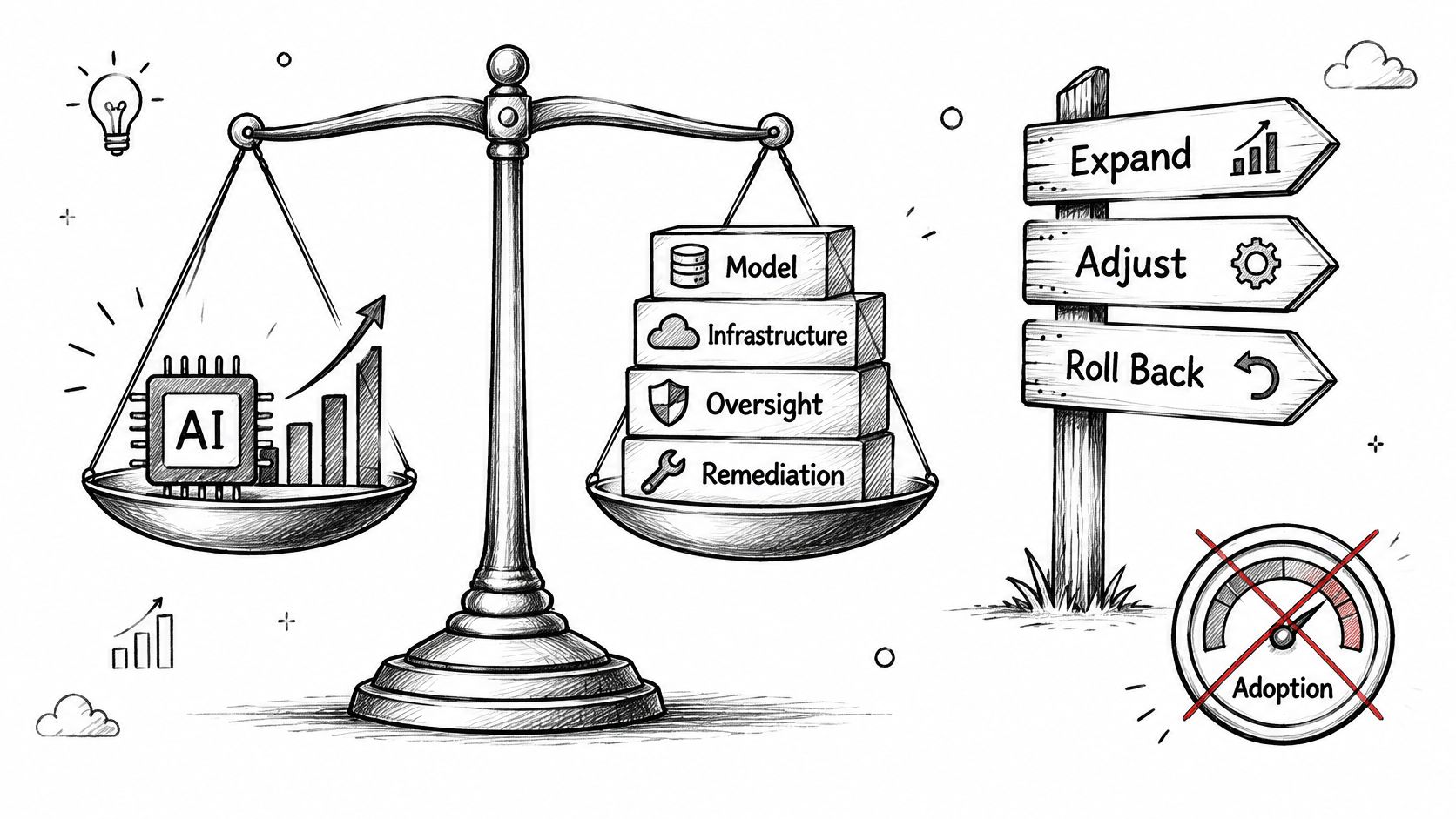
KPMG's survey reporting on AI value finds that only 12% of surveyed organizations consistently assess AI value against implementation cost across the organization. It also records that 59% of executives reported AI spending significantly above expectations or budget, with affected organizations averaging 24% overspend. On the small-business side, 30% of non-adopting firms cite implementation cost as a primary barrier and 33% cite concerns about tool quality.
So compare the first cohort against the baseline in your launch brief: conversion rate, qualified-lead rate, resolution time, abandonment, hallucination rate, escalation rate, latency and cost per successful outcome. Review by customer segment, because an average can hide a group the feature actively harms.
Then choose one of three paths.
- Scale: promote the flag to all visitors, with a dated review already scheduled.
- Adjust: change the prompts, sources or routing, then rerun the same cohort against the same baseline.
- Roll back: pull the flag the moment any metric crosses its stop-loss level, and hold the feature until you've found the cause.
Test the AI result against cheaper alternatives before you scale. Improved search, rules-based personalization, a better form or another support shift may beat it outright, and that's a useful answer rather than a failure. Teams that don't want to run this loop in-house can request an AI chatbot demo from our AI Chat Bots page and see what the measurements look like on a working build.
If you'd rather not build the permissions sheet, the cost model and the rollback path from scratch, Up North Media handles custom AI integration from readiness assessment through deployment and support, including the retrieval systems and monitoring that keep a feature honest after launch. We work with Omaha businesses on AI consulting, custom chatbots and the analytics that prove whether any of it earned its keep. Visit Up North Media to talk through which single workflow on your site is worth automating first.