
You might be in this spot right now. Your business does good work, your customers are happy, and referrals still come in, but when someone in Omaha searches for what you sell, your company barely shows up. A competitor with a weaker website, fewer reviews, or a less polished brand appears first on Google Maps and gets the call.
That usually isn't because Google "likes" them more. It's because they have a better Google Business Profile.
If you're searching for how to set up google business profile, treat this as more than an account setup task. This is one of the most practical local SEO actions you can take. Done right, it helps customers find you, trust you, and contact you without ever landing on your homepage first.
Why Your Google Business Profile Is Your Digital Storefront
For most local businesses, Google Business Profile is the first real impression. Before a customer visits your site, they often see your business name, reviews, hours, location, photos, and service details inside Google Search or Google Maps. That profile acts like your front door.
The urgency is easy to understand once you look at how people search. 46% of all Google searches have local intent, 97% of users rely on online search to discover local businesses, and 78% of local searches on Google result in offline purchases, according to Google Business statistics compiled by Safari Digital. For an Omaha service company, retailer, clinic, restaurant, or contractor, that means nearby buyers are already searching. The question is whether your profile gives them a reason to choose you.
Why this matters more than another directory listing
A lot of owners still treat GBP like a citation site. They fill in the basics once, then ignore it. That's a mistake.
Your profile controls the information people act on fastest:
- Calls: Someone searches, sees your number, and contacts you.
- Directions: They decide whether you're convenient.
- Clicks: They visit your site if the profile looks credible.
- Trust signals: Reviews, photos, and business details shape the decision before a conversation starts.
A weak profile creates friction. Wrong hours waste leads. A vague category puts you in front of the wrong searches. No photos can make a legitimate business look inactive. Missing services force people to keep searching.
Your website explains your business. Your Google Business Profile proves you're active, local, and reachable right now.
What local owners often underestimate
In practice, the businesses that win local search aren't always the biggest. They're the ones that remove doubt quickly.
If someone searches "Omaha roofer," "family dentist near me," or "coffee shop downtown Omaha," they want confidence fast. They want to know you're open, where you are, whether you serve their area, and whether other customers had a good experience. GBP is where Google packages all of that into one decision point.
Here's the shift that matters. Don't think of your profile as something you "claim because Google says so." Think of it as the operating layer of your local visibility. If you get it right, your profile can generate calls, website visits, direction requests, and bookings without extra ad spend. If you get it wrong, your business can stay invisible even when demand is already there.
Claiming and Verifying Your Business on Google
The first move is simple. Search for your business on Google Maps and in regular Google search before you create anything. A lot of businesses already have a profile Google generated from public data, and creating a second listing is one of the fastest ways to create confusion.
Path one is claiming an existing listing
If Google already shows your business, click into the listing and look for the option to claim or manage it. This is usually the best route because it preserves any existing visibility, reviews, or map history attached to that profile.
Use a business-owned Google account, not a staff member's personal Gmail. That sounds minor, but ownership problems create headaches later, especially when an employee leaves or when an outside agency needs access. If you work with a team, keep ownership with the business and assign manager access to others.
Path two is creating a new profile
If nothing exists, go to Google's business setup flow and enter your exact business name, address, phone number, website, and business category. Keep these details aligned with your website. If your site says "Suite 200" and your profile says "Ste 2," it may seem harmless, but inconsistency can slow trust and complicate verification.
For service-area businesses, don't force a storefront setup if customers don't visit your location. Configure the profile based on how you do business. If you serve Omaha, Papillion, Elkhorn, and Bellevue at the customer location, set that up clearly instead of pretending your office is a walk-in retail space.
A helpful primer on how local listings fit into broader visibility strategy is this guide on local search marketing basics.
Which verification method is worth trying first
Verification is where many owners get stuck. Google may offer different methods depending on your business type and trust signals.
Use this order of preference:
-
Search Console-linked verification first
If your website is already verified in Google Search Console, prioritize instant verification. The reported success rate is ~70%, according to this Google Business Profile setup guide. -
Phone or SMS if available
If instant verification isn't offered, phone or SMS is usually the better fallback. That same source reports 85% success in US major markets for phone/SMS verification. -
Postcard only if you have to
Postcard verification is often the slowest and most frustrating route. The same source notes it can take up to 14 days, and postcard mail has a 20% delivery failure rate in urban areas like Omaha.
Practical rule: Don't edit major profile details repeatedly while verification is pending. Frequent changes can create delays or trigger another review cycle.
Small setup choices that prevent bigger problems
A few things consistently reduce friction:
- Use the exact legal or customer-facing name your business uses publicly.
- Send the verification to a current address where staff can receive and recognize business mail.
- Tell your front desk or mail handler to watch for it if postcard verification is required.
- Avoid duplicate attempts from multiple Google accounts. Competing claims can slow resolution.
What works is boring and precise. Search first. Claim if possible. Create only when necessary. Verify using the fastest method Google offers. Businesses that rush this stage usually create problems they then spend weeks trying to clean up.
Configuring Your Profile for Maximum Impact
Verification gets you access. Configuration is what makes the profile useful.
A barely completed GBP can appear online, but it won't perform like a profile that gives Google strong business signals and gives customers clear reasons to act. Consequently, owners often leave money on the table. They fill in the obvious fields, skip the strategic ones, and assume setup is done.
Start with the fields Google trusts most
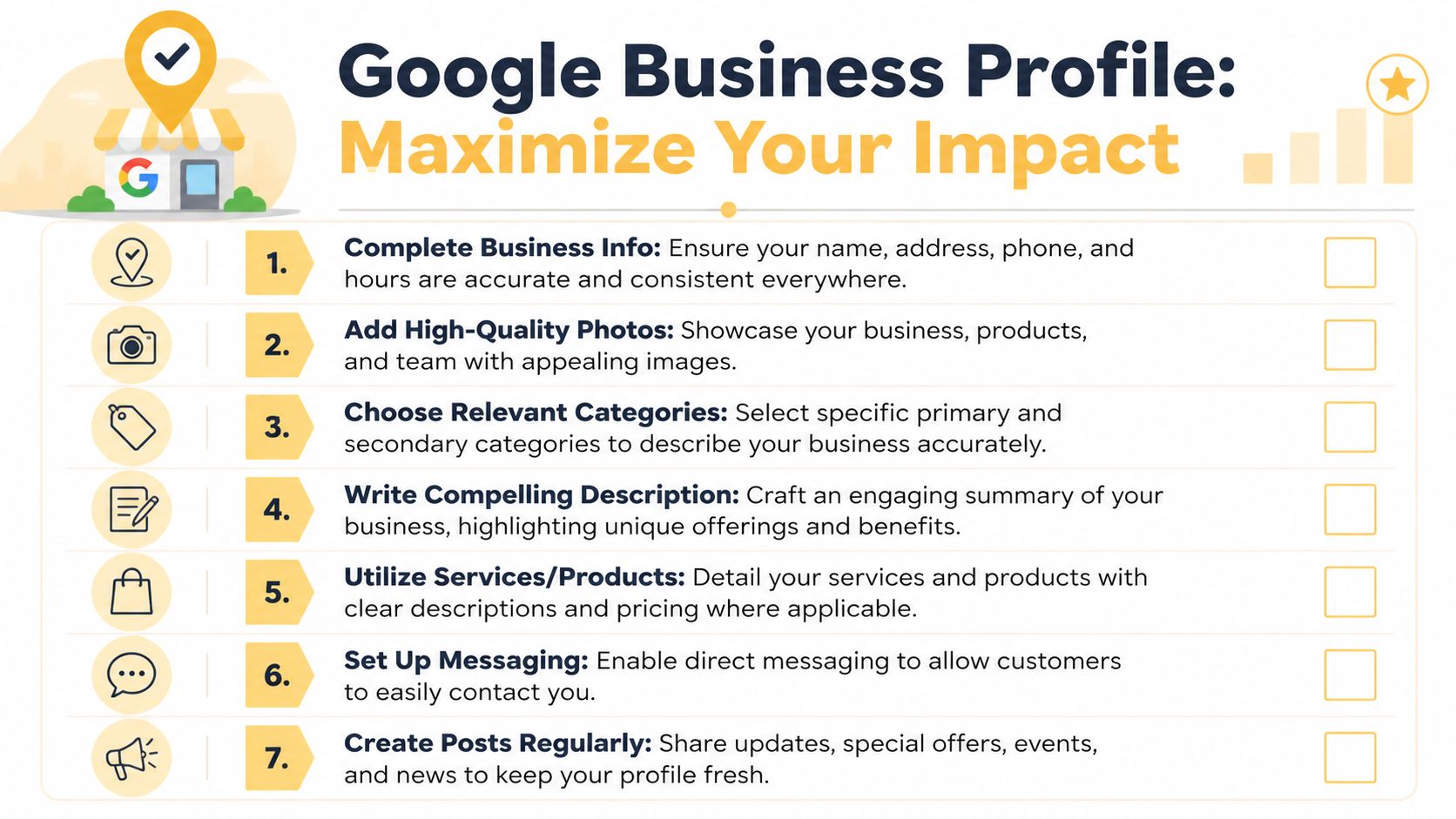
Google wants consistency. Customers do too. Your first priority is making your core business information match everywhere that matters.
| Field | What to do | What goes wrong if you don't |
|---|---|---|
| Business name | Use your real public business name | Keyword stuffing can look spammy |
| Address | Match your website and other listings | Mismatches confuse users and trust signals |
| Phone number | Use a monitored local number if possible | Missed calls or inconsistent contact info |
| Hours | Add regular and holiday hours | Customers show up when you're closed |
| Website | Link to the most relevant page | Sending users to a weak page lowers conversion |
Category selection is not a minor detail
Your primary category influences which searches your business can show up for. If you're an Omaha marketing firm, "Digital agency" sends a very different signal than a broad or unrelated category. Secondary categories help refine the profile, but the primary one carries the most weight.
If you need help choosing category options, this resource on Google business categories can help you boost local SEO for businesses. Use it for research, then choose the category that best matches what you sell, not the category you wish ranked fastest.
Pick the category that fits your core service first. Relevance beats ambition.
Write the description like a buyer will read it
You have 750 characters for your business description, as noted in the earlier source on Google Business Profile setup and insights. Don't waste that space on generic lines like "We are committed to quality service." Every business says that.
A stronger description usually includes:
- Who you serve: Omaha homeowners, local families, B2B clients, regional shoppers
- What you do: roofing, family law, HVAC repair, web design, bookkeeping
- Where you operate: Omaha and surrounding service areas
- What makes you useful: emergency availability, custom solutions, specialized expertise
For example, a stronger service description says what the business does: "Custom web app development, data-driven SEO, and AI consulting for Omaha businesses." A weak one says almost nothing: "We are a leading provider committed to excellence."
Fill out the profile completely
The businesses that look established usually aren't doing one magic thing. They're completing everything Google gives them.
Add these details before you move on:
- Services or products: List what you sell.
- Attributes: Use the applicable business features Google offers.
- Service areas: Set them carefully if you travel to customers.
- Photos: Add real images of your team, location, work, and products.
- Messaging and booking: Enable them if you can respond reliably.
Accuracy beats volume here. A lean, complete, truthful profile performs better than a bloated one full of vague promises and sloppy details.
Optimizing Your Profile to Outrank Competitors
Setup gets you on the board. Ongoing optimization is what helps you pull ahead of competitors who stop after the basics.
The difference shows up fast in local search. One business has current photos, recent posts, active review responses, product details, and helpful Q&A. The other has a verified profile that hasn't been touched in months. Google can see the difference, and customers can too.
Completeness and activity affect results
A fully built profile doesn't just look better. It gets more action. According to Google Business Profile guidance referenced here, profiles with complete info attract 7x more clicks.
That tracks with what you see in the field. Customers prefer businesses that answer obvious questions before they have to ask. If your services, photos, hours, and contact paths are complete, the profile removes friction. If they're missing, the user keeps scrolling.
The recurring tasks that matter most
You don't need a huge weekly production system. You need consistency in a few specific areas.
-
Photos that prove the business is real
Upload current images of your storefront, interior, staff, vehicles, job sites, products, or finished work. Skip stock photos. Real images create confidence. -
Review responses with speed and professionalism
The same Google Business Profile guidance reports that responding to 90% of reviews within 24 hours can yield a 12% revenue lift. That doesn't mean every reply has to be long. It means customers notice whether you're engaged. -
Product and service detail
If your profile supports products, use them. That source notes that adding products to the GBP menu can boost conversions by 28%. For retailers, restaurants, and some service businesses, this is one of the cleanest ways to move from visibility to action. -
Q&A as reputation control
Most businesses ignore Q&A until a customer asks something awkward or inaccurate. Preempt that. The same source says pre-populating the Q&A section with 20+ responses can reduce bad PR by 40%.
If a customer asks the same question twice by phone, it belongs in your GBP Q&A.
Reviews and freshness beat set-it-and-forget-it
A common mistake is treating reviews as a vanity metric. Reviews aren't only social proof. They're operational feedback, keyword language from customers, and evidence that the business is active.
Good optimization also means posting updates when you have something worth saying. Holiday hours, events, promotions, new services, seasonal reminders, or team updates all help keep the profile current. Not every post will drive direct leads, but stale profiles rarely outperform active ones.
For businesses that want to think beyond current local SEO and understand how visibility is changing in AI-shaped search results, this guide to AI SEO Tracker on SGE optimization is a worthwhile read. It's useful context for why strong entity signals and complete business information matter beyond the classic map pack.
A broader breakdown of what influences local placement is covered in these local SEO ranking factors.
Here's a useful walkthrough if you want to see profile optimization in action:
Troubleshooting Common Verification and Suspension Issues
GBP setup guides often make the process sound cleaner than it is. In real business use, verification stalls, ownership conflicts happen, and profiles get suspended after edits that looked harmless.
That doesn't mean the platform is broken. It means you need to manage it carefully, especially if multiple people touch the listing.
The postcard problem is more common than people think
One of the most common agency-side problems is simple: the verification postcard goes to the wrong place. According to BrightLocal's guidance on setting up Google Business Profile, clients receiving verification postcards at outdated addresses is reported in 40% of cases.
For local owners, the fix starts before you request anything:
- Confirm the address in your records first
- Check old suite numbers or previous offices
- Tell whoever handles mail what to look for
- Don't request multiple codes unless Google's system tells you to
If the postcard doesn't arrive, pause before making major profile edits. Repeated changes during a delayed verification process can make a messy situation worse.
Why suspensions happen after routine changes
Suspensions often surprise owners because they happen after an edit that felt normal. A category change, name change, address tweak, or ownership handoff can trigger review.
That same BrightLocal guidance notes that agency-managed profiles can see 25% higher suspension rates if not prepared correctly for ownership transfer. Even if you're not an agency, the lesson applies. Ownership and editing permissions need structure.
Use this approach when more than one person is involved:
| Situation | Better approach | Risky approach |
|---|---|---|
| Owner needs help | Keep the business as primary owner and assign manager roles | Hand full ownership to a freelancer immediately |
| Business moved locations | Update supporting website and citations first, then edit GBP carefully | Change multiple profile elements at once |
| Existing verified profile | Request proper access and document who owns it | Start a new duplicate profile |
Field note: The more important the edit, the more important it is to make supporting details consistent first.
What to do if your profile gets suspended
If Google suspends the profile, don't panic and don't create a replacement listing unless Google instructs you to. That usually adds another layer of trouble.
A practical recovery sequence looks like this:
- Review your public business details for accuracy on your website and major listings.
- Check the business name and category for anything that looks inflated or misleading.
- Confirm ownership roles inside the profile.
- Gather documentation that proves the business exists at the listed location or service area.
- Use Google's reinstatement and support process instead of guessing.
What doesn't work is making frantic edits, switching accounts repeatedly, or trying to outsmart the system. Clean documentation and patient follow-through usually beat aggressive troubleshooting.
Tracking Performance and Taking Next Steps
Once the profile is live and optimized, the next question is simple. Is it producing business results or just impressions?
Google gives you enough data to answer that if you know what to watch. The performance side of GBP is where setup turns into decision-making.
What the key metrics actually tell you
According to DashThis guidance on Google Business Profile insights, Google Business Profile insights provide 18 months of historical data to benchmark growth. The same source notes that only verified profiles access full analytics, including interactions such as calls, messages, directions, website clicks, and bookings, and those metrics are updated monthly with a 5-day lag.
That matters because owners often check the profile too quickly and assume nothing is happening. GBP isn't a live dashboard for every action. You need to review trends, not just yesterday's activity.
Here's how to interpret the core metrics:
-
Calls
Are people contacting you directly from the profile? If yes, your listing is doing real lead generation work. -
Website clicks
These show whether searchers want more information before buying. If clicks are high but leads are weak, the website may be the problem, not the profile. -
Directions
For storefronts, this is one of the clearest local intent signals. -
Messages and bookings
These matter most if you've enabled those features and can respond reliably.
Use the data to make changes, not just reports
The best use of GBP performance data is operational. If calls rise after adding photos and improving services, keep investing there. If website clicks happen but visitors don't convert, tighten the landing page. If directions increase during certain months, plan staffing and offers around that demand pattern.
A simple review rhythm works well:
- Monthly: Check GBP performance after the reporting lag
- Quarterly: Compare trends and update photos, services, and Q&A
- Seasonally: Adjust hours, offers, and posts
- After major business changes: Confirm the profile reflects reality
If you also want a broader picture of search visibility outside GBP, this guide on how to check Google rankings can help you connect map visibility with organic website performance.
For a stronger measurement framework, pair GBP review with site analytics and lead tracking. This overview of measuring digital marketing performance is a good starting point for building that system.
The next step after setup
At some point, most businesses outgrow DIY profile management. Not because GBP becomes impossible, but because local search gets more competitive as the stakes rise.
If your profile is already generating calls and clicks, the next layer is integration. Tighten your website pages. Add UTM tagging to your profile link. Keep your NAP consistent across the web. Make your service pages align with the categories and services you're advertising in GBP. Local SEO works best when the profile and the site reinforce each other.
A well-managed profile should help you answer practical questions. Which services get the most attention? Which locations respond best? Are customers calling, clicking, or requesting directions? Once you can answer those consistently, your GBP stops being a listing and starts acting like a revenue channel.
If you'd rather have an Omaha team handle the setup, cleanup, optimization, and reporting for your local search presence, Up North Media can help. They build growth systems that connect Google Business Profile, local SEO, websites, web apps, and analytics so your visibility turns into measurable leads and revenue.