
Global ecommerce sales reached $26.7 trillion in 2019, and $21.8 trillion of that ran business to business, according to the United Nations Conference on Trade and Development. Consumer storefronts get the attention, but most of the money and nearly all of the complexity sit in systems that talk to each other: pricing engines, inventory feeds, tax tables, marketplaces, procurement portals.
That one fact explains why an ecommerce website development timeline resists a simple answer. A store with 20 products, one currency and a hosted checkout is a design job with a shopping cart attached. A store with 4,000 SKUs, three warehouses, VAT rules for five countries and an ERP feed is an integration project that happens to have a front end. The phases are the same in both cases. The weeks inside them are not.
Every duration below is a range on purpose. Treat the low end as the case where the business decisions are already made and signed, and the high end as the case where they aren't.
Stage-by-Stage Timeline With Typical Durations
The table below is the short answer to how long a standard custom store takes, before you adjust anything for your own catalog, integrations or market.
| Phase | Typical duration | Main output | Overlaps with |
|---|---|---|---|
| Discovery and planning | 1-3 weeks | Scope document, sitemap, requirements list | Nothing; it starts the project |
| UX and visual design | 2-4 weeks | Wireframes, page templates, clickable prototype | Early shared components in development |
| Development and integrations | 4-8 weeks | Catalog, cart, checkout, payments, shipping, tax | Content and data migration |
| Content and data migration | 1-3 weeks | Product data, customer accounts, redirect map | Development and testing |
| Testing and QA | 2-3 weeks | Test reports, fixed defects, performance baseline | Final development sprints |
| Launch and stabilization | 1-2 weeks | Live site, monitoring, first order checks | Post-launch fixes |
Add the column up and you get 11 to 23 weeks, which overstates the actual elapsed time. Three rows run alongside the row above them. Migration begins once the product schema stops moving and continues through testing. Component-level QA happens inside the last development sprints rather than after them. Count the overlaps and a standard custom build lands at roughly 10 to 18 weeks from kickoff to a monitored live site.
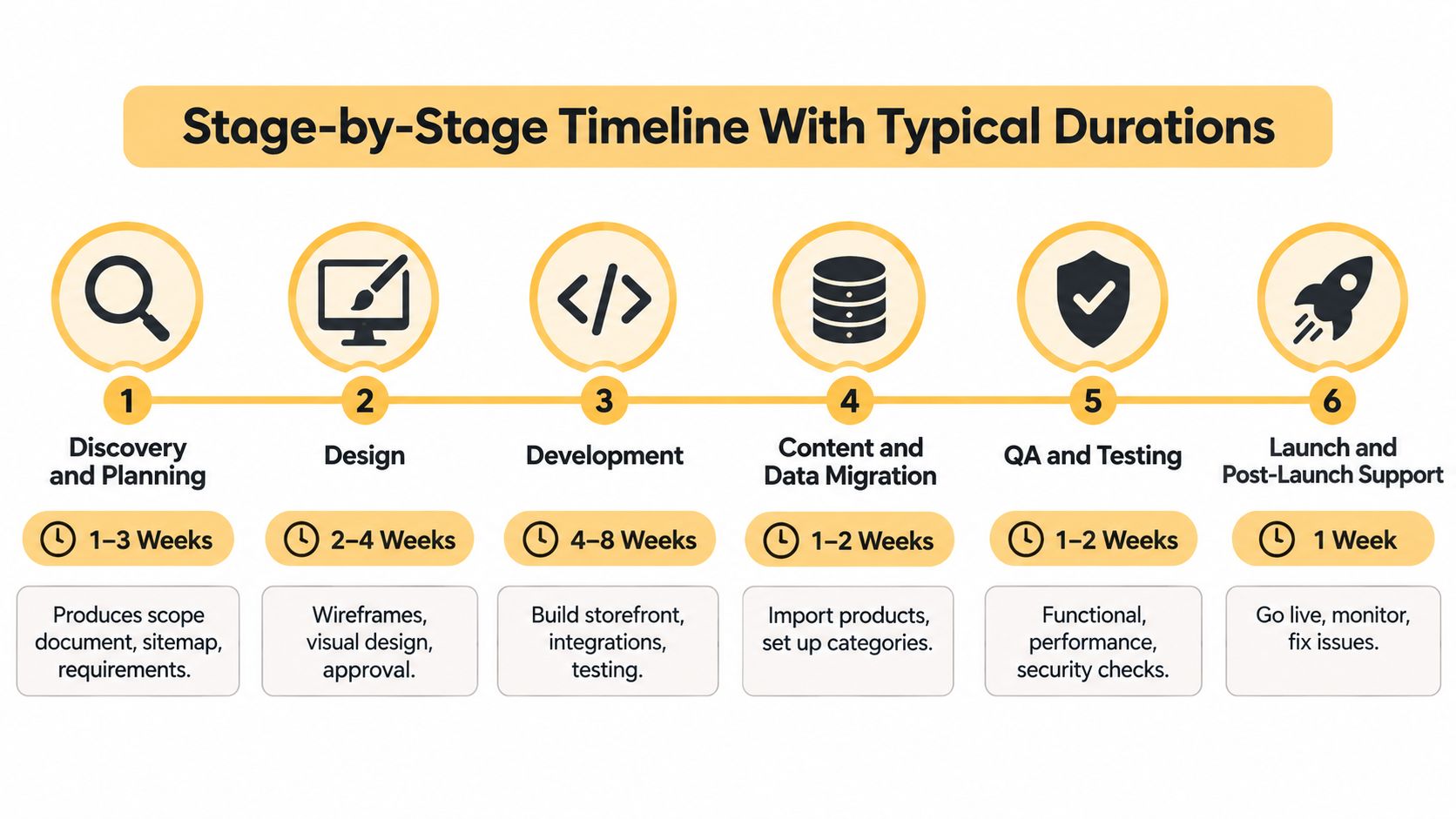
The six phases in order, with the durations most mid-sized custom builds follow:
What Each Phase Has to Produce
-
Discovery and planning, 1-3 weeks. Out comes a scope document, a sitemap and a requirements list with a named owner for every business rule. Nothing downstream starts until that scope is signed.
-
UX and visual design, 2-4 weeks. Wireframes for home, category, product, cart and checkout, then full page templates and a clickable prototype. Shared elements such as the header and cart drawer move into build while the remaining templates are still being drawn.
-
Development and integrations, 4-8 weeks. Variant and bundle logic, cart, checkout, payment gateways, shipping rates, tax calculation, customer accounts. This phase carries most of the schedule risk, because every integration comes with a third party's sandbox, documentation gaps and edge cases.
-
Content and data migration, 1-3 weeks, overlapping development. Products, images, customer accounts and the redirect map. The redirect map is the piece teams forget: every indexed URL needs a destination before the new site takes traffic.
-
Testing and QA, 2-3 weeks. Functional, cross-browser, mobile, payment failure paths, tax and shipping calculations, plus performance and accessibility checks. Test reports, closed defects and a performance baseline are the deliverables.
-
Launch and stabilization, 1-2 weeks. DNS changes, go-live, monitoring, and the first real orders walked end to end by a human. Keep the build team reachable through the first sales cycle, because the defects that hurt show up with live payment methods.
The slip chain to plan around: design waits on approved requirements, development waits on approved templates, and testing waits on real catalog data. A two-week discovery delay doesn't cost two weeks. It costs two weeks plus whatever overlap you can no longer recover.
Copy those six rows into your project plan and mark two things against each one: what it waits for, and what can run alongside it. The rows with hard dependencies are the ones worth defending in a status meeting.
How Project Size Changes the Total Schedule
In 2025, Tenet's breakdown of website build times estimated that an ecommerce website with 10-50 or more pages typically required 2-4 months to complete. That range is wide because page count is a weak predictor of effort. What moves the schedule is the number of systems the store has to talk to, and how many of them you control.
| Project type | Typical duration | Main schedule drivers |
|---|---|---|
| Template store with standard catalog | 3-6 weeks | Theme setup, a few standard integrations |
| Custom store with 10-50 pages | 2-4 months | Custom design, catalog, payment and shipping integrations |
| Integrated platform with ERP, tax and marketplace sync | 4-9 months | Multiple systems, data mapping, extended integration testing |
| Multi-region store with localization | 6-12 months | Languages, currencies, regional tax and fulfilment rules |
A template store is the 3-6 week case. You configure a theme, connect one payment provider and one carrier, and import data the platform already knows how to display. Most of the risk sits in content readiness, not code.
The custom store with 10-50 pages is where the 2-4 month figure applies. Custom templates mean custom components, and each component gets tested on mobile, with assistive technology, and against a performance budget.
The jump to an integrated platform is the one that surprises finance teams. An ERP connection isn't a plugin. Item master data has to map to catalog attributes, stock has to reconcile across locations, and integration testing can't finish until the other system's API is stable, which is a date you don't control.
Worked example: a 30-page custom store adds a warehouse management system mid-project. Data mapping gets redone, integration testing waits on the warehouse API, and QA runs into the migration window. That single addition typically adds six to eight weeks, and none of it appears on the page count.
Multi-region adds a layer that compounds with everything else: translated content, currency display, regional tax rules and per-country fulfilment logic. The line items that drive both budget and calendar in each band are broken out in this guide to ecommerce website development cost.
Before you count pages, count systems. Payment gateway, tax service, ERP or warehouse, marketplace, email or CRM, analytics, and any subscription or B2B pricing layer. Seven systems is a different project from two, whatever the sitemap says.
Planning and Discovery Set the Real Schedule
Requirements volatility is the most measurable timeline risk in software, and store builds are not exempt. A family of controlled experiments published through Chalmers University of Technology reported that obsolete requirements produced systematic effort overestimation of approximately twice the percentage of obsolete requirements included in the task set. In plain terms, a requirement that's already dead when estimating starts doesn't cost you the work. It costs you double.
In a store build, that mechanism shows up as a list of undecided business rules:
- Catalog rules: which products have variants, whether bundles carry separate SKUs, how backorders and pre-orders behave.
- Promotion logic: whether discounts stack, how a sitewide sale interacts with a member price, when a coupon expires.
- Tax handling: which regions calculate tax, at what level, and on shipping or not.
- Shipping zones and rates: table rates versus live carrier rates, split shipments, free-shipping thresholds.
- Returns and refunds: partial refunds, restocking, exchanges, store credit.
- Customer accounts: guest checkout, saved payment methods, B2B price lists, company accounts with multiple buyers.
- Payment methods: cards, wallets, buy-now-pay-later, purchase orders.
None of those are documentation chores. Each one changes the data model, an API contract, an authorization rule, the checkout state machine, test fixtures and the acceptance criteria a developer signs off against. That's why a rule decided in week seven costs far more than the same rule decided in week one.
Write the six scenarios that break most stores as test cases during planning, not after build: guest checkout, split shipments, discount stacking, refunds, failed payments, and international tax calculation. If the answer to any of them is "we'll see," the estimate is fiction.
Practical rule: a business rule without a named owner and a decision date isn't a requirement. It's a change request waiting for the worst possible moment to arrive.
Put change-control gates in two places: before the database schema is finalized, and before third-party integration work begins. Late changes at those boundaries ripple through frontend, backend, QA, analytics and deployment simultaneously, and each ripple gets its own ticket. The full list of what belongs in a requirements document is set out in this guide to ecommerce website requirements.
Content has its own lead time and blocks templates if it starts late. Product photography, descriptions, category copy and the legal pages for returns, shipping and privacy usually need two to four weeks. List every content item with an owner and a delivery date, and treat a missing policy page as an open decision at the same gate as a missing tax rule.
Approve three things before design begins: a signed scope document, a requirements list with owners, and a register of open decisions with deadlines attached.
How Design and Development Run in Sequence
The design-to-development handoff is a sequence of decisions, not a single approval. A late change to a shared template can affect every page that uses it, while a delayed integration can hold up testing. Keep the following six checkpoints visible in the schedule.
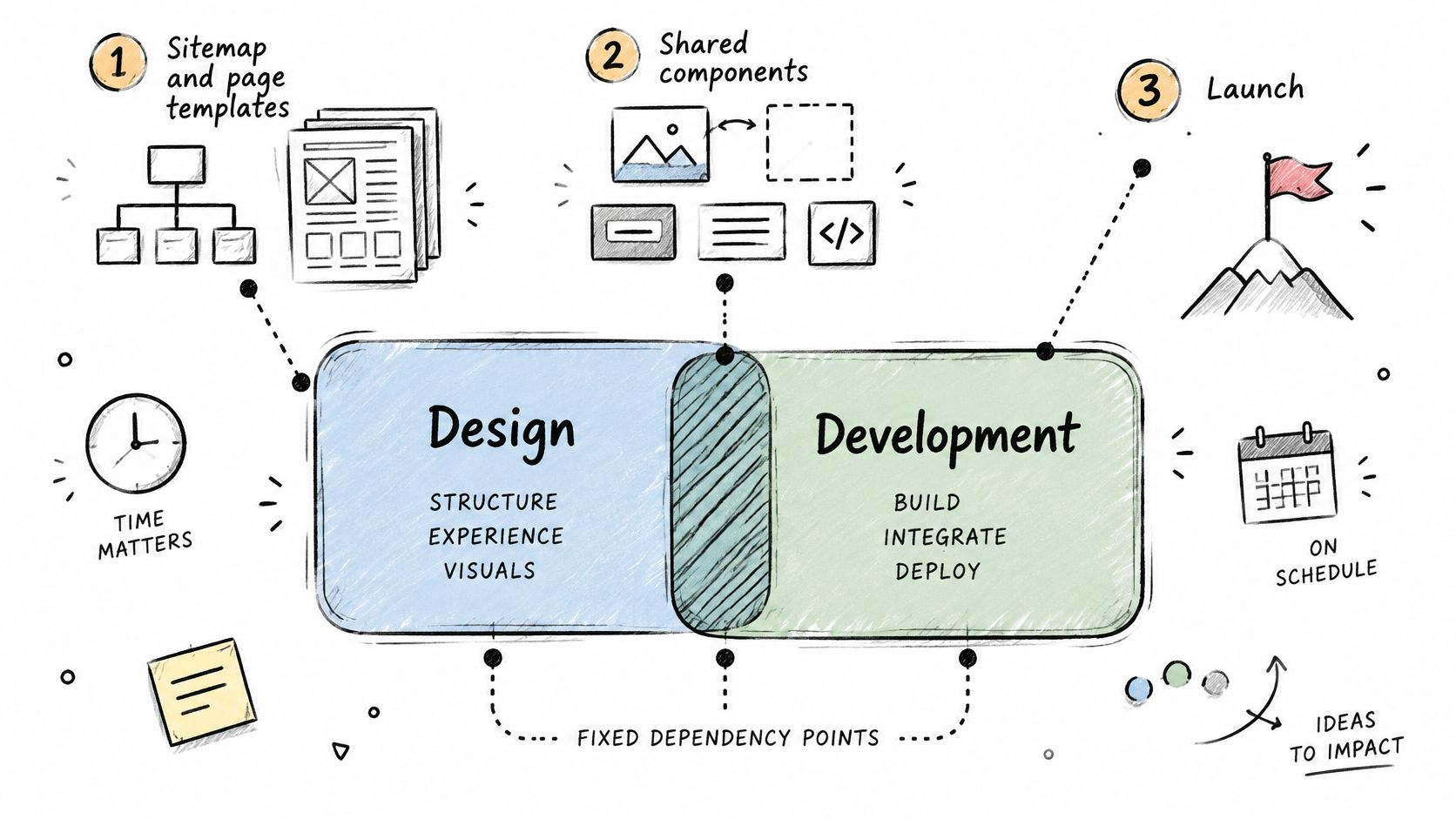
- Approve the sitemap and page templates. Developers need the number and types of pages to estimate components. Approving the homepage while category and product templates remain unsettled leaves scope open.
- Build shared components. Finalize the header, navigation, product cards, cart drawer and footer before page-specific work. Changes to these components can affect the whole store.
- Build category and product templates with representative content. Use products that reflect actual attribute counts, long names and awkward images. Placeholder data can hide layout problems that surface when the catalog arrives.
- Connect cart, checkout and payment sandboxes. Set up sandbox payments first, then test declines, 3-D Secure prompts and partial failures while the build schedule still has room for fixes.
- Add shipping, tax and inventory integrations. These rely on addresses and cart contents, so validate them after checkout works. Test the integrations together, since their interactions can expose issues that separate checks miss.
- Freeze the schema and begin final integration tests. Changes to the data model after this checkpoint need change requests with owners and dates, because they can affect connected work.
The handoff in practice:
Performance Is a Workstream, Not a Cleanup Task
Performance needs scheduled work during design and development. Google's web.dev guidance on site speed and business metrics recommends tracking measures such as conversion rate, product views, add-to-cart rate and checkout completion alongside technical performance. This connects speed checks to store behavior, rather than leaving them as a final technical review.
Design toward these field targets, measured at the 75th percentile: Largest Contentful Paint of 2.5 seconds or less, Interaction to Next Paint of 200 milliseconds or less, and Cumulative Layout Shift of 0.1 or less. Validate with representative product content, connected payments and analytics, and mobile testing. Image formats, JavaScript execution, third-party scripts, caching and CDN configuration all need attention during the build.
A single pre-launch test is not enough to identify every bottleneck. Schedule time for baseline measurement, optimization and regression testing, so performance changes can be checked without leaving the final review to catch problems that should have been addressed earlier.
Testing, Accessibility and Performance Checks
Most published timelines answer the wrong question. They promise a build estimate and fold everything else into a generic "QA" line, which leaves no room for the one part of checkout that fails most often in production.
A 2025 Contentsquare ecommerce accessibility snapshot found that 94% of ecommerce sites had inaccessible checkout journeys, while 84% failed to properly label buttons or form fields under a WCAG criterion. Those numbers describe stores that shipped on time and still can't be bought from by a customer using a keyboard or a screen reader.
Accessibility isn't a post-launch compliance task you can invoice later. It's a launch gate, and it belongs in the schedule with its own boundaries.
| Workstream | Timing | Time reserve |
|---|---|---|
| Accessibility discovery | Week one of design | Design-phase work, no extra build week |
| Keyboard-only and screen-reader checkout testing | Start of testing | Two passes, one before remediation and one after |
| Form-label validation | Start of testing | Automated scan first, then manual check of every checkout field |
| Remediation of checkout defects | After testing findings | 1-2 weeks for a standard checkout |
| Regression testing of fixes | After remediation | Fold into the final QA cycle |
| Custom checkout flows | Remediation phase | Longer than a standard checkout; add a second testing cycle |
The functional test set belongs on the same schedule, because it shares the same environments:
- Cart and checkout across every browser and device you support, weighted to the mobile browser your analytics shows.
- Payment failure paths, including declined cards, expired cards and abandoned 3-D Secure prompts.
- Tax and shipping calculations checked against known orders, not just the default case.
- Transactional email, order confirmation, shipping notice and refund.
- Analytics events, add to cart, begin checkout and purchase, with values matching the order total.
Shifting accessibility earlier reduces rework. Postponing it creates an unplanned second development cycle, and that one has no estimate attached.
The trade-off is not speed versus quality. It's when you pay for the same fix. The question to settle at the start of testing is simple, and it isn't "how many weeks to build." It's how many weeks until a real customer, including one using assistive technology, can complete a purchase.
Calendar-Safe Launch Planning
A technically ready store can still launch at the wrong time. Retailers often avoid major platform changes during peak trading, so the calendar around the build can matter as much as the development schedule. A launch that overlaps a promotion or busy sales period leaves less room to resolve issues without affecting trading.
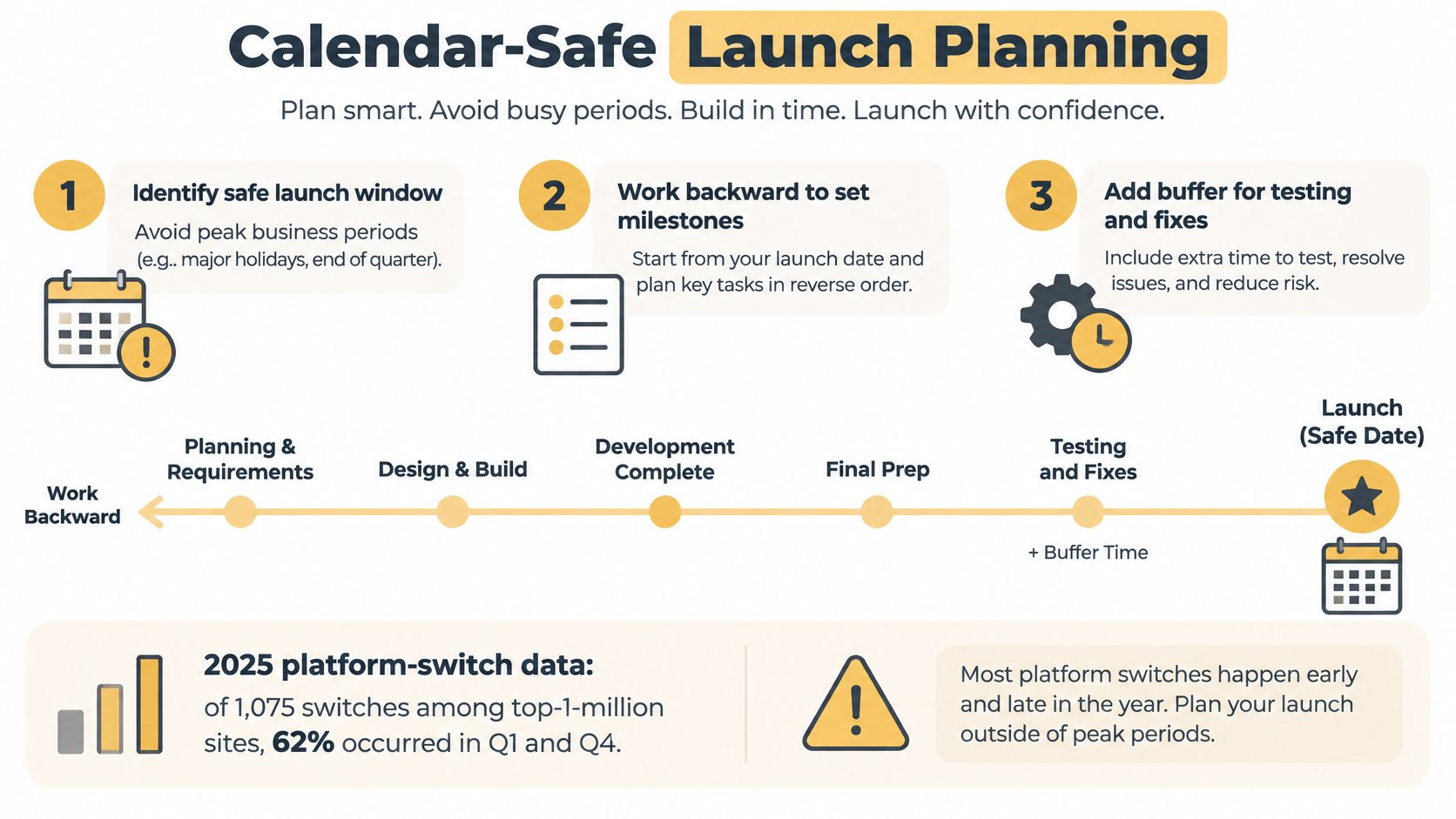
Plan backward from a safe launch window, then assign time to each dependency:
- Choose the window first. Avoid peak trading and major promotions, and leave at least two weeks before either begins.
- Map data and discovery. List catalog attributes, customer records, order history and subscription state.
- Run migration trials. Import a sample, check variant mapping and customer passwords, then repeat the import. Two trials can expose problems a single clean run misses.
- Test integrations end to end. Check payments, tax, shipping and any ERP feed using real order values.
- Validate redirects. Reserve one to two weeks, not one afternoon. Each indexed URL needs a 301 redirect to a live destination.
- Verify analytics. Check conversion tracking, ecommerce events and goal values against a test order.
- Train staff. Practise order management, refunds and catalog updates on the staging site.
- Soft launch to a limited audience. Set aside two weeks as a buffer, and hold paid traffic until checkout is clean.
- Monitor after launch. Watch error rates, failed payments, page speed and Search Console coverage during the first month. Also track which directory placements stay live as the old site and its links change.
Worked calendar: For an eight-week build on a store whose peak season starts in October, a late-spring kickoff gives the team room to finish the soft launch before the first back-to-school promotion.
The dates need to account for business availability as well as engineering. Migration work can stretch beyond the build, so schedule redirects and indexation checks as their own tasks. This website migration SEO checklist covers the redirect and indexation sequence to include in that work.
A compressed build that collides with peak operations carries more commercial risk than a staged launch with a smaller first scope and a controlled stabilization period. Faster engineering is not automatically a better outcome if the new store goes live as the biggest campaign starts. Choose a date when staff can monitor orders, payments and site performance, and keep time available to respond if something breaks.
Confirm Your Timeline Before You Sign
Before agreeing to a build, check whether the schedule shows dependencies, ownership and time for work that often gets squeezed near launch.
- Phase dates, not phase names. Each phase should have a start and end date.
- A total that fits the project. If your integrations suggest a longer build than the estimate allows, ask what has been excluded.
- Migration as scheduled work. Confirm it has time allocated separately from storefront construction.
- Accessibility as scheduled work. Look for a defined testing window and time to address issues.
- Integration ownership. List each system and identify who is responsible for its API.
- Approved requirements. Name an owner for each business rule before development begins.
- A calendar-safe launch. Avoid peak trading periods and include time for a soft launch.
Warning signs include a single build estimate without phase details, no scheduled data migration, or a launch date set before requirements are approved. These gaps make it difficult to judge whether the proposed schedule accounts for the actual work.
Bring your phase table and requirements list to the first conversation. Ask which activities can overlap, which depend on others, and whether accessibility checks and calendar buffers have specific time allocated. Those answers help you assess the schedule before signing.
Up North Media's audit request is a short form asking for your current website and target market. The team replies within one business day to confirm scope and pricing. Use that exchange to clarify what the estimate covers before committing to a build timeline.