
Picture this: a software factory where every single approved part automatically travels down an assembly line and ships to customers instantly, without a single manual check. That’s the core idea behind continuous deployment.
It represents the highest level of automation you can achieve in a software pipeline, turning the entire release process into a seamless, hands-off workflow. The moment a developer merges new code, an automated system takes over completely.
This system runs the code through a gauntlet of tests—unit tests, integration tests, you name it—to make sure everything is solid. If every single test passes, the code is automatically pushed live to your users. There's no manual "go" button, no release manager waiting for the right moment, and no scheduled deployment windows. It's an approach built on a deep trust in your automated testing and monitoring.
Where It Fits in the Pipeline
To really get what continuous deployment is all about, you have to understand where it sits in the development lifecycle. It helps to start by understanding the differences between Continuous Deployment and Continuous Delivery because people often mix them up. The distinction is simple but critical.
Here's how the concepts build on each other:
-
Continuous Integration (CI): This is the foundation. Developers regularly merge their code changes into a central repository, which kicks off automated builds and tests. The main goal is to find integration bugs early and often.
-
Continuous Delivery (CDelivery): This is the next logical step. Every code change that passes the automated tests is automatically prepared and made ready for a production release. The code is deployable at any time, but a human has to manually trigger the final push to production.
-
Continuous Deployment (CDeployment): This is the final, fully automated stage. It completely removes the manual trigger. If the code passes all the tests, it’s automatically released to production. No human intervention needed.
To make this crystal clear, let's break it down side-by-side.
Integration vs Delivery vs Deployment At a Glance
This table helps you quickly see how each concept progresses, from integrating code to automatically shipping it.
| Concept | Primary Goal | Final Release Trigger | Key Outcome |
|---|---|---|---|
| Continuous Integration | Integrate code frequently to find bugs early. | N/A (Builds are triggered, not releases) | A successfully built and tested software artifact. |
| Continuous Delivery | Keep the code in a deployable state at all times. | Manual (Human decision) | A release-ready artifact that can be deployed with one click. |
| Continuous Deployment | Release every good change to users immediately. | Automatic (Passing tests) | A constantly updated production environment with new features. |
As you can see, the key difference boils down to that final trigger—is it manual or automatic? That single change is what separates a team that can deploy at any time from one that is deploying all the time.
Continuous deployment is the pinnacle of DevOps practices. Teams embracing it achieve 46 times more frequent code deployments and recover from failures 96 times faster than lower-performing teams. This demonstrates a massive leap in both speed and resilience.
This commitment to full automation delivers incredible speed and reliability, setting the stage for faster innovation and a much more stable experience for your users.
Tracing a Code Change Through an Automated Pipeline
So, what does this whole process actually look like in the real world? Let's follow a single code change as it travels through a fully automated pipeline.
Imagine one of your developers just finished building a slick new "dark mode" toggle for your e-commerce site. They're happy with how it works on their machine. Now what?
It all kicks off with a simple command: git push.
That one command sends the new code from the developer's laptop to a shared code repository like GitHub or GitLab. Pushing the code is like hitting the first domino—it instantly triggers an automated workflow managed by a tool like GitHub Actions or Jenkins. There are no meetings, no emails to a release manager, no manual handoffs. The system just takes over.
First up is the build stage. The CI/CD tool grabs the latest code, compiles it, and bundles all the necessary files and dependencies into a single, neat package. This is called a build artifact, and it’s a self-contained version of your application, ready to be tested. If anything goes wrong here—a typo in the code, a missing file—the pipeline stops dead and alerts the developer immediately.
The Gauntlet of Automated Testing
Assuming the build was successful, the artifact now faces its biggest challenge: a relentless series of automated tests. This isn't just a quick check; it's a comprehensive gauntlet designed to catch any and all bugs before they can ever bother a real customer.
-
Unit Tests: These are the most granular checks. They zoom in on tiny, individual pieces of code to make sure they work in isolation. For our dark mode feature, a unit test would confirm that the toggle function correctly switches the theme's internal state from 'light' to 'dark' and back again. Simple, but crucial.
-
Integration Tests: Next, the system checks how different components play together. Does flipping the dark mode toggle actually cause the rest of the site to react? An integration test would verify that when the toggle's state changes, the correct CSS styles are applied across the entire user interface.
-
End-to-End (E2E) Tests: This is the final boss of testing. E2E tests mimic a real user's journey from start to finish. An automated script will literally open a browser, navigate to your site, log in, find and click the dark mode toggle, and visually confirm that the page's appearance changes exactly as expected.
Only when the code passes every single one of these tests without a single failure does it get the green light. This testing gauntlet is what builds the trust needed to let a machine push code to your live site.
This diagram shows how code moves from integration to delivery and, finally, to deployment. The key difference is what triggers that final release.
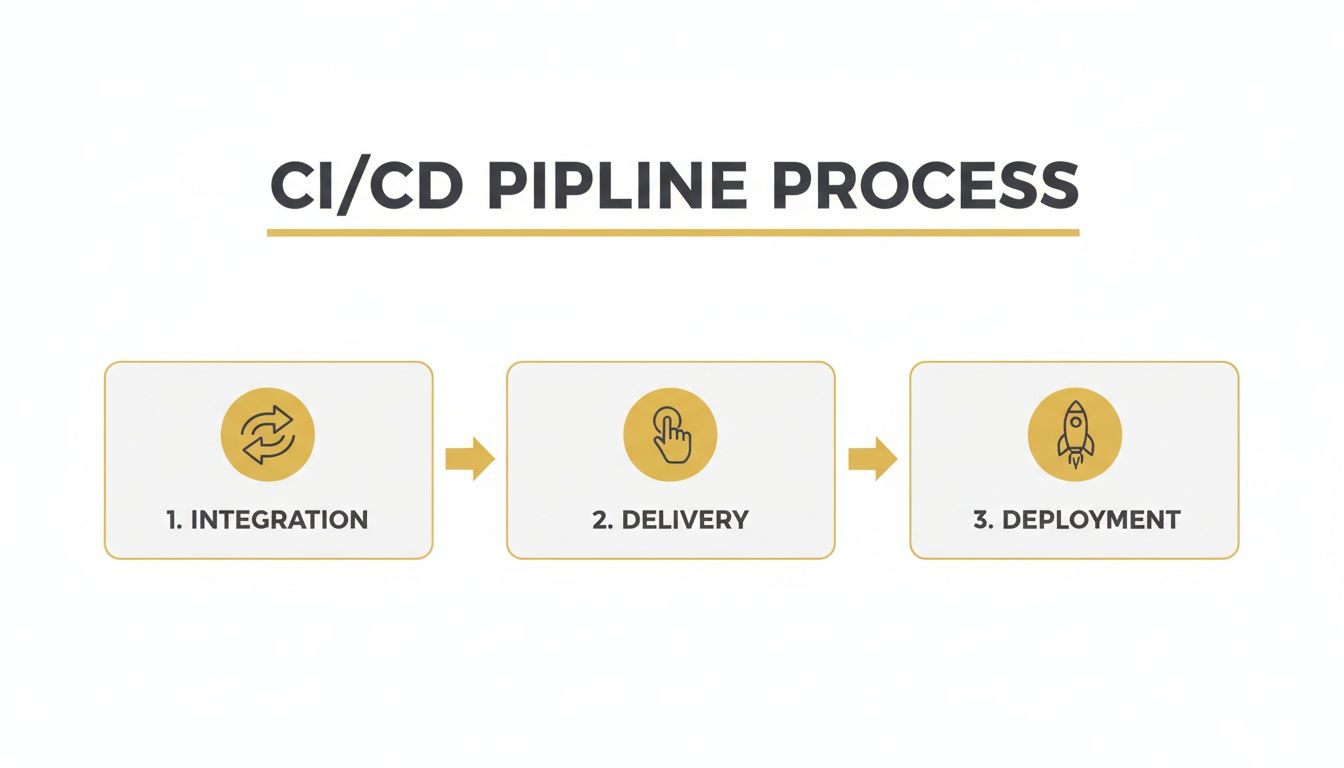
As you can see, continuous deployment is the last piece of the automation puzzle, getting rid of that manual "go live" button you see in continuous delivery.
The Final Step: Automatic Deployment
Once all the tests are passed, the pipeline moves into its final, hands-off stage. The fully validated build artifact is automatically deployed to your production environment.
Within minutes of that initial git push, the new "dark mode" toggle is live on your website for every customer to see. No human ever had to click a deploy button.
This entire journey, from a developer committing code to it being live in front of customers, is a completely hands-off workflow. Its success depends entirely on the quality and reliability of the automated pipeline—a core concept when you learn how to build a web application from scratch that's both modern and built to scale.
This is the power of continuous deployment. It transforms the release process from a stressful, all-hands-on-deck event into a boring, predictable, and incredibly fast routine.
Why Adopting Continuous Deployment Is a Business Decision
While the nuts and bolts of continuous deployment are technical, its real value is all about business outcomes. This isn't just some engineering upgrade; it's a strategic shift that directly impacts your company's agility, customer happiness, and, ultimately, your bottom line. When you automate the path from a line of code to a live customer, you fundamentally change how your business operates.
The most obvious win is a massive reduction in your time-to-market. Instead of bundling a bunch of features into big, risky releases every few weeks or months, you can push out small improvements the moment they're ready. This lets you launch new products faster, react to market changes, and run circles around competitors stuck in slow, manual deployment cycles.
Fostering a Culture of Innovation
Adopting continuous deployment does more than just speed things up—it transforms your internal culture. When your developers are freed from the drudgery of manual releases and late-night deployment emergencies, their morale and productivity go through the roof. They spend less time managing complex rollouts and more time doing what they do best: building things that create value.
This shift creates a powerful feedback loop. Developers can test new ideas, release them to a small group of users, get real-world data back, and iterate in a flash. The ability to test a hypothesis in minutes instead of months naturally encourages a culture of innovation and smart risk-taking.
The core business advantage of continuous deployment is transforming your development team from a cost center into a direct driver of revenue and innovation. It empowers them to deliver value constantly, not just periodically.
A Data-Driven Approach to Growth
The move to CI/CD has been swift. Right now, 80% of organizations are practicing DevOps, a huge jump from just 47% five years ago. This boom is directly tied to the business world's need for automation, with the DevOps market expected to hit $25.5 billion. You can dig deeper into these DevOps statistics to see how they're reshaping entire industries.
Every automated deployment becomes a chance to learn something. By releasing small, isolated changes, you can measure their exact impact on key business metrics like user engagement, conversion rates, and customer retention.
Here’s what that looks like in the real world:
- Improved Customer Satisfaction: Bugs get fixed and shipped in minutes, not days. That kind of responsiveness shows customers you’re listening and actively making their experience better.
- Reduced Risk: Small, frequent updates are way less risky than massive, infrequent ones. If something does go wrong, it's much easier to pinpoint the cause and roll it back instantly.
- Increased Revenue: Getting features that drive sales into the hands of customers faster has a direct impact on your bottom line. An A/B test on a checkout button can be deployed, measured, and optimized in a single afternoon.
At the end of the day, continuous deployment is about more than just shipping code faster. It's about building a more resilient, responsive, and data-driven organization that can adapt and win in a competitive market. It’s a business decision that pays for itself in speed, stability, and customer loyalty.
Building a Bulletproof Deployment System

I’ve seen pipelines break down in the most unexpected ways. A truly reliable continuous deployment setup feels like a vault—every layer locks down risk and builds confidence.
You don’t get trust overnight. You earn it by stacking non-negotiable components that catch issues early and keep your releases smooth.
Think of your deployment pipeline as a fortress:
- Automated Testing Strategy: Your first line of defense
- Infrastructure as Code: Guarantees consistency
- Monitoring and Observability: Lets you peer inside
- Intelligent Rollouts: Reduces blast radius
- Automated Rollbacks: Your escape hatch
Creating Consistent And Repeatable Environments
Before you even run a test, your staging environment must be indistinguishable from production. That’s where Infrastructure as Code (IaC) comes in, using tools like Terraform or AWS CloudFormation.
IaC lets you version-control servers, databases, and networks the same way you do application code. No more “but it worked on my machine” surprises.
Once your environments match, it’s critical to know what’s happening once code goes live:
- Monitoring: Set up alerts for known failure points—CPU spikes, memory leaks, error-rate surges.
- Observability: Collect logs, traces, and metrics so you can ask new questions without shipping fresh code.
A truly bulletproof system is one you can see into. Without robust monitoring and observability, you are flying blind—you can’t fix what you can’t see, and you can’t build confidence in what you don’t understand.
Deploying Smart And Rolling Back Fast
Even the best test suites can miss something. To limit the fallout, adopt deployment strategies that give you room to breathe:
- Canary Releases: Ship to a small subset of users first. If metrics stay green, expand the rollout.
- Blue-Green Deployments: Keep two identical production environments. Switch traffic from Blue to Green—and if anything breaks, flip back instantly.
And never underestimate the power of automated rollbacks. If a bad build slips through, your pipeline should revert to the last known good version in seconds—no manual steps required.
You’ve automated the code path, but remember: people matter just as much. A clear grasp of mastering DevOps team roles and responsibilities ensures every operator knows their part in keeping this fortress standing. And while you’re locking down deployments, don’t forget security—our guide on website security best practices is a great companion as you automate your delivery pipeline.
A Realistic Starting Point For Small And Growing Teams

You don’t need the engineering headcount of a tech giant to start automating deployments. For a small or growing team, the idea of a fully autonomous pipeline can feel daunting. The trick is to pick one piece—get that right—and then build momentum from there.
A practical first move is to automate deployments to a staging environment. This lets your team fine-tune scripts, catch edge-case bugs, and build confidence in the process—all without touching live customer traffic.
Once that stage runs smoothly, you’ve earned the runway to add the next piece. One win leads to the next, and before long you’ve stacked reliable, automated steps into a full pipeline.
Choosing The Right Tools Without Breaking The Bank
You don’t need a six-figure software budget to kick off continuous deployment. Plenty of robust CI/CD platforms are open-source or offer free tiers that work brilliantly for smaller teams. Here are three popular, cost-effective options:
- GitHub Actions: Built directly into GitHub, this tool has a generous free tier for public and private repos. Setup is as simple as adding a YAML file to your repository.
- GitLab CI/CD: If you’re already on GitLab, its integrated CI/CD is a natural fit. You get pipelines, container registry, and artifacts all under one roof.
- Jenkins: A stalwart in the automation world, Jenkins is free and highly extensible. Its large plugin ecosystem can adapt to nearly any workflow—though it does require a bit more initial setup.
These platforms scale with your needs, so the investment you make today carries forward tomorrow. For a deep dive into how you can further lower infrastructure bills, see our guide on what serverless architecture is.
The goal is to demystify continuous deployment and earn internal buy-in. A reliable staging pipeline is proof enough to justify broader automation.
Fostering A Culture Of Ownership
Tools alone won’t transform your workflow—your people will. In a small team, empowering each developer to own code from commit through deployment can be game-changing.
Encourage engineers to write their own tests and pipeline configurations. When they author the scripts, they internalize best practices and feel accountable for stability.
This approach turns deployments into a team-wide capability instead of a bottleneck. Everyone shares in the wins and the fixes, which shrinks feedback loops and accelerates innovation.
Answering Your Questions About Continuous Deployment
Even after seeing how the pipeline works, a few questions always pop up. Let's tackle the most common ones so you have a rock-solid understanding of what this looks like in the real world.
Delivery vs. Deployment—What’s the Real Difference?
So, what’s the biggest distinction between continuous delivery and continuous deployment? It boils down to a single, manual step.
With continuous delivery, every change that clears the automated tests is ready to go live, but a human has to click a button to actually release it. With continuous deployment, that final button-push is gone. If the tests pass, the code is automatically deployed without anyone needing to intervene.
Continuous deployment is just the fully automated version of continuous delivery. It’s a commitment to trusting your automated safety nets completely, turning the entire release process into a hands-off workflow from code commit to live customer feature.
That one difference separates a team that can deploy whenever they want from one that is deploying all the time.
Is This Really Safe for a Small Business?
Yes, it absolutely can be—and when done right, it's often much safer than the alternative. The safety net isn't a person nervously clicking a deploy button; it's a powerful, consistent suite of automated tests that vets every single change.
For a small business, this means investing in tests that cover your most critical user journeys, like the checkout process or user sign-ups. It also means using smart deployment strategies like Canary releases (releasing to a small group of users first) and having automated rollbacks ready to go. Honestly, it's far safer than making huge, infrequent manual deployments that are almost always prone to human error.
What Tools Do I Actually Need to Start?
You don't need a massive, expensive tech stack to get going. A few core tools working together will do the trick:
- Version Control System: This is non-negotiable. You need a platform like Git, usually hosted on a service like GitHub or GitLab, to manage and track every code change.
- CI/CD Platform: This is the engine that runs all the automation. Tools like Jenkins, GitHub Actions, or GitLab CI/CD are the most common choices here.
- Automated Testing Framework: You'll need a tool specific to your programming language to actually write and run your tests. Think Jest for JavaScript or PyTest for Python.
Ready to build a deployment pipeline that actually accelerates your growth? The experts at Up North Media specialize in creating custom web applications with robust CI/CD practices that deliver real business results. Schedule your free consultation today!