

Most guides on how to optimize Google Business Profile tell you to stuff the business name with services, stack every nearby category, and post every week. That advice is how listings get restricted.
A complete, accurate profile beats a keyword-stuffed one. Google already understands a plumber, a cafe, or a clinic when the category, the services, and the reviews say so. Extra city names in the business name do not make the match stronger. They make the listing look like an ad, and identity fields are not ad slots.
I would start with the cheapest fix. Match the actual business, change one major field at a time, and check suspension risk before any edit, not after. Rankings are a weak scoreboard. Calls, direction requests, and website clicks tell you whether the profile is earning customers. If you run a shop, a service van, or a home-based firm, the same rule applies. Restraint is the tactic.
The Profile Fields Worth Getting Right
Open the listing and treat it like a form a stranger will use to decide whether to call. Completeness matters because Google's profile performance reporting tracks how people discover and interact with a profile on Search and Maps. You can see profile views, discovery searches, website clicks, phone calls, direction requests, and the search terms people used. Those insights come from public, location-based information, including reviews, photos, and local search trends. Views are context. Actions are the point.
The field map below is the audit. Set each row to the actual-world fact, then stop.
| Field | Set it to | Do not |
|---|---|---|
| Business name | Exact name on signage and customer materials | Extra keywords, city names, or slogans |
| Primary category | Most specific category for the core service | A broad or unrelated category |
| Secondary categories | Only services the business actually offers | Every nearby category for reach |
| Address | Staffed public location with signage | Home address or virtual office shown as a storefront |
| Service area | Cities or radius actually served, for mobile businesses | A huge area the business cannot cover |
| Phone, website, hours | Same NAP and hours as the website, including holidays | A tracking number or hours that differ by directory |
| Services and description | Real services and a factual local description | Promotional copy or stuffed keywords |
| Photos | Original exterior, team, product, and completed-work images | Stock photos, watermarks, or customer-private images |
| Attributes and booking link | Only options customers can truly use | Links or attributes that do not work |
What each field is doing
Business name matches the sign, the invoice, and the website. A bakery called North Oven stays North Oven. It does not become North Oven Bakery Omaha Wedding Cakes.
Primary category is the narrowest accurate label for the main job. A wedding cake shop picks the bakery label customers would search, not a broad food category that could mean anything. Add a secondary category only when you sell that service.
Address is for a staffed place people can walk into, with signage they can see. A plumber who drives to jobs uses a service area and does not publish a home or a mailbox as a storefront. Phone, website, regular hours, and holiday hours must match the site and the other directories. A tracking number that appears nowhere else creates a second identity.
Services name real jobs. The description says who you help and where, in plain language, not a slogan. Photos show the place or the vehicle, the team, and finished work. Turn on attributes and a booking link only when a customer can use them. A dead "book online" button trains people to leave.
Practical rule: If a field would be false on a Tuesday when you are closed, or false for a job you do not sell, leave it blank.
If you run a counter-service restaurant, the hours and the menu items on the profile should match what a guest can order, and a tool such as loyalty software for quick-service eateries is a separate way to bring those guests back after the visit. Category choice still does more for local relevance than a clever description, which is why local SEO ranking factors start with what the business is.
Before you change anything, screenshot every field. Write down this month's views, calls, direction requests, and website clicks. That sheet is the baseline. Later edits only count if those actions move.
Claim, Verify, and Edit Without Suspension
Popular checklists skip the part that costs you the listing. Google does not rank a profile you can no longer open. Google's Business Profile guidelines require the name to match how the business is represented in the world, prohibit unnecessary keywords in the name, recommend the fewest categories that describe the core business, and allow one profile per business. Local visibility rests mainly on relevance, distance, and prominence, not on keyword stuffing. Restraint is an optimization tactic because an accurate listing stays eligible.
Google's content policies say violations can restrict what people see or cut off access to the profile. Photos, videos, posts, and reviews sit under those same prohibited-content rules. Audit before you publish, not after a warning.
The safe path is a short sequence, not a weekend rewrite.
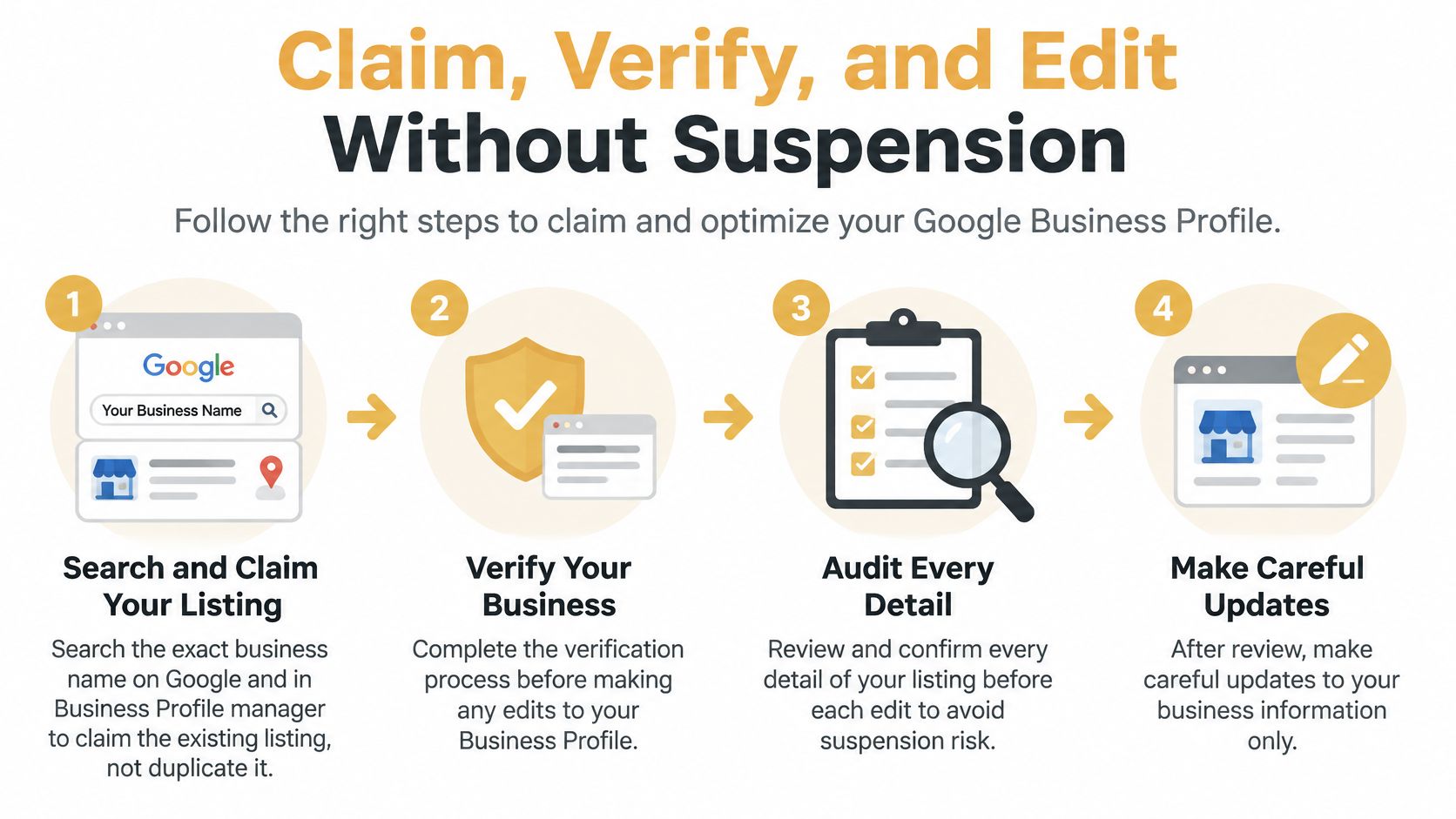
Setup in order
- Search before you create. Look up the exact business name on Google and inside Business Profile manager. Claim the listing that already exists. A second card for the same place is a duplicate, not a backup.
- Create only if nothing exists. One profile for that eligible location. A second staffed shop with its own signage can have its own profile. A desk in the same building cannot.
- Verify in a way that matches the building. Postcard, phone, email, or video are the usual paths Google offers. Video is the common route when there is no public counter. A virtual office, a coworking mailbox, or a UPS store is not a staffed location with permanent signage.
- Hide the home address when you go to the customer. Set the cities or radius you cover. Publishing a house without a public sign is a common way mobile businesses fail verification.
- Enter identity from the field table. Legal and signage name, one primary category, phone, website, and hours. Add secondary categories only for work you perform. Never bolt service words onto the name to "help Google."
- Write facts, then add original photos. A short description of who you help and where. No sale language in the name, category, or hours. Offers belong in posts.
- Hunt duplicates and file the evidence. Search the name and the phone again. Request removal of extras. Save a dated copy of every field.
The appeal folder
Keep a folder before you touch a major field. Signage or a branded-vehicle photo. A utility bill or lease if customers visit a public location. The pre-edit screenshot. If Google limits the profile, stop editing. Do not open a fresh listing to "start clean." Use the folder. A new card next to a restricted one looks like the duplicate you were trying to avoid.
Change one major field, such as the name or the primary category, then wait. If calls and discovery searches are the score you care about, you cannot read them when three fields moved on the same afternoon.
Accurate real-world representation protects visibility longer than an aggressive edit that looks clever for a week.
Edits that get listings restricted
| Risky edit | Why it fails | Safer move |
|---|---|---|
| Keywords in the business name | Name must match the real-world business | Use the legal and signage name only |
| Many extra categories | Only the fewest accurate categories belong | Keep the primary category and real secondary ones |
| Second profile for one location | One profile per business location | Claim the existing listing and remove duplicates |
| Virtual office shown as a storefront | No staffed public location or signage | Switch to a service-area profile |
| Home address for a mobile business | Address without permanent signage fails verification | Hide the address and set the service area |
| Several core fields changed at once | Hard to tell what triggered a restriction | Change one major field, then wait |
| Incentivized reviews | Google treats paid or biased reviews as manipulation | Ask every real customer with no reward |
| Promo text in factual fields | Those fields are for facts, not ads | Put offers in posts, facts in the profile |
A monthly pass is enough for most owners. Record the fields, compare name, address, phone, hours, and URL with the website and the major directories, and check that the primary category still matches the job people buy. Separate profiles only for eligible staffed locations. Service-area settings when nobody visits an office.
Say a painter works from a van across three Omaha suburbs. The safe profile hides the house, lists those suburbs, and uses the name on the truck. The unsafe one adds "Best Interior Painting" to the name, pins a virtual office downtown, and opens a second profile "for the website." The second version can look busier in the editor and still lose access.
Reviews People Read Before They Call
People decide before they dial, and the review block is where that decision happens. A 2026 BrightLocal survey of more than 1,000 U.S. small-business owners reported that 71% of consumers use Google for local-business searches, with 61% beginning on Google Search or Google Maps. The same report found that 47% would not consider a business with fewer than 20 Google reviews, 89% expect a response, and 42% are unlikely to use a business that ignores feedback.
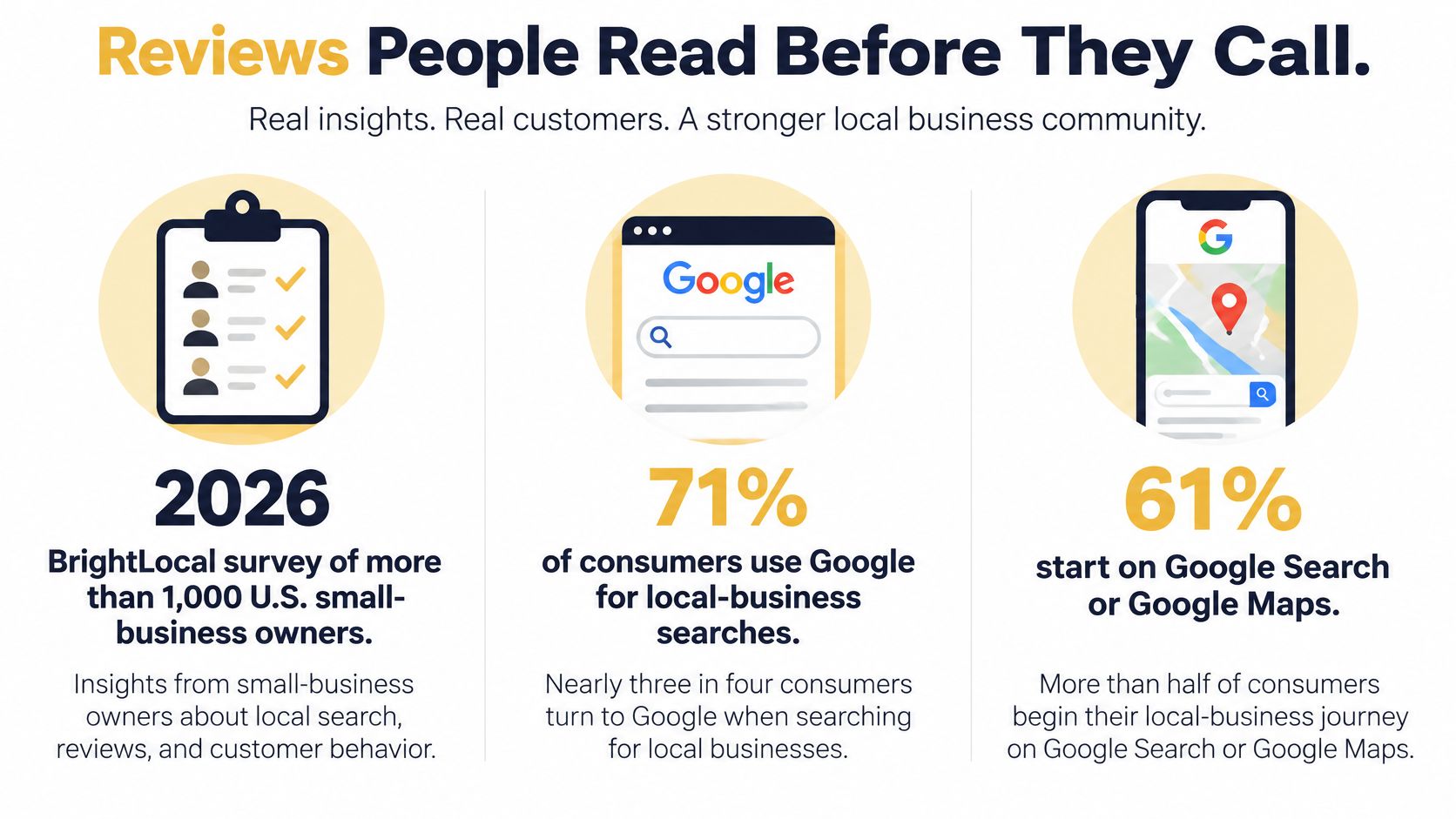
A full profile with four reviews can still lose the call. Volume and a visible owner reply are trust signals, not decorations.
What people read first
Counts and stars are not the whole story. BrightLocal's 2025 Local Consumer Review Survey found that 48% of consumers read the review summary before a selection of positive and negative reviews. Recurring themes describe you. A pile of vague five-star lines does not. A smaller set of detailed, recent reviews can convert better than a larger stack of empty praise, because the summary has something specific to repeat.
The short video below walks through how review patterns show up to someone comparing local options.
Ask once, reply every time
After a finished job, send one neutral link or a QR code and ask for an honest review. A counter team can follow the same idea with a simple way to collect restaurant reviews with QR codes at the register, aimed at every guest, not only the ones who smiled. Never offer a discount, a gift card, or a free add-on. Do not ask only the happy customers. That is selective solicitation, and it trains the summary to lie.
Reply within a few days, including the quiet three-star notes.
- Positive review: Name the job. "Glad the water heater install on Thursday stayed on schedule" beats "Thanks for the five stars."
- Negative review: Acknowledge the issue, skip private details, and offer a phone or email path to fix it. Do not argue in public.
- Neutral review: Thank them and clarify the one point they were unsure about, such as what is included in a service call.
Generic "sorry to hear that" replies add nothing for someone scanning a summary. A useful reply pattern for hard feedback is laid out in this guide to responding to negative reviews.
Once a month, log review count, average rating, response rate, and repeated words. Late arrival, clear pricing, clean work. If the same phrase shows up, fix the operation, then say that fact in the services list so the profile matches what customers already write.
Photos Posts and One Change at a Time
Photos and posts are a light rhythm, not a daily content job. A quiet profile with true pictures outperforms a noisy one full of stock art.
Each month, add original images of the exterior or the vehicle, the team at work, the products, and one completed job. Skip stock photos, watermarks, and before-and-after tricks that mislead. Skip anything that shows a customer's face, address, paperwork, or a job site they did not agree to share. Google's rules on prohibited and restricted content apply to reviews, photos, videos, and posts, and they bar private or confidential information. Clear filenames help your own folder. They do not rank the listing.
When a post is worth publishing
Publish when there is real news. A holiday-hour change. A finished project customers can recognize. A service people are already requesting. Skip the empty weekly "we are open" post. Three post types exist in the editor, updates, offers, and events, and an offer with no end date is just an ad sitting on a fact card.
If the news also belongs on social channels, plan that separately so the profile is not your only calendar. A practical walkthrough is plan your business's social presence with SleekPost. The profile post should still be the factual version, not a copied caption full of hashtags.
One test, then the numbers
Change one thing. Faster replies, or a batch of project photos, not both. Then compare a 28- to 90-day window of discovery searches, direction requests, calls, website clicks, qualified leads, and conversion rate with the prior period. The success check is qualified leads divided by profile interactions, and revenue divided by profile-attributed leads. Profile views alone are not the goal.
| Signal | What it measures | How to use it |
|---|---|---|
| Profile views | How often the listing was seen | Context only, not the success goal |
| Discovery searches | People who were not already searching the brand | Main sign that relevance improved |
| Search terms | Queries that surfaced the profile | Check category and services against real demand |
| Calls | Tap-to-call actions | A primary conversion for service businesses |
| Direction requests | People who wanted to visit or meet | Stronger for storefronts than service-area firms |
| Website clicks | Visits sent to the site | Pair with form fills or booked jobs, not clicks alone |
| Qualified leads | Calls, forms, or bookings that fit the service | Divide by profile interactions |
| Revenue per lead | Money from profile-attributed leads | Keeps the test tied to sales |
If calls rise while views stay flat, keep the change. If nothing moves, revert it and test a different field. A storefront should watch direction requests. A service-area firm should watch calls and booked jobs, because a map pin people cannot visit will not produce trips.
If the last edit did not move a row you can tie to a lead, it did not work, even if the profile looks busier.
Decide Your Next Move After 30 Days
Two to four weeks is long enough to compare calls, direction requests, website clicks, and discovery searches with the baseline you wrote down before the first edit. Local SEO improvements can show within 2 to 4 weeks on a Google Business Profile, with fuller results in 3 to 6 months. Do not rebuild the profile because one quiet week scared you. Rankings, leads, and revenue usually need that longer window.
Keep the rhythm
If discovery searches and calls are rising, leave the categories alone. Keep asking every real customer for a review, keep replying, and keep the monthly photo habit. Our local SEO work follows four steps: Local SEO Audit, Profile and Website Optimization, Reputation and Link Building, and Ongoing Tracking and Growth. The last step is the one owners skip, and it is the one that tells you the first three worked.
Celeste N. described the kind of movement that matters: "Moved from page 3 to page 1 on Google. We've seen a real increase in customer calls." Page position without calls is a vanity win. Calls without a clean profile are hard to repeat.
Stop and get a harder look
Stop editing if verification failed, a duplicate is still live, or several locations each need their own profile. Flat actions on a verified listing are a different problem. Confirm the name, address, and phone match the website, then test whether the primary category fits the job customers request. If those checks still do not explain the stall, a structured Google Business Profile audit should cover eligibility, duplicates, category fit, and review themes before anyone touches another field.
The fork is simple.
- Keep going when discovery and calls are up and the name, category, and hours still match the business.
- Get help when you cannot verify, a second listing will not die, or several locations are sharing one card.
- Wait out the month when the only complaint is that rankings did not jump in seven days.
I would not change the business name, the address, and the primary category in the same month just to "reset" a flat report. You would lose the baseline, and you might lose the listing.
Up North Media helps Omaha businesses claim, verify, and optimize a Google Business Profile, then track the calls and leads that follow. If your listing is stuck on duplicates, the wrong category, or reviews nobody answers, start with a clear audit instead of another round of keyword edits. Visit Up North Media to talk through the profile you have now.