

The new site goes live on a Monday. The homepage looks sharper, product photos load faster, and the team treats the relaunch as finished. Three weeks later organic traffic is down 40 percent. A staging robots rule slipped into production, a few hundred old URLs return 404 errors, and the analytics tag never loaded on the checkout template. None of those failures is exotic. Each one is a launch-day miss that a disciplined website migration SEO checklist can stop, if every task has an owner and a proof that it worked.
I recommend running the work in the order a migration unfolds. Inventory first. Then the redirect map, chain tests, on-page carryover, robots, sitemaps, tracking, internal links, mobile and speed, and only then the recovery watch. Teams that sign off the design before they have a URL list usually find the missing pages after rankings have already moved.
Say a regional retailer rebuilds its catalog on a new platform. The design review passes. Nobody exports the old crawl, so seasonal category URLs never get a one-to-one redirect. Bookmarks and old ads hit dead ends. Search Console fills with not-found reports while the homepage still looks fine. That is the pattern this list is built to prevent.
The ten steps below are the run order I use with launch teams. Each one names the failure it blocks and the evidence that confirms the fix. Get that evidence before you celebrate the redesign.
1. Pre-Migration Site Crawl and URL Inventory
The failure this step prevents is finding, after launch, that a page which earned traffic never made the new site. Crawl the live site with Screaming Frog SEO Spider, Sitebulb, or an equivalent crawler before anyone changes templates. Record every indexable URL with its status code, title, meta description, H1, canonical, and internal link count.
The crawl should read as a page-level inventory, not a design review.

Export the crawl and match it to Google Search Console and analytics. Flag URLs that earn organic clicks, backlinks, or conversions as high priority. Low-traffic URLs still matter when they hold a form, a PDF, or a partner link.
Pull three lists, not one. A crawler misses URLs that are orphaned or blocked.
- XML sitemaps: Export every URL the current sitemap advertises.
- Server logs: Catch addresses crawlers request that the HTML crawl never reached.
- Analytics and campaigns: Include landing pages from email, ads, and old promotions.
Save the crawl as a dated file. That file is the baseline you compare after launch. Set the crawl limit high enough to include pagination and filtered URLs, or the map will look complete while category page four never existed.
A catalog retailer can export product and category URLs, then line them up with Search Console performance so the pages that sell get mapped first. If a URL isn't in this file, later steps can't protect it.
2. URL Mapping, 301 Redirects, and Change of Address
Redirects are how you keep rankings, links, and bookmarks. The failure you prevent is sending those requests to the wrong page, or to a URL that doesn't exist.
Build a spreadsheet that maps every old URL to the closest equivalent, then implement the rules on the server. Google's site-move documentation calls for a complete old-to-new mapping, server-side permanent redirects (preferably HTTP 301 or 308), a new XML sitemap in Search Console, and redirects kept generally at least one year, because users, crawlers, bookmarks, and external links keep requesting legacy URLs. The same guidance warns that redirects to incorrect or nonexistent destinations spike "Not found" errors. Change of Address guidance uses a shorter floor of 180 days, and longer while Search traffic still hits the old URLs.
Don't dump unrelated URLs on the homepage. Map by topic and intent. Use a 301 for a permanent move, and a 302 only when the move is temporary. Store the rules in version control so a later deploy can be rolled back.
This walkthrough shows how a permanent redirect should resolve before you ship the map.
A publisher moving a blog from a subfolder to a new domain should redirect each article, plus tag and category archives, to the matching new URL. For a domain change, verify both properties in Search Console and in Bing Webmaster Tools, and submit Change of Address only after the 301s return the right destinations. Keep the old domain under your control. Test one product template, one article, and one legacy campaign URL before you call the map done.
3. Redirect Chain and Loop Testing
A redirect that lands on another redirect isn't finished. Chains (A to B to C) slow crawling and muddy the signal. Loops make the page unreachable. The checkbox "redirects are live" doesn't catch either one.
After deploy, test every row in the map. The pass is a single hop to a final page that returns 200.
Use the flow below as the test order, not as a sample of ten friendly URLs.
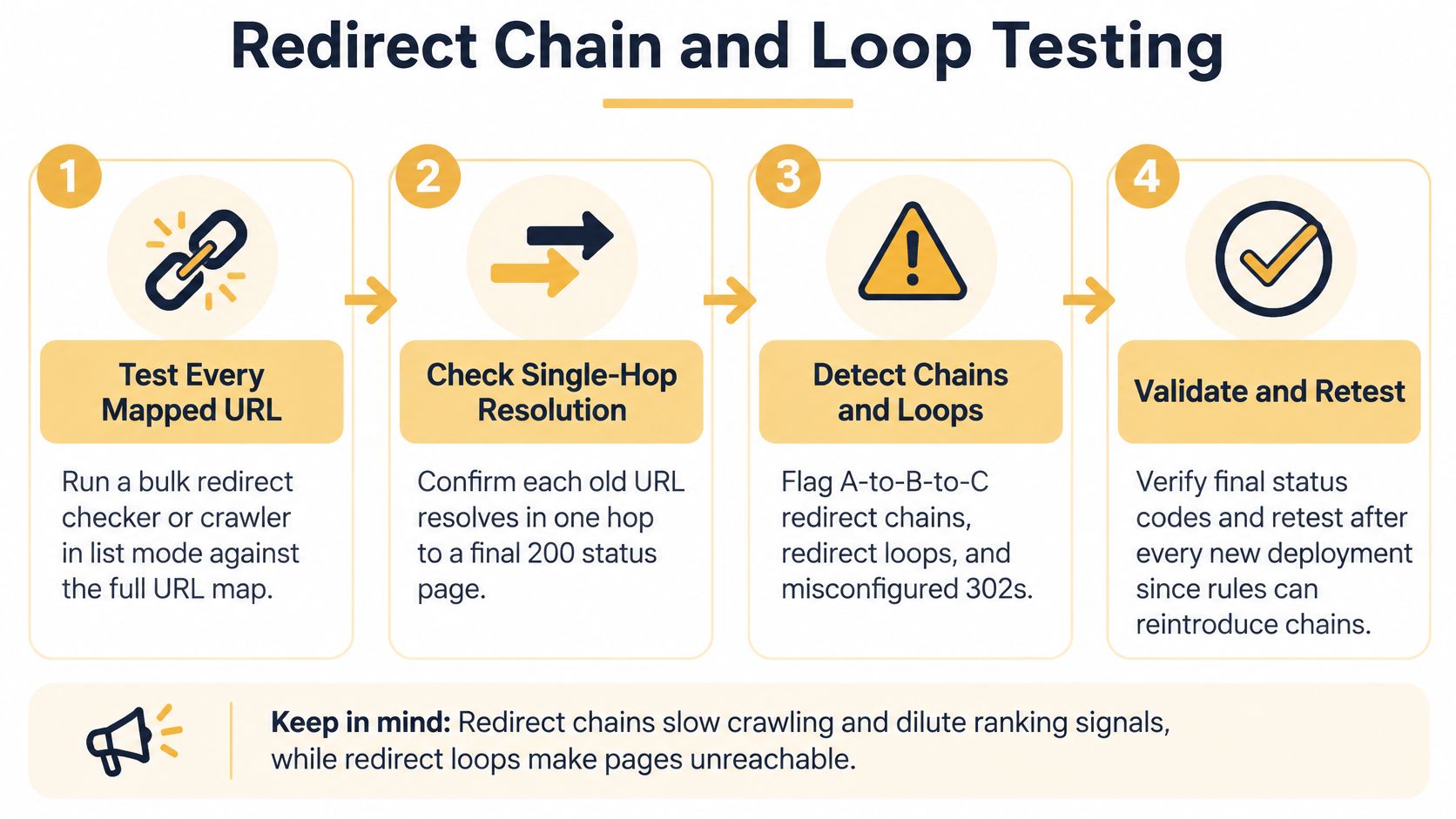
A SaaS team running a bulk check after a domain change found older HTTP URLs hopping twice before the final HTTPS page. They collapsed those rules into one 301. That is the test doing its job.
- List mode: Point a crawler or bulk checker at the full map.
- Protocol variants: Test HTTP and HTTPS, and both www and non-www.
- Retest after deploys: A new rule can rebuild a chain you already removed.
A chain that "still gets there" is a failed test. One hop, correct URL, status 200.
If a URL has no real equivalent, don't point it at the homepage. Return 404 or 410 and record that decision in the map so the next crawl doesn't look like a surprise.
4. Preserving On-Page SEO Elements
The quiet failure is a redesign that looks better and ranks worse because titles, canonicals, and schema didn't survive the template swap. Compare old and new versions of priority pages in a spreadsheet: title, meta description, headings, image alt text, canonical, and structured data.
HTTPS belongs in that same check. The 2025 Web Almanac reports that more than 98.8% of mobile requests were served over HTTPS. Google can prefer HTTPS as canonical, but an invalid certificate, an HTTPS page that redirects through HTTP, or a canonical pointing at HTTP weakens that preference. Check product pages, pagination, articles, PDFs, and campaign URLs, not only the homepage. Update absolute links, hreflang, schema URLs, image and script references, and sitemap entries so they all name the HTTPS URL.
What "matched" means on a key page:
- Titles and descriptions: The click text you already earned shouldn't vanish in the new template.
- Canonicals: They must not point at the old domain or a staging host.
- Schema: It still has to describe the page that shipped, not the page you deleted.
A local services firm that keeps its title pattern and LocalBusiness schema usually holds branded impressions. Validate with Google's Rich Results Test after launch.
Practical rule: If the canonical and the redirect name different URLs, you've given mixed instructions. Make them agree.
5. Staging Environment Controls and Robots Directives
One line can take a site out of search while humans still see the homepage. Disallow: / copied from staging into production robots.txt is that line.
Block staging with password protection plus a noindex meta tag or X-Robots-Tag header. On launch day, open the live robots.txt and view source on key templates. Confirm that noindex and broad disallows didn't travel with the deploy.
What a robots.txt file actually controls is crawl access, not removal from the index. Use noindex when a page should stay out of search. Robots.txt alone won't do that job, and a disallow on production can stop Google from seeing the noindex you meant to ship.
Treat the staging gate as something that must not become the live rule.

A development team that shipped a staging disallow caught it the same day because indexed-page alerts dropped. URL Inspection in Search Console should show that Google can fetch the homepage, a category, and a conversion page. Put this check on the go/no-go list. It isn't a postmortem item.
6. XML Sitemap Update and Resubmission
A sitemap full of redirected and noindexed URLs teaches crawlers the wrong set. Generate XML that lists only final, canonical URLs on the new site.
Submit that file in Google Search Console and Bing Webmaster Tools, and reference it from robots.txt. Sound XML sitemap practice here means valid XML, a 200 response, and no URLs you don't want indexed.
A digital publisher can split sitemaps by type, such as articles, categories, and videos, so indexing reports show which section stalled instead of one blended number.
- Keep the old sitemap briefly: Crawlers can still see the redirects, then you retire the file.
- Split large sections: Separate files make coverage reports easier to read.
- Exclude 3xx and noindex: Those URLs don't belong in the new file.
Open the sitemap in a browser before you submit it. A 500, a login wall, or a staging hostname in the loc tags is a discovery failure. The evidence it worked is a submitted file that returns 200 and a Pages report that starts listing the new URLs, not the old ones.
7. Analytics and Tracking Verification
Broken tracking creates a false emergency, or hides a real one. You can't tell a traffic drop from a tag that never loaded.
Before cutover, write down the event names and values you expect for add-to-cart, lead, and purchase. On launch day, walk those paths in the analytics debug view and the tag manager preview. Compare the new property with the baseline for sessions, conversions, and landing pages.
An online store that ran this check found the checkout template missing its container while the homepage fired normally. They patched the template before the first real orders went uncounted. Consent scripts have to load too, or you'll collect nothing where a choice is required.
A dashboard nobody opens on day one is just a chart. Assign someone to watch real-time events through the first sales cycle.
The proof isn't "the container ID is in the header." It's a test conversion that shows the right event name, value, and landing page. If that event is missing on one template, fix that template before you judge whether the migration hurt revenue.
8. Internal Linking and Navigation Validation
Internal links that still point at old addresses add a hop you already paid to remove. Crawlers then discover the new URL only after a 301, or not at all if that redirect is wrong.
Update navigation, breadcrumbs, in-content links, and footer links to the final URLs. A deliberate internal linking strategy also keeps topical anchors and hierarchy, so authority doesn't pool on the homepage by accident.
A content-heavy publisher can run a database replace, then crawl and filter for internal links that return 3xx or 4xx. The pass is simple: no internal link on your own site should need a redirect to reach a live page.
Check these before you close the ticket:
- HTML, not only JavaScript: Menus and key links should exist in the raw HTML.
- Anchor text: Priority pages should keep the phrases that describe them.
- Breadcrumbs: They should name the new hierarchy, not the retired folders.
If the crawl still shows internal 301s after the script, the script missed a template. Fix the template. Don't add another redirect to hide it.
9. Performance, Mobile Usability, and Core Web Vitals Check
Perfect redirects won't save a template that dropped its copy on phones or got slower in the rebuild. Rankings and conversions both feel that change.
Google's mobile indexing update sets the standard you have to meet: Google now indexes the mobile version of your pages first. That version has to expose the same essential text, images, videos, links, metadata, canonicals, and structured data as desktop. Don't block those URLs in robots.txt, and don't redirect every mobile URL to the homepage.
The failure this check prevents is a quiet parity gap. A template that renders everything on desktop can still hide copy behind a mobile accordion, lazy-load images Googlebot never sees, or ship different structured data on small screens. Crawl the mobile version of each template and diff it against desktop, element by element. If the mobile page carries less content, it ranks on less content.
Benchmark the old site before you switch. Test each template in PageSpeed Insights and Lighthouse, not just the home page, and save those scores so a regression shows up as a number instead of a hunch. Field data in the Core Web Vitals report updates gradually, so keep watching it for several weeks after launch.
A studio rebuilding a fitness tracking app should compare Largest Contentful Paint on the key screens and fix image delivery before the public switch. The proof is a mobile render that still contains the content, plus lab scores that didn't regress against the benchmark you saved.
10. Post-Migration Monitoring and Recovery Plan
Some movement in the first weeks is normal. A section that stays down isn't. Watch indexing, crawl errors, rankings, organic traffic, and conversions daily at first, then weekly for months. Set Search Console alerts for crawl anomalies and drops in indexed pages.
Conventional reports won't tell you whether answer engines still cite you. A migration guide from Stradiji recommends recording AI citations for important pages and checking whether citations in ChatGPT, Perplexity, and AI Overviews move to the new URLs, while you decide how robots.txt and firewall rules treat AI crawlers. Baseline branded and non-branded prompts, cited URLs, and referral traffic from those interfaces before and after launch. Blocking non-search crawlers can cut scraping and can also cut visibility in those channels. I would make that call on purpose, not by copying a staging firewall rule.
A publisher that checked indexed pages daily found a category template returning 404s and restored it within one business day. Name owners for SEO, development, and analytics, with an escalation path and a rollback if the live site is worse than staging. Keep redirects in place for the long window this kind of move requires, and longer while old URLs still receive traffic.
Migration SEO Checklist at a Glance
| Item | Primary Output | Key Tools | When to Run |
|---|---|---|---|
| Pre-Migration Site Crawl and URL Inventory | Baseline inventory of URLs, SEO data, and business priorities | Screaming Frog, Sitebulb, Google Search Console, analytics | Before migration planning or site changes |
| URL Mapping, 301 Redirects, and Change of Address | Page-level redirect map and configured permanent redirects | Google Search Console, Bing Webmaster Tools, server or hosting platform | Before launch; submit address change after redirects work |
| Redirect Chain and Loop Testing | Verified single-hop redirects to final pages | Screaming Frog, Ahrefs, Moz, bulk redirect checker | After redirects are deployed and after later changes |
| Preserving On-Page SEO Elements | Retained titles, metadata, canonicals, alt text, and structured data | Google Search Central, Schema.org, Rich Results Test | During migration build and after launch |
| Staging Environment Controls and Robots Directives | Protected, non-indexable staging site and crawlable live site | Google Search Console, Bing Webmaster Tools, URL Inspection | Throughout development and on launch day |
| XML Sitemap Update and Resubmission | Sitemap containing canonical, indexable new URLs | Google Search Console, Bing Webmaster Tools | At launch and after URL structure changes |
| Analytics and Tracking Verification | Working analytics tags, conversion events, and continuous reporting | Google Analytics, Google Tag Manager | Before launch and on launch day |
| Internal Linking and Navigation Validation | Updated internal links pointing directly to final URLs | Screaming Frog, Ahrefs, Moz | During migration and in a post-launch crawl |
| Performance, Mobile Usability, and Core Web Vitals Check | Performance and mobile usability benchmarks by template | PageSpeed Insights, Lighthouse, Google Search Console | Before and after launch; continue monitoring field data |
| Post-Migration Monitoring and Recovery Plan | Ongoing performance checks, alerts, and issue-response ownership | Google Search Console, analytics, ranking tools | Daily for the first weeks, then weekly for several months |
Turn This Checklist Into a Launch Runbook
A list doesn't protect rankings. An owner with proof does. Before the migration date, put a name on every step above. Schedule the crawl export, the full redirect test, and the live robots review as go/no-go gates. If any one of those fails, you don't launch. Agree on the baseline you'll compare against: indexed URLs, organic clicks, conversions, and the priority landing pages from the dated crawl. Without that file, every post-launch argument becomes a guess.
Separate big changes when you can. A new domain, a new CMS, and a full content rewrite in the same weekend make a fault hard to isolate. If you must combine them, phase the content and keep the redirect map as the single source of truth. Lower DNS TTL ahead of a host change, then restore a normal TTL once traffic is on the new server. Plan extra crawl capacity. Google often requests more URLs right after a move.
After launch, don't stop at day three. Keep a daily watch through the first weeks, then a weekly review for several months. Look for patterns, not single-day dips. A missing resource section often means an incomplete import. A whole template dropping out of search often means a canonical, a noindex header, or a robots rule. Compare record counts and also spot-check titles, dates, and images. Matching totals can hide one missing record and one duplicate.
Write the recovery steps before you need them. Who reverts DNS, who patches a template, who confirms tracking, and who tells stakeholders. If organic clicks fall and the tag is firing, check redirects and index coverage before you rewrite content. If the tag isn't firing, fix measurement first so you don't "recover" a reporting gap.
If your team can't hold that cadence, we can. Up North Media tracks rankings, traffic, and conversions with detailed monthly reports and ongoing optimization, and our website optimization work fixes the technical issues that stop search engines from finding and ranking pages properly. That monitoring is the same evidence this checklist asks you to keep, carried past launch week.
Up North Media handles the migration work this checklist depends on, from URL mapping and redirect testing through technical fixes and month-by-month reporting on rankings, traffic, and conversions. If you're planning a relaunch and want those gates owned instead of hoped for, visit Up North Media and book a conversation about your launch date.