

Most advice on user generated content campaigns starts in the wrong place. It tells brands to ask for a hashtag, collect a few posts, and assume authenticity will do the rest. That's how teams end up with cluttered folders, weak creative, and no clean answer when leadership asks whether the campaign moved revenue.
The better question is simpler and harder. What if the advantage of UGC isn't the content itself, but the system around it, the audience you ask, the rights you secure, and the way each asset is measured against polished brand creative? That's where user-generated content stops being a social tactic and starts working like a repeatable growth channel.
Why Most UGC Campaigns Underperform
UGC doesn't automatically beat studio creative. That assumption sounds good in a deck, but it breaks down fast when the content is inconsistent, the audience isn't a fit, or the brand treats every casual post like a finished asset. Berkeley's recent research frames this tension well, since UGC can act as a double-edged sword, building trust in some cases while weakening brand perception in others if quality is poor or the creative is off-brand (Berkeley review of UGC trade-offs).
When authenticity helps and when it hurts
Authenticity helps when the buyer needs reassurance, not polish. That's why UGC is strong on product pages, in review contexts, and in moments where social proof reduces hesitation. It hurts when the content looks rushed, the lighting is bad, the message is unclear, or the creator doesn't match the audience the brand is trying to reach.
The biggest mistake is confusing “real” with “ready to publish.” A raw clip can feel honest and still damage the brand if it's confusing or visually weak. That's especially true for SMBs and ecommerce teams that can't afford to let low-quality creative set the tone for a product launch.
Practical rule: Use UGC where trust gaps are high, then keep brand creative in the places where clarity, control, and premium positioning matter more than social proof.
A useful decision frame is to separate funnel stage and channel intent. Early-stage awareness can tolerate broader, more casual creator content. Conversion pages, retargeting ads, and higher-consideration offers usually need a tighter mix, sometimes a UGC hook in the ad and a polished product demonstration on the landing page.
A simple mix that works
The cleanest setup is usually not “UGC versus brand creative.” It's UGC for proof, brand creative for precision, and a test plan that tells you which one wins by audience and channel. That approach keeps you from over-indexing on a single viral post and lets you use each format for what it does best.
Setting Objectives and KPIs That Matter
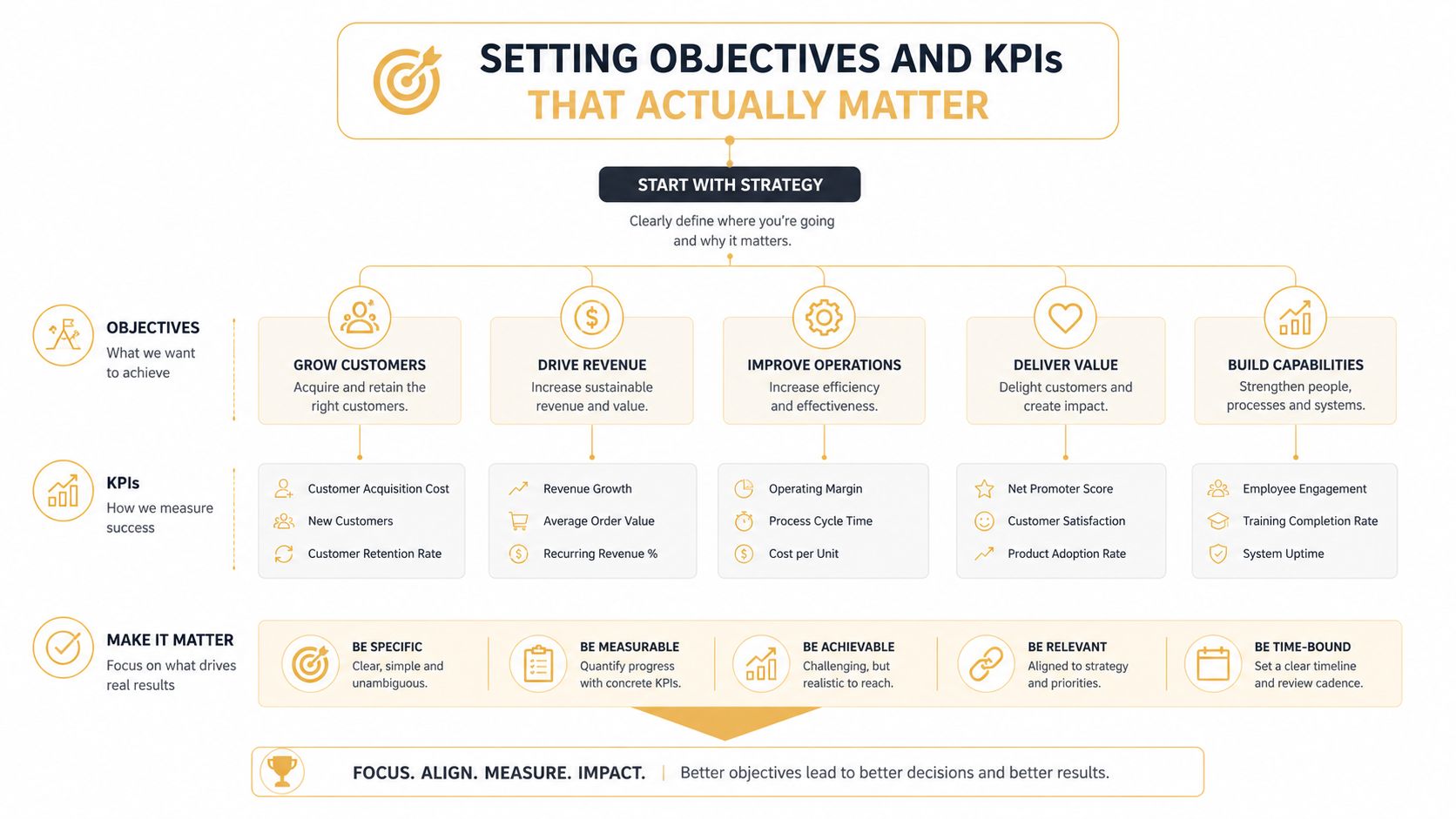
UGC campaigns fail fast when teams celebrate comments and views but cannot tie the content to revenue, pipeline, or lower acquisition costs. Start with incremental value, then separate campaign health from business outcome so you do not confuse a busy post with a profitable one. A usable measurement stack also tracks asset-level details like hook, CTA, creator, persona, length, approval rate, usage rate, time-to-first-draft, and time-to-live, because those fields show which assets moved through the workflow and which ones stalled (measurement framework guidance).
Pick KPIs by campaign objective
Awareness campaigns should be judged on reach and sentiment, but only if the audience is relevant. Consideration campaigns need engagement depth and time on page, since superficial interaction rarely tells you whether the content helped a shopper compare options. Conversion campaigns need asset-level attribution, because that is how you see whether a specific creator clip, review, or testimonial influenced a sale.
Operational insight: If a piece of UGC never leaves the approval queue, it is not a creative asset. It is an internal draft that should be tracked separately.
For ecommerce teams, the better question is whether the asset reached the right audience, cleared review, and led to a high-intent action. That is why leading indicators matter. Retention, email replies, add-to-cart behavior, and other high-intent signals usually tell you more early on than a final revenue figure alone.
A skincare brand running a launch campaign might use creator demos for awareness, then test which approved clips drive add-to-cart behavior on product pages and retargeting ads. If one creator's video gets strong engagement but weak product-page clicks, that is useful information, not a win. It means the hook works, the offer does not, or the audience match is off.
Use a cost per usable asset lens
A practical formula is simple. Cost per usable asset = total creator cost ÷ approved assets. That is a better management number than total spend because it exposes hidden drag in the workflow. If your team commissions a batch of content but only a few pieces clear brand review, the campaign looked cheaper than it really was.
The other metric worth watching is usage rate, which shows how many approved assets are deployed across paid, owned, and organic channels. A campaign with lots of approvals but low usage has a distribution problem, not a sourcing problem.
For a closer look at how audiences and measurement connect in owned channels, see first-party data strategy for marketers. Strong UGC programs use that same discipline, because the best assets perform better when they are matched to known audiences instead of sprayed everywhere.
A concrete KPI example
An ecommerce team launching a new running shoe could assign three KPIs to one creator batch. Track whether the clips generate qualified traffic, whether the best assets survive review quickly enough to hit launch timing, and whether the approved pieces produce add-to-cart actions on the product page. If the campaign gets strong engagement but weak usage, the team should fix the approval process or the distribution plan before commissioning more content.
Choosing the Right Audience and Platform Mix
The best UGC usually comes from the people who already have a reason to care. For a local Omaha service business, that often means happy customers, employees, and referral-driven advocates who can speak with practical credibility. For a national ecommerce brand, the better source might be repeat buyers, category enthusiasts, or niche micro-creators whose content feels native to the platform.
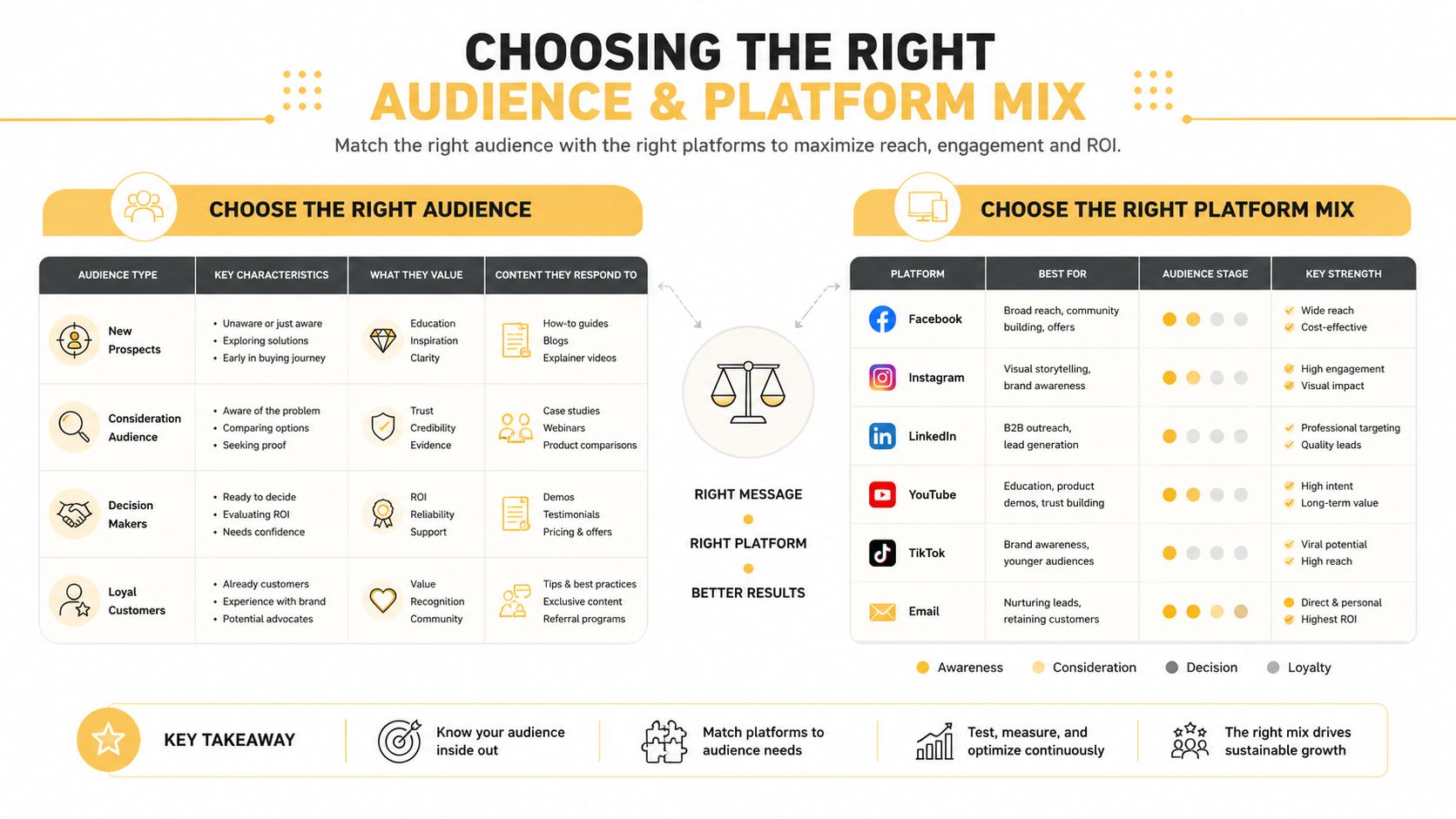
Match the creator to the channel
Instagram rewards visual clarity. TikTok rewards speed, personality, and a looser feel. Review platforms reward trust signals, detail, and specificity. The same customer can create content for all three, but the format and expectation are different on each.
That's why audience selection matters as much as platform selection. A loyal customer with no audience of their own can still produce excellent UGC for your owned channels. A micro-influencer may be better for discovery, while an employee advocate may be best for behind-the-scenes credibility. The question is not who is “best,” it's which source produces the kind of content your funnel needs.
Build the mix around business model
Service businesses usually need proof, not spectacle. They benefit from testimonials, before-and-after visuals, and local trust cues. Ecommerce brands tend to need volume and variation, because product-specific content has to work across many SKU pages and ad sets.
Third-party review sites belong in the mix when trust is the main obstacle. Owned channels make more sense when you need control, sequence, and reuse. Social platforms are useful when your goal is discovery, but they're not a substitute for a system you own.
Keep asking one question, where will this content still help me if the platform algorithm changes next month?
A simple decision matrix helps. If your objective is trust, lean into reviews and testimonials. If the objective is social reach, prioritize short-form social content. If the objective is conversion, route the strongest assets into owned pages where the buyer is closest to purchase.
Designing Creative Prompts and Incentive Structures
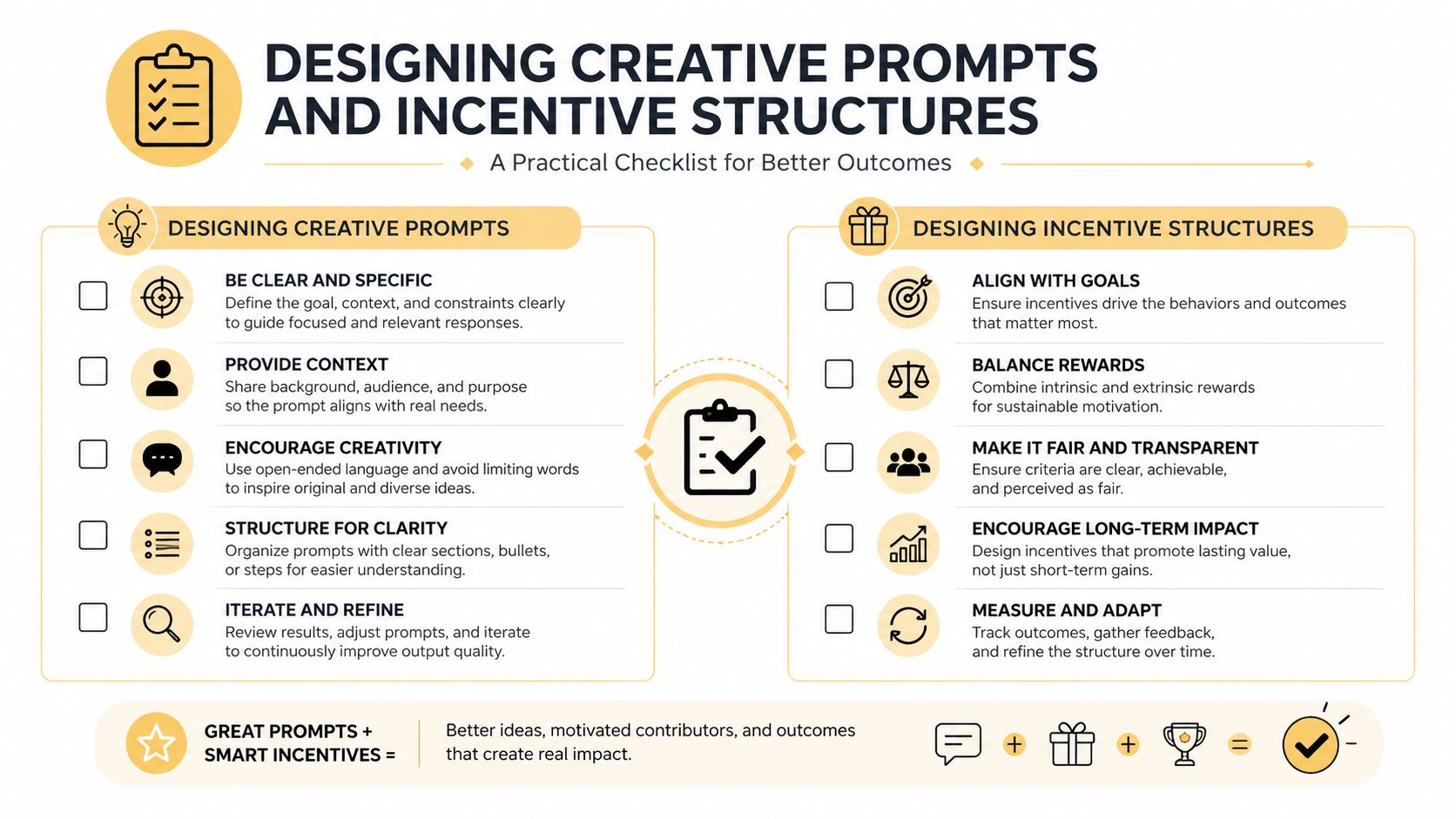
The quality of user generated content campaigns is set by the prompt, not by luck. Generic asks like “share your experience” produce generic results. Better prompts ask for one specific use case, one product context, and one visual cue so the creator knows what kind of content will be usable.
Prompt for usable content, not testimonials
A good prompt asks for a moment. It might be how the product is unpacked, how it fits into a morning routine, how it solves a problem, or what changed after a week of use. That structure yields content you can edit, sort, and repurpose more easily than broad praise.
Prompts also need creative boundaries. If you want clean product visuals, say so. If you want lifestyle footage, define the setting. If you need a tutorial, tell creators which steps matter most. The more operationally specific the brief, the less time your team spends trying to rescue unusable submissions.
Incentives should attract quality, not noise
Incentives don't need to be large to be effective, but they do need to fit the ask. A small reward can work for simple submissions, while extended usage rights or product bundles make more sense for high-effort content. The point is to reward the behavior you want, not just participation in general.
Moderation belongs before publishing, not after. If you wait until content is live to screen for quality, tone, or brand fit, the damage is already public. A smarter workflow reviews submissions, tags the strongest assets, and rejects weak ones before they hit paid media or the website.
For brands that want to extend video-led campaigns, video marketing strategy guidance is useful because many UGC programs fail when they ask for motion content but never define the format, pacing, or reuse plan.
A fast launch checklist
- Define the asset: decide whether you need review, demo, lifestyle, or testimonial content.
- Write one clear prompt: ask for a single use case, not a vague endorsement.
- Set the reward: match the incentive to the effort required.
- Review before publishing: screen for quality, compliance, and fit.
- Save the winners: tag the best assets for reuse in ads, email, and web.
Building a Rights Management and Governance Workflow

Most UGC programs don't fail because they lack content. They fail because nobody can answer three basic questions quickly, who owns this asset, where can we use it, and when does that permission expire? Adobe's guidance is blunt about the need to centralize discovery, permissions, and reuse across channels, which is why rights management has to be treated like a workflow, not a favor you ask in a DM (Adobe on UGC governance and reuse).
What the workflow needs to cover
Start with permission capture. Keep a record of who granted usage rights, what channel they approved, and whether the content can be reused in paid media or only in organic posts. Then add expiration tracking if the rights are time-bound, because old permissions create risk when a campaign gets reactivated months later.
Brand safety screening comes next. Not every post that mentions your brand should be used in ads or on product pages. Teams need a basic review step for tone, visual quality, competitor mentions, and anything else that would make the asset risky outside its original context.
Build one source of truth
A spreadsheet can work at the beginning, but it needs structure. Use fields for creator name, handle, asset link, approval status, rights scope, channels approved, expiration date, credit line, and storage location. If your team uses a DAM, make sure the permission record travels with the asset so nobody has to dig through email threads later.
For brands that are scaling reuse across multiple teams, AccountShare DAM best practices is a helpful reference point for organizing assets so marketing, social, and ecommerce teams can find the same approved content without creating duplicates.
A rights log isn't paperwork for legal's sake. It's what keeps a good asset from becoming a liability the moment someone wants to repurpose it.
When to formalize the agreement
Simple social permissions can be enough for a repost on your own feed, but commercial use deserves a clearer written agreement. If the content is going into ads, landing pages, email, or other revenue-driving placements, the permission should be explicit enough that no one is guessing later. That clarity protects the brand and keeps creators from feeling surprised when their work appears in a new context.
Measuring Performance with Asset-Level Attribution
UGC performance gets clearer when each asset has its own identity. Give every piece a unique creative ID, then track it through the full lifecycle from draft to approval to live placement to conversion. That is the only practical way to see whether a specific hook, creator, or format is doing the work, instead of letting the whole campaign get credit by default.
| Metric | UGC Performance | Brand Creative Performance | Improvement |
|---|---|---|---|
| Engagement | 6.9x more engagement | Baseline brand content | Higher engagement overall |
| Engagement rate | 28% higher engagement rates | Lower baseline rate | Higher engagement |
| Click-through rate | 2-4x higher CTR on UGC ads, as summarized in the industry benchmark summary | Lower CTR | Higher click-through activity |
| Cost per acquisition | 20-50% lower CPA in the same industry benchmark summary | Higher CPA | Lower acquisition cost |
| Conversion rate on product pages | Up to 161% higher conversions | Lower conversion rate | Stronger conversion performance |
Those benchmarks matter because they show where UGC tends to outperform polished brand creative in paid and ecommerce environments. The comparison still needs a measurement layer, because the benchmark alone does not explain why one asset wins and another stalls.
Track the asset, not just the campaign
Use the creative ID to separate variables. Compare different hooks. Compare different CTAs. Compare creators with different audience fits. Compare short clips against longer clips. When one variant wins, you can isolate the reason and repeat it.
That approach also helps you catch process problems. If approval rates are low, the issue may be creative direction. If usage rates are low, the issue may be media planning. If time-to-live is short, the asset may be burning out faster than expected and needs fresher variants.
For broader customer signal mapping, it helps to pair this with a first-party data strategy, because the strongest UGC usually matches a known audience segment, not just a large one.
The cleanest UGC test is simple, same audience, same offer, different asset. Anything less makes the result harder to trust.
What to review weekly
- Approval rate: how much content survives review.
- Usage rate: how much approved content goes live.
- Cost per usable asset: total creator cost divided by approved assets.
- High-intent actions: actions that show real buying interest before the sale closes.
- Conversion impact: what the asset contributed once it entered market.
Amplifying UGC Across Paid and Owned Channels
Great UGC shouldn't live only once. The strongest assets earn a second life in paid ads, email, product pages, landing pages, and sales support, but only if you brief for reuse from the start. That means telling creators how the content may be deployed, what framing is acceptable, and whether extended rights are part of the deal.
Plan reuse before launch
If a creator shot a strong testimonial video, that asset can often work in several places. A short cut can become an ad hook. A longer version can support a product page. A still frame can anchor an email block. The reuse is efficient only if the original rights, aspect ratio, and framing all support it.
Teams that think this way usually get more value from each approved asset. Teams that don't often burn through content too quickly, because they treat every channel as if it needs a brand-new piece. That's expensive, and it makes the program feel harder to scale than it really is.
Keep the reuse respectful
The main warning sign is overextension. If the same creator asset starts showing up everywhere without a clear agreement, the brand is using the content more aggressively than the original relationship implied. The fix is to define channel scope upfront and compensate for broader usage when needed.
Social commerce is a good reminder that the path from content to sale is shorter than many teams assume, especially when the asset already feels native to the platform. For teams building that bridge, social commerce strategy helps frame how UGC can move from attention to transaction without forcing a hard sell.
A practical amplification playbook
Start with the highest-performing asset and adapt it by channel. Use the most trust-heavy version on product pages. Use the fastest-moving cut in paid social. Use the most detailed version in email. Then track how each placement changes performance, because a good asset often behaves differently once it leaves the original feed.
The goal is not to squeeze every creator for endless content. The goal is to create a reusable library of approved assets that can move across channels without losing the trust that made them work in the first place.
If you need a UGC system that's built for rights, attribution, and repeatable ecommerce performance, Up North Media can help you design the workflow and measurement model around it. Visit Up North Media to get a practical plan for turning creator content into a channel you can manage and scale.